




SELENIUM
Test Automation and much more!
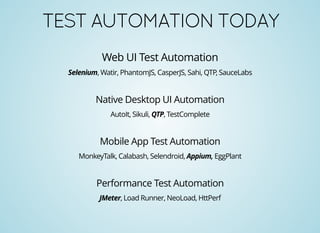
TESTAUTOMATIONTODAY
Web UI Test Automation
Selenium, Watir, PhantomJS, CasperJS, Sahi, QTP, SauceLabs
Native Desktop UI Automation
AutoIt, Sikuli, QTP, TestComplete
Mobile App Test Automation
MonkeyTalk, Calabash, Selendroid, Appium, EggPlant
Performance Test Automation
JMeter, Load Runner, NeoLoad, HttPerf
SAYHELLOTOSELENIUM!
Who am I?
A set of open source tools to interact with browser application in an automated way.
What are my tools?
Selenium IDE, Selenium 1 (RC), Selenium 2 (WebDriver)
Who are my creators?
Selenium 1 - Jason Huggins, Selenium 2 - Simon Stewart
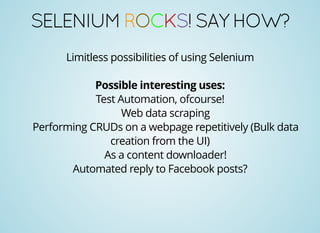
SELENIUMROCKS!SAYHOW?
Limitless possibilities of using Selenium
Possible interesting uses:
Test Automation, ofcourse!
Web data scraping
Performing CRUDs on a webpage repetitively (Bulk data
creation from the UI)
As a content downloader!
Automated reply to Facebook posts?
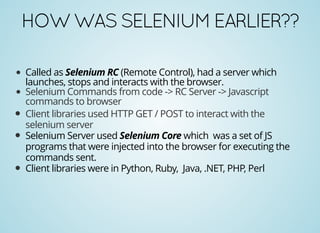
HOWWASSELENIUMEARLIER??
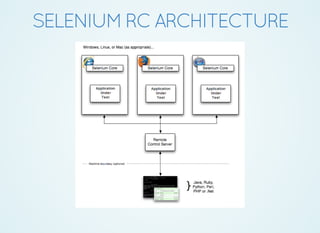
Called as Selenium RC (Remote Control), had a server which
launches, stops and interacts with the browser.
Selenium Commands from code -> RC Server -> Javascript
commands to browser
Client libraries used HTTP GET / POST to interact with the
selenium server
Selenium Server used Selenium Core which was a set of JS
programs that were injected into the browser for executing the
commands sent.
Client libraries were in Python, Ruby, Java, .NET, PHP, Perl
SELENIUMRCARCHITECTURE
WHYEVERYBODYMOVINGTO
SELENIUM2???
Problems with Selenium RC
Explicitly start the server
No good organized API
Used Javascript Injection
Slower execution
No new enhancements. Deprecation!!
Same origin policy problem
WEBDRIVER
Binds natively to the browser. No Javascript injection in browser's JS Sandbox
Better object oriented API
Bindings for Java, Python, C#, Ruby, Perl, Php, JS
Significantly fewer calls than Selenium RC
Variants: ChromeDriver, FireFoxDriver, InternetExplorerDriver, OperaDriver, AndroidDriver,
IPhoneDriver, HtmlUnitDriver
Overcomes same origin policy problem
Self-contained library. No server to start explicitly.
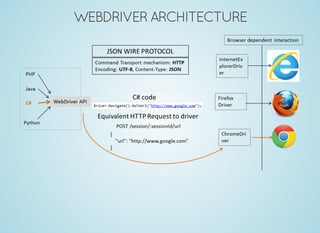
WEBDRIVERARCHITECTURE
LEARNINGTHESEWILLMAKEUSING
SELENIUMEASIER!
HTML, CSS and Javascript from
andCodeacademy HTMLDog
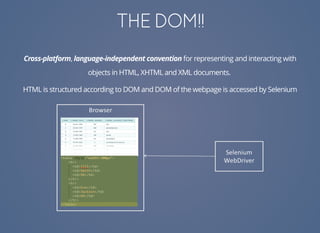
THEDOM!!
Cross-platform, language-independent convention for representing and interacting with
objects in HTML, XHTML and XML documents.
HTML is structured according to DOM and DOM of the webpage is accessed by Selenium
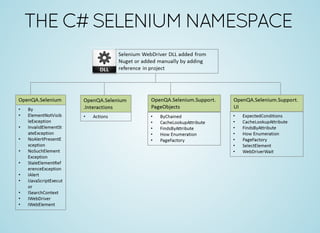
THEC#SELENIUMNAMESPACE
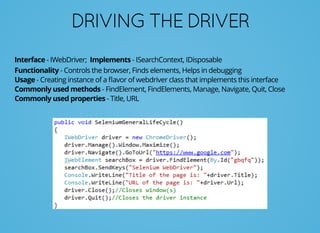
DRIVINGTHEDRIVER
Interface - IWebDriver; Implements - ISearchContext, IDisposable
Functionality - Controls the browser, Finds elements, Helps in debugging
Usage - Creating instance of a flavor of webdriver class that implements this interface
Commonly used methods - FindElement, FindElements, Manage, Navigate, Quit, Close
Commonly used properties - Title, URL
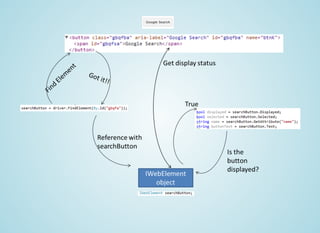
WEBELEMENT
Interface - IWebElement; Implements - ISearchContext
Functionality - Provides methods to identify and interact with DOM
elements on web page. Instance of it represents a HTML element.
Usage: Created using FindElement / FindElements method on driver
instance or another webelement object.
Commonly used methods: Click, SendKeys, Clear, Submit,
GetAttribute, GetCssValue
Commonly used properties: Displayed, Text, Enabled, Selected,
TagName
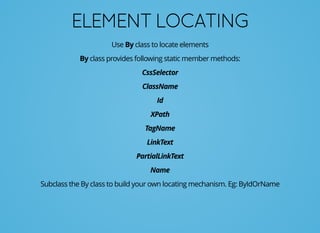
ELEMENTLOCATING
Use By class to locate elements
By class provides following static member methods:
CssSelector
ClassName
Id
XPath
TagName
LinkText
PartialLinkText
Name
Subclass the By class to build your own locating mechanism. Eg: ByIdOrName
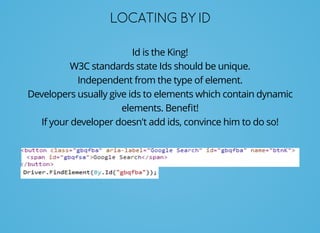
LOCATINGBYID
Id is the King!
W3C standards state Ids should be unique.
Independent from the type of element.
Developers usually give ids to elements which contain dynamic
elements. Benefit!
If your developer doesn't add ids, convince him to do so!
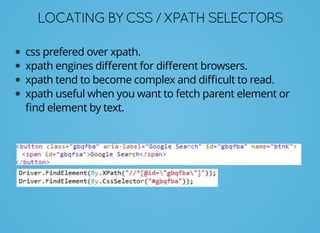
LOCATINGBYCSS/XPATHSELECTORS
css prefered over xpath.
xpath engines different for different browsers.
xpath tend to become complex and difficult to read.
xpath useful when you want to fetch parent element or
find element by text.
USEFULLINKSFORXPATHANDCSS
SELECTORS
Xpath to Css Cheat Sheet
Elemental Selenium Blog on performance benchmarks for
CSS and XPATH selectors
A stackoverflow post
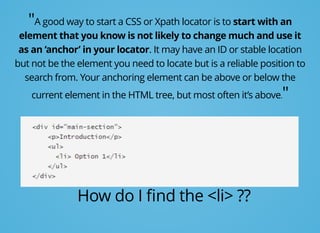
"A good way to start a CSS or Xpath locator is to start with an
element that you know is not likely to change much and use it
as an ‘anchor’ in your locator. It may have an ID or stable location
but not be the element you need to locate but is a reliable position to
search from. Your anchoring element can be above or below the
current element in the HTML tree, but most often it’s above."
How do I find the <li> ??
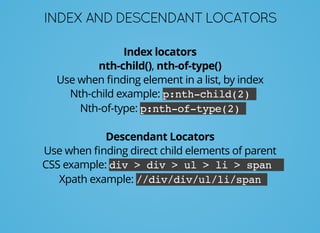
INDEXANDDESCENDANTLOCATORS
Index locators
nth-child(), nth-of-type()
Use when finding element in a list, by index
Nth-child example: p:nth-child(2)
Nth-of-type: p:nth-of-type(2)
Descendant Locators
Use when finding direct child elements of parent
CSS example: div > div > ul > li > span
Xpath example: //div/div/ul/li/span
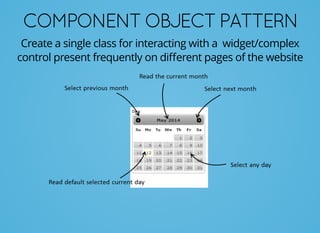
COMPONENTOBJECTPATTERN
Create a single class for interacting with a widget/complex
control present frequently on different pages of the website
YOUNEEDTOWAITFORMR.AJAX!
AJAX (Asynchronous Javascript & XML)
Dynamic content rendered and updated with the help of
AJAX and Javascript
This calls for the need to test dynamic UI which has time
uncertainty
WebDriver handles this using Implict and Explict waiting mechanism
Link: WebDriver Wait Commands
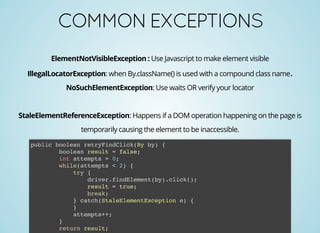
COMMONEXCEPTIONS
ElementNotVisibleException : Use Javascript to make element visible
IllegalLocatorException: when By.className() is used with a compound class name.
NoSuchElementException: Use waits OR verify your locator
StaleElementReferenceException: Happens if a DOM operation happening on the page is
temporarily causing the element to be inaccessible.
public boolean retryFindClick(By by) {
boolean result = false;
int attempts = 0;
while(attempts < 2) {
try {
driver.findElement(by).click();
result = true;
break;
} catch(StaleElementException e) {
}
attempts++;
}
return result;
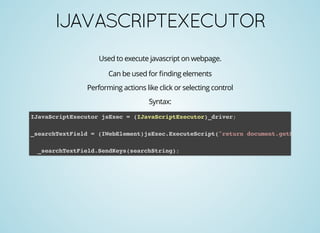
IJAVASCRIPTEXECUTOR
Used to execute javascript on webpage.
Can be used for finding elements
Performing actions like click or selecting control
Syntax:
IJavaScriptExecutor jsExec = (IJavaScriptExecutor)_driver;
_searchTextField = (IWebElement)jsExec.ExecuteScript("return document.getElementBy
_searchTextField.SendKeys(searchString);

Selenium Overview

  • 1.
  • 2.
    TESTAUTOMATIONTODAY Web UI TestAutomation Selenium, Watir, PhantomJS, CasperJS, Sahi, QTP, SauceLabs Native Desktop UI Automation AutoIt, Sikuli, QTP, TestComplete Mobile App Test Automation MonkeyTalk, Calabash, Selendroid, Appium, EggPlant Performance Test Automation JMeter, Load Runner, NeoLoad, HttPerf
  • 3.
    SAYHELLOTOSELENIUM! Who am I? Aset of open source tools to interact with browser application in an automated way. What are my tools? Selenium IDE, Selenium 1 (RC), Selenium 2 (WebDriver) Who are my creators? Selenium 1 - Jason Huggins, Selenium 2 - Simon Stewart
  • 4.
    SELENIUMROCKS!SAYHOW? Limitless possibilities ofusing Selenium Possible interesting uses: Test Automation, ofcourse! Web data scraping Performing CRUDs on a webpage repetitively (Bulk data creation from the UI) As a content downloader! Automated reply to Facebook posts?
  • 5.
    HOWWASSELENIUMEARLIER?? Called as SeleniumRC (Remote Control), had a server which launches, stops and interacts with the browser. Selenium Commands from code -> RC Server -> Javascript commands to browser Client libraries used HTTP GET / POST to interact with the selenium server Selenium Server used Selenium Core which was a set of JS programs that were injected into the browser for executing the commands sent. Client libraries were in Python, Ruby, Java, .NET, PHP, Perl
  • 6.
  • 7.
    WHYEVERYBODYMOVINGTO SELENIUM2??? Problems with SeleniumRC Explicitly start the server No good organized API Used Javascript Injection Slower execution No new enhancements. Deprecation!! Same origin policy problem
  • 8.
    WEBDRIVER Binds natively tothe browser. No Javascript injection in browser's JS Sandbox Better object oriented API Bindings for Java, Python, C#, Ruby, Perl, Php, JS Significantly fewer calls than Selenium RC Variants: ChromeDriver, FireFoxDriver, InternetExplorerDriver, OperaDriver, AndroidDriver, IPhoneDriver, HtmlUnitDriver Overcomes same origin policy problem Self-contained library. No server to start explicitly.
  • 9.
  • 10.
    LEARNINGTHESEWILLMAKEUSING SELENIUMEASIER! HTML, CSS andJavascript from andCodeacademy HTMLDog
  • 11.
    THEDOM!! Cross-platform, language-independent conventionfor representing and interacting with objects in HTML, XHTML and XML documents. HTML is structured according to DOM and DOM of the webpage is accessed by Selenium
  • 12.
  • 13.
    DRIVINGTHEDRIVER Interface - IWebDriver;Implements - ISearchContext, IDisposable Functionality - Controls the browser, Finds elements, Helps in debugging Usage - Creating instance of a flavor of webdriver class that implements this interface Commonly used methods - FindElement, FindElements, Manage, Navigate, Quit, Close Commonly used properties - Title, URL
  • 14.
    WEBELEMENT Interface - IWebElement;Implements - ISearchContext Functionality - Provides methods to identify and interact with DOM elements on web page. Instance of it represents a HTML element. Usage: Created using FindElement / FindElements method on driver instance or another webelement object. Commonly used methods: Click, SendKeys, Clear, Submit, GetAttribute, GetCssValue Commonly used properties: Displayed, Text, Enabled, Selected, TagName
  • 16.
    ELEMENTLOCATING Use By classto locate elements By class provides following static member methods: CssSelector ClassName Id XPath TagName LinkText PartialLinkText Name Subclass the By class to build your own locating mechanism. Eg: ByIdOrName
  • 17.
    LOCATINGBYID Id is theKing! W3C standards state Ids should be unique. Independent from the type of element. Developers usually give ids to elements which contain dynamic elements. Benefit! If your developer doesn't add ids, convince him to do so!
  • 18.
    LOCATINGBYCSS/XPATHSELECTORS css prefered overxpath. xpath engines different for different browsers. xpath tend to become complex and difficult to read. xpath useful when you want to fetch parent element or find element by text.
  • 19.
    USEFULLINKSFORXPATHANDCSS SELECTORS Xpath to CssCheat Sheet Elemental Selenium Blog on performance benchmarks for CSS and XPATH selectors A stackoverflow post
  • 20.
    "A good wayto start a CSS or Xpath locator is to start with an element that you know is not likely to change much and use it as an ‘anchor’ in your locator. It may have an ID or stable location but not be the element you need to locate but is a reliable position to search from. Your anchoring element can be above or below the current element in the HTML tree, but most often it’s above." How do I find the <li> ??
  • 21.
    INDEXANDDESCENDANTLOCATORS Index locators nth-child(), nth-of-type() Usewhen finding element in a list, by index Nth-child example: p:nth-child(2) Nth-of-type: p:nth-of-type(2) Descendant Locators Use when finding direct child elements of parent CSS example: div > div > ul > li > span Xpath example: //div/div/ul/li/span
  • 22.
    COMPONENTOBJECTPATTERN Create a singleclass for interacting with a widget/complex control present frequently on different pages of the website
  • 23.
    YOUNEEDTOWAITFORMR.AJAX! AJAX (Asynchronous Javascript& XML) Dynamic content rendered and updated with the help of AJAX and Javascript This calls for the need to test dynamic UI which has time uncertainty WebDriver handles this using Implict and Explict waiting mechanism Link: WebDriver Wait Commands
  • 24.
    COMMONEXCEPTIONS ElementNotVisibleException : UseJavascript to make element visible IllegalLocatorException: when By.className() is used with a compound class name. NoSuchElementException: Use waits OR verify your locator StaleElementReferenceException: Happens if a DOM operation happening on the page is temporarily causing the element to be inaccessible. public boolean retryFindClick(By by) { boolean result = false; int attempts = 0; while(attempts < 2) { try { driver.findElement(by).click(); result = true; break; } catch(StaleElementException e) { } attempts++; } return result;
  • 25.
    IJAVASCRIPTEXECUTOR Used to executejavascript on webpage. Can be used for finding elements Performing actions like click or selecting control Syntax: IJavaScriptExecutor jsExec = (IJavaScriptExecutor)_driver; _searchTextField = (IWebElement)jsExec.ExecuteScript("return document.getElementBy _searchTextField.SendKeys(searchString);