P R E S E N T I N G B Y:
R I T I K T H A K U R , S A N TO S H R AT H O R E A N D
V I V E K PA N D I T
PRESENTING TO:
ASST. PROF. K.K. YADAV
AND BCA 5TH ‘B’
IntroductiontoJSPScriptingElements
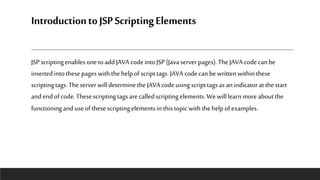
JSP scriptingenablesonetoadd JAVAcodeintoJSP (Java server pages).TheJAVA codecanbe
insertedintothesepageswiththehelpofscripttags. JAVAcodecanbewrittenwithinthese
scriptingtags.TheserverwilldeterminetheJAVAcodeusingscripttagsas anindicatoratthestart
andendofcode.Thesescriptingtagsare calledscriptingelements.We willlearnmore aboutthe
functioninganduseofthesescriptingelementsinthistopicwiththehelpofexamples.
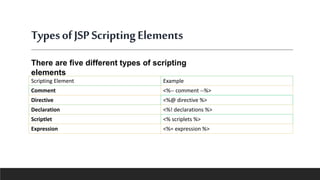
TypesofJSPScriptingElements
Scripting Element Example
Comment <%-- comment --%>
Directive <%@ directive %>
Declaration <%! declarations %>
Scriptlet <% scriplets %>
Expression <%= expression %>
There are five different types of scripting
elements
JSP Comment
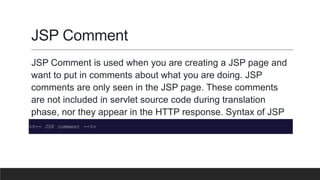
JSP Comment is used when you are creating a JSP page and
want to put in comments about what you are doing. JSP
comments are only seen in the JSP page. These comments
are not included in servlet source code during translation
phase, nor they appear in the HTTP response. Syntax of JSP
comment is as follows :
<%-- JSP comment --%>
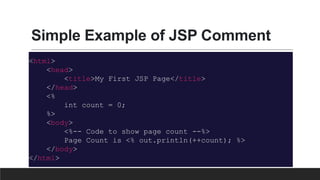
Simple Example of JSP Comment
<html>
<head>
<title>My First JSP Page</title>
</head>
<%
int count = 0;
%>
<body>
<%-- Code to show page count --%>
Page Count is <% out.println(++count); %>
</body>
</html>
JSP Scriptlet Tag
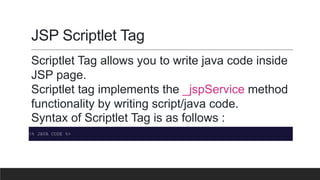
Scriptlet Tag allows you to write java code inside
JSP page.
Scriptlet tag implements the _jspService method
functionality by writing script/java code.
Syntax of Scriptlet Tag is as follows :
<% JAVA CODE %>
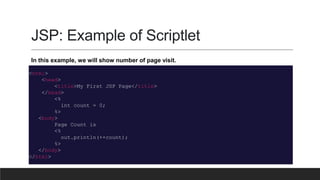
JSP: Example of Scriptlet
<html>
<head>
<title>My First JSP Page</title>
</head>
<%
int count = 0;
%>
<body>
Page Count is
<%
out.println(++count);
%>
</body>
</html>
In this example, we will show number of page visit.
JSP Declaration Tag
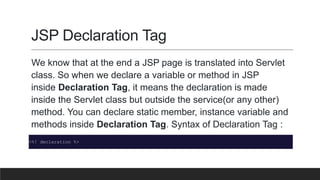
We know that at the end a JSP page is translated into Servlet
class. So when we declare a variable or method in JSP
inside Declaration Tag, it means the declaration is made
inside the Servlet class but outside the service(or any other)
method. You can declare static member, instance variable and
methods inside Declaration Tag. Syntax of Declaration Tag :
<%! declaration %>
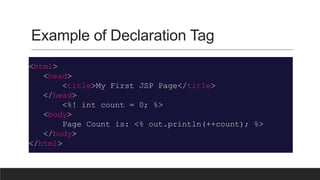
Example of Declaration Tag
<html>
<head>
<title>My First JSP Page</title>
</head>
<%! int count = 0; %>
<body>
Page Count is: <% out.println(++count); %>
</body>
</html>
JSP Directive Tag
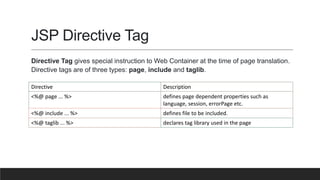
Directive Tag gives special instruction to Web Container at the time of page translation.
Directive tags are of three types: page, include and taglib.
Directive Description
<%@ page ... %> defines page dependent properties such as
language, session, errorPage etc.
<%@ include ... %> defines file to be included.
<%@ taglib ... %> declares tag library used in the page
Page Directive Tag
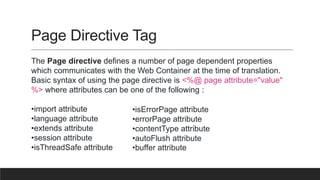
The Page directive defines a number of page dependent properties
which communicates with the Web Container at the time of translation.
Basic syntax of using the page directive is <%@ page attribute="value"
%> where attributes can be one of the following :
•import attribute
•language attribute
•extends attribute
•session attribute
•isThreadSafe attribute
•isErrorPage attribute
•errorPage attribute
•contentType attribute
•autoFlush attribute
•buffer attribute
JSP Expression Tag
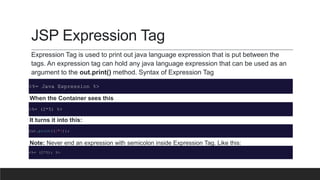
Expression Tag is used to print out java language expression that is put between the
tags. An expression tag can hold any java language expression that can be used as an
argument to the out.print() method. Syntax of Expression Tag
<%= Java Expression %>
When the Container sees this
<%= (2*5) %>
It turns it into this:
out.print((2*5));
Note: Never end an expression with semicolon inside Expression Tag. Like this:
<%= (2*5); %>
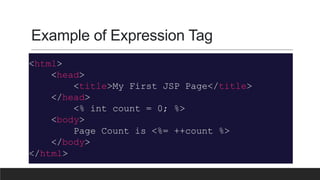
Example of Expression Tag
<html>
<head>
<title>My First JSP Page</title>
</head>
<% int count = 0; %>
<body>
Page Count is <%= ++count %>
</body>
</html>
Java ppt

Java ppt

  • 1.
    P R ES E N T I N G B Y: R I T I K T H A K U R , S A N TO S H R AT H O R E A N D V I V E K PA N D I T PRESENTING TO: ASST. PROF. K.K. YADAV AND BCA 5TH ‘B’
  • 2.
    IntroductiontoJSPScriptingElements JSP scriptingenablesonetoadd JAVAcodeintoJSP(Java server pages).TheJAVA codecanbe insertedintothesepageswiththehelpofscripttags. JAVAcodecanbewrittenwithinthese scriptingtags.TheserverwilldeterminetheJAVAcodeusingscripttagsas anindicatoratthestart andendofcode.Thesescriptingtagsare calledscriptingelements.We willlearnmore aboutthe functioninganduseofthesescriptingelementsinthistopicwiththehelpofexamples.
  • 3.
    TypesofJSPScriptingElements Scripting Element Example Comment<%-- comment --%> Directive <%@ directive %> Declaration <%! declarations %> Scriptlet <% scriplets %> Expression <%= expression %> There are five different types of scripting elements
  • 4.
    JSP Comment JSP Commentis used when you are creating a JSP page and want to put in comments about what you are doing. JSP comments are only seen in the JSP page. These comments are not included in servlet source code during translation phase, nor they appear in the HTTP response. Syntax of JSP comment is as follows : <%-- JSP comment --%>
  • 5.
    Simple Example ofJSP Comment <html> <head> <title>My First JSP Page</title> </head> <% int count = 0; %> <body> <%-- Code to show page count --%> Page Count is <% out.println(++count); %> </body> </html>
  • 6.
    JSP Scriptlet Tag ScriptletTag allows you to write java code inside JSP page. Scriptlet tag implements the _jspService method functionality by writing script/java code. Syntax of Scriptlet Tag is as follows : <% JAVA CODE %>
  • 7.
    JSP: Example ofScriptlet <html> <head> <title>My First JSP Page</title> </head> <% int count = 0; %> <body> Page Count is <% out.println(++count); %> </body> </html> In this example, we will show number of page visit.
  • 8.
    JSP Declaration Tag Weknow that at the end a JSP page is translated into Servlet class. So when we declare a variable or method in JSP inside Declaration Tag, it means the declaration is made inside the Servlet class but outside the service(or any other) method. You can declare static member, instance variable and methods inside Declaration Tag. Syntax of Declaration Tag : <%! declaration %>
  • 9.
    Example of DeclarationTag <html> <head> <title>My First JSP Page</title> </head> <%! int count = 0; %> <body> Page Count is: <% out.println(++count); %> </body> </html>
  • 10.
    JSP Directive Tag DirectiveTag gives special instruction to Web Container at the time of page translation. Directive tags are of three types: page, include and taglib. Directive Description <%@ page ... %> defines page dependent properties such as language, session, errorPage etc. <%@ include ... %> defines file to be included. <%@ taglib ... %> declares tag library used in the page
  • 11.
    Page Directive Tag ThePage directive defines a number of page dependent properties which communicates with the Web Container at the time of translation. Basic syntax of using the page directive is <%@ page attribute="value" %> where attributes can be one of the following : •import attribute •language attribute •extends attribute •session attribute •isThreadSafe attribute •isErrorPage attribute •errorPage attribute •contentType attribute •autoFlush attribute •buffer attribute
  • 12.
    JSP Expression Tag ExpressionTag is used to print out java language expression that is put between the tags. An expression tag can hold any java language expression that can be used as an argument to the out.print() method. Syntax of Expression Tag <%= Java Expression %> When the Container sees this <%= (2*5) %> It turns it into this: out.print((2*5)); Note: Never end an expression with semicolon inside Expression Tag. Like this: <%= (2*5); %>
  • 13.
    Example of ExpressionTag <html> <head> <title>My First JSP Page</title> </head> <% int count = 0; %> <body> Page Count is <%= ++count %> </body> </html>