Using jQuery
         to Extend CSS
             • Fix Cross Browser Problems
               • Solve CSS Shortcomings
               • Do Things CSS Can’t Do
             • Solve ‘Real World’ Problems
• Get Your Site into an Environment with a Bright Future
Why jQuery?


• What about MooTools? Prototype? (go for it!)
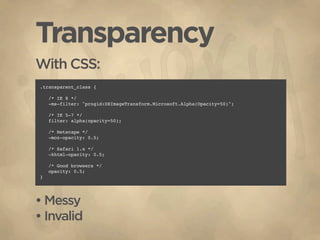
Transparency
With CSS:
.transparent_class {

    /* IE 8 */
    -ms-filter: "progid:DXImageTransform.Microsoft.Alpha(Opacity=50)";

    /* IE 5-7 */
    filter: alpha(opacity=50);

    /* Netscape */
    -moz-opacity: 0.5;

    /* Safari 1.x */
    -khtml-opacity: 0.5;

    /* Good browsers */
    opacity: 0.5;
}


• Messy
• Invalid
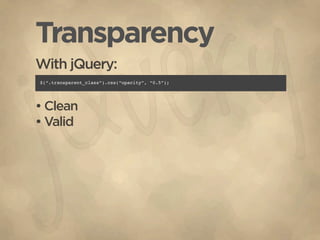
Transparency
With jQuery:
$(“.transparent_class”).css(“opacity”, “0.5”);


• Clean
• Valid
Hover
With CSS:
div {
   background: white;
}

div:hover {
   background: #eee;
}


• Not supported in IE <= 6
• Limited...
Hover
With jQuery
$(“div”).hover(function(){
    $(this).addClass(“hover”);
}, function(){
    $(this).removeClass(“hover”);
});


• All Browser Support
• More Options
$(“div”).hover(function(){
    $(this).addClass(“hover bookHighlight”);
}, function(){
    $(this).removeClass(“hover bookHighlight”);
});
Attribute & Psuedo Selectors
HTML
 <input   type=”text” ... />       <ul>
 <input   type=”radio” ... />        <li><a href=”#”>List Item One</a></li>
 <input   type=”submit” ... />       <li><a href=”#”>List Item Two</a></li>
 <input   type=”checkbox” ... />     <li><a href=”#”>List Item Three</a></li>
 <input   type=”password” ... />   </ul>


CSS
 input[type=text] {                ul li {
    width: 250px;                     border-bottom: 1px solid #ccc;
    border: 1px solid #ccc;        }
    padding: 3px;
 }                                 ul li:last-child {
                                      border-bottom: 0;
 input[type=radio] {               }
    vertical-align: middle;
 }


• Not supported in IE <= 6
Attribute & Psuedo Selectors
With jQuery
 $(“input[type=text]”)          $(“ul li:last-child”)
    .addClass(“textInput”);        .addClass(“last”);


(Still handle styling with CSS)

 <form>                         $(“input[type=text]”)
    <div>                          .focus(function(){
        <label>Name</label>            $(this).parent().addClass(“formFocus”);
        <input type=”text” />      })
    </div>                         .blur(function(){
    <div>                              $(this).parent().removeClass(“formFocus”);
        <label>Email</label>       });
        <input type=”text” />
    </div>
    ...
Looks Simple?
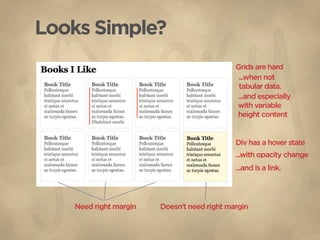
                                            Grids are hard
                                             ...when not
                                             tabular data.
                                            ...and especially
                                            with variable
                                            height content


                                            Div has a hover state
                                            ...with opacity change
                                            ...and is a link.


   Need right margin   Doesn’t need right margin
Looks Simple?
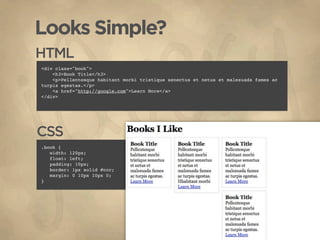
HTML
<div class="book">
    <h3>Book Title</h3>
    <p>Pellentesque habitant morbi tristique senectus et netus et malesuada fames ac
turpis egestas.</p>
    <a href="http://google.com">Learn More</a>
</div>


CSS
.book {
   width: 120px;
   float: left;
   padding: 10px;
   border: 1px solid #ccc;
   margin: 0 10px 10px 0;
}
Looks Simple?
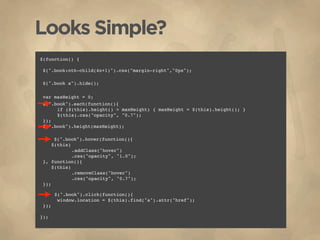
$(function() {


$(".book:nth-child(4n+1)").css("margin-right","0px");


$(".book a").hide();


var maxHeight = 0;

$(".book").each(function(){

    
if ($(this).height() > maxHeight) { maxHeight = $(this).height(); }

    
$(this).css("opacity", "0.7");

});

$(".book").height(maxHeight);

      $(".book").hover(function(){

    $(this)


.addClass("hover")


.css("opacity", "1.0");

}, function(){

    $(this)


.removeClass("hover")


.css("opacity", "0.7");

});


    $(".book").click(function(){

    
window.location = $(this).find("a").attr("href");

});

});
Looks Simple?
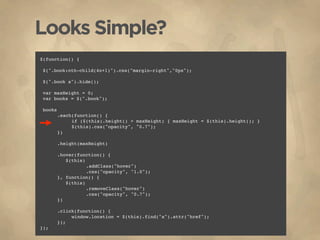
$(function() {


$(".book:nth-child(4n+1)").css("margin-right","0px");


$(".book a").hide();


var maxHeight = 0;

var books = $(".book");


books

    
.each(function() {


if ($(this).height() > maxHeight) { maxHeight = $(this).height(); }


$(this).css("opacity", "0.7");

    
})


.height(maxHeight)


.hover(function() {

    
    $(this)


.addClass("hover")


.css("opacity", "1.0");

    
}, function() {

    
    $(this)


.removeClass("hover")


.css("opacity", "0.7");

    
})


.click(function() {


window.location = $(this).find("a").attr("href");

    
});
});
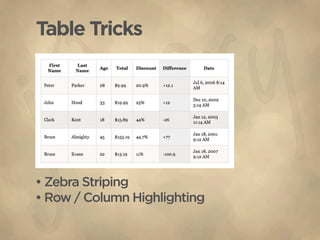
Table Tricks


• Zebra Striping
• Row / Column Highlighting
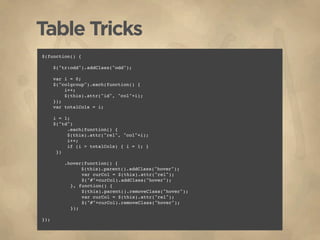
Table Tricks
$(function() {

      $("tr:odd").addClass("odd");

      var i = 0;
      $("colgroup").each(function() {
          i++;
          $(this).attr("id", "col"+i);
      });
      var totalCols = i;

      i = 1;
      $("td")
            .each(function() {
          
 $(this).attr("rel", "col"+i);

           i++;

           if (i > totalCols) { i = 1; }

      })

           .hover(function() {

                $(this).parent().addClass("hover");

      
         var curCol = $(this).attr("rel");

      
         $("#"+curCol).addClass("hover");

      
     }, function() {

      
         $(this).parent().removeClass("hover");

      
         var curCol = $(this).attr("rel");

      
         $("#"+curCol).removeClass("hover");

      
     });

});
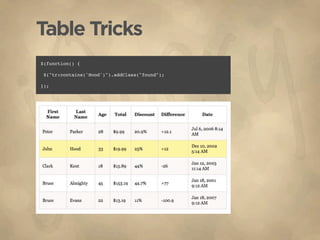
Table Tricks
$(function() {


$("tr:contains('Hood')").addClass("found");

});
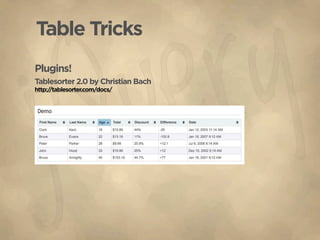
Table Tricks
Plugins!
Tablesorter 2.0 by Christian Bach
http://tablesorter.com/docs/
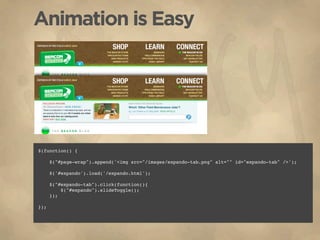
Animation is Easy


• It’s cool... but it’s flair.
• It’s (nearly) useless without JS.
Animation is Easy


$(function() {

      $("#page-wrap").append('<img src="/images/expando-tab.png" alt="" id="expando-tab" />');


      $('#expando').load('/expando.html');

      
      $("#expando-tab").click(function(){
          $("#expando").slideToggle();
      });

});
Animation is Easy
                                                          Regular State (overflow: hidden;)


                                                          Expanded State


var baseWidth = $("pre")[0].width(),
<pre><code>
    rightPadding here...
    ... code in = 10;
</code></pre>
$("pre").hover(function() {

var codeInnerWidth = $("code", this).width() + rightPadding;
     if (codeInnerWidth > baseWidth) {

pre 
$(this)
     {

 overflow: hidden;
     
    
.stop()

 width:
.css({
     
      563px;
}


zIndex: "100",

code
 { 
      
position: "relative"

 font-family: Courier, Monospace;
     
    
})
}


.animate({


width: codeInnerWidth + "px"


});

    
    }

}, function() {


$(this).stop().animate({


width: baseWidth

    
});

});
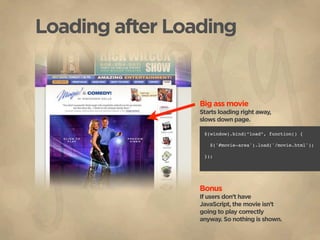
Loading after Loading


                 Big ass movie
                 Starts loading right away,
                 slows down page.

                  $(window).bind(“load”, function() {


                    $('#movie-area').load('/movie.html');

                  });


                 Bonus
                 If users don’t have
                 JavaScript, the movie isn’t
                 going to play correctly
                 anyway. So nothing is shown.
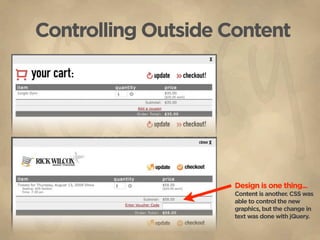
Controlling Outside Content


                     Design is one thing...
                     Content is another. CSS was
                     able to control the new
                     graphics, but the change in
                     text was done with jQuery.
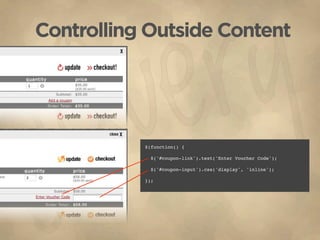
Controlling Outside Content


           $(function() {


             $('#coupon-link').text('Enter Voucher Code');

             $('#coupon-input').css('display', 'inline');

           });
MMMmmm Plugins
Facebox
http://famspam.com/facebox


Tablesorter
http://tablesorter.com/


Coda Slider
http://www.ndoherty.com/demos/coda-slider/1.1.1/


markItUp!
http://markitup.jaysalvat.com/home/


                                         jQuery UI
                                         http://jqueryui.com/


Interactions                 Widgets                  Effects
 •   Draggable               •   Accordion             •   Show/Hide Methods
 •   Droppable               •   Datepicker            •   Toggle Class
 •   Resizable               •   Dialog                •   Color Animation
 •   Selectable              •   Progressbar
 •   Sortable                •   Slider
                             •   Tabs
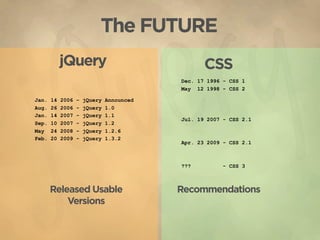
The FUTURE
            jQuery                                 CSS
                                            Dec. 17 1996 - CSS 1
                                            May 12 1998 - CSS 2

Jan.   14   2006   –   jQuery   Announced
Aug.   26   2006   -   jQuery   1.0
Jan.   14   2007   -   jQuery   1.1
                                            Jul. 19 2007 - CSS 2.1
Sep.   10   2007   -   jQuery   1.2
May    24   2008   -   jQuery   1.2.6
Feb.   20   2009   -   jQuery   1.3.2
                                            Apr. 23 2009 - CSS 2.1


                                            ???          - CSS 3


       Released Usable                      Recommendations
           Versions
The FUTURE
• Huge community of people USING it.
• Huge community of DEVELOPERS.
   • Loads of DOCUMENTATION.
   • Plenty of SUPPORT available.
    • Gosh darn it, people like it!

Using jQuery to Extend CSS

  • 1.
    Using jQuery to Extend CSS • Fix Cross Browser Problems • Solve CSS Shortcomings • Do Things CSS Can’t Do • Solve ‘Real World’ Problems • Get Your Site into an Environment with a Bright Future
  • 2.
    Why jQuery? • Whatabout MooTools? Prototype? (go for it!)
  • 3.
    Transparency With CSS: .transparent_class { /* IE 8 */ -ms-filter: "progid:DXImageTransform.Microsoft.Alpha(Opacity=50)"; /* IE 5-7 */ filter: alpha(opacity=50); /* Netscape */ -moz-opacity: 0.5; /* Safari 1.x */ -khtml-opacity: 0.5; /* Good browsers */ opacity: 0.5; } • Messy • Invalid
  • 4.
  • 5.
    Hover With CSS: div { background: white; } div:hover { background: #eee; } • Not supported in IE <= 6 • Limited...
  • 6.
    Hover With jQuery $(“div”).hover(function(){ $(this).addClass(“hover”); }, function(){ $(this).removeClass(“hover”); }); • All Browser Support • More Options $(“div”).hover(function(){ $(this).addClass(“hover bookHighlight”); }, function(){ $(this).removeClass(“hover bookHighlight”); });
  • 7.
    Attribute & PsuedoSelectors HTML <input type=”text” ... /> <ul> <input type=”radio” ... /> <li><a href=”#”>List Item One</a></li> <input type=”submit” ... /> <li><a href=”#”>List Item Two</a></li> <input type=”checkbox” ... /> <li><a href=”#”>List Item Three</a></li> <input type=”password” ... /> </ul> CSS input[type=text] { ul li { width: 250px; border-bottom: 1px solid #ccc; border: 1px solid #ccc; } padding: 3px; } ul li:last-child { border-bottom: 0; input[type=radio] { } vertical-align: middle; } • Not supported in IE <= 6
  • 8.
    Attribute & PsuedoSelectors With jQuery $(“input[type=text]”) $(“ul li:last-child”) .addClass(“textInput”); .addClass(“last”); (Still handle styling with CSS) <form> $(“input[type=text]”) <div> .focus(function(){ <label>Name</label> $(this).parent().addClass(“formFocus”); <input type=”text” /> }) </div> .blur(function(){ <div> $(this).parent().removeClass(“formFocus”); <label>Email</label> }); <input type=”text” /> </div> ...
  • 9.
    Looks Simple? Grids are hard ...when not tabular data. ...and especially with variable height content Div has a hover state ...with opacity change ...and is a link. Need right margin Doesn’t need right margin
  • 10.
    Looks Simple? HTML <div class="book"> <h3>Book Title</h3> <p>Pellentesque habitant morbi tristique senectus et netus et malesuada fames ac turpis egestas.</p> <a href="http://google.com">Learn More</a> </div> CSS .book { width: 120px; float: left; padding: 10px; border: 1px solid #ccc; margin: 0 10px 10px 0; }
  • 11.
    Looks Simple? $(function() { $(".book:nth-child(4n+1)").css("margin-right","0px"); $(".booka").hide(); var maxHeight = 0; $(".book").each(function(){ if ($(this).height() > maxHeight) { maxHeight = $(this).height(); } $(this).css("opacity", "0.7"); }); $(".book").height(maxHeight); $(".book").hover(function(){ $(this) .addClass("hover") .css("opacity", "1.0"); }, function(){ $(this) .removeClass("hover") .css("opacity", "0.7"); }); $(".book").click(function(){ window.location = $(this).find("a").attr("href"); }); });
  • 12.
    Looks Simple? $(function() { $(".book:nth-child(4n+1)").css("margin-right","0px"); $(".booka").hide(); var maxHeight = 0; var books = $(".book"); books .each(function() { if ($(this).height() > maxHeight) { maxHeight = $(this).height(); } $(this).css("opacity", "0.7"); }) .height(maxHeight) .hover(function() { $(this) .addClass("hover") .css("opacity", "1.0"); }, function() { $(this) .removeClass("hover") .css("opacity", "0.7"); }) .click(function() { window.location = $(this).find("a").attr("href"); }); });
  • 13.
    Table Tricks • ZebraStriping • Row / Column Highlighting
  • 14.
    Table Tricks $(function() { $("tr:odd").addClass("odd"); var i = 0; $("colgroup").each(function() { i++; $(this).attr("id", "col"+i); }); var totalCols = i; i = 1; $("td") .each(function() { $(this).attr("rel", "col"+i); i++; if (i > totalCols) { i = 1; } }) .hover(function() { $(this).parent().addClass("hover"); var curCol = $(this).attr("rel"); $("#"+curCol).addClass("hover"); }, function() { $(this).parent().removeClass("hover"); var curCol = $(this).attr("rel"); $("#"+curCol).removeClass("hover"); }); });
  • 15.
  • 16.
    Table Tricks Plugins! Tablesorter 2.0by Christian Bach http://tablesorter.com/docs/
  • 17.
    Animation is Easy •It’s cool... but it’s flair. • It’s (nearly) useless without JS.
  • 18.
    Animation is Easy $(function(){ $("#page-wrap").append('<img src="/images/expando-tab.png" alt="" id="expando-tab" />'); $('#expando').load('/expando.html'); $("#expando-tab").click(function(){ $("#expando").slideToggle(); }); });
  • 19.
    Animation is Easy Regular State (overflow: hidden;) Expanded State var baseWidth = $("pre")[0].width(), <pre><code> rightPadding here... ... code in = 10; </code></pre> $("pre").hover(function() { var codeInnerWidth = $("code", this).width() + rightPadding; if (codeInnerWidth > baseWidth) { pre $(this) { overflow: hidden; .stop() width: .css({ 563px; } zIndex: "100", code { position: "relative" font-family: Courier, Monospace; }) } .animate({ width: codeInnerWidth + "px" }); } }, function() { $(this).stop().animate({ width: baseWidth }); });
  • 20.
    Loading after Loading Big ass movie Starts loading right away, slows down page. $(window).bind(“load”, function() { $('#movie-area').load('/movie.html'); }); Bonus If users don’t have JavaScript, the movie isn’t going to play correctly anyway. So nothing is shown.
  • 21.
    Controlling Outside Content Design is one thing... Content is another. CSS was able to control the new graphics, but the change in text was done with jQuery.
  • 22.
    Controlling Outside Content $(function() { $('#coupon-link').text('Enter Voucher Code'); $('#coupon-input').css('display', 'inline'); });
  • 23.
    MMMmmm Plugins Facebox http://famspam.com/facebox Tablesorter http://tablesorter.com/ Coda Slider http://www.ndoherty.com/demos/coda-slider/1.1.1/ markItUp! http://markitup.jaysalvat.com/home/ jQuery UI http://jqueryui.com/ Interactions Widgets Effects • Draggable • Accordion • Show/Hide Methods • Droppable • Datepicker • Toggle Class • Resizable • Dialog • Color Animation • Selectable • Progressbar • Sortable • Slider • Tabs
  • 24.
    The FUTURE jQuery CSS Dec. 17 1996 - CSS 1 May 12 1998 - CSS 2 Jan. 14 2006 – jQuery Announced Aug. 26 2006 - jQuery 1.0 Jan. 14 2007 - jQuery 1.1 Jul. 19 2007 - CSS 2.1 Sep. 10 2007 - jQuery 1.2 May 24 2008 - jQuery 1.2.6 Feb. 20 2009 - jQuery 1.3.2 Apr. 23 2009 - CSS 2.1 ??? - CSS 3 Released Usable Recommendations Versions
  • 25.
    The FUTURE • Hugecommunity of people USING it. • Huge community of DEVELOPERS. • Loads of DOCUMENTATION. • Plenty of SUPPORT available. • Gosh darn it, people like it!