Continuous Integration at
StrongLoop Using Jenkins
Chandrika
(Dev-Ops & QA at StrongLoop)
Agenda
● Basic Jenkins Configuration
● Jenkins Setup
● Popular Plugins
● Integration with Cloud Providers
● Integration with GitHub
● Adding projects to Jenkins
● Automation – CI Infrastructure
● Build Process at StrongLoop
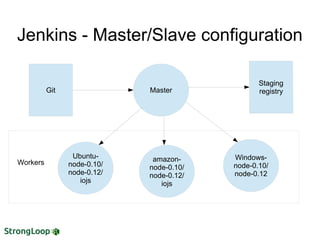
Jenkins - Master/Slave configuration
Git Master
Workers
Ubuntu-
node-0.10/
node-0.12/
iojs
amazon-
node-0.10/
node-0.12/
iojs
Windows-
node-0.10/
node-0.12
Setting up Master Server
● Master server - EC2 amazon linux c4.2xlarge
● Prerequisites – Java
● Jenkins installation
● Jenkins launched as a daemon on startup
● Logs - /var/lib/jenkins/jenkins.log
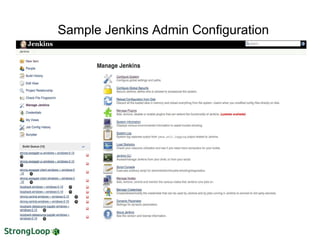
Sample Jenkins Admin Configuration
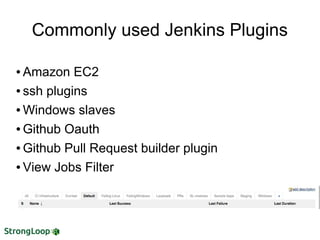
● Amazon EC2
● ssh plugins
● Windows slaves
● Github Oauth
● Github Pull Request builder plugin
● View Jobs Filter
Commonly used Jenkins Plugins
● Prepare images with tools build and testing
● OS platforms
● Node versions
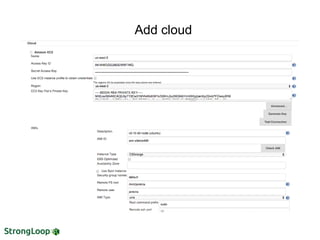
● ec2-plugin – new feature programatically updates the
AMI ID using Groovy
● Add a cloud from Jenkins admin console
● Add images to cloud and configure it
● Launch instances on-demand/or
● Connect using ssh agent
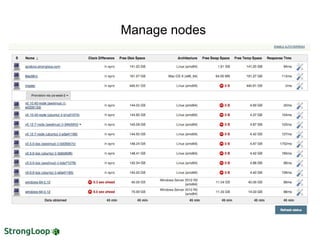
● Manage nodes from Jenkins
Jenkins – EC2 cloud
Add cloud
Manage nodes
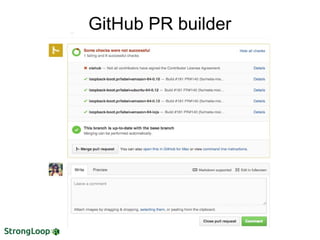
Jenkins – Github Integration
● GitHub Oauth Plugin – authorization and
authentication to Jenkins
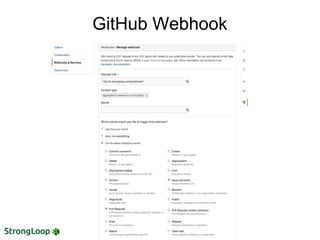
GitHub Webhook
GitHub PR builder
Jenkins Jobs configuration
● Repository settings
● Build Parameters
● Integration with Slack
● Build triggers
● Configuration matrix
● Build/Test scripts
● Post Build Actions
● Email notifications
CI Infrastructure
● Bridge between StrongLoop's repositories on
GitHub and their corresponding Jenkins jobs
● Every new project that needs to build in Jenkins
is handled by this framework
● Templatized job configurations
● Saves time by avoiding manual creation /
configuration / maintenance of jobs.
● Serves as Backup
A tool for building/testing NPM packages in
development on CI (Jenkins).
● Sanity checks
● Linter
● Install dependencies
● Artifact generation
● Run tests
● Generate coverage report
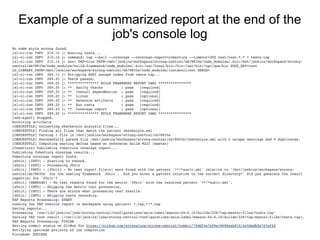
● Summarize report of all the tests
StrongLoop's Build-Framework
Example of a summarized report at the end of the
job's console log
● Node Test tools
● Mocha
● Coverage – nyc & istanbul
● TAP
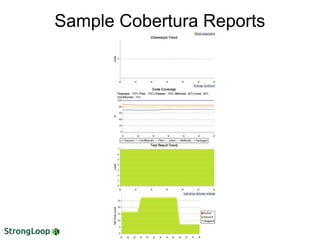
● Coverage reports
● Cobertura (screenshot next page)
Node tests and Code Coverage
Sample Cobertura Reports
Jenkins API & Automation
Remote access API to its functionalities-
Rest style API's and they are available under the
".../api/" URL
API's used to build -
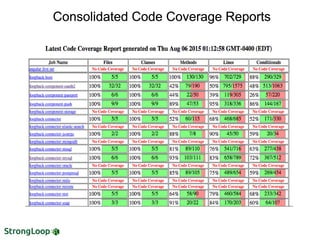
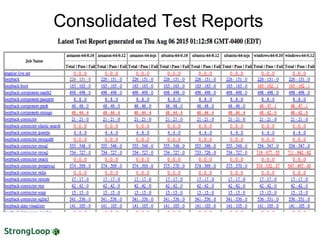
● Consolidated Test Report
● Consolidated Code Coverage Reports
Screenshots next page..
Consolidated Code Coverage ReportsConsolidated Code Coverage ReportsConsolidated Code Coverage Reports
Consolidated Test Reports
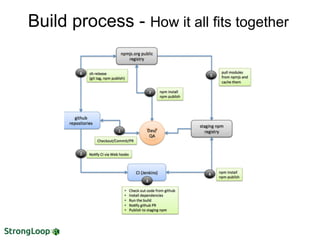
Build process - How it all fits together
Thanks!
● Q & A
● chandrika@strongloop.com
● callback@strongloop.com
● @chandrikagole, @strongloop

JenkinsCI

  • 1.
    Continuous Integration at StrongLoopUsing Jenkins Chandrika (Dev-Ops & QA at StrongLoop)
  • 2.
    Agenda ● Basic JenkinsConfiguration ● Jenkins Setup ● Popular Plugins ● Integration with Cloud Providers ● Integration with GitHub ● Adding projects to Jenkins ● Automation – CI Infrastructure ● Build Process at StrongLoop
  • 3.
    Jenkins - Master/Slaveconfiguration Git Master Workers Ubuntu- node-0.10/ node-0.12/ iojs amazon- node-0.10/ node-0.12/ iojs Windows- node-0.10/ node-0.12
  • 4.
    Setting up MasterServer ● Master server - EC2 amazon linux c4.2xlarge ● Prerequisites – Java ● Jenkins installation ● Jenkins launched as a daemon on startup ● Logs - /var/lib/jenkins/jenkins.log
  • 5.
    Sample Jenkins AdminConfiguration
  • 6.
    ● Amazon EC2 ●ssh plugins ● Windows slaves ● Github Oauth ● Github Pull Request builder plugin ● View Jobs Filter Commonly used Jenkins Plugins
  • 7.
    ● Prepare imageswith tools build and testing ● OS platforms ● Node versions ● ec2-plugin – new feature programatically updates the AMI ID using Groovy ● Add a cloud from Jenkins admin console ● Add images to cloud and configure it ● Launch instances on-demand/or ● Connect using ssh agent ● Manage nodes from Jenkins Jenkins – EC2 cloud
  • 8.
  • 9.
  • 10.
    Jenkins – GithubIntegration ● GitHub Oauth Plugin – authorization and authentication to Jenkins
  • 11.
  • 12.
  • 13.
    Jenkins Jobs configuration ●Repository settings ● Build Parameters ● Integration with Slack ● Build triggers ● Configuration matrix ● Build/Test scripts ● Post Build Actions ● Email notifications
  • 14.
    CI Infrastructure ● Bridgebetween StrongLoop's repositories on GitHub and their corresponding Jenkins jobs ● Every new project that needs to build in Jenkins is handled by this framework ● Templatized job configurations ● Saves time by avoiding manual creation / configuration / maintenance of jobs. ● Serves as Backup
  • 15.
    A tool forbuilding/testing NPM packages in development on CI (Jenkins). ● Sanity checks ● Linter ● Install dependencies ● Artifact generation ● Run tests ● Generate coverage report ● Summarize report of all the tests StrongLoop's Build-Framework
  • 16.
    Example of asummarized report at the end of the job's console log
  • 17.
    ● Node Testtools ● Mocha ● Coverage – nyc & istanbul ● TAP ● Coverage reports ● Cobertura (screenshot next page) Node tests and Code Coverage
  • 18.
  • 19.
    Jenkins API &Automation Remote access API to its functionalities- Rest style API's and they are available under the ".../api/" URL API's used to build - ● Consolidated Test Report ● Consolidated Code Coverage Reports Screenshots next page..
  • 20.
    Consolidated Code CoverageReportsConsolidated Code Coverage ReportsConsolidated Code Coverage Reports
  • 21.
  • 22.
    Build process -How it all fits together
  • 23.
    Thanks! ● Q &A ● chandrika@strongloop.com ● callback@strongloop.com ● @chandrikagole, @strongloop