MULE ESB – CONSUMING
RESTFUL WEB SERVICES
WITH RAML DEFINITION
Quick guide to call RESTful WS defined by RAML
Using RAML Definition to configure HTTP Request - 1
RAML Definition of a Web Service make the build of Request in Anypoint easier and quicker.
In this example we will start from a new flow, with a simple HTTP Listener as shown:
HTTP Listener Configuration can listen classically on localhost at port 8081, in example.
Using RAML Definition to configure HTTP Request - 2
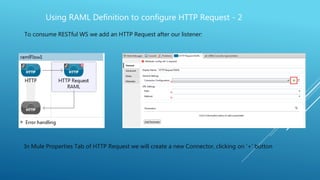
To consume RESTful WS we add an HTTP Request after our listener:
In Mule Properties Tab of HTTP Request we will create a new Connector, clicking on ‘+’ button
Using RAML Definition to configure HTTP Request - 3
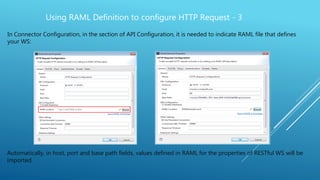
In Connector Configuration, in the section of API Configuration, it is needed to indicate RAML file that defines
your WS:
Automatically, in host, port and base path fields, values defined in RAML for the properties of RESTful WS will be
imported.
Using RAML Definition to configure HTTP Request - 4
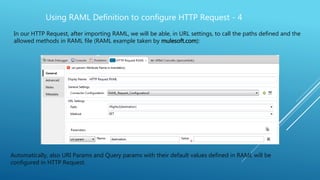
In our HTTP Request, after importing RAML, we will be able, in URL settings, to call the paths defined and the
allowed methods in RAML file (RAML example taken by mulesoft.com):
Automatically, also URI Params and Query params with their default values defined in RAML will be
configured in HTTP Request.
• Mule in Action, David Dossot,John D'Emic Foreword by Ross Mason, Creator of Mule, July 2009
• https://docs.mulesoft.com/anypoint-platform-for-apis/walkthrough-design-existing
• raml.org/
• https://www.mulesoft.com/mulesoft-advances-api-design-tooling-raml
References:

Mule ESB - Consuming RESTful WS with RAML Definition

  • 1.
    MULE ESB –CONSUMING RESTFUL WEB SERVICES WITH RAML DEFINITION Quick guide to call RESTful WS defined by RAML
  • 2.
    Using RAML Definitionto configure HTTP Request - 1 RAML Definition of a Web Service make the build of Request in Anypoint easier and quicker. In this example we will start from a new flow, with a simple HTTP Listener as shown: HTTP Listener Configuration can listen classically on localhost at port 8081, in example.
  • 3.
    Using RAML Definitionto configure HTTP Request - 2 To consume RESTful WS we add an HTTP Request after our listener: In Mule Properties Tab of HTTP Request we will create a new Connector, clicking on ‘+’ button
  • 4.
    Using RAML Definitionto configure HTTP Request - 3 In Connector Configuration, in the section of API Configuration, it is needed to indicate RAML file that defines your WS: Automatically, in host, port and base path fields, values defined in RAML for the properties of RESTful WS will be imported.
  • 5.
    Using RAML Definitionto configure HTTP Request - 4 In our HTTP Request, after importing RAML, we will be able, in URL settings, to call the paths defined and the allowed methods in RAML file (RAML example taken by mulesoft.com): Automatically, also URI Params and Query params with their default values defined in RAML will be configured in HTTP Request.
  • 6.
    • Mule inAction, David Dossot,John D'Emic Foreword by Ross Mason, Creator of Mule, July 2009 • https://docs.mulesoft.com/anypoint-platform-for-apis/walkthrough-design-existing • raml.org/ • https://www.mulesoft.com/mulesoft-advances-api-design-tooling-raml References: