Devops
Introduction
Devops is the combination of cultural philosophies, practices,
and tools that increases an organization's ability to deliver
applications and services at high velocity: evolving and
improving products at a faster pace than organizations using
traditional software development and infrastructure
management processes.
• Under a DevOps model, development and operations teams are no longer “siloed.”
Sometimes, these two teams are merged into a single team where the engineers work
across the entire application lifecycle, from development and test to deployment to
operations, and develop a range of skills not limited to a single function.
• In some DevOps models, quality assurance and security teams may also become more
tightly integrated with development and operations and throughout the application
lifecycle. When security is the focus of everyone on a DevOps team, this is sometimes
referred to as DevSecOps.
• These teams use practices to automate processes that historically have been manual and
slow. They use a technology stack and tooling which help them operate and evolve
applications quickly and reliably. These tools also help engineers independently
accomplish tasks (for example, deploying code or provisioning infrastructure) that
normally would have required help from other teams, and this further increases a team’s
velocity.
• The following are DevOps best practices:
• Continuous Integration
• Continuous Delivery
• Microservices
• Infrastructure as Code
• Monitoring and Logging
• Communication and Collaboration
• The most popular DevOps tools are mentioned below:
• Git : Version Control System tool
• Jenkins : Continuous Integration tool
• Selenium : Continuous Testing tool
• Puppet, Chef, Ansible : Configuration Management and Deployment
tools
• Nagios : Continuous Monitoring tool
• Docker : Containerization tool
• Dev tools
Gerrit,Git,Github,Maven,Ant
• Continuous Integration tool
Jenkins
• Nexus
• Config Tools
Puppet
Ansible
• Container Tool
Docker,kubernates
• Developers develop the code and this source code is managed by Version
Control System tools like Git etc.
• Developers send this code to the Git repository and any changes made in the
code is committed to this Repository.
• Jenkins pulls this code from the repository using the Git plugin and build it using
tools like Ant or Maven.
• Configuration management tools like puppet deploys & provisions testing
environment and then Jenkins releases this code on the test environment on
which testing is done using tools like selenium.
• Once the code is tested, Jenkins send it for deployment on the production
server (even production server is provisioned & maintained by tools like
puppet).
• After deployment It is continuously monitored by tools like Nagios.

• Docker containers provides testing environment to test the build features.
• Kubernetes is a container orchestration system for Docker containers that is
more extensive than Docker Swarm and is meant to coordinate clusters of
nodes at scale in production in an efficient manner. It is open source for
automating application deployment, scaling, and management.
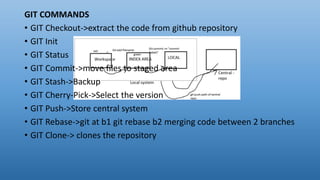
GIT COMMANDS
• GIT Checkout->extract the code from github repository
• GIT Init
• GIT Status
• GIT Commit->move files to staged area
• GIT Stash->Backup
• GIT Cherry-Pick->Select the version
• GIT Push->Store central system
• GIT Rebase->git at b1 git rebase b2 merging code between 2 branches
• GIT Clone-> clones the repository
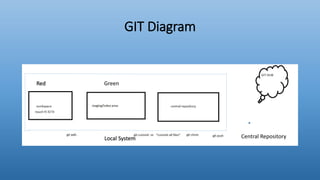
GIT Diagram
Red Green
Local System Central Repository
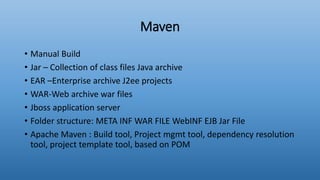
Maven
• Manual Build
• Jar – Collection of class files Java archive
• EAR –Enterprise archive J2ee projects
• WAR-Web archive war files
• Jboss application server
• Folder structure: META INF WAR FILE WebINF EJB Jar File
• Apache Maven : Build tool, Project mgmt tool, dependency resolution
tool, project template tool, based on POM
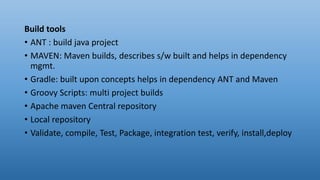
Build tools
• ANT : build java project
• MAVEN: Maven builds, describes s/w built and helps in dependency
mgmt.
• Gradle: built upon concepts helps in dependency ANT and Maven
• Groovy Scripts: multi project builds
• Apache maven Central repository
• Local repository
• Validate, compile, Test, Package, integration test, verify, install,deploy
• Commands
mvn install ,mvn clean ,mvn clean compile , mvn compile install
,mvn test clean
POM
Pom, xml file defines goals
Components POM:
Name,Version,Packaging,Dependencies,Plugins,Profiles
<Project><dependency><groupid><artifactid><version></dependency>
</project>
Repositories,Plugins,Automation using plugins
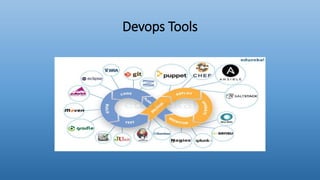
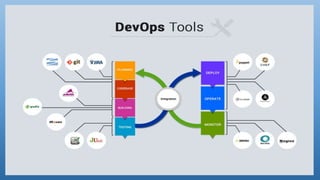
Devops Tools
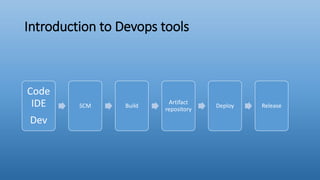
Introduction to Devops tools
Code
IDE
Dev
SCM Build
Artifact
repository
Deploy Release
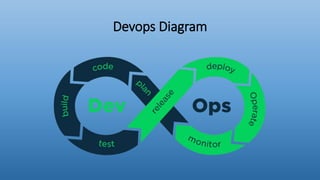
Devops Diagram
Jenkins
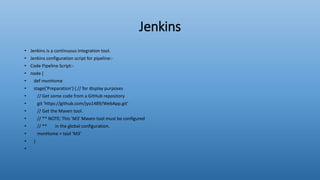
• Jenkins is a continuous integration tool.
• Jenkins configuration script for pipeline:-
• Code Pipeline Script:-
• node {
• def mvnHome
• stage('Preparation') { // for display purposes
• // Get some code from a GitHub repository
• git 'https://github.com/jyo1489/WebApp.git'
• // Get the Maven tool.
• // ** NOTE: This 'M3' Maven tool must be configured
• // ** in the global configuration.
• mvnHome = tool 'M3'
• }
•
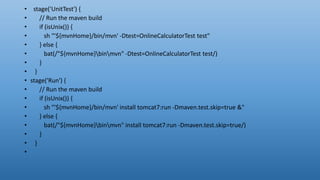
• stage('UnitTest') {
• // Run the maven build
• if (isUnix()) {
• sh "'${mvnHome}/bin/mvn' -Dtest=OnlineCalculatorTest test"
• } else {
• bat(/"${mvnHome}binmvn" -Dtest=OnlineCalculatorTest test/)
• }
• }
• stage('Run') {
• // Run the maven build
• if (isUnix()) {
• sh "'${mvnHome}/bin/mvn' install tomcat7:run -Dmaven.test.skip=true &"
• } else {
• bat(/"${mvnHome}binmvn" install tomcat7:run -Dmaven.test.skip=true/)
• }
• }
•
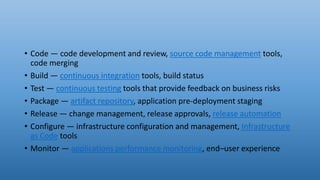
• Code — code development and review, source code management tools,
code merging
• Build — continuous integration tools, build status
• Test — continuous testing tools that provide feedback on business risks
• Package — artifact repository, application pre-deployment staging
• Release — change management, release approvals, release automation
• Configure — infrastructure configuration and management, Infrastructure
as Code tools
• Monitor — applications performance monitoring, end–user experience
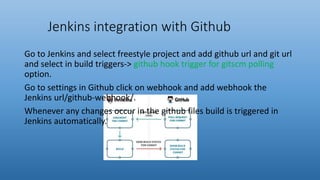
Jenkins integration with Github
Go to Jenkins and select freestyle project and add github url and git url
and select in build triggers-> github hook trigger for gitscm polling
option.
Go to settings in Github click on webhook and add webhook the
Jenkins url/github-webhook/.
Whenever any changes occur in the github files build is triggered in
Jenkins automatically.
DOCKER
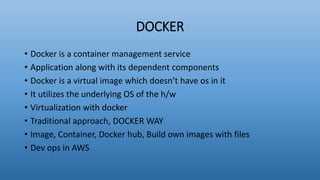
• Docker is a container management service
• Application along with its dependent components
• Docker is a virtual image which doesn’t have os in it
• It utilizes the underlying OS of the h/w
• Virtualization with docker
• Traditional approach, DOCKER WAY
• Image, Container, Docker hub, Build own images with files
• Dev ops in AWS
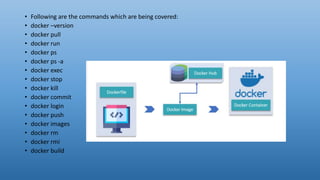
• Following are the commands which are being covered:
• docker –version
• docker pull
• docker run
• docker ps
• docker ps -a
• docker exec
• docker stop
• docker kill
• docker commit
• docker login
• docker push
• docker images
• docker rm
• docker rmi
• docker build
Ansible
• Ansible is an IT automation tool. It can configure systems, deploy software, and orchestrate more advanced
IT tasks such as continuous deployments or zero downtime rolling updates.
• Playbook: Playbooks are the files where Ansible code is written in YAML format.
• YAML stands for Yet Another Mark up Language.
• name: install and configure DB vgfbt
• hosts: test Server
• become: yes
• vars:
• oracle_db_port_value : 1521
• tasks:
• -name: Install the Oracle DB
• yum: <code to install the DB>
• -name: Ensure the installed service is enabled and running
• service:
• name: <your service name>
• name
• This tag specifies the name of the Ansible playbook. As in what this
playbook will be doing. Any logical name can be given to the playbook.
• hosts
• This tag specifies the lists of hosts or host group against which we want to
run the task. The hosts field/tag is mandatory. It tells Ansible on which hosts
to run the listed tasks. The tasks can be run on the same machine or on a
remote machine. One can run the tasks on multiple machines and hence
hosts tag can have a group of hosts’ entry as well.
• vars
• Vars tag lets you define the variables which you can use in your playbook.
Usage is similar to variables in any programming language.
• tasks
• All playbooks should contain tasks or a list of tasks to be executed. Tasks are
a list of actions one needs to perform. A tasks field contains the name of the
task.
5 DevOps tools you should know in 2019
• DevOps culture is now an integral part of every tech savvy business
and plays a role in many business processes, ranging from project
planning to software delivery. As cloud services are prevailing today,
the requirement of related supplementary services is growing rapidly.
DevOps technologies are increasing as well, so how one should
choose the right tools to automate his work? There are a lot of
opinions, but I will share the list of DevOps technologies I find the
most important to master in 2019.
Ansible
• Ansible is a quite simple software provisioning, configuration management
and application deployment tool, which ensures faster time-to-market for
your applications. No matter if you are a one man company or an
enterprise, you can automate orchestration, cloud provisioning, computing
machines deployment and other tasks. I like Ansible because it is not as
complex as Puppet or Chef, but speeds up productivity just as well.
• Ansible playbooks are written in YAML, which is one of the easiest data-
serialization languages for creating configuration files.
• It’s fast, performs all its functions over SSH and doesn’t require agent
installation.
• It allows you to create groups of servers, describe how these should be
configured and what actions should be performed on these machines.
Jenkins
• A lot of DevOps engineers call Jenkins the best CI/CD tool available in the
market, since it’s incredibly useful. Jenkins is an automation server that is
written in Java and is used to report changes, conduct live testing and
distribute code across multiple machines. As Jenkins has a built-in GUI and
over 1000 plugins to support building and testing your application, it is
considered a really powerful, yet easy to use tool. Thanks to these plugins,
Jenkins integrates well with practically every other instrument in the
continuous integration and continuous delivery toolchain.
• Easy to install and a lot of support available from community.
• 1000+ plugins available and easy to create your own, if needed.
• It can be used to publish results and send email notifications.
Docker
• Docker is a software containerization platform that allows DevOps to build, ship, and run distributed processes within containers.
This gives developers the ability to create predictable environments that are isolated from the rest of the applications and can be
run anywhere. Containers are isolated but share the same OS kernel. This way you get to use hardware resources more efficiently
compared to virtual machines.
• Each container can hold a single process, like web server or database management system. You can create a cluster of containers
distributed across different nodes to have your application up and running in both, load balancing and high availability, modes.
Containers can communicate on a private network, as you most probably want to keep some of your application parts private for
security purposes. Simply expose your web server to the Internet and you are good to go.
• What I like most is that you can install Docker on your computer to run containers locally to make some ad-hoc software tests
without installing its dependencies globally. When you are done, you simply terminate your Docker container and your computer is
as clean as new.
• Build once, run anywhere! You can package an application from your laptop and run it unmodified on any public/private cloud or
bare metal server.
• Containers are lightweight and fast.
• Docker Hub offers many official and community-built public Docker images.
• Separating different components of a large application into containers have security benefits: if one container is compromised,
others remain unaffected.
Kubernetes
• While Docker allows developers to build, ship and run applications in containers easily, Kubernetes makes
running containers in a cluster as easy as ever. You can automatically deploy, scale, monitor and manage
your cloud-native application with Kubernetes. It is a powerful orchestrator that allows you to manage
communication between containerized components, known as pods, and coordinate them as a cluster.
• Kubernetes has now become the heart of a microservices application. The ecosystem around it is expanding
by the minute with Cloud Native Computing Foundation ensuring its future success. There are now many
additional observability, networking and distributed data storage services that complement Kubernetes in
building a loosely coupled distributed system that is resilient, manageable and observable.
• Open-source orchestrator.
• Easy container management.
• Horizontal autoscaling — if you get high loads, you can replicate your pods and balance the load across them
to avoid downtime.
• Self-healing, Automated Rollouts and Rollbacks — if something goes wrong, you can automatically replace,
restart, reschedule your containers or rollout/rollback to the desired state of the containerized application.
• Service Discovery — Kubernetes uses unique IP addresses and can put a set of containers behind a single
DNS name. This allows you easily track and identify your across the cluster.
RabbitMQ
• A great messaging and queuing tool which you can use for applications that runs
on most operating systems. Managing queues, exchanges and routing with it is a
breeze. Even if you have elaborate configuration to be built, it’s relatively easy to
do so, since the tool is really well-documented. You can stream a lot of different
high-performance processes and avoid system crashes through a friendly user
interface. It ‘s a durable and robust messaging broker that is worth your
attention. As RabbitMQ developers like to say, it’s “messaging that just works”.
• Guaranteed message delivery.
• Push work into background processes, freeing your web server up to handle more
users.
• Scale the most frequently used parts of your system, without having to scale
everything.
• Handling everything with ease even if it seems to be a huge crash.
QUERIES??
THANK YOU !

Devops

  • 1.
  • 2.
    Introduction Devops is thecombination of cultural philosophies, practices, and tools that increases an organization's ability to deliver applications and services at high velocity: evolving and improving products at a faster pace than organizations using traditional software development and infrastructure management processes.
  • 3.
    • Under aDevOps model, development and operations teams are no longer “siloed.” Sometimes, these two teams are merged into a single team where the engineers work across the entire application lifecycle, from development and test to deployment to operations, and develop a range of skills not limited to a single function. • In some DevOps models, quality assurance and security teams may also become more tightly integrated with development and operations and throughout the application lifecycle. When security is the focus of everyone on a DevOps team, this is sometimes referred to as DevSecOps. • These teams use practices to automate processes that historically have been manual and slow. They use a technology stack and tooling which help them operate and evolve applications quickly and reliably. These tools also help engineers independently accomplish tasks (for example, deploying code or provisioning infrastructure) that normally would have required help from other teams, and this further increases a team’s velocity.
  • 4.
    • The followingare DevOps best practices: • Continuous Integration • Continuous Delivery • Microservices • Infrastructure as Code • Monitoring and Logging • Communication and Collaboration
  • 5.
    • The mostpopular DevOps tools are mentioned below: • Git : Version Control System tool • Jenkins : Continuous Integration tool • Selenium : Continuous Testing tool • Puppet, Chef, Ansible : Configuration Management and Deployment tools • Nagios : Continuous Monitoring tool • Docker : Containerization tool
  • 6.
    • Dev tools Gerrit,Git,Github,Maven,Ant •Continuous Integration tool Jenkins • Nexus • Config Tools Puppet Ansible • Container Tool Docker,kubernates
  • 7.
    • Developers developthe code and this source code is managed by Version Control System tools like Git etc. • Developers send this code to the Git repository and any changes made in the code is committed to this Repository. • Jenkins pulls this code from the repository using the Git plugin and build it using tools like Ant or Maven. • Configuration management tools like puppet deploys & provisions testing environment and then Jenkins releases this code on the test environment on which testing is done using tools like selenium. • Once the code is tested, Jenkins send it for deployment on the production server (even production server is provisioned & maintained by tools like puppet). • After deployment It is continuously monitored by tools like Nagios. • Docker containers provides testing environment to test the build features. • Kubernetes is a container orchestration system for Docker containers that is more extensive than Docker Swarm and is meant to coordinate clusters of nodes at scale in production in an efficient manner. It is open source for automating application deployment, scaling, and management.
  • 8.
    GIT COMMANDS • GITCheckout->extract the code from github repository • GIT Init • GIT Status • GIT Commit->move files to staged area • GIT Stash->Backup • GIT Cherry-Pick->Select the version • GIT Push->Store central system • GIT Rebase->git at b1 git rebase b2 merging code between 2 branches • GIT Clone-> clones the repository
  • 9.
    GIT Diagram Red Green LocalSystem Central Repository
  • 10.
    Maven • Manual Build •Jar – Collection of class files Java archive • EAR –Enterprise archive J2ee projects • WAR-Web archive war files • Jboss application server • Folder structure: META INF WAR FILE WebINF EJB Jar File • Apache Maven : Build tool, Project mgmt tool, dependency resolution tool, project template tool, based on POM
  • 11.
    Build tools • ANT: build java project • MAVEN: Maven builds, describes s/w built and helps in dependency mgmt. • Gradle: built upon concepts helps in dependency ANT and Maven • Groovy Scripts: multi project builds • Apache maven Central repository • Local repository • Validate, compile, Test, Package, integration test, verify, install,deploy
  • 12.
    • Commands mvn install,mvn clean ,mvn clean compile , mvn compile install ,mvn test clean POM Pom, xml file defines goals Components POM: Name,Version,Packaging,Dependencies,Plugins,Profiles <Project><dependency><groupid><artifactid><version></dependency> </project> Repositories,Plugins,Automation using plugins
  • 13.
  • 14.
    Introduction to Devopstools Code IDE Dev SCM Build Artifact repository Deploy Release
  • 15.
  • 17.
    Jenkins • Jenkins isa continuous integration tool. • Jenkins configuration script for pipeline:- • Code Pipeline Script:- • node { • def mvnHome • stage('Preparation') { // for display purposes • // Get some code from a GitHub repository • git 'https://github.com/jyo1489/WebApp.git' • // Get the Maven tool. • // ** NOTE: This 'M3' Maven tool must be configured • // ** in the global configuration. • mvnHome = tool 'M3' • } •
  • 18.
    • stage('UnitTest') { •// Run the maven build • if (isUnix()) { • sh "'${mvnHome}/bin/mvn' -Dtest=OnlineCalculatorTest test" • } else { • bat(/"${mvnHome}binmvn" -Dtest=OnlineCalculatorTest test/) • } • } • stage('Run') { • // Run the maven build • if (isUnix()) { • sh "'${mvnHome}/bin/mvn' install tomcat7:run -Dmaven.test.skip=true &" • } else { • bat(/"${mvnHome}binmvn" install tomcat7:run -Dmaven.test.skip=true/) • } • } •
  • 19.
    • Code —code development and review, source code management tools, code merging • Build — continuous integration tools, build status • Test — continuous testing tools that provide feedback on business risks • Package — artifact repository, application pre-deployment staging • Release — change management, release approvals, release automation • Configure — infrastructure configuration and management, Infrastructure as Code tools • Monitor — applications performance monitoring, end–user experience
  • 20.
    Jenkins integration withGithub Go to Jenkins and select freestyle project and add github url and git url and select in build triggers-> github hook trigger for gitscm polling option. Go to settings in Github click on webhook and add webhook the Jenkins url/github-webhook/. Whenever any changes occur in the github files build is triggered in Jenkins automatically.
  • 21.
    DOCKER • Docker isa container management service • Application along with its dependent components • Docker is a virtual image which doesn’t have os in it • It utilizes the underlying OS of the h/w • Virtualization with docker • Traditional approach, DOCKER WAY • Image, Container, Docker hub, Build own images with files • Dev ops in AWS
  • 22.
    • Following arethe commands which are being covered: • docker –version • docker pull • docker run • docker ps • docker ps -a • docker exec • docker stop • docker kill • docker commit • docker login • docker push • docker images • docker rm • docker rmi • docker build
  • 23.
    Ansible • Ansible isan IT automation tool. It can configure systems, deploy software, and orchestrate more advanced IT tasks such as continuous deployments or zero downtime rolling updates. • Playbook: Playbooks are the files where Ansible code is written in YAML format. • YAML stands for Yet Another Mark up Language. • name: install and configure DB vgfbt • hosts: test Server • become: yes • vars: • oracle_db_port_value : 1521 • tasks: • -name: Install the Oracle DB • yum: <code to install the DB> • -name: Ensure the installed service is enabled and running • service: • name: <your service name>
  • 24.
    • name • Thistag specifies the name of the Ansible playbook. As in what this playbook will be doing. Any logical name can be given to the playbook. • hosts • This tag specifies the lists of hosts or host group against which we want to run the task. The hosts field/tag is mandatory. It tells Ansible on which hosts to run the listed tasks. The tasks can be run on the same machine or on a remote machine. One can run the tasks on multiple machines and hence hosts tag can have a group of hosts’ entry as well. • vars • Vars tag lets you define the variables which you can use in your playbook. Usage is similar to variables in any programming language. • tasks • All playbooks should contain tasks or a list of tasks to be executed. Tasks are a list of actions one needs to perform. A tasks field contains the name of the task.
  • 25.
    5 DevOps toolsyou should know in 2019 • DevOps culture is now an integral part of every tech savvy business and plays a role in many business processes, ranging from project planning to software delivery. As cloud services are prevailing today, the requirement of related supplementary services is growing rapidly. DevOps technologies are increasing as well, so how one should choose the right tools to automate his work? There are a lot of opinions, but I will share the list of DevOps technologies I find the most important to master in 2019.
  • 26.
    Ansible • Ansible isa quite simple software provisioning, configuration management and application deployment tool, which ensures faster time-to-market for your applications. No matter if you are a one man company or an enterprise, you can automate orchestration, cloud provisioning, computing machines deployment and other tasks. I like Ansible because it is not as complex as Puppet or Chef, but speeds up productivity just as well. • Ansible playbooks are written in YAML, which is one of the easiest data- serialization languages for creating configuration files. • It’s fast, performs all its functions over SSH and doesn’t require agent installation. • It allows you to create groups of servers, describe how these should be configured and what actions should be performed on these machines.
  • 27.
    Jenkins • A lotof DevOps engineers call Jenkins the best CI/CD tool available in the market, since it’s incredibly useful. Jenkins is an automation server that is written in Java and is used to report changes, conduct live testing and distribute code across multiple machines. As Jenkins has a built-in GUI and over 1000 plugins to support building and testing your application, it is considered a really powerful, yet easy to use tool. Thanks to these plugins, Jenkins integrates well with practically every other instrument in the continuous integration and continuous delivery toolchain. • Easy to install and a lot of support available from community. • 1000+ plugins available and easy to create your own, if needed. • It can be used to publish results and send email notifications.
  • 28.
    Docker • Docker isa software containerization platform that allows DevOps to build, ship, and run distributed processes within containers. This gives developers the ability to create predictable environments that are isolated from the rest of the applications and can be run anywhere. Containers are isolated but share the same OS kernel. This way you get to use hardware resources more efficiently compared to virtual machines. • Each container can hold a single process, like web server or database management system. You can create a cluster of containers distributed across different nodes to have your application up and running in both, load balancing and high availability, modes. Containers can communicate on a private network, as you most probably want to keep some of your application parts private for security purposes. Simply expose your web server to the Internet and you are good to go. • What I like most is that you can install Docker on your computer to run containers locally to make some ad-hoc software tests without installing its dependencies globally. When you are done, you simply terminate your Docker container and your computer is as clean as new. • Build once, run anywhere! You can package an application from your laptop and run it unmodified on any public/private cloud or bare metal server. • Containers are lightweight and fast. • Docker Hub offers many official and community-built public Docker images. • Separating different components of a large application into containers have security benefits: if one container is compromised, others remain unaffected.
  • 29.
    Kubernetes • While Dockerallows developers to build, ship and run applications in containers easily, Kubernetes makes running containers in a cluster as easy as ever. You can automatically deploy, scale, monitor and manage your cloud-native application with Kubernetes. It is a powerful orchestrator that allows you to manage communication between containerized components, known as pods, and coordinate them as a cluster. • Kubernetes has now become the heart of a microservices application. The ecosystem around it is expanding by the minute with Cloud Native Computing Foundation ensuring its future success. There are now many additional observability, networking and distributed data storage services that complement Kubernetes in building a loosely coupled distributed system that is resilient, manageable and observable. • Open-source orchestrator. • Easy container management. • Horizontal autoscaling — if you get high loads, you can replicate your pods and balance the load across them to avoid downtime. • Self-healing, Automated Rollouts and Rollbacks — if something goes wrong, you can automatically replace, restart, reschedule your containers or rollout/rollback to the desired state of the containerized application. • Service Discovery — Kubernetes uses unique IP addresses and can put a set of containers behind a single DNS name. This allows you easily track and identify your across the cluster.
  • 30.
    RabbitMQ • A greatmessaging and queuing tool which you can use for applications that runs on most operating systems. Managing queues, exchanges and routing with it is a breeze. Even if you have elaborate configuration to be built, it’s relatively easy to do so, since the tool is really well-documented. You can stream a lot of different high-performance processes and avoid system crashes through a friendly user interface. It ‘s a durable and robust messaging broker that is worth your attention. As RabbitMQ developers like to say, it’s “messaging that just works”. • Guaranteed message delivery. • Push work into background processes, freeing your web server up to handle more users. • Scale the most frequently used parts of your system, without having to scale everything. • Handling everything with ease even if it seems to be a huge crash.
  • 31.