Internet Banking System
Chandravati Group Of Institution
Bharatpur
1
A Project Report
on
Contents
• Introduction
• Project requirements
• System modules
• User interface specification
• Use case and data flow diagram’s
2
1. An Internet Banking System
“Internet banking” refers to systems that enable bank customers to access
accounts and general information on bank products and services through
a personal computer (PC) or other intelligent device.
 Our aims at creation of secure banking system.
 this will be accessible to all users who have a valid user Id and
password.
 A cusomer can access his account from anywhere.
3
4
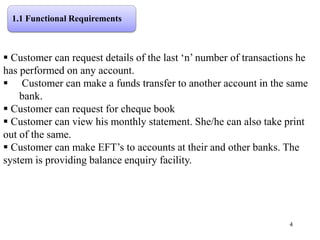
 Customer can request details of the last ‘n’ number of transactions he
has performed on any account.
 Customer can make a funds transfer to another account in the same
bank.
 Customer can request for cheque book
 Customer can view his monthly statement. She/he can also take print
out of the same.
 Customer can make EFT’s to accounts at their and other banks. The
system is providing balance enquiry facility.
1.1 Functional Requirements
5
1.2 Non-functional Requirements
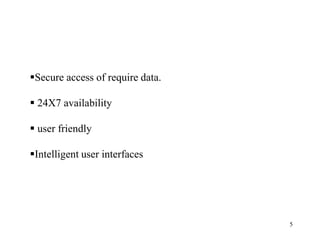
Secure access of require data.
 24X7 availability
 user friendly
Intelligent user interfaces
6
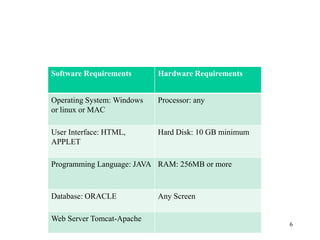
Software Requirements Hardware Requirements
Operating System: Windows
or linux or MAC
Processor: any
User Interface: HTML,
APPLET
Hard Disk: 10 GB minimum
Programming Language: JAVA RAM: 256MB or more
Database: ORACLE Any Screen
Web Server Tomcat-Apache
1.3 System Requirements
7
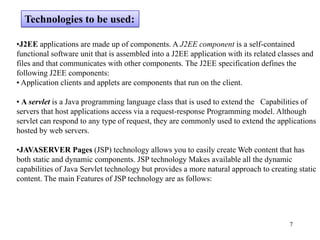
•J2EE applications are made up of components. A J2EE component is a self-contained
functional software unit that is assembled into a J2EE application with its related classes and
files and that communicates with other components. The J2EE specification defines the
following J2EE components:
• Application clients and applets are components that run on the client.
• A servlet is a Java programming language class that is used to extend the Capabilities of
servers that host applications access via a request-response Programming model. Although
servlet can respond to any type of request, they are commonly used to extend the applications
hosted by web servers.
•JAVASERVER Pages (JSP) technology allows you to easily create Web content that has
both static and dynamic components. JSP technology Makes available all the dynamic
capabilities of Java Servlet technology but provides a more natural approach to creating static
content. The main Features of JSP technology are as follows:
Technologies to be used:
8
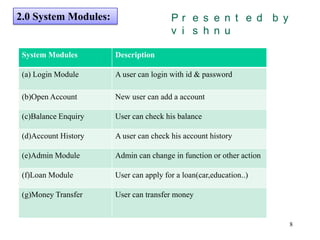
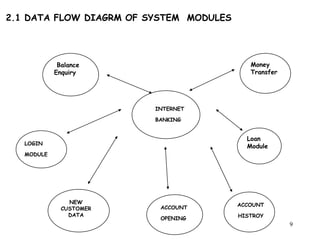
2.0 System Modules:
System Modules Description
(a) Login Module A user can login with id & password
(b)Open Account New user can add a account
(c)Balance Enquiry User can check his balance
(d)Account History A user can check his account history
(e)Admin Module Admin can change in function or other action
(f)Loan Module User can apply for a loan(car,education..)
(g)Money Transfer User can transfer money
Presented by vishnu
9
INTERNET
BANKING
Money
Transfer
Loan
Module
Balance
Enquiry
LOGIN
MODULE
NEW
CUSTOMER
DATA
ACCOUNT
OPENING
ACCOUNT
HISTROY
2.1 DATA FLOW DIAGRM OF SYSTEM MODULES
10
Data
base
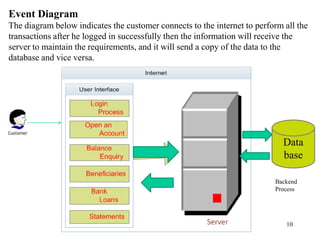
Event Diagram
The diagram below indicates the customer connects to the internet to perform all the
transactions after he logged in successfully then the information will receive the
server to maintain the requirements, and it will send a copy of the data to the
database and vice versa.
Backend
Process
11
1.0 Home Page
12
1.1 Registration form and
opening a new account
13
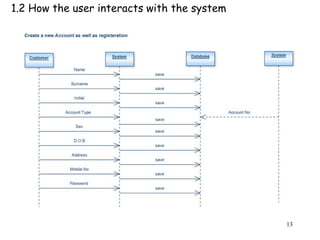
1.2 How the user interacts with the system
14
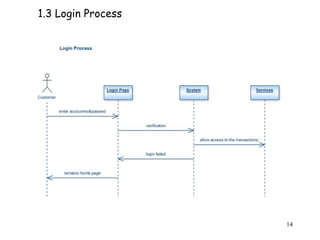
1.3 Login Process
15
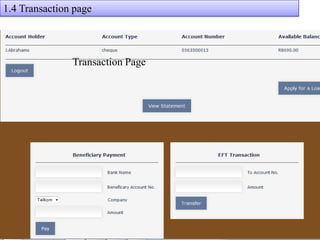
Transaction Page
1.4 Transaction page
16
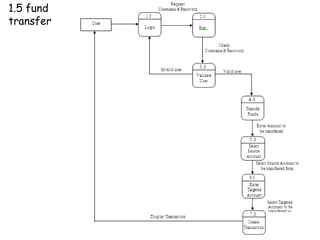
1.5 fund
transfer
17
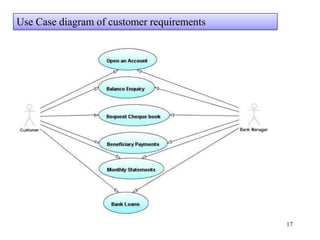
Use Case diagram of customer requirements
18
(f)
Reply
User
2.0
Login
System
4.0
Account
TransactionAccess
Access
Valid user
Valid user
Online Banking
System
Database
Administrator
(e)
(g)
(h)
(i)
(j)
Access
1.0
Registratio
n
Process
Registration Info
Valid Administrator 7.0
Create and
Update
Process
(k)
(l)
Login_ Info
(m)
(n)
3.0
Account
Opening
process
User Details
Reply
(a)
(b)
(c)
(d)
6.0
Customer
Feed Back
5.0
Loan
Over all working of Internet Banking
Request
/respond
19`
conclusion
The application demonstrate the way to develop an online banking
system by using interactive web client by using JSP, Servlet
with more secure way to access.
This means the application server easily deployable and accessible.
Be Not Afraid Of Falling Be Afraid Of Not Trying
20

java Project report online banking system

  • 1.
    Internet Banking System ChandravatiGroup Of Institution Bharatpur 1 A Project Report on
  • 2.
    Contents • Introduction • Projectrequirements • System modules • User interface specification • Use case and data flow diagram’s 2
  • 3.
    1. An InternetBanking System “Internet banking” refers to systems that enable bank customers to access accounts and general information on bank products and services through a personal computer (PC) or other intelligent device.  Our aims at creation of secure banking system.  this will be accessible to all users who have a valid user Id and password.  A cusomer can access his account from anywhere. 3
  • 4.
    4  Customer canrequest details of the last ‘n’ number of transactions he has performed on any account.  Customer can make a funds transfer to another account in the same bank.  Customer can request for cheque book  Customer can view his monthly statement. She/he can also take print out of the same.  Customer can make EFT’s to accounts at their and other banks. The system is providing balance enquiry facility. 1.1 Functional Requirements
  • 5.
    5 1.2 Non-functional Requirements Secureaccess of require data.  24X7 availability  user friendly Intelligent user interfaces
  • 6.
    6 Software Requirements HardwareRequirements Operating System: Windows or linux or MAC Processor: any User Interface: HTML, APPLET Hard Disk: 10 GB minimum Programming Language: JAVA RAM: 256MB or more Database: ORACLE Any Screen Web Server Tomcat-Apache 1.3 System Requirements
  • 7.
    7 •J2EE applications aremade up of components. A J2EE component is a self-contained functional software unit that is assembled into a J2EE application with its related classes and files and that communicates with other components. The J2EE specification defines the following J2EE components: • Application clients and applets are components that run on the client. • A servlet is a Java programming language class that is used to extend the Capabilities of servers that host applications access via a request-response Programming model. Although servlet can respond to any type of request, they are commonly used to extend the applications hosted by web servers. •JAVASERVER Pages (JSP) technology allows you to easily create Web content that has both static and dynamic components. JSP technology Makes available all the dynamic capabilities of Java Servlet technology but provides a more natural approach to creating static content. The main Features of JSP technology are as follows: Technologies to be used:
  • 8.
    8 2.0 System Modules: SystemModules Description (a) Login Module A user can login with id & password (b)Open Account New user can add a account (c)Balance Enquiry User can check his balance (d)Account History A user can check his account history (e)Admin Module Admin can change in function or other action (f)Loan Module User can apply for a loan(car,education..) (g)Money Transfer User can transfer money Presented by vishnu
  • 9.
  • 10.
    10 Data base Event Diagram The diagrambelow indicates the customer connects to the internet to perform all the transactions after he logged in successfully then the information will receive the server to maintain the requirements, and it will send a copy of the data to the database and vice versa. Backend Process
  • 11.
  • 12.
    12 1.1 Registration formand opening a new account
  • 13.
    13 1.2 How theuser interacts with the system
  • 14.
  • 15.
  • 16.
  • 17.
    17 Use Case diagramof customer requirements
  • 18.
    18 (f) Reply User 2.0 Login System 4.0 Account TransactionAccess Access Valid user Valid user OnlineBanking System Database Administrator (e) (g) (h) (i) (j) Access 1.0 Registratio n Process Registration Info Valid Administrator 7.0 Create and Update Process (k) (l) Login_ Info (m) (n) 3.0 Account Opening process User Details Reply (a) (b) (c) (d) 6.0 Customer Feed Back 5.0 Loan Over all working of Internet Banking Request /respond
  • 19.
    19` conclusion The application demonstratethe way to develop an online banking system by using interactive web client by using JSP, Servlet with more secure way to access. This means the application server easily deployable and accessible.
  • 20.
    Be Not AfraidOf Falling Be Afraid Of Not Trying 20