Contents
 Introduction
 System Analysis
Present System
Proposed System
Benefits Of the System
 Software Requirement Specifications
 System Design
 Conclusion
Introduction
Internet Banking is all about knowing our user need and provide them with the right service at
the right time through right channel 24*7 day a week.
Being “electronic”,it not only provides its users with faster and better facilities, it even reduces
the manual overhead of accountsmaintenance.
 Our aim at creation of secure and efficient net banking system.
 This will be accessibleto all users who have a valid username and password.
 User can access his account from anywhere.
Functional Requirements
Following are thefunctionalneeds of the Software:-
User must have a valid username and password to login to the system.
User can transfer amount from one account to another account in the same bank.
User can perform transactions like deposit and withdrawal from his account.
User can request for loan .
Non - Functional
Requirements
 Secure access of require data.
 24X7 availability.
 user friendly.
 Intelligent user interfaces.
PRESENT SYSTEM
In the existing system the no. of staff required for completing the work is more, while the new system
requires lesser staffs generally.
The data entry process requires the data on the paper, which is then feed into the application by the
operator while doing so; the data entry operator has to look into the paper again & again and thus the
chances of inaccuraciesin the typed contents increases.
Also the process includes higher transportation cost, increased handling cost, more time delays, low
accuracy, more usage of resourceslike registers, books, papers, etc.
Proposed System
Almost 60% of today’s information is still paper based.
30% of all office time is spent finding documents.
The average time to manage a single document is 12 minutes, 9 minutes to re-file and 3 minutes to
process.
Hence the requirement is to develop a system that minimizes all these overheads included while giving
the maximum output for the organization.
The basis for the project is to develop a fully automated banking system that includes depositing of
amount , withdrawal of amount and exporting the outcome back to the client while considering all the
tools and facilities than a client may need for efficient and effective output.
Benefits of the System
Quick, authenticated access to accounts via the desktop.
Easily scalableto grow with changing system requirement.
Enterprise wide access to information.
Improved information security, restricting unauthorizedaccess.
Minimize Storage Space.
In manual system, much storage space for data files is requiredso to overcome this problem, An
automated well managed database is developed for saving storage space. This s/w saves space and stores
information efficiently. It ends the burden of having large manual filing storage system.
Software Requirement
Specification
Software Requirements :
Operating System : Windows or Linux or Mac
IDE : Netbeans
Front End : JSP, JDBC, Javascript, Bootstrap.
Programming Language : Java
Backend : Oracle 10g
Technologies Used
 J2EE : J2EE is a platform-independent, Java-centricenvironment for developing, building and deploying
Web-basedenterprise applications online. This is basicallyused to develop the enterprise applications and
also web applications.J2EE consists of Servlets , Jsp , Jdbc , EJb.
Servlet : A servlet is a Java programming language class that is used to extend the Capabilities of servers
that host applications access via a request-response Programming model. Althoughservlet can respond to
any type of request, they are commonly used to extend the applications hosted by web servers.
JSP(Java Server Page) : JSP technologyis used to create web application just like Servlet technology.It can
be thought of as an extension to Servlet because it provides more functionality than servlet such as
expression language, JSTL, etc. A JSP page consists of HTML tags and JSP tags. The JSP pages are easier to
maintain than Servlet because we can separate designing and development. It provides some additional
features such as Expression Language, Custom Tags, etc.
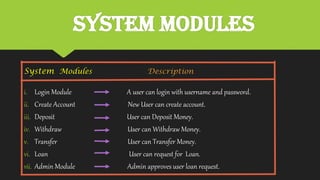
System Modules
System Modules Description
i. Login Module A user can login with username and password.
ii. Create Account New User can create account.
iii. Deposit User can Deposit Money.
iv. Withdraw User can Withdraw Money.
v. Transfer User can Transfer Money.
vi. Loan User can request for Loan.
vii. Admin Module Admin approves user loan request.
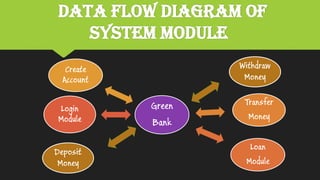
DATA Flow Diagram of
System Module
Green
Bank
Create
Account
Transfer
Money
Loan
Module
Login
Module
Withdraw
Money
Deposit
Money
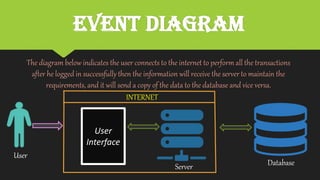
EVENT dIAGRAM
The diagram below indicates the user connects to the internet to perform all the transactions
after he logged in successfullythen the information will receive the server to maintain the
requirements, and it will send a copy of the data to the database and vice versa.
User
Interface
INTERNET
Server Database
User
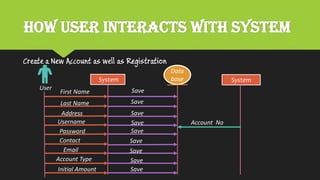
How user interacts with System
Create a New Account as well as Registration
System System
First Name
Last Name
Address
Username
Password
Contact
Email
Account Type
Initial Amount
Save
Save
Save
Save
Save
Save
Save
Save
Save
Account No
Data
base
User
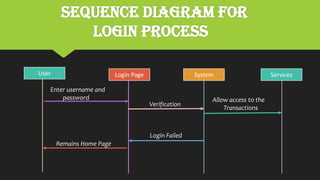
Sequence Diagram For
Login Process
User Login Page System Services
Enter username and
password
Verification
Allow access to the
Transactions
Login Failed
Remains Home Page
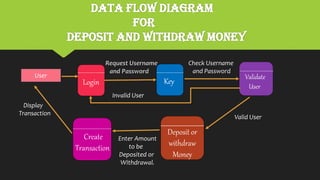
Data Flow Diagram
for
Deposit and Withdraw Money
User
Login Key
Check Username
and Password
Validate
User
Valid User
Deposit or
withdraw
Money
Create
Transaction
Display
Transaction
Enter Amount
to be
Deposited or
Withdrawal.
Invalid User
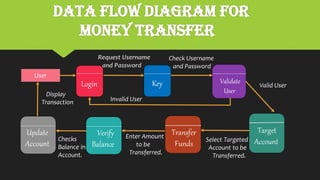
Data Flow Diagram for
Money Transfer
User
Login Key
Check Username
and Password
Validate
User
Valid User
Transfer
Funds
Target
AccountSelect Targeted
Account to be
Transferred.
Verify
Balance
Display
Transaction
Enter Amount
to be
Transferred.
Invalid User
Update
Account
Checks
Balance in
Account.
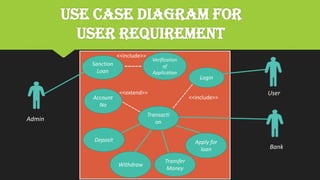
Use case diagram for
User Requirement
--
Sanction
Loan
Admin
Transacti
on
Login
Withdraw
Deposit
Transfer
Money
Apply for
loan
Account
No
User
Bank
<<include>>
<<extend>>
Verification
of
Application
-----
<<include>>
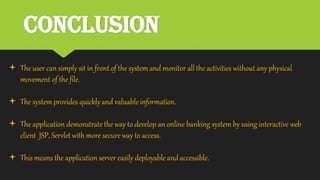
Conclusion
 The user can simply sit in front of the system and monitor all the activities without any physical
movement of the file.
 The system provides quickly and valuable information.
 The application demonstrate the way to develop an online banking system by using interactive web
client JSP, Servlet with more secure way to access.
 This means the application server easily deployable and accessible.
Net banking
Net banking

Net banking

  • 2.
    Contents  Introduction  SystemAnalysis Present System Proposed System Benefits Of the System  Software Requirement Specifications  System Design  Conclusion
  • 3.
    Introduction Internet Banking isall about knowing our user need and provide them with the right service at the right time through right channel 24*7 day a week. Being “electronic”,it not only provides its users with faster and better facilities, it even reduces the manual overhead of accountsmaintenance.  Our aim at creation of secure and efficient net banking system.  This will be accessibleto all users who have a valid username and password.  User can access his account from anywhere.
  • 4.
    Functional Requirements Following arethefunctionalneeds of the Software:- User must have a valid username and password to login to the system. User can transfer amount from one account to another account in the same bank. User can perform transactions like deposit and withdrawal from his account. User can request for loan .
  • 5.
    Non - Functional Requirements Secure access of require data.  24X7 availability.  user friendly.  Intelligent user interfaces.
  • 7.
    PRESENT SYSTEM In theexisting system the no. of staff required for completing the work is more, while the new system requires lesser staffs generally. The data entry process requires the data on the paper, which is then feed into the application by the operator while doing so; the data entry operator has to look into the paper again & again and thus the chances of inaccuraciesin the typed contents increases. Also the process includes higher transportation cost, increased handling cost, more time delays, low accuracy, more usage of resourceslike registers, books, papers, etc.
  • 8.
    Proposed System Almost 60%of today’s information is still paper based. 30% of all office time is spent finding documents. The average time to manage a single document is 12 minutes, 9 minutes to re-file and 3 minutes to process. Hence the requirement is to develop a system that minimizes all these overheads included while giving the maximum output for the organization. The basis for the project is to develop a fully automated banking system that includes depositing of amount , withdrawal of amount and exporting the outcome back to the client while considering all the tools and facilities than a client may need for efficient and effective output.
  • 9.
    Benefits of theSystem Quick, authenticated access to accounts via the desktop. Easily scalableto grow with changing system requirement. Enterprise wide access to information. Improved information security, restricting unauthorizedaccess. Minimize Storage Space. In manual system, much storage space for data files is requiredso to overcome this problem, An automated well managed database is developed for saving storage space. This s/w saves space and stores information efficiently. It ends the burden of having large manual filing storage system.
  • 10.
    Software Requirement Specification Software Requirements: Operating System : Windows or Linux or Mac IDE : Netbeans Front End : JSP, JDBC, Javascript, Bootstrap. Programming Language : Java Backend : Oracle 10g
  • 11.
    Technologies Used  J2EE: J2EE is a platform-independent, Java-centricenvironment for developing, building and deploying Web-basedenterprise applications online. This is basicallyused to develop the enterprise applications and also web applications.J2EE consists of Servlets , Jsp , Jdbc , EJb. Servlet : A servlet is a Java programming language class that is used to extend the Capabilities of servers that host applications access via a request-response Programming model. Althoughservlet can respond to any type of request, they are commonly used to extend the applications hosted by web servers. JSP(Java Server Page) : JSP technologyis used to create web application just like Servlet technology.It can be thought of as an extension to Servlet because it provides more functionality than servlet such as expression language, JSTL, etc. A JSP page consists of HTML tags and JSP tags. The JSP pages are easier to maintain than Servlet because we can separate designing and development. It provides some additional features such as Expression Language, Custom Tags, etc.
  • 12.
    System Modules System ModulesDescription i. Login Module A user can login with username and password. ii. Create Account New User can create account. iii. Deposit User can Deposit Money. iv. Withdraw User can Withdraw Money. v. Transfer User can Transfer Money. vi. Loan User can request for Loan. vii. Admin Module Admin approves user loan request.
  • 14.
    DATA Flow Diagramof System Module Green Bank Create Account Transfer Money Loan Module Login Module Withdraw Money Deposit Money
  • 15.
    EVENT dIAGRAM The diagrambelow indicates the user connects to the internet to perform all the transactions after he logged in successfullythen the information will receive the server to maintain the requirements, and it will send a copy of the data to the database and vice versa. User Interface INTERNET Server Database User
  • 16.
    How user interactswith System Create a New Account as well as Registration System System First Name Last Name Address Username Password Contact Email Account Type Initial Amount Save Save Save Save Save Save Save Save Save Account No Data base User
  • 17.
    Sequence Diagram For LoginProcess User Login Page System Services Enter username and password Verification Allow access to the Transactions Login Failed Remains Home Page
  • 18.
    Data Flow Diagram for Depositand Withdraw Money User Login Key Check Username and Password Validate User Valid User Deposit or withdraw Money Create Transaction Display Transaction Enter Amount to be Deposited or Withdrawal. Invalid User
  • 19.
    Data Flow Diagramfor Money Transfer User Login Key Check Username and Password Validate User Valid User Transfer Funds Target AccountSelect Targeted Account to be Transferred. Verify Balance Display Transaction Enter Amount to be Transferred. Invalid User Update Account Checks Balance in Account.
  • 20.
    Use case diagramfor User Requirement -- Sanction Loan Admin Transacti on Login Withdraw Deposit Transfer Money Apply for loan Account No User Bank <<include>> <<extend>> Verification of Application ----- <<include>>
  • 21.
    Conclusion  The usercan simply sit in front of the system and monitor all the activities without any physical movement of the file.  The system provides quickly and valuable information.  The application demonstrate the way to develop an online banking system by using interactive web client JSP, Servlet with more secure way to access.  This means the application server easily deployable and accessible.