Hamid Ghorbani Java Advanced Tutorial(I/O Streams) https://ir.linkedin.com/in/ghorbanihamid
١
I/O Streams
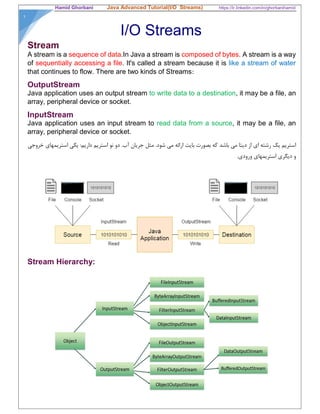
Stream
A stream is a sequence of data.In Java a stream is composed of bytes. A stream is a way
of sequentially accessing a file. It's called a stream because it is like a stream of water
that continues to flow. There are two kinds of Streams:
OutputStream
Java application uses an output stream to write data to a destination, it may be a file, an
array, peripheral device or socket.
InputStream
Java application uses an input stream to read data from a source, it may be a file, an
array, peripheral device or socket.
‫خروجي‬ ‫استريمهاي‬ ‫يكي‬ :‫داريم‬ ‫استريم‬ ‫نو‬ ‫دو‬ .‫آب‬ ‫جريان‬ ‫مثل‬ .‫شود‬ ‫مي‬ ‫ارائه‬ ‫بايت‬ ‫بصورت‬ ‫كه‬ ‫باشد‬ ‫مي‬ ‫ديتا‬ ‫از‬ ‫اي‬ ‫رشته‬ ‫يك‬ ‫استريم‬
‫استريمهاي‬ ‫ديگري‬ ‫و‬.‫ورودي‬
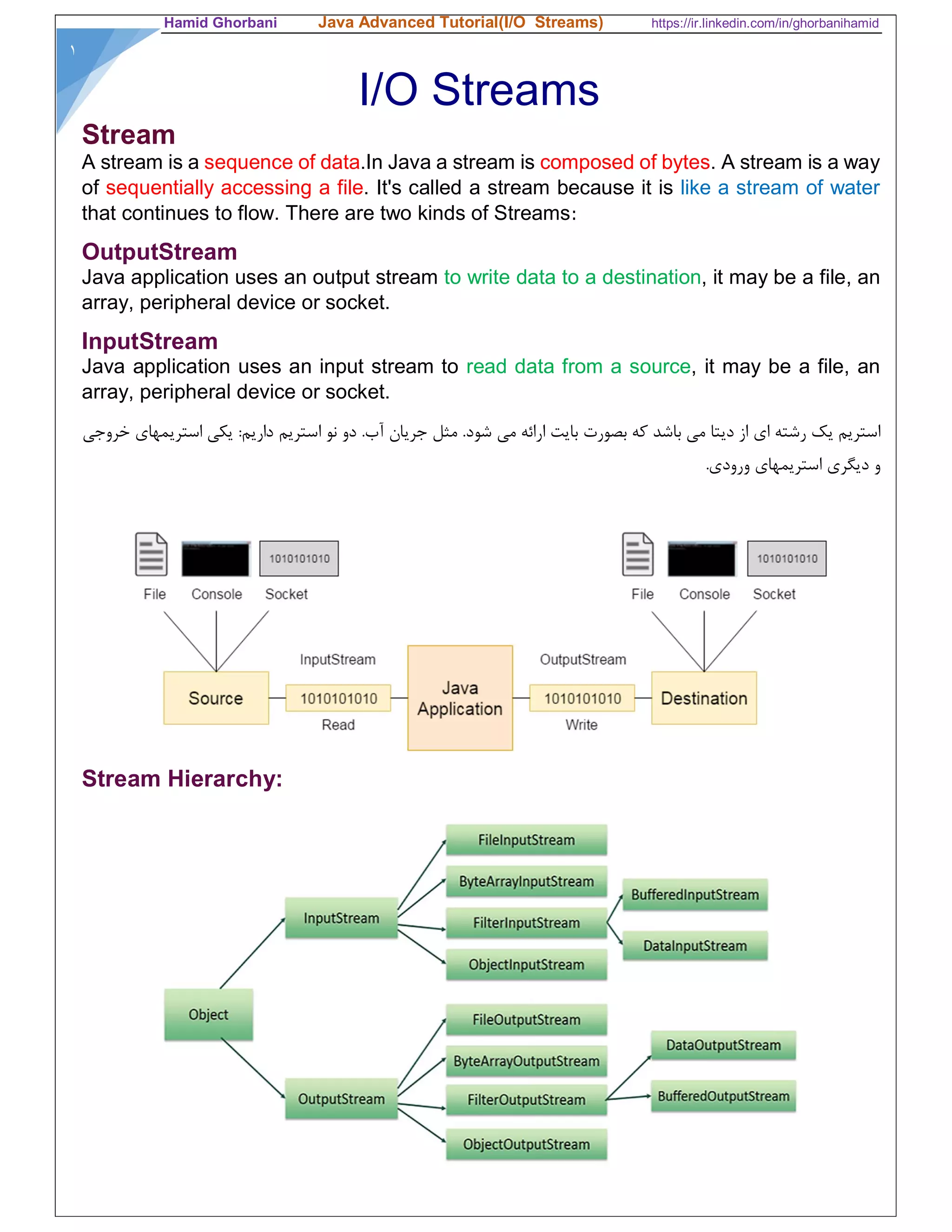
Stream Hierarchy:
Hamid Ghorbani Java Advanced Tutorial(I/O Streams) https://ir.linkedin.com/in/ghorbanihamid
٢
Byte Streams
Java byte streams are used to perform input and output of 8-bit bytes. A byte stream
access the file byte by byte. A byte stream is suitable for any kind of file, however not
quite appropriate for text files.There are many classes related to byte streams but the
most frequently used classes are, FileInputStream and FileOutputStream.
FileOutputStream
FileOutputStream is used to create a file and write data into it. The stream would create
a file, if it doesn't already exist, before opening it for output.
Method Description
protected void finalize() It is sued to clean up the connection with the file output stream.
Ensures that the close method of this file output stream is called when
there are no more references to this stream. Throws an IOException.
void write(byte[] ary) It is used to write ary.length bytes from the byte array to the file output
stream.
void write(byte[] ary, int off,
int len)
It is used to write len bytes from the byte array starting at offset off to
the file output stream.
void write(int b) It is used to write the specified byte to the file output stream.
FileChannel getChannel() It is used to return the file channel object associated with the file output
stream.
FileDescriptor getFD() It is used to return the file descriptor associated with the stream.
void close() It is used to closes the file output stream.
Example:
try{
FileOutputStream fout=new FileOutputStream("D:testout.txt");
String s="Welcome to javaTpoint.";
byte b[]=s.getBytes();//converting string into byte array
fout.write(b);
fout.close();
System.out.println("success...");
}
catch(Exception e){System.out.println(e);}
Hamid Ghorbani Java Advanced Tutorial(I/O Streams) https://ir.linkedin.com/in/ghorbanihamid
٣
FileInputStream Class
FileInputStream class obtains input bytes from a file. It is used for reading byte-oriented
data (streams of raw bytes) such as image data, audio, video etc. You can also read
character-stream data. But, for reading streams of characters, it is recommended to use
FileReader class.
Method Description
int available() It is used to return the estimated number of bytes that can
be read from the input stream.
int read() It is used to read the byte of data from the input stream.
int read(byte[] b) It is used to read up to b.length bytes of data from the input
stream.
int read(byte[] b, int off, int len) It is used to read up to len bytes of data from the input stream.
long skip(long x) It is used to skip over and discards x bytes of data from
the input stream.
FileChannel getChannel() It is used to return the unique FileChannel object associated
with the file input stream.
FileDescriptor getFD() It is used to return the FileDescriptor object.
protected void finalize() It is used to ensure that the close method is call when there is
no more reference to the file input stream.
void close() It is used to closes the stream.
Example: Read a file with FileInputStream
try{
FileInputStream fin=new FileInputStream("D:testout.txt");
int i=0;
while((i=fin.read())!=-1){
System.out.print((char)i);
}
fin.close();
}catch(Exception e){System.out.println(e);}
Hamid Ghorbani Java Advanced Tutorial(I/O Streams) https://ir.linkedin.com/in/ghorbanihamid
۴
Example: Create a file & read it again
try {
byte bWrite [] = {11,21,3,40,5};
OutputStream os = new FileOutputStream("test.txt");
for(int x = 0; x < bWrite.length ; x++) {
os.write( bWrite[x] ); // writes the bytes
}
os.close();
InputStream ins = new FileInputStream("test.txt");
int size = ins.available();
for(int i = 0; i < size; i++) {
System.out.print((char)ins.read() + " ");
}
ins.close();
}catch(IOException e) {
System.out.print("Exception");
}
Example: CopyFile
public class CopyFile {
public static void main(String args[]) throws IOException {
FileInputStream in = null;
FileOutputStream out = null;
try {
in = new FileInputStream("input.txt");
out = new FileOutputStream("output.txt");
int c;
while ((c = in.read()) != -1) {
out.write(c);
}
}finally {
if (in != null) {
in.close(); }
if (out != null) {
out.close();}
} } }
Character Streams
Hamid Ghorbani Java Advanced Tutorial(I/O Streams) https://ir.linkedin.com/in/ghorbanihamid
۵
Java Character streams are used to perform input and output for 16-bit unicode. A character
stream will read a file character by character. Character streams are appropriate for text files.
A character stream needs to be given the file's encoding in order to work properly. Though there
are many classes related to character streams but the most frequently used classes
are, FileReader and FileWriter. Though internally FileReader uses FileInputStream and
FileWriter uses FileOutputStream but here the major difference is that FileReader reads two
bytes at a time and FileWriter writes two bytes at a time.
Example:
import java.io.*;
public class CopyFile {
public static void main(String args[]) throws IOException {
FileReader in = null;
FileWriter out = null;
try {
in = new FileReader("input.txt");
out = new FileWriter("output.txt");
int c;
while ((c = in.read()) != -1) {
out.write(c);
}
}finally {
if (in != null) {
in.close();
}
if (out != null) {
out.close();
}
}
}
}
BufferedOutputStream
Hamid Ghorbani Java Advanced Tutorial(I/O Streams) https://ir.linkedin.com/in/ghorbanihamid
۶
Java BufferedOutputStream class is used for buffering an output stream. It internally
uses buffer to store data. It adds more efficiency than to write data directly into a stream.
So, it makes the performance fast.
Example:
FileOutputStream fileOut=new FileOutputStream("D:testout.txt");
BufferedOutputStream bufferOut=new BufferedOutputStream(fileOut);
String s="Welcome to javaTpoint.";
byte b[]=s.getBytes();
bufferOut.write(b);
bufferOut.flush();
bufferOut.close();
fileOut.close();
System.out.println("success");
BufferedInputStream
BufferedInputStream class is used to read information from stream. It internally uses
buffer mechanism to make the performance fast.
Example:
try{
FileInputStream fileIn=new FileInputStream("D:testout.txt");
BufferedInputStream bufferIn=new BufferedInputStream(fileIn);
int i;
while((i= bufferIn.read())!=-1){
System.out.print((char)i);
}
String str;
while ((str= bufferIn.readLine())!=null) { // for reading a line
System.out.println(str);
}
bufferIn.close();
fileIn.close();
}catch(Exception e){System.out.println(e);}
Properties Class
Hamid Ghorbani Java Advanced Tutorial(I/O Streams) https://ir.linkedin.com/in/ghorbanihamid
٧
Properties is a subclass of Hashtable. It is used to maintain lists of values in which the
key is a String and the value is also a String. Normally, Java properties file is used to store
project configuration data or settings.
Method Description
public void load(Reader r) loads data from the Reader object.
public void load(InputStream is) loads data from the InputStream object
public String getProperty(String key) returns value based on the key.
public void setProperty(String key,String
value)
sets the property in the properties object.
public void store(Writer w, String comment) writers the properties in the writer object.
public void store(OutputStream os, String
comment)
writes the properties in the OutputStream object.
storeToXML(OutputStream os, String
comment)
writers the properties in the writer object for
generating xml document.
public void storeToXML(Writer w, String
comment, String encoding)
writers the properties in the writer object for
generating xml document with specified
encoding.
Example
String filePath = "E: databaseProperties.properties";
Properties properties = new Properties();
FileInputStream fileIn = new FileInputStream(filePath);
properties.load(fileIn);
fileIn.close();
String mysqlDriver = properties.getProperty("mysql.jdbc.driverClassName");
PrintStream:
Hamid Ghorbani Java Advanced Tutorial(I/O Streams) https://ir.linkedin.com/in/ghorbanihamid
٨
The PrintStream class provides methods to write formatted data to another output stream. It
can format primitive types like int, long etc. formatted as text, rather than as their byte values.
That is why it is called a PrintStream, because it formats the primitive values as text - like
they would look when printed to the screen (or printed to paper).
The PrintStream class automatically flushes the data so there is no need to call flush() method.
Moreover, its methods don't throw IOException.
‫مثل‬ ‫هايی‬ ‫متغيره‬ ‫مثﻼ‬ .‫نويسد‬ ‫می‬ ‫ديگر‬ ‫خروجی‬ ‫استريم‬ ‫يک‬ ‫به‬ ‫را‬ ‫است‬ ‫خاصی‬ ‫فرمت‬ ‫دارای‬ ‫که‬ ‫را‬ ‫اطﻼعاتی‬ ‫متد‬ ‫اين‬Int‫يا‬Long
.‫کرد‬ ‫کپی‬ ‫ديگر‬ ‫استريم‬ ‫يک‬ ‫در‬ ،‫بکنيم‬ ‫بايت‬ ‫به‬ ‫تبديل‬ ‫را‬ ‫آنها‬ ‫ابتدا‬ ‫باشيم‬ ‫مجبور‬ ‫اينکه‬ ‫بدون‬ ‫توان‬ ‫می‬ ‫را‬
Example:
import java.io.FileOutputStream;
import java.io.PrintStream;
public class PrintStreamTest{
public static void main(String args[])throws Exception{
FileOutputStream fout=new FileOutputStream("D:testout.txt ");
PrintStream pout=new PrintStream(fout);
pout.println(true);
pout.println(2016);
pout.println((float) 123.456);
pout.println("Hello Java");
pout.println("Welcome to Java");
pout.close();
fout.close();
System.out.println("Success?");
}
}
File Lock:
Hamid Ghorbani Java Advanced Tutorial(I/O Streams) https://ir.linkedin.com/in/ghorbanihamid
٩
In java we have the ability to lock a region of a file or the entire file.The file locking mechanism is
handled by the operating system.There are two kinds of file locking:
Exclusive: Only one program can hold an exclusive lock on a region of a file.
shared: Multiple programs can hold shared locks on the same region of a file.
We acquire a lock on a file by using the lock() or tryLock() method of the FileChannel object. If you
use these methods without an argument, they lock the entire file.
isShared(): The isShared() method of the FileLock object returns true if the lock is shared;
otherwise, it returns false.
Example:
public class Main {
public static void main(String[] args) throws Exception {
RandomAccessFile raf = new RandomAccessFile("test.txt", "rw");
FileChannel fileChannel = raf.getChannel();
FileLock lock = null;
try {
lock = fileChannel.lock(); // Lock all file
lock = fileChannel.lock(0, 10, false); // Get an exclusive lock first 10 byte
lock = fileChannel.tryLock(11, 100, true); // tries to lock first 10 byte on first 10 byte
if (lock == null) { // Could not get the lock
} else { // Got the lock }
} catch (IOException e) {
// Handle the exception
} finally {
if (lock != null) {
try {
lock.release();
} catch (IOException e) {
// Handle the exception
}
}
}
}
}
Serializable:
Hamid Ghorbani Java Advanced Tutorial(I/O Streams) https://ir.linkedin.com/in/ghorbanihamid
١
Serialization in java is a mechanism of writing an object as a sequence of bytes that includes the
object's data as well as information about the object's type and the types of data stored in the object.
It is mainly used in Hibernate, RMI, JPA, EJB and JMS technologies. The reverse operation of serialization is
called deserialization.
After a serialized object has been written into a file, it can be read from the file and deserialized that
is, the type information and bytes that represent the object and its data can be used to recreate the
object in memory.
Notice: that for a class to be serialized successfully, two conditions must be met:
 The class must implement the java.io.Serializable interface.
 All of the fields in the class must be serializable. If a field is not serializable, it must be
marked transient.
Example:
public class Employee implements java.io.Serializable {
public String name;
public String address;
public transient int SSN;
public int number;
public void mailCheck() {
System.out.println("Mailing a check to " + name + " " + address);
}
}
Read and Write Java Objects:
Hamid Ghorbani Java Advanced Tutorial(I/O Streams) https://ir.linkedin.com/in/ghorbanihamid
١
In order to write objects into a file, objects must be converted into byte-stream using
ObjectOutputStream. It is mandatory that the concerned class implements Serializable
interface.
ObjectInputStream can be used to de-serialize and read java objects that have been serialized
and written using ObjectOutputStream.
Example:
public static void main(String[] args) {
Person p1 = new Person("John", 30, "Male");
Person p2 = new Person("Rachel", 25, "Female");
try {
FileOutputStream f = new FileOutputStream(new File("myObjects.txt"));
ObjectOutputStream o = new ObjectOutputStream(f);
// Write objects to file
o.writeObject(p1);
o.writeObject(p2);
o.close();
f.close();
FileInputStream fi = new FileInputStream(new File("myObjects.txt"));
ObjectInputStream oi = new ObjectInputStream(fi);
// Read objects
Person pr1 = (Person) oi.readObject();
Person pr2 = (Person) oi.readObject();
System.out.println(pr1.toString());
System.out.println(pr2.toString());
oi.close();
fi.close();
} catch (FileNotFoundException e) {
System.out.println("File not found");
} catch (IOException e) {
System.out.println("Error initializing stream");
} catch (ClassNotFoundException e) {
// TODO Auto-generated catch block
e.printStackTrace();
}
PrintWriter class:
PrintWriter class is the implementation of Writer class. It is used to print the formatted representation
of objects to the text-output stream.
Hamid Ghorbani Java Advanced Tutorial(I/O Streams) https://ir.linkedin.com/in/ghorbanihamid
١
public class PrintWriterExample {
public static void main(String[] args) throws Exception {
//Data to write on Console using PrintWriter
PrintWriter writer = new PrintWriter(System.out);
writer.write("Javatpoint provides tutorials of all technology.");
writer.flush();
writer.close();
//Data to write in File using PrintWriter
PrintWriter writer1 =null;
writer1 = new PrintWriter(new File("D:testout.txt"));
writer1.write("Like Java, Spring, Hibernate, Android, PHP etc.");
writer1.flush();
writer1.close();
}
}

Java I/o streams

  • 1.
    Hamid Ghorbani JavaAdvanced Tutorial(I/O Streams) https://ir.linkedin.com/in/ghorbanihamid ١ I/O Streams Stream A stream is a sequence of data.In Java a stream is composed of bytes. A stream is a way of sequentially accessing a file. It's called a stream because it is like a stream of water that continues to flow. There are two kinds of Streams: OutputStream Java application uses an output stream to write data to a destination, it may be a file, an array, peripheral device or socket. InputStream Java application uses an input stream to read data from a source, it may be a file, an array, peripheral device or socket. ‫خروجي‬ ‫استريمهاي‬ ‫يكي‬ :‫داريم‬ ‫استريم‬ ‫نو‬ ‫دو‬ .‫آب‬ ‫جريان‬ ‫مثل‬ .‫شود‬ ‫مي‬ ‫ارائه‬ ‫بايت‬ ‫بصورت‬ ‫كه‬ ‫باشد‬ ‫مي‬ ‫ديتا‬ ‫از‬ ‫اي‬ ‫رشته‬ ‫يك‬ ‫استريم‬ ‫استريمهاي‬ ‫ديگري‬ ‫و‬.‫ورودي‬ Stream Hierarchy:
  • 2.
    Hamid Ghorbani JavaAdvanced Tutorial(I/O Streams) https://ir.linkedin.com/in/ghorbanihamid ٢ Byte Streams Java byte streams are used to perform input and output of 8-bit bytes. A byte stream access the file byte by byte. A byte stream is suitable for any kind of file, however not quite appropriate for text files.There are many classes related to byte streams but the most frequently used classes are, FileInputStream and FileOutputStream. FileOutputStream FileOutputStream is used to create a file and write data into it. The stream would create a file, if it doesn't already exist, before opening it for output. Method Description protected void finalize() It is sued to clean up the connection with the file output stream. Ensures that the close method of this file output stream is called when there are no more references to this stream. Throws an IOException. void write(byte[] ary) It is used to write ary.length bytes from the byte array to the file output stream. void write(byte[] ary, int off, int len) It is used to write len bytes from the byte array starting at offset off to the file output stream. void write(int b) It is used to write the specified byte to the file output stream. FileChannel getChannel() It is used to return the file channel object associated with the file output stream. FileDescriptor getFD() It is used to return the file descriptor associated with the stream. void close() It is used to closes the file output stream. Example: try{ FileOutputStream fout=new FileOutputStream("D:testout.txt"); String s="Welcome to javaTpoint."; byte b[]=s.getBytes();//converting string into byte array fout.write(b); fout.close(); System.out.println("success..."); } catch(Exception e){System.out.println(e);}
  • 3.
    Hamid Ghorbani JavaAdvanced Tutorial(I/O Streams) https://ir.linkedin.com/in/ghorbanihamid ٣ FileInputStream Class FileInputStream class obtains input bytes from a file. It is used for reading byte-oriented data (streams of raw bytes) such as image data, audio, video etc. You can also read character-stream data. But, for reading streams of characters, it is recommended to use FileReader class. Method Description int available() It is used to return the estimated number of bytes that can be read from the input stream. int read() It is used to read the byte of data from the input stream. int read(byte[] b) It is used to read up to b.length bytes of data from the input stream. int read(byte[] b, int off, int len) It is used to read up to len bytes of data from the input stream. long skip(long x) It is used to skip over and discards x bytes of data from the input stream. FileChannel getChannel() It is used to return the unique FileChannel object associated with the file input stream. FileDescriptor getFD() It is used to return the FileDescriptor object. protected void finalize() It is used to ensure that the close method is call when there is no more reference to the file input stream. void close() It is used to closes the stream. Example: Read a file with FileInputStream try{ FileInputStream fin=new FileInputStream("D:testout.txt"); int i=0; while((i=fin.read())!=-1){ System.out.print((char)i); } fin.close(); }catch(Exception e){System.out.println(e);}
  • 4.
    Hamid Ghorbani JavaAdvanced Tutorial(I/O Streams) https://ir.linkedin.com/in/ghorbanihamid ۴ Example: Create a file & read it again try { byte bWrite [] = {11,21,3,40,5}; OutputStream os = new FileOutputStream("test.txt"); for(int x = 0; x < bWrite.length ; x++) { os.write( bWrite[x] ); // writes the bytes } os.close(); InputStream ins = new FileInputStream("test.txt"); int size = ins.available(); for(int i = 0; i < size; i++) { System.out.print((char)ins.read() + " "); } ins.close(); }catch(IOException e) { System.out.print("Exception"); } Example: CopyFile public class CopyFile { public static void main(String args[]) throws IOException { FileInputStream in = null; FileOutputStream out = null; try { in = new FileInputStream("input.txt"); out = new FileOutputStream("output.txt"); int c; while ((c = in.read()) != -1) { out.write(c); } }finally { if (in != null) { in.close(); } if (out != null) { out.close();} } } } Character Streams
  • 5.
    Hamid Ghorbani JavaAdvanced Tutorial(I/O Streams) https://ir.linkedin.com/in/ghorbanihamid ۵ Java Character streams are used to perform input and output for 16-bit unicode. A character stream will read a file character by character. Character streams are appropriate for text files. A character stream needs to be given the file's encoding in order to work properly. Though there are many classes related to character streams but the most frequently used classes are, FileReader and FileWriter. Though internally FileReader uses FileInputStream and FileWriter uses FileOutputStream but here the major difference is that FileReader reads two bytes at a time and FileWriter writes two bytes at a time. Example: import java.io.*; public class CopyFile { public static void main(String args[]) throws IOException { FileReader in = null; FileWriter out = null; try { in = new FileReader("input.txt"); out = new FileWriter("output.txt"); int c; while ((c = in.read()) != -1) { out.write(c); } }finally { if (in != null) { in.close(); } if (out != null) { out.close(); } } } } BufferedOutputStream
  • 6.
    Hamid Ghorbani JavaAdvanced Tutorial(I/O Streams) https://ir.linkedin.com/in/ghorbanihamid ۶ Java BufferedOutputStream class is used for buffering an output stream. It internally uses buffer to store data. It adds more efficiency than to write data directly into a stream. So, it makes the performance fast. Example: FileOutputStream fileOut=new FileOutputStream("D:testout.txt"); BufferedOutputStream bufferOut=new BufferedOutputStream(fileOut); String s="Welcome to javaTpoint."; byte b[]=s.getBytes(); bufferOut.write(b); bufferOut.flush(); bufferOut.close(); fileOut.close(); System.out.println("success"); BufferedInputStream BufferedInputStream class is used to read information from stream. It internally uses buffer mechanism to make the performance fast. Example: try{ FileInputStream fileIn=new FileInputStream("D:testout.txt"); BufferedInputStream bufferIn=new BufferedInputStream(fileIn); int i; while((i= bufferIn.read())!=-1){ System.out.print((char)i); } String str; while ((str= bufferIn.readLine())!=null) { // for reading a line System.out.println(str); } bufferIn.close(); fileIn.close(); }catch(Exception e){System.out.println(e);} Properties Class
  • 7.
    Hamid Ghorbani JavaAdvanced Tutorial(I/O Streams) https://ir.linkedin.com/in/ghorbanihamid ٧ Properties is a subclass of Hashtable. It is used to maintain lists of values in which the key is a String and the value is also a String. Normally, Java properties file is used to store project configuration data or settings. Method Description public void load(Reader r) loads data from the Reader object. public void load(InputStream is) loads data from the InputStream object public String getProperty(String key) returns value based on the key. public void setProperty(String key,String value) sets the property in the properties object. public void store(Writer w, String comment) writers the properties in the writer object. public void store(OutputStream os, String comment) writes the properties in the OutputStream object. storeToXML(OutputStream os, String comment) writers the properties in the writer object for generating xml document. public void storeToXML(Writer w, String comment, String encoding) writers the properties in the writer object for generating xml document with specified encoding. Example String filePath = "E: databaseProperties.properties"; Properties properties = new Properties(); FileInputStream fileIn = new FileInputStream(filePath); properties.load(fileIn); fileIn.close(); String mysqlDriver = properties.getProperty("mysql.jdbc.driverClassName"); PrintStream:
  • 8.
    Hamid Ghorbani JavaAdvanced Tutorial(I/O Streams) https://ir.linkedin.com/in/ghorbanihamid ٨ The PrintStream class provides methods to write formatted data to another output stream. It can format primitive types like int, long etc. formatted as text, rather than as their byte values. That is why it is called a PrintStream, because it formats the primitive values as text - like they would look when printed to the screen (or printed to paper). The PrintStream class automatically flushes the data so there is no need to call flush() method. Moreover, its methods don't throw IOException. ‫مثل‬ ‫هايی‬ ‫متغيره‬ ‫مثﻼ‬ .‫نويسد‬ ‫می‬ ‫ديگر‬ ‫خروجی‬ ‫استريم‬ ‫يک‬ ‫به‬ ‫را‬ ‫است‬ ‫خاصی‬ ‫فرمت‬ ‫دارای‬ ‫که‬ ‫را‬ ‫اطﻼعاتی‬ ‫متد‬ ‫اين‬Int‫يا‬Long .‫کرد‬ ‫کپی‬ ‫ديگر‬ ‫استريم‬ ‫يک‬ ‫در‬ ،‫بکنيم‬ ‫بايت‬ ‫به‬ ‫تبديل‬ ‫را‬ ‫آنها‬ ‫ابتدا‬ ‫باشيم‬ ‫مجبور‬ ‫اينکه‬ ‫بدون‬ ‫توان‬ ‫می‬ ‫را‬ Example: import java.io.FileOutputStream; import java.io.PrintStream; public class PrintStreamTest{ public static void main(String args[])throws Exception{ FileOutputStream fout=new FileOutputStream("D:testout.txt "); PrintStream pout=new PrintStream(fout); pout.println(true); pout.println(2016); pout.println((float) 123.456); pout.println("Hello Java"); pout.println("Welcome to Java"); pout.close(); fout.close(); System.out.println("Success?"); } } File Lock:
  • 9.
    Hamid Ghorbani JavaAdvanced Tutorial(I/O Streams) https://ir.linkedin.com/in/ghorbanihamid ٩ In java we have the ability to lock a region of a file or the entire file.The file locking mechanism is handled by the operating system.There are two kinds of file locking: Exclusive: Only one program can hold an exclusive lock on a region of a file. shared: Multiple programs can hold shared locks on the same region of a file. We acquire a lock on a file by using the lock() or tryLock() method of the FileChannel object. If you use these methods without an argument, they lock the entire file. isShared(): The isShared() method of the FileLock object returns true if the lock is shared; otherwise, it returns false. Example: public class Main { public static void main(String[] args) throws Exception { RandomAccessFile raf = new RandomAccessFile("test.txt", "rw"); FileChannel fileChannel = raf.getChannel(); FileLock lock = null; try { lock = fileChannel.lock(); // Lock all file lock = fileChannel.lock(0, 10, false); // Get an exclusive lock first 10 byte lock = fileChannel.tryLock(11, 100, true); // tries to lock first 10 byte on first 10 byte if (lock == null) { // Could not get the lock } else { // Got the lock } } catch (IOException e) { // Handle the exception } finally { if (lock != null) { try { lock.release(); } catch (IOException e) { // Handle the exception } } } } } Serializable:
  • 10.
    Hamid Ghorbani JavaAdvanced Tutorial(I/O Streams) https://ir.linkedin.com/in/ghorbanihamid ١ Serialization in java is a mechanism of writing an object as a sequence of bytes that includes the object's data as well as information about the object's type and the types of data stored in the object. It is mainly used in Hibernate, RMI, JPA, EJB and JMS technologies. The reverse operation of serialization is called deserialization. After a serialized object has been written into a file, it can be read from the file and deserialized that is, the type information and bytes that represent the object and its data can be used to recreate the object in memory. Notice: that for a class to be serialized successfully, two conditions must be met:  The class must implement the java.io.Serializable interface.  All of the fields in the class must be serializable. If a field is not serializable, it must be marked transient. Example: public class Employee implements java.io.Serializable { public String name; public String address; public transient int SSN; public int number; public void mailCheck() { System.out.println("Mailing a check to " + name + " " + address); } } Read and Write Java Objects:
  • 11.
    Hamid Ghorbani JavaAdvanced Tutorial(I/O Streams) https://ir.linkedin.com/in/ghorbanihamid ١ In order to write objects into a file, objects must be converted into byte-stream using ObjectOutputStream. It is mandatory that the concerned class implements Serializable interface. ObjectInputStream can be used to de-serialize and read java objects that have been serialized and written using ObjectOutputStream. Example: public static void main(String[] args) { Person p1 = new Person("John", 30, "Male"); Person p2 = new Person("Rachel", 25, "Female"); try { FileOutputStream f = new FileOutputStream(new File("myObjects.txt")); ObjectOutputStream o = new ObjectOutputStream(f); // Write objects to file o.writeObject(p1); o.writeObject(p2); o.close(); f.close(); FileInputStream fi = new FileInputStream(new File("myObjects.txt")); ObjectInputStream oi = new ObjectInputStream(fi); // Read objects Person pr1 = (Person) oi.readObject(); Person pr2 = (Person) oi.readObject(); System.out.println(pr1.toString()); System.out.println(pr2.toString()); oi.close(); fi.close(); } catch (FileNotFoundException e) { System.out.println("File not found"); } catch (IOException e) { System.out.println("Error initializing stream"); } catch (ClassNotFoundException e) { // TODO Auto-generated catch block e.printStackTrace(); } PrintWriter class: PrintWriter class is the implementation of Writer class. It is used to print the formatted representation of objects to the text-output stream.
  • 12.
    Hamid Ghorbani JavaAdvanced Tutorial(I/O Streams) https://ir.linkedin.com/in/ghorbanihamid ١ public class PrintWriterExample { public static void main(String[] args) throws Exception { //Data to write on Console using PrintWriter PrintWriter writer = new PrintWriter(System.out); writer.write("Javatpoint provides tutorials of all technology."); writer.flush(); writer.close(); //Data to write in File using PrintWriter PrintWriter writer1 =null; writer1 = new PrintWriter(new File("D:testout.txt")); writer1.write("Like Java, Spring, Hibernate, Android, PHP etc."); writer1.flush(); writer1.close(); } }