Continuous DB migration
Boris Trofimov
@b0ris_1
www.btrofimoff.com
Agenda
 Dealing with changes
 Perfect solution or Continuous DB migration
 Carbon5 Introduction
 Maven-driven mode
 Embedded mode
 Pros/Cos and best practices
Dealing with Changes
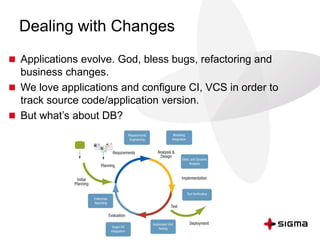
 Applications evolve. God, bless bugs, refactoring and
business changes.
 We love applications and configure CI, VCS in order to
track source code/application version.
 But what’s about DB?
Dealing with Schema Change
 FACT: Some modifications might require changes in DB
schema.
Dealing with Schema Change
 FACT: Some modifications might require changes in DB
schema.
 Changes are simple and risky.
Dealing with Schema Change
 FACT: Some modifications might require changes in DB
schema.
 Changes are simple and risky.
 Simple changes:
– add one more table
– add index
Dealing with Schema Change
 FACT: Some application modifications might require
changes in DB schema.
 Changes are simple and risky.
 Simple changes:
– add one more table
– add index
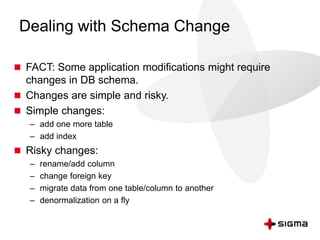
 Risky changes:
– rename/add column
– change foreign key
– migrate data from one table/column to another
– denormalization on a fly
Dealing with Schema Change
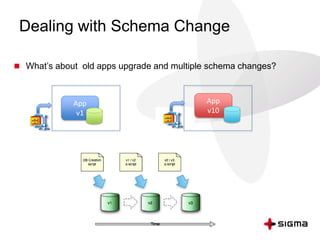
 What’s about old apps upgrade and multiple schema changes?
App
v1
App
v10
The Impact
 Risks to lose data
 Painful downtime
 Risks to break application (see #1 and #2)
 Resources, efforts and budget
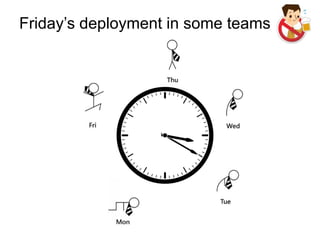
Friday’s deployment in some teams
How people solve it
 Deny Friday’s deployments
 Manual deployment
 Hibernate-like schema update + SQLexec
 Self-developed tools based on version number approach
Perfect solution
 Dedicated reusable framework
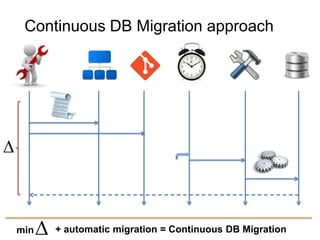
 Every Feature request leads to separated SQL migration script.
 Framework tracks which changes were not applied and applies
them.
 Configurable time to launch apply procedure
 Prevent Double changes
 Have Change Log
 Simple integration to existent project
Continuous DB Migration approach
min + automatic migration = Continuous DB Migration
Carbon V
Why Carbon V
 DB-migration framework
 Open Source project
 Lightweight framework
 Simple usage
How it works
 Dedicated project folder for SQL migration scripts. This folder
should be available when framework takes control.
 Each SQL migration script is pure SQL/DDL file with migration
SQL code for specific feature
 Each Delta file should have name
YYYYMMDDHHMMSS_<FEATURE>.sql
 When framework take control it checks and applies only new
changes.
 C5 uses own JDBC connection.
 Way to re-usue existent DataSources with connection params
No magic, just…
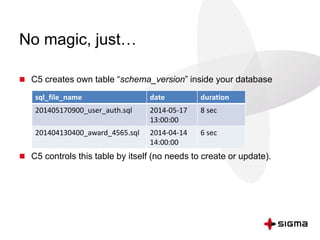
 C5 creates own table “schema_version” inside your database
 C5 controls this table by itself (no needs to create or update).
sql_file_name date duration
201405170900_user_auth.sql 2014-05-17
13:00:00
8 sec
201404130400_award_4565.sql 2014-04-14
14:00:00
6 sec
When to initiate migration procedure?
 Maven-driven approach
 Embedded mode
Maven-driven mode
Maven-driven mode
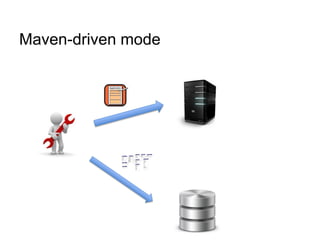
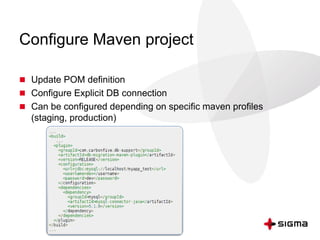
Configure Maven project
 Update POM definition
 Configure Explicit DB connection
 Can be configured depending on specific maven profiles
(staging, production)
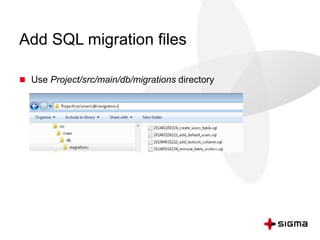
Add SQL migration files
 Use Project/src/main/db/migrations directory
Launch it
 performs migration
$ mvn db-migration:migrate
 resets migration
$ mvn db-migration:reset
 check if DB is up to date
$ mvn db-migration:validate
 create new feature
$ mvn db-migration:new -Dname=new_feature
Use cases
 Manual runs from developer machine
 Part of Continuous Deivery process
– Add just one more Maven action inside specific CI configuration before
deployment action
Embedded mode
Embedded mode
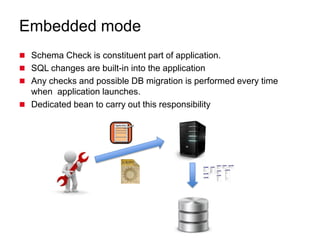
 Schema Check is constituent part of application.
 SQL changes are built-in into the application
 Any checks and possible DB migration is performed every time
when application launches.
 Dedicated bean to carry out this responsibility
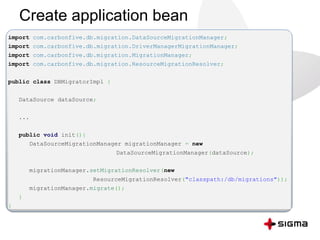
Create application bean
import com.carbonfive.db.migration.DataSourceMigrationManager;
import com.carbonfive.db.migration.DriverManagerMigrationManager;
import com.carbonfive.db.migration.MigrationManager;
import com.carbonfive.db.migration.ResourceMigrationResolver;
public class DBMigratorImpl {
DataSource dataSource;
...
public void init(){
DataSourceMigrationManager migrationManager = new
DataSourceMigrationManager(dataSource);
migrationManager.setMigrationResolver(new
ResourceMigrationResolver("classpath:/db/migrations"));
migrationManager.migrate();
}
}
Inject the bean into application context
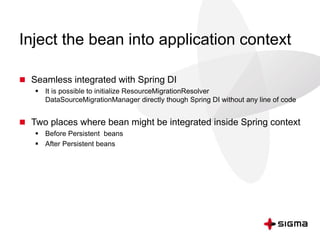
 Seamless integrated with Spring DI
 It is possible to initialize ResourceMigrationResolver
DataSourceMigrationManager directly though Spring DI without any line of code
 Two places where bean might be integrated inside Spring context
 Before Persistent beans
 After Persistent beans
Embedded vs maven driven
 E: Consistent and grace application upgrade
 E: No delays between deployment and schema upgrade
 M: Simple integration with CI
 M: External commands like validate & reset
 M: Quick manual migrations (hotfixes for instance)
Carbon5 Benefits
 Lightweight framework
 Brilliant extensibility (thanks to reasonable design)
 Support many DBMS in unofficial mode
 Simple integration
 Real continuous DB migration
Need more features?
Flyway framework
 Rich support for different build tools
 The same integration approach on Carbon V
 Pluggable architecture
 Java-based migrations (two options: through JDBC Connection &
Spring JDBCTemplate)
 Extended service table
Best practices
 Feature driven development (each SQL feature change in own
file)
 Make sql files safe in order to prevent it from double execution
 Keep database connection settings in single place (use shared
DataSource)
 Do not make structure changes to the DB outside of your
framework
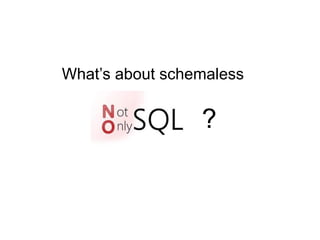
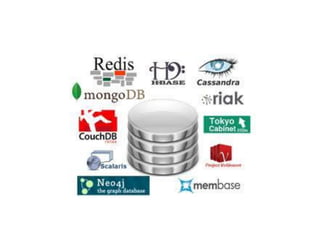
What’s about schemaless
?
NoSQL migration approach
 No dedicated explicit migration procedure (solved on business
level in case of needs)
 No shutdown or downtime
 Rolling update
– Every domain entity has version number
– your v2 application should handle the v1 db format
– Write code to convert entity to v2 on a fly (repository level)
– Write modified entities to v2 on demand
 Some DBs like RavenDB are able to perform auto-migration
References
 https://code.google.com/p/c5-db-migration/
 http://flywaydb.org/
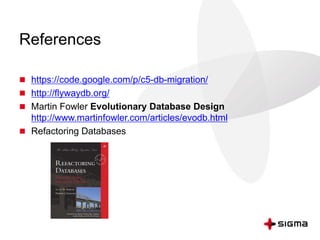
 Martin Fowler Evolutionary Database Design
http://www.martinfowler.com/articles/evodb.html
 Refactoring Databases
Presentation in a nutshell
 Keep in mind this problem
 Do not invent wheels, use external frameworks/techniques
 And do not be afraid of Friday’s deployment then.
Thank you!
Q&A

Борис Трофимов. Continuous Database migration-это просто!

  • 1.
    Continuous DB migration BorisTrofimov @b0ris_1 www.btrofimoff.com
  • 2.
    Agenda  Dealing withchanges  Perfect solution or Continuous DB migration  Carbon5 Introduction  Maven-driven mode  Embedded mode  Pros/Cos and best practices
  • 3.
    Dealing with Changes Applications evolve. God, bless bugs, refactoring and business changes.  We love applications and configure CI, VCS in order to track source code/application version.  But what’s about DB?
  • 4.
    Dealing with SchemaChange  FACT: Some modifications might require changes in DB schema.
  • 5.
    Dealing with SchemaChange  FACT: Some modifications might require changes in DB schema.  Changes are simple and risky.
  • 6.
    Dealing with SchemaChange  FACT: Some modifications might require changes in DB schema.  Changes are simple and risky.  Simple changes: – add one more table – add index
  • 7.
    Dealing with SchemaChange  FACT: Some application modifications might require changes in DB schema.  Changes are simple and risky.  Simple changes: – add one more table – add index  Risky changes: – rename/add column – change foreign key – migrate data from one table/column to another – denormalization on a fly
  • 8.
    Dealing with SchemaChange  What’s about old apps upgrade and multiple schema changes? App v1 App v10
  • 9.
    The Impact  Risksto lose data  Painful downtime  Risks to break application (see #1 and #2)  Resources, efforts and budget
  • 10.
  • 11.
    How people solveit  Deny Friday’s deployments  Manual deployment  Hibernate-like schema update + SQLexec  Self-developed tools based on version number approach
  • 12.
    Perfect solution  Dedicatedreusable framework  Every Feature request leads to separated SQL migration script.  Framework tracks which changes were not applied and applies them.  Configurable time to launch apply procedure  Prevent Double changes  Have Change Log  Simple integration to existent project
  • 13.
    Continuous DB Migrationapproach min + automatic migration = Continuous DB Migration
  • 14.
  • 15.
    Why Carbon V DB-migration framework  Open Source project  Lightweight framework  Simple usage
  • 16.
    How it works Dedicated project folder for SQL migration scripts. This folder should be available when framework takes control.  Each SQL migration script is pure SQL/DDL file with migration SQL code for specific feature  Each Delta file should have name YYYYMMDDHHMMSS_<FEATURE>.sql  When framework take control it checks and applies only new changes.  C5 uses own JDBC connection.  Way to re-usue existent DataSources with connection params
  • 17.
    No magic, just… C5 creates own table “schema_version” inside your database  C5 controls this table by itself (no needs to create or update). sql_file_name date duration 201405170900_user_auth.sql 2014-05-17 13:00:00 8 sec 201404130400_award_4565.sql 2014-04-14 14:00:00 6 sec
  • 18.
    When to initiatemigration procedure?  Maven-driven approach  Embedded mode
  • 19.
  • 20.
  • 21.
    Configure Maven project Update POM definition  Configure Explicit DB connection  Can be configured depending on specific maven profiles (staging, production)
  • 22.
    Add SQL migrationfiles  Use Project/src/main/db/migrations directory
  • 23.
    Launch it  performsmigration $ mvn db-migration:migrate  resets migration $ mvn db-migration:reset  check if DB is up to date $ mvn db-migration:validate  create new feature $ mvn db-migration:new -Dname=new_feature
  • 24.
    Use cases  Manualruns from developer machine  Part of Continuous Deivery process – Add just one more Maven action inside specific CI configuration before deployment action
  • 25.
  • 26.
    Embedded mode  SchemaCheck is constituent part of application.  SQL changes are built-in into the application  Any checks and possible DB migration is performed every time when application launches.  Dedicated bean to carry out this responsibility
  • 27.
    Create application bean importcom.carbonfive.db.migration.DataSourceMigrationManager; import com.carbonfive.db.migration.DriverManagerMigrationManager; import com.carbonfive.db.migration.MigrationManager; import com.carbonfive.db.migration.ResourceMigrationResolver; public class DBMigratorImpl { DataSource dataSource; ... public void init(){ DataSourceMigrationManager migrationManager = new DataSourceMigrationManager(dataSource); migrationManager.setMigrationResolver(new ResourceMigrationResolver("classpath:/db/migrations")); migrationManager.migrate(); } }
  • 28.
    Inject the beaninto application context  Seamless integrated with Spring DI  It is possible to initialize ResourceMigrationResolver DataSourceMigrationManager directly though Spring DI without any line of code  Two places where bean might be integrated inside Spring context  Before Persistent beans  After Persistent beans
  • 29.
    Embedded vs mavendriven  E: Consistent and grace application upgrade  E: No delays between deployment and schema upgrade  M: Simple integration with CI  M: External commands like validate & reset  M: Quick manual migrations (hotfixes for instance)
  • 30.
    Carbon5 Benefits  Lightweightframework  Brilliant extensibility (thanks to reasonable design)  Support many DBMS in unofficial mode  Simple integration  Real continuous DB migration
  • 31.
  • 33.
    Flyway framework  Richsupport for different build tools  The same integration approach on Carbon V  Pluggable architecture  Java-based migrations (two options: through JDBC Connection & Spring JDBCTemplate)  Extended service table
  • 34.
    Best practices  Featuredriven development (each SQL feature change in own file)  Make sql files safe in order to prevent it from double execution  Keep database connection settings in single place (use shared DataSource)  Do not make structure changes to the DB outside of your framework
  • 35.
  • 37.
    NoSQL migration approach No dedicated explicit migration procedure (solved on business level in case of needs)  No shutdown or downtime  Rolling update – Every domain entity has version number – your v2 application should handle the v1 db format – Write code to convert entity to v2 on a fly (repository level) – Write modified entities to v2 on demand  Some DBs like RavenDB are able to perform auto-migration
  • 38.
    References  https://code.google.com/p/c5-db-migration/  http://flywaydb.org/ Martin Fowler Evolutionary Database Design http://www.martinfowler.com/articles/evodb.html  Refactoring Databases
  • 39.
    Presentation in anutshell  Keep in mind this problem  Do not invent wheels, use external frameworks/techniques  And do not be afraid of Friday’s deployment then.
  • 40.