Distributed, Robust Software
         Made Easy

    Introducing the
JActor Cluster Platform
        Bill La Forge, CTO
    JActor Consulting Pvt. Ltd
      laforge49@gmail.com

  http://jactorconsulting.com
The Jactor Cluster Platform
●   Discovers new nodes (JVMs) running in the cluster
    and detects when a node is no longer active.
●   Prevents more than one cluster from being active due
    to a network failure by requiring a quorum of hosts to
    be present.
●   Creates and manages Server objects across multiple
    nodes.
●   Determines the least busy node in the cluster or on a
    given host for running a Server.
●   Provides basic tools for monitoring and configuring the
    cluster.
The Jactor Cluster is a
                      Platform
●   To port a Java application to the JActor Cluster
    Platform, you need to write an adapter class, a
    subclass of Server, for starting and stopping
    your application and which provides access, as
    needed, to other servers running in the cluster.
●   The Apache SSHD Project has already been
    ported to the JActor Cluster Platform to provide
    remote console access.
●   The next port will likely be OSGi.
Running the JActor Cluster
                       Platform
●   Just set the CLASSPATH and run the main function of
    agilewiki.jaconfig.JACNode on all the hosts of the
    cluster.
●   There is a single, optional argument: the port number used
    to communicate with other nodes in the cluster. It has a
    default value of 8880.
●   If no port number is specified, an operator console is also
    started up.
●   To run a server, its class file or a jar containing it must be
    included in the CLASSPATH.
●   To change the basic configuration, simply subclass
    JACNode and override the appropriate methods.
The Config Database
●   The config database holds key/value pairs of strings.
●   This is a fully replicated, eventually consistent
    database (NOSQL). Every node in the cluster has its
    own copy.
●   There is no log file, and no operational complications.
    If a database copy gets corrupted, it gets rebuilt when
    the node is restarted.
●   The database holds the cluster configuration, as well
    as encrypted operator passwords.
●   Application servers may subscribe to database change
    notifications.
Cluster Commands (1)
●   help lists the cluster commands.
●   halt exits the local node.
●   who lists the operators that are logged in
    across the cluster.
●   broadcast sends a message to all users.
●   write {name} {msg} sends the msg to an
    operator.
Cluster Commands (2)
●   localServers lists all the local servers.
●   startup {server class name} {args string}
    starts a local server.
●   server {server name} {command line} sends
    a command to a local server.
●   server {server name} help lists the commands
    of a server.
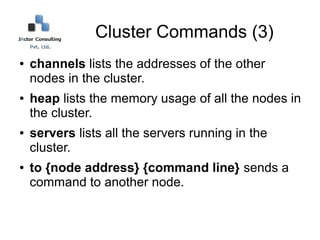
Cluster Commands (3)
●   channels lists the addresses of the other
    nodes in the cluster.
●   heap lists the memory usage of all the nodes in
    the cluster.
●   servers lists all the servers running in the
    cluster.
●   to {node address} {command line} sends a
    command to another node.
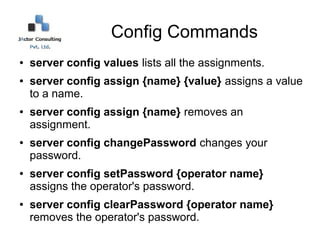
Config Commands
●   server config values lists all the assignments.
●   server config assign {name} {value} assigns a value
    to a name.
●   server config assign {name} removes an
    assignment.
●   server config changePassword changes your
    password.
●   server config setPassword {operator name}
    assigns the operator's password.
●   server config clearPassword {operator name}
    removes the operator's password.
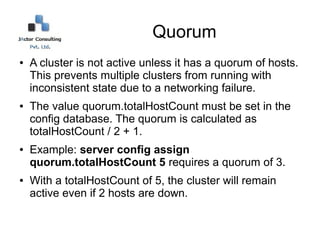
Quorum
●   A cluster is not active unless it has a quorum of hosts.
    This prevents multiple clusters from running with
    inconsistent state due to a networking failure.
●   The value quorum.totalHostCount must be set in the
    config database. The quorum is calculated as
    totalHostCount / 2 + 1.
●   Example: server config assign
    quorum.totalHostCount 5 requires a quorum of 3.
●   With a totalHostCount of 5, the cluster will remain
    active even if 2 hosts are down.
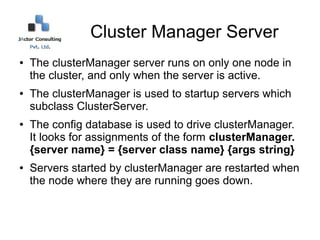
Cluster Manager Server
●   The clusterManager server runs on only one node in
    the cluster, and only when the server is active.
●   The clusterManager is used to startup servers which
    subclass ClusterServer.
●   The config database is used to drive clusterManager.
    It looks for assignments of the form clusterManager.
    {server name} = {server class name} {args string}
●   Servers started by clusterManager are restarted when
    the node where they are running goes down.
Host Manager Server
●   A hostManager server runs on one node on
    every host in the cluster, even if the cluster is
    not active.
●   The hostManager is used to startup servers
    which subclass HostServer. These servers are
    run on every host in the cluster.
●   The config database is used to drive the
    hostManager servers, which look for
    assignments of the form hostManager.{server
    name} = {server class name} {args string}
SSH Server
●   The ssh server integrates Apache SSHD and supports
    operator login via an ssh client like PuTTY.
●   To have the ssh run on every host in the cluster, just
    enter this command: server config assign
    hostManager.ssh
    org.agilewiki.config.SSHHostServer {ssh port
    number}
●   To list all the ssh servers in the cluster, enter this
    command: server hostManager.ssh all
●   The all command lists the port number and the
    number of operators using each ssh server.

JActor Cluster Platform

  • 1.
    Distributed, Robust Software Made Easy Introducing the JActor Cluster Platform Bill La Forge, CTO JActor Consulting Pvt. Ltd laforge49@gmail.com http://jactorconsulting.com
  • 2.
    The Jactor ClusterPlatform ● Discovers new nodes (JVMs) running in the cluster and detects when a node is no longer active. ● Prevents more than one cluster from being active due to a network failure by requiring a quorum of hosts to be present. ● Creates and manages Server objects across multiple nodes. ● Determines the least busy node in the cluster or on a given host for running a Server. ● Provides basic tools for monitoring and configuring the cluster.
  • 3.
    The Jactor Clusteris a Platform ● To port a Java application to the JActor Cluster Platform, you need to write an adapter class, a subclass of Server, for starting and stopping your application and which provides access, as needed, to other servers running in the cluster. ● The Apache SSHD Project has already been ported to the JActor Cluster Platform to provide remote console access. ● The next port will likely be OSGi.
  • 4.
    Running the JActorCluster Platform ● Just set the CLASSPATH and run the main function of agilewiki.jaconfig.JACNode on all the hosts of the cluster. ● There is a single, optional argument: the port number used to communicate with other nodes in the cluster. It has a default value of 8880. ● If no port number is specified, an operator console is also started up. ● To run a server, its class file or a jar containing it must be included in the CLASSPATH. ● To change the basic configuration, simply subclass JACNode and override the appropriate methods.
  • 5.
    The Config Database ● The config database holds key/value pairs of strings. ● This is a fully replicated, eventually consistent database (NOSQL). Every node in the cluster has its own copy. ● There is no log file, and no operational complications. If a database copy gets corrupted, it gets rebuilt when the node is restarted. ● The database holds the cluster configuration, as well as encrypted operator passwords. ● Application servers may subscribe to database change notifications.
  • 6.
    Cluster Commands (1) ● help lists the cluster commands. ● halt exits the local node. ● who lists the operators that are logged in across the cluster. ● broadcast sends a message to all users. ● write {name} {msg} sends the msg to an operator.
  • 7.
    Cluster Commands (2) ● localServers lists all the local servers. ● startup {server class name} {args string} starts a local server. ● server {server name} {command line} sends a command to a local server. ● server {server name} help lists the commands of a server.
  • 8.
    Cluster Commands (3) ● channels lists the addresses of the other nodes in the cluster. ● heap lists the memory usage of all the nodes in the cluster. ● servers lists all the servers running in the cluster. ● to {node address} {command line} sends a command to another node.
  • 9.
    Config Commands ● server config values lists all the assignments. ● server config assign {name} {value} assigns a value to a name. ● server config assign {name} removes an assignment. ● server config changePassword changes your password. ● server config setPassword {operator name} assigns the operator's password. ● server config clearPassword {operator name} removes the operator's password.
  • 10.
    Quorum ● A cluster is not active unless it has a quorum of hosts. This prevents multiple clusters from running with inconsistent state due to a networking failure. ● The value quorum.totalHostCount must be set in the config database. The quorum is calculated as totalHostCount / 2 + 1. ● Example: server config assign quorum.totalHostCount 5 requires a quorum of 3. ● With a totalHostCount of 5, the cluster will remain active even if 2 hosts are down.
  • 11.
    Cluster Manager Server ● The clusterManager server runs on only one node in the cluster, and only when the server is active. ● The clusterManager is used to startup servers which subclass ClusterServer. ● The config database is used to drive clusterManager. It looks for assignments of the form clusterManager. {server name} = {server class name} {args string} ● Servers started by clusterManager are restarted when the node where they are running goes down.
  • 12.
    Host Manager Server ● A hostManager server runs on one node on every host in the cluster, even if the cluster is not active. ● The hostManager is used to startup servers which subclass HostServer. These servers are run on every host in the cluster. ● The config database is used to drive the hostManager servers, which look for assignments of the form hostManager.{server name} = {server class name} {args string}
  • 13.
    SSH Server ● The ssh server integrates Apache SSHD and supports operator login via an ssh client like PuTTY. ● To have the ssh run on every host in the cluster, just enter this command: server config assign hostManager.ssh org.agilewiki.config.SSHHostServer {ssh port number} ● To list all the ssh servers in the cluster, enter this command: server hostManager.ssh all ● The all command lists the port number and the number of operators using each ssh server.