Identifying (and fixing)
oslo.messaging &
RabbitMQ issues
Michael Klishin, Pivotal
Dmitry Mescheryakov, Mirantis
What is oslo.messaging?
● Library for
○ building RPC clients/servers
○ emitting/handling notifications
What is oslo.messaging?
● Library for
○ building RPC clients/servers
○ emitting/handling notifications
● Supports several backends:
○ RabbitMQ
■ based on Kombu - the oldest and most well known (and we will speak about it)
■ based on Pika - recent addition
○ AMQP 1.0
What is oslo.messaging?
● Library for
○ building RPC clients/servers
○ emitting/handling notifications
● Supports several backends:
○ RabbitMQ
■ based on Kombu - the oldest and most well known (and we will speak about it)
■ based on Pika - recent addition
○ AMQP 1.0
What is oslo.messaging?
● Library for
○ building RPC clients/servers
○ emitting/handling notifications
● Supports several backends:
○ RabbitMQ
■ based on Kombu - the oldest and most well known (and we will speak about it)
■ based on Pika - recent addition
○ AMQP 1.0
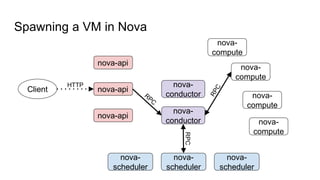
Spawning a VM in Nova
nova-api
nova-api
nova-api
nova-
conductor
nova-
conductor
nova-
scheduler
nova-
scheduler
nova-
scheduler
nova-
compute
nova-
compute
nova-
compute
nova-
compute
Client
HTTP
RPC
Examples
Internal:
● nova-compute sends a report to nova-conductor every minute
● nova-conductor sends a command to spawn a VM to nova-compute
● neutron-l3-agent requests router list from neutron-server
● …
Examples
Internal:
● nova-compute sends a report to nova-conductor every minute
● nova-conductor sends a command to spawn a VM to nova-compute
● neutron-l3-agent requests router list from neutron-server
● …
External:
● Every OpenStack service sends notifications to Ceilometer
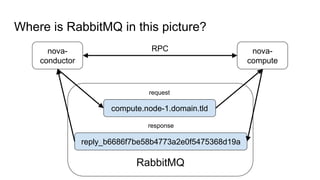
Where is RabbitMQ in this picture?
nova-
conductor
nova-
compute
RabbitMQ
compute.node-1.domain.tld
reply_b6686f7be58b4773a2e0f5475368d19a
request
response
RPC
Spotting oslo.messaging logs
2016-04-15 11:16:57.239 16181 DEBUG nova.service [req-d83ae554-7ef5-4299-
82ce-3f70b00b6490 - - - - -] Creating RPC server for service scheduler start
/usr/lib/python2.7/dist-packages/nova/service.py:218
2016-04-15 11:16:57.258 16181 DEBUG oslo.messaging._drivers.pool [req-
d83ae554-7ef5-4299-82ce-3f70b00b6490 - - - - -] Pool creating new connection
create /usr/lib/python2.7/dist-packages/oslo_messaging/_drivers/pool.py:109
...
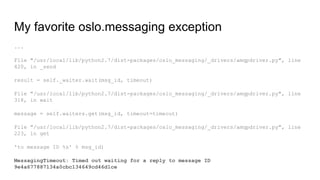
File "/usr/local/lib/python2.7/dist-packages/oslo_messaging/_drivers/amqpdriver.py", line
420, in _send
result = self._waiter.wait(msg_id, timeout)
File "/usr/local/lib/python2.7/dist-packages/oslo_messaging/_drivers/amqpdriver.py", line
318, in wait
message = self.waiters.get(msg_id, timeout=timeout)
File "/usr/local/lib/python2.7/dist-packages/oslo_messaging/_drivers/amqpdriver.py", line
223, in get
'to message ID %s' % msg_id)
MessagingTimeout: Timed out waiting for a reply to message ID
9e4a677887134a0cbc134649cd46d1ce
My favorite oslo.messaging exception
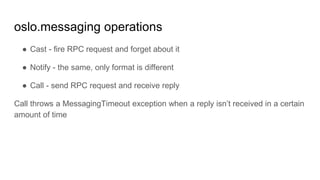
oslo.messaging operations
● Cast - fire RPC request and forget about it
● Notify - the same, only format is different
● Call - send RPC request and receive reply
Call throws a MessagingTimeout exception when a reply isn’t received in a certain
amount of time
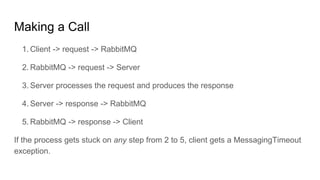
Making a Call
1. Client -> request -> RabbitMQ
2. RabbitMQ -> request -> Server
3. Server processes the request and produces the response
4. Server -> response -> RabbitMQ
5. RabbitMQ -> response -> Client
If the process gets stuck on any step from 2 to 5, client gets a MessagingTimeout
exception.
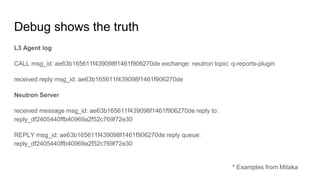
Debug shows the truth
L3 Agent log
CALL msg_id: ae63b165611f439098f1461f906270de exchange: neutron topic: q-reports-plugin
received reply msg_id: ae63b165611f439098f1461f906270de
* Examples from Mitaka
Debug shows the truth
L3 Agent log
CALL msg_id: ae63b165611f439098f1461f906270de exchange: neutron topic: q-reports-plugin
received reply msg_id: ae63b165611f439098f1461f906270de
Neutron Server
received message msg_id: ae63b165611f439098f1461f906270de reply to:
reply_df2405440ffb40969a2f52c769f72e30
REPLY msg_id: ae63b165611f439098f1461f906270de reply queue:
reply_df2405440ffb40969a2f52c769f72e30
* Examples from Mitaka
Enabling the debug
[DEFAULT]
debug=true
Enabling the debug
[DEFAULT]
debug=true
default_log_levels=...,oslo.messaging=DEBUG,...
If you don’t have debug enabled
Examine the stack trace
Find which operation failed
Guess the destination service
Try to find correlating log entries around the time the request was made
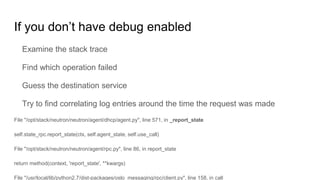
If you don’t have debug enabled
Examine the stack trace
Find which operation failed
Guess the destination service
Try to find correlating log entries around the time the request was made
File "/opt/stack/neutron/neutron/agent/dhcp/agent.py", line 571, in _report_state
self.state_rpc.report_state(ctx, self.agent_state, self.use_call)
File "/opt/stack/neutron/neutron/agent/rpc.py", line 86, in report_state
return method(context, 'report_state', **kwargs)
File "/usr/local/lib/python2.7/dist-packages/oslo_messaging/rpc/client.py", line 158, in call
Diagnosing issues through RabbitMQ
● # rabbitmqctl list_queues consumers name
0 consumers indicate that nobody listens to the queue
● # rabbitmqctl list_queues messages consumers name
If a queue has consumers, but also messages are accumulating there. It
means that the corresponding service can not process messages in time or got
stuck in a deadlock or cluster is partitioned
Checking RabbitMQ cluster for integrity
# rabbitmqctl cluster_status
Check that its output contains all the nodes in the cluster. You might find that your
cluster is partitioned.
Partitioning is a good reason for some messages to get stuck in queues.
How to fix such issues
For RabbitMQ issues including partitioning, see RabbitMQ docs
Restart of the affected services helps in most cases
How to fix such issues
For RabbitMQ issues including partitioning, see RabbitMQ docs
Restart of the affected services helps in most cases
Force close connections using `rabbitmqctl` or HTTP API
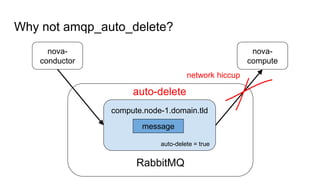
Never set amqp_auto_delete = true
Use a queue expiration policy instead, with a TTL of at least 1 minute
Starting from Mitaka all by default auto-delete queues were replaced with expiring
ones
Why not amqp_auto_delete?
nova-
conductor
nova-
compute
RabbitMQ
compute.node-1.domain.tld
message
auto-delete
auto-delete = true
network hiccup
Queue mirroring is quite expensive
Out testing shows 2x drop in throughput on 3-node cluster with ‘ha-mode: all’
policy comparing with non-mirrored queues.
RPC can live without it
But notifications might be too important (if used for billing)
In later case enable mirroring for notification queues only (example in Fuel)
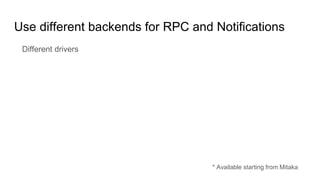
Use different backends for RPC and Notifications
Different drivers
* Available starting from Mitaka
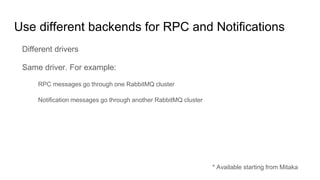
Use different backends for RPC and Notifications
Different drivers
Same driver. For example:
RPC messages go through one RabbitMQ cluster
Notification messages go through another RabbitMQ cluster
* Available starting from Mitaka
Use different backends for RPC and Notifications
Different drivers
Same driver. For example:
RPC messages go through one RabbitMQ cluster
Notification messages go through another RabbitMQ cluster
Implementation (non-documented)
* Available starting from Mitaka
Part 2
Erlang VM process disappears
Syslog, kern.log, /var/log/messages: grep for “killed process”
Erlang VM process disappears
Syslog, kern.log, /var/log/messages: grep for “killed process”
“Cannot allocate 1117203264527168 bytes of memory (of type …)” — move to
Erlang 17.5 or 18.3
RAM usage
RAM usage
`rabbitmqctl status`
RAM usage
`rabbitmqctl status`
`rabbitmqctl list_queues name messages memory consumers`
Stats DB overload
Stats DB overload
Connections, channels, queues, and nodes emit stats on a timer
Stats DB overload
Connections, channels, queues, and nodes emit stats on a timer
With a lot of those the stats DB collector can fall behind
Stats DB overload
Connections, channels, queues, and nodes emit stats on a timer
With a lot of those the stats DB collector can fall behind
`rabbitmqctl status` reports most RAM used by `mgmt_db`
Stats DB overload
Connections, channels, queues, and nodes emit stats on a timer
With a lot of those the stats DB collector can fall behind
`rabbitmqctl status` reports most RAM used by `mgmt_db`
You can reset it: `rabbitmqctl eval ‘exit(erlang:whereis(rabbit_mgmt_db),
please_terminate).’`
Stats DB overload
Connections, channels, queues, and nodes emit stats on a timer
With a lot of those the stats DB collector can fall behind
`rabbitmqctl status` reports most RAM used by `mgmt_db`
You can reset it: `rabbitmqctl eval ‘exit(erlang:whereis(rabbit_mgmt_db),
please_terminate).’`
Resetting is a safe thing to do but may confuse your monitoring tools
Stats DB overload
Connections, channels, queues, and nodes emit stats on a timer
With a lot of those the stats DB collector can fall behind
`rabbitmqctl status` reports most RAM used by `mgmt_db`
You can reset it: `rabbitmqctl eval ‘exit(erlang:whereis(rabbit_mgmt_db),
please_terminate).’`
Resetting is a safe thing to do but may confuse your monitoring tools
New better parallelized event collector coming in RabbitMQ 3.6.2
RAM usage
`rabbitmqctl status`
`rabbitmqctl list_queues name messages memory consumers`
rabbitmq_top
RAM usage
`rabbitmqctl status`
`rabbitmqctl list_queues name messages memory consumers`
rabbitmq_top
`rabbitmqctl list_connections | wc -l`
RAM usage
`rabbitmqctl status`
`rabbitmqctl list_queues name messages memory consumers`
rabbitmq_top
`rabbitmqctl list_connections | wc -l`
`rabbitmqctl list_channels | wc -l`
RAM usage
`rabbitmqctl status`
`rabbitmqctl list_queues name messages memory consumers`
rabbitmq_top
`rabbitmqctl list_connections | wc -l`
`rabbitmqctl list_channels | wc -l`
Reduce TCP buffer size: RabbitMQ Networking guide
RAM usage
`rabbitmqctl status`
`rabbitmqctl list_queues name messages memory consumers`
rabbitmq_top
`rabbitmqctl list_connections | wc -l`
`rabbitmqctl list_channels | wc -l`
Reduce TCP buffer size: RabbitMQ Networking guide
To force per-connection channel limit use`rabbit.channel_max`.
Unresponsive nodes
Unresponsive nodes
`rabbitmqctl eval 'rabbit_diagnostics:maybe_stuck().'`
Unresponsive nodes
`rabbitmqctl eval 'rabbit_diagnostics:maybe_stuck().'`
Pivotal & Erlang Solutions contributed a few Mnesia deadlock fixes in
Erlang/OTP 18.3.1 and 19.0
TCP connections are rejected
Ensure traffic on RabbitMQ ports is accepted by firewall
TCP connections are rejected
Ensure traffic on RabbitMQ ports is accepted by firewall
Ensure RabbitMQ listens on correct network interfaces
TCP connections are rejected
Ensure traffic on RabbitMQ ports is accepted by firewall
Ensure RabbitMQ listens on correct network interfaces
Check open file handles limit (defaults on Linux are completely inadequate)
TCP connections are rejected
Ensure traffic on RabbitMQ ports is accepted by firewall
Ensure RabbitMQ listens on correct network interfaces
Check open file handles limit (defaults on Linux are completely inadequate)
TCP connection backlog size: rabbitmq.tcp_listen_options.backlog,
net.core.somaxconn
TCP connections are rejected
Ensure traffic on RabbitMQ ports is accepted by firewall
Ensure RabbitMQ listens on correct network interfaces
Check open file handles limit (defaults on Linux are completely inadequate)
TCP connection backlog size: rabbitmq.tcp_listen_options.backlog,
net.core.somaxconn
Consult RabbitMQ logs for authentication and authorization errors
TLS connections fail
Deserves a talk of its own
TLS connections fail
Deserves a talk of its own
See log files
TLS connections fail
Deserves a talk of its own
See log files
`openssl s_client` (`man 1 s_client`)
TLS connections fail
Deserves a talk of its own
See log files
`openssl s_client` (`man 1 s_client`)
`openssl s_server` (`man 1 s_server`)
TLS connections fail
Deserves a talk of its own
See log files
`openssl s_client` (`man 1 s_client`)
`openssl s_server` (`man 1 s_server`)
Ensure peer CA certificate is trusted and verification depth is sufficient
TLS connections fail
Deserves a talk of its own
See log files
`openssl s_client` (`man 1 s_client`)
`openssl s_server` (`man 1 s_server`)
Ensure peer CA certificate is trusted and verification depth is sufficient
Troubleshooting TLS on rabbitmq.com
TLS connections fail
Deserves a talk of its own
See log files
`openssl s_client` (`man 1 s_client`)
`openssl s_server` (`man 1 s_server`)
Ensure peer CA certificate is trusted and verification depth is sufficient
Troubleshooting TLS on rabbitmq.com
Run Erlang 17.5 or 18.3.1
Message payload inspection
Message tracing: `rabbitmqctl trace_on -p my-vhost`, amq.rabbitmq.trace
Message payload inspection
Message tracing: `rabbitmqctl trace_on -p my-vhost`, amq.rabbitmq.trace
rabbitmq_tracing
Message payload inspection
Message tracing: `rabbitmqctl trace_on -p my-vhost`, amq.rabbitmq.trace
rabbitmq_tracing
Tracing puts *very* high load on the system
Message payload inspection
Message tracing: `rabbitmqctl trace_on -p my-vhost`, amq.rabbitmq.trace
rabbitmq_tracing
Tracing puts *very* high load on the system
Wireshark (tcpdump, …)
Higher than expected latency
Wireshark (tcpdump, …)
Higher than expected latency
Wireshark (tcpdump, …)
strace, DTrace, …
Higher than expected latency
Wireshark (tcpdump, …)
strace, DTrace, …
Erlang VM scheduler-to-core binding (pinning)
General remarks
General remarks
Guessing is not effective (or efficient)
General remarks
Guessing is not effective (or efficient)
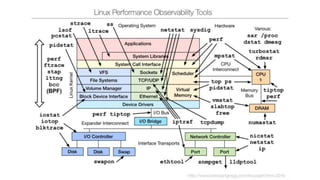
Use tools to gather more data
General remarks
Guessing is not effective (or efficient)
Use tools to gather more data
Always consult log files
General remarks
Guessing is not effective (or efficient)
Use tools to gather more data
Always consult log files
Ask on rabbitmq-users
Thank you
Thank you
@michaelklishin
Thank you
@michaelklishin
rabbitmq-users

Troubleshooting common oslo.messaging and RabbitMQ issues

  • 1.
    Identifying (and fixing) oslo.messaging& RabbitMQ issues Michael Klishin, Pivotal Dmitry Mescheryakov, Mirantis
  • 2.
    What is oslo.messaging? ●Library for ○ building RPC clients/servers ○ emitting/handling notifications
  • 3.
    What is oslo.messaging? ●Library for ○ building RPC clients/servers ○ emitting/handling notifications ● Supports several backends: ○ RabbitMQ ■ based on Kombu - the oldest and most well known (and we will speak about it) ■ based on Pika - recent addition ○ AMQP 1.0
  • 4.
    What is oslo.messaging? ●Library for ○ building RPC clients/servers ○ emitting/handling notifications ● Supports several backends: ○ RabbitMQ ■ based on Kombu - the oldest and most well known (and we will speak about it) ■ based on Pika - recent addition ○ AMQP 1.0
  • 5.
    What is oslo.messaging? ●Library for ○ building RPC clients/servers ○ emitting/handling notifications ● Supports several backends: ○ RabbitMQ ■ based on Kombu - the oldest and most well known (and we will speak about it) ■ based on Pika - recent addition ○ AMQP 1.0
  • 6.
    Spawning a VMin Nova nova-api nova-api nova-api nova- conductor nova- conductor nova- scheduler nova- scheduler nova- scheduler nova- compute nova- compute nova- compute nova- compute Client HTTP RPC
  • 7.
    Examples Internal: ● nova-compute sendsa report to nova-conductor every minute ● nova-conductor sends a command to spawn a VM to nova-compute ● neutron-l3-agent requests router list from neutron-server ● …
  • 8.
    Examples Internal: ● nova-compute sendsa report to nova-conductor every minute ● nova-conductor sends a command to spawn a VM to nova-compute ● neutron-l3-agent requests router list from neutron-server ● … External: ● Every OpenStack service sends notifications to Ceilometer
  • 9.
    Where is RabbitMQin this picture? nova- conductor nova- compute RabbitMQ compute.node-1.domain.tld reply_b6686f7be58b4773a2e0f5475368d19a request response RPC
  • 10.
  • 11.
    Spotting oslo.messaging logs 2016-04-1511:16:57.239 16181 DEBUG nova.service [req-d83ae554-7ef5-4299- 82ce-3f70b00b6490 - - - - -] Creating RPC server for service scheduler start /usr/lib/python2.7/dist-packages/nova/service.py:218 2016-04-15 11:16:57.258 16181 DEBUG oslo.messaging._drivers.pool [req- d83ae554-7ef5-4299-82ce-3f70b00b6490 - - - - -] Pool creating new connection create /usr/lib/python2.7/dist-packages/oslo_messaging/_drivers/pool.py:109
  • 12.
    ... File "/usr/local/lib/python2.7/dist-packages/oslo_messaging/_drivers/amqpdriver.py", line 420,in _send result = self._waiter.wait(msg_id, timeout) File "/usr/local/lib/python2.7/dist-packages/oslo_messaging/_drivers/amqpdriver.py", line 318, in wait message = self.waiters.get(msg_id, timeout=timeout) File "/usr/local/lib/python2.7/dist-packages/oslo_messaging/_drivers/amqpdriver.py", line 223, in get 'to message ID %s' % msg_id) MessagingTimeout: Timed out waiting for a reply to message ID 9e4a677887134a0cbc134649cd46d1ce My favorite oslo.messaging exception
  • 13.
    oslo.messaging operations ● Cast- fire RPC request and forget about it ● Notify - the same, only format is different ● Call - send RPC request and receive reply Call throws a MessagingTimeout exception when a reply isn’t received in a certain amount of time
  • 14.
    Making a Call 1.Client -> request -> RabbitMQ 2. RabbitMQ -> request -> Server 3. Server processes the request and produces the response 4. Server -> response -> RabbitMQ 5. RabbitMQ -> response -> Client If the process gets stuck on any step from 2 to 5, client gets a MessagingTimeout exception.
  • 15.
    Debug shows thetruth L3 Agent log CALL msg_id: ae63b165611f439098f1461f906270de exchange: neutron topic: q-reports-plugin received reply msg_id: ae63b165611f439098f1461f906270de * Examples from Mitaka
  • 16.
    Debug shows thetruth L3 Agent log CALL msg_id: ae63b165611f439098f1461f906270de exchange: neutron topic: q-reports-plugin received reply msg_id: ae63b165611f439098f1461f906270de Neutron Server received message msg_id: ae63b165611f439098f1461f906270de reply to: reply_df2405440ffb40969a2f52c769f72e30 REPLY msg_id: ae63b165611f439098f1461f906270de reply queue: reply_df2405440ffb40969a2f52c769f72e30 * Examples from Mitaka
  • 17.
  • 18.
  • 19.
    If you don’thave debug enabled Examine the stack trace Find which operation failed Guess the destination service Try to find correlating log entries around the time the request was made
  • 20.
    If you don’thave debug enabled Examine the stack trace Find which operation failed Guess the destination service Try to find correlating log entries around the time the request was made File "/opt/stack/neutron/neutron/agent/dhcp/agent.py", line 571, in _report_state self.state_rpc.report_state(ctx, self.agent_state, self.use_call) File "/opt/stack/neutron/neutron/agent/rpc.py", line 86, in report_state return method(context, 'report_state', **kwargs) File "/usr/local/lib/python2.7/dist-packages/oslo_messaging/rpc/client.py", line 158, in call
  • 21.
    Diagnosing issues throughRabbitMQ ● # rabbitmqctl list_queues consumers name 0 consumers indicate that nobody listens to the queue ● # rabbitmqctl list_queues messages consumers name If a queue has consumers, but also messages are accumulating there. It means that the corresponding service can not process messages in time or got stuck in a deadlock or cluster is partitioned
  • 22.
    Checking RabbitMQ clusterfor integrity # rabbitmqctl cluster_status Check that its output contains all the nodes in the cluster. You might find that your cluster is partitioned. Partitioning is a good reason for some messages to get stuck in queues.
  • 23.
    How to fixsuch issues For RabbitMQ issues including partitioning, see RabbitMQ docs Restart of the affected services helps in most cases
  • 24.
    How to fixsuch issues For RabbitMQ issues including partitioning, see RabbitMQ docs Restart of the affected services helps in most cases Force close connections using `rabbitmqctl` or HTTP API
  • 25.
    Never set amqp_auto_delete= true Use a queue expiration policy instead, with a TTL of at least 1 minute Starting from Mitaka all by default auto-delete queues were replaced with expiring ones
  • 26.
  • 27.
    Queue mirroring isquite expensive Out testing shows 2x drop in throughput on 3-node cluster with ‘ha-mode: all’ policy comparing with non-mirrored queues. RPC can live without it But notifications might be too important (if used for billing) In later case enable mirroring for notification queues only (example in Fuel)
  • 28.
    Use different backendsfor RPC and Notifications Different drivers * Available starting from Mitaka
  • 29.
    Use different backendsfor RPC and Notifications Different drivers Same driver. For example: RPC messages go through one RabbitMQ cluster Notification messages go through another RabbitMQ cluster * Available starting from Mitaka
  • 30.
    Use different backendsfor RPC and Notifications Different drivers Same driver. For example: RPC messages go through one RabbitMQ cluster Notification messages go through another RabbitMQ cluster Implementation (non-documented) * Available starting from Mitaka
  • 32.
  • 34.
  • 35.
    Erlang VM processdisappears Syslog, kern.log, /var/log/messages: grep for “killed process”
  • 36.
    Erlang VM processdisappears Syslog, kern.log, /var/log/messages: grep for “killed process” “Cannot allocate 1117203264527168 bytes of memory (of type …)” — move to Erlang 17.5 or 18.3
  • 37.
  • 38.
  • 39.
    RAM usage `rabbitmqctl status` `rabbitmqctllist_queues name messages memory consumers`
  • 40.
  • 41.
    Stats DB overload Connections,channels, queues, and nodes emit stats on a timer
  • 42.
    Stats DB overload Connections,channels, queues, and nodes emit stats on a timer With a lot of those the stats DB collector can fall behind
  • 43.
    Stats DB overload Connections,channels, queues, and nodes emit stats on a timer With a lot of those the stats DB collector can fall behind `rabbitmqctl status` reports most RAM used by `mgmt_db`
  • 44.
    Stats DB overload Connections,channels, queues, and nodes emit stats on a timer With a lot of those the stats DB collector can fall behind `rabbitmqctl status` reports most RAM used by `mgmt_db` You can reset it: `rabbitmqctl eval ‘exit(erlang:whereis(rabbit_mgmt_db), please_terminate).’`
  • 45.
    Stats DB overload Connections,channels, queues, and nodes emit stats on a timer With a lot of those the stats DB collector can fall behind `rabbitmqctl status` reports most RAM used by `mgmt_db` You can reset it: `rabbitmqctl eval ‘exit(erlang:whereis(rabbit_mgmt_db), please_terminate).’` Resetting is a safe thing to do but may confuse your monitoring tools
  • 46.
    Stats DB overload Connections,channels, queues, and nodes emit stats on a timer With a lot of those the stats DB collector can fall behind `rabbitmqctl status` reports most RAM used by `mgmt_db` You can reset it: `rabbitmqctl eval ‘exit(erlang:whereis(rabbit_mgmt_db), please_terminate).’` Resetting is a safe thing to do but may confuse your monitoring tools New better parallelized event collector coming in RabbitMQ 3.6.2
  • 47.
    RAM usage `rabbitmqctl status` `rabbitmqctllist_queues name messages memory consumers` rabbitmq_top
  • 48.
    RAM usage `rabbitmqctl status` `rabbitmqctllist_queues name messages memory consumers` rabbitmq_top `rabbitmqctl list_connections | wc -l`
  • 49.
    RAM usage `rabbitmqctl status` `rabbitmqctllist_queues name messages memory consumers` rabbitmq_top `rabbitmqctl list_connections | wc -l` `rabbitmqctl list_channels | wc -l`
  • 50.
    RAM usage `rabbitmqctl status` `rabbitmqctllist_queues name messages memory consumers` rabbitmq_top `rabbitmqctl list_connections | wc -l` `rabbitmqctl list_channels | wc -l` Reduce TCP buffer size: RabbitMQ Networking guide
  • 51.
    RAM usage `rabbitmqctl status` `rabbitmqctllist_queues name messages memory consumers` rabbitmq_top `rabbitmqctl list_connections | wc -l` `rabbitmqctl list_channels | wc -l` Reduce TCP buffer size: RabbitMQ Networking guide To force per-connection channel limit use`rabbit.channel_max`.
  • 52.
  • 53.
    Unresponsive nodes `rabbitmqctl eval'rabbit_diagnostics:maybe_stuck().'`
  • 54.
    Unresponsive nodes `rabbitmqctl eval'rabbit_diagnostics:maybe_stuck().'` Pivotal & Erlang Solutions contributed a few Mnesia deadlock fixes in Erlang/OTP 18.3.1 and 19.0
  • 55.
  • 56.
    TCP connections arerejected Ensure traffic on RabbitMQ ports is accepted by firewall
  • 57.
    TCP connections arerejected Ensure traffic on RabbitMQ ports is accepted by firewall Ensure RabbitMQ listens on correct network interfaces
  • 58.
    TCP connections arerejected Ensure traffic on RabbitMQ ports is accepted by firewall Ensure RabbitMQ listens on correct network interfaces Check open file handles limit (defaults on Linux are completely inadequate)
  • 59.
    TCP connections arerejected Ensure traffic on RabbitMQ ports is accepted by firewall Ensure RabbitMQ listens on correct network interfaces Check open file handles limit (defaults on Linux are completely inadequate) TCP connection backlog size: rabbitmq.tcp_listen_options.backlog, net.core.somaxconn
  • 60.
    TCP connections arerejected Ensure traffic on RabbitMQ ports is accepted by firewall Ensure RabbitMQ listens on correct network interfaces Check open file handles limit (defaults on Linux are completely inadequate) TCP connection backlog size: rabbitmq.tcp_listen_options.backlog, net.core.somaxconn Consult RabbitMQ logs for authentication and authorization errors
  • 61.
  • 62.
  • 63.
    TLS connections fail Deservesa talk of its own See log files
  • 64.
    TLS connections fail Deservesa talk of its own See log files `openssl s_client` (`man 1 s_client`)
  • 65.
    TLS connections fail Deservesa talk of its own See log files `openssl s_client` (`man 1 s_client`) `openssl s_server` (`man 1 s_server`)
  • 66.
    TLS connections fail Deservesa talk of its own See log files `openssl s_client` (`man 1 s_client`) `openssl s_server` (`man 1 s_server`) Ensure peer CA certificate is trusted and verification depth is sufficient
  • 67.
    TLS connections fail Deservesa talk of its own See log files `openssl s_client` (`man 1 s_client`) `openssl s_server` (`man 1 s_server`) Ensure peer CA certificate is trusted and verification depth is sufficient Troubleshooting TLS on rabbitmq.com
  • 68.
    TLS connections fail Deservesa talk of its own See log files `openssl s_client` (`man 1 s_client`) `openssl s_server` (`man 1 s_server`) Ensure peer CA certificate is trusted and verification depth is sufficient Troubleshooting TLS on rabbitmq.com Run Erlang 17.5 or 18.3.1
  • 69.
  • 70.
    Message payload inspection Messagetracing: `rabbitmqctl trace_on -p my-vhost`, amq.rabbitmq.trace
  • 71.
    Message payload inspection Messagetracing: `rabbitmqctl trace_on -p my-vhost`, amq.rabbitmq.trace rabbitmq_tracing
  • 72.
    Message payload inspection Messagetracing: `rabbitmqctl trace_on -p my-vhost`, amq.rabbitmq.trace rabbitmq_tracing Tracing puts *very* high load on the system
  • 73.
    Message payload inspection Messagetracing: `rabbitmqctl trace_on -p my-vhost`, amq.rabbitmq.trace rabbitmq_tracing Tracing puts *very* high load on the system Wireshark (tcpdump, …)
  • 74.
  • 75.
    Higher than expectedlatency Wireshark (tcpdump, …)
  • 76.
    Higher than expectedlatency Wireshark (tcpdump, …) strace, DTrace, …
  • 77.
    Higher than expectedlatency Wireshark (tcpdump, …) strace, DTrace, … Erlang VM scheduler-to-core binding (pinning)
  • 78.
  • 79.
    General remarks Guessing isnot effective (or efficient)
  • 80.
    General remarks Guessing isnot effective (or efficient) Use tools to gather more data
  • 81.
    General remarks Guessing isnot effective (or efficient) Use tools to gather more data Always consult log files
  • 82.
    General remarks Guessing isnot effective (or efficient) Use tools to gather more data Always consult log files Ask on rabbitmq-users
  • 84.
  • 85.
  • 86.

Editor's Notes

  • #16 Casts don’t have message id, but are distinguished by a unique_id
  • #17 Casts don’t have message id, but are distinguished by a unique_id
  • #23 Depends on to which partition sender and listener are connected.