MariaDB-as-a-Service
Auto-Clustering, Vertical and
Horizontal Scaling within Jelastic PaaS
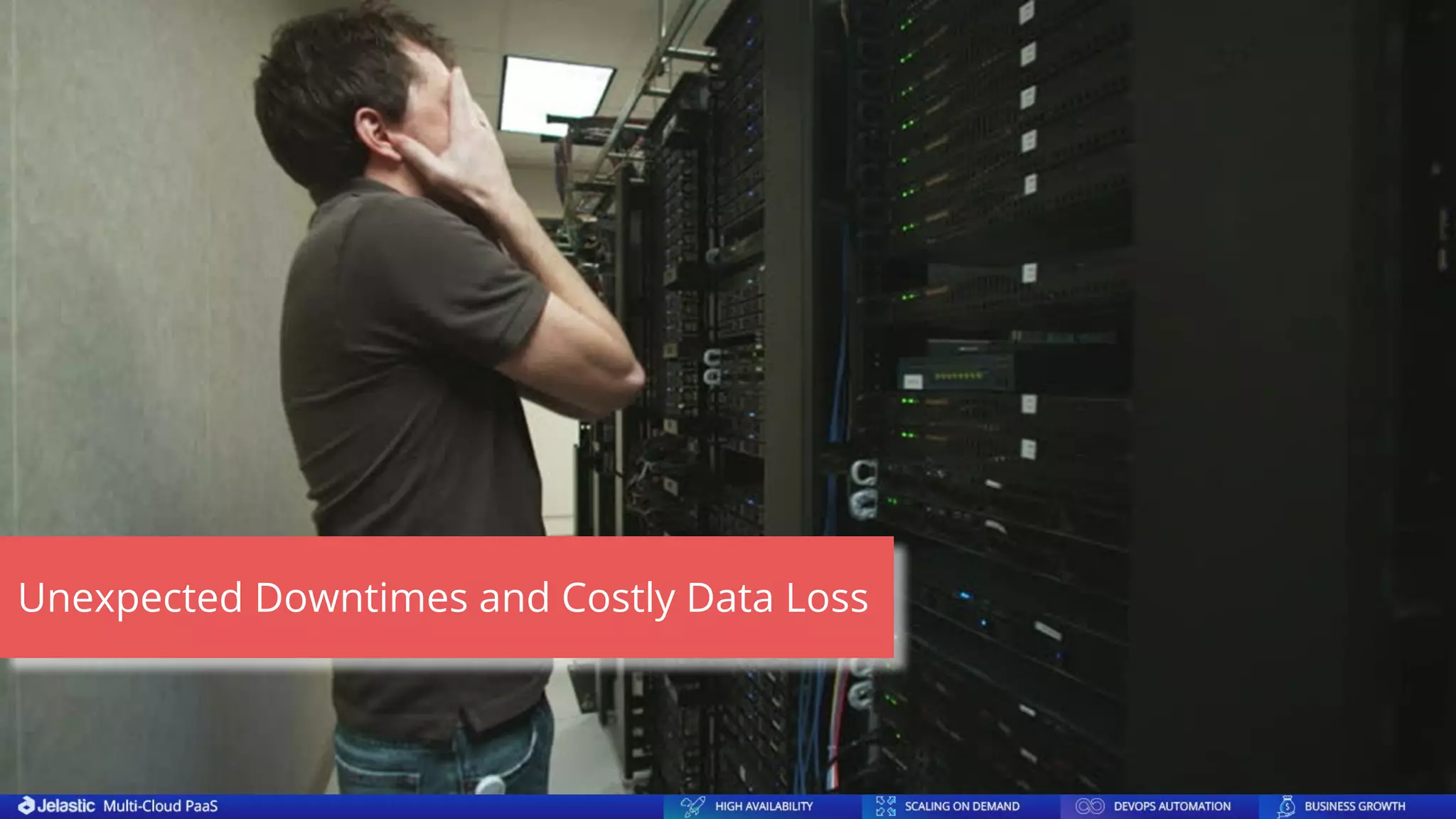
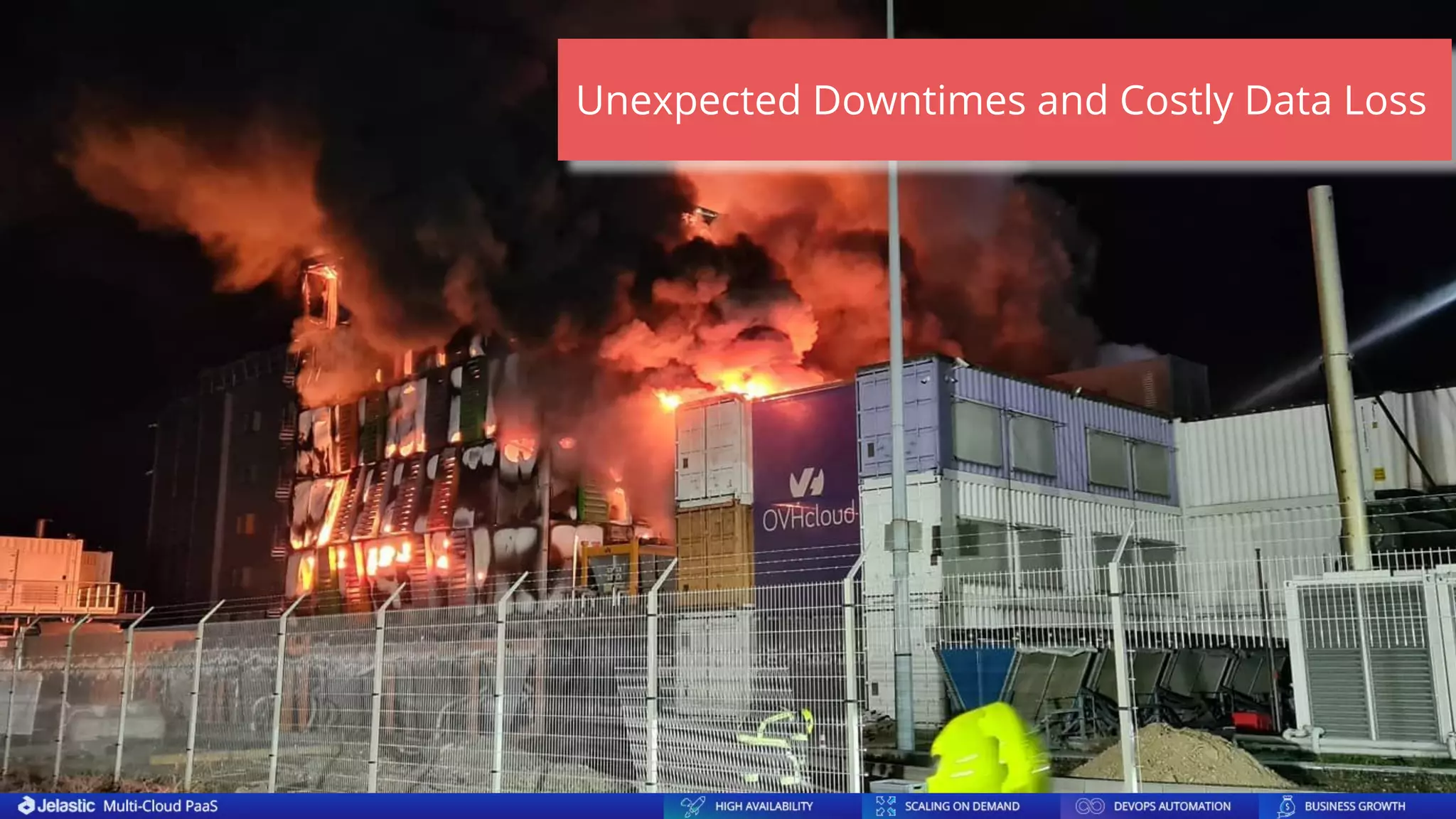
Unexpected Downtimes and Costly Data Loss
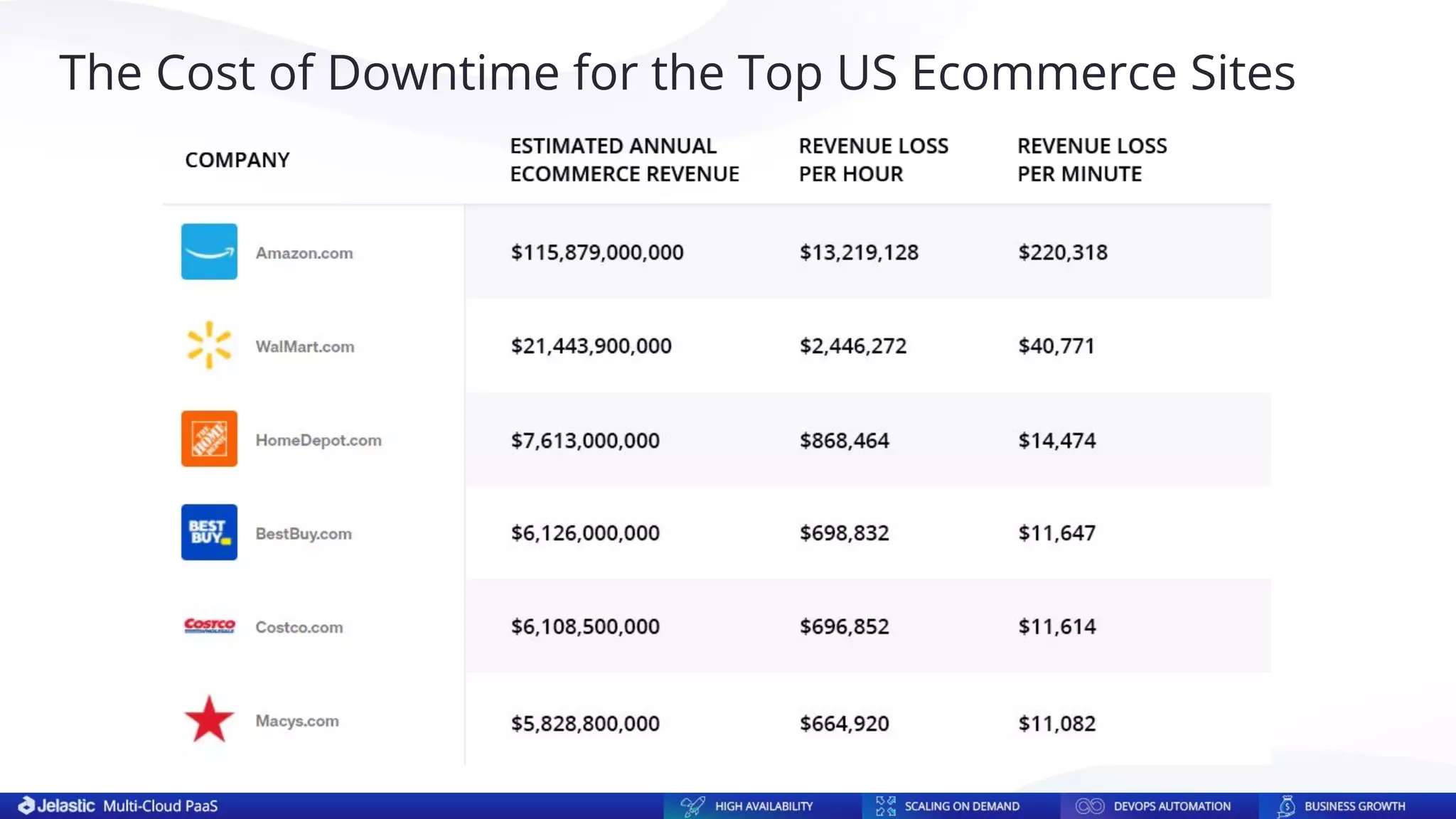
The Cost of Downtime for the Top US Ecommerce Sites
Configuration and Management Complexity
● Create the required number of server nodes
● Add MariaDB repositories to all nodes
● Install MariaDB on all nodes
● Configure each server in the cluster
● Open firewall on every server for inter-node
communication
● Install and configure SQL Load Balancer
● Initiate and start the cluster
● Check the nodes and the cluster operability
● Control and timely perform database software updates
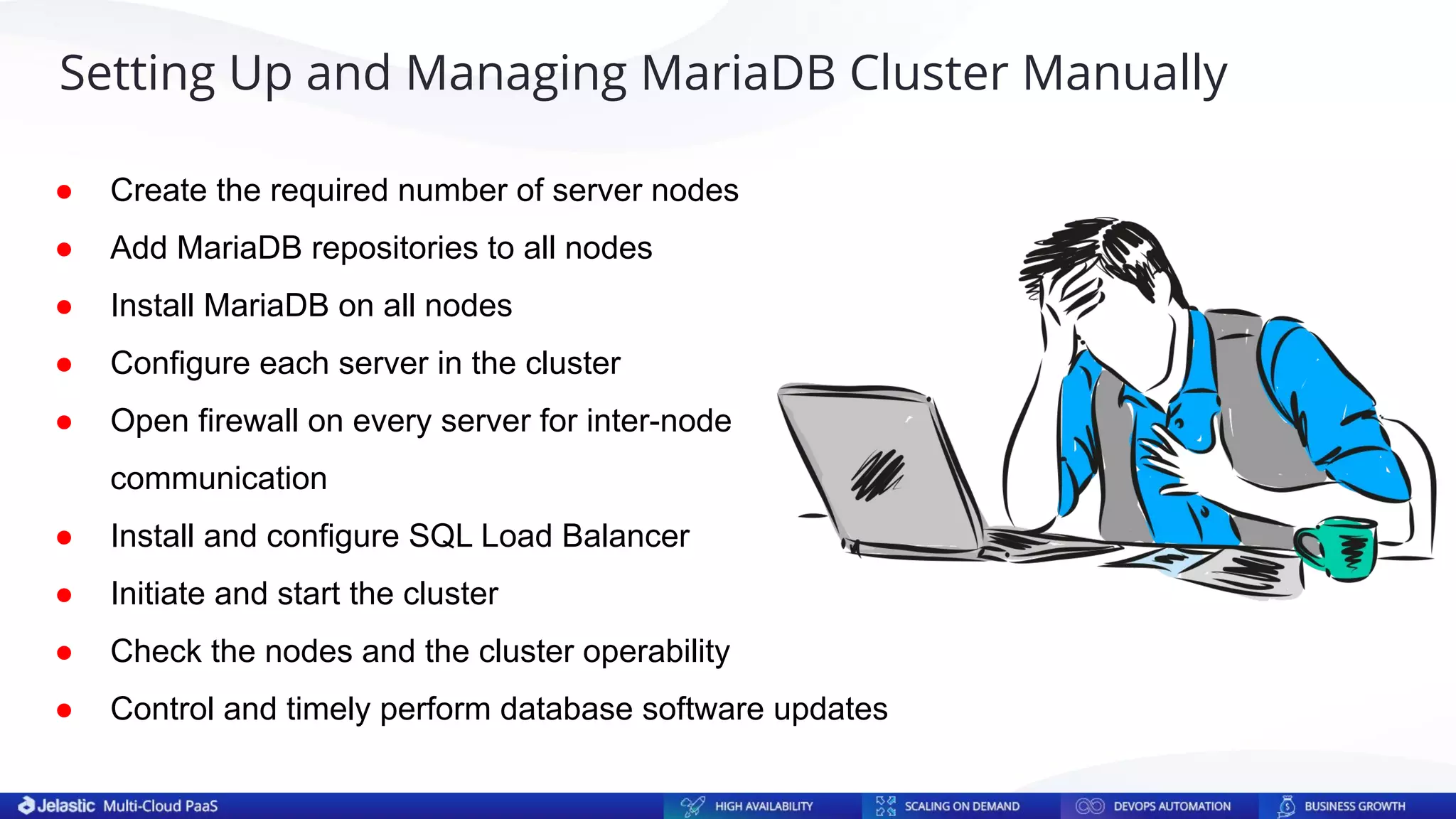
Setting Up and Managing MariaDB Cluster Manually
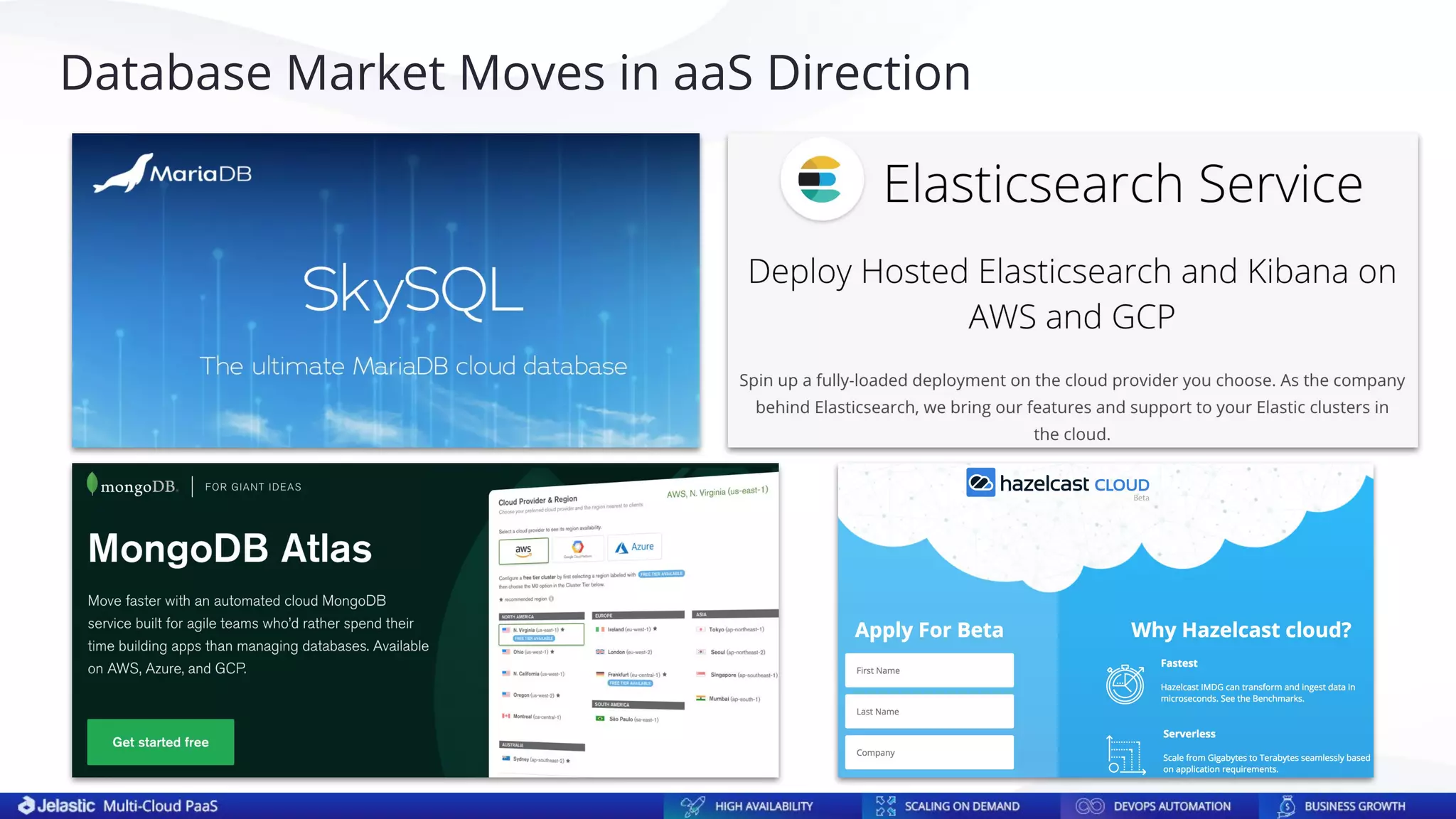
Database Market Moves in aaS Direction
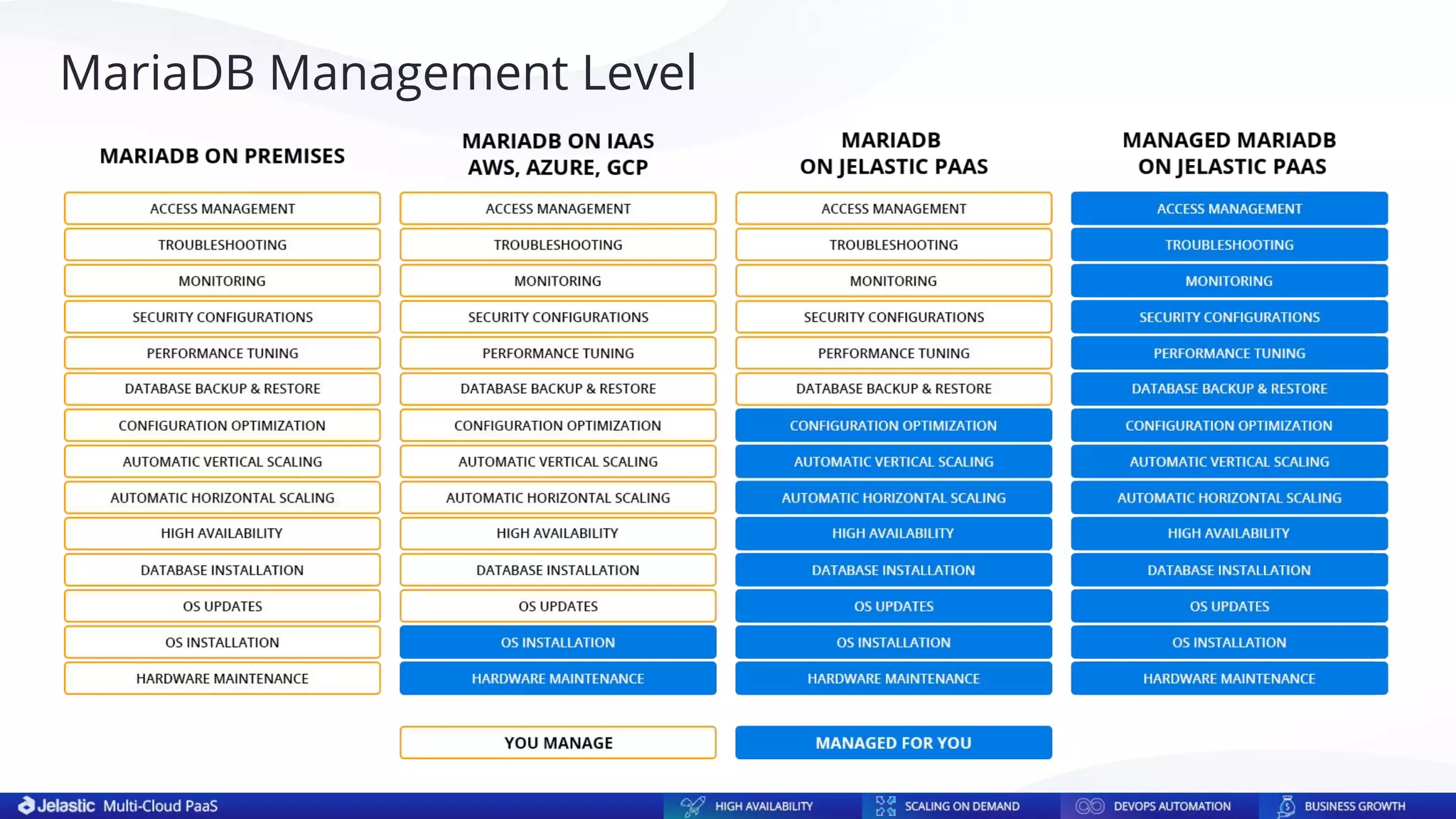
MariaDB Management Level
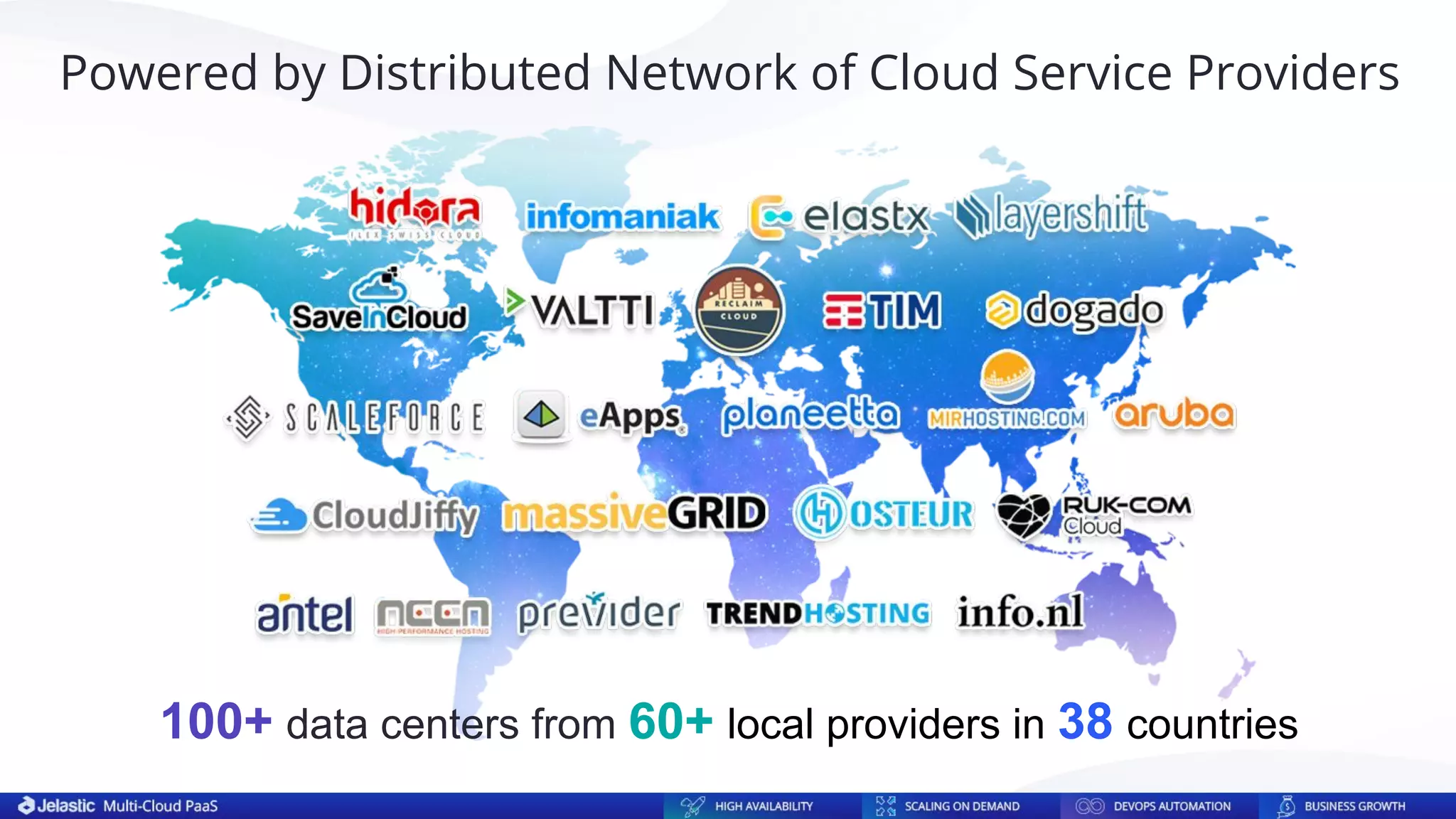
100+ data centers from 60+ local providers in 38 countries
Powered by Distributed Network of Cloud Service Providers
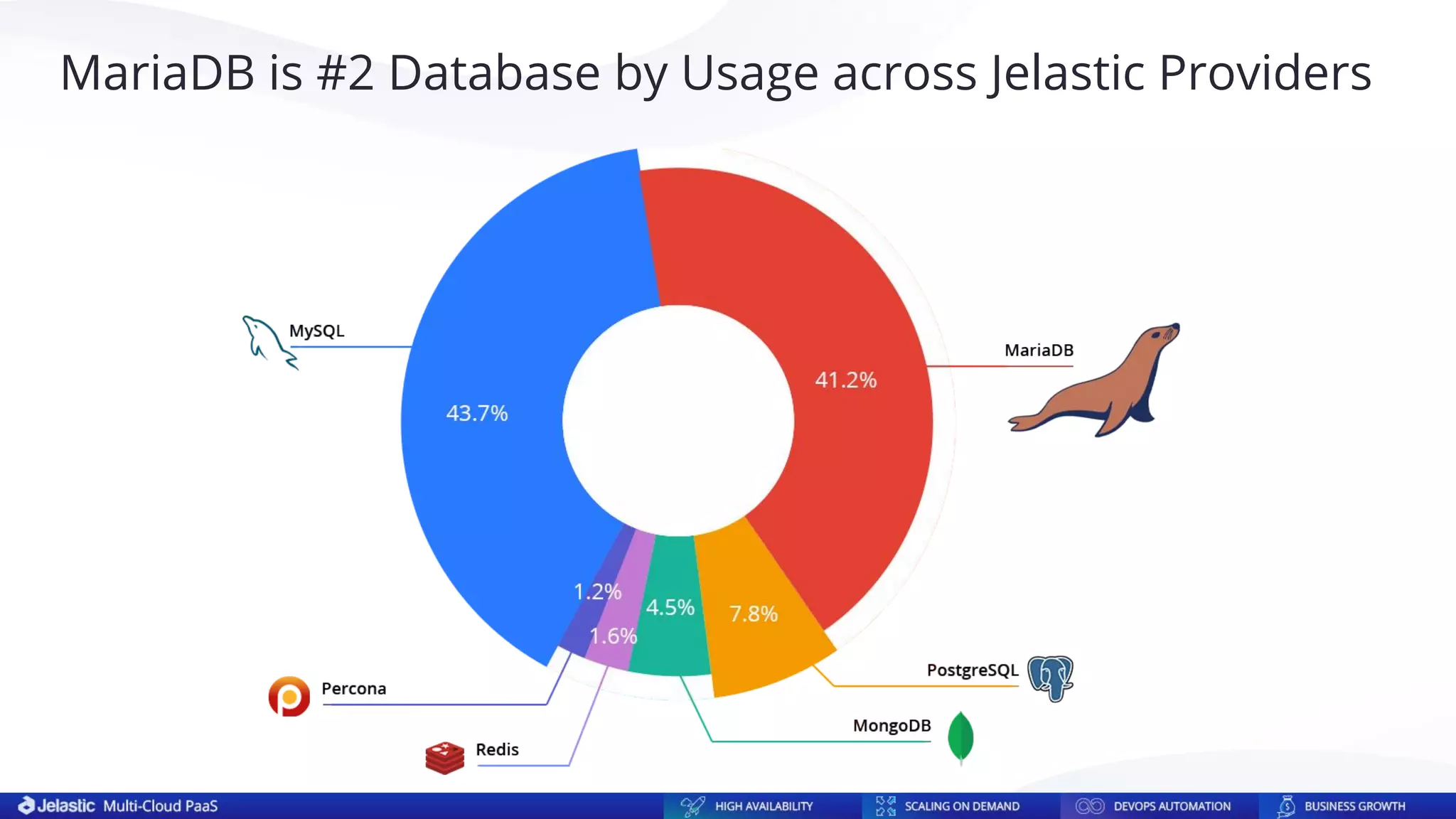
MariaDB is #2 Database by Usage across Jelastic Providers
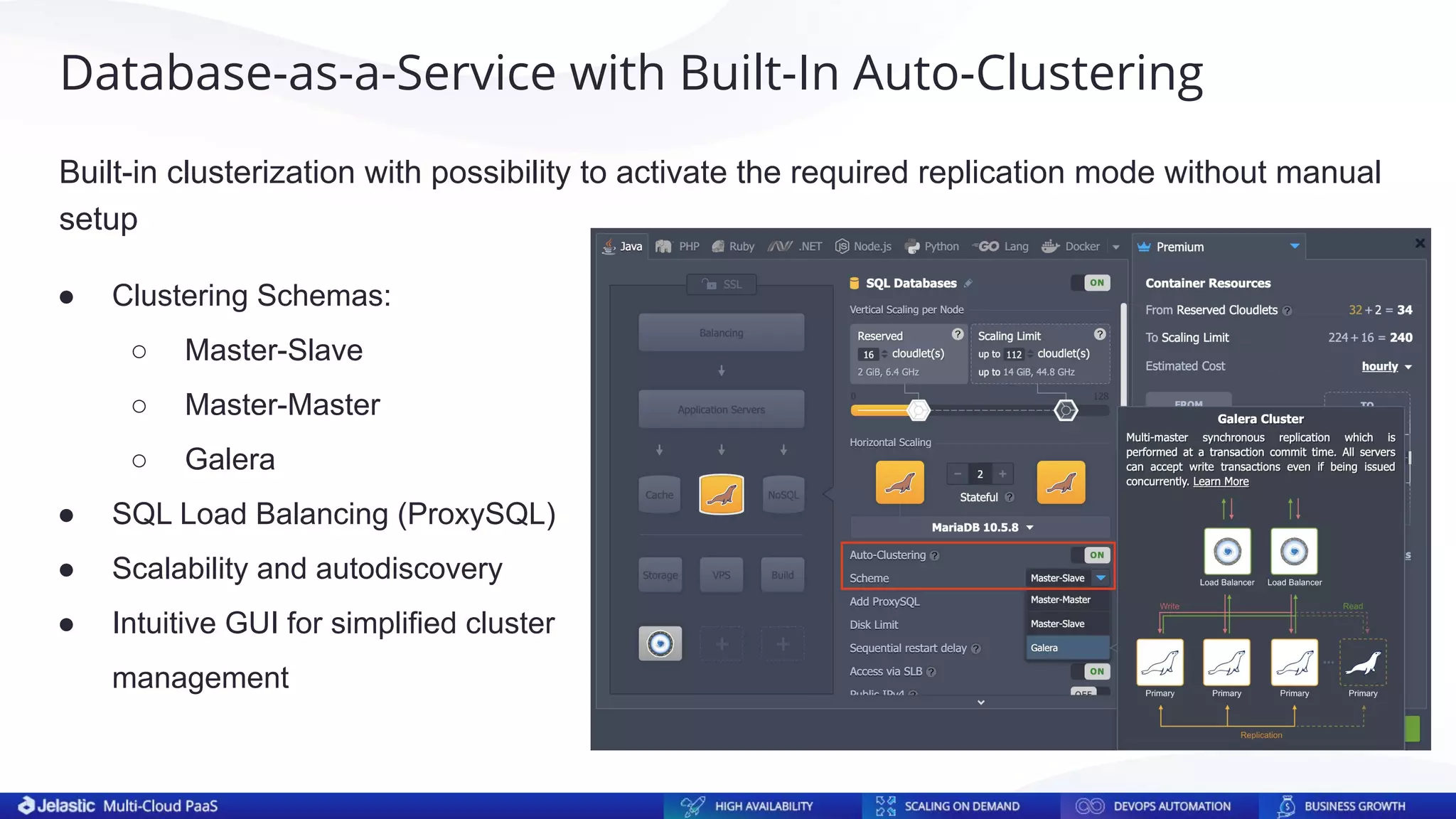
Built-in clusterization with possibility to activate the required replication mode without manual
setup
Database-as-a-Service with Built-In Auto-Clustering
● Clustering Schemas:
○ Master-Slave
○ Master-Master
○ Galera
● SQL Load Balancing (ProxySQL)
● Scalability and autodiscovery
● Intuitive GUI for simplified cluster
management
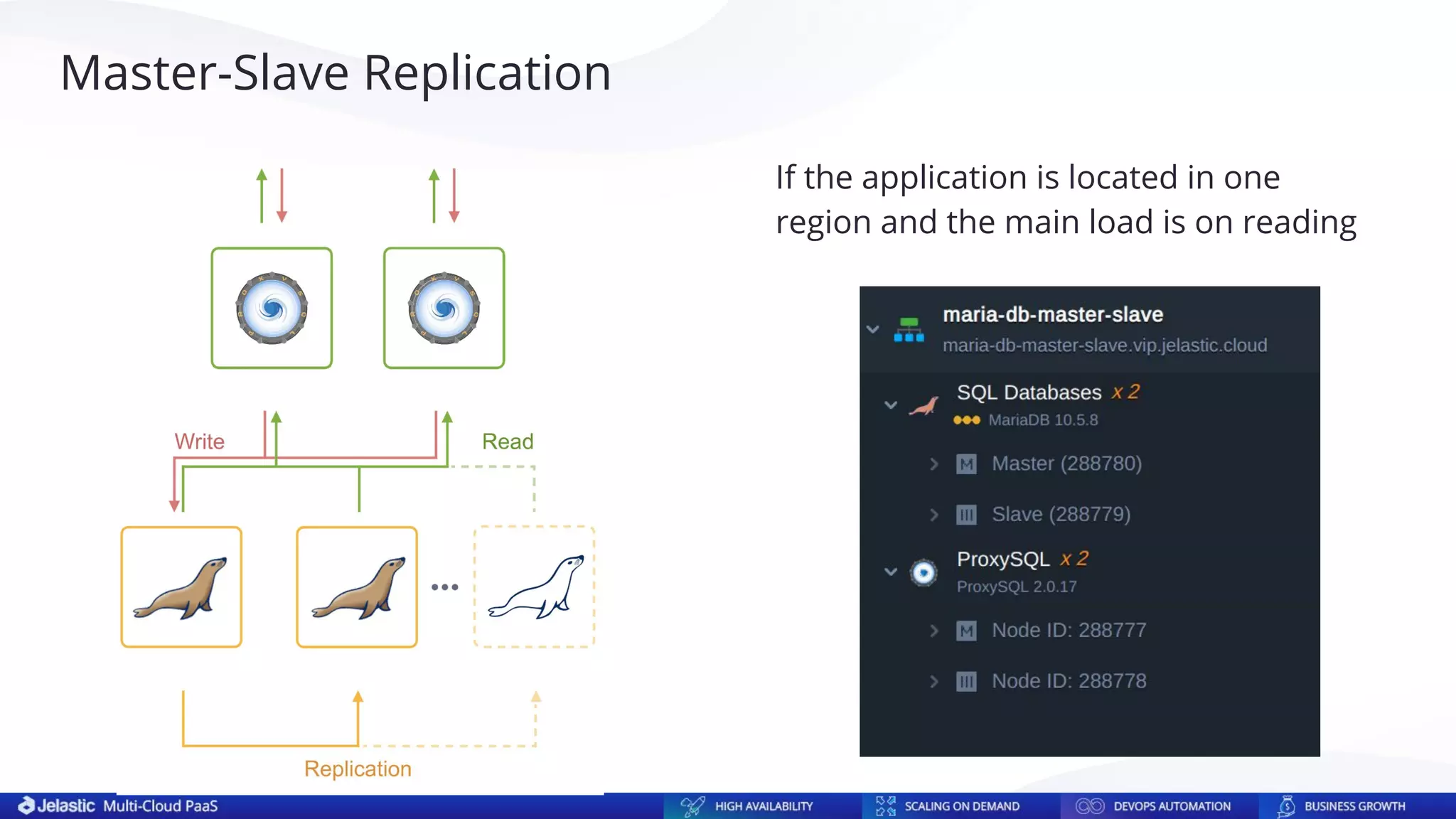
If the application is located in one
region and the main load is on reading
Master-Slave Replication
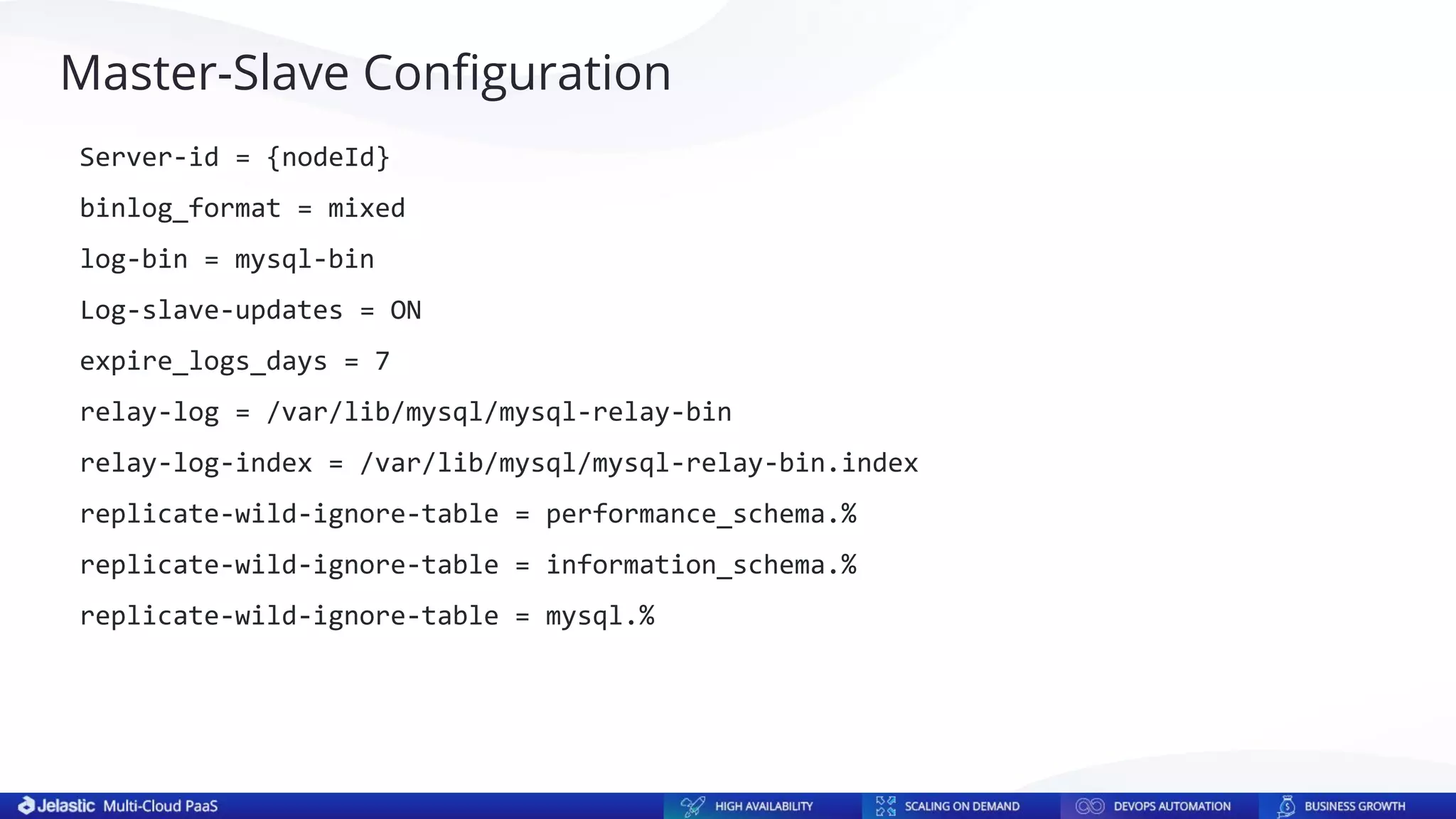
Master-Slave Configuration
Server-id = {nodeId}
binlog_format = mixed
log-bin = mysql-bin
Log-slave-updates = ON
expire_logs_days = 7
relay-log = /var/lib/mysql/mysql-relay-bin
relay-log-index = /var/lib/mysql/mysql-relay-bin.index
replicate-wild-ignore-table = performance_schema.%
replicate-wild-ignore-table = information_schema.%
replicate-wild-ignore-table = mysql.%
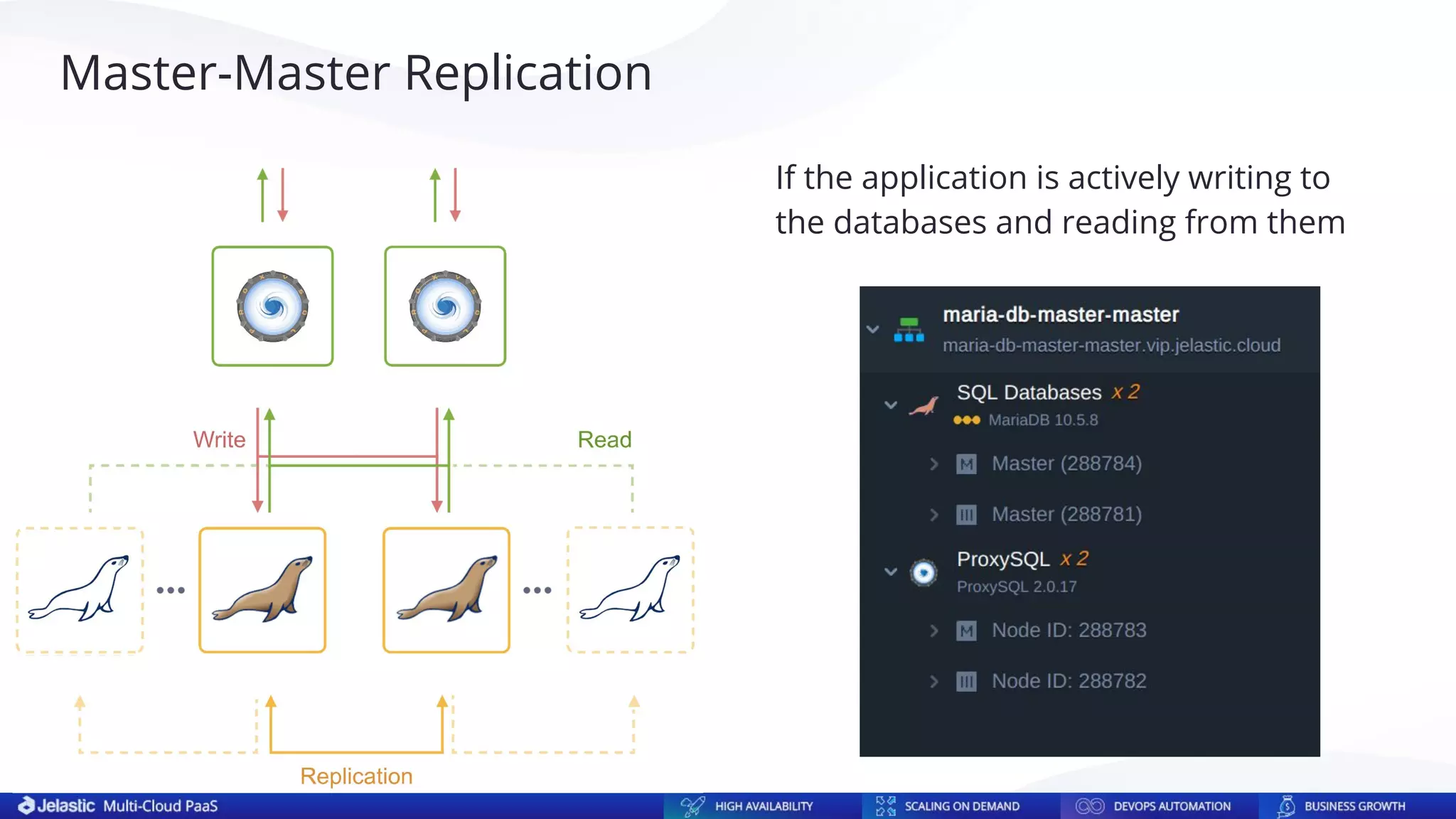
Master-Master Replication
If the application is actively writing to
the databases and reading from them
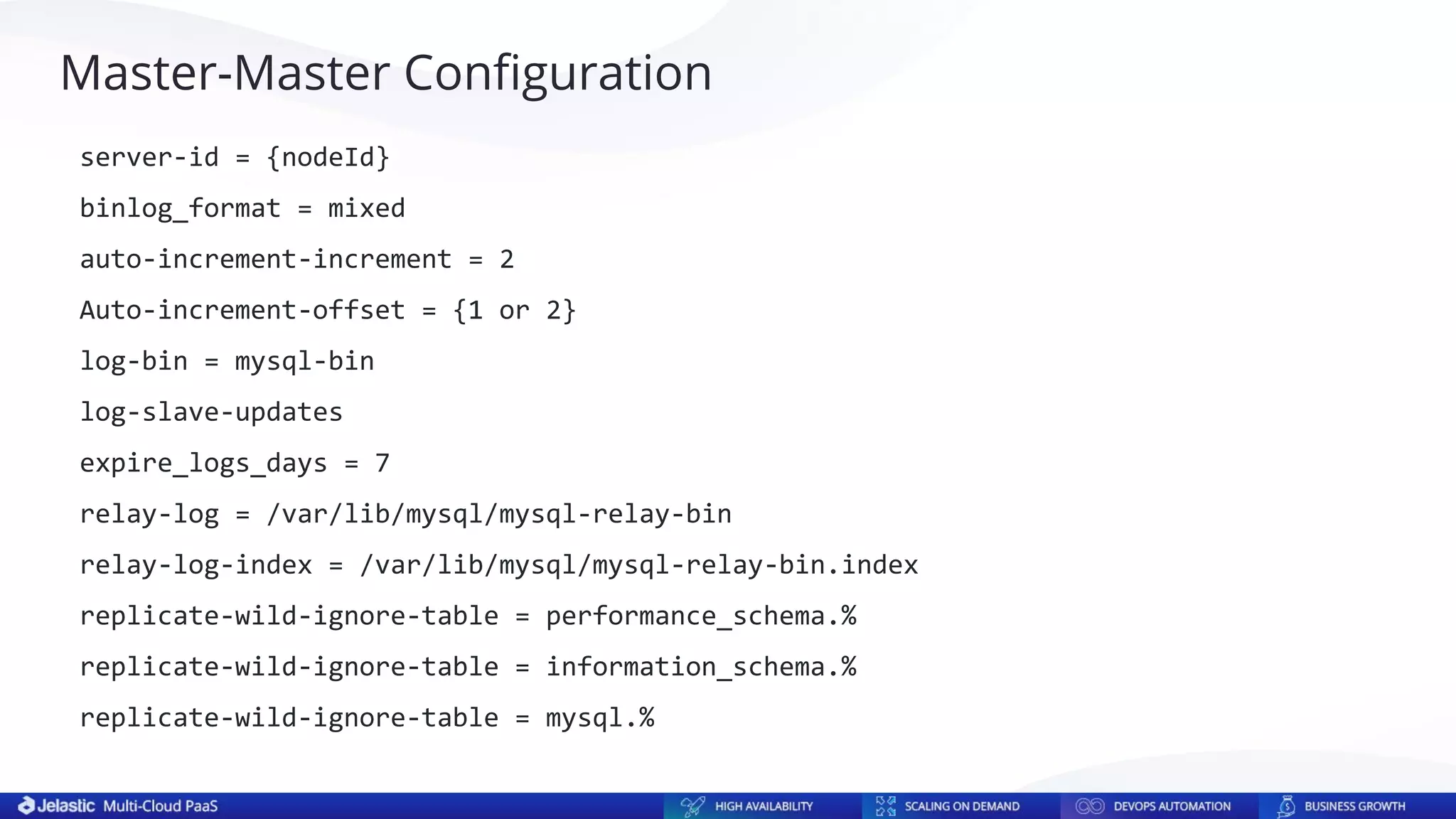
Master-Master Configuration
server-id = {nodeId}
binlog_format = mixed
auto-increment-increment = 2
Auto-increment-offset = {1 or 2}
log-bin = mysql-bin
log-slave-updates
expire_logs_days = 7
relay-log = /var/lib/mysql/mysql-relay-bin
relay-log-index = /var/lib/mysql/mysql-relay-bin.index
replicate-wild-ignore-table = performance_schema.%
replicate-wild-ignore-table = information_schema.%
replicate-wild-ignore-table = mysql.%
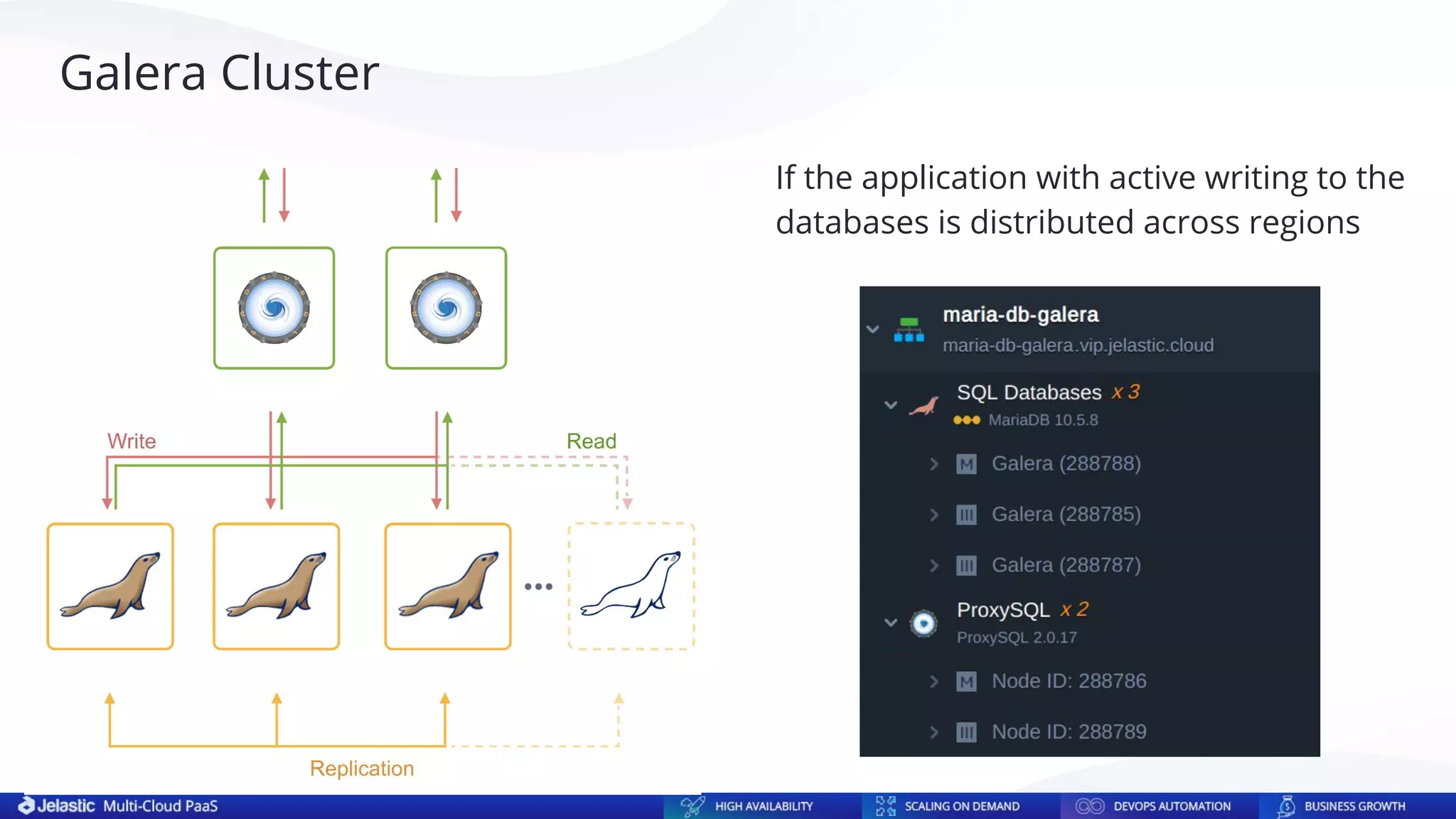
Galera Cluster
If the application with active writing to the
databases is distributed across regions
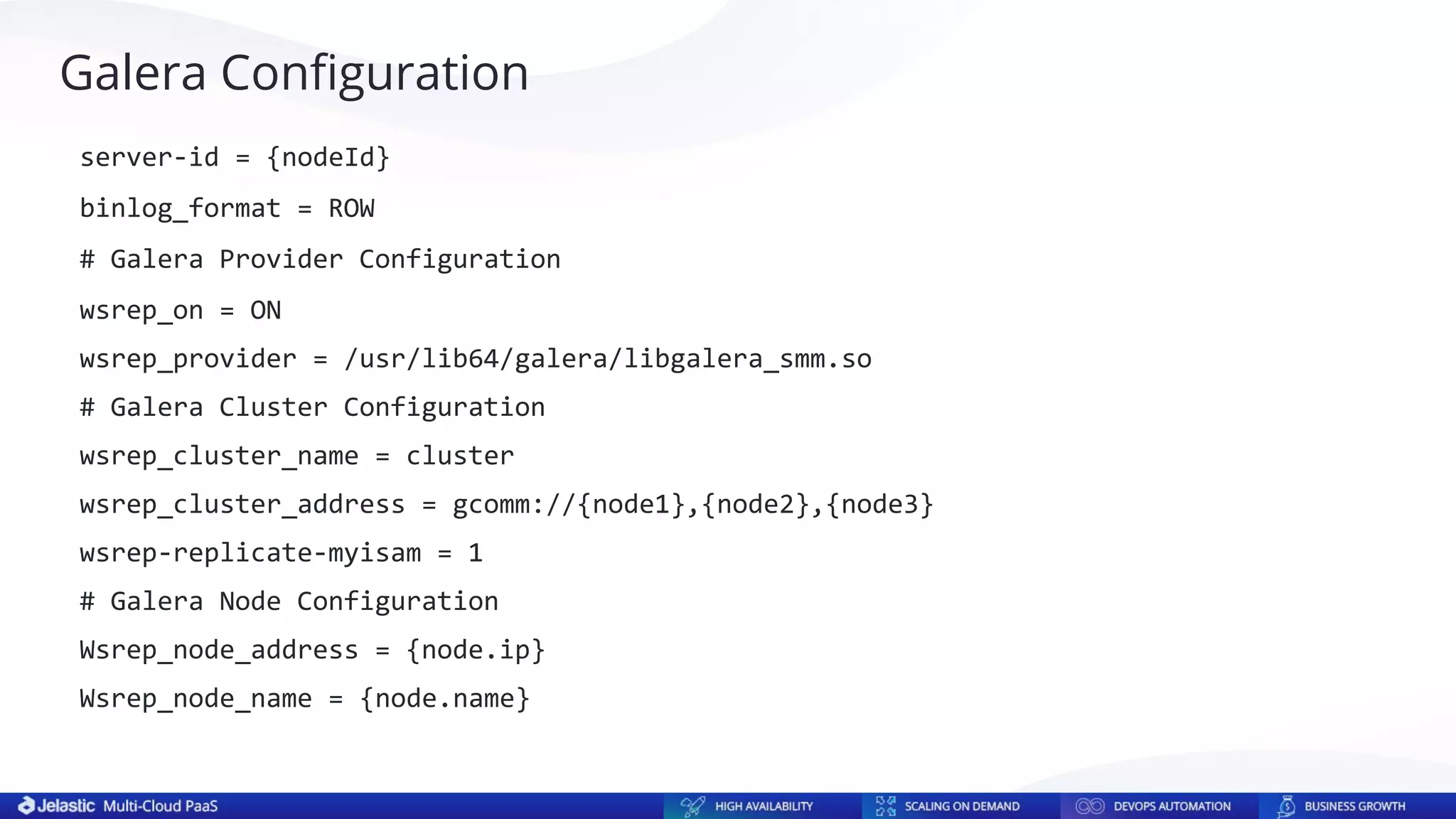
Galera Configuration
server-id = {nodeId}
binlog_format = ROW
# Galera Provider Configuration
wsrep_on = ON
wsrep_provider = /usr/lib64/galera/libgalera_smm.so
# Galera Cluster Configuration
wsrep_cluster_name = cluster
wsrep_cluster_address = gcomm://{node1},{node2},{node3}
wsrep-replicate-myisam = 1
# Galera Node Configuration
Wsrep_node_address = {node.ip}
Wsrep_node_name = {node.name}
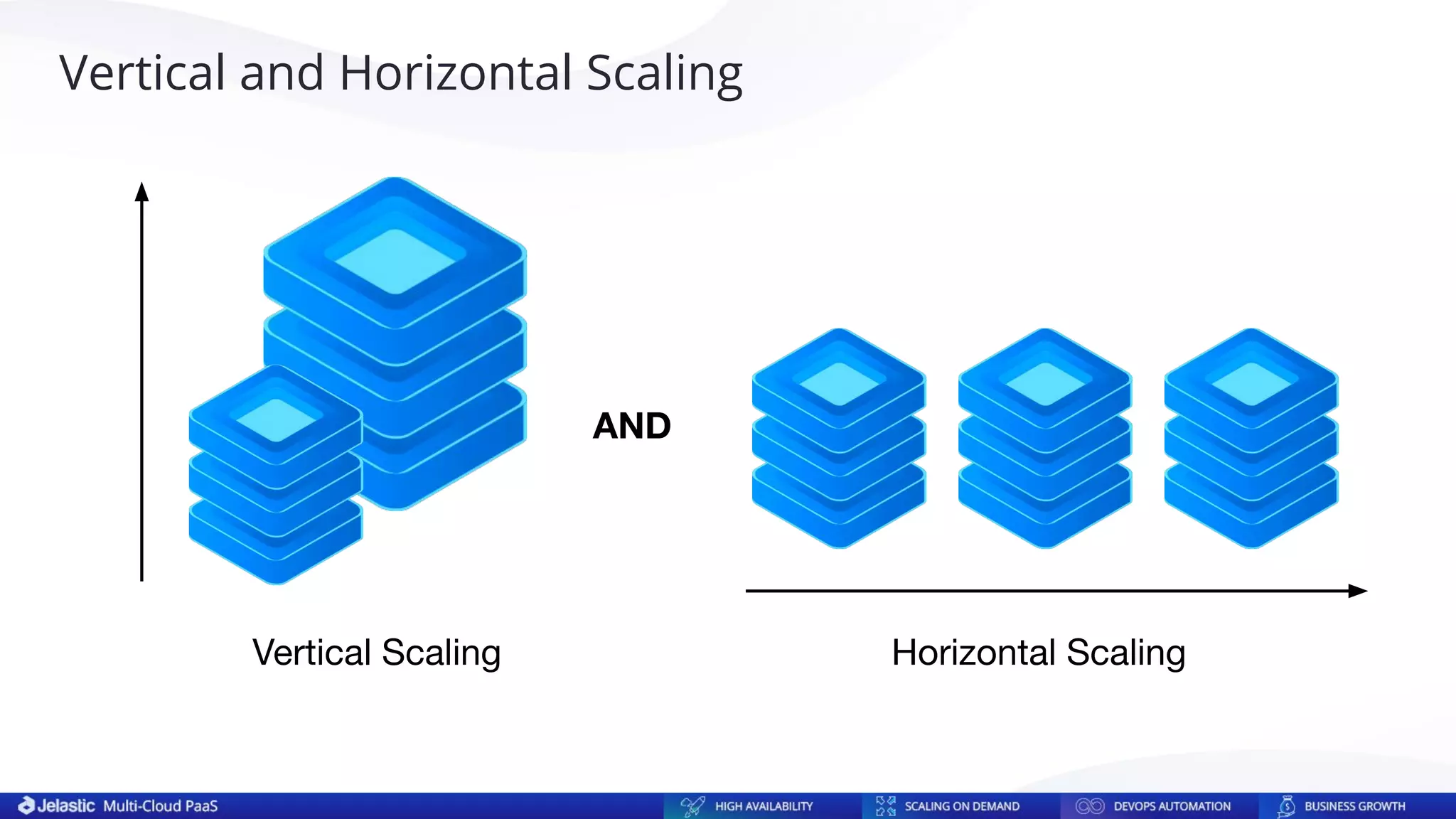
Vertical Scaling Horizontal Scaling
AND
Vertical and Horizontal Scaling
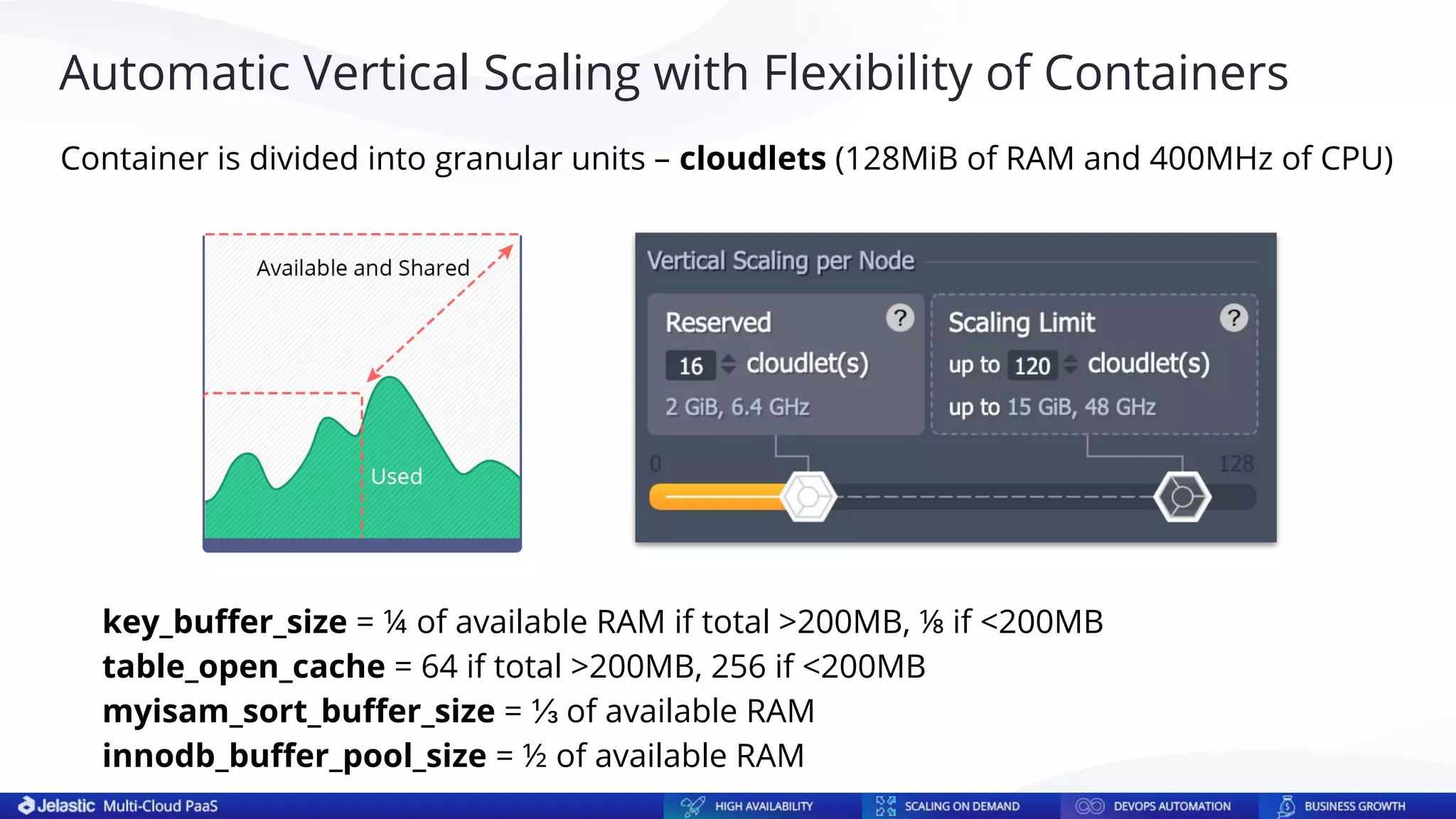
key_buffer_size = ¼ of available RAM if total >200MB, ⅛ if <200MB
table_open_cache = 64 if total >200MB, 256 if <200MB
myisam_sort_buffer_size = ⅓ of available RAM
innodb_buffer_pool_size = ½ of available RAM
Automatic Vertical Scaling with Flexibility of Containers
Container is divided into granular units – cloudlets (128MiB of RAM and 400MHz of CPU)
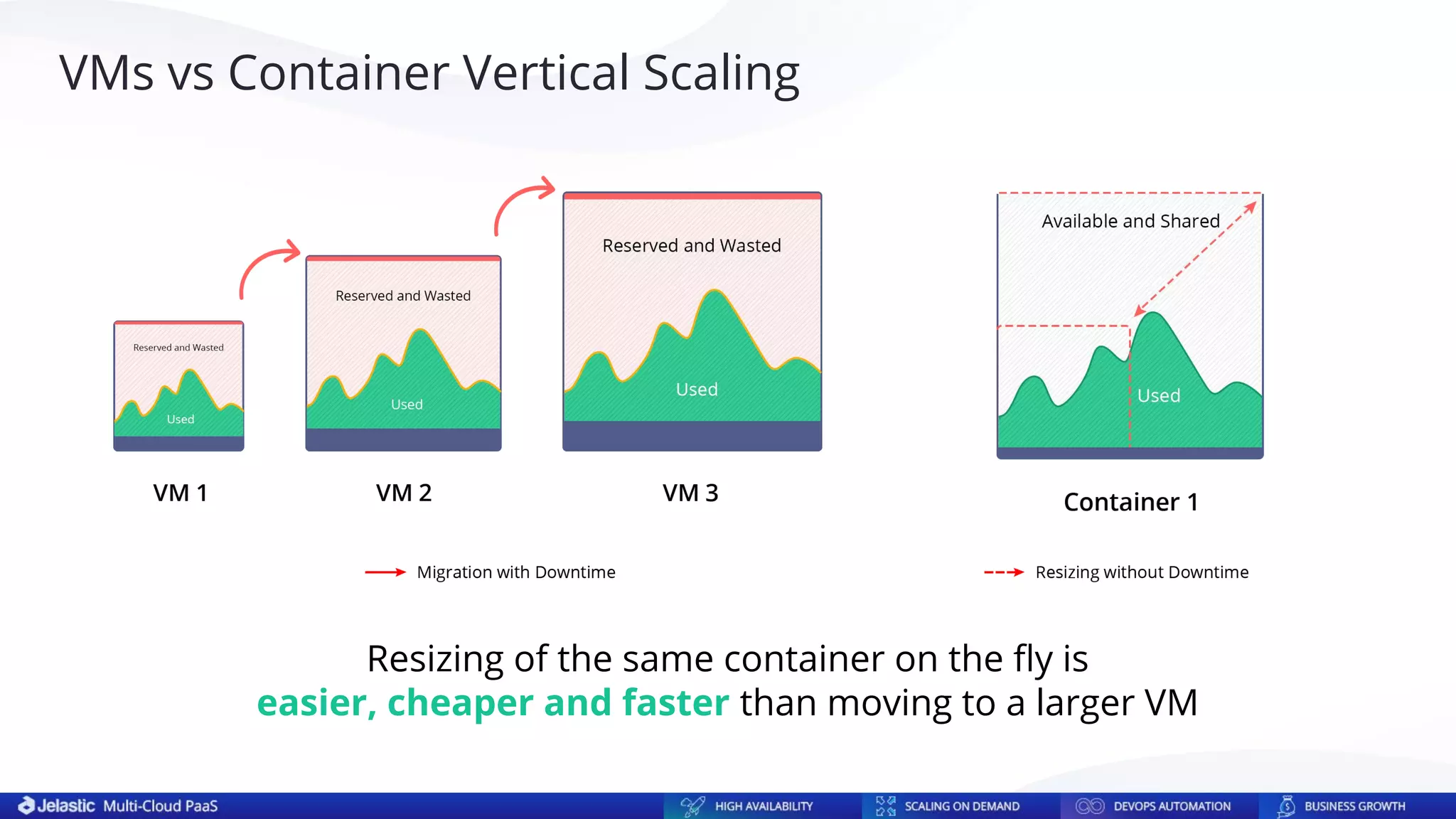
Resizing of the same container on the fly is
easier, cheaper and faster than moving to a larger VM
VMs vs Container Vertical Scaling
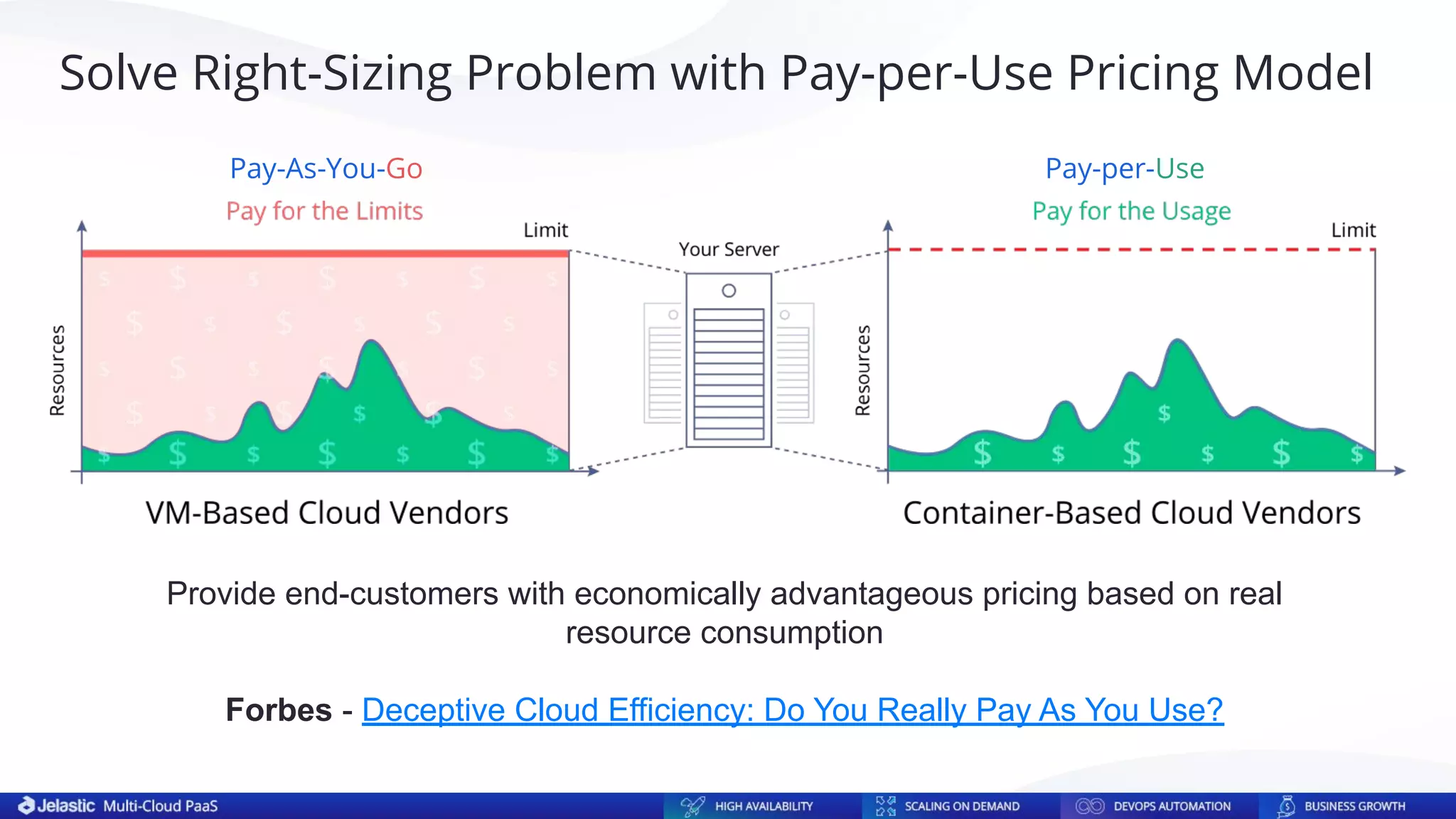
Provide end-customers with economically advantageous pricing based on real
resource consumption
Forbes - Deceptive Cloud Efficiency: Do You Really Pay As You Use?
Solve Right-Sizing Problem with Pay-per-Use Pricing Model
Pay-As-You-Go Pay-per-Use
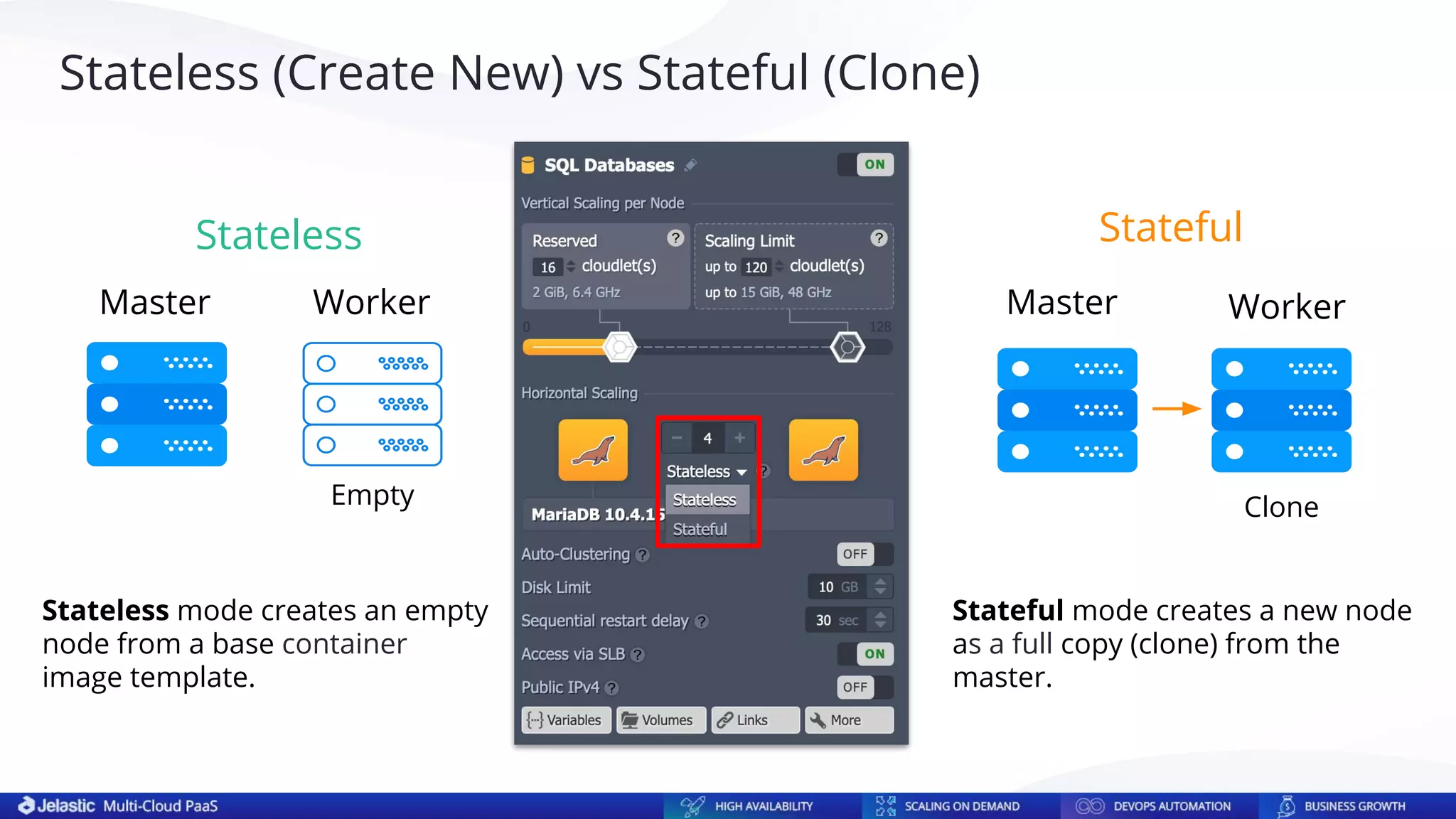
Master
Master Worker Worker
Stateless Stateful
Stateless mode creates an empty
node from a base container
image template.
Stateful mode creates a new node
as a full copy (clone) from the
master.
Empty Clone
Stateless (Create New) vs Stateful (Clone)
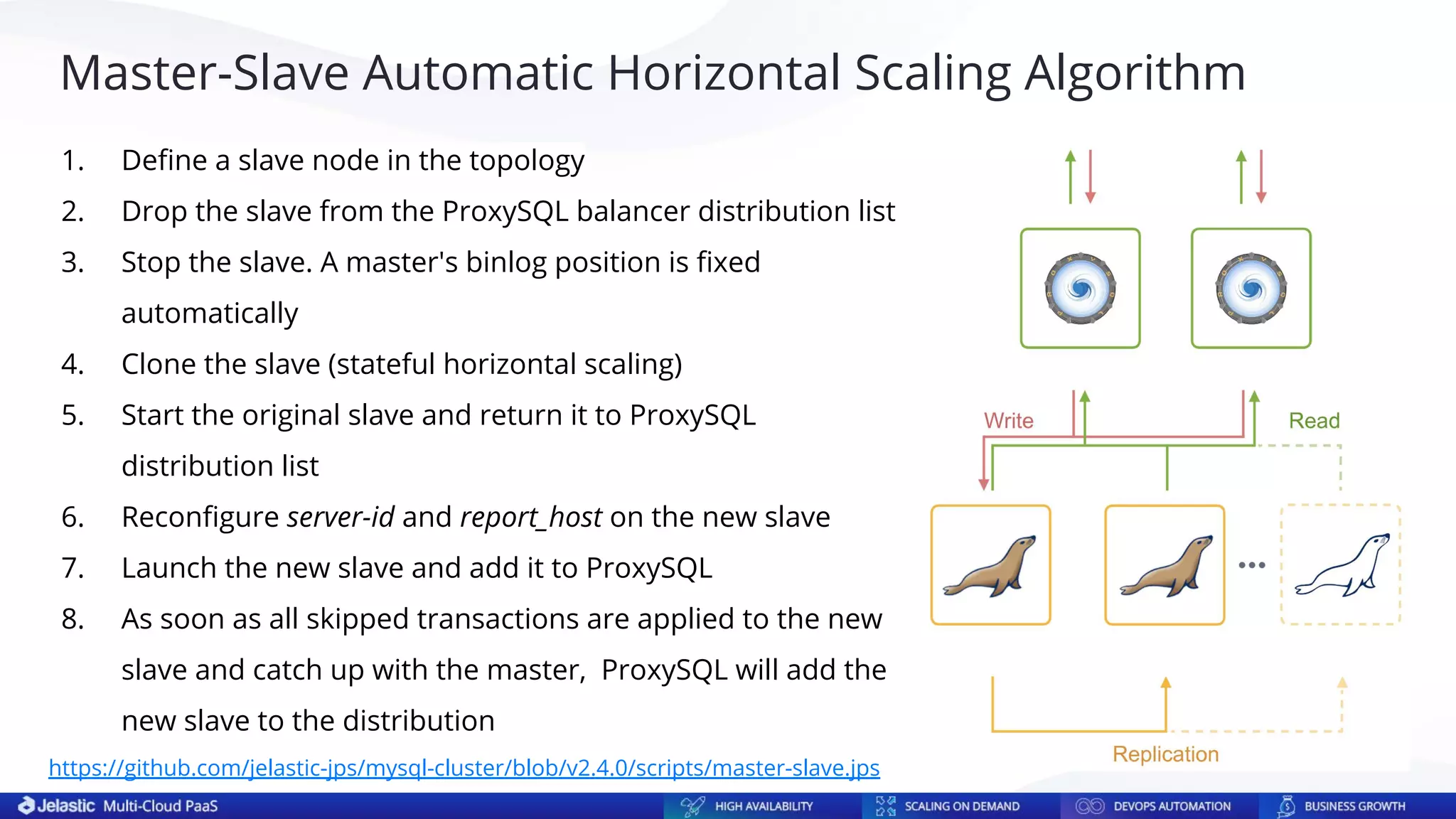
Master-Slave Automatic Horizontal Scaling Algorithm
1. Define a slave node in the topology
2. Drop the slave from the ProxySQL balancer distribution list
3. Stop the slave. A master's binlog position is fixed
automatically
4. Clone the slave (stateful horizontal scaling)
5. Start the original slave and return it to ProxySQL
distribution list
6. Reconfigure server-id and report_host on the new slave
7. Launch the new slave and add it to ProxySQL
8. As soon as all skipped transactions are applied to the new
slave and catch up with the master, ProxySQL will add the
new slave to the distribution
https://github.com/jelastic-jps/mysql-cluster/blob/v2.4.0/scripts/master-slave.jps
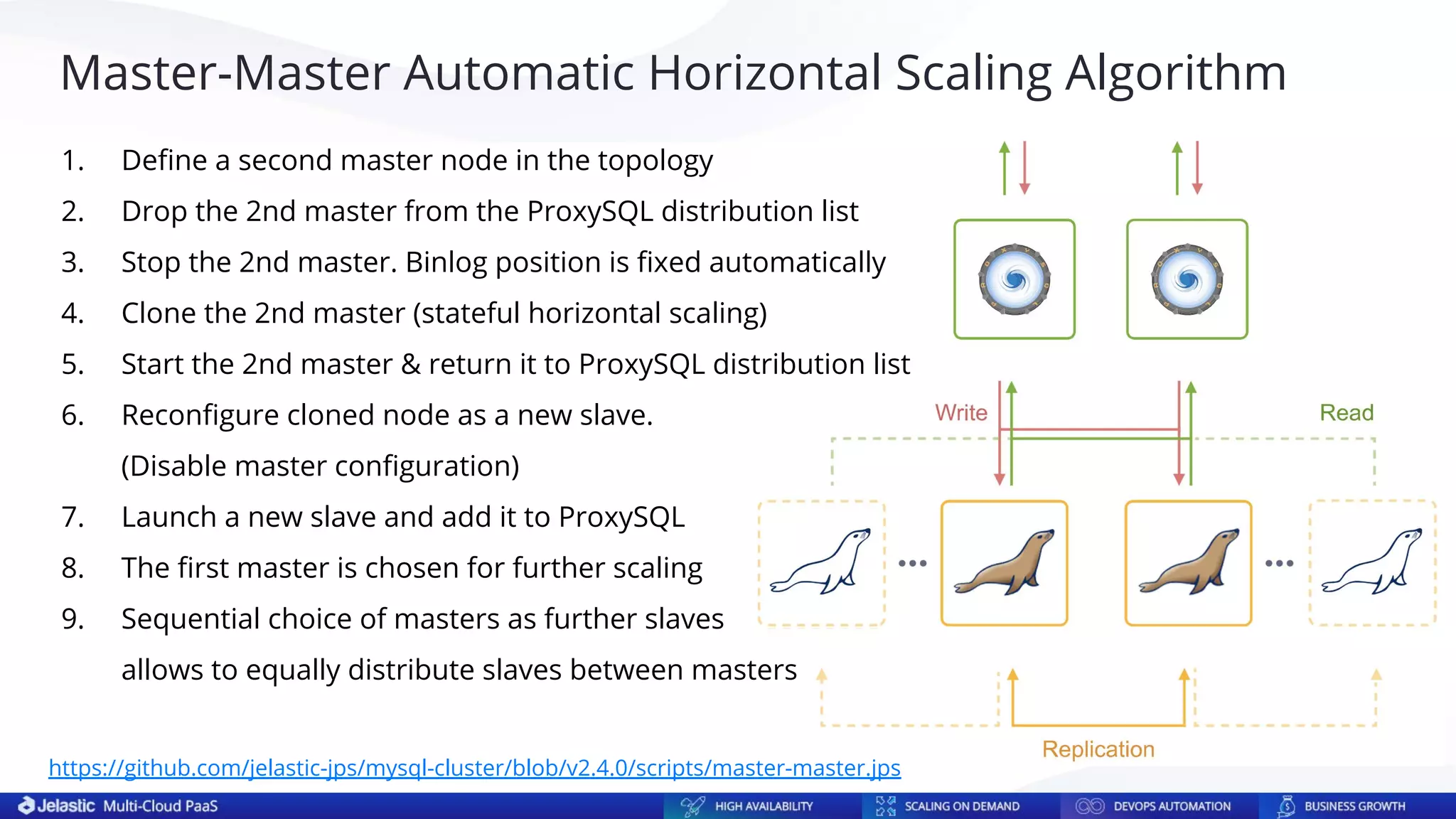
Master-Master Automatic Horizontal Scaling Algorithm
1. Define a second master node in the topology
2. Drop the 2nd master from the ProxySQL distribution list
3. Stop the 2nd master. Binlog position is fixed automatically
4. Clone the 2nd master (stateful horizontal scaling)
5. Start the 2nd master & return it to ProxySQL distribution list
6. Reconfigure cloned node as a new slave.
(Disable master configuration)
7. Launch a new slave and add it to ProxySQL
8. The first master is chosen for further scaling
9. Sequential choice of masters as further slaves
allows to equally distribute slaves between masters
https://github.com/jelastic-jps/mysql-cluster/blob/v2.4.0/scripts/master-master.jps
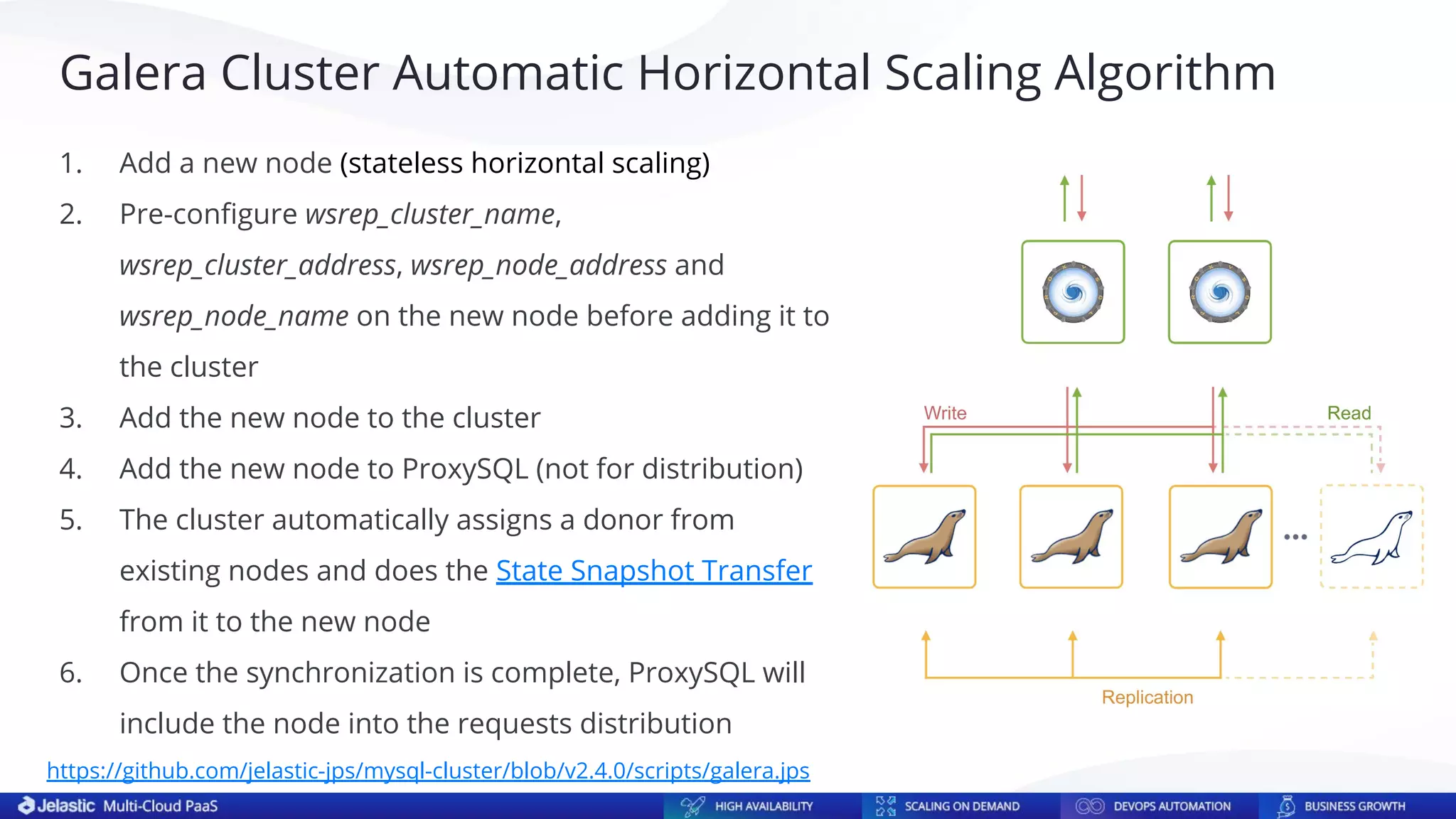
Galera Cluster Automatic Horizontal Scaling Algorithm
1. Add a new node (stateless horizontal scaling)
2. Pre-configure wsrep_cluster_name,
wsrep_cluster_address, wsrep_node_address and
wsrep_node_name on the new node before adding it to
the cluster
3. Add the new node to the cluster
4. Add the new node to ProxySQL (not for distribution)
5. The cluster automatically assigns a donor from
existing nodes and does the State Snapshot Transfer
from it to the new node
6. Once the synchronization is complete, ProxySQL will
include the node into the requests distribution
https://github.com/jelastic-jps/mysql-cluster/blob/v2.4.0/scripts/galera.jps
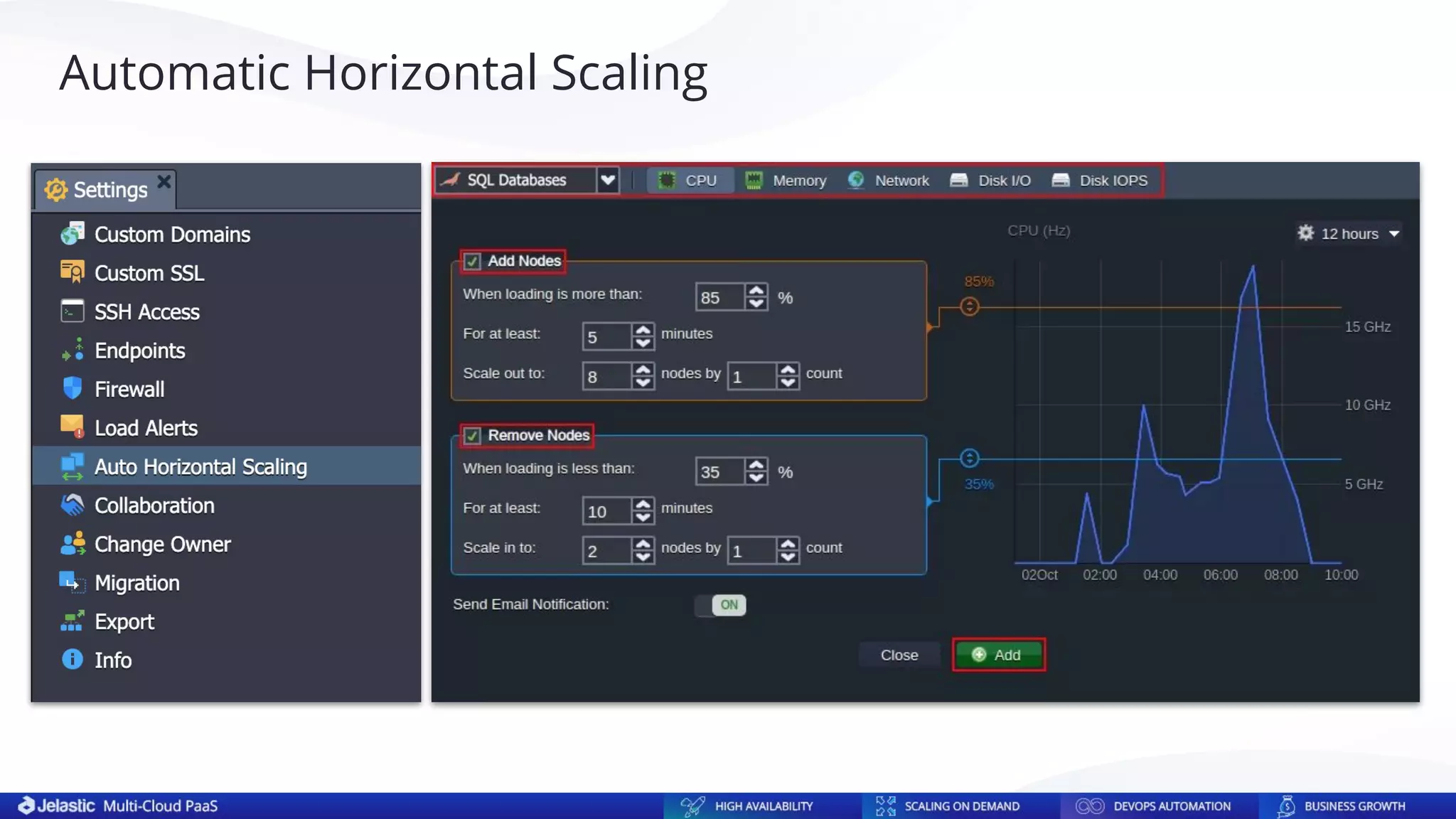
Automatic Horizontal Scaling
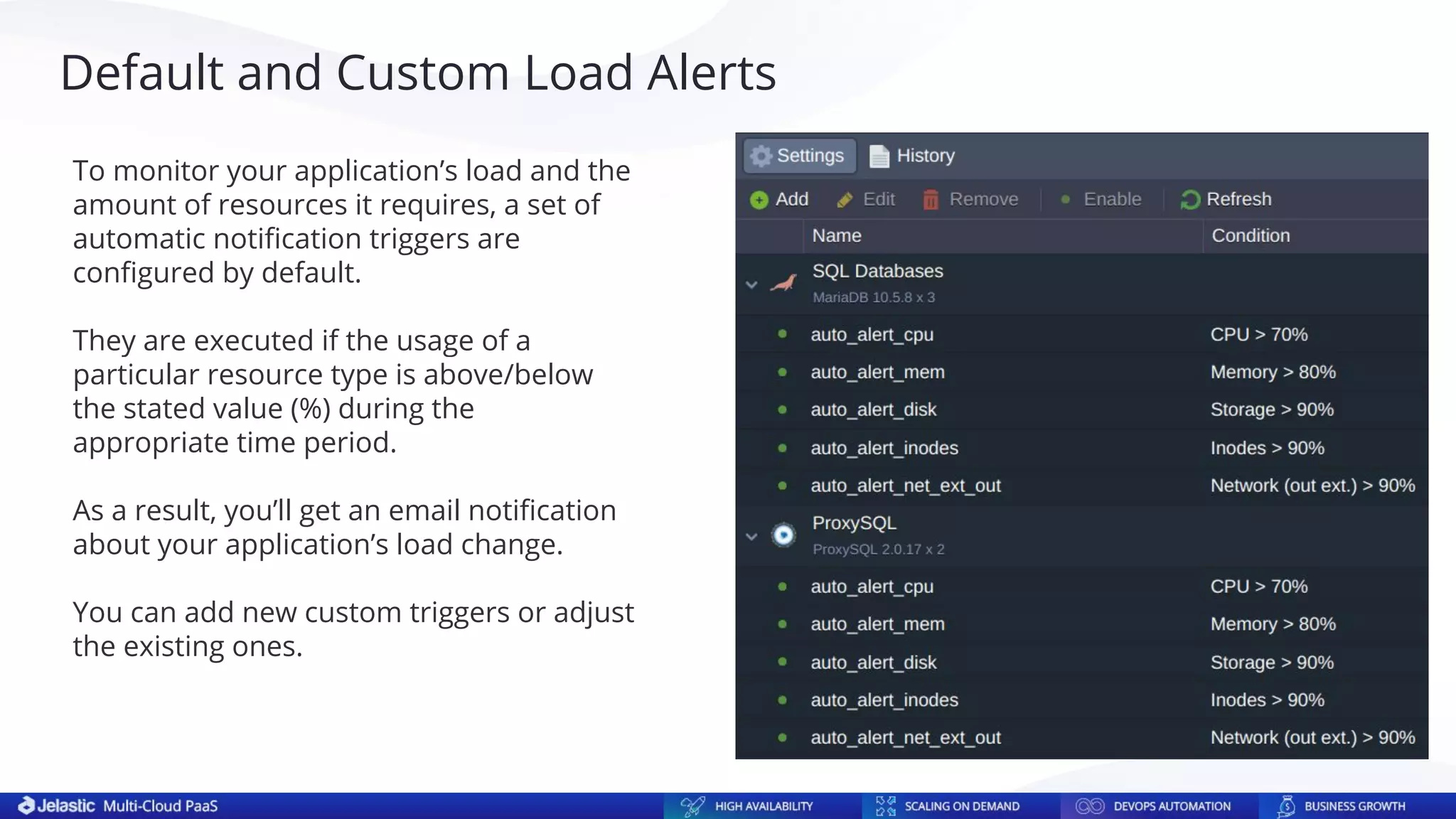
Default and Custom Load Alerts
To monitor your application’s load and the
amount of resources it requires, a set of
automatic notification triggers are
configured by default.
They are executed if the usage of a
particular resource type is above/below
the stated value (%) during the
appropriate time period.
As a result, you’ll get an email notification
about your application’s load change.
You can add new custom triggers or adjust
the existing ones.
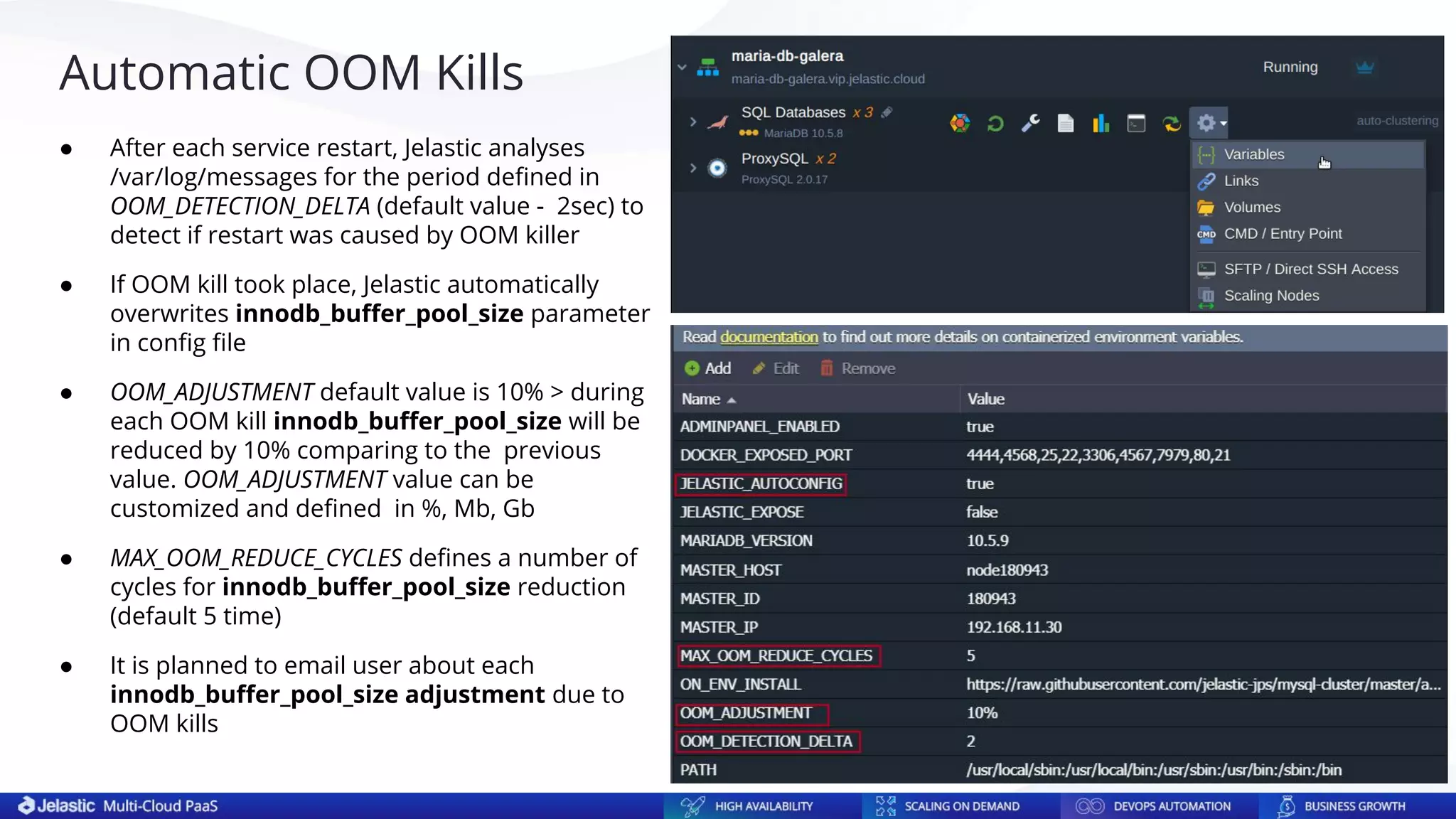
Automatic OOM Kills
● After each service restart, Jelastic analyses
/var/log/messages for the period defined in
OOM_DETECTION_DELTA (default value - 2sec) to
detect if restart was caused by OOM killer
● If OOM kill took place, Jelastic automatically
overwrites innodb_buffer_pool_size parameter
in config file
● OOM_ADJUSTMENT default value is 10% > during
each OOM kill innodb_buffer_pool_size will be
reduced by 10% comparing to the previous
value. OOM_ADJUSTMENT value can be
customized and defined in %, Mb, Gb
● MAX_OOM_REDUCE_CYCLES defines a number of
cycles for innodb_buffer_pool_size reduction
(default 5 time)
● It is planned to email user about each
innodb_buffer_pool_size adjustment due to
OOM kills
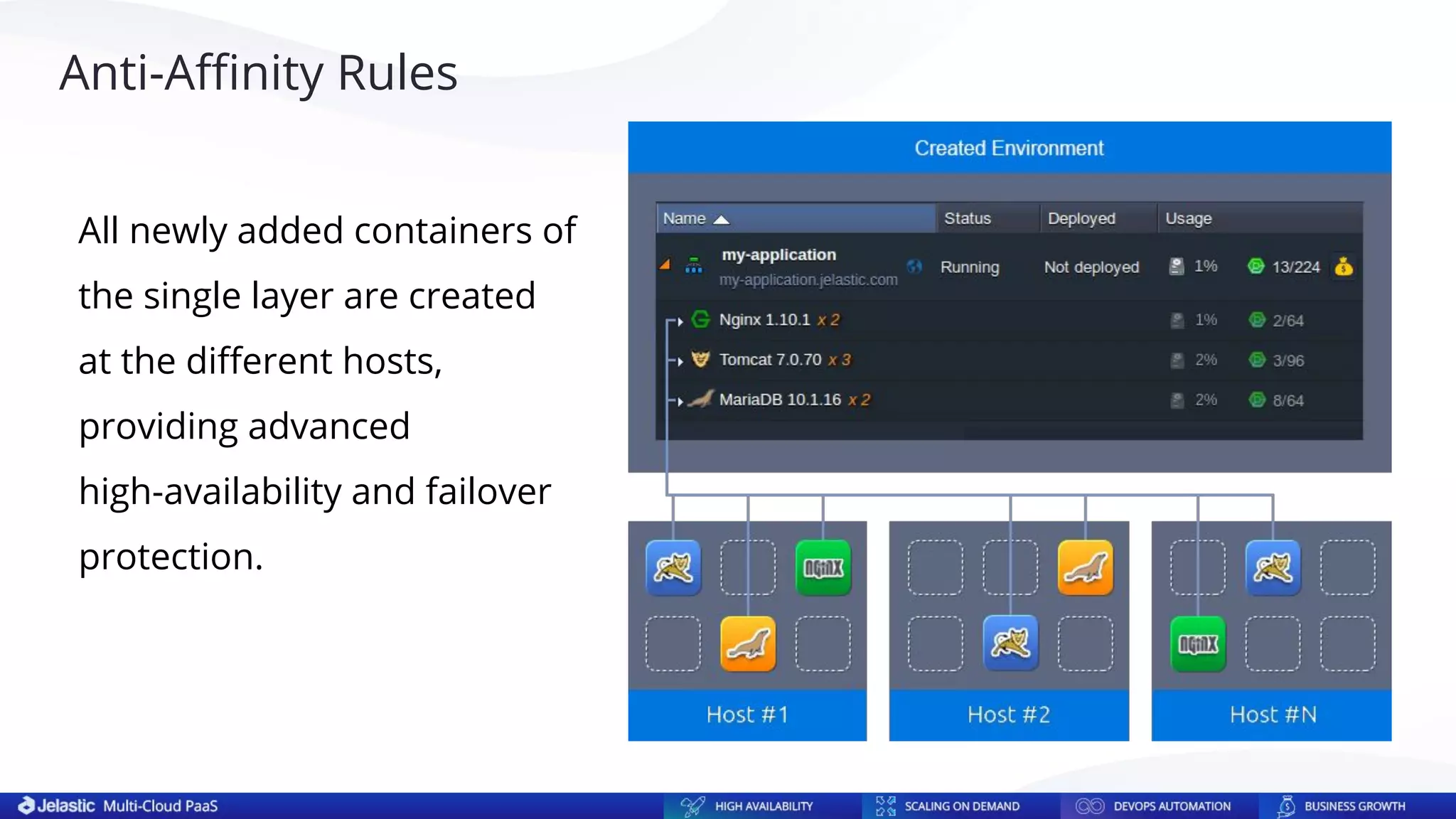
All newly added containers of
the single layer are created
at the different hosts,
providing advanced
high-availability and failover
protection.
Anti-Affinity Rules
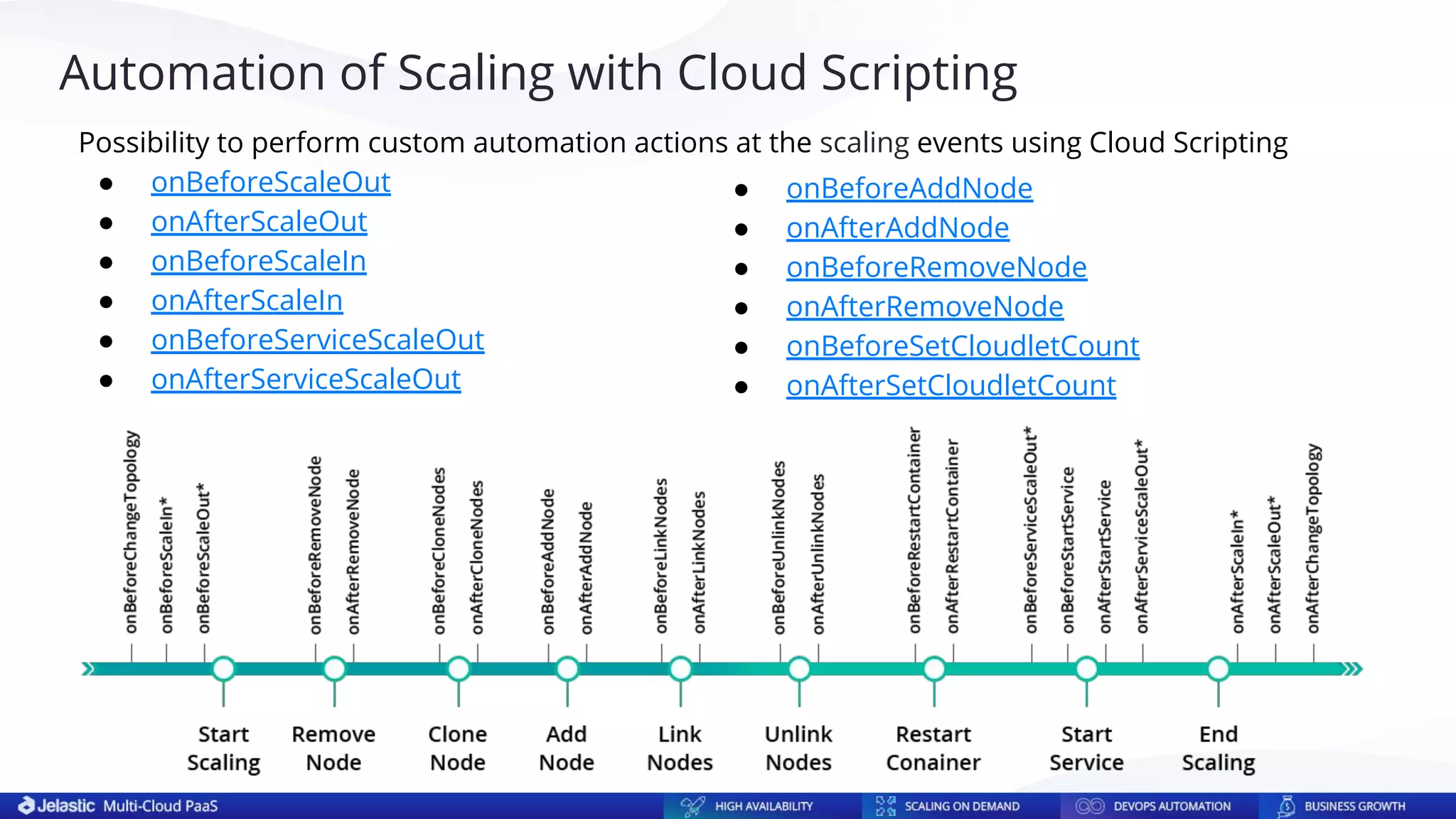
Possibility to perform custom automation actions at the scaling events using Cloud Scripting
● onBeforeScaleOut
● onAfterScaleOut
● onBeforeScaleIn
● onAfterScaleIn
● onBeforeServiceScaleOut
● onAfterServiceScaleOut
● onBeforeAddNode
● onAfterAddNode
● onBeforeRemoveNode
● onAfterRemoveNode
● onBeforeSetCloudletCount
● onAfterSetCloudletCount
Automation of Scaling with Cloud Scripting
Unexpected Downtimes and Costly Data Loss
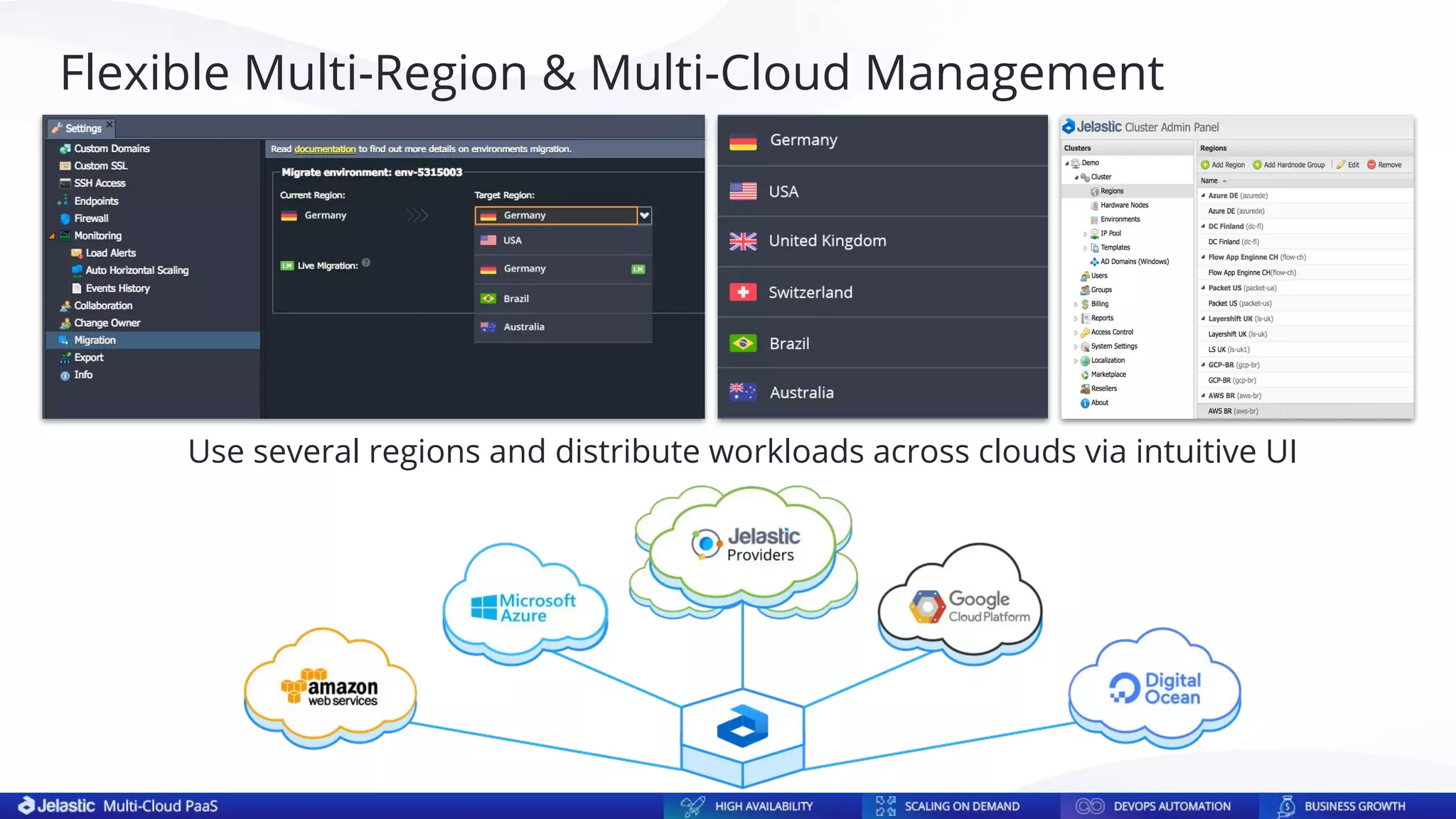
Use several regions and distribute workloads across clouds via intuitive UI
Flexible Multi-Region & Multi-Cloud Management
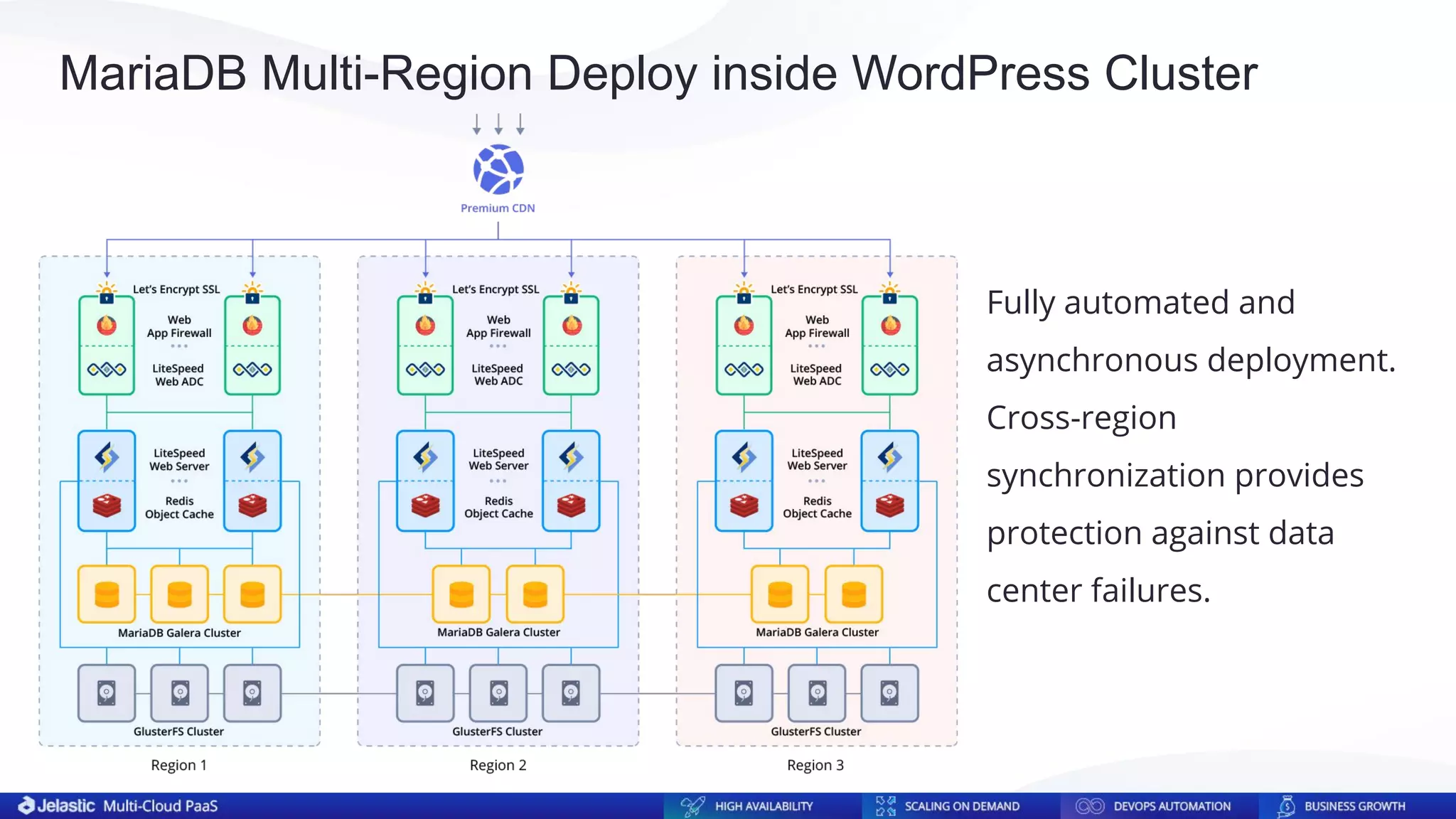
Fully automated and
asynchronous deployment.
Cross-region
synchronization provides
protection against data
center failures.
MariaDB Multi-Region Deploy inside WordPress Cluster
Thank you!
Get in touch for more details
https://jelastic.com/apaas/
info@jelastic.com

MariaDB Auto-Clustering, Vertical and Horizontal Scaling within Jelastic PaaS

  • 1.
  • 2.
    Unexpected Downtimes andCostly Data Loss
  • 3.
    The Cost ofDowntime for the Top US Ecommerce Sites
  • 4.
  • 5.
    ● Create therequired number of server nodes ● Add MariaDB repositories to all nodes ● Install MariaDB on all nodes ● Configure each server in the cluster ● Open firewall on every server for inter-node communication ● Install and configure SQL Load Balancer ● Initiate and start the cluster ● Check the nodes and the cluster operability ● Control and timely perform database software updates Setting Up and Managing MariaDB Cluster Manually
  • 6.
    Database Market Movesin aaS Direction
  • 7.
  • 8.
    100+ data centersfrom 60+ local providers in 38 countries Powered by Distributed Network of Cloud Service Providers
  • 9.
    MariaDB is #2Database by Usage across Jelastic Providers
  • 10.
    Built-in clusterization withpossibility to activate the required replication mode without manual setup Database-as-a-Service with Built-In Auto-Clustering ● Clustering Schemas: ○ Master-Slave ○ Master-Master ○ Galera ● SQL Load Balancing (ProxySQL) ● Scalability and autodiscovery ● Intuitive GUI for simplified cluster management
  • 11.
    If the applicationis located in one region and the main load is on reading Master-Slave Replication
  • 12.
    Master-Slave Configuration Server-id ={nodeId} binlog_format = mixed log-bin = mysql-bin Log-slave-updates = ON expire_logs_days = 7 relay-log = /var/lib/mysql/mysql-relay-bin relay-log-index = /var/lib/mysql/mysql-relay-bin.index replicate-wild-ignore-table = performance_schema.% replicate-wild-ignore-table = information_schema.% replicate-wild-ignore-table = mysql.%
  • 13.
    Master-Master Replication If theapplication is actively writing to the databases and reading from them
  • 14.
    Master-Master Configuration server-id ={nodeId} binlog_format = mixed auto-increment-increment = 2 Auto-increment-offset = {1 or 2} log-bin = mysql-bin log-slave-updates expire_logs_days = 7 relay-log = /var/lib/mysql/mysql-relay-bin relay-log-index = /var/lib/mysql/mysql-relay-bin.index replicate-wild-ignore-table = performance_schema.% replicate-wild-ignore-table = information_schema.% replicate-wild-ignore-table = mysql.%
  • 15.
    Galera Cluster If theapplication with active writing to the databases is distributed across regions
  • 16.
    Galera Configuration server-id ={nodeId} binlog_format = ROW # Galera Provider Configuration wsrep_on = ON wsrep_provider = /usr/lib64/galera/libgalera_smm.so # Galera Cluster Configuration wsrep_cluster_name = cluster wsrep_cluster_address = gcomm://{node1},{node2},{node3} wsrep-replicate-myisam = 1 # Galera Node Configuration Wsrep_node_address = {node.ip} Wsrep_node_name = {node.name}
  • 17.
    Vertical Scaling HorizontalScaling AND Vertical and Horizontal Scaling
  • 18.
    key_buffer_size = ¼of available RAM if total >200MB, ⅛ if <200MB table_open_cache = 64 if total >200MB, 256 if <200MB myisam_sort_buffer_size = ⅓ of available RAM innodb_buffer_pool_size = ½ of available RAM Automatic Vertical Scaling with Flexibility of Containers Container is divided into granular units – cloudlets (128MiB of RAM and 400MHz of CPU)
  • 19.
    Resizing of thesame container on the fly is easier, cheaper and faster than moving to a larger VM VMs vs Container Vertical Scaling
  • 20.
    Provide end-customers witheconomically advantageous pricing based on real resource consumption Forbes - Deceptive Cloud Efficiency: Do You Really Pay As You Use? Solve Right-Sizing Problem with Pay-per-Use Pricing Model Pay-As-You-Go Pay-per-Use
  • 21.
    Master Master Worker Worker StatelessStateful Stateless mode creates an empty node from a base container image template. Stateful mode creates a new node as a full copy (clone) from the master. Empty Clone Stateless (Create New) vs Stateful (Clone)
  • 22.
    Master-Slave Automatic HorizontalScaling Algorithm 1. Define a slave node in the topology 2. Drop the slave from the ProxySQL balancer distribution list 3. Stop the slave. A master's binlog position is fixed automatically 4. Clone the slave (stateful horizontal scaling) 5. Start the original slave and return it to ProxySQL distribution list 6. Reconfigure server-id and report_host on the new slave 7. Launch the new slave and add it to ProxySQL 8. As soon as all skipped transactions are applied to the new slave and catch up with the master, ProxySQL will add the new slave to the distribution https://github.com/jelastic-jps/mysql-cluster/blob/v2.4.0/scripts/master-slave.jps
  • 23.
    Master-Master Automatic HorizontalScaling Algorithm 1. Define a second master node in the topology 2. Drop the 2nd master from the ProxySQL distribution list 3. Stop the 2nd master. Binlog position is fixed automatically 4. Clone the 2nd master (stateful horizontal scaling) 5. Start the 2nd master & return it to ProxySQL distribution list 6. Reconfigure cloned node as a new slave. (Disable master configuration) 7. Launch a new slave and add it to ProxySQL 8. The first master is chosen for further scaling 9. Sequential choice of masters as further slaves allows to equally distribute slaves between masters https://github.com/jelastic-jps/mysql-cluster/blob/v2.4.0/scripts/master-master.jps
  • 24.
    Galera Cluster AutomaticHorizontal Scaling Algorithm 1. Add a new node (stateless horizontal scaling) 2. Pre-configure wsrep_cluster_name, wsrep_cluster_address, wsrep_node_address and wsrep_node_name on the new node before adding it to the cluster 3. Add the new node to the cluster 4. Add the new node to ProxySQL (not for distribution) 5. The cluster automatically assigns a donor from existing nodes and does the State Snapshot Transfer from it to the new node 6. Once the synchronization is complete, ProxySQL will include the node into the requests distribution https://github.com/jelastic-jps/mysql-cluster/blob/v2.4.0/scripts/galera.jps
  • 25.
  • 26.
    Default and CustomLoad Alerts To monitor your application’s load and the amount of resources it requires, a set of automatic notification triggers are configured by default. They are executed if the usage of a particular resource type is above/below the stated value (%) during the appropriate time period. As a result, you’ll get an email notification about your application’s load change. You can add new custom triggers or adjust the existing ones.
  • 27.
    Automatic OOM Kills ●After each service restart, Jelastic analyses /var/log/messages for the period defined in OOM_DETECTION_DELTA (default value - 2sec) to detect if restart was caused by OOM killer ● If OOM kill took place, Jelastic automatically overwrites innodb_buffer_pool_size parameter in config file ● OOM_ADJUSTMENT default value is 10% > during each OOM kill innodb_buffer_pool_size will be reduced by 10% comparing to the previous value. OOM_ADJUSTMENT value can be customized and defined in %, Mb, Gb ● MAX_OOM_REDUCE_CYCLES defines a number of cycles for innodb_buffer_pool_size reduction (default 5 time) ● It is planned to email user about each innodb_buffer_pool_size adjustment due to OOM kills
  • 28.
    All newly addedcontainers of the single layer are created at the different hosts, providing advanced high-availability and failover protection. Anti-Affinity Rules
  • 29.
    Possibility to performcustom automation actions at the scaling events using Cloud Scripting ● onBeforeScaleOut ● onAfterScaleOut ● onBeforeScaleIn ● onAfterScaleIn ● onBeforeServiceScaleOut ● onAfterServiceScaleOut ● onBeforeAddNode ● onAfterAddNode ● onBeforeRemoveNode ● onAfterRemoveNode ● onBeforeSetCloudletCount ● onAfterSetCloudletCount Automation of Scaling with Cloud Scripting
  • 30.
    Unexpected Downtimes andCostly Data Loss
  • 31.
    Use several regionsand distribute workloads across clouds via intuitive UI Flexible Multi-Region & Multi-Cloud Management
  • 32.
    Fully automated and asynchronousdeployment. Cross-region synchronization provides protection against data center failures. MariaDB Multi-Region Deploy inside WordPress Cluster
  • 33.
    Thank you! Get intouch for more details https://jelastic.com/apaas/ info@jelastic.com