Basics : Introduction to Clustering
Topics
•  Review the key benefits offered by Continuent Tungsten Clustering
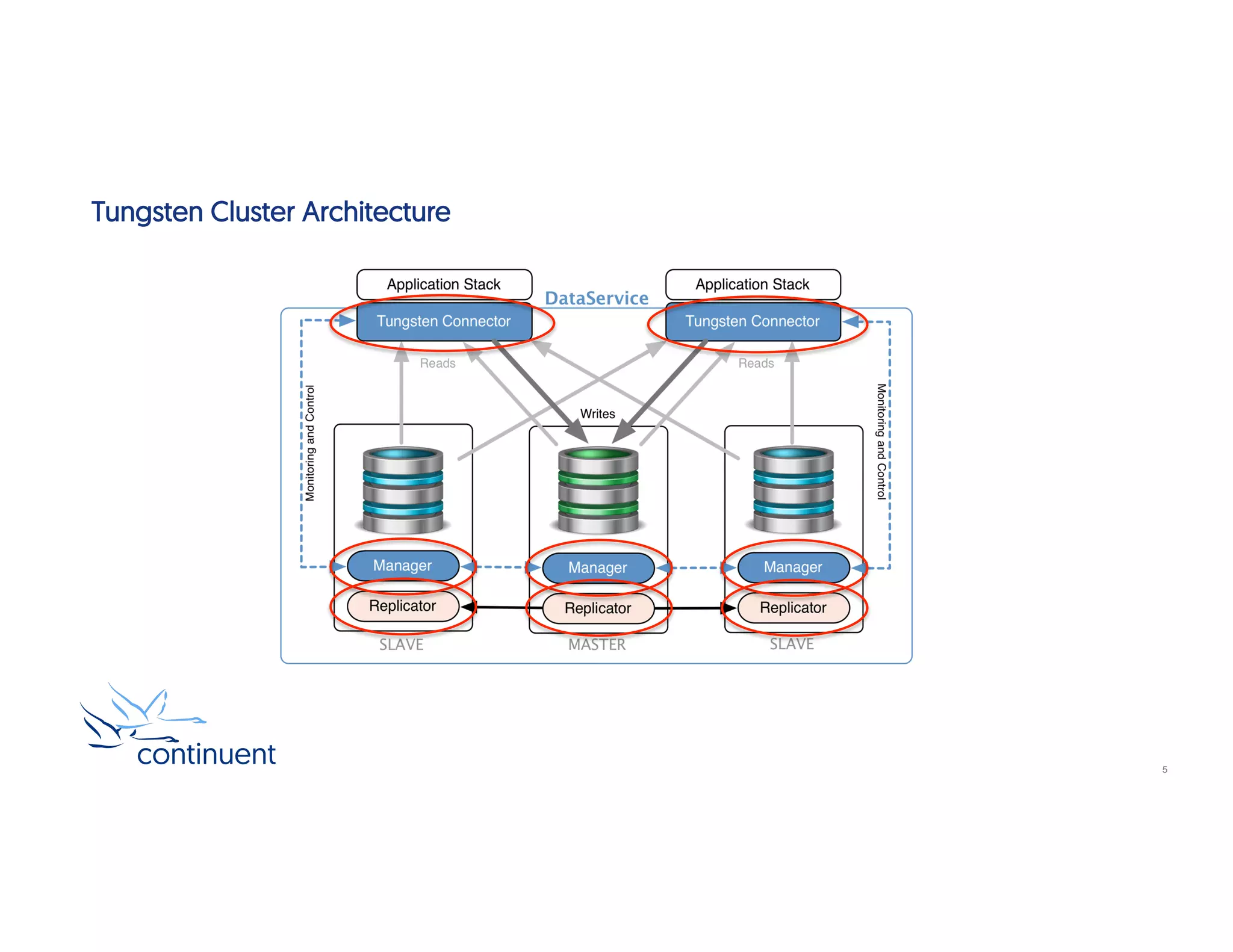
•  Examine the clustering architecture
•  Topologies: Composite vs Multi-Site/Multi-Master
•  Review automatic and manual failover
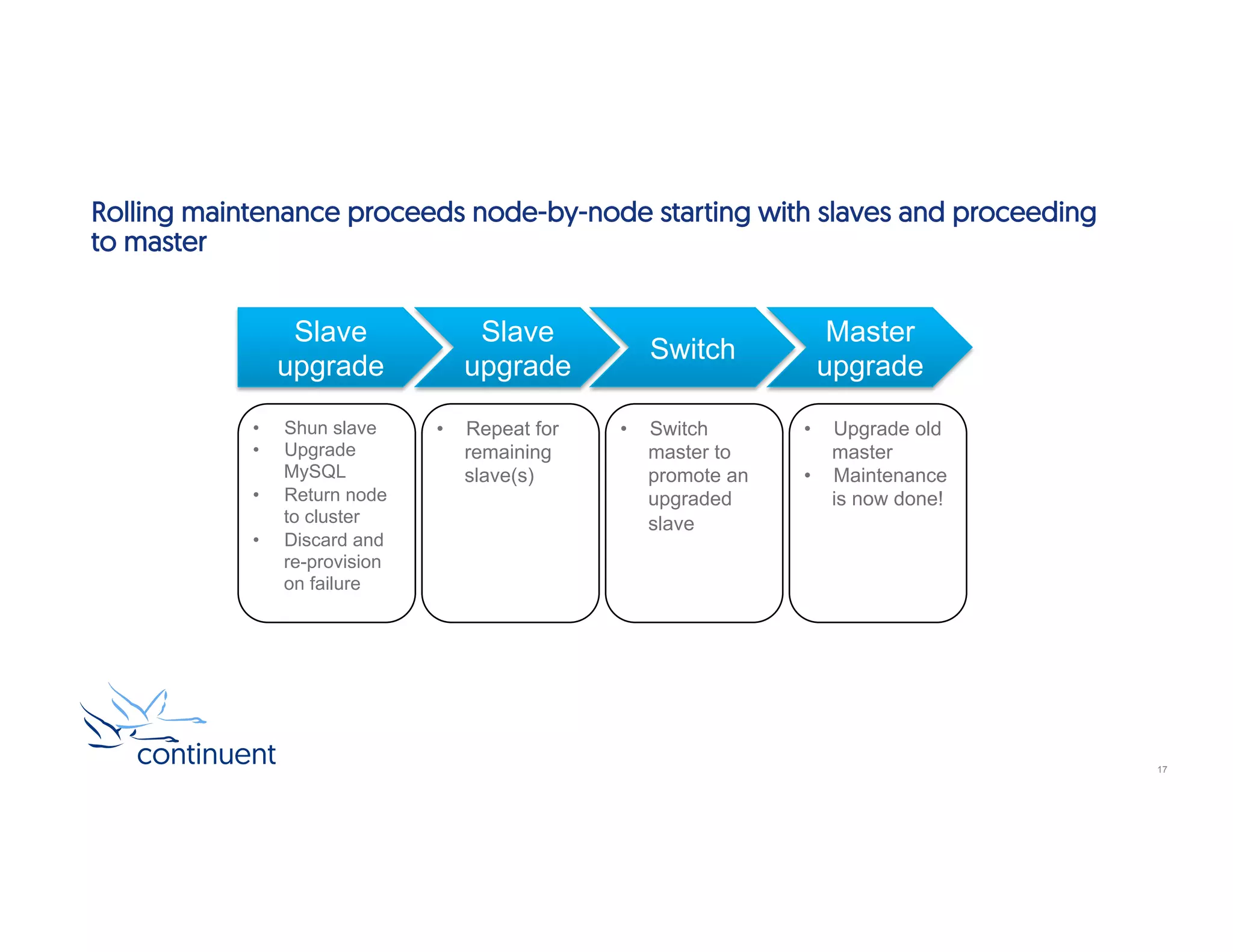
•  Explore the concepts of a rolling maintenance procedure
•  Study key resources to monitor and manage the cluster
In this short course we will:
2
Key Benefits
•  High Availability
–  Maintain continuous connectivity during database maintenance or node failover
–  Automatic failover that replaces a failed local master within seconds
–  Manages seamless integration of failed nodes once corrected and available
•  Multi-Site/Multi-Master
–  Deploy database clusters across physical datacenters or virtual geographic regions (think AWS)
–  Global real-time transaction processing between clusters and individual DBMS servers
•  Ease Of Use And Zero Down Time Operations
–  Deploy within minutes to cloud or on-premises environments
–  Perform database maintenance and application upgrades without service interruptions
•  Performance
–  Transparent load balancing operations across read slaves, reducing master load
•  No-Migration Deployments
–  Continuent Clustering works with off-the-shelf MySQL (Community, Enterprise, Percona, MariaDB)
3
What does a Tungsten Cluster look like?
14
Tungsten Cluster Architecture
5
Tungsten Clusters : The Connector
•  Any MySQL client can connect
•  Connector initiates connections on behalf of client to the DBMS
MySQL
Protocol
COM_QUERY
COM_INIT_DB
COM_DROP_DB
…
MySQL
Master
MySQL
Slave
MySQL
Slave
Application
Tungsten
Connector
6
Tungsten Clusters : The Replicator
BinLogs
Download transactions
via network
Apply using JDBC
THL = Events + Metadata
Master Replicator:
Extractor
THL
Slave Replicator:
Applier
THL
7
•  Extracts transactions from source binary logs (Master)
•  Applies transactions to the target from the THL (Slave)
•  Enable optional Parallel Apply for increased performance under the
right circumstances
What happens during a Failover?
1. Detect and
shun a non-
responsive node
Cluster rules fail over master if DBMS no longer accepts network connections
2. Halt
in-coming
connections MySQL
Master
MySQL
Slave
MySQL
Slave
Reads & Writes Reads & Writes
Replication
Traffic
Replication
Traffic
•  Tungsten Manger detects a database outage
•  Query flow stops, and a new master is chosen
3. Find and
promote the most
up-to-date slave
Tungsten
Connector
XApplication
8
Failed nodes can be re-provisioned from a backup with a single management
command
4. Bring
replicator online
as Master
5. Resume
query flow
using new
Master
MySQL
Master
MySQL
Slave
MySQL
Slave
Reads & Writes Reads & Writes
Replication
Traffic
•  The replicator on the promoted node is then brought online as a master
•  Query flow is re-enabled so as to get the application online as quickly as possible
•  Lastly, any remaining slave replicators will be re-pointed to the newly promoted master
6. Reconfigure
Slave replicators
to use the new
Master
7. Administrator
recovers the
shunned node
as a Slave
Tungsten
Connector
X
Application
9
Tungsten Cluster Topologies
for
High Availability and Disaster Recovery
Simple Cluster: HA only in a Single Site
12
Composite Clusters : Full HA & DR that span remote sites and are ready for
immediate failover
13
Multi-Site/Multi-Master : Operate independent, active clusters on 2 or more
remote sites
14
How do I achieve zero-downtime maintenance?
Tungsten clusters support Zero-downtime Maintenance operations from
parameter changes to app upgrade
•  Task: Upgrade MySQL to the latest version
•  Problem: Requires a mysqld restart, hence can cause application downtime
•  Constraint: Avoid application-visible restart
•  Solution: Upgrade nodes in succession
16
Rolling maintenance proceeds node-by-node starting with slaves and proceeding
to master
Slave
upgrade
Slave
upgrade
Switch
Master
upgrade
•  Shun slave
•  Upgrade
MySQL
•  Return node
to cluster
•  Discard and
re-provision
on failure
•  Repeat for
remaining
slave(s)
•  Switch
master to
promote an
upgraded
slave
•  Upgrade old
master
•  Maintenance
is now done!
17
Command Line Tools
&
Resources
Tools : cctrl
19
•  “cctrl” can be run from any node within a cluster to control the cluster and gather information
•  Type “help” to get a full list of all commands available
•  Use the “TAB” key for auto-completion – very handy!
•  Always ensure the cluster is in “Automatic” mode for normal operation, and “Maintenance”
mode for any maintenance activities
–  set policy automatic
–  set policy maintenance
•  “ls” provides a summary overview of the entire cluster
•  Control manual failover with one simple command: “switch“
Tools : tpm diag
20
•  Provides support engineers with an entire overview of the cluster state, by:
–  Gathering point-in-time status of all components in a cluster
–  Gathering log files of all components in a cluster, including database logs to provide historical
information
–  Bundles everything into one easy zip file that can be attached to a support case
•  ALWAYS create a tpm diag package when you contact support for assistance
•  tungsten_send_diag
–  Available in version 5.1 and later
–  Executes tpm diag to generate the diagnostic package
–  Automatically uploads the package to support
–  https://docs.continuent.com/tungsten-clustering-5.1/cmdline-tools-tungsten_send_diag.html
tungsten@db1:/opt/continuent/service_logs $ tungsten_send_diag –d –c 1234
Log Files
21
•  The /opt/continuent/service_logs/ directory contains both text files and symbolic links.
•  Links in the service_logs directory go to one of three (3) subdirectories:
–  /opt/continuent/tungsten/tungsten-connector/log/
–  /opt/continuent/tungsten/tungsten-manager/log/
–  /opt/continuent/tungsten/tungsten-replicator/log/
tungsten@db1:/opt/continuent/service_logs $ ll
total 116
lrwxrwxrwx 1 tungsten tungsten 61 Jun 22 09:52 connector.log -> /opt/continuent/tungsten/tungsten-connector/log/connector.log
lrwxrwxrwx 1 tungsten tungsten 62 Jun 22 09:52 mysqldump.log -> /opt/continuent/tungsten/tungsten-replicator/log/mysqldump.log
lrwxrwxrwx 1 tungsten tungsten 55 Jun 22 09:52 tmsvc.log -> /opt/continuent/tungsten/tungsten-manager/log/tmsvc.log
lrwxrwxrwx 1 tungsten tungsten 60 Jun 22 09:52 trepsvc.log -> /opt/continuent/tungsten/tungsten-replicator/log/trepsvc.log
lrwxrwxrwx 1 tungsten tungsten 63 Jun 22 09:52 xtrabackup.log -> /opt/continuent/tungsten/tungsten-replicator/log/xtrabackup.log
Demo of cctrl and performing a Manual Switch
tungsten@db1:~ $ cctrl
Continuent Tungsten 5.2.0 build 214
east: session established, encryption=false, authentication=false
[LOGICAL] /east >
[LOGICAL] /east > help
--------
Overview
--------
Description: Overview of Tungsten cctrl Commands
Commands
--------
admin - Enter admin mode
cd <name> - Change to the specified SOR cluster element
cluster <command> - Issue a command on the entire cluster
create composite <type> <name> - Create SOR cluster components
datasource <host> <cmd> - Issue a command on a datasource
expert - Enter expert mode
failover - Failover from failed master to slave
help - Show help
ls [options] - Show generic cluster status
members - List all of the managers in the cluster
ping - Test host availability
physical - Enter physical mode
quit or exit - Leave cctrl
replicator <host> <cmd> - Issue a command on a replicator
service - Run a service script
set - Set management options
switch - Promote a slave to master
To get more information about particular commands type help followed by a
command. Examples: 'help datasource' or 'help create composite'.
[LOGICAL] /east >
[LOGICAL] /east > switch
SELECTED SLAVE: db3@east
SET POLICY: AUTOMATIC => MAINTENANCE
PURGE REMAINING ACTIVE SESSIONS ON CURRENT MASTER 'db1@east'
PURGED A TOTAL OF 0 ACTIVE SESSIONS ON MASTER 'db1@east'
FLUSH TRANSACTIONS ON CURRENT MASTER 'db1@east'
PUT THE NEW MASTER 'db3@east' ONLINE
PUT THE PRIOR MASTER 'db1@east' ONLINE AS A SLAVE
RECONFIGURING SLAVE 'db2@east' TO POINT TO NEW MASTER 'db3@east'
REVERT POLICY: MAINTENANCE => AUTOMATIC
SWITCH TO 'db3@east' WAS SUCCESSFUL
[LOGICAL] /east >
23
[LOGICAL] /east > ls
COORDINATOR[db1:AUTOMATIC:ONLINE]
ROUTERS:
+----------------------------------------------------------------------------+
|connector@db1.chris-vagrant[10518](ONLINE, created=0, active=0) |
|connector@db2.chris-vagrant[10596](ONLINE, created=0, active=0) |
|connector@db3.chris-vagrant[10541](ONLINE, created=0, active=0) |
+----------------------------------------------------------------------------+
DATASOURCES:
+----------------------------------------------------------------------------+
|db1(master:ONLINE, progress=0, THL latency=0.680) |
|STATUS [OK] [2017/06/22 03:04:15 PM UTC] |
+----------------------------------------------------------------------------+
| MANAGER(state=ONLINE) |
| REPLICATOR(role=master, state=ONLINE) |
| DATASERVER(state=ONLINE) |
| CONNECTIONS(created=0, active=0) |
+----------------------------------------------------------------------------+
+----------------------------------------------------------------------------+
|db2(slave:ONLINE, progress=0, latency=3.913) |
|STATUS [OK] [2017/06/22 03:04:18 PM UTC] |
+----------------------------------------------------------------------------+
| MANAGER(state=ONLINE) |
| REPLICATOR(role=slave, master=db1, state=ONLINE) |
| DATASERVER(state=ONLINE) |
| CONNECTIONS(created=0, active=0) |
+----------------------------------------------------------------------------+
+----------------------------------------------------------------------------+
|db3(slave:ONLINE, progress=0, latency=2.175) |
|STATUS [OK] [2017/06/22 03:04:17 PM UTC] |
+----------------------------------------------------------------------------+
| MANAGER(state=ONLINE) |
| REPLICATOR(role=slave, master=db1, state=ONLINE) |
| DATASERVER(state=ONLINE) |
| CONNECTIONS(created=0, active=0) |
+----------------------------------------------------------------------------+
[LOGICAL] /east >
[LOGICAL] /east > ls
COORDINATOR[db1:AUTOMATIC:ONLINE]
ROUTERS:
+----------------------------------------------------------------------------+
|connector@db1.chris-vagrant[10518](ONLINE, created=0, active=0) |
|connector@db2.chris-vagrant[10596](ONLINE, created=0, active=0) |
|connector@db3.chris-vagrant[10541](ONLINE, created=0, active=0) |
+----------------------------------------------------------------------------+
DATASOURCES:
+----------------------------------------------------------------------------+
|db1(slave:ONLINE, progress=4, latency=1.081) |
|STATUS [OK] [2017/06/23 08:10:05 AM UTC] |
+----------------------------------------------------------------------------+
| MANAGER(state=ONLINE) |
| REPLICATOR(role=slave, master=db3, state=ONLINE) |
| DATASERVER(state=ONLINE) |
| CONNECTIONS(created=0, active=0) |
+----------------------------------------------------------------------------+
+----------------------------------------------------------------------------+
|db2(slave:ONLINE, progress=4, latency=1.093) |
|STATUS [OK] [2017/06/22 03:04:18 PM UTC] |
+----------------------------------------------------------------------------+
| MANAGER(state=ONLINE) |
| REPLICATOR(role=slave, master=db3, state=ONLINE) |
| DATASERVER(state=ONLINE) |
| CONNECTIONS(created=0, active=0) |
+----------------------------------------------------------------------------+
+----------------------------------------------------------------------------+
|db3(master:ONLINE, progress=4, THL latency=0.996) |
|STATUS [OK] [2017/06/23 08:10:00 AM UTC] |
+----------------------------------------------------------------------------+
| MANAGER(state=ONLINE) |
| REPLICATOR(role=master, state=ONLINE) |
| DATASERVER(state=ONLINE) |
| CONNECTIONS(created=0, active=0) |
+----------------------------------------------------------------------------+
[LOGICAL] /east >
Before After
24
[LOGICAL] /east > datasource db1 recover
VERIFYING THAT WE CAN CONNECT TO DATA SERVER 'db1'
Verified that DB server notification 'db1' is in state 'ONLINE'
DATA SERVER 'db1' IS NOW AVAILABLE FOR CONNECTIONS
The active primary in data service 'east' is 'db3'
RECOVERING 'db1@east' TO A SLAVE USING 'db3@east' AS THE MASTER
DataSource 'db1' is now OFFLINE
RECOVERY OF 'db1@east' WAS SUCCESSFUL
[LOGICAL] /east > set policy maintenance
policy mode is now MAINTENANCE
[LOGICAL] /east > ls
[LOGICAL] /east > datasource db1 shun
WARNING: This is an expert-level command:
Incorrect use may cause data corruption
or make the cluster unavailable.
Do you want to continue? (y/n)> y
The active primary in data service 'east' is 'db3'
DataSource 'db1' set to SHUNNED
[LOGICAL] /east > replicator db1 offline
Replicator 'db1' is now OFFLINE
[LOGICAL] /east > ls
COORDINATOR[db1:MAINTENANCE:ONLINE]
ROUTERS:
. . .
DATASOURCES:
+----------------------------------------------------------------------------+
|db1(slave:SHUNNED(MANUALLY-SHUNNED), progress=-1, latency=-1.000) |
|STATUS [SHUNNED] [2017/06/23 08:18:55 AM UTC] |
+----------------------------------------------------------------------------+
| MANAGER(state=ONLINE) |
| REPLICATOR(role=slave, master=db3, state=OFFLINE) |
| DATASERVER(state=ONLINE) |
| CONNECTIONS(created=0, active=0) |
+----------------------------------------------------------------------------+
[LOGICAL] /east > ls
COORDINATOR[db1:MAINTENANCE:ONLINE]
ROUTERS:
. . .
DATASOURCES:
+----------------------------------------------------------------------------+
|db1(slave:ONLINE, progress=4, latency=1.000) |
|STATUS [OK] [2017/06/23 08:24:12 AM UTC] |
+----------------------------------------------------------------------------+
| MANAGER(state=ONLINE) |
| REPLICATOR(role=slave, master=db3, state=ONLINE) |
| DATASERVER(state=ONLINE) |
| CONNECTIONS(created=0, active=0) |
+----------------------------------------------------------------------------+
[LOGICAL] /east > set policy automatic
policy mode is now AUTOMATIC
25
Review
24x7 data access
SQL load balancing Simple management
Off-the-shelf MySQL
Benefits
26
Next Steps
•  If you are interested in knowing more about the clustering software and would like to try it out for
yourself, please contact our sales team who will be able to take you through the details and
setup a POC – sales@continuent.com
•  Read the documentation at https://docs.continuent.com/tungsten-clustering-5.1/index.html
•  Subscribe to our Tungsten University YouTube channel! http://tinyurl.com/TungstenUni
27
Upcoming Training and Webinars
•  Tungsten Training Program
–  Training -- Tuesday, 11th July 2017, 09:00 PST, 17:00 BST, 30 minutes-- Basics: Simple
Clustering Deployments
–  Training -- Tuesday, 25th July 2017, 09:00 PST, 17:00 BST, 30 minutes -- Basics: Power of the
Tungsten Connector
•  Continuent Webinar Program
–  Webinar -- Monday, 10th July 2017, 09:00 PST, 17:00 BST, 30 minutes – What’s new in 5.2
–  Webinar -- Wednesday, 19th July 2017, 09:00 PST, 17:00 BST, 30 minutes – Tungsten Replicator
for Oracle – A Real Oracle GoldenGate Alternative
28
For more information, contact us:
Chris Parker
Director, Professional Services EMEA & APAC
chris.parker@continuent.com
Matthew Lang
Director, Professional Services Americas
Matthew.lang@continuent.com
Eero Teerikorpi
Founder, CEO
eero.teerikorpi@continuent.com
+1 (408) 431-3305
Eric M. Stone
COO
eric.stone@continuent.com
MC Brown
VP Products
mc.brown@continuent.com

Training Slides: Basics 102: Introduction to Tungsten Clustering

  • 1.
    Basics : Introductionto Clustering
  • 2.
    Topics •  Review thekey benefits offered by Continuent Tungsten Clustering •  Examine the clustering architecture •  Topologies: Composite vs Multi-Site/Multi-Master •  Review automatic and manual failover •  Explore the concepts of a rolling maintenance procedure •  Study key resources to monitor and manage the cluster In this short course we will: 2
  • 3.
    Key Benefits •  HighAvailability –  Maintain continuous connectivity during database maintenance or node failover –  Automatic failover that replaces a failed local master within seconds –  Manages seamless integration of failed nodes once corrected and available •  Multi-Site/Multi-Master –  Deploy database clusters across physical datacenters or virtual geographic regions (think AWS) –  Global real-time transaction processing between clusters and individual DBMS servers •  Ease Of Use And Zero Down Time Operations –  Deploy within minutes to cloud or on-premises environments –  Perform database maintenance and application upgrades without service interruptions •  Performance –  Transparent load balancing operations across read slaves, reducing master load •  No-Migration Deployments –  Continuent Clustering works with off-the-shelf MySQL (Community, Enterprise, Percona, MariaDB) 3
  • 4.
    What does aTungsten Cluster look like? 14
  • 5.
  • 6.
    Tungsten Clusters :The Connector •  Any MySQL client can connect •  Connector initiates connections on behalf of client to the DBMS MySQL Protocol COM_QUERY COM_INIT_DB COM_DROP_DB … MySQL Master MySQL Slave MySQL Slave Application Tungsten Connector 6
  • 7.
    Tungsten Clusters :The Replicator BinLogs Download transactions via network Apply using JDBC THL = Events + Metadata Master Replicator: Extractor THL Slave Replicator: Applier THL 7 •  Extracts transactions from source binary logs (Master) •  Applies transactions to the target from the THL (Slave) •  Enable optional Parallel Apply for increased performance under the right circumstances
  • 8.
  • 9.
    1. Detect and shuna non- responsive node Cluster rules fail over master if DBMS no longer accepts network connections 2. Halt in-coming connections MySQL Master MySQL Slave MySQL Slave Reads & Writes Reads & Writes Replication Traffic Replication Traffic •  Tungsten Manger detects a database outage •  Query flow stops, and a new master is chosen 3. Find and promote the most up-to-date slave Tungsten Connector XApplication 8
  • 10.
    Failed nodes canbe re-provisioned from a backup with a single management command 4. Bring replicator online as Master 5. Resume query flow using new Master MySQL Master MySQL Slave MySQL Slave Reads & Writes Reads & Writes Replication Traffic •  The replicator on the promoted node is then brought online as a master •  Query flow is re-enabled so as to get the application online as quickly as possible •  Lastly, any remaining slave replicators will be re-pointed to the newly promoted master 6. Reconfigure Slave replicators to use the new Master 7. Administrator recovers the shunned node as a Slave Tungsten Connector X Application 9
  • 11.
    Tungsten Cluster Topologies for HighAvailability and Disaster Recovery
  • 12.
    Simple Cluster: HAonly in a Single Site 12
  • 13.
    Composite Clusters :Full HA & DR that span remote sites and are ready for immediate failover 13
  • 14.
    Multi-Site/Multi-Master : Operateindependent, active clusters on 2 or more remote sites 14
  • 15.
    How do Iachieve zero-downtime maintenance?
  • 16.
    Tungsten clusters supportZero-downtime Maintenance operations from parameter changes to app upgrade •  Task: Upgrade MySQL to the latest version •  Problem: Requires a mysqld restart, hence can cause application downtime •  Constraint: Avoid application-visible restart •  Solution: Upgrade nodes in succession 16
  • 17.
    Rolling maintenance proceedsnode-by-node starting with slaves and proceeding to master Slave upgrade Slave upgrade Switch Master upgrade •  Shun slave •  Upgrade MySQL •  Return node to cluster •  Discard and re-provision on failure •  Repeat for remaining slave(s) •  Switch master to promote an upgraded slave •  Upgrade old master •  Maintenance is now done! 17
  • 18.
  • 19.
    Tools : cctrl 19 • “cctrl” can be run from any node within a cluster to control the cluster and gather information •  Type “help” to get a full list of all commands available •  Use the “TAB” key for auto-completion – very handy! •  Always ensure the cluster is in “Automatic” mode for normal operation, and “Maintenance” mode for any maintenance activities –  set policy automatic –  set policy maintenance •  “ls” provides a summary overview of the entire cluster •  Control manual failover with one simple command: “switch“
  • 20.
    Tools : tpmdiag 20 •  Provides support engineers with an entire overview of the cluster state, by: –  Gathering point-in-time status of all components in a cluster –  Gathering log files of all components in a cluster, including database logs to provide historical information –  Bundles everything into one easy zip file that can be attached to a support case •  ALWAYS create a tpm diag package when you contact support for assistance •  tungsten_send_diag –  Available in version 5.1 and later –  Executes tpm diag to generate the diagnostic package –  Automatically uploads the package to support –  https://docs.continuent.com/tungsten-clustering-5.1/cmdline-tools-tungsten_send_diag.html tungsten@db1:/opt/continuent/service_logs $ tungsten_send_diag –d –c 1234
  • 21.
    Log Files 21 •  The/opt/continuent/service_logs/ directory contains both text files and symbolic links. •  Links in the service_logs directory go to one of three (3) subdirectories: –  /opt/continuent/tungsten/tungsten-connector/log/ –  /opt/continuent/tungsten/tungsten-manager/log/ –  /opt/continuent/tungsten/tungsten-replicator/log/ tungsten@db1:/opt/continuent/service_logs $ ll total 116 lrwxrwxrwx 1 tungsten tungsten 61 Jun 22 09:52 connector.log -> /opt/continuent/tungsten/tungsten-connector/log/connector.log lrwxrwxrwx 1 tungsten tungsten 62 Jun 22 09:52 mysqldump.log -> /opt/continuent/tungsten/tungsten-replicator/log/mysqldump.log lrwxrwxrwx 1 tungsten tungsten 55 Jun 22 09:52 tmsvc.log -> /opt/continuent/tungsten/tungsten-manager/log/tmsvc.log lrwxrwxrwx 1 tungsten tungsten 60 Jun 22 09:52 trepsvc.log -> /opt/continuent/tungsten/tungsten-replicator/log/trepsvc.log lrwxrwxrwx 1 tungsten tungsten 63 Jun 22 09:52 xtrabackup.log -> /opt/continuent/tungsten/tungsten-replicator/log/xtrabackup.log
  • 22.
    Demo of cctrland performing a Manual Switch
  • 23.
    tungsten@db1:~ $ cctrl ContinuentTungsten 5.2.0 build 214 east: session established, encryption=false, authentication=false [LOGICAL] /east > [LOGICAL] /east > help -------- Overview -------- Description: Overview of Tungsten cctrl Commands Commands -------- admin - Enter admin mode cd <name> - Change to the specified SOR cluster element cluster <command> - Issue a command on the entire cluster create composite <type> <name> - Create SOR cluster components datasource <host> <cmd> - Issue a command on a datasource expert - Enter expert mode failover - Failover from failed master to slave help - Show help ls [options] - Show generic cluster status members - List all of the managers in the cluster ping - Test host availability physical - Enter physical mode quit or exit - Leave cctrl replicator <host> <cmd> - Issue a command on a replicator service - Run a service script set - Set management options switch - Promote a slave to master To get more information about particular commands type help followed by a command. Examples: 'help datasource' or 'help create composite'. [LOGICAL] /east > [LOGICAL] /east > switch SELECTED SLAVE: db3@east SET POLICY: AUTOMATIC => MAINTENANCE PURGE REMAINING ACTIVE SESSIONS ON CURRENT MASTER 'db1@east' PURGED A TOTAL OF 0 ACTIVE SESSIONS ON MASTER 'db1@east' FLUSH TRANSACTIONS ON CURRENT MASTER 'db1@east' PUT THE NEW MASTER 'db3@east' ONLINE PUT THE PRIOR MASTER 'db1@east' ONLINE AS A SLAVE RECONFIGURING SLAVE 'db2@east' TO POINT TO NEW MASTER 'db3@east' REVERT POLICY: MAINTENANCE => AUTOMATIC SWITCH TO 'db3@east' WAS SUCCESSFUL [LOGICAL] /east > 23
  • 24.
    [LOGICAL] /east >ls COORDINATOR[db1:AUTOMATIC:ONLINE] ROUTERS: +----------------------------------------------------------------------------+ |connector@db1.chris-vagrant[10518](ONLINE, created=0, active=0) | |connector@db2.chris-vagrant[10596](ONLINE, created=0, active=0) | |connector@db3.chris-vagrant[10541](ONLINE, created=0, active=0) | +----------------------------------------------------------------------------+ DATASOURCES: +----------------------------------------------------------------------------+ |db1(master:ONLINE, progress=0, THL latency=0.680) | |STATUS [OK] [2017/06/22 03:04:15 PM UTC] | +----------------------------------------------------------------------------+ | MANAGER(state=ONLINE) | | REPLICATOR(role=master, state=ONLINE) | | DATASERVER(state=ONLINE) | | CONNECTIONS(created=0, active=0) | +----------------------------------------------------------------------------+ +----------------------------------------------------------------------------+ |db2(slave:ONLINE, progress=0, latency=3.913) | |STATUS [OK] [2017/06/22 03:04:18 PM UTC] | +----------------------------------------------------------------------------+ | MANAGER(state=ONLINE) | | REPLICATOR(role=slave, master=db1, state=ONLINE) | | DATASERVER(state=ONLINE) | | CONNECTIONS(created=0, active=0) | +----------------------------------------------------------------------------+ +----------------------------------------------------------------------------+ |db3(slave:ONLINE, progress=0, latency=2.175) | |STATUS [OK] [2017/06/22 03:04:17 PM UTC] | +----------------------------------------------------------------------------+ | MANAGER(state=ONLINE) | | REPLICATOR(role=slave, master=db1, state=ONLINE) | | DATASERVER(state=ONLINE) | | CONNECTIONS(created=0, active=0) | +----------------------------------------------------------------------------+ [LOGICAL] /east > [LOGICAL] /east > ls COORDINATOR[db1:AUTOMATIC:ONLINE] ROUTERS: +----------------------------------------------------------------------------+ |connector@db1.chris-vagrant[10518](ONLINE, created=0, active=0) | |connector@db2.chris-vagrant[10596](ONLINE, created=0, active=0) | |connector@db3.chris-vagrant[10541](ONLINE, created=0, active=0) | +----------------------------------------------------------------------------+ DATASOURCES: +----------------------------------------------------------------------------+ |db1(slave:ONLINE, progress=4, latency=1.081) | |STATUS [OK] [2017/06/23 08:10:05 AM UTC] | +----------------------------------------------------------------------------+ | MANAGER(state=ONLINE) | | REPLICATOR(role=slave, master=db3, state=ONLINE) | | DATASERVER(state=ONLINE) | | CONNECTIONS(created=0, active=0) | +----------------------------------------------------------------------------+ +----------------------------------------------------------------------------+ |db2(slave:ONLINE, progress=4, latency=1.093) | |STATUS [OK] [2017/06/22 03:04:18 PM UTC] | +----------------------------------------------------------------------------+ | MANAGER(state=ONLINE) | | REPLICATOR(role=slave, master=db3, state=ONLINE) | | DATASERVER(state=ONLINE) | | CONNECTIONS(created=0, active=0) | +----------------------------------------------------------------------------+ +----------------------------------------------------------------------------+ |db3(master:ONLINE, progress=4, THL latency=0.996) | |STATUS [OK] [2017/06/23 08:10:00 AM UTC] | +----------------------------------------------------------------------------+ | MANAGER(state=ONLINE) | | REPLICATOR(role=master, state=ONLINE) | | DATASERVER(state=ONLINE) | | CONNECTIONS(created=0, active=0) | +----------------------------------------------------------------------------+ [LOGICAL] /east > Before After 24
  • 25.
    [LOGICAL] /east >datasource db1 recover VERIFYING THAT WE CAN CONNECT TO DATA SERVER 'db1' Verified that DB server notification 'db1' is in state 'ONLINE' DATA SERVER 'db1' IS NOW AVAILABLE FOR CONNECTIONS The active primary in data service 'east' is 'db3' RECOVERING 'db1@east' TO A SLAVE USING 'db3@east' AS THE MASTER DataSource 'db1' is now OFFLINE RECOVERY OF 'db1@east' WAS SUCCESSFUL [LOGICAL] /east > set policy maintenance policy mode is now MAINTENANCE [LOGICAL] /east > ls [LOGICAL] /east > datasource db1 shun WARNING: This is an expert-level command: Incorrect use may cause data corruption or make the cluster unavailable. Do you want to continue? (y/n)> y The active primary in data service 'east' is 'db3' DataSource 'db1' set to SHUNNED [LOGICAL] /east > replicator db1 offline Replicator 'db1' is now OFFLINE [LOGICAL] /east > ls COORDINATOR[db1:MAINTENANCE:ONLINE] ROUTERS: . . . DATASOURCES: +----------------------------------------------------------------------------+ |db1(slave:SHUNNED(MANUALLY-SHUNNED), progress=-1, latency=-1.000) | |STATUS [SHUNNED] [2017/06/23 08:18:55 AM UTC] | +----------------------------------------------------------------------------+ | MANAGER(state=ONLINE) | | REPLICATOR(role=slave, master=db3, state=OFFLINE) | | DATASERVER(state=ONLINE) | | CONNECTIONS(created=0, active=0) | +----------------------------------------------------------------------------+ [LOGICAL] /east > ls COORDINATOR[db1:MAINTENANCE:ONLINE] ROUTERS: . . . DATASOURCES: +----------------------------------------------------------------------------+ |db1(slave:ONLINE, progress=4, latency=1.000) | |STATUS [OK] [2017/06/23 08:24:12 AM UTC] | +----------------------------------------------------------------------------+ | MANAGER(state=ONLINE) | | REPLICATOR(role=slave, master=db3, state=ONLINE) | | DATASERVER(state=ONLINE) | | CONNECTIONS(created=0, active=0) | +----------------------------------------------------------------------------+ [LOGICAL] /east > set policy automatic policy mode is now AUTOMATIC 25
  • 26.
    Review 24x7 data access SQLload balancing Simple management Off-the-shelf MySQL Benefits 26
  • 27.
    Next Steps •  Ifyou are interested in knowing more about the clustering software and would like to try it out for yourself, please contact our sales team who will be able to take you through the details and setup a POC – sales@continuent.com •  Read the documentation at https://docs.continuent.com/tungsten-clustering-5.1/index.html •  Subscribe to our Tungsten University YouTube channel! http://tinyurl.com/TungstenUni 27
  • 28.
    Upcoming Training andWebinars •  Tungsten Training Program –  Training -- Tuesday, 11th July 2017, 09:00 PST, 17:00 BST, 30 minutes-- Basics: Simple Clustering Deployments –  Training -- Tuesday, 25th July 2017, 09:00 PST, 17:00 BST, 30 minutes -- Basics: Power of the Tungsten Connector •  Continuent Webinar Program –  Webinar -- Monday, 10th July 2017, 09:00 PST, 17:00 BST, 30 minutes – What’s new in 5.2 –  Webinar -- Wednesday, 19th July 2017, 09:00 PST, 17:00 BST, 30 minutes – Tungsten Replicator for Oracle – A Real Oracle GoldenGate Alternative 28
  • 29.
    For more information,contact us: Chris Parker Director, Professional Services EMEA & APAC chris.parker@continuent.com Matthew Lang Director, Professional Services Americas Matthew.lang@continuent.com Eero Teerikorpi Founder, CEO eero.teerikorpi@continuent.com +1 (408) 431-3305 Eric M. Stone COO eric.stone@continuent.com MC Brown VP Products mc.brown@continuent.com