Workshop
@
Ramnshee Infotech
By Jainul Musani
SESSION:01
1
SESSION:01
Node.Js
 Node.js is a cross-platform runtime environment
 Node.js provide a library to run JavaScript applications
outside the browser.
 Node.js is used for creating server-side and networking
web applications.
 It is open source and free to use.
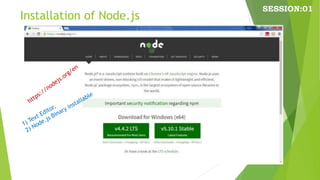
 It can be downloaded from this
link https://nodejs.org/en/
Node.js = Runtime Environment +
JavaScript Library
About Node.js
 Node.js uses
 Event-Driven,
Non-Blocking I/O model
Lightweight and Efficient,
 Perfect for Data-Intensive real-time applications
Run across distributed devices
Node.js is a platform built on Chrome's JavaScript
runtime
easily building fast and scalable network
applications.
SESSION:01
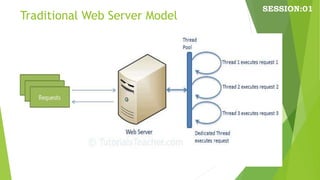
Traditional Web Server Model
SESSION:01
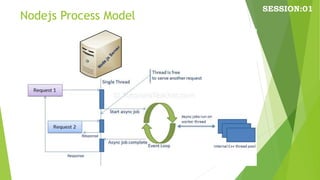
Nodejs Process Model
SESSION:01
Different Parts of Node.js
SESSION:01
Features of Node.js
 1) Extremely fast:
 2) I/O is Asynchronous and Event Driven:
 3) Single threaded:
 4) Highly Scalable:
 5) No buffering:
 6) Open source:
 7) License: under the MIT license.
SESSION:01
Installation of Node.js
SESSION:01
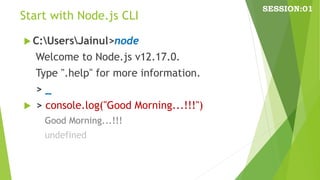
Start with Node.js CLI
SESSION:01
 C:UsersJainul>node
Welcome to Node.js v12.17.0.
Type ".help" for more information.
> _
 > console.log("Good Morning...!!!")
Good Morning...!!!
undefined
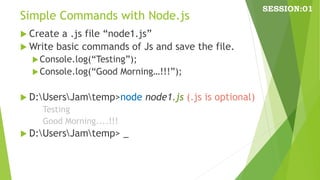
Simple Commands with Node.js
 Create a .js file “node1.js”
 Write basic commands of Js and save the file.
Console.log(“Testing”);
Console.log(“Good Morning…!!!”);
 D:UsersJamtemp>node node1.js (.js is optional)
Testing
Good Morning....!!!
 D:UsersJamtemp> _
SESSION:01
Node.js REPL
 Read
 Evaluate
 Print
 Loop
SESSION:01
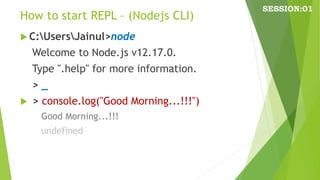
How to start REPL – (Nodejs CLI)
 C:UsersJainul>node
Welcome to Node.js v12.17.0.
Type ".help" for more information.
> _
 > console.log("Good Morning...!!!")
Good Morning...!!!
undefined
SESSION:01
REPL commands and Features
 Press Ctrl+C to terminate the current command.
Pressing Ctrl + C twice causes the REPL to quit.
Press Ctrl+D to exit the REPL.
 Pressing up and down arrow keys you can see command
history and modify previous commands.
 Press tab key to see the list of current commands. If you
type a single character followed by tab it will show the
list of keywords, functions, and variables starting with
that particular character.
 The REPL can handle multiline expression.
 The REPL provides a special variable _ (underscore)
which is used to pull the result of the last expression.
SESSION:01
REPL commands and Features
> 1+2
3
> 1+2-3
0
> 1+(3-2)*4/2
3
>
SESSION:01
REPL commands and Features
> var x = 10;
undefined
> var y = 20;
undefined
> x+y
30
> console.log(x+y);
30
undefined
>
SESSION:01
Node.js Underscore _ variable
 To get last result use underscore _ variable
> console.clear()
> a = 10
> b = 15
> a+b
25
> console.log(“last sum is: “ + _+5);
last sum is 30
>
SESSION:01
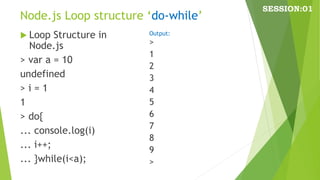
Node.js Loop structure ‘do-while’
 Loop Structure in
Node.js
> var a = 10
undefined
> i = 1
1
> do{
... console.log(i)
... i++;
... }while(i<a);
SESSION:01
>
1
2
3
4
5
6
7
8
9
>
Output:
Node.js Primitive Data Types
 Node.js includes following primitive types:
• String
• Number
• Boolean
• Undefined
• Null
• RegExp
 Everything else is an object in Node.js.
SESSION:01
Node.js Data Types
 Loose Typing
• JavaScript in Node.js supports loose typing like
the browser's JavaScript.
• Use var keyword to declare a variable of any
type.
• Object Literal
var obj = {
authorName: 'Raxit Dilhan',
language: 'Node.js'
}
SESSION:01
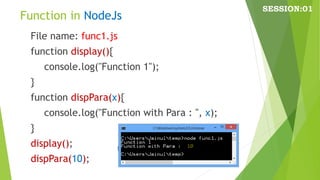
Function in NodeJs
File name: func1.js
function display(){
console.log("Function 1");
}
function dispPara(x){
console.log("Function with Para : ", x);
}
display();
dispPara(10);
SESSION:01
Buffer in NodeJs
 Node.js includes an additional data type
called Buffer (not available in browser's
JavaScript).
 Buffer is mainly used to store binary data,
while reading from a file or receiving packets
over the network.
SESSION:01
process object in NodeJs
Each Node.js script runs in a process.
It includes process object to get all the
information about the current process of
Node.js application.
SESSION:01
Defaults to local in NodeJs
Nodejs JavaScript is different from
browser's JavaScript when it comes to
global scope.
In the browser's JavaScript, variables
declared without var keyword become
global.
In Node.js, everything becomes local by
default.
SESSION:01
Access Global Scope in NodeJs
In a browser, global scope is the window
object. In Node.js, global object represents
the global scope.
To add something in global scope, you need
to export it using export or module.export.
The same way, import modules/object using
require() function to access it from the
global scope.
For example, to export an object in
Node.js, use exports.name = object.
SESSION:01
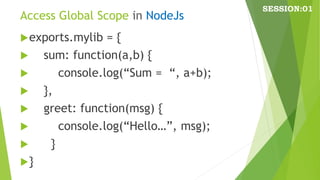
Access Global Scope in NodeJs
exports.mylib = {
 sum: function(a,b) {
 console.log(“Sum = “, a+b);
 },
 greet: function(msg) {
 console.log(“Hello…”, msg);
 }
}
SESSION:01

Nodejs Session01

  • 1.
  • 2.
    SESSION:01 Node.Js  Node.js isa cross-platform runtime environment  Node.js provide a library to run JavaScript applications outside the browser.  Node.js is used for creating server-side and networking web applications.  It is open source and free to use.  It can be downloaded from this link https://nodejs.org/en/ Node.js = Runtime Environment + JavaScript Library
  • 3.
    About Node.js  Node.jsuses  Event-Driven, Non-Blocking I/O model Lightweight and Efficient,  Perfect for Data-Intensive real-time applications Run across distributed devices Node.js is a platform built on Chrome's JavaScript runtime easily building fast and scalable network applications. SESSION:01
  • 4.
    Traditional Web ServerModel SESSION:01
  • 5.
  • 6.
    Different Parts ofNode.js SESSION:01
  • 7.
    Features of Node.js 1) Extremely fast:  2) I/O is Asynchronous and Event Driven:  3) Single threaded:  4) Highly Scalable:  5) No buffering:  6) Open source:  7) License: under the MIT license. SESSION:01
  • 8.
  • 9.
    Start with Node.jsCLI SESSION:01  C:UsersJainul>node Welcome to Node.js v12.17.0. Type ".help" for more information. > _  > console.log("Good Morning...!!!") Good Morning...!!! undefined
  • 10.
    Simple Commands withNode.js  Create a .js file “node1.js”  Write basic commands of Js and save the file. Console.log(“Testing”); Console.log(“Good Morning…!!!”);  D:UsersJamtemp>node node1.js (.js is optional) Testing Good Morning....!!!  D:UsersJamtemp> _ SESSION:01
  • 11.
    Node.js REPL  Read Evaluate  Print  Loop SESSION:01
  • 12.
    How to startREPL – (Nodejs CLI)  C:UsersJainul>node Welcome to Node.js v12.17.0. Type ".help" for more information. > _  > console.log("Good Morning...!!!") Good Morning...!!! undefined SESSION:01
  • 13.
    REPL commands andFeatures  Press Ctrl+C to terminate the current command. Pressing Ctrl + C twice causes the REPL to quit. Press Ctrl+D to exit the REPL.  Pressing up and down arrow keys you can see command history and modify previous commands.  Press tab key to see the list of current commands. If you type a single character followed by tab it will show the list of keywords, functions, and variables starting with that particular character.  The REPL can handle multiline expression.  The REPL provides a special variable _ (underscore) which is used to pull the result of the last expression. SESSION:01
  • 14.
    REPL commands andFeatures > 1+2 3 > 1+2-3 0 > 1+(3-2)*4/2 3 > SESSION:01
  • 15.
    REPL commands andFeatures > var x = 10; undefined > var y = 20; undefined > x+y 30 > console.log(x+y); 30 undefined > SESSION:01
  • 16.
    Node.js Underscore _variable  To get last result use underscore _ variable > console.clear() > a = 10 > b = 15 > a+b 25 > console.log(“last sum is: “ + _+5); last sum is 30 > SESSION:01
  • 17.
    Node.js Loop structure‘do-while’  Loop Structure in Node.js > var a = 10 undefined > i = 1 1 > do{ ... console.log(i) ... i++; ... }while(i<a); SESSION:01 > 1 2 3 4 5 6 7 8 9 > Output:
  • 18.
    Node.js Primitive DataTypes  Node.js includes following primitive types: • String • Number • Boolean • Undefined • Null • RegExp  Everything else is an object in Node.js. SESSION:01
  • 19.
    Node.js Data Types Loose Typing • JavaScript in Node.js supports loose typing like the browser's JavaScript. • Use var keyword to declare a variable of any type. • Object Literal var obj = { authorName: 'Raxit Dilhan', language: 'Node.js' } SESSION:01
  • 20.
    Function in NodeJs Filename: func1.js function display(){ console.log("Function 1"); } function dispPara(x){ console.log("Function with Para : ", x); } display(); dispPara(10); SESSION:01
  • 21.
    Buffer in NodeJs Node.js includes an additional data type called Buffer (not available in browser's JavaScript).  Buffer is mainly used to store binary data, while reading from a file or receiving packets over the network. SESSION:01
  • 22.
    process object inNodeJs Each Node.js script runs in a process. It includes process object to get all the information about the current process of Node.js application. SESSION:01
  • 23.
    Defaults to localin NodeJs Nodejs JavaScript is different from browser's JavaScript when it comes to global scope. In the browser's JavaScript, variables declared without var keyword become global. In Node.js, everything becomes local by default. SESSION:01
  • 24.
    Access Global Scopein NodeJs In a browser, global scope is the window object. In Node.js, global object represents the global scope. To add something in global scope, you need to export it using export or module.export. The same way, import modules/object using require() function to access it from the global scope. For example, to export an object in Node.js, use exports.name = object. SESSION:01
  • 25.
    Access Global Scopein NodeJs exports.mylib = {  sum: function(a,b) {  console.log(“Sum = “, a+b);  },  greet: function(msg) {  console.log(“Hello…”, msg);  } } SESSION:01