Installation
Martin Zapletal Cake Solutions
Apache Spark
Apache Spark and Big Data
1) History and market overview
2) Installation
3) MLlib and machine learning on Spark
4) Porting R code to Scala and Spark
5) Concepts - Core, SQL, GraphX, Streaming
6) Spark’s distributed programming model
7) Deployment
Table of Contents
● Spark architecture
● download, versions, install, startup
● Cluster managers
○ Local
○ Standalone
○ Mesos
○ YARN
● Spark shell
● Job deployment
● Streaming job deployment
● Integration with other tools
● after this session you should be able to install Spark, run Spark cluster and deploy
basic jobs
Installation
● prebuilt packages for different versions of Hadoop, CDH (Cloudera’s
distribution of Hadoop), MapR (MapR’s distribution of Hadoop)
○ currently only support for Scala 2.10
● build from source
○ uses mvn, but has a sbt wrapper
○ need to specify Hadoop version build against
○ can be built with Scala 2.11 support
Spark architecture
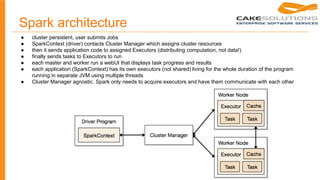
● cluster persistent, user submits Jobs
● SparkContext (driver) contacts Cluster Manager which assigns cluster resources
● then it sends application code to assigned Executors (distributing computation, not data!)
● finally sends tasks to Executors to run
● each master and worker run a webUI that displays task progress and results
● each application (SparkContext) has its own executors (not shared) living for the whole duration of the program
running in separate JVM using multiple threads
● Cluster Manager agnostic. Spark only needs to acquire executors and have them communicate with each other
Spark streaming
● mostly similar
● Receiver components - consuming from data source
● Receiver sends information to driver program which then schedules tasks (discretized streams,
small batches) to run in the cluster
○ number of assigned cores must be higher than number of Receivers
● different job lifecycle
○ potentially unbounded
○ needs to be stopped by calling sc.stop()
SparkContext
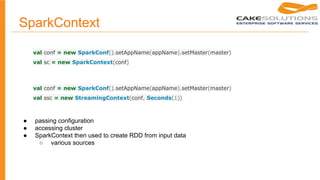
● passing configuration
● accessing cluster
● SparkContext then used to create RDD from input data
○ various sources
val conf = new SparkConf().setAppName(appName).setMaster(master)
val sc = new SparkContext(conf)
val conf = new SparkConf().setAppName(appName).setMaster(master)
val ssc = new StreamingContext(conf, Seconds(1))
Spark architecture
● 5 modes:
1. local
2. standalone
3. Yarn
4. Mesos
5. Amazon EC2
Local mode
● for application development purposes, no cluster required
● local
○ Run Spark locally with one worker thread (i.e. no parallelism at all).
● local[K]
○ Run Spark locally with K worker threads (ideally, set this to the number of cores on your
machine).
● local[*]
○ Run Spark locally with as many worker threads as logical cores on your machine.
● example local
Standalone mode
● place compiled version of spark at each node
● deployment scripts
○ sbin/start-master.sh
○ sbin/start-slaves.sh
○ sbin/stop-all.sh
● various settings, e.g. port, webUI port, memory, cores, java opts
● drivers use spark://HOST:PORT as master
● only supports a simple FIFO scheduler
○ application or global config decides how many cores and memory will be assigned to it.
● resilient to Worker failures, Master single point of failure
● supports Zookeeper for multiple Masters, leader election and state recovery. Running applications unaffected
● or local filesystem recovery mode just restarts Master if it goes down. Single node. Better with external monitor
● example 2 start cluster
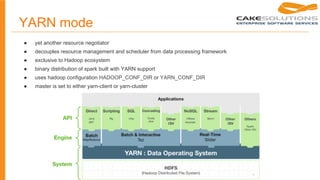
YARN mode
● yet another resource negotiator
● decouples resource management and scheduler from data processing framework
● exclusive to Hadoop ecosystem
● binary distribution of spark built with YARN support
● uses hadoop configuration HADOOP_CONF_DIR or YARN_CONF_DIR
● master is set to either yarn-client or yarn-cluster
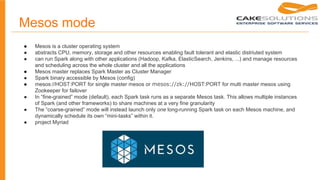
Mesos mode
● Mesos is a cluster operating system
● abstracts CPU, memory, storage and other resources enabling fault tolerant and elastic distriuted system
● can run Spark along with other applications (Hadoop, Kafka, ElasticSearch, Jenkins, ...) and manage resources
and scheduling across the whole cluster and all the applications
● Mesos master replaces Spark Master as Cluster Manager
● Spark binary accessible by Mesos (config)
● mesos://HOST:PORT for single master mesos or mesos://zk://HOST:PORT for multi master mesos using
Zookeeper for failover
● In “fine-grained” mode (default), each Spark task runs as a separate Mesos task. This allows multiple instances
of Spark (and other frameworks) to share machines at a very fine granularity
● The “coarse-grained” mode will instead launch only one long-running Spark task on each Mesos machine, and
dynamically schedule its own “mini-tasks” within it.
● project Myriad
● utility to connect to a cluster/local Spark
● no need to write program
● constructs and provides SparkContext
● similar to Scala console
● example 3 shell
Spark shell
Job deployment
● client or cluster mode
● spark-submit script
● spark driver program
● allows to write same programs, differ in deployment to cluster
Spark submit script
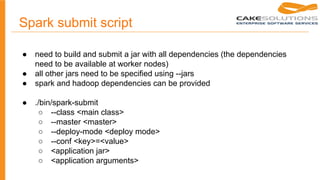
● need to build and submit a jar with all dependencies (the dependencies
need to be available at worker nodes)
● all other jars need to be specified using --jars
● spark and hadoop dependencies can be provided
● ./bin/spark-submit
○ --class <main class>
○ --master <master>
○ --deploy-mode <deploy mode>
○ --conf <key>=<value>
○ <application jar>
○ <application arguments>
Spark submit script
● non trivial automation
● need to build application jar, have it available at driver, submit job with
arguments and collect result
● deployment pipeline necessary
Spark driver program
● can be part of scala/akka application and execute Spark jobs
● needs dependencies, can not be provided
● jars need to be specified using .setJars() method
● running Spark applications, passing parameters and retrieving results
same as just running any other code
● dependency management, versions, compatibility, jar size
● one SparkContext per JVM
● example 3 submit script
Integration
● streaming
○ Kafka, Flume, Kinesis, Twitter, ZeroMQ, MQTT
● batch
○ HDFS, Cassandra, HBase, Amazon S3, …
○ text files, SequenceFiles, any Hadoop InputFormat
○ when loading local file then the file must be present on worker nodes
on given path. You need to either copy it or use dfs
Conclusion
● getting started with Spark is relatively simple
● tools simplifying development (console, local mode)
● cluster deployment fragile and difficult to troubleshoot
● networking using akka remoting
Questions

Apache spark - Installation

  • 1.
    Installation Martin Zapletal CakeSolutions Apache Spark
  • 2.
    Apache Spark andBig Data 1) History and market overview 2) Installation 3) MLlib and machine learning on Spark 4) Porting R code to Scala and Spark 5) Concepts - Core, SQL, GraphX, Streaming 6) Spark’s distributed programming model 7) Deployment
  • 3.
    Table of Contents ●Spark architecture ● download, versions, install, startup ● Cluster managers ○ Local ○ Standalone ○ Mesos ○ YARN ● Spark shell ● Job deployment ● Streaming job deployment ● Integration with other tools ● after this session you should be able to install Spark, run Spark cluster and deploy basic jobs
  • 4.
    Installation ● prebuilt packagesfor different versions of Hadoop, CDH (Cloudera’s distribution of Hadoop), MapR (MapR’s distribution of Hadoop) ○ currently only support for Scala 2.10 ● build from source ○ uses mvn, but has a sbt wrapper ○ need to specify Hadoop version build against ○ can be built with Scala 2.11 support
  • 5.
    Spark architecture ● clusterpersistent, user submits Jobs ● SparkContext (driver) contacts Cluster Manager which assigns cluster resources ● then it sends application code to assigned Executors (distributing computation, not data!) ● finally sends tasks to Executors to run ● each master and worker run a webUI that displays task progress and results ● each application (SparkContext) has its own executors (not shared) living for the whole duration of the program running in separate JVM using multiple threads ● Cluster Manager agnostic. Spark only needs to acquire executors and have them communicate with each other
  • 6.
    Spark streaming ● mostlysimilar ● Receiver components - consuming from data source ● Receiver sends information to driver program which then schedules tasks (discretized streams, small batches) to run in the cluster ○ number of assigned cores must be higher than number of Receivers ● different job lifecycle ○ potentially unbounded ○ needs to be stopped by calling sc.stop()
  • 7.
    SparkContext ● passing configuration ●accessing cluster ● SparkContext then used to create RDD from input data ○ various sources val conf = new SparkConf().setAppName(appName).setMaster(master) val sc = new SparkContext(conf) val conf = new SparkConf().setAppName(appName).setMaster(master) val ssc = new StreamingContext(conf, Seconds(1))
  • 8.
    Spark architecture ● 5modes: 1. local 2. standalone 3. Yarn 4. Mesos 5. Amazon EC2
  • 9.
    Local mode ● forapplication development purposes, no cluster required ● local ○ Run Spark locally with one worker thread (i.e. no parallelism at all). ● local[K] ○ Run Spark locally with K worker threads (ideally, set this to the number of cores on your machine). ● local[*] ○ Run Spark locally with as many worker threads as logical cores on your machine. ● example local
  • 10.
    Standalone mode ● placecompiled version of spark at each node ● deployment scripts ○ sbin/start-master.sh ○ sbin/start-slaves.sh ○ sbin/stop-all.sh ● various settings, e.g. port, webUI port, memory, cores, java opts ● drivers use spark://HOST:PORT as master ● only supports a simple FIFO scheduler ○ application or global config decides how many cores and memory will be assigned to it. ● resilient to Worker failures, Master single point of failure ● supports Zookeeper for multiple Masters, leader election and state recovery. Running applications unaffected ● or local filesystem recovery mode just restarts Master if it goes down. Single node. Better with external monitor ● example 2 start cluster
  • 11.
    YARN mode ● yetanother resource negotiator ● decouples resource management and scheduler from data processing framework ● exclusive to Hadoop ecosystem ● binary distribution of spark built with YARN support ● uses hadoop configuration HADOOP_CONF_DIR or YARN_CONF_DIR ● master is set to either yarn-client or yarn-cluster
  • 12.
    Mesos mode ● Mesosis a cluster operating system ● abstracts CPU, memory, storage and other resources enabling fault tolerant and elastic distriuted system ● can run Spark along with other applications (Hadoop, Kafka, ElasticSearch, Jenkins, ...) and manage resources and scheduling across the whole cluster and all the applications ● Mesos master replaces Spark Master as Cluster Manager ● Spark binary accessible by Mesos (config) ● mesos://HOST:PORT for single master mesos or mesos://zk://HOST:PORT for multi master mesos using Zookeeper for failover ● In “fine-grained” mode (default), each Spark task runs as a separate Mesos task. This allows multiple instances of Spark (and other frameworks) to share machines at a very fine granularity ● The “coarse-grained” mode will instead launch only one long-running Spark task on each Mesos machine, and dynamically schedule its own “mini-tasks” within it. ● project Myriad
  • 13.
    ● utility toconnect to a cluster/local Spark ● no need to write program ● constructs and provides SparkContext ● similar to Scala console ● example 3 shell Spark shell
  • 14.
    Job deployment ● clientor cluster mode ● spark-submit script ● spark driver program ● allows to write same programs, differ in deployment to cluster
  • 15.
    Spark submit script ●need to build and submit a jar with all dependencies (the dependencies need to be available at worker nodes) ● all other jars need to be specified using --jars ● spark and hadoop dependencies can be provided ● ./bin/spark-submit ○ --class <main class> ○ --master <master> ○ --deploy-mode <deploy mode> ○ --conf <key>=<value> ○ <application jar> ○ <application arguments>
  • 16.
    Spark submit script ●non trivial automation ● need to build application jar, have it available at driver, submit job with arguments and collect result ● deployment pipeline necessary
  • 17.
    Spark driver program ●can be part of scala/akka application and execute Spark jobs ● needs dependencies, can not be provided ● jars need to be specified using .setJars() method ● running Spark applications, passing parameters and retrieving results same as just running any other code ● dependency management, versions, compatibility, jar size ● one SparkContext per JVM ● example 3 submit script
  • 18.
    Integration ● streaming ○ Kafka,Flume, Kinesis, Twitter, ZeroMQ, MQTT ● batch ○ HDFS, Cassandra, HBase, Amazon S3, … ○ text files, SequenceFiles, any Hadoop InputFormat ○ when loading local file then the file must be present on worker nodes on given path. You need to either copy it or use dfs
  • 19.
    Conclusion ● getting startedwith Spark is relatively simple ● tools simplifying development (console, local mode) ● cluster deployment fragile and difficult to troubleshoot ● networking using akka remoting
  • 20.