Introduction to Asterisk
Or: How to spend 2 months on the phone
kingasterisk (king@kingasterisk.com)
http://www.kingasterisk.com/
kingasterisk Technologies, India
Agenda
•

What is Asterisk?

•

What is Asterisk NOT?

•

What do you want to do? (goals, budget, user
requirements)

•

PBX Replacement

•

Super-Brief Examples
What is Asterisk?
•

a conversion gateway for...
–

physical media (C-T1, PRI, FXO, FSX, IP)

–

protocol (TDM,SIP,H.323,IAX,MGCP,SCCP)

–

codec (G.729,G.711,GSM,ILBC,G.726, etc.)

•

an IVR/user interface application server

•

a lot more (conferencing, recording, etc.)
What is Asterisk? (cont’d)
•

open-source (GPL + exceptions)

•

blessed (cursed?) with an extremely active
user community

•

easily extended with Perl/C/Python/etc. or
apps written (typically C)

•

flexible enough to do almost any
telecommunications task (blessing/curse
again)
What is Asterisk not?
•

not a SIP proxy (subtle, yet important)

•

not a billing system

•

not an OSS (Operational Support System)

•

not a natively database-driven system

•

not an email tool or USENET browser (yet)

•

not easily configured without command-line interaction
PBX Replacement!
•

Primary stated goal is to be a *NIX based
PBX replacement

•

Multiple desksets, multiple “inbound line”
support (hundreds or thousands)

•

Features are comparable to or better than
most PBX systems (even VoIP-enabled
ones); some assembly required
What do you need to run
Asterisk?
•

Ugly answer: “That depends.”

•

Easy answer: Dedicated P4 2.0ghz with good IRQ
support and 1 X100P card (from Digium at around
$110)

•

Linux (RH 9.0, Debian are good choices; *BSD
support is there, but shaky)

•

Low-jitter, low-loss bandwidth to SIP endpoints
(desktops and/or upstreams)
How big?
•

MORE ugly answers: “That depends.”

•

If the server is just a SIP redirector, then you
can scale quite large (tens of thousands?)

•

Figure 8:1 to 10:1 ratio for offhook users

•

Word of the day: Erlangs

•

Rule of thumb for g.729 transcoding:
2x Xeon 3ghz = 100 users
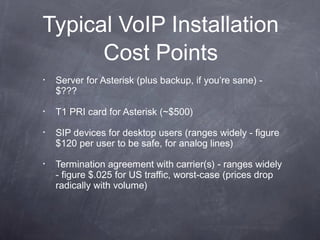
Typical VoIP Installation
Cost Points
•

Server for Asterisk (plus backup, if you’re sane) $???

•

T1 PRI card for Asterisk (~$500)

•

SIP devices for desktop users (ranges widely - figure
$120 per user to be safe, for analog lines)

•

Termination agreement with carrier(s) - ranges widely
- figure $.025 for US traffic, worst-case (prices drop
radically with volume)
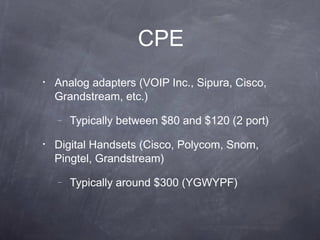
CPE
•

Analog adapters (VOIP Inc., Sipura, Cisco,
Grandstream, etc.)
–

•

Typically between $80 and $120 (2 port)

Digital Handsets (Cisco, Polycom, Snom,
Pingtel, Grandstream)
–

Typically around $300 (YGWYPF)
Why are you changing,
anyway?
•

Implement based on price, expand based on
features.

•

Long Distance will soon become a commodity (i.e.:
invisible) but features of the system will always be
visible to users

•

Integration of telephony into other business systems
is gradual and subtle; start with something that is
open so you can expand as you need.
What new stuff are you
providing?
•

FEATURES! Don’t get hung up on building just a
“replacement” service. Implement phone++ services
which are “easily” implemented with Asterisk (given
time, patience, and Perl)

•

Sample of services: phone spam blocking, inbound
call redirection based on CLID, time-of-day routing,
IM integration of VM notices, VM-to-email, busy line
redirection, multi-number custom ringers
What do they see?
•

Remember: the visibility of the customer is
very limited. They see:
–

Deskset (equipment) and features

–

Call Quality/Call completion

–

Price (if they’re the CFO)
Non-PBX * Use
•

Extremely low bandwidth call relay (PRI-to-PRI via
VoIP) via 802.11b or long-haul WAN

•

Dating services/voicemail services

•

Text-to-speech service (Nagios, weather, etc.)

•

Call centers (inbound or outbound)

•

Calling cards
Startup Notes
or: how to really annoy your [spouse/co-workers]
•

Recommended setup for beginners:
–
–

X100P card (Digium ~$110)

–

•

PIII 700mhz or faster machine

2 SIP devices (Sipura, Cisco ATA-186, Cisco
79[60, 40, 05, 12]) - $100-$300

Test on your own line or home first, then expose to
the office
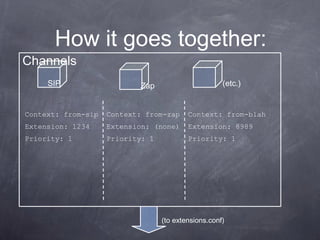
How it goes together:

Channels
SIP

(etc.)

Zap

Context: from-sip

Context: from-zap

Context: from-blah

Extension: 1234

Extension: (none)

Extension: 8989

Priority: 1

Priority: 1

Priority: 1

(to extensions.conf)
sip.conf
[2000]
type=friend
host=dynamic
context=from-sip
secret=mysecret
[2001]
type=friend
host=dynamic
context=from-sip
secret=moresecret
extensions.conf

(calls from SIP channel
configs end up here)

; This is where we handle our SIP calls
[from-sip]
exten => 1234,1,Answer
exten => 1234,2,Playback(tt-monkeys)
exten => 1234,3,Hangup
;
exten => _20XX,1,Dial(SIP/${EXTEN},30,r)
exten => _20XX,2,Goto(from-sip,${EXTEN},102)
exten => _20XX,102,Voicemail(b${EXTEN})
exten => _20XX,103,Hangup
;
exten => t,1,Hangup
exten => h,1,Hangup
Most-Used Applications
•

Dial - tries to make a new call, and then connects
current channel with new call if successful

•

Goto - allows arbitrary leaps between contexts and
priorities; allows modification of current extension

•

Background - plays a file to current channel;
interprets DTMF input
Magic with “Include”
•

Contexts are NOT parsed in the order they
appear

•

Break up large contexts into smaller contexts
and then use “include => <context>” in the
“main” context

•

This helps your sanity, as well.
Wrong
[main]
exten =>
exten =>
exten =>
exten =>

_X11,1,Dial(Zap/1/${EXTEN},500,r)
_9.,1,Dial(SIP/${EXTEN}@mysipprovider,60,r)
_011.,1,Dial(SIP/${EXTEN:3}@int-sip,60,r)
h,1,Hangup
Right
[main]
include => emergency
include => outside-line
include => international
exten => h,1,Hangup
[emergency]
exten => _X11,1,Dial(Zap/1/${EXTEN},500,r)
[outside-line]
exten => _9.,1,Dial(SIP/${EXTEN}@mysipprovider,60,r)
[international]
exten => _011.,1,Dial(SIP/${EXTEN:3}@int-sip,60,r)
Links
•

http://www.asterisk.org/

•

http://www.voip-info/wiki-Asterisk

•

http://www.loligo.com/asterisk/

•

http://www.onlamp.com/pub/a/onlamp/2003/0
7/03/asterisk.html

•

http://www.digium.com/

•

http://www.asteriskdocs.org/

•

http://www.kingasterisk.com

Asterisk Introduction

  • 1.
    Introduction to Asterisk Or:How to spend 2 months on the phone kingasterisk (king@kingasterisk.com) http://www.kingasterisk.com/ kingasterisk Technologies, India
  • 2.
    Agenda • What is Asterisk? • Whatis Asterisk NOT? • What do you want to do? (goals, budget, user requirements) • PBX Replacement • Super-Brief Examples
  • 3.
    What is Asterisk? • aconversion gateway for... – physical media (C-T1, PRI, FXO, FSX, IP) – protocol (TDM,SIP,H.323,IAX,MGCP,SCCP) – codec (G.729,G.711,GSM,ILBC,G.726, etc.) • an IVR/user interface application server • a lot more (conferencing, recording, etc.)
  • 4.
    What is Asterisk?(cont’d) • open-source (GPL + exceptions) • blessed (cursed?) with an extremely active user community • easily extended with Perl/C/Python/etc. or apps written (typically C) • flexible enough to do almost any telecommunications task (blessing/curse again)
  • 5.
    What is Asterisknot? • not a SIP proxy (subtle, yet important) • not a billing system • not an OSS (Operational Support System) • not a natively database-driven system • not an email tool or USENET browser (yet) • not easily configured without command-line interaction
  • 6.
    PBX Replacement! • Primary statedgoal is to be a *NIX based PBX replacement • Multiple desksets, multiple “inbound line” support (hundreds or thousands) • Features are comparable to or better than most PBX systems (even VoIP-enabled ones); some assembly required
  • 7.
    What do youneed to run Asterisk? • Ugly answer: “That depends.” • Easy answer: Dedicated P4 2.0ghz with good IRQ support and 1 X100P card (from Digium at around $110) • Linux (RH 9.0, Debian are good choices; *BSD support is there, but shaky) • Low-jitter, low-loss bandwidth to SIP endpoints (desktops and/or upstreams)
  • 8.
    How big? • MORE uglyanswers: “That depends.” • If the server is just a SIP redirector, then you can scale quite large (tens of thousands?) • Figure 8:1 to 10:1 ratio for offhook users • Word of the day: Erlangs • Rule of thumb for g.729 transcoding: 2x Xeon 3ghz = 100 users
  • 9.
    Typical VoIP Installation CostPoints • Server for Asterisk (plus backup, if you’re sane) $??? • T1 PRI card for Asterisk (~$500) • SIP devices for desktop users (ranges widely - figure $120 per user to be safe, for analog lines) • Termination agreement with carrier(s) - ranges widely - figure $.025 for US traffic, worst-case (prices drop radically with volume)
  • 10.
    CPE • Analog adapters (VOIPInc., Sipura, Cisco, Grandstream, etc.) – • Typically between $80 and $120 (2 port) Digital Handsets (Cisco, Polycom, Snom, Pingtel, Grandstream) – Typically around $300 (YGWYPF)
  • 11.
    Why are youchanging, anyway? • Implement based on price, expand based on features. • Long Distance will soon become a commodity (i.e.: invisible) but features of the system will always be visible to users • Integration of telephony into other business systems is gradual and subtle; start with something that is open so you can expand as you need.
  • 12.
    What new stuffare you providing? • FEATURES! Don’t get hung up on building just a “replacement” service. Implement phone++ services which are “easily” implemented with Asterisk (given time, patience, and Perl) • Sample of services: phone spam blocking, inbound call redirection based on CLID, time-of-day routing, IM integration of VM notices, VM-to-email, busy line redirection, multi-number custom ringers
  • 13.
    What do theysee? • Remember: the visibility of the customer is very limited. They see: – Deskset (equipment) and features – Call Quality/Call completion – Price (if they’re the CFO)
  • 14.
    Non-PBX * Use • Extremelylow bandwidth call relay (PRI-to-PRI via VoIP) via 802.11b or long-haul WAN • Dating services/voicemail services • Text-to-speech service (Nagios, weather, etc.) • Call centers (inbound or outbound) • Calling cards
  • 15.
    Startup Notes or: howto really annoy your [spouse/co-workers] • Recommended setup for beginners: – – X100P card (Digium ~$110) – • PIII 700mhz or faster machine 2 SIP devices (Sipura, Cisco ATA-186, Cisco 79[60, 40, 05, 12]) - $100-$300 Test on your own line or home first, then expose to the office
  • 16.
    How it goestogether: Channels SIP (etc.) Zap Context: from-sip Context: from-zap Context: from-blah Extension: 1234 Extension: (none) Extension: 8989 Priority: 1 Priority: 1 Priority: 1 (to extensions.conf)
  • 17.
  • 18.
    extensions.conf (calls from SIPchannel configs end up here) ; This is where we handle our SIP calls [from-sip] exten => 1234,1,Answer exten => 1234,2,Playback(tt-monkeys) exten => 1234,3,Hangup ; exten => _20XX,1,Dial(SIP/${EXTEN},30,r) exten => _20XX,2,Goto(from-sip,${EXTEN},102) exten => _20XX,102,Voicemail(b${EXTEN}) exten => _20XX,103,Hangup ; exten => t,1,Hangup exten => h,1,Hangup
  • 19.
    Most-Used Applications • Dial -tries to make a new call, and then connects current channel with new call if successful • Goto - allows arbitrary leaps between contexts and priorities; allows modification of current extension • Background - plays a file to current channel; interprets DTMF input
  • 20.
    Magic with “Include” • Contextsare NOT parsed in the order they appear • Break up large contexts into smaller contexts and then use “include => <context>” in the “main” context • This helps your sanity, as well.
  • 21.
    Wrong [main] exten => exten => exten=> exten => _X11,1,Dial(Zap/1/${EXTEN},500,r) _9.,1,Dial(SIP/${EXTEN}@mysipprovider,60,r) _011.,1,Dial(SIP/${EXTEN:3}@int-sip,60,r) h,1,Hangup
  • 22.
    Right [main] include => emergency include=> outside-line include => international exten => h,1,Hangup [emergency] exten => _X11,1,Dial(Zap/1/${EXTEN},500,r) [outside-line] exten => _9.,1,Dial(SIP/${EXTEN}@mysipprovider,60,r) [international] exten => _011.,1,Dial(SIP/${EXTEN:3}@int-sip,60,r)
  • 23.