VIRGINIA SCHOOL FOR THE DEAF AND BLIND

                                                                                             February, 2008


                    News from Technology
 BEWARE OF PHISHING SCAMS
 How many of us have re-                ITRT? IT? What are they?
 ceived the phishing scam
 involving the banks in Nige-      Just the other day, I was asked         and service all the computers here
 ria? Well, here is another        what is the difference between          on campus. They also own and ser-
 one. In a recent e-mail from      an ITRT (Instructional Technology vice the servers in Byrd Hall and all
 VITA security; we were all        Resource Teacher) and an IT             network printers. IT also deals with
 warned of the most recent         (Information Technologist). The         the installation of software on the
 scam that claims to be from       ITRT positions were set up by the       network or individual computers but
 the Department of Justice. In     State of Virginia in the effort to      do not handle software program
 a response to this newest         help teachers. According to VA          issues. So in a nutshell, ITRTs handle
 scam, the DOJ issued this         DOE, “ITRTs provide on-site and         the training, support and implement-
 statement, “The DOJ did not       on-demand assistance for fellow ing of technology in the classroom.
 send these unsolicited e-mail     teachers to create different            ITs deal with the equipment.
 messages and would not            forms of learning and teaching
 send them via e-mail...the        with the help of technologies.
 message contains a mali-          The intent...for ITRT ...is to assist
 cious attachment as well as       teachers with the integration of
 random text used to defeat        technology in the classroom, to
 spam filters.” If you receive     train teachers to use technology
 this hoax e-mail, do not open     in an effective manner and to
 it. Delete it immediately.        assist with curriculum develop-
                                   ment as it relates to educational
                                   technology.” On the flip side
                                   VITA and their ITs work mostly
                                   with the hardware. They own
 Closet in Strader
       Lab
 Check out the closet in
   Strader Computer lab.          National Educational Technology Standards for
   There are many resource
   materials for teacher and      Teachers
   student use.
                                 Marian Hackney, Harry                plans that integrate tech-     this group for being our first
 Each resource is separated    Wood, Kristin Quinn and my-          nology into the classroom.     group at VSDB to go through
   by subject area.              self have made it through            There are 23 standards.        this national certification!
                                 the first hurdle for passing         Each standard then has 2
 Check with me for a key and
                                 our NETS-T certification. All 4      to 5 sub-areas. It is hard
   we can wade through the
   closet together               of us must submit artifacts          but rewarding work. It
                                 such as lesson plans, tech-          really makes you think how
                                 nology integration plans             technology is integrated
                                 and personal development             into our lessons. Kudos to
Page 2


   In Strader Computer Lab– Clicker 5
Clicker 5 is a writing support and          animation to make writing come to
multimedia program for children             life. Clicker is also good for creating
of all abilities. You can use               presentations, especially school
Clicker to support teaching and             field trips, if you’ve taken the digital
learning in any subject area. You           camera with you. The potential for
can use full-screen Clicker Grids           Clicker 5 is endless. It can adapted
for talking books, multimedia               and modified for the Deaf as well
presentations and labeling ac-              as the Blind. Come take a look at
tivities. Clicker has highly de-            Clicker 5. Training will be held later
tailed pictures to illustrate com-          this month or you can schedule 1:1
mon words. You can also use                 training at your convenience.


On the Web: VSTE Big Deal Book of Technology
“Big Deal Books are resources of interest to various audiences within the education market”. The Big Deal Book of
Technology is a free bi-weekly publication offered to anyone interested in technology in education. The following infor-
mation is provided in partnership with VSTE (Virginia Society of Technology in Education.) Enjoy!

Incorporate Project-Based Learning into the Curriculum
A new book from the International Society for Technology in Education (ISTE), Reinventing Project-Based Learning: Your Field Guide to
Real-World Projects in the Digital Age, offers educators a practical guide for maximizing the benefits of project-based learning in to-
day’s technology-rich learning environment. http://www.iste.org/AM/Template.cfm?
Section=Leadership_and_Skills_Development&Template=/CM/HTMLDisplay.cfm&ContentID=17265


Maximizing Technology Learning
The Encyclopedia of Educational Technology provides a comprehensive collection of short, multimedia articles on a variety of topics
in the field of educational technology. Many include links to supporting resources. Topics include “Active Learning”; “Brain-based
Learning”; “Cooperative Learning”; “Metacognition”; “Multiple Intelligences”; “Using Simulations to Facilitate Learning”; “Visual
Perception”—and much more. The online encyclopedia is a publication of San Diego State University’s Department of
Educational Technology. http://coe.sdsu.edu/eet/Admin/TOC/index.htm

Listen to the Diversity of Music in the U.S.
Complementing the WGBH radio show of the same name, the Art of the States Web site streams hard-to-find musical
pieces in their entirety, showcasing often-challenging examples of contemporary American music. Art of the States
provides access to hundreds of compositions and will eventually house an archive of more than 500 pieces. Search
contents by composer, performer, time period, instrumentation and genre. http://www.artofthestates.org


 What’s Legal and What’s Not
                                                 cialist with WVPT and will help us
Mark your calendars! John Neuman                 wade through the legal red tape of
with WVPT will be in the Blind De-               copyright issues in the classroom. For
partment to discuss copyright law in             those working towards NETS-T certifi-
the educational setting on February              cation, this workshop supports stan-
22 at 1:30. A similar workshop will be           dards VIA, VID.
presented to the Deaf Department
in March. John is an Education Spe-
Page 3


SharePoint
Don’t forget to check out the        puter. Simply go to VSDB’s               word is the same password you
VSDB SharePoint. You will find       homepage at                              use here at school. Try it out!
information from the Business        www.vsdbs.virginia.gov . On the
Office, Human Resources, Poli-       left side of the page towards the
cies, Forms and many more. In        bottom, you will see the VSDB
the future, Curriculum will be up-   SharePoint icon. Simply click on
dated and placed on Share-           that. You will then be prompted
Point as well. The best thing        to log-in. This is a little different.
about SharePoint is that you can     Here you will have to use the for-
access this from home! It is easy    mat: VSDBfirstinitial + last name
to access from your home com-        (ex. VSDBkstinson). The pass-


Classroom Ideas from WVPT and Shenandoah Valley Technology Consortium

Are you struggling to find a les-
son that captures your student’s
attention but don’t have the
time to wade through countless
internet sites.? Check out the
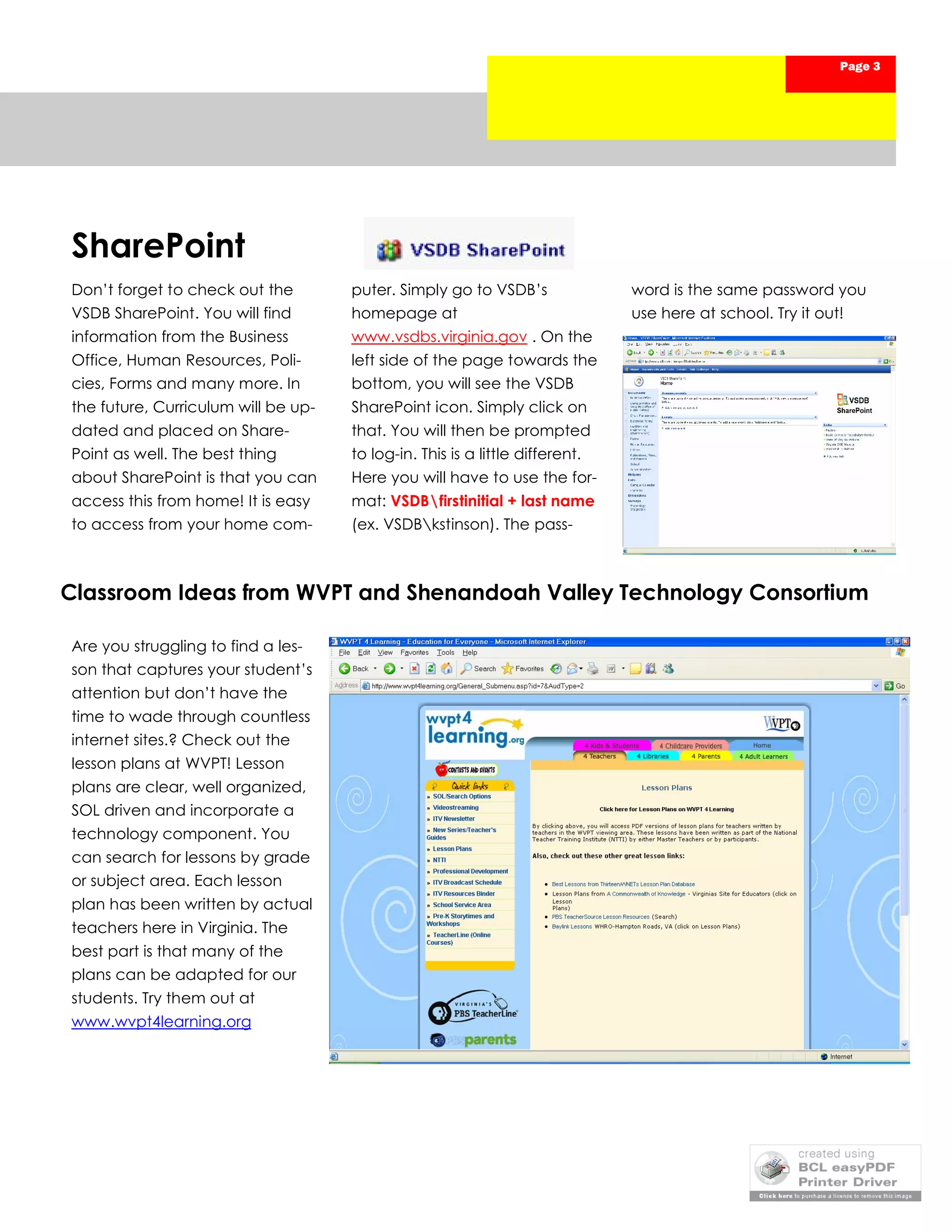
lesson plans at WVPT! Lesson
plans are clear, well organized,
SOL driven and incorporate a
technology component. You
can search for lessons by grade
or subject area. Each lesson
plan has been written by actual
teachers here in Virginia. The
best part is that many of the
plans can be adapted for our
students. Try them out at
www.wvpt4learning.org

February Newsletter

  • 1.
    VIRGINIA SCHOOL FORTHE DEAF AND BLIND February, 2008 News from Technology BEWARE OF PHISHING SCAMS How many of us have re- ITRT? IT? What are they? ceived the phishing scam involving the banks in Nige- Just the other day, I was asked and service all the computers here ria? Well, here is another what is the difference between on campus. They also own and ser- one. In a recent e-mail from an ITRT (Instructional Technology vice the servers in Byrd Hall and all VITA security; we were all Resource Teacher) and an IT network printers. IT also deals with warned of the most recent (Information Technologist). The the installation of software on the scam that claims to be from ITRT positions were set up by the network or individual computers but the Department of Justice. In State of Virginia in the effort to do not handle software program a response to this newest help teachers. According to VA issues. So in a nutshell, ITRTs handle scam, the DOJ issued this DOE, “ITRTs provide on-site and the training, support and implement- statement, “The DOJ did not on-demand assistance for fellow ing of technology in the classroom. send these unsolicited e-mail teachers to create different ITs deal with the equipment. messages and would not forms of learning and teaching send them via e-mail...the with the help of technologies. message contains a mali- The intent...for ITRT ...is to assist cious attachment as well as teachers with the integration of random text used to defeat technology in the classroom, to spam filters.” If you receive train teachers to use technology this hoax e-mail, do not open in an effective manner and to it. Delete it immediately. assist with curriculum develop- ment as it relates to educational technology.” On the flip side VITA and their ITs work mostly with the hardware. They own Closet in Strader Lab  Check out the closet in Strader Computer lab. National Educational Technology Standards for There are many resource materials for teacher and Teachers student use. Marian Hackney, Harry plans that integrate tech- this group for being our first  Each resource is separated Wood, Kristin Quinn and my- nology into the classroom. group at VSDB to go through by subject area. self have made it through There are 23 standards. this national certification! the first hurdle for passing Each standard then has 2  Check with me for a key and our NETS-T certification. All 4 to 5 sub-areas. It is hard we can wade through the closet together of us must submit artifacts but rewarding work. It such as lesson plans, tech- really makes you think how nology integration plans technology is integrated and personal development into our lessons. Kudos to
  • 2.
    Page 2 In Strader Computer Lab– Clicker 5 Clicker 5 is a writing support and animation to make writing come to multimedia program for children life. Clicker is also good for creating of all abilities. You can use presentations, especially school Clicker to support teaching and field trips, if you’ve taken the digital learning in any subject area. You camera with you. The potential for can use full-screen Clicker Grids Clicker 5 is endless. It can adapted for talking books, multimedia and modified for the Deaf as well presentations and labeling ac- as the Blind. Come take a look at tivities. Clicker has highly de- Clicker 5. Training will be held later tailed pictures to illustrate com- this month or you can schedule 1:1 mon words. You can also use training at your convenience. On the Web: VSTE Big Deal Book of Technology “Big Deal Books are resources of interest to various audiences within the education market”. The Big Deal Book of Technology is a free bi-weekly publication offered to anyone interested in technology in education. The following infor- mation is provided in partnership with VSTE (Virginia Society of Technology in Education.) Enjoy! Incorporate Project-Based Learning into the Curriculum A new book from the International Society for Technology in Education (ISTE), Reinventing Project-Based Learning: Your Field Guide to Real-World Projects in the Digital Age, offers educators a practical guide for maximizing the benefits of project-based learning in to- day’s technology-rich learning environment. http://www.iste.org/AM/Template.cfm? Section=Leadership_and_Skills_Development&Template=/CM/HTMLDisplay.cfm&ContentID=17265 Maximizing Technology Learning The Encyclopedia of Educational Technology provides a comprehensive collection of short, multimedia articles on a variety of topics in the field of educational technology. Many include links to supporting resources. Topics include “Active Learning”; “Brain-based Learning”; “Cooperative Learning”; “Metacognition”; “Multiple Intelligences”; “Using Simulations to Facilitate Learning”; “Visual Perception”—and much more. The online encyclopedia is a publication of San Diego State University’s Department of Educational Technology. http://coe.sdsu.edu/eet/Admin/TOC/index.htm Listen to the Diversity of Music in the U.S. Complementing the WGBH radio show of the same name, the Art of the States Web site streams hard-to-find musical pieces in their entirety, showcasing often-challenging examples of contemporary American music. Art of the States provides access to hundreds of compositions and will eventually house an archive of more than 500 pieces. Search contents by composer, performer, time period, instrumentation and genre. http://www.artofthestates.org What’s Legal and What’s Not cialist with WVPT and will help us Mark your calendars! John Neuman wade through the legal red tape of with WVPT will be in the Blind De- copyright issues in the classroom. For partment to discuss copyright law in those working towards NETS-T certifi- the educational setting on February cation, this workshop supports stan- 22 at 1:30. A similar workshop will be dards VIA, VID. presented to the Deaf Department in March. John is an Education Spe-
  • 3.
    Page 3 SharePoint Don’t forgetto check out the puter. Simply go to VSDB’s word is the same password you VSDB SharePoint. You will find homepage at use here at school. Try it out! information from the Business www.vsdbs.virginia.gov . On the Office, Human Resources, Poli- left side of the page towards the cies, Forms and many more. In bottom, you will see the VSDB the future, Curriculum will be up- SharePoint icon. Simply click on dated and placed on Share- that. You will then be prompted Point as well. The best thing to log-in. This is a little different. about SharePoint is that you can Here you will have to use the for- access this from home! It is easy mat: VSDBfirstinitial + last name to access from your home com- (ex. VSDBkstinson). The pass- Classroom Ideas from WVPT and Shenandoah Valley Technology Consortium Are you struggling to find a les- son that captures your student’s attention but don’t have the time to wade through countless internet sites.? Check out the lesson plans at WVPT! Lesson plans are clear, well organized, SOL driven and incorporate a technology component. You can search for lessons by grade or subject area. Each lesson plan has been written by actual teachers here in Virginia. The best part is that many of the plans can be adapted for our students. Try them out at www.wvpt4learning.org