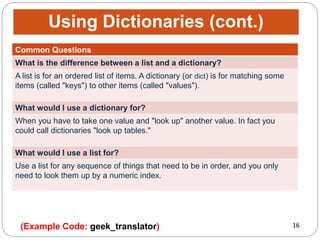
Lists and dictionaries can be used to store and organize data in Python. Lists are mutable sequences that can be modified after they are created. Common list operations include accessing elements by index or slice, checking membership with "in", concatenating lists, and modifying elements. Dictionaries store data as key-value pairs and allow looking up values using almost any type of key, making them useful for storing related data like databases. Common dictionary operations include accessing values with keys and methods like get, keys, items, update and clear.

![3
Lists are sequences, just like tuples, but lists are
mutable. They can be modified. So, lists can do
everything tuples can, plus more. Lists work just like
tuples, so everything you learned about tuples is
applicable to lists.
Example:
inventory = ["sword", "armor", "shield", "healing
potion"]
Lists
(Example Code: lists / Exercise 1)
bracket bracket](https://image.slidesharecdn.com/module5usinglistanddictionaries-171214213921/85/ITS-16163-Module-5-Using-Lists-and-Dictionaries-3-320.jpg)
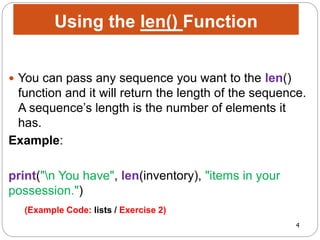

![6
Once again, the code is exactly the same as it was with
tuples. Indexing a list is the same as indexing a tuple,
just supply the position number of the element you’re
after in brackets.
Example:
index = int(input("n Enter the index number for an
item in inventory: "))
print("At index", index, "is", inventory[index])
Indexing Lists
(Example Code: lists / Exercise 4)](https://image.slidesharecdn.com/module5usinglistanddictionaries-171214213921/85/ITS-16163-Module-5-Using-Lists-and-Dictionaries-6-320.jpg)
![7
Slicing a list is exactly the same as slicing a tuple!
you can supply the two end points, separated by a
colon, in brackets:
Example:
start = int(input("nEnter the index number to begin a
slice: "))
finish = int(input("Enter the index number to end the
slice: "))
print("inventory[", start, ":", finish, "] is",
inventory[start:finish] )
Slicing Lists
(Example Code: lists / Exercise 5)](https://image.slidesharecdn.com/module5usinglistanddictionaries-171214213921/85/ITS-16163-Module-5-Using-Lists-and-Dictionaries-7-320.jpg)
![8
Concatenating lists works the same way concatenating
tuples does.
you can only concatenate sequences of the same type.
Example:
chest = ["gold", "gems"]
print("You find a chest which contains:")
print(chest)
print("You add the contents of the chest to your
inventory.")
inventory += chest #concatenate chest and
inventory
print("Your inventory is now:")
Concatenating Lists
(Example Code: lists / Exercise 6)](https://image.slidesharecdn.com/module5usinglistanddictionaries-171214213921/85/ITS-16163-Module-5-Using-Lists-and-Dictionaries-8-320.jpg)
![10
Lists are mutable.
They can change. As a result, there are many things
you can do with lists that you can’t do with tuples. you
can only concatenate sequences of the same type.
Because lists are mutable, you can assign an existing
element a new value
Example:
print("You trade your sword for a
crossbow.")
inventory[0] = "crossbow"
print("Your inventory is now:")
print(inventory)
Assigning a New List Element by
Index
(Example Code: lists / Exercise 7)](https://image.slidesharecdn.com/module5usinglistanddictionaries-171214213921/85/ITS-16163-Module-5-Using-Lists-and-Dictionaries-10-320.jpg)
![11
You can delete an element from a list with delsimply
designate the element after del
Example:
print("In a great battle, your ‘shield’ is
destroyed.")
del inventory[2]
print("Your inventory is now:")
print(inventory)
Deleting a List Element
(Example Code: lists / Exercise 8)](https://image.slidesharecdn.com/module5usinglistanddictionaries-171214213921/85/ITS-16163-Module-5-Using-Lists-and-Dictionaries-11-320.jpg)
![12
SELECTED LIST METHODS
Method Description
append(value) Adds value to end of a list.
sort() Sorts the elements, smallest value
first.
reverse() Reverses the order of a list.
count(value) Returns the number of occurrences of
value.
index(value) Returns the first position number of
where value occurs.
insert(i, value) Inserts value at position i.
pop([i]) Returns value at position i and
removes value from the list.
remove(value) Removes the first occurrence of
value from the list.
(Example Code: high_scores](https://image.slidesharecdn.com/module5usinglistanddictionaries-171214213921/85/ITS-16163-Module-5-Using-Lists-and-Dictionaries-12-320.jpg)

![14
Dictionary (or "dict") is a way to store data just like
a list but instead of using only numbers to get the
data, you can use almost anything. This lets you
treat a dict like it's a database for storing and
organizing data.
Example:
stuff = {'name': 'Zed', 'age': 39, 'height': 6 * 12 + 2}
print (stuff ['name'])
print (stuff ['age'])
print (stuff ['height'])
OUTPUT>>> Zed
39
74
Using Dictionaries
(Example Code: dictionaries)
bracket
s
braces braces](https://image.slidesharecdn.com/module5usinglistanddictionaries-171214213921/85/ITS-16163-Module-5-Using-Lists-and-Dictionaries-14-320.jpg)
![SELECTED DIC METHODS
Method Description
len(dict) Gives the total length of the dictionary. This would be equal to
the number of items in the dictionary.
str(dict) Produces a printable string representation of a dictionary
type(variable) Returns the type of the passed variable. If passed variable is
dictionary, then it would return a dictionary type.
dict.clear() Removes all elements of dictionary dict
dict.copy() Returns a shallow copy of dictionary dict
dict.fromkeys() Create a new dictionary with keys from seq and
values set to value.
dict.get(key, default=None) For key key, returns value or default if key not in dictionary
dict.has_key(key) Removed, use the in operation instead.
dict.items() Returns a list of dict's (key, value) tuple pairs
dict.keys() Returns list of dictionary dict's keys
dict.setdefault(key, default =
None)
Similar to get(), but will set dict[key] = default if key is not
already in dict
dict.update(dict2) Adds dictionary dict2's key-values pairs to dict
Source: TutorialsPoints](https://image.slidesharecdn.com/module5usinglistanddictionaries-171214213921/85/ITS-16163-Module-5-Using-Lists-and-Dictionaries-15-320.jpg)