PYTHON
SETS DICT
By,
Prof. Sharath H A,
Asst. Prof.,
Dept. of ISE,
MIT Mysore
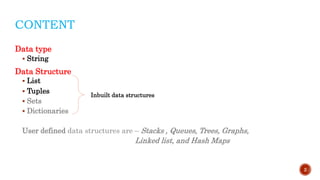
CONTENT
Data type
 String
Data Structure
 List
 Tuples
 Sets
 Dictionaries
User defined data structures are – Stacks , Queues, Trees, Graphs,
Linked list, and Hash Maps
2
Inbuilt data structures
DATA-STRUCTURES
Types of Data Structures
 Strings – immutable ordered sequence of characters
EX: S = ‘abc’ or S = “abc” or S = ‘‘‘abc’’’
 List – mutable ordered sequence of objects
EX: L = [1,2,’a’]
 Tuples – immutable ordered sequence of objects
EX: T = (1,2,’a’)
 Sets – mutable unordered sequence of unique element
EX: S = {1,2,3}
Frozensets – same as Sets but it is immutable
EX: FS = frozenset(s)
 Dictionaries – mutable unordered collection of value pairs (mapping unique
key to value)
EX: D = ({1:’Karnataka’},{2:’Kerala’},{3:’Tamil Nadu’})
3
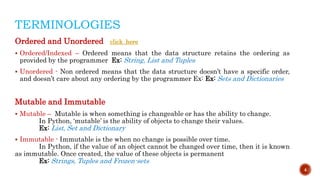
TERMINOLOGIES
Ordered and Unordered click_here
 Ordered/Indexed – Ordered means that the data structure retains the ordering as
provided by the programmer Ex: String, List and Tuples
 Unordered - Non ordered means that the data structure doesn’t have a specific order,
and doesn’t care about any ordering by the programmer Ex: Ex: Sets and Dictionaries
Mutable and Immutable
 Mutable – Mutable is when something is changeable or has the ability to change.
In Python, ‘mutable’ is the ability of objects to change their values.
Ex: List, Set and Dictionary
 Immutable - Immutable is the when no change is possible over time.
In Python, if the value of an object cannot be changed over time, then it is known
as immutable. Once created, the value of these objects is permanent
Ex: Strings, Tuples and Frozen-sets
4
COMPRESSION
String List Tuples Sets Dictionaries
Immutable Mutable Immutable Mutable Mutable
Ordered/Index Ordered/Index Ordered/Index Unordered unordered
Allows Duplicate
member
Allows Duplicate
member
Allows Duplicate
member
Not allows Duplicate
member
Not allows Duplicate
member
Empty string
S = “ ”
Empty list
L = [ ]
Empty tuple
T = ( )
Empty set
S = set{ }
Empty Dictionary
D = { }
String with single
character
S = “c”
List with single
Element
L = [ “Hello”]
Tuple with single
Element
T = ( “Hello”,)
List with single
Element
S = set { 1 }
List with single
Element
D = { “a”:1}
It can store any
datatype: int, str,
list, tuple, set and
dictionary
It can store any
datatype: int,
string, list, tuple,
set and dictionary
It can store any
datatype: int, str and
tuple
Key can be int, str
and tuple
Value can be int, str,
list, tuple, set and
dictionary
5
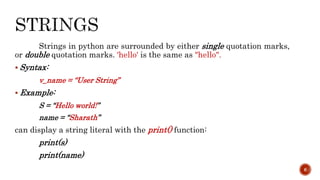
Strings in python are surrounded by either single quotation marks,
or double quotation marks. 'hello' is the same as "hello".
 Syntax:
v_name = “User String”
 Example:
S = “Hello world!”
name = “Sharath”
can display a string literal with the print() function:
print(s)
print(name)
6
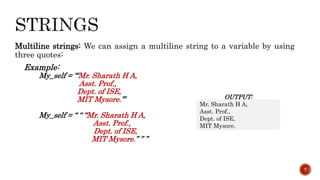
Multiline strings: We can assign a multiline string to a variable by using
three quotes:
Example:
My_self = ‘‘‘Mr. Sharath H A,
Asst. Prof.,
Dept. of ISE,
MIT Mysore.’’’
My_self = “ “ “Mr. Sharath H A,
Asst. Prof.,
Dept. of ISE,
MIT Mysore.” ” ”
7
OUTPUT:
Mr. Sharath H A,
Asst. Prof.,
Dept. of ISE,
MIT Mysore.
Strings are Arrays: Python does not have a character data type, a single
character is simply a string with a length of 1
Square brackets can be used to access elements of the string.
Example:
a = ‘Hello’
print(a[1])
8
OUTPUT:
e
Note: remember that the first character has the position 0
Slicing: Specify the start index and the end index, separated by a colon, to
return a part of the string
Example:
a = ‘Hello World!’
print(a[1:5])
Slicing from the start: By leaving out the start index, the range will start
at the first character
Example:
a = ‘Hello World!’
print(a[:5])
Slice to the end: By leaving out the end index, the range will go to the end
Example:
a = ‘Hello World!’
print(a[7:])
9
OUTPUT:
ello
OUTPUT:
Hello
OUTPUT:
World!
Negative Indexing: Use negative indexes to start the slice from the end of
the string
Example:
a = ‘Hello World!’
print(a[-6:-2])
Slicing from the start: By leaving out the start index, the range will start
at the first character
Example:
a = ‘Hello World!’
print([:-2])
Slice to the end: By leaving out the end index, the range will go to the end
Example:
a = ‘Hello World!’
print(a[-6:])
10
OUTPUT:
Worl
OUTPUT:
Hello Worl
OUTPUT:
World!
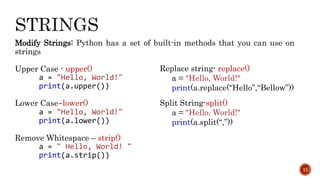
Modify Strings: Python has a set of built-in methods that you can use on
strings
Upper Case - upper()
a = "Hello, World!"
print(a.upper())
Lower Case-lower()
a = "Hello, World!"
print(a.lower())
Remove Whitespace – strip()
a = " Hello, World! "
print(a.strip())
11
Replace string- replace()
a = "Hello, World!"
print(a.replace(“Hello”,“Bellow”))
Split String-split()
a = "Hello, World!"
print(a.split(“,”))
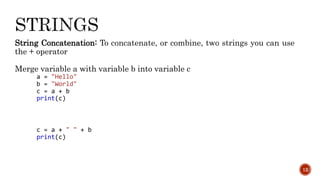
String Concatenation: To concatenate, or combine, two strings you can use
the + operator
Merge variable a with variable b into variable c
a = "Hello"
b = "World"
c = a + b
print(c)
c = a + " " + b
print(c)
12
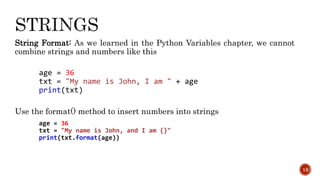
String Format: As we learned in the Python Variables chapter, we cannot
combine strings and numbers like this
age = 36
txt = "My name is John, I am " + age
print(txt)
Use the format() method to insert numbers into strings
age = 36
txt = "My name is John, and I am {}"
print(txt.format(age))
13
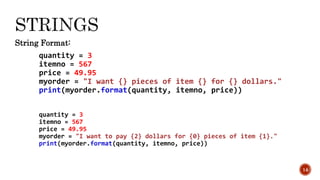
String Format:
quantity = 3
itemno = 567
price = 49.95
myorder = "I want {} pieces of item {} for {} dollars."
print(myorder.format(quantity, itemno, price))
quantity = 3
itemno = 567
price = 49.95
myorder = "I want to pay {2} dollars for {0} pieces of item {1}."
print(myorder.format(quantity, itemno, price))
14

Python ds

  • 1.
    PYTHON SETS DICT By, Prof. SharathH A, Asst. Prof., Dept. of ISE, MIT Mysore
  • 2.
    CONTENT Data type  String DataStructure  List  Tuples  Sets  Dictionaries User defined data structures are – Stacks , Queues, Trees, Graphs, Linked list, and Hash Maps 2 Inbuilt data structures
  • 3.
    DATA-STRUCTURES Types of DataStructures  Strings – immutable ordered sequence of characters EX: S = ‘abc’ or S = “abc” or S = ‘‘‘abc’’’  List – mutable ordered sequence of objects EX: L = [1,2,’a’]  Tuples – immutable ordered sequence of objects EX: T = (1,2,’a’)  Sets – mutable unordered sequence of unique element EX: S = {1,2,3} Frozensets – same as Sets but it is immutable EX: FS = frozenset(s)  Dictionaries – mutable unordered collection of value pairs (mapping unique key to value) EX: D = ({1:’Karnataka’},{2:’Kerala’},{3:’Tamil Nadu’}) 3
  • 4.
    TERMINOLOGIES Ordered and Unorderedclick_here  Ordered/Indexed – Ordered means that the data structure retains the ordering as provided by the programmer Ex: String, List and Tuples  Unordered - Non ordered means that the data structure doesn’t have a specific order, and doesn’t care about any ordering by the programmer Ex: Ex: Sets and Dictionaries Mutable and Immutable  Mutable – Mutable is when something is changeable or has the ability to change. In Python, ‘mutable’ is the ability of objects to change their values. Ex: List, Set and Dictionary  Immutable - Immutable is the when no change is possible over time. In Python, if the value of an object cannot be changed over time, then it is known as immutable. Once created, the value of these objects is permanent Ex: Strings, Tuples and Frozen-sets 4
  • 5.
    COMPRESSION String List TuplesSets Dictionaries Immutable Mutable Immutable Mutable Mutable Ordered/Index Ordered/Index Ordered/Index Unordered unordered Allows Duplicate member Allows Duplicate member Allows Duplicate member Not allows Duplicate member Not allows Duplicate member Empty string S = “ ” Empty list L = [ ] Empty tuple T = ( ) Empty set S = set{ } Empty Dictionary D = { } String with single character S = “c” List with single Element L = [ “Hello”] Tuple with single Element T = ( “Hello”,) List with single Element S = set { 1 } List with single Element D = { “a”:1} It can store any datatype: int, str, list, tuple, set and dictionary It can store any datatype: int, string, list, tuple, set and dictionary It can store any datatype: int, str and tuple Key can be int, str and tuple Value can be int, str, list, tuple, set and dictionary 5
  • 6.
    Strings in pythonare surrounded by either single quotation marks, or double quotation marks. 'hello' is the same as "hello".  Syntax: v_name = “User String”  Example: S = “Hello world!” name = “Sharath” can display a string literal with the print() function: print(s) print(name) 6
  • 7.
    Multiline strings: Wecan assign a multiline string to a variable by using three quotes: Example: My_self = ‘‘‘Mr. Sharath H A, Asst. Prof., Dept. of ISE, MIT Mysore.’’’ My_self = “ “ “Mr. Sharath H A, Asst. Prof., Dept. of ISE, MIT Mysore.” ” ” 7 OUTPUT: Mr. Sharath H A, Asst. Prof., Dept. of ISE, MIT Mysore.
  • 8.
    Strings are Arrays:Python does not have a character data type, a single character is simply a string with a length of 1 Square brackets can be used to access elements of the string. Example: a = ‘Hello’ print(a[1]) 8 OUTPUT: e Note: remember that the first character has the position 0
  • 9.
    Slicing: Specify thestart index and the end index, separated by a colon, to return a part of the string Example: a = ‘Hello World!’ print(a[1:5]) Slicing from the start: By leaving out the start index, the range will start at the first character Example: a = ‘Hello World!’ print(a[:5]) Slice to the end: By leaving out the end index, the range will go to the end Example: a = ‘Hello World!’ print(a[7:]) 9 OUTPUT: ello OUTPUT: Hello OUTPUT: World!
  • 10.
    Negative Indexing: Usenegative indexes to start the slice from the end of the string Example: a = ‘Hello World!’ print(a[-6:-2]) Slicing from the start: By leaving out the start index, the range will start at the first character Example: a = ‘Hello World!’ print([:-2]) Slice to the end: By leaving out the end index, the range will go to the end Example: a = ‘Hello World!’ print(a[-6:]) 10 OUTPUT: Worl OUTPUT: Hello Worl OUTPUT: World!
  • 11.
    Modify Strings: Pythonhas a set of built-in methods that you can use on strings Upper Case - upper() a = "Hello, World!" print(a.upper()) Lower Case-lower() a = "Hello, World!" print(a.lower()) Remove Whitespace – strip() a = " Hello, World! " print(a.strip()) 11 Replace string- replace() a = "Hello, World!" print(a.replace(“Hello”,“Bellow”)) Split String-split() a = "Hello, World!" print(a.split(“,”))
  • 12.
    String Concatenation: Toconcatenate, or combine, two strings you can use the + operator Merge variable a with variable b into variable c a = "Hello" b = "World" c = a + b print(c) c = a + " " + b print(c) 12
  • 13.
    String Format: Aswe learned in the Python Variables chapter, we cannot combine strings and numbers like this age = 36 txt = "My name is John, I am " + age print(txt) Use the format() method to insert numbers into strings age = 36 txt = "My name is John, and I am {}" print(txt.format(age)) 13
  • 14.
    String Format: quantity =3 itemno = 567 price = 49.95 myorder = "I want {} pieces of item {} for {} dollars." print(myorder.format(quantity, itemno, price)) quantity = 3 itemno = 567 price = 49.95 myorder = "I want to pay {2} dollars for {0} pieces of item {1}." print(myorder.format(quantity, itemno, price)) 14