• A listis an ordered set of values, where each value is identified by
an index. The values that make up a list are called its elements.
Lists are similar to strings, which are ordered sets of characters,
except that the elements of a list can have any type. Lists and
strings- and other things that behave like ordered sets are called
sequences.
3.
Characteristics of Lists
•The list has the following characteristics:
• The lists are ordered.
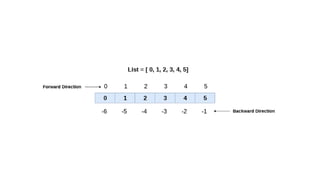
• The element of the list can access by index.
• The lists are the mutable type.
• The lists are mutable types.
• A list can store the number of various elements.
• There areseveral ways to create a new list; the simplest is to
enclose the elements in square brackets ([ and ]):
[10, 20, 30, 40]
["spam", "bungee", "swallow"]
6.
["hello", 2.0, 5,[10, 20]]
A list within another list is said to be
nested.
a = [1,2,"Peter",4.50,"Ricky",5,6]
b= [1,2,5,"Peter",4.50,"Ricky",6]
a ==b
a = [1, 2,"Peter", 4.50,"Ricky",5, 6]
b = [1, 2,"Peter", 4.50,"Ricky",5, 6]
a == b
11.
List Operations
Operator DescriptionExample
Repetition The repetition operator
enables the list elements
to be repeated multiple
times.
L1*2 = [1, 2, 3, 4, 1, 2, 3,
4]
Concatenation It concatenates the list
mentioned on either side
of the operator.
l1+l2 = [1, 2, 3, 4, 5, 6, 7,
8]
Membership It returns true if a
particular item exists in a
particular list otherwise
false.
print(2 in l1) prints True.
Iteration The for loop is used to for i in l1: print(i)Output1
12.
Iterating a List
•A list can be iterated by using a for - in loop
list = ["John", "David", "James", "Jonathan"]
for i in list:
print(i)
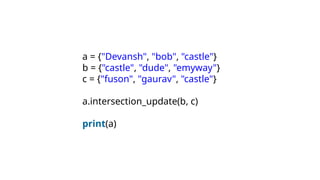
13.
Adding elements tothe list
• append() function can only add value to the end of the list.
#Declaring the empty list
l =[]
#Number of elements will be entered by the user
n = int(input("Enter the number of elements in the list:"))
# for loop to take the input
for i in range(0,n):
# The input is taken from the user and added to the list as the it
em
l.append(input("Enter the item:"))
print("printing the list items..")
# traversal loop to print the list items
for i in l:
print(i, end = " ")
14.
Removing elements fromthe list
• remove() function which is used to remove the element
from the list
list = [0,1,2,3,4]
print("printing original list: ");
for i in list:
print(i,end=" ")
list.remove(2)
print("
nprinting the list after the removal of first element...")
for i in list:
print(i,end=" ")
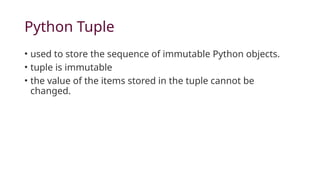
Python Tuple
• usedto store the sequence of immutable Python objects.
• tuple is immutable
• the value of the items stored in the tuple cannot be
changed.
17.
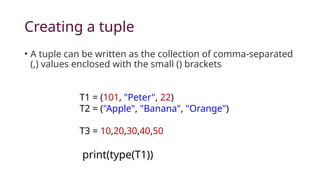
Creating a tuple
•A tuple can be written as the collection of comma-separated
(,) values enclosed with the small () brackets
T1 = (101, "Peter", 22)
T2 = ("Apple", "Banana", "Orange")
T3 = 10,20,30,40,50
print(type(T1))
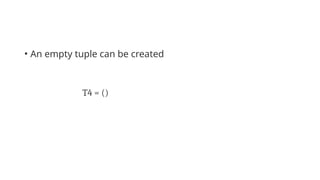
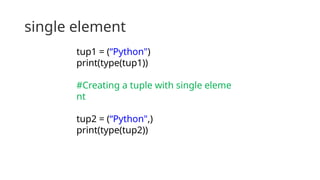
single element
tup1 =(“Python")
print(type(tup1))
#Creating a tuple with single eleme
nt
tup2 = (“Python",)
print(type(tup2))
20.
Accessing Elements -Tuple
tuple1 = (10, 20, 30, 40, 50, 60)
print(tuple1)
count = 0
for i in tuple1:
print("tuple1[%d] = %d"%(count, i))
count = count+1
21.
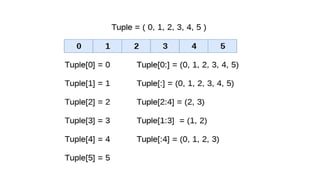
Tuple indexing andslicing
• The indexing in the tuple starts from 0 and goes to
length(tuple) - 1.
• The items in the tuple can be accessed by using the index []
operator.
• The colon operator used to access multiple items in the
tuple.
Negative Indexing
• Thetuple element can also access by using negative
indexing. The index of -1 denotes the rightmost element
and -2 to the second last item and so on.
tuple1 = (1, 2, 3, 4, 5)
print(tuple1[-1])
print(tuple1[-4])
print(tuple1[-3:-1])
print(tuple1[:-1])
print(tuple1[-2:])
25.
Deleting Tuple
• Thetuple items cannot be deleted by using the del keyword
as tuples are immutable.
• To delete an entire tuple, the del keyword is used with the
tuple name
tuple1 = (1, 2, 3, 4, 5, 6)
print(tuple1)
del tuple1[0]
print(tuple1)
del tuple1
print(tuple1)
26.
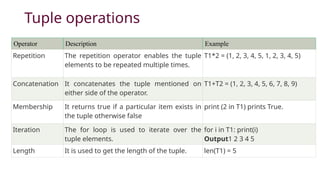
Tuple operations
Operator DescriptionExample
Repetition The repetition operator enables the tuple
elements to be repeated multiple times.
T1*2 = (1, 2, 3, 4, 5, 1, 2, 3, 4, 5)
Concatenation It concatenates the tuple mentioned on
either side of the operator.
T1+T2 = (1, 2, 3, 4, 5, 6, 7, 8, 9)
Membership It returns true if a particular item exists in
the tuple otherwise false
print (2 in T1) prints True.
Iteration The for loop is used to iterate over the
tuple elements.
for i in T1: print(i)
Output1 2 3 4 5
Length It is used to get the length of the tuple. len(T1) = 5
27.
Where use tuple?
•Using tuple instead of list gives us a clear idea that tuple
data is constant and must not be changed
• Tuple can simulate a dictionary without keys.
• Consider the following nested structure, which can be used
as a dictionary.
• [(101, "John", 22), (102, "Mike", 28), (103, "Dustin", 30)]
28.
List Tuple
The literalsyntax of list is shown by the []. The literal syntax of the tuple is shown by the ().
The List is mutable. The tuple is immutable.
The List has the a variable length. The tuple has the fixed length.
The list provides more functionality than a tuple. The tuple provides less functionality than the list.
The list is used in the scenario in which we need to
store the simple collections with no constraints
where the value of the items can be changed.
The tuple is used in the cases where we need to
store the read-only collections i.e., the value of the
items cannot be changed. It can be used as the key
inside the dictionary.
The lists are less memory efficient than a tuple. The tuples are more memory efficient because of
its immutability.
Python Set
• APython set is the collection of the unordered items.
• Each element in the set must be unique, immutable,
• Sets remove the duplicate elements.
• Sets are mutable, elements can be modified after its creation.
31.
Creating a set
•The set can be created by enclosing the comma-separated
immutable items with the curly braces {}.
• Python also provides the set() method, which can be used to
create the set by the passed sequence.
32.
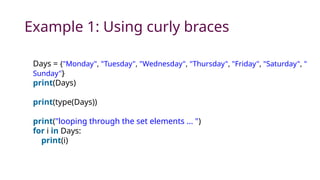
Example 1: Usingcurly braces
Days = {"Monday", "Tuesday", "Wednesday", "Thursday", "Friday", "Saturday", "
Sunday"}
print(Days)
print(type(Days))
print("looping through the set elements ... ")
for i in Days:
print(i)
33.
Example 2: Usingset() method
Days = set(["Monday", "Tuesday", "Wednesday", "Thursday", "Friday", "Saturday", "
Sunday"])
print(Days)
print(type(Days))
print("looping through the set elements ... ")
for i in Days:
print(i)
34.
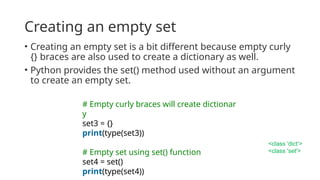
Creating an emptyset
• Creating an empty set is a bit different because empty curly
{} braces are also used to create a dictionary as well.
• Python provides the set() method used without an argument
to create an empty set.
# Empty curly braces will create dictionar
y
set3 = {}
print(type(set3))
# Empty set using set() function
set4 = set()
print(type(set4))
<class 'dict’>
<class 'set'>
35.
Adding items tothe set
• Python provides the add() method and update() method to
add some particular item to the set.
• add() method is used to add a single element
• update() method is used to add multiple elements to the
set.
36.
Example: 1 -Using add() method
Months = set(["January","February", "March", "April", "May", "Jun
e"])
print("nprinting the original set ... ")
print(months)
print("nAdding other months to the set...");
Months.add("July");
Months.add ("August");
print("nPrinting the modified set...");
print(Months)
print("nlooping through the set elements ... ")
for i in Months:
print(i)
37.
Example - 2Using update() function
Months = set(["January","February", "March", "April", "May", "Ju
ne"])
print("nprinting the original set ... ")
print(Months)
print("nupdating the original set ... ")
Months.update(["July","August","September","October"]);
print("nprinting the modified set ... ")
print(Months);
38.
Removing items fromthe set
• Python provides the discard() method
and remove() method - used to remove the items from the
set.
• discard() function if the item does not exist in the set then
the set remain unchanged
• remove() method will through an error
39.
Example-1 Using discard()method
months = set(["January","February", "March", "April", "May", "June"])
print("nprinting the original set ... ")
print(months)
print("nRemoving some months from the set...");
months.discard("January");
months.discard("May");
print("nPrinting the modified set...");
print(months)
print("nlooping through the set elements ... ")
for i in months:
print(i)
40.
• Python providesalso the remove() method to remove the
item from the set
41.
Example-2 Using remove()function
months = set(["January","February", "March", "April", "May", "June"]
)
print("nprinting the original set ... ")
print(months)
print("nRemoving some months from the set...");
months.remove("January");
months.remove("May");
print("nPrinting the modified set...");
print(months)
42.
• pop() methodto remove the item.
• pop() method will always remove the last item but the set is
unordered
43.
Months = set(["January","February","March", "April", "May", "Ju
ne"])
print("nprinting the original set ... ")
print(Months)
print("nRemoving some months from the set...");
Months.pop();
Months.pop();
print("nPrinting the modified set...");
print(Months)
44.
Python provides theclear() method to remove all the items from the set.
Months = set(["January","February", "March", "April", "May", "Ju
ne"])
print("nprinting the original set ... ")
print(Months)
print("nRemoving all the items from the set...");
Months.clear()
print("nPrinting the modified set...")
print(Months)
45.
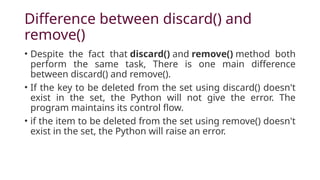
Difference between discard()and
remove()
• Despite the fact that discard() and remove() method both
perform the same task, There is one main difference
between discard() and remove().
• If the key to be deleted from the set using discard() doesn't
exist in the set, the Python will not give the error. The
program maintains its control flow.
• if the item to be deleted from the set using remove() doesn't
exist in the set, the Python will raise an error.
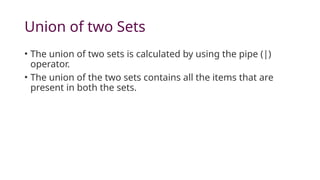
Union of twoSets
• The union of two sets is calculated by using the pipe (|)
operator.
• The union of the two sets contains all the items that are
present in both the sets.
48.
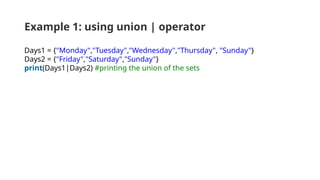
Example 1: usingunion | operator
Days1 = {"Monday","Tuesday","Wednesday","Thursday", "Sunday"}
Days2 = {"Friday","Saturday","Sunday"}
print(Days1|Days2) #printing the union of the sets
49.
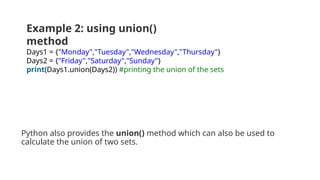
Python also providesthe union() method which can also be used to
calculate the union of two sets.
Example 2: using union()
method
Days1 = {"Monday","Tuesday","Wednesday","Thursday"}
Days2 = {"Friday","Saturday","Sunday"}
print(Days1.union(Days2)) #printing the union of the sets
50.
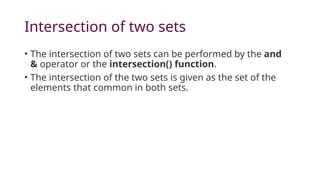
Intersection of twosets
• The intersection of two sets can be performed by the and
& operator or the intersection() function.
• The intersection of the two sets is given as the set of the
elements that common in both sets.
51.
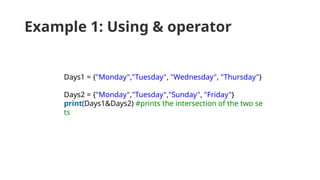
Example 1: Using& operator
Days1 = {"Monday","Tuesday", "Wednesday", "Thursday"}
Days2 = {"Monday","Tuesday","Sunday", "Friday"}
print(Days1&Days2) #prints the intersection of the two se
ts
52.
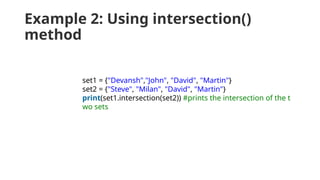
Example 2: Usingintersection()
method
set1 = {"Devansh","John", "David", "Martin"}
set2 = {"Steve", "Milan", "David", "Martin"}
print(set1.intersection(set2)) #prints the intersection of the t
wo sets
53.
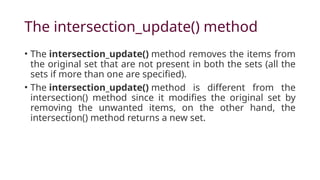
The intersection_update() method
•The intersection_update() method removes the items from
the original set that are not present in both the sets (all the
sets if more than one are specified).
• The intersection_update() method is different from the
intersection() method since it modifies the original set by
removing the unwanted items, on the other hand, the
intersection() method returns a new set.
54.
a = {"Devansh","bob", "castle"}
b = {"castle", "dude", "emyway"}
c = {"fuson", "gaurav", "castle"}
a.intersection_update(b, c)
print(a)
55.
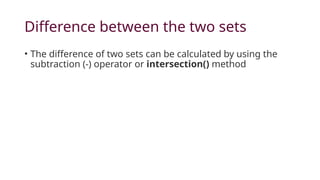
Difference between thetwo sets
• The difference of two sets can be calculated by using the
subtraction (-) operator or intersection() method
56.
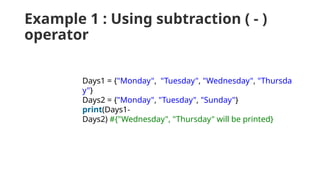
Example 1 :Using subtraction ( - )
operator
Days1 = {"Monday", "Tuesday", "Wednesday", "Thursda
y"}
Days2 = {"Monday", "Tuesday", "Sunday"}
print(Days1-
Days2) #{"Wednesday", "Thursday" will be printed}
57.
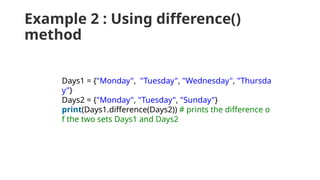
Example 2 :Using difference()
method
Days1 = {"Monday", "Tuesday", "Wednesday", "Thursda
y"}
Days2 = {"Monday", "Tuesday", "Sunday"}
print(Days1.difference(Days2)) # prints the difference o
f the two sets Days1 and Days2
58.
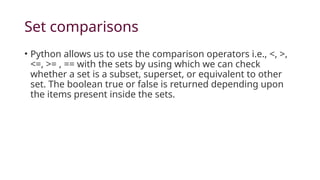
Set comparisons
• Pythonallows us to use the comparison operators i.e., <, >,
<=, >= , == with the sets by using which we can check
whether a set is a subset, superset, or equivalent to other
set. The boolean true or false is returned depending upon
the items present inside the sets.
59.
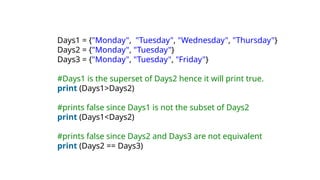
Days1 = {"Monday","Tuesday", "Wednesday", "Thursday"}
Days2 = {"Monday", "Tuesday"}
Days3 = {"Monday", "Tuesday", "Friday"}
#Days1 is the superset of Days2 hence it will print true.
print (Days1>Days2)
#prints false since Days1 is not the subset of Days2
print (Days1<Days2)
#prints false since Days2 and Days3 are not equivalent
print (Days2 == Days3)


![• There are several ways to create a new list; the simplest is to
enclose the elements in square brackets ([ and ]):
[10, 20, 30, 40]
["spam", "bungee", "swallow"]](https://image.slidesharecdn.com/unit4-list-tuple-251124082142-6b993e73/85/Unit-4-List-Tuple-pptx-Python-subject-5-320.jpg)
![["hello", 2.0, 5, [10, 20]]
A list within another list is said to be
nested.](https://image.slidesharecdn.com/unit4-list-tuple-251124082142-6b993e73/85/Unit-4-List-Tuple-pptx-Python-subject-6-320.jpg)
![Accessing elements
• print numbers[0]
• numbers[1] = 5](https://image.slidesharecdn.com/unit4-list-tuple-251124082142-6b993e73/85/Unit-4-List-Tuple-pptx-Python-subject-7-320.jpg)
![List operations
a = [1, 2, 3]
b = [4, 5, 6]
c = a + b
print c](https://image.slidesharecdn.com/unit4-list-tuple-251124082142-6b993e73/85/Unit-4-List-Tuple-pptx-Python-subject-8-320.jpg)
![a = [1,2,"Peter",4.50,"Ricky",5,6]
b = [1,2,5,"Peter",4.50,"Ricky",6]
a ==b
a = [1, 2,"Peter", 4.50,"Ricky",5, 6]
b = [1, 2,"Peter", 4.50,"Ricky",5, 6]
a == b](https://image.slidesharecdn.com/unit4-list-tuple-251124082142-6b993e73/85/Unit-4-List-Tuple-pptx-Python-subject-9-320.jpg)
![List Operations
Operator Description Example
Repetition The repetition operator
enables the list elements
to be repeated multiple
times.
L1*2 = [1, 2, 3, 4, 1, 2, 3,
4]
Concatenation It concatenates the list
mentioned on either side
of the operator.
l1+l2 = [1, 2, 3, 4, 5, 6, 7,
8]
Membership It returns true if a
particular item exists in a
particular list otherwise
false.
print(2 in l1) prints True.
Iteration The for loop is used to for i in l1: print(i)Output1](https://image.slidesharecdn.com/unit4-list-tuple-251124082142-6b993e73/85/Unit-4-List-Tuple-pptx-Python-subject-11-320.jpg)
![Iterating a List
• A list can be iterated by using a for - in loop
list = ["John", "David", "James", "Jonathan"]
for i in list:
print(i)](https://image.slidesharecdn.com/unit4-list-tuple-251124082142-6b993e73/85/Unit-4-List-Tuple-pptx-Python-subject-12-320.jpg)
![Adding elements to the list
• append() function can only add value to the end of the list.
#Declaring the empty list
l =[]
#Number of elements will be entered by the user
n = int(input("Enter the number of elements in the list:"))
# for loop to take the input
for i in range(0,n):
# The input is taken from the user and added to the list as the it
em
l.append(input("Enter the item:"))
print("printing the list items..")
# traversal loop to print the list items
for i in l:
print(i, end = " ")](https://image.slidesharecdn.com/unit4-list-tuple-251124082142-6b993e73/85/Unit-4-List-Tuple-pptx-Python-subject-13-320.jpg)
![Removing elements from the list
• remove() function which is used to remove the element
from the list
list = [0,1,2,3,4]
print("printing original list: ");
for i in list:
print(i,end=" ")
list.remove(2)
print("
nprinting the list after the removal of first element...")
for i in list:
print(i,end=" ")](https://image.slidesharecdn.com/unit4-list-tuple-251124082142-6b993e73/85/Unit-4-List-Tuple-pptx-Python-subject-14-320.jpg)
![Accessing Elements - Tuple
tuple1 = (10, 20, 30, 40, 50, 60)
print(tuple1)
count = 0
for i in tuple1:
print("tuple1[%d] = %d"%(count, i))
count = count+1](https://image.slidesharecdn.com/unit4-list-tuple-251124082142-6b993e73/85/Unit-4-List-Tuple-pptx-Python-subject-20-320.jpg)
![Tuple indexing and slicing
• The indexing in the tuple starts from 0 and goes to
length(tuple) - 1.
• The items in the tuple can be accessed by using the index []
operator.
• The colon operator used to access multiple items in the
tuple.](https://image.slidesharecdn.com/unit4-list-tuple-251124082142-6b993e73/85/Unit-4-List-Tuple-pptx-Python-subject-21-320.jpg)
![tup = (1,2,3,4,5,6,7)
print(tup[0])
print(tup[1])
print(tup[2])
print(tup[8])](https://image.slidesharecdn.com/unit4-list-tuple-251124082142-6b993e73/85/Unit-4-List-Tuple-pptx-Python-subject-23-320.jpg)
![Negative Indexing
• The tuple element can also access by using negative
indexing. The index of -1 denotes the rightmost element
and -2 to the second last item and so on.
tuple1 = (1, 2, 3, 4, 5)
print(tuple1[-1])
print(tuple1[-4])
print(tuple1[-3:-1])
print(tuple1[:-1])
print(tuple1[-2:])](https://image.slidesharecdn.com/unit4-list-tuple-251124082142-6b993e73/85/Unit-4-List-Tuple-pptx-Python-subject-24-320.jpg)
![Deleting Tuple
• The tuple items cannot be deleted by using the del keyword
as tuples are immutable.
• To delete an entire tuple, the del keyword is used with the
tuple name
tuple1 = (1, 2, 3, 4, 5, 6)
print(tuple1)
del tuple1[0]
print(tuple1)
del tuple1
print(tuple1)](https://image.slidesharecdn.com/unit4-list-tuple-251124082142-6b993e73/85/Unit-4-List-Tuple-pptx-Python-subject-25-320.jpg)
![Where use tuple?
• Using tuple instead of list gives us a clear idea that tuple
data is constant and must not be changed
• Tuple can simulate a dictionary without keys.
• Consider the following nested structure, which can be used
as a dictionary.
• [(101, "John", 22), (102, "Mike", 28), (103, "Dustin", 30)]](https://image.slidesharecdn.com/unit4-list-tuple-251124082142-6b993e73/85/Unit-4-List-Tuple-pptx-Python-subject-27-320.jpg)
![List Tuple
The literal syntax of list is shown by the []. The literal syntax of the tuple is shown by the ().
The List is mutable. The tuple is immutable.
The List has the a variable length. The tuple has the fixed length.
The list provides more functionality than a tuple. The tuple provides less functionality than the list.
The list is used in the scenario in which we need to
store the simple collections with no constraints
where the value of the items can be changed.
The tuple is used in the cases where we need to
store the read-only collections i.e., the value of the
items cannot be changed. It can be used as the key
inside the dictionary.
The lists are less memory efficient than a tuple. The tuples are more memory efficient because of
its immutability.](https://image.slidesharecdn.com/unit4-list-tuple-251124082142-6b993e73/85/Unit-4-List-Tuple-pptx-Python-subject-28-320.jpg)
![Example 2: Using set() method
Days = set(["Monday", "Tuesday", "Wednesday", "Thursday", "Friday", "Saturday", "
Sunday"])
print(Days)
print(type(Days))
print("looping through the set elements ... ")
for i in Days:
print(i)](https://image.slidesharecdn.com/unit4-list-tuple-251124082142-6b993e73/85/Unit-4-List-Tuple-pptx-Python-subject-33-320.jpg)
![Example: 1 - Using add() method
Months = set(["January","February", "March", "April", "May", "Jun
e"])
print("nprinting the original set ... ")
print(months)
print("nAdding other months to the set...");
Months.add("July");
Months.add ("August");
print("nPrinting the modified set...");
print(Months)
print("nlooping through the set elements ... ")
for i in Months:
print(i)](https://image.slidesharecdn.com/unit4-list-tuple-251124082142-6b993e73/85/Unit-4-List-Tuple-pptx-Python-subject-36-320.jpg)
![Example - 2 Using update() function
Months = set(["January","February", "March", "April", "May", "Ju
ne"])
print("nprinting the original set ... ")
print(Months)
print("nupdating the original set ... ")
Months.update(["July","August","September","October"]);
print("nprinting the modified set ... ")
print(Months);](https://image.slidesharecdn.com/unit4-list-tuple-251124082142-6b993e73/85/Unit-4-List-Tuple-pptx-Python-subject-37-320.jpg)
![Example-1 Using discard() method
months = set(["January","February", "March", "April", "May", "June"])
print("nprinting the original set ... ")
print(months)
print("nRemoving some months from the set...");
months.discard("January");
months.discard("May");
print("nPrinting the modified set...");
print(months)
print("nlooping through the set elements ... ")
for i in months:
print(i)](https://image.slidesharecdn.com/unit4-list-tuple-251124082142-6b993e73/85/Unit-4-List-Tuple-pptx-Python-subject-39-320.jpg)
![Example-2 Using remove() function
months = set(["January","February", "March", "April", "May", "June"]
)
print("nprinting the original set ... ")
print(months)
print("nRemoving some months from the set...");
months.remove("January");
months.remove("May");
print("nPrinting the modified set...");
print(months)](https://image.slidesharecdn.com/unit4-list-tuple-251124082142-6b993e73/85/Unit-4-List-Tuple-pptx-Python-subject-41-320.jpg)
![Months = set(["January","February", "March", "April", "May", "Ju
ne"])
print("nprinting the original set ... ")
print(Months)
print("nRemoving some months from the set...");
Months.pop();
Months.pop();
print("nPrinting the modified set...");
print(Months)](https://image.slidesharecdn.com/unit4-list-tuple-251124082142-6b993e73/85/Unit-4-List-Tuple-pptx-Python-subject-43-320.jpg)
![Python provides the clear() method to remove all the items from the set.
Months = set(["January","February", "March", "April", "May", "Ju
ne"])
print("nprinting the original set ... ")
print(Months)
print("nRemoving all the items from the set...");
Months.clear()
print("nPrinting the modified set...")
print(Months)](https://image.slidesharecdn.com/unit4-list-tuple-251124082142-6b993e73/85/Unit-4-List-Tuple-pptx-Python-subject-44-320.jpg)