SQL Server Security
sunit@sunitkanyan.in 1
sunit@sunitkanyan.in 2
Contents
 SQL Server
 Why security?
 SQL Server Security
 Authentication
 Authorization
 Securing.
 Do & Don’t.
sunit@sunitkanyan.in 3
SQL Server
RDBM by Microsoft
sunit@sunitkanyan.in 4
Why Security?
 Server Attack
 Port Scanning
 Instance Name Browsing
 Exposing Database Names
 Accessing administrative objects
 Data threats
 Data theft.
 Business logic theft.
 Database object change/drop.
sunit@sunitkanyan.in 5
SQL Server Security
Authentication
Authorization
sunit@sunitkanyan.in 6
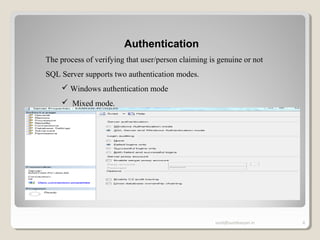
Authentication
The process of verifying that user/person claiming is genuine or not
SQL Server supports two authentication modes.
 Windows authentication mode
 Mixed mode.
sunit@sunitkanyan.in 7
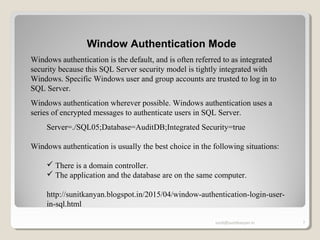
Window Authentication Mode
Windows authentication is the default, and is often referred to as integrated
security because this SQL Server security model is tightly integrated with
Windows. Specific Windows user and group accounts are trusted to log in to
SQL Server.
Windows authentication wherever possible. Windows authentication uses a
series of encrypted messages to authenticate users in SQL Server.
Server=./SQL05;Database=AuditDB;Integrated Security=true
Windows authentication is usually the best choice in the following situations:
 There is a domain controller.
 The application and the database are on the same computer.
http://sunitkanyan.blogspot.in/2015/04/window-authentication-login-user-
in-sql.html
sunit@sunitkanyan.in 8
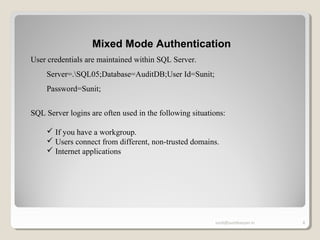
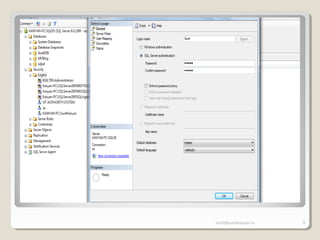
Mixed Mode Authentication
User credentials are maintained within SQL Server.
Server=.SQL05;Database=AuditDB;User Id=Sunit;
Password=Sunit;
SQL Server logins are often used in the following situations:
 If you have a workgroup.
 Users connect from different, non-trusted domains.
 Internet applications
sunit@sunitkanyan.in 9
Mixed Mode Authentication
sunit@sunitkanyan.in 10
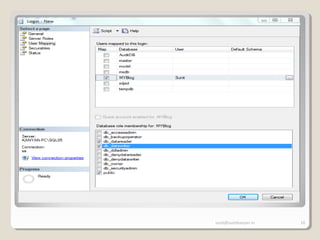
Mixed Mode Authentication
sunit@sunitkanyan.in 11
Authorization
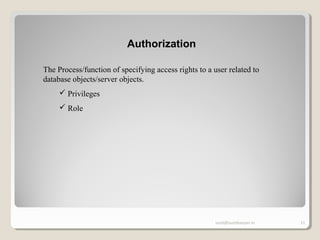
The Process/function of specifying access rights to a user related to
database objects/server objects.
 Privileges
 Role
sunit@sunitkanyan.in 12
Securing
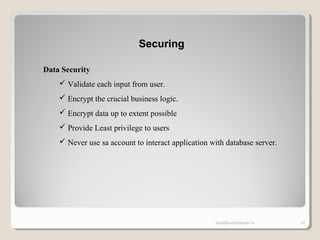
Data Security
 Validate each input from user.
 Encrypt the crucial business logic.
 Encrypt data up to extent possible
 Provide Least privilege to users
 Never use sa account to interact application with database server.
sunit@sunitkanyan.in 13
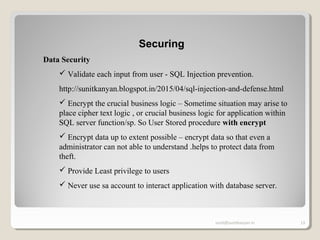
Securing
Data Security
 Validate each input from user - SQL Injection prevention.
http://sunitkanyan.blogspot.in/2015/04/sql-injection-and-defense.html
 Encrypt the crucial business logic – Sometime situation may arise to
place cipher text logic , or crucial business logic for application within
SQL server function/sp. So User Stored procedure with encrypt
 Encrypt data up to extent possible – encrypt data so that even a
administrator can not able to understand .helps to protect data from
theft.
 Provide Least privilege to users
 Never use sa account to interact application with database server.
sunit@sunitkanyan.in 14
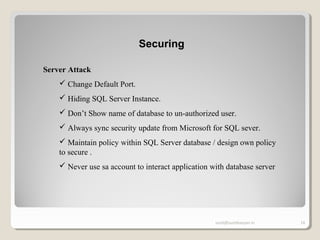
Securing
Server Attack
 Change Default Port.
 Hiding SQL Server Instance.
 Don’t Show name of database to un-authorized user.
 Always sync security update from Microsoft for SQL sever.
 Maintain policy within SQL Server database / design own policy
to secure .
 Never use sa account to interact application with database server
sunit@sunitkanyan.in 15
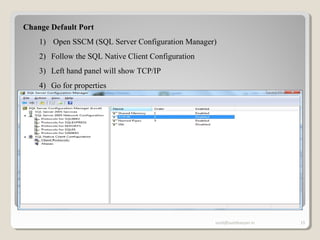
Change Default Port
1) Open SSCM (SQL Server Configuration Manager)
2) Follow the SQL Native Client Configuration
3) Left hand panel will show TCP/IP
4) Go for properties
5)
sunit@sunitkanyan.in 16
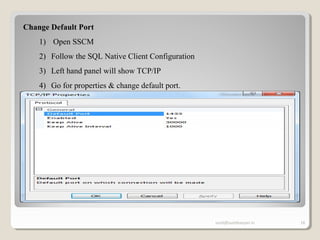
Change Default Port
1) Open SSCM
2) Follow the SQL Native Client Configuration
3) Left hand panel will show TCP/IP
4) Go for properties & change default port.
sunit@sunitkanyan.in 17
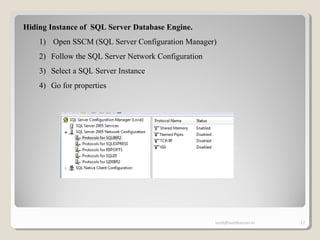
Hiding Instance of SQL Server Database Engine.
1) Open SSCM (SQL Server Configuration Manager)
2) Follow the SQL Server Network Configuration
3) Select a SQL Server Instance
4) Go for properties
sunit@sunitkanyan.in 18
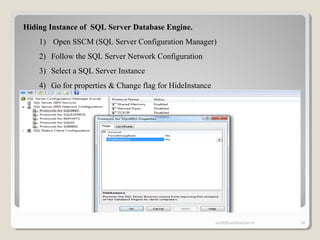
Hiding Instance of SQL Server Database Engine.
1) Open SSCM (SQL Server Configuration Manager)
2) Follow the SQL Server Network Configuration
3) Select a SQL Server Instance
4) Go for properties & Change flag for HideInstance
sunit@sunitkanyan.in 19
Don’t Show name of database to un-authorized user.
Provide view database permission for specific database to specific database.
sunit@sunitkanyan.in 20
Do & Don’t
Do
 Install only required components.
 Disable unnecessary features and
services.
 Install recent fixes & service packs
from Microsoft.
 Enforce strong password policy,
 Disable SA account or rename it.
 Change default port
 Hide instances
 Valid every input.
 Don’t use dynamic queries.
Don’t
 Don’t Install sample database on
Production server.
 Never Use SA account to interact
application to database
 Don’t remove the system databases/
system stored procedure.
 Don’t use dictionary passwords.
 Don’t treat input safe be valid all.
 Don’t disable automatic updated for
SQL server on production.
 Don’t take manual backup also
schedule things using scripts/
management plans
sunit@sunitkanyan.in 21
If you have any query , Please drop
email Sunit@SunitKanyan.in
sunit@sunitkanyan.in 22
Thanks!
Sunit Kanyan
www.sunitkanyan.in

SQL Server Security

  • 1.
  • 2.
    sunit@sunitkanyan.in 2 Contents  SQLServer  Why security?  SQL Server Security  Authentication  Authorization  Securing.  Do & Don’t.
  • 3.
  • 4.
    sunit@sunitkanyan.in 4 Why Security? Server Attack  Port Scanning  Instance Name Browsing  Exposing Database Names  Accessing administrative objects  Data threats  Data theft.  Business logic theft.  Database object change/drop.
  • 5.
    sunit@sunitkanyan.in 5 SQL ServerSecurity Authentication Authorization
  • 6.
    sunit@sunitkanyan.in 6 Authentication The processof verifying that user/person claiming is genuine or not SQL Server supports two authentication modes.  Windows authentication mode  Mixed mode.
  • 7.
    sunit@sunitkanyan.in 7 Window AuthenticationMode Windows authentication is the default, and is often referred to as integrated security because this SQL Server security model is tightly integrated with Windows. Specific Windows user and group accounts are trusted to log in to SQL Server. Windows authentication wherever possible. Windows authentication uses a series of encrypted messages to authenticate users in SQL Server. Server=./SQL05;Database=AuditDB;Integrated Security=true Windows authentication is usually the best choice in the following situations:  There is a domain controller.  The application and the database are on the same computer. http://sunitkanyan.blogspot.in/2015/04/window-authentication-login-user- in-sql.html
  • 8.
    sunit@sunitkanyan.in 8 Mixed ModeAuthentication User credentials are maintained within SQL Server. Server=.SQL05;Database=AuditDB;User Id=Sunit; Password=Sunit; SQL Server logins are often used in the following situations:  If you have a workgroup.  Users connect from different, non-trusted domains.  Internet applications
  • 9.
  • 10.
  • 11.
    sunit@sunitkanyan.in 11 Authorization The Process/functionof specifying access rights to a user related to database objects/server objects.  Privileges  Role
  • 12.
    sunit@sunitkanyan.in 12 Securing Data Security Validate each input from user.  Encrypt the crucial business logic.  Encrypt data up to extent possible  Provide Least privilege to users  Never use sa account to interact application with database server.
  • 13.
    sunit@sunitkanyan.in 13 Securing Data Security Validate each input from user - SQL Injection prevention. http://sunitkanyan.blogspot.in/2015/04/sql-injection-and-defense.html  Encrypt the crucial business logic – Sometime situation may arise to place cipher text logic , or crucial business logic for application within SQL server function/sp. So User Stored procedure with encrypt  Encrypt data up to extent possible – encrypt data so that even a administrator can not able to understand .helps to protect data from theft.  Provide Least privilege to users  Never use sa account to interact application with database server.
  • 14.
    sunit@sunitkanyan.in 14 Securing Server Attack Change Default Port.  Hiding SQL Server Instance.  Don’t Show name of database to un-authorized user.  Always sync security update from Microsoft for SQL sever.  Maintain policy within SQL Server database / design own policy to secure .  Never use sa account to interact application with database server
  • 15.
    sunit@sunitkanyan.in 15 Change DefaultPort 1) Open SSCM (SQL Server Configuration Manager) 2) Follow the SQL Native Client Configuration 3) Left hand panel will show TCP/IP 4) Go for properties 5)
  • 16.
    sunit@sunitkanyan.in 16 Change DefaultPort 1) Open SSCM 2) Follow the SQL Native Client Configuration 3) Left hand panel will show TCP/IP 4) Go for properties & change default port.
  • 17.
    sunit@sunitkanyan.in 17 Hiding Instanceof SQL Server Database Engine. 1) Open SSCM (SQL Server Configuration Manager) 2) Follow the SQL Server Network Configuration 3) Select a SQL Server Instance 4) Go for properties
  • 18.
    sunit@sunitkanyan.in 18 Hiding Instanceof SQL Server Database Engine. 1) Open SSCM (SQL Server Configuration Manager) 2) Follow the SQL Server Network Configuration 3) Select a SQL Server Instance 4) Go for properties & Change flag for HideInstance
  • 19.
    sunit@sunitkanyan.in 19 Don’t Showname of database to un-authorized user. Provide view database permission for specific database to specific database.
  • 20.
    sunit@sunitkanyan.in 20 Do &Don’t Do  Install only required components.  Disable unnecessary features and services.  Install recent fixes & service packs from Microsoft.  Enforce strong password policy,  Disable SA account or rename it.  Change default port  Hide instances  Valid every input.  Don’t use dynamic queries. Don’t  Don’t Install sample database on Production server.  Never Use SA account to interact application to database  Don’t remove the system databases/ system stored procedure.  Don’t use dictionary passwords.  Don’t treat input safe be valid all.  Don’t disable automatic updated for SQL server on production.  Don’t take manual backup also schedule things using scripts/ management plans
  • 21.
    sunit@sunitkanyan.in 21 If youhave any query , Please drop email Sunit@SunitKanyan.in
  • 22.

Editor's Notes

  • #5 Server attach may lead to denial of Service attach Port Scanning :- Change default port of database server Instance Name Browsing : does not allow browser server’s instance name over network Exposing Database Names : implement proper security over login /server , don’t display databases name to a user on which user does hv access. Accessing Administrative Objects Data threats >> data loss may occur
  • #6 Server attach may lead to denial of Service attach Port Scanning :- Change default port of database server Instance Name Browsing : does not allow browser server’s instance name over network Exposing Database Names : implement proper security over login /server , don’t display databases name to a user on which user does hv access. Accessing Administrative Objects Data threats >> data loss may occur
  • #7 Server attach may lead to denial of Service attach Port Scanning :- Change default port of database server Instance Name Browsing : does not allow browser server’s instance name over network Exposing Database Names : implement proper security over login /server , don’t display databases name to a user on which user does hv access. Accessing Administrative Objects Data threats >> data loss may occur
  • #8 Server attach may lead to denial of Service attach Port Scanning :- Change default port of database server Instance Name Browsing : does not allow browser server’s instance name over network Exposing Database Names : implement proper security over login /server , don’t display databases name to a user on which user does hv access. Accessing Administrative Objects Data threats >> data loss may occur
  • #9 Server attach may lead to denial of Service attach Port Scanning :- Change default port of database server Instance Name Browsing : does not allow browser server’s instance name over network Exposing Database Names : implement proper security over login /server , don’t display databases name to a user on which user does hv access. Accessing Administrative Objects Data threats >> data loss may occur
  • #10 Server attach may lead to denial of Service attach Port Scanning :- Change default port of database server Instance Name Browsing : does not allow browser server’s instance name over network Exposing Database Names : implement proper security over login /server , don’t display databases name to a user on which user does hv access. Accessing Administrative Objects Data threats >> data loss may occur
  • #11 Server attach may lead to denial of Service attach Port Scanning :- Change default port of database server Instance Name Browsing : does not allow browser server’s instance name over network Exposing Database Names : implement proper security over login /server , don’t display databases name to a user on which user does hv access. Accessing Administrative Objects Data threats >> data loss may occur
  • #12 Server attach may lead to denial of Service attach Port Scanning :- Change default port of database server Instance Name Browsing : does not allow browser server’s instance name over network Exposing Database Names : implement proper security over login /server , don’t display databases name to a user on which user does hv access. Accessing Administrative Objects Data threats >> data loss may occur
  • #13 Server attach may lead to denial of Service attach Port Scanning :- Change default port of database server Instance Name Browsing : does not allow browser server’s instance name over network Exposing Database Names : implement proper security over login /server , don’t display databases name to a user on which user does hv access. Accessing Administrative Objects Data threats >> data loss may occur
  • #14 Server attach may lead to denial of Service attach Port Scanning :- Change default port of database server Instance Name Browsing : does not allow browser server’s instance name over network Exposing Database Names : implement proper security over login /server , don’t display databases name to a user on which user does hv access. Accessing Administrative Objects Data threats >> data loss may occur
  • #15 Server attach may lead to denial of Service attach Port Scanning :- Change default port of database server Instance Name Browsing : does not allow browser server’s instance name over network Exposing Database Names : implement proper security over login /server , don’t display databases name to a user on which user does hv access. Accessing Administrative Objects Data threats >> data loss may occur
  • #16 Server attach may lead to denial of Service attach Port Scanning :- Change default port of database server Instance Name Browsing : does not allow browser server’s instance name over network Exposing Database Names : implement proper security over login /server , don’t display databases name to a user on which user does hv access. Accessing Administrative Objects Data threats >> data loss may occur
  • #17 Server attach may lead to denial of Service attach Port Scanning :- Change default port of database server Instance Name Browsing : does not allow browser server’s instance name over network Exposing Database Names : implement proper security over login /server , don’t display databases name to a user on which user does hv access. Accessing Administrative Objects Data threats >> data loss may occur
  • #18 Server attach may lead to denial of Service attach Port Scanning :- Change default port of database server Instance Name Browsing : does not allow browser server’s instance name over network Exposing Database Names : implement proper security over login /server , don’t display databases name to a user on which user does hv access. Accessing Administrative Objects Data threats >> data loss may occur
  • #19 Server attach may lead to denial of Service attach Port Scanning :- Change default port of database server Instance Name Browsing : does not allow browser server’s instance name over network Exposing Database Names : implement proper security over login /server , don’t display databases name to a user on which user does hv access. Accessing Administrative Objects Data threats >> data loss may occur
  • #20 Server attach may lead to denial of Service attach Port Scanning :- Change default port of database server Instance Name Browsing : does not allow browser server’s instance name over network Exposing Database Names : implement proper security over login /server , don’t display databases name to a user on which user does hv access. Accessing Administrative Objects Data threats >> data loss may occur
  • #22 Server attach may lead to denial of Service attach Port Scanning :- Change default port of database server Instance Name Browsing : does not allow browser server’s instance name over network Exposing Database Names : implement proper security over login /server , don’t display databases name to a user on which user does hv access. Accessing Administrative Objects Data threats >> data loss may occur
  • #23 Server attach may lead to denial of Service attach Port Scanning :- Change default port of database server Instance Name Browsing : does not allow browser server’s instance name over network Exposing Database Names : implement proper security over login /server , don’t display databases name to a user on which user does hv access. Accessing Administrative Objects Data threats >> data loss may occur