SQL Server 2012
39th Autoexec Event 27/4/2012, Athens
sp_who
Solution Architect - Principal Consultant - SQL Server Evangelist

1982 >The first contact with computers.
1988 > I started my professional carrier in IT,
especially in software development.
1998 > I earned my 1st Certification as MCSD
(3rd in Greece). Since then I certified as
MCP, MCSD, MCT, MCDBA,
MCAD, MCTS, MCITP, MCPD, MCSA, OCA.
1999 > I started my Trainer carrier as MCT. Since
then I have more than 14.000 hours of
training
2010 > I became for first time Microsoft MVP
on SQL Server.
Leader of IAMCT Europe Greek Chapter
Moderator of autoexec.gr
Member of the dotNETZone.gr
Connect with me
“ blog”

@antoniosch

sqlschoolgr
.wordpress.com

help@sqlschool.gr

http://sqlschool.gr
History Lesson
Installation &
Configuration
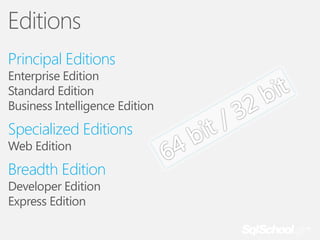
Editions
Principal Editions

Enterprise Edition
Standard Edition
Business Intelligence Edition

Specialized Editions
Web Edition

Breadth Edition
Developer Edition
Express Edition
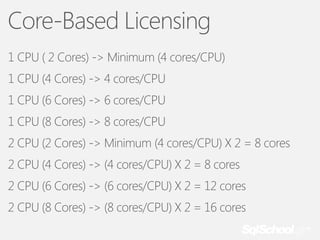
Core-Based Licensing
1 CPU ( 2 Cores) -> Minimum (4 cores/CPU)
1 CPU (4 Cores) -> 4 cores/CPU
1 CPU (6 Cores) -> 6 cores/CPU
1 CPU (8 Cores) -> 8 cores/CPU

2 CPU (2 Cores) -> Minimum (4 cores/CPU) X 2 = 8 cores
2 CPU (4 Cores) -> (4 cores/CPU) X 2 = 8 cores
2 CPU (6 Cores) -> (6 cores/CPU) X 2 = 12 cores
2 CPU (8 Cores) -> (8 cores/CPU) X 2 = 16 cores
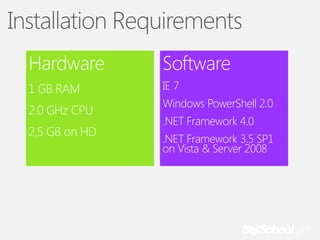
Installation Requirements
Hardware

Software

1 GB RAM

IE 7

2.0 GHz CPU
2,5 GB on HD

Windows PowerShell 2.0
.NET Framework 4.0
.NET Framework 3.5 SP1
on Vista & Server 2008
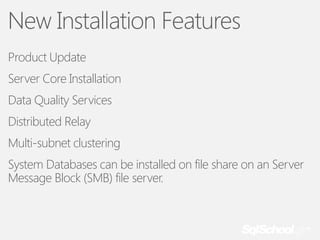
New Installation Features
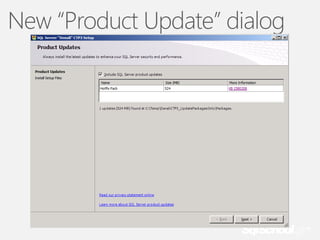
Product Update
Server Core Installation
Data Quality Services
Distributed Relay

Multi-subnet clustering
System Databases can be installed on file share on an Server
Message Block (SMB) file server.
New “Product Update” dialog
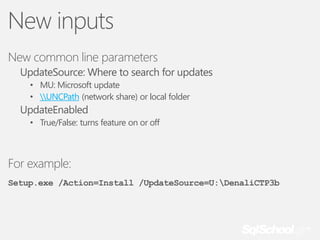
New inputs
New common line parameters
UpdateSource: Where to search for updates
• MU: Microsoft update
• UNCPath (network share) or local folder

UpdateEnabled
• True/False: turns feature on or off

For example:
Setup.exe /Action=Install /UpdateSource=U:DenaliCTP3b
Upgrade Path
All Editions from SQL Server 2005 can be upgraded direct to
SQL Server 2012 except SQL Server 2000.
Use Upgrade Advisor utility.
Use Distributed Replay utility.
Post Upgrade Tasks
Re-register servers
Re-populate full text catalogs
Run DBCC UPDATEUDAGE on all databases to correct any
incorrect row or page counts.

Validate on remove USE PLAN hints that are generated by
SQL Server 2005 and applied to queries on partitioned tables
and indexes
Update Statistics on all databases.
Special consideration for Replicated databases (BOL)
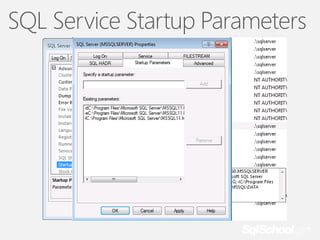
SQL Service Startup Parameters
Availability
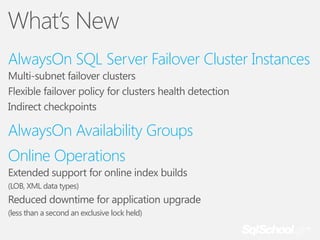
What’s New
AlwaysOn SQL Server Failover Cluster Instances
Multi-subnet failover clusters
Flexible failover policy for clusters health detection
Indirect checkpoints

AlwaysOn Availability Groups

Online Operations
Extended support for online index builds
(LOB, XML data types)

Reduced downtime for application upgrade
(less than a second an exclusive lock held)
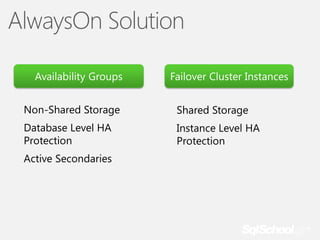
AlwaysOn Solution
Availability Groups

Failover Cluster Instances

Non-Shared Storage

Shared Storage

Database Level HA
Protection

Instance Level HA
Protection

Active Secondaries
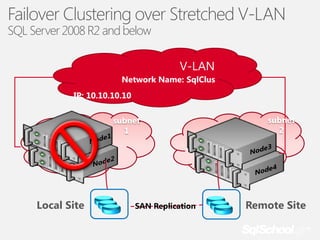
Failover Clustering over Stretched V-LAN
SQL Server 2008 R2 and below

V-LAN
Network Name: SqlClus
IP: 10.10.10.10
subnet
1

Local Site

SAN Replication

subnet
2

Remote Site
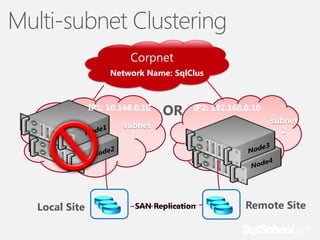
Multi-subnet Clustering
Corpnet
Network Name: SqlClus

IP1: 10.168.0.10

OR

IP2: 192.168.0.10

subnet
1

Local Site

SAN Replication

subnet
2

Remote Site
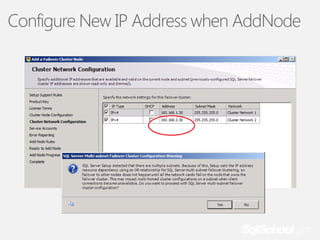
Configure New IP Address when AddNode
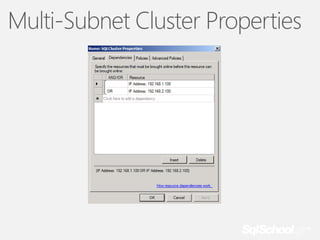
Multi-Subnet Cluster Properties
Multi-Subnet Clustering Requirements
SQL SKU: Enterprise Edition
OS version: Windows Server 2008 R2 +
SAN replication for cross-site DR (e.g. EMC SRDF)
Single AD domain for all nodes
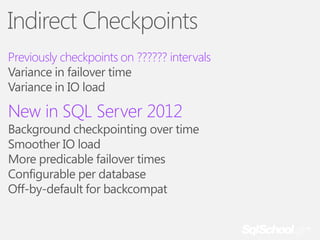
Indirect Checkpoints
Previously checkpoints on ?????? intervals
Variance in failover time
Variance in IO load

New in SQL Server 2012

Background checkpointing over time
Smoother IO load
More predicable failover times
Configurable per database
Off-by-default for backcompat
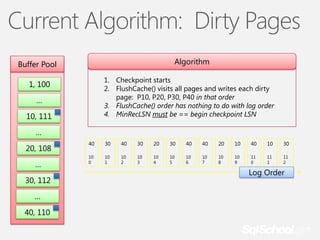
Current Algorithm: Dirty Pages
Algorithm

Buffer Pool

1. Checkpoint starts
2. FlushCache() visits all pages and writes each dirty
page: P10, P20, P30, P40 in that order
3. FlushCache() order has nothing to do with log order
4. MinRecLSN must be == begin checkpoint LSN

1, 100
…
10, 111

…
20, 108
…

30, 112
…
40, 110

40

30

40

30

20

30

40

40

20

10

40

10

30

10
0

10
1

10
2

10
3

10
4

10
5

10
6

10
7

10
8

10
9

11
0

11
1

11
2

Log Order
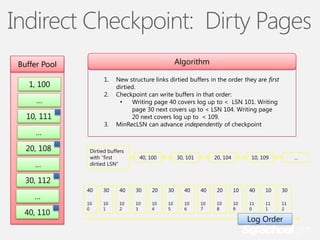
Indirect Checkpoint: Dirty Pages
Algorithm

Buffer Pool
1.

1, 100

2.

…
10, 111

3.

…
20, 108
…

New structure links dirtied buffers in the order they are first
dirtied.
Checkpoint can write buffers in that order:
•
Writing page 40 covers log up to < LSN 101. Writing
page 30 next covers up to < LSN 104. Writing page
20 next covers log up to < 109.
MinRecLSN can advance independently of checkpoint

Dirtied buffers
with “first
dirtied LSN”

40, 100

30, 101

20, 104

10, 109

…

30, 112
…
40, 110

40

30

40

30

20

30

40

40

20

10

40

10

30

10
0

10
1

10
2

10
3

10
4

10
5

10
6

10
7

10
8

10
9

11
0

11
1

11
2

Log Order
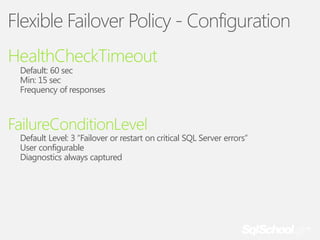
Flexible Failover Policy - Configuration
HealthCheckTimeout
Default: 60 sec
Min: 15 sec
Frequency of responses

FailureConditionLevel

Default Level: 3 “Failover or restart on critical SQL Server errors”
User configurable
Diagnostics always captured
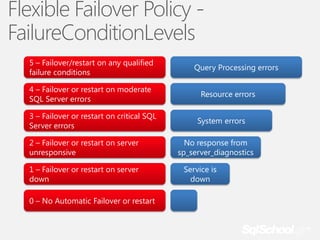
Flexible Failover Policy FailureConditionLevels
5 – Failover/restart on any qualified
failure conditions

4 – Failover or restart on moderate
SQL Server errors
3 – Failover or restart on critical SQL
Server errors
2 – Failover or restart on server
unresponsive
1 – Failover or restart on server
down
0 – No Automatic Failover or restart

Query Processing errors
Resource errors
System errors
No response from
sp_server_diagnostics
Service is
down
AlwaysOn
A deep dive into Availability Groups
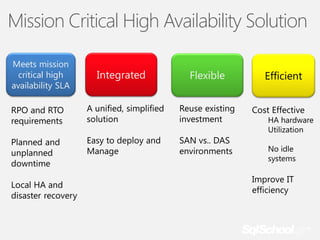
Mission Critical High Availability Solution
Meets mission
critical high
availability SLA

Integrated

Flexible

Efficient
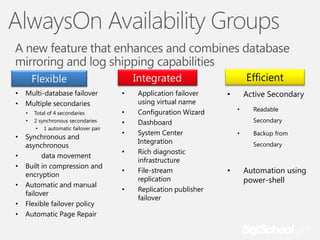
AlwaysOn Availability Groups
A new feature that enhances and combines database
mirroring and log shipping capabilities
•
•

Multi-database failover
Multiple secondaries
•
•

•
•
•

•
•
•

Total of 4 secondaries
2 synchronous secondaries
• 1 automatic failover pair

Synchronous and
asynchronous
data movement
Built in compression and
encryption
Automatic and manual
failover
Flexible failover policy
Automatic Page Repair

Efficient

Integrated

Flexible
•
•
•
•
•

•
•

Application failover
using virtual name
Configuration Wizard
Dashboard
System Center
Integration
Rich diagnostic
infrastructure
File-stream
replication
Replication publisher
failover

Active Secondary

•
•

Readable
Secondary

•

Backup from
Secondary

•

Automation using
power-shell
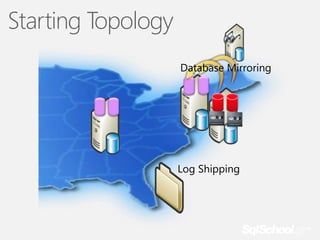
Starting Topology
Database Mirroring

Log Shipping
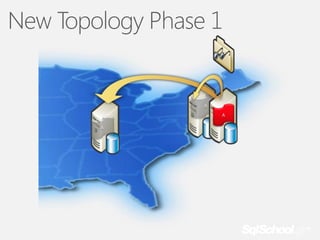
New Topology Phase 1

A
A

A
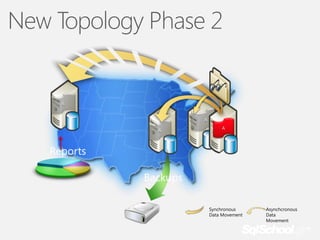
New Topology Phase 2

A
A

A

A

Reports
Backups
Synchronous
Data Movement

Asynchcronous
Data
Movement
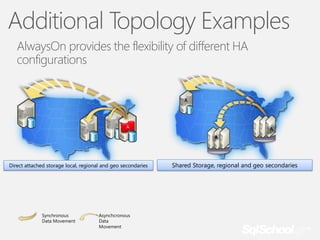
Additional Topology Examples
AlwaysOn provides the flexibility of different HA
configurations
A
A
A

A

A

A
A

Direct attached storage local, regional and geo secondaries

Synchronous
Data Movement

Asynchcronous
Data
Movement

Shared Storage, regional and geo secondaries
New Topology Benefits
• Better SLAs
• Multiple no data loss secondaries
• Better data loss protection for DR secondaries through
continuous replication
• Faster failover to DR secondaries through virtual name failover

• Easier deployment/management
•
•
•
•
•
•

Unified solution
Simple deployment
Unified dashboard
Rich diagnostics
Centralized management of client connection topology
Multi-DB failover
Windows Server Pre-Reqs
• KB 976097
• Supports SQL Server Failover Cluster Instances with AlwaysOn Availability
Groups

• KB 2494036
• Supports configuring optimal quorum with non-automatic failover targets

• All nodes should be in the same AD domain
• To create WFSC cluster user running creation must have:
•
•
•
•

Domain account
Administrator on all machines
Have Create Computer objects and Read All Properties rights in AD
Detailed Article: http://technet.microsoft.com/enus/library/cc731002(WS.10).aspx
Quorum Configuration
• Quorum: need majority of votes to operate and avoid split brain

• Two-Steps process:
1.

Select nodes to vote (KB 2494036)

• 1 vote if node’s that host a replica that is currently:
•
•

Primary (if primary is an FCI include all possible owner nodes for that FCI)
An auto failover target if the primary is also configured for auto failover

• 0 votes for rest of nodes

2.

Select the quorum type:

• Odd number of votes, use “Node Majority”
• Even number of votes, add a witness by either:
•
•

Adding an additional witness node and use “Node Majority”
Using “Node and File Share Majority” with a protected file share (blog with details)

• Re-evaluate and adjust quorum after manual failover outside automatic
target
Active Secondary
Offloading Backup
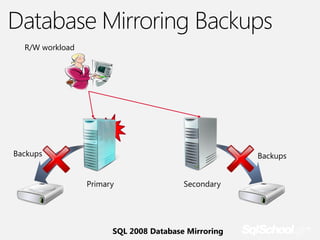
Database Mirroring Backups
R/W workload

Failed

Backups

Backups
Primary

Secondary

SQL 2008 Database Mirroring
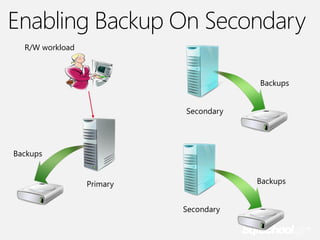
Enabling Backup On Secondary
R/W workload

Backups
Secondary

Backups
Backups

Primary
Secondary
Restrictions, cautions, and gotchas
Differential backups are not supported on secondary
Only Copy-only full backups are supported on secondary
The only distinction is the differential bitmap clearing

Advisable for backups to be stored centrally
Distributed Replay
What is Distributed Replay?
Multi-client scalability to drive higher throughput
Higher workload replay fidelity
Useful for stress testing production workload or performing
application compatibility testing before upgrades
Why an enhanced replay tool?
Use multiple low-cost clients (workstations) to handle large
workload traces within reasonable time
Address limitations of current SQL Trace based tools (Profiler,
Upgrade Assistant)
Provide enhanced features
Lay groundwork for future workload replay capabilities
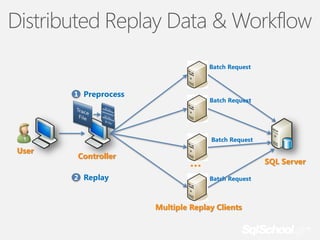
Distributed Replay Data & Workflow
Batch Request

1 Preprocess

Batch Request

Batch Request

User

Controller
2 Replay

…

SQL Server
Batch Request

Multiple Replay Clients
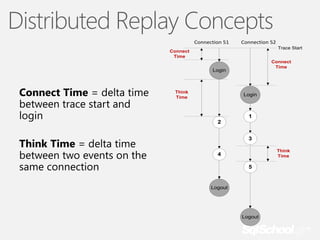
Distributed Replay Concepts
Connection 51

Connection 52
Trace Start

Connect
Time

Connect
Time

Login

Connect Time = delta time
between trace start and
login
Think Time = delta time
between two events on the
same connection

Think
Time

Login

1
2
3
Think
Time

4
5

Logout

Logout
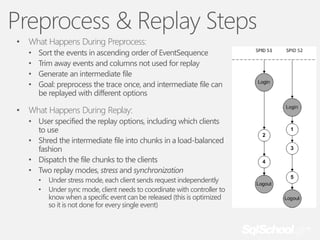
Preprocess & Replay Steps
•

What Happens During Preprocess:
•
•
•
•

•

Sort the events in ascending order of EventSequence
Trim away events and columns not used for replay
Generate an intermediate file
Goal: preprocess the trace once, and intermediate file can
be replayed with different options

What Happens During Replay:
• User specified the replay options, including which clients
to use
• Shred the intermediate file into chunks in a load-balanced
fashion
• Dispatch the file chunks to the clients
• Two replay modes, stress and synchronization
•
•

Under stress mode, each client sends request independently
Under sync mode, client needs to coordinate with controller to
know when a specific event can be released (this is optimized
so it is not done for every single event)
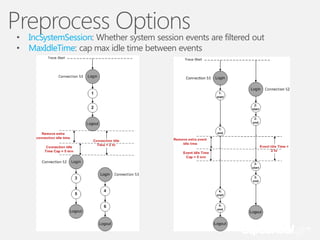
Preprocess Options
•
•

IncSystemSession: Whether system session events are filtered out
MaxIdleTime: cap max idle time between events
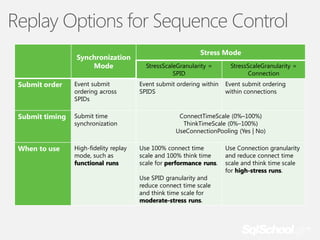
Replay Options for Sequence Control
Synchronization
Mode
Submit order

Event submit
ordering across
SPIDs

Submit timing

Submit time
synchronization

When to use

High-fidelity replay
mode, such as
functional runs

Stress Mode
StressScaleGranularity =
SPID
Event submit ordering within
SPIDS

StressScaleGranularity =
Connection
Event submit ordering
within connections

ConnectTimeScale (0%–100%)
ThinkTimeScale (0%–100%)
UseConnectionPooling (Yes | No)
Use 100% connect time
scale and 100% think time
scale for performance runs.
Use SPID granularity and
reduce connect time scale
and think time scale for
moderate-stress runs.

Use Connection granularity
and reduce connect time
scale and think time scale
for high-stress runs.
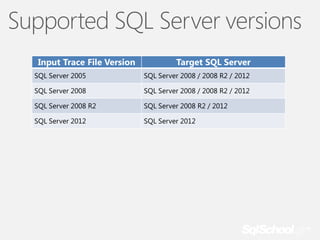
Supported SQL Server versions
Input Trace File Version

Target SQL Server

SQL Server 2005

SQL Server 2008 / 2008 R2 / 2012

SQL Server 2008

SQL Server 2008 / 2008 R2 / 2012

SQL Server 2008 R2

SQL Server 2008 R2 / 2012

SQL Server 2012

SQL Server 2012
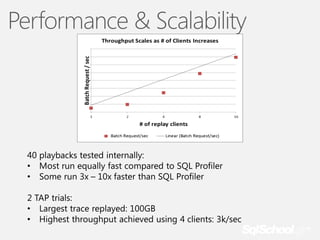
Performance & Scalability
Security Enhancements
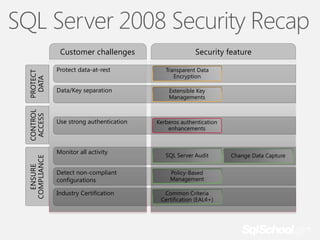
SQL Server 2008 Security Recap

ENSURE
COMPLIANCE

CONTROL
ACCESS

PROTECT
DATA

Customer challenges

Security feature

Protect data-at-rest

Transparent Data
Encryption

Data/Key separation

Extensible Key
Managements

Use strong authentication

Monitor all activity

Kerberos authentication
enhancements

SQL Server Audit

Detect non-compliant
configurations

Policy-Based
Management

Industry Certification

Common Criteria
Certification (EAL4+)

Change Data Capture
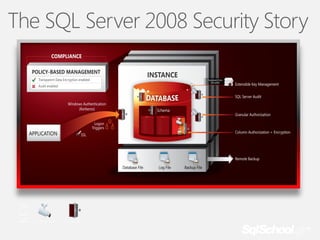
The SQL Server 2008 Security Story
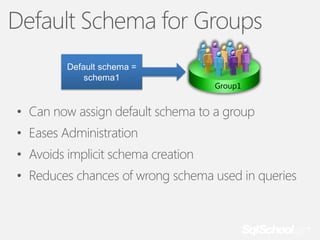
Default Schema for Groups
Default schema =
schema1

Group1

• Can now assign default schema to a group
• Eases Administration
• Avoids implicit schema creation
• Reduces chances of wrong schema used in queries
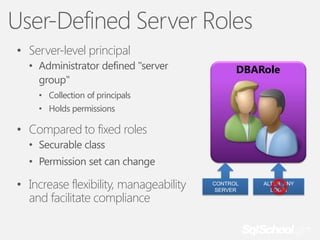
User-Defined Server Roles
• Server-level principal
• Administrator defined "server
group"

DBARole

• Collection of principals
• Holds permissions

• Compared to fixed roles
• Securable class
• Permission set can change

• Increase flexibility, manageability
and facilitate compliance

CONTROL
SERVER

ALTER ANY
LOGIN
Database Authentication
Available in Contained Databases
Allow authentication without Logins
SQL Users with passwords
Windows authentication without Login

Easier deployment for some applications
Tightly scoped security boundary
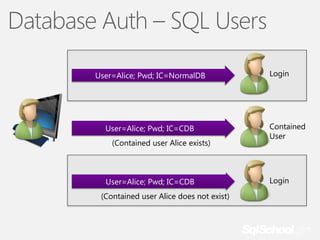
Database Auth – SQL Users
User=Alice; Pwd; IC=NormalDB

User=Alice; Pwd; IC=CDB
(Contained user Alice exists)

User=Alice; Pwd; IC=CDB

(Contained user Alice does not exist)

Login

Contained
User

Login
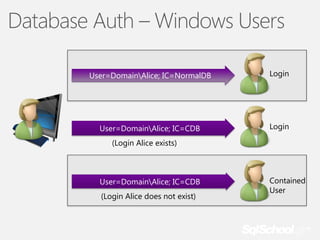
Database Auth – Windows Users
User=DomainAlice; IC=NormalDB

Login

User=DomainAlice; IC=CDB

Login

(Login Alice exists)

User=DomainAlice; IC=CDB

(Login Alice does not exist)

Contained
User
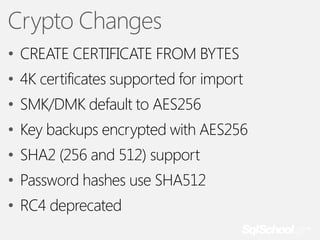
Crypto Changes
• CREATE CERTIFICATE FROM BYTES
• 4K certificates supported for import
• SMK/DMK default to AES256
• Key backups encrypted with AES256
• SHA2 (256 and 512) support

• Password hashes use SHA512
• RC4 deprecated
Audit Enhancements
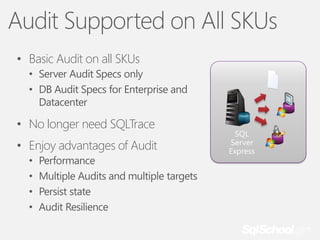
Audit Supported on All SKUs
• Basic Audit on all SKUs
• Server Audit Specs only
• DB Audit Specs for Enterprise and
Datacenter

• No longer need SQLTrace
• Enjoy advantages of Audit
•
•
•
•

Performance
Multiple Audits and multiple targets
Persist state
Audit Resilience

SQL
Server
Express
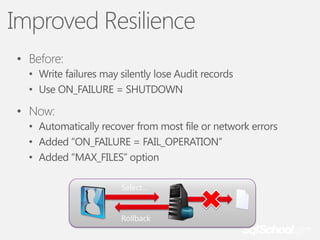
Improved Resilience
• Before:
• Write failures may silently lose Audit records
• Use ON_FAILURE = SHUTDOWN

• Now:
• Automatically recover from most file or network errors
• Added “ON_FAILURE = FAIL_OPERATION”
• Added “MAX_FILES” option
Select…

Rollback
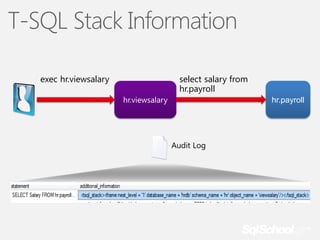
T-SQL Stack Information
exec hr.viewsalary

select salary from
hr.payroll
hr.viewsalary

hr.payroll

Audit Log
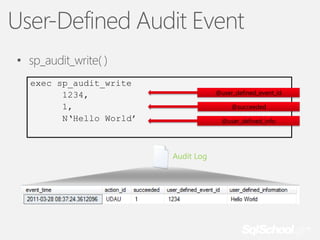
User-Defined Audit Event
• sp_audit_write( )
exec sp_audit_write
1234,
1,
N‘Hello World’

@user_defined_event_id
@succeeded
@user_defined_info

Audit Log
Record Filtering
CREATE SERVER AUDIT audit_name
TO { [ FILE (<file_options> [ , ...n ]) ] | APPLICATION_LOG |
SECURITY_LOG }
[ WITH ( <audit_options> [ , ...n ] ) ]
[ FILTER = <predicate_expression> ]
}
…
<predicate_expression> ::=
{
[ NOT ] <predicate_factor> | {( <predicate_expression> ) }
[ { AND | OR } [ NOT ] { <predicate_factor> | (
<predicate_expression> ) } ]
[ ,...n ]
}

• Tightly constrain info written to Audit log
●

Audit record generated but not written

• Leverages Xevent filtering
Management
Enchancments
Backup - Restore
Backup Timeline
Page Restore Window
Server Related DMVs
sys.dm_server_services
sys.dm_server_registry
sys.dm_server_memory_dumps
Other Enhacements
Scalability & Performance
Columnstore Indexes
Online Index operations
Partition Support Increased (15.000 instead of 1.000)
Filestream filegroups can contain multiple files
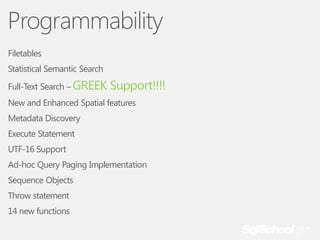
Programmability
Filetables

Statistical Semantic Search
Full-Text Search – GREEK

Support!!!!

New and Enhanced Spatial features
Metadata Discovery

Execute Statement
UTF-16 Support
Ad-hoc Query Paging Implementation
Sequence Objects
Throw statement

14 new functions
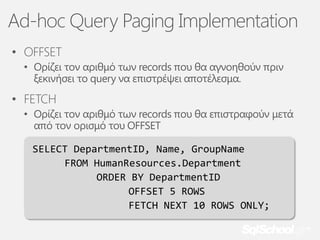
Ad-hoc Query Paging Implementation
• OFFSET
• Ορίζει τον αριθμό των records που θα αγνοηθούν πριν
ξεκινήσει το query να επιστρέψει αποτέλεσμα.

• FETCH
• Ορίζει τον αριθμό των records που θα επιστραφούν μετά
από τον ορισμό του OFFSET
SELECT DepartmentID, Name, GroupName
FROM HumanResources.Department
ORDER BY DepartmentID
OFFSET 5 ROWS
FETCH NEXT 10 ROWS ONLY;
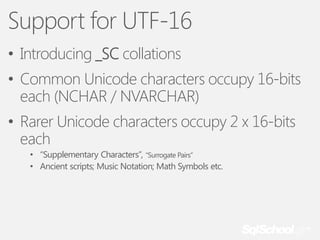
Support for UTF-16
• Introducing _SC collations
• Common Unicode characters occupy 16-bits
each (NCHAR / NVARCHAR)

• Rarer Unicode characters occupy 2 x 16-bits
each
• “Supplementary Characters”, “Surrogate Pairs”
• Ancient scripts; Music Notation; Math Symbols etc.
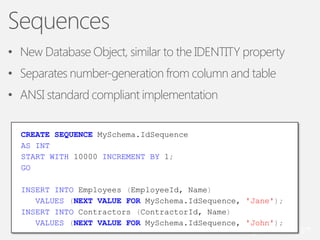
Sequences
• New Database Object, similar to the IDENTITY property
• Separates number-generation from column and table

• ANSI standard compliant implementation
CREATE SEQUENCE MySchema.IdSequence
AS INT
START WITH 10000 INCREMENT BY 1;
GO
INSERT INTO Employees (EmployeeId, Name)
VALUES (NEXT VALUE FOR MySchema.IdSequence, 'Jane');
INSERT INTO Contractors (ContractorId, Name)
VALUES (NEXT VALUE FOR MySchema.IdSequence, 'John');
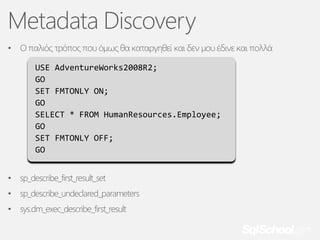
Metadata Discovery
•

Ο παλιός τρόπος που όμως θα καταργηθεί και δεν μου έδινε και πολλά
USE AdventureWorks2008R2;
GO
SET FMTONLY ON;
GO
SELECT * FROM HumanResources.Employee;
GO
SET FMTONLY OFF;
GO

•

sp_describe_first_result_set

•

sp_describe_undeclared_parameters

•

sys.dm_exec_describe_first_result
SSDT
SQL Server Data Tools
Έχει και άλλα…

Αντέχουμε;;;;;;;;;;;;;;;;;;;;;;
Looking ahead
Σας
ευχαριστώ
ROCKING WITH KNOWLEDGE IN SQL SERVER

Sql server 2012 autoexec event no 39

  • 1.
    SQL Server 2012 39thAutoexec Event 27/4/2012, Athens
  • 2.
    sp_who Solution Architect -Principal Consultant - SQL Server Evangelist 1982 >The first contact with computers. 1988 > I started my professional carrier in IT, especially in software development. 1998 > I earned my 1st Certification as MCSD (3rd in Greece). Since then I certified as MCP, MCSD, MCT, MCDBA, MCAD, MCTS, MCITP, MCPD, MCSA, OCA. 1999 > I started my Trainer carrier as MCT. Since then I have more than 14.000 hours of training 2010 > I became for first time Microsoft MVP on SQL Server. Leader of IAMCT Europe Greek Chapter Moderator of autoexec.gr Member of the dotNETZone.gr
  • 3.
    Connect with me “blog” @antoniosch sqlschoolgr .wordpress.com help@sqlschool.gr http://sqlschool.gr
  • 4.
  • 5.
  • 6.
    Editions Principal Editions Enterprise Edition StandardEdition Business Intelligence Edition Specialized Editions Web Edition Breadth Edition Developer Edition Express Edition
  • 7.
    Core-Based Licensing 1 CPU( 2 Cores) -> Minimum (4 cores/CPU) 1 CPU (4 Cores) -> 4 cores/CPU 1 CPU (6 Cores) -> 6 cores/CPU 1 CPU (8 Cores) -> 8 cores/CPU 2 CPU (2 Cores) -> Minimum (4 cores/CPU) X 2 = 8 cores 2 CPU (4 Cores) -> (4 cores/CPU) X 2 = 8 cores 2 CPU (6 Cores) -> (6 cores/CPU) X 2 = 12 cores 2 CPU (8 Cores) -> (8 cores/CPU) X 2 = 16 cores
  • 8.
    Installation Requirements Hardware Software 1 GBRAM IE 7 2.0 GHz CPU 2,5 GB on HD Windows PowerShell 2.0 .NET Framework 4.0 .NET Framework 3.5 SP1 on Vista & Server 2008
  • 9.
    New Installation Features ProductUpdate Server Core Installation Data Quality Services Distributed Relay Multi-subnet clustering System Databases can be installed on file share on an Server Message Block (SMB) file server.
  • 10.
  • 11.
    New inputs New commonline parameters UpdateSource: Where to search for updates • MU: Microsoft update • UNCPath (network share) or local folder UpdateEnabled • True/False: turns feature on or off For example: Setup.exe /Action=Install /UpdateSource=U:DenaliCTP3b
  • 12.
    Upgrade Path All Editionsfrom SQL Server 2005 can be upgraded direct to SQL Server 2012 except SQL Server 2000. Use Upgrade Advisor utility. Use Distributed Replay utility.
  • 13.
    Post Upgrade Tasks Re-registerservers Re-populate full text catalogs Run DBCC UPDATEUDAGE on all databases to correct any incorrect row or page counts. Validate on remove USE PLAN hints that are generated by SQL Server 2005 and applied to queries on partitioned tables and indexes Update Statistics on all databases. Special consideration for Replicated databases (BOL)
  • 14.
  • 15.
  • 16.
    What’s New AlwaysOn SQLServer Failover Cluster Instances Multi-subnet failover clusters Flexible failover policy for clusters health detection Indirect checkpoints AlwaysOn Availability Groups Online Operations Extended support for online index builds (LOB, XML data types) Reduced downtime for application upgrade (less than a second an exclusive lock held)
  • 17.
    AlwaysOn Solution Availability Groups FailoverCluster Instances Non-Shared Storage Shared Storage Database Level HA Protection Instance Level HA Protection Active Secondaries
  • 18.
    Failover Clustering overStretched V-LAN SQL Server 2008 R2 and below V-LAN Network Name: SqlClus IP: 10.10.10.10 subnet 1 Local Site SAN Replication subnet 2 Remote Site
  • 19.
    Multi-subnet Clustering Corpnet Network Name:SqlClus IP1: 10.168.0.10 OR IP2: 192.168.0.10 subnet 1 Local Site SAN Replication subnet 2 Remote Site
  • 20.
    Configure New IPAddress when AddNode
  • 21.
  • 22.
    Multi-Subnet Clustering Requirements SQLSKU: Enterprise Edition OS version: Windows Server 2008 R2 + SAN replication for cross-site DR (e.g. EMC SRDF) Single AD domain for all nodes
  • 23.
    Indirect Checkpoints Previously checkpointson ?????? intervals Variance in failover time Variance in IO load New in SQL Server 2012 Background checkpointing over time Smoother IO load More predicable failover times Configurable per database Off-by-default for backcompat
  • 24.
    Current Algorithm: DirtyPages Algorithm Buffer Pool 1. Checkpoint starts 2. FlushCache() visits all pages and writes each dirty page: P10, P20, P30, P40 in that order 3. FlushCache() order has nothing to do with log order 4. MinRecLSN must be == begin checkpoint LSN 1, 100 … 10, 111 … 20, 108 … 30, 112 … 40, 110 40 30 40 30 20 30 40 40 20 10 40 10 30 10 0 10 1 10 2 10 3 10 4 10 5 10 6 10 7 10 8 10 9 11 0 11 1 11 2 Log Order
  • 25.
    Indirect Checkpoint: DirtyPages Algorithm Buffer Pool 1. 1, 100 2. … 10, 111 3. … 20, 108 … New structure links dirtied buffers in the order they are first dirtied. Checkpoint can write buffers in that order: • Writing page 40 covers log up to < LSN 101. Writing page 30 next covers up to < LSN 104. Writing page 20 next covers log up to < 109. MinRecLSN can advance independently of checkpoint Dirtied buffers with “first dirtied LSN” 40, 100 30, 101 20, 104 10, 109 … 30, 112 … 40, 110 40 30 40 30 20 30 40 40 20 10 40 10 30 10 0 10 1 10 2 10 3 10 4 10 5 10 6 10 7 10 8 10 9 11 0 11 1 11 2 Log Order
  • 26.
    Flexible Failover Policy- Configuration HealthCheckTimeout Default: 60 sec Min: 15 sec Frequency of responses FailureConditionLevel Default Level: 3 “Failover or restart on critical SQL Server errors” User configurable Diagnostics always captured
  • 27.
    Flexible Failover PolicyFailureConditionLevels 5 – Failover/restart on any qualified failure conditions 4 – Failover or restart on moderate SQL Server errors 3 – Failover or restart on critical SQL Server errors 2 – Failover or restart on server unresponsive 1 – Failover or restart on server down 0 – No Automatic Failover or restart Query Processing errors Resource errors System errors No response from sp_server_diagnostics Service is down
  • 28.
    AlwaysOn A deep diveinto Availability Groups
  • 29.
    Mission Critical HighAvailability Solution Meets mission critical high availability SLA Integrated Flexible Efficient
  • 30.
    AlwaysOn Availability Groups Anew feature that enhances and combines database mirroring and log shipping capabilities • • Multi-database failover Multiple secondaries • • • • • • • • Total of 4 secondaries 2 synchronous secondaries • 1 automatic failover pair Synchronous and asynchronous data movement Built in compression and encryption Automatic and manual failover Flexible failover policy Automatic Page Repair Efficient Integrated Flexible • • • • • • • Application failover using virtual name Configuration Wizard Dashboard System Center Integration Rich diagnostic infrastructure File-stream replication Replication publisher failover Active Secondary • • Readable Secondary • Backup from Secondary • Automation using power-shell
  • 31.
  • 32.
  • 33.
    New Topology Phase2 A A A A Reports Backups Synchronous Data Movement Asynchcronous Data Movement
  • 34.
    Additional Topology Examples AlwaysOnprovides the flexibility of different HA configurations A A A A A A A Direct attached storage local, regional and geo secondaries Synchronous Data Movement Asynchcronous Data Movement Shared Storage, regional and geo secondaries
  • 35.
    New Topology Benefits •Better SLAs • Multiple no data loss secondaries • Better data loss protection for DR secondaries through continuous replication • Faster failover to DR secondaries through virtual name failover • Easier deployment/management • • • • • • Unified solution Simple deployment Unified dashboard Rich diagnostics Centralized management of client connection topology Multi-DB failover
  • 36.
    Windows Server Pre-Reqs •KB 976097 • Supports SQL Server Failover Cluster Instances with AlwaysOn Availability Groups • KB 2494036 • Supports configuring optimal quorum with non-automatic failover targets • All nodes should be in the same AD domain • To create WFSC cluster user running creation must have: • • • • Domain account Administrator on all machines Have Create Computer objects and Read All Properties rights in AD Detailed Article: http://technet.microsoft.com/enus/library/cc731002(WS.10).aspx
  • 37.
    Quorum Configuration • Quorum:need majority of votes to operate and avoid split brain • Two-Steps process: 1. Select nodes to vote (KB 2494036) • 1 vote if node’s that host a replica that is currently: • • Primary (if primary is an FCI include all possible owner nodes for that FCI) An auto failover target if the primary is also configured for auto failover • 0 votes for rest of nodes 2. Select the quorum type: • Odd number of votes, use “Node Majority” • Even number of votes, add a witness by either: • • Adding an additional witness node and use “Node Majority” Using “Node and File Share Majority” with a protected file share (blog with details) • Re-evaluate and adjust quorum after manual failover outside automatic target
  • 38.
  • 39.
    Database Mirroring Backups R/Wworkload Failed Backups Backups Primary Secondary SQL 2008 Database Mirroring
  • 40.
    Enabling Backup OnSecondary R/W workload Backups Secondary Backups Backups Primary Secondary
  • 41.
    Restrictions, cautions, andgotchas Differential backups are not supported on secondary Only Copy-only full backups are supported on secondary The only distinction is the differential bitmap clearing Advisable for backups to be stored centrally
  • 42.
  • 43.
    What is DistributedReplay? Multi-client scalability to drive higher throughput Higher workload replay fidelity Useful for stress testing production workload or performing application compatibility testing before upgrades
  • 44.
    Why an enhancedreplay tool? Use multiple low-cost clients (workstations) to handle large workload traces within reasonable time Address limitations of current SQL Trace based tools (Profiler, Upgrade Assistant) Provide enhanced features Lay groundwork for future workload replay capabilities
  • 45.
    Distributed Replay Data& Workflow Batch Request 1 Preprocess Batch Request Batch Request User Controller 2 Replay … SQL Server Batch Request Multiple Replay Clients
  • 46.
    Distributed Replay Concepts Connection51 Connection 52 Trace Start Connect Time Connect Time Login Connect Time = delta time between trace start and login Think Time = delta time between two events on the same connection Think Time Login 1 2 3 Think Time 4 5 Logout Logout
  • 47.
    Preprocess & ReplaySteps • What Happens During Preprocess: • • • • • Sort the events in ascending order of EventSequence Trim away events and columns not used for replay Generate an intermediate file Goal: preprocess the trace once, and intermediate file can be replayed with different options What Happens During Replay: • User specified the replay options, including which clients to use • Shred the intermediate file into chunks in a load-balanced fashion • Dispatch the file chunks to the clients • Two replay modes, stress and synchronization • • Under stress mode, each client sends request independently Under sync mode, client needs to coordinate with controller to know when a specific event can be released (this is optimized so it is not done for every single event)
  • 48.
    Preprocess Options • • IncSystemSession: Whethersystem session events are filtered out MaxIdleTime: cap max idle time between events
  • 49.
    Replay Options forSequence Control Synchronization Mode Submit order Event submit ordering across SPIDs Submit timing Submit time synchronization When to use High-fidelity replay mode, such as functional runs Stress Mode StressScaleGranularity = SPID Event submit ordering within SPIDS StressScaleGranularity = Connection Event submit ordering within connections ConnectTimeScale (0%–100%) ThinkTimeScale (0%–100%) UseConnectionPooling (Yes | No) Use 100% connect time scale and 100% think time scale for performance runs. Use SPID granularity and reduce connect time scale and think time scale for moderate-stress runs. Use Connection granularity and reduce connect time scale and think time scale for high-stress runs.
  • 50.
    Supported SQL Serverversions Input Trace File Version Target SQL Server SQL Server 2005 SQL Server 2008 / 2008 R2 / 2012 SQL Server 2008 SQL Server 2008 / 2008 R2 / 2012 SQL Server 2008 R2 SQL Server 2008 R2 / 2012 SQL Server 2012 SQL Server 2012
  • 51.
  • 52.
  • 53.
    SQL Server 2008Security Recap ENSURE COMPLIANCE CONTROL ACCESS PROTECT DATA Customer challenges Security feature Protect data-at-rest Transparent Data Encryption Data/Key separation Extensible Key Managements Use strong authentication Monitor all activity Kerberos authentication enhancements SQL Server Audit Detect non-compliant configurations Policy-Based Management Industry Certification Common Criteria Certification (EAL4+) Change Data Capture
  • 54.
    The SQL Server2008 Security Story
  • 55.
    Default Schema forGroups Default schema = schema1 Group1 • Can now assign default schema to a group • Eases Administration • Avoids implicit schema creation • Reduces chances of wrong schema used in queries
  • 56.
    User-Defined Server Roles •Server-level principal • Administrator defined "server group" DBARole • Collection of principals • Holds permissions • Compared to fixed roles • Securable class • Permission set can change • Increase flexibility, manageability and facilitate compliance CONTROL SERVER ALTER ANY LOGIN
  • 57.
    Database Authentication Available inContained Databases Allow authentication without Logins SQL Users with passwords Windows authentication without Login Easier deployment for some applications Tightly scoped security boundary
  • 58.
    Database Auth –SQL Users User=Alice; Pwd; IC=NormalDB User=Alice; Pwd; IC=CDB (Contained user Alice exists) User=Alice; Pwd; IC=CDB (Contained user Alice does not exist) Login Contained User Login
  • 59.
    Database Auth –Windows Users User=DomainAlice; IC=NormalDB Login User=DomainAlice; IC=CDB Login (Login Alice exists) User=DomainAlice; IC=CDB (Login Alice does not exist) Contained User
  • 60.
    Crypto Changes • CREATECERTIFICATE FROM BYTES • 4K certificates supported for import • SMK/DMK default to AES256 • Key backups encrypted with AES256 • SHA2 (256 and 512) support • Password hashes use SHA512 • RC4 deprecated
  • 61.
  • 62.
    Audit Supported onAll SKUs • Basic Audit on all SKUs • Server Audit Specs only • DB Audit Specs for Enterprise and Datacenter • No longer need SQLTrace • Enjoy advantages of Audit • • • • Performance Multiple Audits and multiple targets Persist state Audit Resilience SQL Server Express
  • 63.
    Improved Resilience • Before: •Write failures may silently lose Audit records • Use ON_FAILURE = SHUTDOWN • Now: • Automatically recover from most file or network errors • Added “ON_FAILURE = FAIL_OPERATION” • Added “MAX_FILES” option Select… Rollback
  • 64.
    T-SQL Stack Information exechr.viewsalary select salary from hr.payroll hr.viewsalary hr.payroll Audit Log
  • 65.
    User-Defined Audit Event •sp_audit_write( ) exec sp_audit_write 1234, 1, N‘Hello World’ @user_defined_event_id @succeeded @user_defined_info Audit Log
  • 66.
    Record Filtering CREATE SERVERAUDIT audit_name TO { [ FILE (<file_options> [ , ...n ]) ] | APPLICATION_LOG | SECURITY_LOG } [ WITH ( <audit_options> [ , ...n ] ) ] [ FILTER = <predicate_expression> ] } … <predicate_expression> ::= { [ NOT ] <predicate_factor> | {( <predicate_expression> ) } [ { AND | OR } [ NOT ] { <predicate_factor> | ( <predicate_expression> ) } ] [ ,...n ] } • Tightly constrain info written to Audit log ● Audit record generated but not written • Leverages Xevent filtering
  • 67.
  • 68.
    Backup - Restore BackupTimeline Page Restore Window
  • 69.
  • 70.
  • 71.
    Scalability & Performance ColumnstoreIndexes Online Index operations Partition Support Increased (15.000 instead of 1.000) Filestream filegroups can contain multiple files
  • 72.
    Programmability Filetables Statistical Semantic Search Full-TextSearch – GREEK Support!!!! New and Enhanced Spatial features Metadata Discovery Execute Statement UTF-16 Support Ad-hoc Query Paging Implementation Sequence Objects Throw statement 14 new functions
  • 73.
    Ad-hoc Query PagingImplementation • OFFSET • Ορίζει τον αριθμό των records που θα αγνοηθούν πριν ξεκινήσει το query να επιστρέψει αποτέλεσμα. • FETCH • Ορίζει τον αριθμό των records που θα επιστραφούν μετά από τον ορισμό του OFFSET SELECT DepartmentID, Name, GroupName FROM HumanResources.Department ORDER BY DepartmentID OFFSET 5 ROWS FETCH NEXT 10 ROWS ONLY;
  • 74.
    Support for UTF-16 •Introducing _SC collations • Common Unicode characters occupy 16-bits each (NCHAR / NVARCHAR) • Rarer Unicode characters occupy 2 x 16-bits each • “Supplementary Characters”, “Surrogate Pairs” • Ancient scripts; Music Notation; Math Symbols etc.
  • 75.
    Sequences • New DatabaseObject, similar to the IDENTITY property • Separates number-generation from column and table • ANSI standard compliant implementation CREATE SEQUENCE MySchema.IdSequence AS INT START WITH 10000 INCREMENT BY 1; GO INSERT INTO Employees (EmployeeId, Name) VALUES (NEXT VALUE FOR MySchema.IdSequence, 'Jane'); INSERT INTO Contractors (ContractorId, Name) VALUES (NEXT VALUE FOR MySchema.IdSequence, 'John');
  • 76.
    Metadata Discovery • Ο παλιόςτρόπος που όμως θα καταργηθεί και δεν μου έδινε και πολλά USE AdventureWorks2008R2; GO SET FMTONLY ON; GO SELECT * FROM HumanResources.Employee; GO SET FMTONLY OFF; GO • sp_describe_first_result_set • sp_describe_undeclared_parameters • sys.dm_exec_describe_first_result
  • 77.
  • 78.
  • 79.
  • 80.
  • 81.