Cascading Style Sheets
Plan of the course What is CSS CSS levels Including CSS in HTML files CSS syntax Colours in HTML Examples
CSS CSS = Cascading Style-Sheets Style = how the HTML tags are displayed Style-sheets = documents where the style information is stored – usually external documents Cascading = there are multiple levels on which we can define the style of a page
CSS usage The style information can be attached in the HTML page to each element => problems in maintaining the page => problems in large sites containing many pages Much easier if the style for all the elements is stored separately – modifications made in 1 place are spread to all the pages automatically
CSS levels Style information can be defined at multiple levels Browser level  – the default style of the browser The way the page is displayed if no style information is present
CSS Browser level example Default browser style; no style specified in html After we modified the default browser style
CSS levels External document level  – the style is specified in an external .css file. The file is included in the html document by using the link element <link rel=&quot;stylesheet&quot; type=&quot;text/css&quot; href=“style.css&quot; />
CSS External Document Level h1 { color: blue;}
CSS levels Internal style sheet (inside the <head> tag)  Define the style-sheet inside the html page Style specified inside a style element Example: <style type=&quot;text/css&quot;> h1 {color: yellow} </style>
CSS Internal Style Sheet Level  <head> <title>le titre du document</title> <link rel=&quot;stylesheet&quot; type=&quot;text/css&quot; href=&quot;style.css&quot; /> <style type=&quot;text/css&quot;> h1 {color: yellow} </style> </head>
CSS Levels Element level – the style is specified inside the element  NOT RECOMMENDED!!! Example <h1 style=&quot;color: black;&quot; > Introduction dans la programmation web</h1>
CSS Element Style Level <h1 style=&quot;color: black;&quot; > Introduction dans la programmation web</h1>
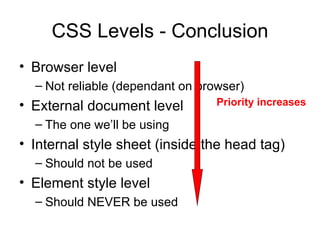
CSS Levels - Conclusion Browser level  Not reliable (dependant on browser) External document level The one we’ll be using Internal style sheet (inside the head tag) Should not be used Element style level Should NEVER be used Priority increases
CSS Syntax Syntax contains triples: Selector – on what element(s) we’re applying the style Property – which is the property that we change Value – the modified value h1  { color :  yellow; }
CSS syntax – selector types A selector can be the name of an html element (h1) The style defined applies for all elements of that type The name of an element “.”the name of the style class H1.blue{color:blue;} The class is used inside the html element as an attribute <h1 class=“blue”> The id of an element #id5 {color:blue;} In the html the element must have the id defined <h1 id=“id5”>
Colours in html/css Colours are identified through Names (blue, red, green,…) This is possible for a very small number of colours Values A colour is represented as a triplet of RGB values Each value in the triplet can take a value between 0-255 (FF in hexa) The total number of colours that can be expressed like this is around 16 million A colour value is formed like #RRGGBB where RR=the hexa value for red, GG=hexa value for green…
Colours in html examples Black #000000 White #FFFFFF Red  #FF0000 Green  #00FF00 Blue  #0000FF Yellow  # FFFF00
CSS Examples body { background-image: url('bgdesert.jpg') }  body { background-color: #FFFF00; }
Text properties
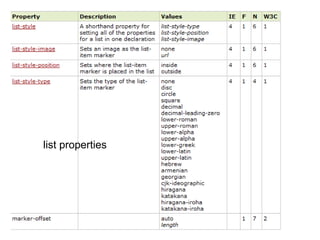
list properties
padding properties margin properties
CSS Tables Example table, td, th { border:1px solid green; //border-collapse:collapse; } th { background-color:green; color:white; } Without border-collapse With border-collapse
CSS HowTO There are a lot of CSS values and attributes to set the style Difficult to know them all Need to use a internet reference like http://www.w3schools.com/css/css_reference.asp Need to understand the mechanisms of CSS Use the reference to discover more hidden html design features!
Conclusions CSS = the way to modify the style of a html page 4 levels of priority - use as much as possible external stylesheets Remember that style and semantics are different things for an HTML page

IPW 3rd Course - CSS

  • 1.
  • 2.
    Plan of thecourse What is CSS CSS levels Including CSS in HTML files CSS syntax Colours in HTML Examples
  • 3.
    CSS CSS =Cascading Style-Sheets Style = how the HTML tags are displayed Style-sheets = documents where the style information is stored – usually external documents Cascading = there are multiple levels on which we can define the style of a page
  • 4.
    CSS usage Thestyle information can be attached in the HTML page to each element => problems in maintaining the page => problems in large sites containing many pages Much easier if the style for all the elements is stored separately – modifications made in 1 place are spread to all the pages automatically
  • 5.
    CSS levels Styleinformation can be defined at multiple levels Browser level – the default style of the browser The way the page is displayed if no style information is present
  • 6.
    CSS Browser levelexample Default browser style; no style specified in html After we modified the default browser style
  • 7.
    CSS levels Externaldocument level – the style is specified in an external .css file. The file is included in the html document by using the link element <link rel=&quot;stylesheet&quot; type=&quot;text/css&quot; href=“style.css&quot; />
  • 8.
    CSS External DocumentLevel h1 { color: blue;}
  • 9.
    CSS levels Internalstyle sheet (inside the <head> tag) Define the style-sheet inside the html page Style specified inside a style element Example: <style type=&quot;text/css&quot;> h1 {color: yellow} </style>
  • 10.
    CSS Internal StyleSheet Level <head> <title>le titre du document</title> <link rel=&quot;stylesheet&quot; type=&quot;text/css&quot; href=&quot;style.css&quot; /> <style type=&quot;text/css&quot;> h1 {color: yellow} </style> </head>
  • 11.
    CSS Levels Elementlevel – the style is specified inside the element NOT RECOMMENDED!!! Example <h1 style=&quot;color: black;&quot; > Introduction dans la programmation web</h1>
  • 12.
    CSS Element StyleLevel <h1 style=&quot;color: black;&quot; > Introduction dans la programmation web</h1>
  • 13.
    CSS Levels -Conclusion Browser level Not reliable (dependant on browser) External document level The one we’ll be using Internal style sheet (inside the head tag) Should not be used Element style level Should NEVER be used Priority increases
  • 14.
    CSS Syntax Syntaxcontains triples: Selector – on what element(s) we’re applying the style Property – which is the property that we change Value – the modified value h1 { color : yellow; }
  • 15.
    CSS syntax –selector types A selector can be the name of an html element (h1) The style defined applies for all elements of that type The name of an element “.”the name of the style class H1.blue{color:blue;} The class is used inside the html element as an attribute <h1 class=“blue”> The id of an element #id5 {color:blue;} In the html the element must have the id defined <h1 id=“id5”>
  • 16.
    Colours in html/cssColours are identified through Names (blue, red, green,…) This is possible for a very small number of colours Values A colour is represented as a triplet of RGB values Each value in the triplet can take a value between 0-255 (FF in hexa) The total number of colours that can be expressed like this is around 16 million A colour value is formed like #RRGGBB where RR=the hexa value for red, GG=hexa value for green…
  • 17.
    Colours in htmlexamples Black #000000 White #FFFFFF Red #FF0000 Green #00FF00 Blue #0000FF Yellow # FFFF00
  • 18.
    CSS Examples body{ background-image: url('bgdesert.jpg') } body { background-color: #FFFF00; }
  • 19.
  • 20.
  • 21.
  • 22.
    CSS Tables Exampletable, td, th { border:1px solid green; //border-collapse:collapse; } th { background-color:green; color:white; } Without border-collapse With border-collapse
  • 23.
    CSS HowTO Thereare a lot of CSS values and attributes to set the style Difficult to know them all Need to use a internet reference like http://www.w3schools.com/css/css_reference.asp Need to understand the mechanisms of CSS Use the reference to discover more hidden html design features!
  • 24.
    Conclusions CSS =the way to modify the style of a html page 4 levels of priority - use as much as possible external stylesheets Remember that style and semantics are different things for an HTML page