http://schoolacademy.telerik.comIntroduction to Cascading Style Sheets (CSS)Svetlin NakovTelerik Corporationwww.telerik.com
Table of ContentsWhat is CSS?Styling with Cascading Stylesheets (CSS)Selectors and style definitionsLinking HTML and CSSFonts, Backgrounds, BordersThe Box Model in W3C and IEAlignment, Z-Index, Margin, PaddingPositioning and Floating ElementsVisibility, Display, Overflow2
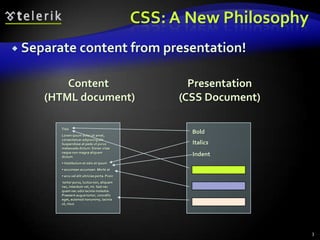
CSS: A New PhilosophySeparate content from presentation!3Content (HTML document)Presentation(CSS Document)TitleLorem ipsum dolor sit amet, consectetuer adipiscing elit. Suspendisse at pede ut purus malesuada dictum. Donec vitae neque non magna aliquam dictum. Vestibulum et odio et ipsum
 accumsan accumsan. Morbi at
 arcu vel elit ultricies porta. Proin tortor purus, luctus non, aliquam nec, interdum vel, mi. Sed nec quam nec odio lacinia molestie. Praesent augue tortor, convallis eget, euismod nonummy, lacinia ut, risus. BoldItalicsIndent
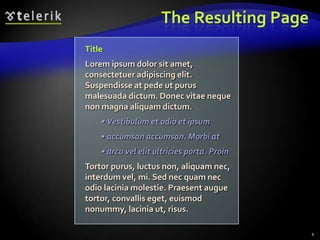
The Resulting Page4TitleLorem ipsum dolor sit amet, consectetuer adipiscing elit. Suspendisse at pede ut purus malesuada dictum. Donec vitae neque non magna aliquam dictum.Vestibulum et odio et ipsum
 accumsan accumsan. Morbi at
 arcu vel elit ultricies porta. ProinTortor purus, luctus non, aliquam nec, interdum vel, mi. Sed nec quam nec odio lacinia molestie. Praesent augue tortor, convallis eget, euismod nonummy, lacinia ut, risus.
CSS IntroStyling with Cascading Stylesheets
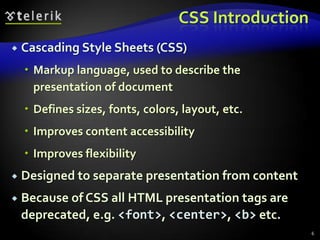
CSS IntroductionCascading Style Sheets (CSS)Markup language, used to describe the presentation of documentDefines sizes, fonts, colors, layout, etc.Improves content accessibilityImproves flexibilityDesigned to separate presentation from contentBecause of CSS all HTML presentation tags are deprecated, e.g. <font>, <center>, <b> etc.6
CSS Introduction (2)CSS can be applied to any XML documentNot just to HTML / XHTMLCSS can specify different styles for different rendering methodsOn-screenIn printEtc.… even by voice or Braille-based reader7
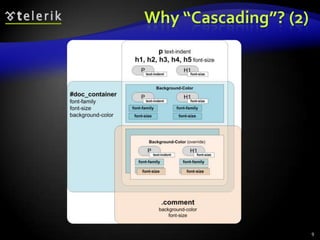
Why “Cascading”?Priority scheme determining which style rules apply to elementCascade priorities or weights are calculated and assigned to the rulesChild elements in the HTML DOM tree inherit the styles from their parentCan override themControl via !important rule8
Why “Cascading”? (2)9
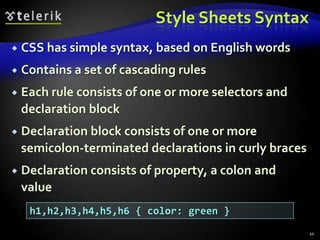
Style Sheets SyntaxCSS has simple syntax, based on English wordsContains a set of cascading rulesEach rule consists of one or more selectors and declaration blockDeclaration block consists of one or more semicolon-terminated declarations in curly bracesDeclaration consists of property, a colon and value10h1,h2,h3,h4,h5,h6 { color: green }
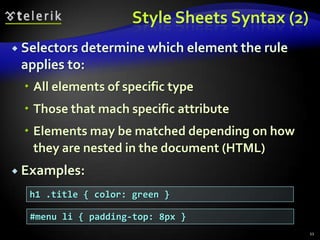
Style Sheets Syntax (2)Selectors determine which element the rule applies to: All elements of specific typeThose that mach specific attributeElements may be matched depending on how they are nested in the document (HTML)Examples:11h1 .title { color: green }#menu li { padding-top: 8px }
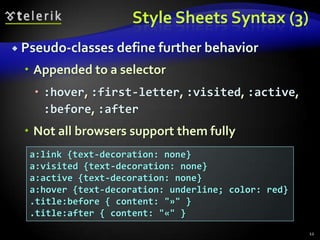
Style Sheets Syntax (3)Pseudo-classes define further behaviorAppended to a selector :hover, :first-letter, :visited, :active, :before, :afterNot all browsers support them fully12a:link {text-decoration: none}a:visited {text-decoration: none}a:active {text-decoration: none}a:hover {text-decoration: underline; color: red}.title:before { content: "»" }.title:after { content: "«" }
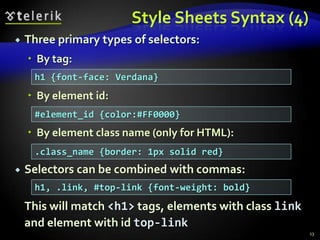
Style Sheets Syntax (4)Three primary types of selectors:By tag:By element id:By element class name (only for HTML): Selectors can be combined with commas:This will match <h1> tags, elements with class link and element with id top-link13h1 {font-face: Verdana}#element_id {color:#FF0000}.class_name {border: 1px solid red}h1, .link, #top-link {font-weight: bold}
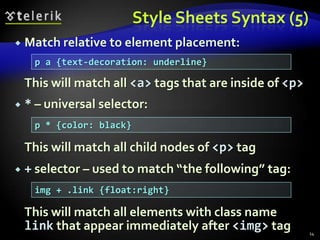
Style Sheets Syntax (5)Match relative to element placement:This will match all <a> tags that are inside of <p>* – universal selector:This will match all child nodes of <p> tag+ selector – used to match “the following” tag:	This will match all elements with class name link that appear immediately after <img> tag14p a {text-decoration: underline}p * {color: black}img + .link {float:right}
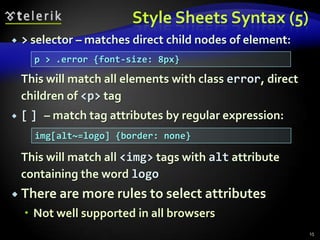
Style Sheets Syntax (5)> selector – matches direct child nodes of element:	This will match all elements with class error, direct children of <p> tag[] – match tag attributes by regular expression:This will match all <img> tags with alt attribute containing the word logoThere are more rules to select attributesNot well supported in all browsers15p > .error {font-size: 8px}img[alt~=logo] {border: none}
Default Browser StylesBrowsers have default CSS stylesUsed when there is no CSS information or any other style information in the documentSilently inherited in all documentsCaution: default styles differ in browsersE.g. Firefox default page background is white, while IE7 uses about 5% gray background16
Linking HTML and CSSHTML (content) and CSS (presentation) can be linked in three ways:Inline: the CSS rules in the style attributeNo selectors are neededEmbedded: in the HTML in <style> tagExternal: CSS rules are in separate file Usually a file with .css extensionLinked via <linkrel="stylesheet"href=…>tag or @import directive in embedded CSS block17

Linking HTML and CSS (2)Inline styles have highest priorityThen are the embedded stylesExternal styles are lastUsing external files is highly recommendedSimplify the HTML document Benefit from browser's cacheInline styles are about to be deprecated by the W3C18
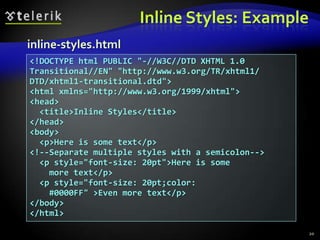
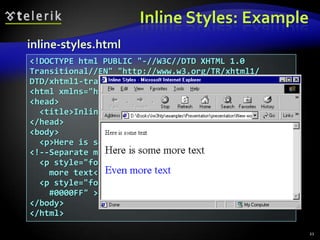
Inline StylesInline CSS stylesIndividual element’s style defined using styleattributeContains only declaration, no selectors:Override any other stylesApply to all descendant elementsUsed for styles that are not needed anywhere else in the Web site19<p style="font-size:20pt; color: #0000FF">
Inline Styles: Example20inline-styles.html<!DOCTYPE html PUBLIC "-//W3C//DTD XHTML 1.0 Transitional//EN" "http://www.w3.org/TR/xhtml1/ DTD/xhtml1-transitional.dtd"><html xmlns="http://www.w3.org/1999/xhtml"><head>  <title>Inline Styles</title></head><body>  <p>Here is some text</p><!--Separate multiple styles with a semicolon-->  <p style="font-size: 20pt">Here is some    more text</p>  <p style="font-size: 20pt;color:    #0000FF" >Even more text</p> </body></html>
Inline Styles: Example21inline-styles.html<!DOCTYPE html PUBLIC "-//W3C//DTD XHTML 1.0 Transitional//EN" "http://www.w3.org/TR/xhtml1/ DTD/xhtml1-transitional.dtd"><html xmlns="http://www.w3.org/1999/xhtml"><head>  <title>Inline Styles</title></head><body>  <p>Here is some text</p><!--Separate multiple styles with a semicolon-->  <p style="font-size: 20pt">Here is some    more text</p>  <p style="font-size: 20pt;color:    #0000FF" >Even more text</p> </body></html>
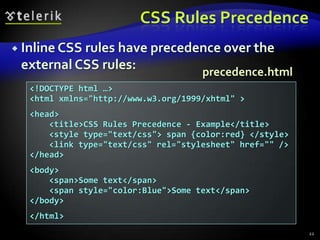
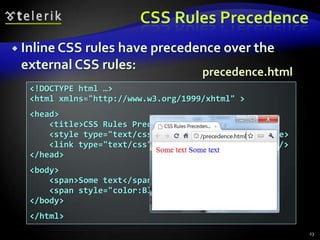
CSS Rules PrecedenceInline CSS rules have precedence over the external CSS rules:22precedence.html<!DOCTYPE html …><html xmlns="http://www.w3.org/1999/xhtml" ><head>    <title>CSS Rules Precedence - Example</title>    <style type="text/css"> span {color:red} </style>    <link type="text/css" rel="stylesheet" href="" /></head><body>    <span>Some text</span>    <span style="color:Blue">Some text</span></body></html>
CSS Rules PrecedenceInline CSS rules have precedence over the external CSS rules:23precedence.html<!DOCTYPE html …><html xmlns="http://www.w3.org/1999/xhtml" ><head>    <title>CSS Rules Precedence - Example</title>    <style type="text/css"> span {color:red} </style>    <link type="text/css" rel="stylesheet" href="" /></head><body>    <span>Some text</span>    <span style="color:Blue">Some text</span></body></html>
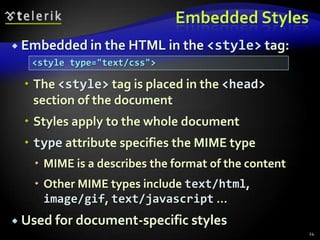
Embedded StylesEmbedded in the HTML in the <style> tag:The <style> tag is placed in the <head> section of the documentStyles apply to the whole documenttype attribute specifies the MIME typeMIME is a describes the format of the contentOther MIME types include text/html, image/gif, text/javascript …Used for document-specific styles24<style type="text/css">
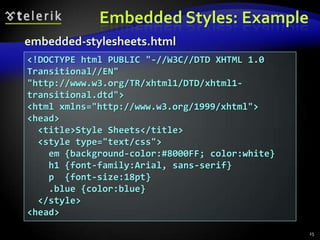
Embedded Styles: Example25embedded-stylesheets.html<!DOCTYPE html PUBLIC "-//W3C//DTD XHTML 1.0 Transitional//EN" "http://www.w3.org/TR/xhtml1/DTD/xhtml1-transitional.dtd"><html xmlns="http://www.w3.org/1999/xhtml"><head>  <title>Style Sheets</title>  <style type="text/css">    em {background-color:#8000FF; color:white}    h1 {font-family:Arial, sans-serif}    p  {font-size:18pt}    .blue {color:blue}  </style><head>
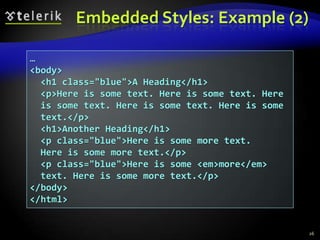
Embedded Styles: Example (2)26…<body>  <h1 class="blue">A Heading</h1>  <p>Here is some text. Here is some text. Here  is some text. Here is some text. Here is some  text.</p>        <h1>Another Heading</h1>          <p class="blue">Here is some more text.  Here is some more text.</p>  <p class="blue">Here is some <em>more</em>  text. Here is some more text.</p>  </body></html>
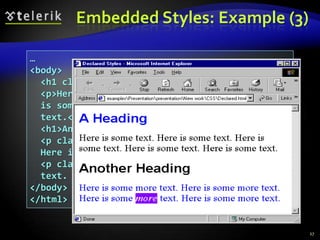
…<body>  <h1 class="blue">A Heading</h1>  <p>Here is some text. Here is some text. Here  is some text. Here is some text. Here is some  text.</p>        <h1>Another Heading</h1>          <p class="blue">Here is some more text.  Here is some more text.</p>  <p class="blue">Here is some <em>more</em>  text. Here is some more text.</p>  </body></html>Embedded Styles: Example (3)27
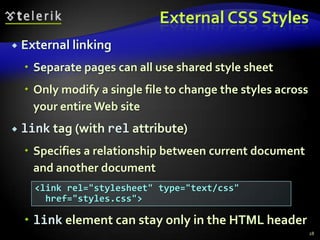
External CSS StylesExternal linkingSeparate pages can all use shared style sheetOnly modify a single file to change the styles across your entire Web sitelink tag (with rel attribute)Specifies a relationship between current document and another documentlink element can stay only in the HTML header28<link rel="stylesheet" type="text/css"  href="styles.css">
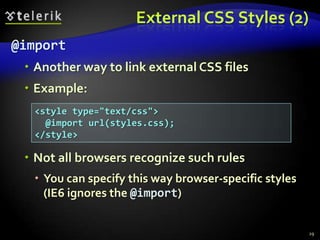
External CSS Styles (2)@importAnother way to link external CSS filesExample:Not all browsers recognize such rulesYou can specify this way browser-specific styles (IE6 ignores the @import)29<style type="text/css">  @import url(styles.css);</style>
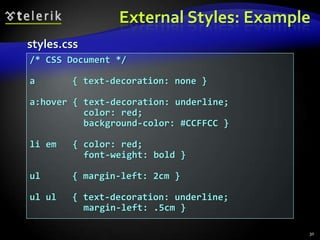
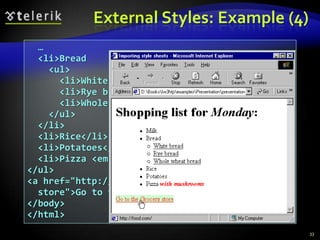
External Styles: Example30styles.css/* CSS Document */a 	  { text-decoration: none }a:hover { text-decoration: underline;          color: red;          background-color: #CCFFCC }li em   { color: red;           font-weight: bold }ul	  { margin-left: 2cm }ul ul	  { text-decoration: underline;           margin-left: .5cm }
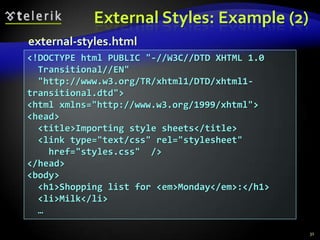
External Styles: Example (2)31external-styles.html<!DOCTYPE html PUBLIC "-//W3C//DTD XHTML 1.0   Transitional//EN"   "http://www.w3.org/TR/xhtml1/DTD/xhtml1-transitional.dtd"><html xmlns="http://www.w3.org/1999/xhtml"><head>  <title>Importing style sheets</title>  <link type="text/css" rel="stylesheet"    href="styles.css"  /></head><body>  <h1>Shopping list for <em>Monday</em>:</h1>  <li>Milk</li>  …
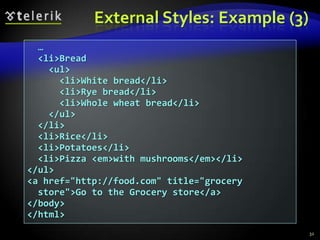
External Styles: Example (3)32  …  <li>Bread    <ul>      <li>White bread</li>      <li>Rye bread</li>      <li>Whole wheat bread</li>    </ul>  </li>  <li>Rice</li>  <li>Potatoes</li>  <li>Pizza <em>with mushrooms</em></li></ul><a href="http://food.com" title="grocery  store">Go to the Grocery store</a></body></html>
  …  <li>Bread    <ul>      <li>White bread</li>      <li>Rye bread</li>      <li>Whole wheat bread</li>    </ul>  </li>  <li>Rice</li>  <li>Potatoes</li>  <li>Pizza <em>with mushrooms</em></li></ul><a href="http://food.com" title="grocery  store">Go to the Grocery store</a></body></html>External Styles: Example (4)33
Values in the CSS RulesColors are specified in RGB format, in hex form: Example: #A0A6AAPredefined color aliases exist: black, blue, etc.Numeric values are specified in:Pixels, e.g. 12pxPoints, e.g. 10ptInches, centimeters, millimetersE.g. 1in, 1cm, 1mmPercentages, e.g. 50%Percentage is relative to the parent element34
CSS Rules for Fontscolor – specifies the color of the textfont-size – size of font: xx-small, x-small, small, medium, large, x-large, xx-large, smaller, larger or numeric valuefont-family – comma separated font namesExample: Verdana, Sans-Serif, etc. The browser loads the first one that is availableThere should always be at least one serif fontfont-weight –normal, bold, bolder, lighter or number in range [100…900]35
CSS Rules for Fonts (2)font-style – styles the fontValues: normal, italic, obliquetext-decoration – decorates the textValues: none, underline, line-trough, overline, blinktext-align – defines the alignment of text or other contentValues: left, right, center, justify36
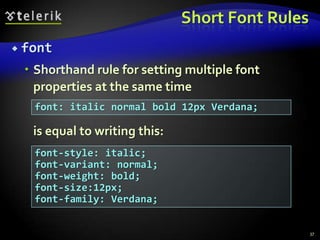
Short Font RulesfontShorthand rule for setting multiple font properties at the same time	is equal to writing this:37font: italic normal bold 12px Verdana;font-style: italic;font-variant: normal;font-weight: bold;font-size:12px;font-family: Verdana;
FontsLive Demofont-rules.html
Background CSS Rulesbackground-colorSolid color backgroundbackground-imageURL of image to be used as background, e.g.:background-repeatrepeat-x, repeat-y, repeat, no-repeatbackground-attachmentfixed / scroll39background-image:url("back.gif");
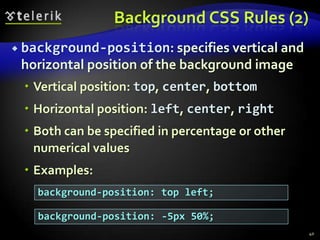
Background CSS Rules (2)background-position: specifies vertical and horizontal position of the background imageVertical position: top, center, bottomHorizontal position: left, center, rightBoth can be specified in percentage or other numerical valuesExamples:40background-position: top left;background-position: -5px 50%;
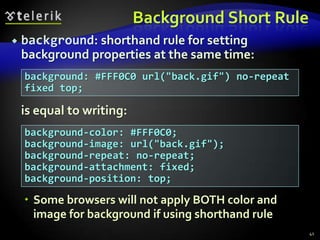
Background Short Rulebackground: shorthand rule for setting background properties at the same time:	is equal to writing:Some browsers will not apply BOTH color and image for background if using shorthand rule41background: #FFF0C0 url("back.gif") no-repeat fixed top;background-color: #FFF0C0;background-image: url("back.gif");background-repeat: no-repeat;background-attachment: fixed;background-position: top;
Background-image or <img>?Background images allow you to save many image tags from the HTML Leads to less codeMore content-oriented approachAll images that are not part of the page content should be moved to the CSS42
Background StylesLive Demobackground-rules.html
Border CSS Rulesborder-width: thin, medium, thick or numerical value (e.g. 10px)border-color: color alias or RGB valueborder-style: none, hidden, dotted, dashed, solid, double, groove, ridge, inset, outsetEach property can be defined separately for left, top, bottom and rightborder-top-style, border-left-color, …44
Border Short Rulesborder: shorthand rule for setting border properties at once:	is equal to writing:Specify different borders for the sides via shorthand rules: border-top, border-left, border-right, border-bottom45border: 1px solid red;border-width:1px;border-color:red;border-style:solid;
BordersLive Demoborder-rules.html
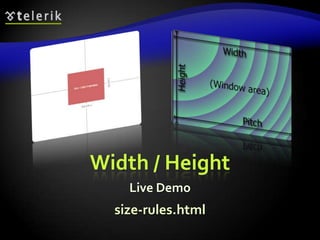
Width, Height CSS Ruleswidth – defines numerical value for the width of element, e.g. 200pxheight – defines numerical value for the height of element, e.g. 100pxImportant: not all elements and browsers follow this value!Usually the height of an element is defined by its contentCommon mistake is to apply height to tables or table cells47
Width / HeightLive Demosize-rules.html
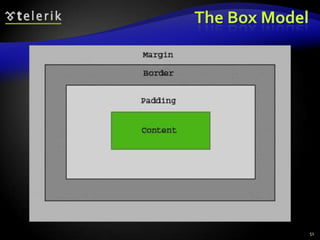
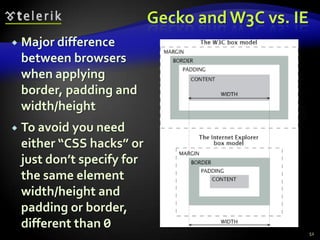
Margin and Paddingmargin and padding define the spacing around the elementNumerical value, e.g. 10px or -5pxCan be defined for each of the four sides separatelymargin-top, padding-left, …margin is the spacing outside of the borderpadding is the spacing between the border and the content49
Margin and Padding: Short Rulesmargin: 5px;Sets all four sides to have margin of 5 px;margin: 10px 20px;Sets margins: top and bottom to 10px, left and right to 20px;margin: 1px 3px 5px 7px;Sets top, right, bottom, left margins to 1px, 3px, 5px and 7px respectivelySame shorthand rules apply for padding50
The Box Model51
Gecko and W3C vs. IEMajor difference between browsers when applying border, padding and width/heightTo avoid you need either “CSS hacks” or just don’t specify for the same element width/height and padding or border,  different than 052
Margins and PaddingsLive Demomargins-paddings-rules.html
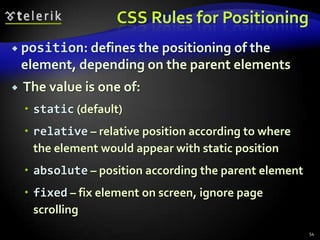
CSS Rules for Positioningposition: defines the positioning of the element, depending on the parent elements The value is one of:static (default)relative – relative position according to where the element would appear with static positionabsolute – position according the parent elementfixed – fix element on screen, ignore page scrolling54
CSS Rules for Positioning (2)Fixed and absolute positioned elements “float” over the rest of elementsMoved to separate document layerTheir position and size is ignored when calculating the size of parent element or position of surrounding elementsOrdered by their z-index55
PositioningLive Demopositioning-rules.html
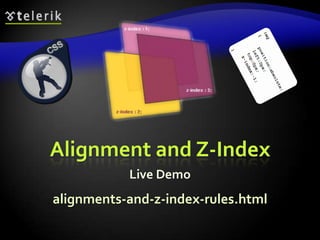
CSS Rules for Positioningtop, left, bottom, right: specifies offset of absolute/fixed/relative positioned element as numerical valuesvertical-align: sets the vertical-alignment of an elementUsually used for table cellsValues: baseline, sub, super, top, text-top, middle, bottom, text-bottom or numericz-index: specifies the depth-order of element57
Alignment and Z-IndexLive Demoalignments-and-z-index-rules.html
Float CSS Rulefloat: the element “floats” above the elementssimilar to position:absolute and the align HTML property of <img> tag element is taken into account when rendering the surrounding text and elementsleft: places the element on the leftright: places the element on the right59
Clear CSS RuleclearSets the sides of the element where other floating elements are NOT allowedPossible values: left, right, bothThis rule can be applied only to “floating” elements60
Floating ElementsLive Demofloat-rules.html
Opacity CSS Ruleopacity: specifies the opacity of the elementFloating point number from 0 to 1Supported only by Safari browser For Mozilla use –moz-opacity CSS ruleFor IE use filter:alpha(opacity=value) where value is from 0 to 100Need to apply all three rules62
OpacityLive Demoopacity-rule.html
Visibility CSS RulevisibilityDetermines whether the element is visiblehidden: element is not rendered, but still takes place in the rendering (acts like opacity:0)visible: element is rendered normally64
VisibilityLive Demovisibility-rule.html
Display CSS Ruledisplay: controls the display of the element and the way it is rendered and if breaks should be placed before and after the elementinline: no breaks are placed before and after (<span> is inline element)block:  breaks are placed before AND after the element (<div> is block element)66
Display CSS Rule (2)none: element is hidden and its dimensions are not used to calculate the surrounding elements rendering (differs from visibility:hidden!)There are some more possible values, but not all browsers support themSpecific displays like table-cell and table-row67
DisplayLive Demodisplay-rule.html
Overflow CSS Ruleoverflow: defines the behavior of element when content needs more space than you have specified by the size properties or for other reasons. Values: visible (default) – element size is increased to make space for content or the content “overflows” out of the elementscroll – show horizontal/vertical scroll bar in the elementhidden – any content in the element that cannot be placed inside is hidden69
OverflowLive Demooverflow-rule.html
Other CSS Rulescursor:  specifies the look of the mouse cursor when placed over the element Values: crosshair, help, pointer, progress, move, hair, col-resize, row-resize, text, wait, copy, drop, and otherswhite-space – controls the line breaking of text. Value is one of:nowrap – keeps the text on one linenormal (default) – browser decides whether to brake the lines if needed71
Benefits of using CSSMore powerful formatting than using presentation tagsYour pages load faster, because browsers cache the .css filesIncreased accessibility, because rules can be defined according given mediaPages are easier to maintain and update72
Maintenance Example73TitleSome random text here.  You can’t read it anyway!  Harharhar!  Use Css.TitleSome random text here.  You can’t read it anyway!  Harharhar!  Use Css.TitleSome random text here.  You can’t read it anyway!  Harharhar!  Use Css.TitleSome random text here.  You can’t read it anyway!  Harharhar!  Use Css.TitleSome random text here.  You can’t read it anyway!  Harharhar!  Use Css.TitleSome random text here.  You can’t read it anyway!  Harharhar!  Use Css.TitleSome random text here.  You can’t read it anyway!  Harharhar!  Use Css.TitleSome random text here.  You can’t read it anyway!  Harharhar!  Use Css.TitleSome random text here.  You can’t read it anyway!  Harharhar!  Use Css.TitleSome random text here.  You can’t read it anyway!  Harharhar!  Use Css.TitleSome random text here.  You can’t read it anyway!  Harharhar!  Use Css.TitleSome random text here.  You can’t read it anyway!  Harharhar!  Use Css.TitleSome random text here.  You can’t read it anyway!  Harharhar!  Use Css.TitleSome random text here.  You can’t read it anyway!  Harharhar!  Use Css.TitleSome random text here.  You can’t read it anyway!  Harharhar!  Use Css.TitleSome random text here.  You can’t read it anyway!  Harharhar!  Use Css.TitleSome random text here.  You can’t read it anyway!  Harharhar!  Use Css.TitleSome random text here.  You can’t read it anyway!  Harharhar!  Use Css.TitleSome random text here.  You can’t read it anyway!  Harharhar!  Use Css.TitleSome random text here.  You can’t read it anyway!  Harharhar!  Use Css.TitleSome random text here.  You can’t read it anyway!  Harharhar!  Use Css.TitleSome random text here.  You can’t read it anyway!  Harharhar!  Use Css.TitleSome random text here.  You can’t read it anyway!  Harharhar!  Use Css.one CSS fileTitleSome random text here.  You can’t read it anyway!  Harharhar!  Use Css.TitleSome random text here.  You can’t read it anyway!  Harharhar!  Use Css.TitleSome random text here.  You can’t read it anyway!  Harharhar!  Use Css.TitleSome random text here.  You can’t read it anyway!  Harharhar!  Use Css.TitleSome random text here.  You can’t read it anyway!  Harharhar!  Use Css.TitleSome random text here.  You can’t read it anyway!  Harharhar!  Use Css.TitleSome random text here.  You can’t read it anyway!  Harharhar!  Use Css.TitleSome random text here.  You can’t read it anyway!  Harharhar!  Use Css.TitleSome random text here.  You can’t read it anyway!  Harharhar!  Use Css.TitleSome random text here.  You can’t read it anyway!  Harharhar!  Use Css.TitleSome random text here.  You can’t read it anyway!  Harharhar!  Use Css.TitleSome random text here.  You can’t read it anyway!  Harharhar!  Use Css.TitleSome random text here.  You can’t read it anyway!  Harharhar!  Use Css.TitleSome random text here.  You can’t read it anyway!  Harharhar!  Use Css.TitleSome random text here.  You can’t read it anyway!  Harharhar!  Use Css.TitleSome random text here.  You can’t read it anyway!  Harharhar!  Use Css.TitleSome random text here.  You can’t read it anyway!  Harharhar!  Use Css.TitleSome random text here.  You can’t read it anyway!  Harharhar!  Use Css.TitleSome random text here.  You can’t read it anyway!  Harharhar!  Use Css.TitleSome random text here.  You can’t read it anyway!  Harharhar!  Use Css.TitleSome random text here.  You can’t read it anyway!  Harharhar!  Use Css.TitleSome random text here.  You can’t read it anyway!  Harharhar!  Use Css.TitleSome random text here.  You can’t read it anyway!  Harharhar!  Use Css.TitleSome random text here.  You can’t read it anyway!  Harharhar!  Use Css.TitleSome random text here.  You can’t read it anyway!  Harharhar!  Use Css.TitleSome random text here.  You can’t read it anyway!  Harharhar!  Use Css.TitleSome random text here.  You can’t read it anyway!  Harharhar!  Use Css.TitleSome random text here.  You can’t read it anyway!  Harharhar!  Use Css.TitleSome random text here.  You can’t read it anyway!  Harharhar!  Use Css.TitleSome random text here.  You can’t read it anyway!  Harharhar!  Use Css.TitleSome random text here.  You can’t read it anyway!  Harharhar!  Use Css.TitleSome random text here.  You can’t read it anyway!  Harharhar!  Use Css.TitleSome random text here.  You can’t read it anyway!  Harharhar!  Use Css.TitleSome random text here.  You can’t read it anyway!  Harharhar!  Use Css.TitleSome random text here.  You can’t read it anyway!  Harharhar!  Use Css.TitleSome random text here.  You can’t read it anyway!  Harharhar!  Use Css.
What to AvoidDon’t use <font> or other presentation tags to change the look of your text<font color=...><b>text that is bold<center> this text is centeredDo not use complex CSS rules-sets because may slow down page renderingMove as much as possible to external filesAvoid inline CSS74

CSS

  • 1.
    http://schoolacademy.telerik.comIntroduction to CascadingStyle Sheets (CSS)Svetlin NakovTelerik Corporationwww.telerik.com
  • 2.
    Table of ContentsWhatis CSS?Styling with Cascading Stylesheets (CSS)Selectors and style definitionsLinking HTML and CSSFonts, Backgrounds, BordersThe Box Model in W3C and IEAlignment, Z-Index, Margin, PaddingPositioning and Floating ElementsVisibility, Display, Overflow2
  • 3.
    CSS: A NewPhilosophySeparate content from presentation!3Content (HTML document)Presentation(CSS Document)TitleLorem ipsum dolor sit amet, consectetuer adipiscing elit. Suspendisse at pede ut purus malesuada dictum. Donec vitae neque non magna aliquam dictum. Vestibulum et odio et ipsum
  • 4.
  • 5.
    arcu velelit ultricies porta. Proin tortor purus, luctus non, aliquam nec, interdum vel, mi. Sed nec quam nec odio lacinia molestie. Praesent augue tortor, convallis eget, euismod nonummy, lacinia ut, risus. BoldItalicsIndent
  • 6.
    The Resulting Page4TitleLoremipsum dolor sit amet, consectetuer adipiscing elit. Suspendisse at pede ut purus malesuada dictum. Donec vitae neque non magna aliquam dictum.Vestibulum et odio et ipsum
  • 7.
  • 8.
    arcu velelit ultricies porta. ProinTortor purus, luctus non, aliquam nec, interdum vel, mi. Sed nec quam nec odio lacinia molestie. Praesent augue tortor, convallis eget, euismod nonummy, lacinia ut, risus.
  • 9.
    CSS IntroStyling withCascading Stylesheets
  • 10.
    CSS IntroductionCascading StyleSheets (CSS)Markup language, used to describe the presentation of documentDefines sizes, fonts, colors, layout, etc.Improves content accessibilityImproves flexibilityDesigned to separate presentation from contentBecause of CSS all HTML presentation tags are deprecated, e.g. <font>, <center>, <b> etc.6
  • 11.
    CSS Introduction (2)CSScan be applied to any XML documentNot just to HTML / XHTMLCSS can specify different styles for different rendering methodsOn-screenIn printEtc.… even by voice or Braille-based reader7
  • 12.
    Why “Cascading”?Priority schemedetermining which style rules apply to elementCascade priorities or weights are calculated and assigned to the rulesChild elements in the HTML DOM tree inherit the styles from their parentCan override themControl via !important rule8
  • 13.
  • 14.
    Style Sheets SyntaxCSShas simple syntax, based on English wordsContains a set of cascading rulesEach rule consists of one or more selectors and declaration blockDeclaration block consists of one or more semicolon-terminated declarations in curly bracesDeclaration consists of property, a colon and value10h1,h2,h3,h4,h5,h6 { color: green }
  • 15.
    Style Sheets Syntax(2)Selectors determine which element the rule applies to: All elements of specific typeThose that mach specific attributeElements may be matched depending on how they are nested in the document (HTML)Examples:11h1 .title { color: green }#menu li { padding-top: 8px }
  • 16.
    Style Sheets Syntax(3)Pseudo-classes define further behaviorAppended to a selector :hover, :first-letter, :visited, :active, :before, :afterNot all browsers support them fully12a:link {text-decoration: none}a:visited {text-decoration: none}a:active {text-decoration: none}a:hover {text-decoration: underline; color: red}.title:before { content: "»" }.title:after { content: "«" }
  • 17.
    Style Sheets Syntax(4)Three primary types of selectors:By tag:By element id:By element class name (only for HTML): Selectors can be combined with commas:This will match <h1> tags, elements with class link and element with id top-link13h1 {font-face: Verdana}#element_id {color:#FF0000}.class_name {border: 1px solid red}h1, .link, #top-link {font-weight: bold}
  • 18.
    Style Sheets Syntax(5)Match relative to element placement:This will match all <a> tags that are inside of <p>* – universal selector:This will match all child nodes of <p> tag+ selector – used to match “the following” tag: This will match all elements with class name link that appear immediately after <img> tag14p a {text-decoration: underline}p * {color: black}img + .link {float:right}
  • 19.
    Style Sheets Syntax(5)> selector – matches direct child nodes of element: This will match all elements with class error, direct children of <p> tag[] – match tag attributes by regular expression:This will match all <img> tags with alt attribute containing the word logoThere are more rules to select attributesNot well supported in all browsers15p > .error {font-size: 8px}img[alt~=logo] {border: none}
  • 20.
    Default Browser StylesBrowsershave default CSS stylesUsed when there is no CSS information or any other style information in the documentSilently inherited in all documentsCaution: default styles differ in browsersE.g. Firefox default page background is white, while IE7 uses about 5% gray background16
  • 21.
    Linking HTML andCSSHTML (content) and CSS (presentation) can be linked in three ways:Inline: the CSS rules in the style attributeNo selectors are neededEmbedded: in the HTML in <style> tagExternal: CSS rules are in separate file Usually a file with .css extensionLinked via <linkrel="stylesheet"href=…>tag or @import directive in embedded CSS block17
  • 22.
    Linking HTML andCSS (2)Inline styles have highest priorityThen are the embedded stylesExternal styles are lastUsing external files is highly recommendedSimplify the HTML document Benefit from browser's cacheInline styles are about to be deprecated by the W3C18
  • 23.
    Inline StylesInline CSSstylesIndividual element’s style defined using styleattributeContains only declaration, no selectors:Override any other stylesApply to all descendant elementsUsed for styles that are not needed anywhere else in the Web site19<p style="font-size:20pt; color: #0000FF">
  • 24.
    Inline Styles: Example20inline-styles.html<!DOCTYPEhtml PUBLIC "-//W3C//DTD XHTML 1.0 Transitional//EN" "http://www.w3.org/TR/xhtml1/ DTD/xhtml1-transitional.dtd"><html xmlns="http://www.w3.org/1999/xhtml"><head> <title>Inline Styles</title></head><body> <p>Here is some text</p><!--Separate multiple styles with a semicolon--> <p style="font-size: 20pt">Here is some more text</p> <p style="font-size: 20pt;color: #0000FF" >Even more text</p> </body></html>
  • 25.
    Inline Styles: Example21inline-styles.html<!DOCTYPEhtml PUBLIC "-//W3C//DTD XHTML 1.0 Transitional//EN" "http://www.w3.org/TR/xhtml1/ DTD/xhtml1-transitional.dtd"><html xmlns="http://www.w3.org/1999/xhtml"><head> <title>Inline Styles</title></head><body> <p>Here is some text</p><!--Separate multiple styles with a semicolon--> <p style="font-size: 20pt">Here is some more text</p> <p style="font-size: 20pt;color: #0000FF" >Even more text</p> </body></html>
  • 26.
    CSS Rules PrecedenceInlineCSS rules have precedence over the external CSS rules:22precedence.html<!DOCTYPE html …><html xmlns="http://www.w3.org/1999/xhtml" ><head> <title>CSS Rules Precedence - Example</title> <style type="text/css"> span {color:red} </style> <link type="text/css" rel="stylesheet" href="" /></head><body> <span>Some text</span> <span style="color:Blue">Some text</span></body></html>
  • 27.
    CSS Rules PrecedenceInlineCSS rules have precedence over the external CSS rules:23precedence.html<!DOCTYPE html …><html xmlns="http://www.w3.org/1999/xhtml" ><head> <title>CSS Rules Precedence - Example</title> <style type="text/css"> span {color:red} </style> <link type="text/css" rel="stylesheet" href="" /></head><body> <span>Some text</span> <span style="color:Blue">Some text</span></body></html>
  • 28.
    Embedded StylesEmbedded inthe HTML in the <style> tag:The <style> tag is placed in the <head> section of the documentStyles apply to the whole documenttype attribute specifies the MIME typeMIME is a describes the format of the contentOther MIME types include text/html, image/gif, text/javascript …Used for document-specific styles24<style type="text/css">
  • 29.
    Embedded Styles: Example25embedded-stylesheets.html<!DOCTYPEhtml PUBLIC "-//W3C//DTD XHTML 1.0 Transitional//EN" "http://www.w3.org/TR/xhtml1/DTD/xhtml1-transitional.dtd"><html xmlns="http://www.w3.org/1999/xhtml"><head> <title>Style Sheets</title> <style type="text/css"> em {background-color:#8000FF; color:white} h1 {font-family:Arial, sans-serif} p {font-size:18pt} .blue {color:blue} </style><head>
  • 30.
    Embedded Styles: Example(2)26…<body> <h1 class="blue">A Heading</h1> <p>Here is some text. Here is some text. Here is some text. Here is some text. Here is some text.</p> <h1>Another Heading</h1> <p class="blue">Here is some more text. Here is some more text.</p> <p class="blue">Here is some <em>more</em> text. Here is some more text.</p> </body></html>
  • 31.
    …<body> <h1class="blue">A Heading</h1> <p>Here is some text. Here is some text. Here is some text. Here is some text. Here is some text.</p> <h1>Another Heading</h1> <p class="blue">Here is some more text. Here is some more text.</p> <p class="blue">Here is some <em>more</em> text. Here is some more text.</p> </body></html>Embedded Styles: Example (3)27
  • 32.
    External CSS StylesExternallinkingSeparate pages can all use shared style sheetOnly modify a single file to change the styles across your entire Web sitelink tag (with rel attribute)Specifies a relationship between current document and another documentlink element can stay only in the HTML header28<link rel="stylesheet" type="text/css" href="styles.css">
  • 33.
    External CSS Styles(2)@importAnother way to link external CSS filesExample:Not all browsers recognize such rulesYou can specify this way browser-specific styles (IE6 ignores the @import)29<style type="text/css"> @import url(styles.css);</style>
  • 34.
    External Styles: Example30styles.css/*CSS Document */a { text-decoration: none }a:hover { text-decoration: underline; color: red; background-color: #CCFFCC }li em { color: red; font-weight: bold }ul { margin-left: 2cm }ul ul { text-decoration: underline; margin-left: .5cm }
  • 35.
    External Styles: Example(2)31external-styles.html<!DOCTYPE html PUBLIC "-//W3C//DTD XHTML 1.0 Transitional//EN" "http://www.w3.org/TR/xhtml1/DTD/xhtml1-transitional.dtd"><html xmlns="http://www.w3.org/1999/xhtml"><head> <title>Importing style sheets</title> <link type="text/css" rel="stylesheet" href="styles.css" /></head><body> <h1>Shopping list for <em>Monday</em>:</h1> <li>Milk</li> …
  • 36.
    External Styles: Example(3)32 … <li>Bread <ul> <li>White bread</li> <li>Rye bread</li> <li>Whole wheat bread</li> </ul> </li> <li>Rice</li> <li>Potatoes</li> <li>Pizza <em>with mushrooms</em></li></ul><a href="http://food.com" title="grocery store">Go to the Grocery store</a></body></html>
  • 37.
    <li>Bread <ul> <li>White bread</li> <li>Rye bread</li> <li>Whole wheat bread</li> </ul> </li> <li>Rice</li> <li>Potatoes</li> <li>Pizza <em>with mushrooms</em></li></ul><a href="http://food.com" title="grocery store">Go to the Grocery store</a></body></html>External Styles: Example (4)33
  • 38.
    Values in theCSS RulesColors are specified in RGB format, in hex form: Example: #A0A6AAPredefined color aliases exist: black, blue, etc.Numeric values are specified in:Pixels, e.g. 12pxPoints, e.g. 10ptInches, centimeters, millimetersE.g. 1in, 1cm, 1mmPercentages, e.g. 50%Percentage is relative to the parent element34
  • 39.
    CSS Rules forFontscolor – specifies the color of the textfont-size – size of font: xx-small, x-small, small, medium, large, x-large, xx-large, smaller, larger or numeric valuefont-family – comma separated font namesExample: Verdana, Sans-Serif, etc. The browser loads the first one that is availableThere should always be at least one serif fontfont-weight –normal, bold, bolder, lighter or number in range [100…900]35
  • 40.
    CSS Rules forFonts (2)font-style – styles the fontValues: normal, italic, obliquetext-decoration – decorates the textValues: none, underline, line-trough, overline, blinktext-align – defines the alignment of text or other contentValues: left, right, center, justify36
  • 41.
    Short Font RulesfontShorthandrule for setting multiple font properties at the same time is equal to writing this:37font: italic normal bold 12px Verdana;font-style: italic;font-variant: normal;font-weight: bold;font-size:12px;font-family: Verdana;
  • 42.
  • 43.
    Background CSS Rulesbackground-colorSolidcolor backgroundbackground-imageURL of image to be used as background, e.g.:background-repeatrepeat-x, repeat-y, repeat, no-repeatbackground-attachmentfixed / scroll39background-image:url("back.gif");
  • 44.
    Background CSS Rules(2)background-position: specifies vertical and horizontal position of the background imageVertical position: top, center, bottomHorizontal position: left, center, rightBoth can be specified in percentage or other numerical valuesExamples:40background-position: top left;background-position: -5px 50%;
  • 45.
    Background Short Rulebackground:shorthand rule for setting background properties at the same time: is equal to writing:Some browsers will not apply BOTH color and image for background if using shorthand rule41background: #FFF0C0 url("back.gif") no-repeat fixed top;background-color: #FFF0C0;background-image: url("back.gif");background-repeat: no-repeat;background-attachment: fixed;background-position: top;
  • 46.
    Background-image or <img>?Backgroundimages allow you to save many image tags from the HTML Leads to less codeMore content-oriented approachAll images that are not part of the page content should be moved to the CSS42
  • 47.
  • 48.
    Border CSS Rulesborder-width:thin, medium, thick or numerical value (e.g. 10px)border-color: color alias or RGB valueborder-style: none, hidden, dotted, dashed, solid, double, groove, ridge, inset, outsetEach property can be defined separately for left, top, bottom and rightborder-top-style, border-left-color, …44
  • 49.
    Border Short Rulesborder:shorthand rule for setting border properties at once: is equal to writing:Specify different borders for the sides via shorthand rules: border-top, border-left, border-right, border-bottom45border: 1px solid red;border-width:1px;border-color:red;border-style:solid;
  • 50.
  • 51.
    Width, Height CSSRuleswidth – defines numerical value for the width of element, e.g. 200pxheight – defines numerical value for the height of element, e.g. 100pxImportant: not all elements and browsers follow this value!Usually the height of an element is defined by its contentCommon mistake is to apply height to tables or table cells47
  • 52.
    Width / HeightLiveDemosize-rules.html
  • 53.
    Margin and Paddingmarginand padding define the spacing around the elementNumerical value, e.g. 10px or -5pxCan be defined for each of the four sides separatelymargin-top, padding-left, …margin is the spacing outside of the borderpadding is the spacing between the border and the content49
  • 54.
    Margin and Padding:Short Rulesmargin: 5px;Sets all four sides to have margin of 5 px;margin: 10px 20px;Sets margins: top and bottom to 10px, left and right to 20px;margin: 1px 3px 5px 7px;Sets top, right, bottom, left margins to 1px, 3px, 5px and 7px respectivelySame shorthand rules apply for padding50
  • 55.
  • 56.
    Gecko and W3Cvs. IEMajor difference between browsers when applying border, padding and width/heightTo avoid you need either “CSS hacks” or just don’t specify for the same element width/height and padding or border, different than 052
  • 57.
    Margins and PaddingsLiveDemomargins-paddings-rules.html
  • 58.
    CSS Rules forPositioningposition: defines the positioning of the element, depending on the parent elements The value is one of:static (default)relative – relative position according to where the element would appear with static positionabsolute – position according the parent elementfixed – fix element on screen, ignore page scrolling54
  • 59.
    CSS Rules forPositioning (2)Fixed and absolute positioned elements “float” over the rest of elementsMoved to separate document layerTheir position and size is ignored when calculating the size of parent element or position of surrounding elementsOrdered by their z-index55
  • 60.
  • 61.
    CSS Rules forPositioningtop, left, bottom, right: specifies offset of absolute/fixed/relative positioned element as numerical valuesvertical-align: sets the vertical-alignment of an elementUsually used for table cellsValues: baseline, sub, super, top, text-top, middle, bottom, text-bottom or numericz-index: specifies the depth-order of element57
  • 62.
    Alignment and Z-IndexLiveDemoalignments-and-z-index-rules.html
  • 63.
    Float CSS Rulefloat:the element “floats” above the elementssimilar to position:absolute and the align HTML property of <img> tag element is taken into account when rendering the surrounding text and elementsleft: places the element on the leftright: places the element on the right59
  • 64.
    Clear CSS RuleclearSetsthe sides of the element where other floating elements are NOT allowedPossible values: left, right, bothThis rule can be applied only to “floating” elements60
  • 65.
  • 66.
    Opacity CSS Ruleopacity:specifies the opacity of the elementFloating point number from 0 to 1Supported only by Safari browser For Mozilla use –moz-opacity CSS ruleFor IE use filter:alpha(opacity=value) where value is from 0 to 100Need to apply all three rules62
  • 67.
  • 68.
    Visibility CSS RulevisibilityDetermineswhether the element is visiblehidden: element is not rendered, but still takes place in the rendering (acts like opacity:0)visible: element is rendered normally64
  • 69.
  • 70.
    Display CSS Ruledisplay:controls the display of the element and the way it is rendered and if breaks should be placed before and after the elementinline: no breaks are placed before and after (<span> is inline element)block: breaks are placed before AND after the element (<div> is block element)66
  • 71.
    Display CSS Rule(2)none: element is hidden and its dimensions are not used to calculate the surrounding elements rendering (differs from visibility:hidden!)There are some more possible values, but not all browsers support themSpecific displays like table-cell and table-row67
  • 72.
  • 73.
    Overflow CSS Ruleoverflow:defines the behavior of element when content needs more space than you have specified by the size properties or for other reasons. Values: visible (default) – element size is increased to make space for content or the content “overflows” out of the elementscroll – show horizontal/vertical scroll bar in the elementhidden – any content in the element that cannot be placed inside is hidden69
  • 74.
  • 75.
    Other CSS Rulescursor: specifies the look of the mouse cursor when placed over the element Values: crosshair, help, pointer, progress, move, hair, col-resize, row-resize, text, wait, copy, drop, and otherswhite-space – controls the line breaking of text. Value is one of:nowrap – keeps the text on one linenormal (default) – browser decides whether to brake the lines if needed71
  • 76.
    Benefits of usingCSSMore powerful formatting than using presentation tagsYour pages load faster, because browsers cache the .css filesIncreased accessibility, because rules can be defined according given mediaPages are easier to maintain and update72
  • 77.
    Maintenance Example73TitleSome randomtext here. You can’t read it anyway! Harharhar! Use Css.TitleSome random text here. You can’t read it anyway! Harharhar! Use Css.TitleSome random text here. You can’t read it anyway! Harharhar! Use Css.TitleSome random text here. You can’t read it anyway! Harharhar! Use Css.TitleSome random text here. You can’t read it anyway! Harharhar! Use Css.TitleSome random text here. You can’t read it anyway! Harharhar! Use Css.TitleSome random text here. You can’t read it anyway! Harharhar! Use Css.TitleSome random text here. You can’t read it anyway! Harharhar! Use Css.TitleSome random text here. You can’t read it anyway! Harharhar! Use Css.TitleSome random text here. You can’t read it anyway! Harharhar! Use Css.TitleSome random text here. You can’t read it anyway! Harharhar! Use Css.TitleSome random text here. You can’t read it anyway! Harharhar! Use Css.TitleSome random text here. You can’t read it anyway! Harharhar! Use Css.TitleSome random text here. You can’t read it anyway! Harharhar! Use Css.TitleSome random text here. You can’t read it anyway! Harharhar! Use Css.TitleSome random text here. You can’t read it anyway! Harharhar! Use Css.TitleSome random text here. You can’t read it anyway! Harharhar! Use Css.TitleSome random text here. You can’t read it anyway! Harharhar! Use Css.TitleSome random text here. You can’t read it anyway! Harharhar! Use Css.TitleSome random text here. You can’t read it anyway! Harharhar! Use Css.TitleSome random text here. You can’t read it anyway! Harharhar! Use Css.TitleSome random text here. You can’t read it anyway! Harharhar! Use Css.TitleSome random text here. You can’t read it anyway! Harharhar! Use Css.one CSS fileTitleSome random text here. You can’t read it anyway! Harharhar! Use Css.TitleSome random text here. You can’t read it anyway! Harharhar! Use Css.TitleSome random text here. You can’t read it anyway! Harharhar! Use Css.TitleSome random text here. You can’t read it anyway! Harharhar! Use Css.TitleSome random text here. You can’t read it anyway! Harharhar! Use Css.TitleSome random text here. You can’t read it anyway! Harharhar! Use Css.TitleSome random text here. You can’t read it anyway! Harharhar! Use Css.TitleSome random text here. You can’t read it anyway! Harharhar! Use Css.TitleSome random text here. You can’t read it anyway! Harharhar! Use Css.TitleSome random text here. You can’t read it anyway! Harharhar! Use Css.TitleSome random text here. You can’t read it anyway! Harharhar! Use Css.TitleSome random text here. You can’t read it anyway! Harharhar! Use Css.TitleSome random text here. You can’t read it anyway! Harharhar! Use Css.TitleSome random text here. You can’t read it anyway! Harharhar! Use Css.TitleSome random text here. You can’t read it anyway! Harharhar! Use Css.TitleSome random text here. You can’t read it anyway! Harharhar! Use Css.TitleSome random text here. You can’t read it anyway! Harharhar! Use Css.TitleSome random text here. You can’t read it anyway! Harharhar! Use Css.TitleSome random text here. You can’t read it anyway! Harharhar! Use Css.TitleSome random text here. You can’t read it anyway! Harharhar! Use Css.TitleSome random text here. You can’t read it anyway! Harharhar! Use Css.TitleSome random text here. You can’t read it anyway! Harharhar! Use Css.TitleSome random text here. You can’t read it anyway! Harharhar! Use Css.TitleSome random text here. You can’t read it anyway! Harharhar! Use Css.TitleSome random text here. You can’t read it anyway! Harharhar! Use Css.TitleSome random text here. You can’t read it anyway! Harharhar! Use Css.TitleSome random text here. You can’t read it anyway! Harharhar! Use Css.TitleSome random text here. You can’t read it anyway! Harharhar! Use Css.TitleSome random text here. You can’t read it anyway! Harharhar! Use Css.TitleSome random text here. You can’t read it anyway! Harharhar! Use Css.TitleSome random text here. You can’t read it anyway! Harharhar! Use Css.TitleSome random text here. You can’t read it anyway! Harharhar! Use Css.TitleSome random text here. You can’t read it anyway! Harharhar! Use Css.TitleSome random text here. You can’t read it anyway! Harharhar! Use Css.TitleSome random text here. You can’t read it anyway! Harharhar! Use Css.TitleSome random text here. You can’t read it anyway! Harharhar! Use Css.
  • 78.
    What to AvoidDon’tuse <font> or other presentation tags to change the look of your text<font color=...><b>text that is bold<center> this text is centeredDo not use complex CSS rules-sets because may slow down page renderingMove as much as possible to external filesAvoid inline CSS74