Usability and Accessibility on the Web
Usability Usability is the study of the ease with which people can employ a particular tool or other human-made object in order to achieve a particular goal. A web application must function and it must be usable There are a lot of books on the subject - we only have time to present some best practices
Navigation on the web site Search + Browsing Classify the content The user must know where he is inside the web site   The user mus know how he arrived in the page Navigation in the content and in the options of the site
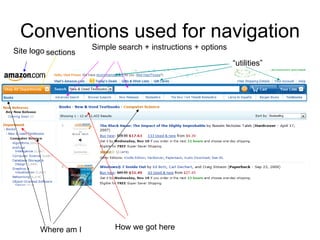
Conventions used for navigation Where am I How we got here Site logo “ utilities” sections Simple search + instructions + options
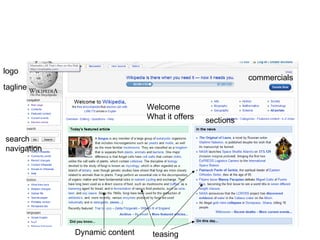
Home page Logo + tag line Sections/classification Search  Teasing  Dynamic content [publicite] Shortcuts to the most visited pages [sign-up]
Home page objectives Show what the user is looking for Offer alternatives (something more than the user is looking for)   Show how to begin and use the web site Show credibility and trust
logo tagline search navigation Dynamic content sections commercials Welcome  What it offers teasing
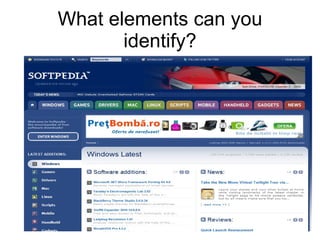
What elements can you identify?
Accessibility  Web Content Accessibility Guidelines (WCAG) 2.0 how the web content is made accessible to people with handicaps.   Accessibility should take into account a large number of handicaps: visual, auditives, physical, neurological, mental. => this should make the web content more usable for older people and for people in general
Introduction 160 million people have some kind of visual handicap Around 40 million people are blind There are tools that allow blind people to use the web There are people who have different handicaps that use other types of tools
Guides for accessible web sites Web Accessibility Initiative  –   Workgroup W3C for improving the web accessibility. Web Content Accessibility Guidelines 1.0   –  1999  Web Content Accessibility Guidelines  2 .0   –  2008  The instructions are grouped by their characteristics and by their priority (1 or A being the most important)
Objective no 1: the information and the elements of the interface must be perceived All the non-text content must have an alternative text.    For an image we can specify an alternative text to describe the content of the image (<img alt=&quot;description&quot;> ..)   If a sound has a specific significance (i.e. it announces an error) it must be accompanied by an explaining text The multimedia objects need to have texts to explain the content
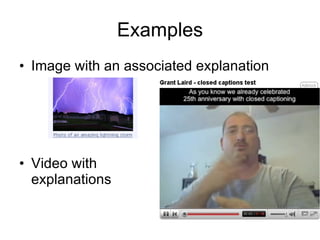
Examples Image with an associated explanation Video with  explanations
Objective no 1: the information and the elements of the interface must be perceived  The content of the page must maintain their importance when the presentation method changes Understand the relations between the graphic elements Insure that the text in the page is read in the correct order   The instructions on how a page must work mustn’t be done only by graphic symbols.   ex: the arrows that mark the next page must be explained with text.  
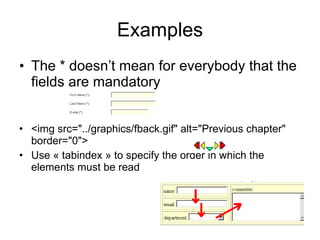
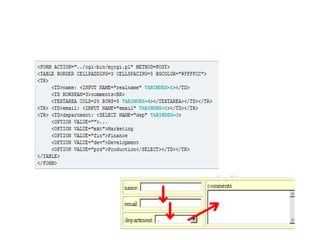
Examples The * doesn’t mean for everybody that the fields are mandatory <img src=&quot;../graphics/fback.gif&quot; alt=&quot;Previous chapter&quot; border=&quot;0&quot;>  Use « tabindex » to specify the order in which the elements must be read
 
Objective no 1: the information and the elements of the interface must be perceived The content must be easy to perceive by separating the foreground and the background  The color mustn’t be the only way in which information is provided There must be a way to stop the background sound of a page
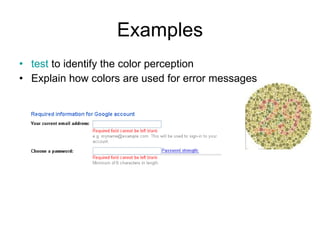
Examples test  to identify the color perception  Explain how colors are used for error messages
Objective no. 2 - the components of the interface should be operable  All the functionalities should be accessible from the keyboard If for the navigation are used non-standard features (other than tab and arrows) the user must be warned about them The user should have enough time to read the content of the page In a web page we shouldn’t have flashes as they can cause convulsions  ( see  .  http://www.w3.org/TR/2007/WD-WCAG20-20071211/#general-thresholddef )
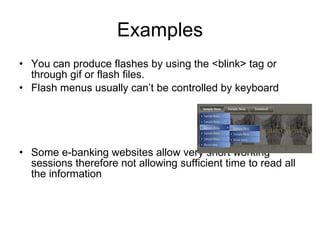
Examples You can produce flashes by using the <blink> tag or through gif or flash files.  Flash menus usually can’t be controlled by keyboard Some e-banking websites allow very short working sessions therefore not allowing sufficient time to read all the information
Objective no. 2 - the components of the interface should be operable The users should be allowed to skip the sections that are repeating in every page  The pages should have explicite titles The components of the interface should gain focus in a logical order
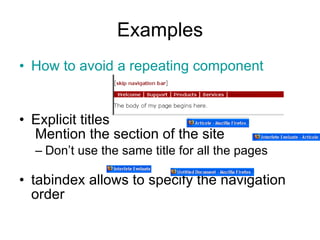
Examples How to avoid a repeating component Explicit titles  Mention the section of the site Don’t use the same title for all the pages  tabindex allows to specify the navigation order 
Objective no. 3 The interface and the content of the page must be understandable  The users must be allowed to avoid or correct errors when using the interface Use labels and/or instructions when you need data from the user
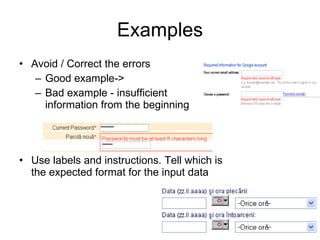
Examples Avoid / Correct the errors Good example-> Bad example - insufficient  information from the beginning  Use labels and instructions. Tell which is the expected format for the input data 
Conclusions The page doesn’t need only to function correctly It has to be usable It has to be accessible Think who is most likely to use your website Know the existing standards and recommendations
References Web Content Accessibility Guidelines 2.0  – W3C working draft Accessible Web Design Examples Web Content Accessibility Guidelines 1.0 See the links inside the presentation
About the exam 75 minutes 1 A4 cheat sheet that can contain only descriptions of HTML or CSS elements or of Javascript objects You are not allowed to have code examples on the cheat sheet You are not allowed to exchange cheat-sheets with your colleagues during the exam
About the exam If your cheat sheet doesn’t follow these rules it will be confiscated  The exam will consist in 3-5 theoretical questions (max 5 lines for each answer) Practical questions Implement a feature as seen in an image Validate a form input with javascript Tell how an element will be displayed having the code available
About the exam The exam does not repeat this session If you fail you will have to take it again in september Any attempt of cheating will be severely punished (automatically failing the subject+ proposal of expulsion from the faculty) In order to pass you need to score at least 50% of the exam points

Usability and accessibility on the web

  • 1.
  • 2.
    Usability Usability isthe study of the ease with which people can employ a particular tool or other human-made object in order to achieve a particular goal. A web application must function and it must be usable There are a lot of books on the subject - we only have time to present some best practices
  • 3.
    Navigation on theweb site Search + Browsing Classify the content The user must know where he is inside the web site   The user mus know how he arrived in the page Navigation in the content and in the options of the site
  • 4.
    Conventions used fornavigation Where am I How we got here Site logo “ utilities” sections Simple search + instructions + options
  • 5.
    Home page Logo+ tag line Sections/classification Search  Teasing Dynamic content [publicite] Shortcuts to the most visited pages [sign-up]
  • 6.
    Home page objectivesShow what the user is looking for Offer alternatives (something more than the user is looking for)   Show how to begin and use the web site Show credibility and trust
  • 7.
    logo tagline searchnavigation Dynamic content sections commercials Welcome What it offers teasing
  • 8.
    What elements canyou identify?
  • 9.
    Accessibility  Web ContentAccessibility Guidelines (WCAG) 2.0 how the web content is made accessible to people with handicaps.  Accessibility should take into account a large number of handicaps: visual, auditives, physical, neurological, mental. => this should make the web content more usable for older people and for people in general
  • 10.
    Introduction 160 millionpeople have some kind of visual handicap Around 40 million people are blind There are tools that allow blind people to use the web There are people who have different handicaps that use other types of tools
  • 11.
    Guides for accessibleweb sites Web Accessibility Initiative –  Workgroup W3C for improving the web accessibility. Web Content Accessibility Guidelines 1.0 – 1999  Web Content Accessibility Guidelines 2 .0 – 2008  The instructions are grouped by their characteristics and by their priority (1 or A being the most important)
  • 12.
    Objective no 1:the information and the elements of the interface must be perceived All the non-text content must have an alternative text.   For an image we can specify an alternative text to describe the content of the image (<img alt=&quot;description&quot;> ..)  If a sound has a specific significance (i.e. it announces an error) it must be accompanied by an explaining text The multimedia objects need to have texts to explain the content
  • 13.
    Examples Image withan associated explanation Video with explanations
  • 14.
    Objective no 1:the information and the elements of the interface must be perceived The content of the page must maintain their importance when the presentation method changes Understand the relations between the graphic elements Insure that the text in the page is read in the correct order   The instructions on how a page must work mustn’t be done only by graphic symbols.   ex: the arrows that mark the next page must be explained with text.  
  • 15.
    Examples The *doesn’t mean for everybody that the fields are mandatory <img src=&quot;../graphics/fback.gif&quot; alt=&quot;Previous chapter&quot; border=&quot;0&quot;> Use « tabindex » to specify the order in which the elements must be read
  • 16.
  • 17.
    Objective no 1:the information and the elements of the interface must be perceived The content must be easy to perceive by separating the foreground and the background  The color mustn’t be the only way in which information is provided There must be a way to stop the background sound of a page
  • 18.
    Examples test to identify the color perception  Explain how colors are used for error messages
  • 19.
    Objective no. 2- the components of the interface should be operable  All the functionalities should be accessible from the keyboard If for the navigation are used non-standard features (other than tab and arrows) the user must be warned about them The user should have enough time to read the content of the page In a web page we shouldn’t have flashes as they can cause convulsions ( see . http://www.w3.org/TR/2007/WD-WCAG20-20071211/#general-thresholddef )
  • 20.
    Examples You canproduce flashes by using the <blink> tag or through gif or flash files. Flash menus usually can’t be controlled by keyboard Some e-banking websites allow very short working sessions therefore not allowing sufficient time to read all the information
  • 21.
    Objective no. 2- the components of the interface should be operable The users should be allowed to skip the sections that are repeating in every page  The pages should have explicite titles The components of the interface should gain focus in a logical order
  • 22.
    Examples How toavoid a repeating component Explicit titles Mention the section of the site Don’t use the same title for all the pages  tabindex allows to specify the navigation order 
  • 23.
    Objective no. 3The interface and the content of the page must be understandable  The users must be allowed to avoid or correct errors when using the interface Use labels and/or instructions when you need data from the user
  • 24.
    Examples Avoid /Correct the errors Good example-> Bad example - insufficient information from the beginning  Use labels and instructions. Tell which is the expected format for the input data 
  • 25.
    Conclusions The pagedoesn’t need only to function correctly It has to be usable It has to be accessible Think who is most likely to use your website Know the existing standards and recommendations
  • 26.
    References Web ContentAccessibility Guidelines 2.0 – W3C working draft Accessible Web Design Examples Web Content Accessibility Guidelines 1.0 See the links inside the presentation
  • 27.
    About the exam75 minutes 1 A4 cheat sheet that can contain only descriptions of HTML or CSS elements or of Javascript objects You are not allowed to have code examples on the cheat sheet You are not allowed to exchange cheat-sheets with your colleagues during the exam
  • 28.
    About the examIf your cheat sheet doesn’t follow these rules it will be confiscated  The exam will consist in 3-5 theoretical questions (max 5 lines for each answer) Practical questions Implement a feature as seen in an image Validate a form input with javascript Tell how an element will be displayed having the code available
  • 29.
    About the examThe exam does not repeat this session If you fail you will have to take it again in september Any attempt of cheating will be severely punished (automatically failing the subject+ proposal of expulsion from the faculty) In order to pass you need to score at least 50% of the exam points