Presentation by Manoj B  Faculty Advisor:  Prof.  Ravikala Kamath
Presentation Outline  _   Overview  _   Since   last   time  _   Approach  _   Bottom   up   component   level   approach _   IP   Camera/802.11   Solution  _   MPEG4   Media   Recorder/Zigbee Solution _   Timeline  _   Estimated   Budget
Overview  _   Wireless   Video   Sensor   Network     Sensor   nodes   controlled   by   a   central   router/computer     Video,   Audio,   with   motion   sensor   activation   Sleep   mode,   continuous   and   burst   modes   of   operation    Mobile     Self   Configuration
Protocols and Bandwidth Requirements  _   Video     MPEG4  _   Video   Resolution     320*240     80kbps   compressed  _   Wireless     802.11b/g  _   11/54Mbps     Zigbee  _   250kbps
Definite Specifications  _   Web   interface   for   displaying   video _   Self   Configuration  _   Mobile  _   Battery   Life     2   Hours   with   continuous,   Week   with   burst   mode  _   Range     30   Meters
Approach  _  3 Main options     Built   from   the   ground   up   using   components  _   Expensive  _   Tricky     Use   an   already   available   IP   Camera  _   Cheap  _   Easiest     Use   a   media   recorder   with Zigbee transmission  _   Relatively   Inexpensive  _   USB
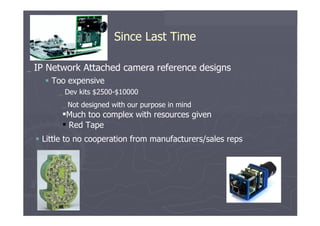
Since Last Time  _   IP   Network   Attached   camera   reference   designs     Too   expensive  _   Dev   kits   $2500-$10000  _   Not   designed   with   our   purpose   in   mind Much   too   complex   with   resources   given Red   Tape     Little   to   no   cooperation   from   manufacturers/sales   reps
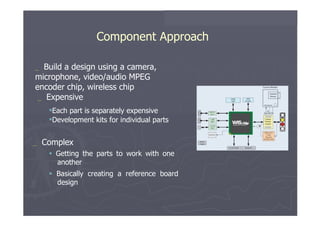
Component Approach  _   Build   a   design   using   a   camera, microphone, video/audio MPEG encoder chip, wireless chip _   Expensive  Each   part   is   separately   expensive  Development   kits   for   individual parts  _   Complex     Getting   the   parts   to   work   with   one another     Basically   creating   a   reference   board design
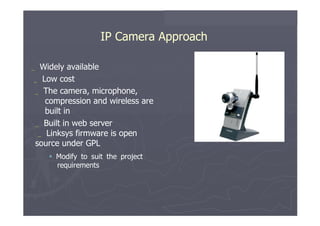
IP Camera Approach  _   Widely   available  _   Low   cost  _   The   camera,   microphone, compression and wireless are built in  _   Built   in   web   server _   Linksys firmware   is   open source under GPL     Modify   to   suit   the   project requirements
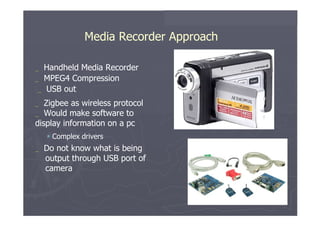
Media Recorder Approach  _   Handheld   Media   Recorder  _   MPEG4   Compression _   USB   out  _   Zigbee as   wireless   protocol  _   Would   make   software   to display information on a pc     Complex   drivers  _   Do   not   know   what   is   being output through USB port of camera
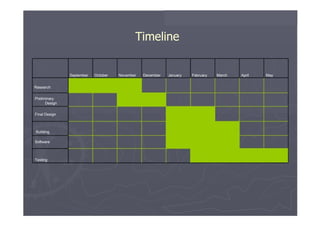
Timeline  September  October  November  December  January  February  March  April  May  Research  Preliminary Design  Final Design Building  Software  Testing
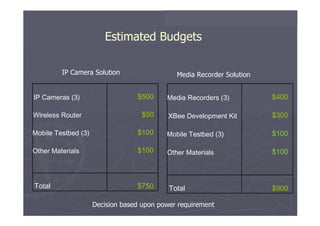
Estimated Budgets  IP Camera Solution  Media Recorder Solution  IP Cameras (3)  $500  Media Recorders (3)  $400  Wireless Router  $50  XBee Development Kit  $300  Mobile Testbed (3)  $100  Mobile Testbed (3)  $100  Other Materials  $100  Other Materials  $100  Total  $750  Total  $900  Decision based upon power requirement
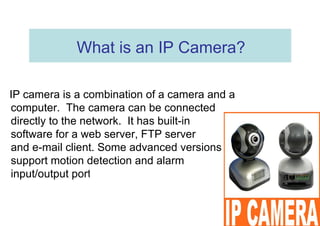
What is an IP Camera?  IP camera is a combination of a camera and a computer.  The camera can be connected directly to the network.  It has built-in  software for a web server, FTP server  and e-mail client. Some advanced versions support motion detection and alarm  input/output ports.
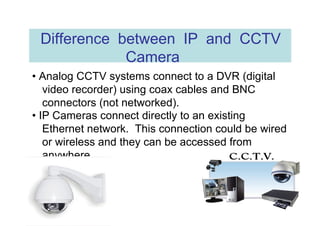
Difference between IP and CCTV Camera  •  Analog CCTV systems connect to a DVR (digital video recorder) using coax cables and BNC connectors (not networked).  •  IP Cameras connect directly to an existing Ethernet network.  This connection could be wired or wireless and they can be accessed from anywhere.
Difference between IP and WEB Cameras  •  WEB cameras must be plugged to a computer to be used (USB connection).  They have to use the resources of the computer they’re connected to.  •  IP cameras are independent networking devices that can be shared and accessed from anywhere.
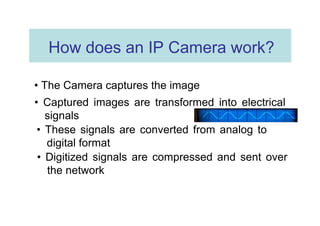
How does an IP Camera work?  •  The Camera captures the image  •  Captured images are transformed into electrical signals  •  These signals are converted from analog to digital format  •  Digitized signals are compressed and sent over the network
Image resolution  •  Digital image resolution is measured in Pixels (640 x 480, 320 x 240)  •  The more detailed an image, the more pixels and the larger the file size  •  Detailed images require more space on a hard disk and more bandwidth for transmission
Image Compression  •  For storing and transmitting images over the network, they must be compressed or they will consume too much disk space or bandwidth  •  M-JPEG and MPEG4 are the common standards used for image compression in IP Cameras
M-JPEG vs. MPEG4  M-JPEG  MPEG-4  •  Less compression  •  More compression  •  Better image quality  •  Lower resolution  •  Larger images and video  •  Reduces amount of  files  storage needed  •  More bandwidth required  •  Reduces bandwidth  utilization by camera  •  More storage space  •  Allows more video to  store
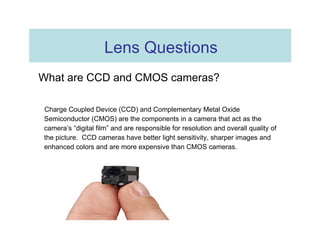
Lens Questions  What are CCD and CMOS cameras?  Charge Coupled Device (CCD) and Complementary Metal Oxide Semiconductor (CMOS) are the components in a camera that act as the camera’s “digital film” and are responsible for resolution and overall quality of the picture.  CCD cameras have better light sensitivity, sharper images and enhanced colors and are more expensive than CMOS cameras.
Lens Questions  What is the f number?  f# is the ratio of the lens focal length to it’s diameter  What is the focal length?  Focal length indicates how far behind a lens an image will form.  shorter the focal length =  wider the angle of view
Questions  What are some specific network camera applications?  » Security surveillance for Banks, Shops, Offices, Warehouses……  » Remote monitoring of the house, daycare or schools
Can I monitor my camera from anywhere?  Yes  If on the same network, you need the camera’s IP address. If on the Internet, you need the WAN IP of the router or a domain name registered with a dynamic DNS provider.  (Router must be configured for port forwarding)
Does my computer need to be on all the time if I use an IP camera?  No  Once the IP Camera is installed and configured, it can be accessed from any system using Internet Explorer.
Do I need a high speed Internet connection to use an IP Camera?  YES (for remote access)  Dial-up connections don’t provide enough bandwidth for streaming video.
1st Question: Why IP Camera?
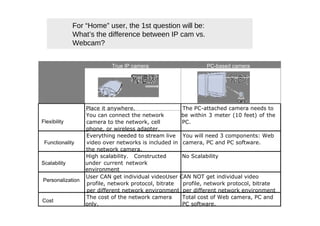
For “Home” user, the 1st question will be: What’s the difference between IP cam vs. Webcam?  True IP camera  PC-based camera  Place it anywhere.  The PC-attached camera needs to  You can connect the network  be within 3 meter (10 feet) of the  Flexibility  camera to the network, cell  PC.  phone, or wireless adapter.  Everything needed to stream live  You will need 3 components: Web  Functionality  video over networks is included in  camera, PC and PC software.  the network camera.  High scalability.  Constructed  No Scalability  Scalability  under current network environment  User CAN get individual videoUser CAN NOT get individual video  Personalization  profile, network protocol, bitrate  profile, network protocol, bitrate  per different network environment  per different network environment  The cost of the network camera  Total cost of Web camera, PC and  Cost  only.  PC software.
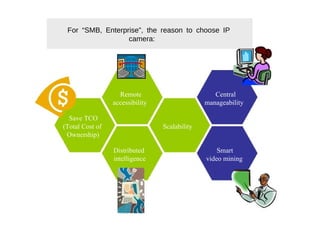
For “SMB, Enterprise”, the reason to choose IP camera:  Remote  Central  accessibility  manageability  Save TCO  (Total Cost of  Scalability  Ownership)  Distributed  Smart  intelligence  video mining
2nd Question:  Where to install IP Camera?
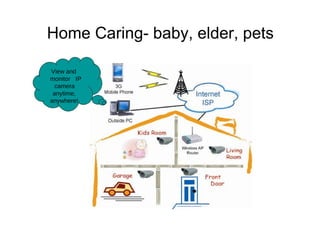
Home Caring- baby, elder, pets  View and  monitor IP camera  anytime, anywhere!
Private and Public Organization  Education  Government   Industrial   Retail   Transportation   Bank
Product FAQ:  1)  Video and Audio
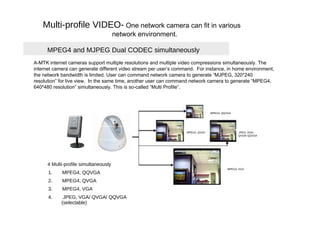
Multi-profile VIDEO-  One network camera can fit in various  network environment.  MPEG4 and MJPEG Dual CODEC simultaneously  A-MTK internet cameras support multiple resolutions and multiple video compressions simultaneously. The internet camera can generate different video stream per user’s command.  For instance, in home environment, the network bandwidth is limited. User can command network camera to generate “MJPEG, 320*240 resolution” for live view.  In the same time, another user can command network camera to generate “MPEG4, 640*480 resolution” simultaneously. This is so-called “Multi Profile”.  MPEG4, QQVGA  MPEG4, QVGA  JPEG, VGA/  QVGA/ QQVGA  4 Multi-profile simultaneously  MPEG4, VGA  1.  MPEG4, QQVGA  2.  MPEG4, QVGA  3.  MPEG4, VGA  4.  JPEG, VGA/ QVGA/ QQVGA  (selectable)
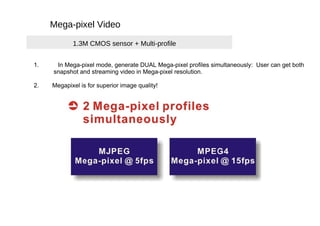
Mega-pixel Video  1.3M CMOS sensor + Multi-profile  1.  In Mega-pixel mode, generate DUAL Mega-pixel profiles simultaneously:  User can get both  snapshot and streaming video in Mega-pixel resolution.  2.  Megapixel is for superior image quality!
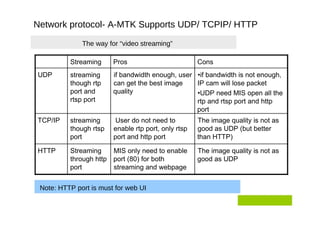
Network protocol- A-MTK Supports UDP/ TCPIP/ HTTP  The way for “video streaming”  Streaming  Pros  Cons  UDP  streaming  if bandwidth enough, user  • if bandwidth is not enough,  though rtp  can get the best image  IP cam will lose packet  port and  quality  • UDP need MIS open all the  rtsp port  rtp and rtsp port and http  port  TCP/IP  streaming  User do not need to  The image quality is not as  though rtsp  enable rtp port, only rtsp  good as UDP (but better  port  port and http port  than HTTP)  HTTP  Streaming  MIS only need to enable  The image quality is not as  through http  port (80) for both  good as UDP  port  streaming and webpage  Note: HTTP port is must for web UI
Pan/Tilt Control
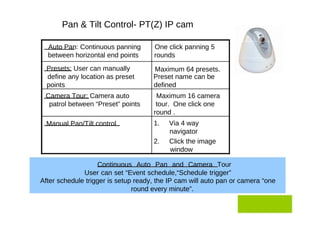
Pan & Tilt Control- PT(Z) IP cam  Auto Pan: Continuous panning  One click panning 5  between horizontal end points  rounds  Presets: User can manually  Maximum 64 presets.  define any location as preset  Preset name can be  points  defined  Camera Tour: Camera auto  Maximum 16 camera  patrol between “Preset” points  tour.  One click one  round .  Manual Pan/Tilt control  1.  Via 4 way  navigator  2.  Click the image  window  Continuous Auto Pan and Camera Tour User can set “Event schedule,“Schedule trigger”  After schedule trigger is setup ready, the IP cam will auto pan or camera “one round every minute”.
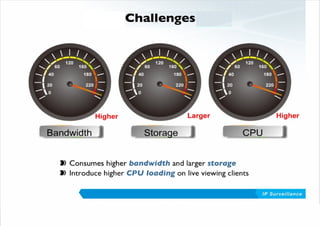
Potential disadvantages of IP cameras The following are some of the potential weaknesses of IP cameras in comparison to analog CCTV cameras: Higher initial cost per camera. Less choice of manufacturers.  Lack of standards. Different IP cameras may encode video differently or use a different programming interface. This means a particular camera model should be deployed only with compatible IP video recording solutions.  High network bandwidth requirements: a typical CCTV camera with resolution of 640x480 pixels and 10 frames per second (10 frame/s) in MJPEG mode requires about 3 Mbit/s.  Technical barrier. Installation for IP Camera required a series of complicated network setting including IP address, DDNS, router setting and port forwarding. This is very difficult for most users to do alone without help from IT technician.
 
Conclusion Having some kind of monitoring system at home or office is always handy for owners. When property owners are able to monitor homes or offices with surveillance equipment, it's like they have a television network devoted to the safety of their properties. IP camera can just do the job. It not only let owners know the condition of their property from remote locations, but also keep records. It is definitely an efficient surveillance system at home and office to protect properties.
Thank You

Ip Cam

  • 1.
    Presentation by ManojB Faculty Advisor: Prof. Ravikala Kamath
  • 2.
    Presentation Outline _ Overview _ Since last time _ Approach _ Bottom up component level approach _ IP Camera/802.11 Solution _ MPEG4 Media Recorder/Zigbee Solution _ Timeline _ Estimated Budget
  • 3.
    Overview _ Wireless Video Sensor Network  Sensor nodes controlled by a central router/computer  Video, Audio, with motion sensor activation  Sleep mode, continuous and burst modes of operation  Mobile  Self Configuration
  • 4.
    Protocols and BandwidthRequirements _ Video  MPEG4 _ Video Resolution  320*240  80kbps compressed _ Wireless  802.11b/g _ 11/54Mbps  Zigbee _ 250kbps
  • 5.
    Definite Specifications _ Web interface for displaying video _ Self Configuration _ Mobile _ Battery Life  2 Hours with continuous, Week with burst mode _ Range  30 Meters
  • 6.
    Approach _ 3 Main options  Built from the ground up using components _ Expensive _ Tricky  Use an already available IP Camera _ Cheap _ Easiest  Use a media recorder with Zigbee transmission _ Relatively Inexpensive _ USB
  • 7.
    Since Last Time _ IP Network Attached camera reference designs  Too expensive _ Dev kits $2500-$10000 _ Not designed with our purpose in mind Much too complex with resources given Red Tape  Little to no cooperation from manufacturers/sales reps
  • 8.
    Component Approach _ Build a design using a camera, microphone, video/audio MPEG encoder chip, wireless chip _ Expensive Each part is separately expensive Development kits for individual parts _ Complex  Getting the parts to work with one another  Basically creating a reference board design
  • 9.
    IP Camera Approach _ Widely available _ Low cost _ The camera, microphone, compression and wireless are built in _ Built in web server _ Linksys firmware is open source under GPL  Modify to suit the project requirements
  • 10.
    Media Recorder Approach _ Handheld Media Recorder _ MPEG4 Compression _ USB out _ Zigbee as wireless protocol _ Would make software to display information on a pc  Complex drivers _ Do not know what is being output through USB port of camera
  • 11.
    Timeline September October November December January February March April May Research Preliminary Design Final Design Building Software Testing
  • 12.
    Estimated Budgets IP Camera Solution Media Recorder Solution IP Cameras (3) $500 Media Recorders (3) $400 Wireless Router $50 XBee Development Kit $300 Mobile Testbed (3) $100 Mobile Testbed (3) $100 Other Materials $100 Other Materials $100 Total $750 Total $900 Decision based upon power requirement
  • 13.
    What is anIP Camera? IP camera is a combination of a camera and a computer. The camera can be connected directly to the network. It has built-in software for a web server, FTP server and e-mail client. Some advanced versions support motion detection and alarm input/output ports.
  • 14.
    Difference between IPand CCTV Camera • Analog CCTV systems connect to a DVR (digital video recorder) using coax cables and BNC connectors (not networked). • IP Cameras connect directly to an existing Ethernet network. This connection could be wired or wireless and they can be accessed from anywhere.
  • 15.
    Difference between IPand WEB Cameras • WEB cameras must be plugged to a computer to be used (USB connection). They have to use the resources of the computer they’re connected to. • IP cameras are independent networking devices that can be shared and accessed from anywhere.
  • 16.
    How does anIP Camera work? • The Camera captures the image • Captured images are transformed into electrical signals • These signals are converted from analog to digital format • Digitized signals are compressed and sent over the network
  • 17.
    Image resolution • Digital image resolution is measured in Pixels (640 x 480, 320 x 240) • The more detailed an image, the more pixels and the larger the file size • Detailed images require more space on a hard disk and more bandwidth for transmission
  • 18.
    Image Compression • For storing and transmitting images over the network, they must be compressed or they will consume too much disk space or bandwidth • M-JPEG and MPEG4 are the common standards used for image compression in IP Cameras
  • 19.
    M-JPEG vs. MPEG4 M-JPEG MPEG-4 • Less compression • More compression • Better image quality • Lower resolution • Larger images and video • Reduces amount of files storage needed • More bandwidth required • Reduces bandwidth utilization by camera • More storage space • Allows more video to store
  • 20.
    Lens Questions What are CCD and CMOS cameras? Charge Coupled Device (CCD) and Complementary Metal Oxide Semiconductor (CMOS) are the components in a camera that act as the camera’s “digital film” and are responsible for resolution and overall quality of the picture. CCD cameras have better light sensitivity, sharper images and enhanced colors and are more expensive than CMOS cameras.
  • 21.
    Lens Questions What is the f number? f# is the ratio of the lens focal length to it’s diameter What is the focal length? Focal length indicates how far behind a lens an image will form. shorter the focal length = wider the angle of view
  • 22.
    Questions Whatare some specific network camera applications? » Security surveillance for Banks, Shops, Offices, Warehouses…… » Remote monitoring of the house, daycare or schools
  • 23.
    Can I monitormy camera from anywhere? Yes If on the same network, you need the camera’s IP address. If on the Internet, you need the WAN IP of the router or a domain name registered with a dynamic DNS provider. (Router must be configured for port forwarding)
  • 24.
    Does my computerneed to be on all the time if I use an IP camera? No Once the IP Camera is installed and configured, it can be accessed from any system using Internet Explorer.
  • 25.
    Do I needa high speed Internet connection to use an IP Camera? YES (for remote access) Dial-up connections don’t provide enough bandwidth for streaming video.
  • 26.
  • 27.
    For “Home” user,the 1st question will be: What’s the difference between IP cam vs. Webcam? True IP camera PC-based camera Place it anywhere. The PC-attached camera needs to You can connect the network be within 3 meter (10 feet) of the Flexibility camera to the network, cell PC. phone, or wireless adapter. Everything needed to stream live You will need 3 components: Web Functionality video over networks is included in camera, PC and PC software. the network camera. High scalability. Constructed No Scalability Scalability under current network environment User CAN get individual videoUser CAN NOT get individual video Personalization profile, network protocol, bitrate profile, network protocol, bitrate per different network environment per different network environment The cost of the network camera Total cost of Web camera, PC and Cost only. PC software.
  • 28.
    For “SMB, Enterprise”,the reason to choose IP camera: Remote Central accessibility manageability Save TCO (Total Cost of Scalability Ownership) Distributed Smart intelligence video mining
  • 29.
    2nd Question: Where to install IP Camera?
  • 30.
    Home Caring- baby,elder, pets View and monitor IP camera anytime, anywhere!
  • 31.
    Private and PublicOrganization Education Government Industrial Retail Transportation Bank
  • 32.
    Product FAQ: 1) Video and Audio
  • 33.
    Multi-profile VIDEO- One network camera can fit in various network environment. MPEG4 and MJPEG Dual CODEC simultaneously A-MTK internet cameras support multiple resolutions and multiple video compressions simultaneously. The internet camera can generate different video stream per user’s command. For instance, in home environment, the network bandwidth is limited. User can command network camera to generate “MJPEG, 320*240 resolution” for live view. In the same time, another user can command network camera to generate “MPEG4, 640*480 resolution” simultaneously. This is so-called “Multi Profile”. MPEG4, QQVGA MPEG4, QVGA JPEG, VGA/ QVGA/ QQVGA 4 Multi-profile simultaneously MPEG4, VGA 1. MPEG4, QQVGA 2. MPEG4, QVGA 3. MPEG4, VGA 4. JPEG, VGA/ QVGA/ QQVGA (selectable)
  • 34.
    Mega-pixel Video 1.3M CMOS sensor + Multi-profile 1. In Mega-pixel mode, generate DUAL Mega-pixel profiles simultaneously: User can get both snapshot and streaming video in Mega-pixel resolution. 2. Megapixel is for superior image quality!
  • 35.
    Network protocol- A-MTKSupports UDP/ TCPIP/ HTTP The way for “video streaming” Streaming Pros Cons UDP streaming if bandwidth enough, user • if bandwidth is not enough, though rtp can get the best image IP cam will lose packet port and quality • UDP need MIS open all the rtsp port rtp and rtsp port and http port TCP/IP streaming User do not need to The image quality is not as though rtsp enable rtp port, only rtsp good as UDP (but better port port and http port than HTTP) HTTP Streaming MIS only need to enable The image quality is not as through http port (80) for both good as UDP port streaming and webpage Note: HTTP port is must for web UI
  • 36.
  • 37.
    Pan & TiltControl- PT(Z) IP cam Auto Pan: Continuous panning One click panning 5 between horizontal end points rounds Presets: User can manually Maximum 64 presets. define any location as preset Preset name can be points defined Camera Tour: Camera auto Maximum 16 camera patrol between “Preset” points tour. One click one round . Manual Pan/Tilt control 1. Via 4 way navigator 2. Click the image window Continuous Auto Pan and Camera Tour User can set “Event schedule,“Schedule trigger” After schedule trigger is setup ready, the IP cam will auto pan or camera “one round every minute”.
  • 38.
    Potential disadvantages ofIP cameras The following are some of the potential weaknesses of IP cameras in comparison to analog CCTV cameras: Higher initial cost per camera. Less choice of manufacturers. Lack of standards. Different IP cameras may encode video differently or use a different programming interface. This means a particular camera model should be deployed only with compatible IP video recording solutions. High network bandwidth requirements: a typical CCTV camera with resolution of 640x480 pixels and 10 frames per second (10 frame/s) in MJPEG mode requires about 3 Mbit/s. Technical barrier. Installation for IP Camera required a series of complicated network setting including IP address, DDNS, router setting and port forwarding. This is very difficult for most users to do alone without help from IT technician.
  • 39.
  • 40.
    Conclusion Having somekind of monitoring system at home or office is always handy for owners. When property owners are able to monitor homes or offices with surveillance equipment, it's like they have a television network devoted to the safety of their properties. IP camera can just do the job. It not only let owners know the condition of their property from remote locations, but also keep records. It is definitely an efficient surveillance system at home and office to protect properties.
  • 41.