IoT Lockdown
Adam Englander, LaunchKey
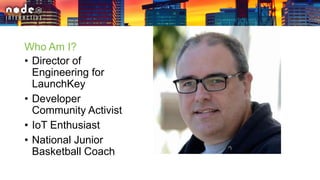
Who Am I?
• Director of
Engineering for
LaunchKey
• Developer
Community Activist
• IoT Enthusiast
• National Junior
Basketball Coach
What Do I Do?
• Security
Consulting
• SDK Development
• API Development
• Protocol Server
Development
• IoT Research
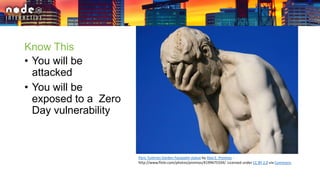
Know This
• You will be
attacked
• You will be
exposed to a Zero
Day vulnerability
Paris Tuileries Garden Facepalm statue by Alex E. Proimos -
http://www.flickr.com/photos/proimos/4199675334/. Licensed under CC BY 2.0 via Commons.
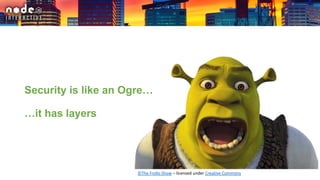
Security is like an Ogre…
…it has layers
©The Frollo Show – licensed under Creative Commons
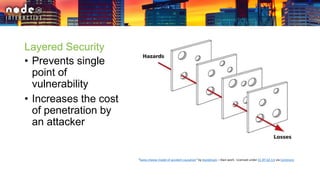
Layered Security
• Prevents single
point of
vulnerability
• Increases the cost
of penetration by
an attacker
“Swiss cheese model of accident causation” by Davidmack – Own work - Licensed under CC BY-SA 3.0 via Commons
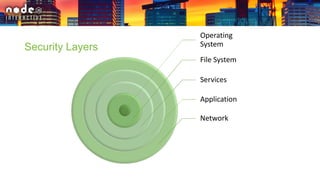
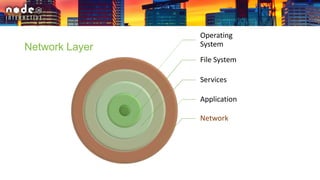
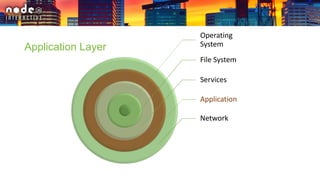
Security Layers
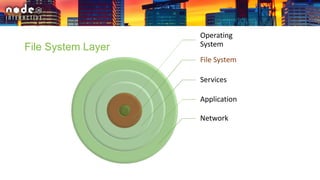
Operating
System
File System
Services
Application
Network
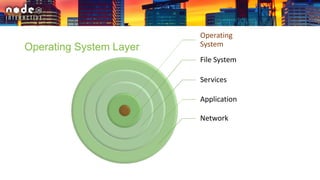
Operating
System
File System
Services
Application
Network
Operating System Layer
Operating System
Security
• Randomize user
passwords
• Disable unused
ports
• Encrypt the file
system
“JolietPrisonGate” by Jacobsteinafm – Own work – Licensed under Public Domain via Commons
Operating
System
File System
Services
Application
Network
File System Layer
File System Security
• Named application user
• Remove “everyone”
access where possible
• Restrict app user to files
necessary to run
• Avoid write access –
use pipes
© Chris Smart license under Creative Commons BY-NC-ND
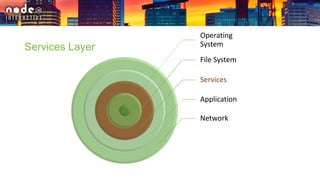
Operating
System
File System
Services
Application
Network
Services Layer
Isolation
• Use web services for
communication
• Remove all non-essential
services (SSH, FTP, etc)
• Use authentication on
remaining services
• Be as secure as possible
with service data
“Joshuatree" by Joho345 - @U2 (www.atu2.com) - Joho345. Licensed under CC BY 2.5 via
Wikimedia Commons.
Operating
System
File System
Services
Application
Network
Network Layer
Network Security
• Devise a system with only
outbound IP traffic
• Restrict inbound and
outbound IP traffic
• Only allow paired Bluetooth
devices to connect
• Pair Bluetooth devices with
challenge-response
"FEMA - 40322 - Road Closed sign" by Patsy Lynch - This image is from the FEMA Photo
Library.. Licensed under Public Domain via Wikimedia Commons -
https://commons.wikimedia.org/wiki/File:FEMA_-_40322_-
_Road_Closed_sign.jpg#/media/File:FEMA_-_40322_-_Road_Closed_sign.jpg
Operating
System
File System
Services
Application
Network
Application Layer
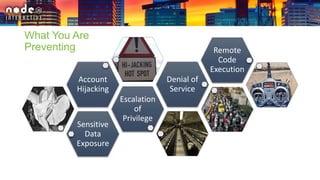
Sensitive
Data
Exposure
Escalation
of
Privilege
Account
Hijacking
Denial of
Service
Remote
Code
Execution
What You Are
Preventing
Sensitive Data Exposure
• Protect data in transit by:
• utilizing TLS
• not following redirects
• pinning SSL certificates
• using DNSSEC to verify DNS
• encrypting data
• Protect data at rest with
encryption
"Marilyn Monroe photo pose Seven Year Itch" by Published by
Corpus Christi Caller-Times photo from Associated Press - Corpus
Christi Caller-Times page 20 via Newspapers.com. Licensed under
Public Domain via Commons -
https://commons.wikimedia.org/wiki/File:Marilyn_Monroe_photo
_pose_Seven_Year_Itch.jpg
SSL Pinning
• Certificate verification via fingerprint
res.socket.getPeerCertificate().fingerprint
• Have backup fingerprints to quickly
rotate when primary is compromised.
• Additional certificates must use
different private keys to have a
different signature.
Encrypting Data
• Data at rest can use symmetric
encryption as secret is not shared
but local.
• Data in transit should use
asymmetric encryption. It’s more
complex and slower but does not
require transmitting your secret.
• Both are available natively via the
“crypto” package.
"Lorenz-SZ42-2". Licensed under Public Domain via Commons -
https://commons.wikimedia.org/wiki/File:Lorenz-SZ42-
2.jpg#/media/File:Lorenz-SZ42-2.jpg
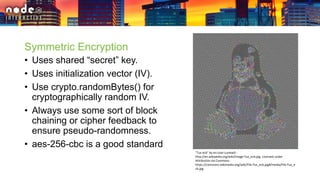
Symmetric Encryption
• Uses shared “secret” key.
• Uses initialization vector (IV).
• Use crypto.randomBytes() for
cryptographically random IV.
• Always use some sort of block
chaining or cipher feedback to
ensure pseudo-randomness.
• aes-256-cbc is a good standard
"Tux ecb" by en:User:Lunkwill -
http://en.wikipedia.org/wiki/Image:Tux_ecb.jpg. Licensed under
Attribution via Commons -
https://commons.wikimedia.org/wiki/File:Tux_ecb.jpg#/media/File:Tux_e
cb.jpg
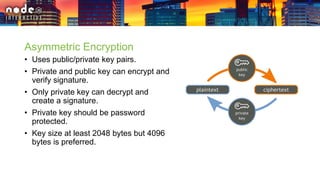
Asymmetric Encryption
• Uses public/private key pairs.
• Private and public key can encrypt and
verify signature.
• Only private key can decrypt and
create a signature.
• Private key should be password
protected.
• Key size at least 2048 bytes but 4096
bytes is preferred.
Account Hijacking
• Never use plain text credentials
• Use strong hashing:
• PBKDF2 is in crypto package
• 32+ character random SALT
• 10,000+ iterations
• sha256 digest
• If you use email for username,
hash the value for storage
• Alert for changes to accounts "Hi-jacking Hot Spot!" by Herby Hönigsperger -
https://www.flickr.com/photos/hmvh/58185411. Licensed under
Attribution via Commons -
https://creativecommons.org/licenses/by-nc-sa/2.0/
Encryption vs. Hashing
• Hashing is one way
• Encryption is reversible
• Hashing is more secure
than encryption
• If you do not need to
decrypt sensitive data,
consider hashing it
"Hi-jacking Hot Spot!" by Herby Hönigsperger -
https://www.flickr.com/photos/hmvh/58185411. Licensed under Attribution via
Commons - https://creativecommons.org/licenses/by-nc-sa/2.0/
Escalation of Privilege
• Always use TLS
• Set "secure" and "HttpOnly" flags
for session cookies
• Use a CSRF token (nonce)
• Strict-Transport-Security
• Expire your requests
• Sign API requests including
credential data and location
"Holborn Tube Station Escalator" by renaissancechambara -
http://www.flickr.com/photos/renaissancechambara/2267250649/.
Licensed under CC BY 2.0 via Commons -
https://commons.wikimedia.org/wiki/File:Holborn_Tube_Station_Escalator
.jpg#/media/File:Holborn_Tube_Station_Escalator.jpg
Nonces
• Used only once
• Must be
cryptographically
random
• Provided by crypto
package with
randomBytes()
• Should expire
"Cutting head of a paper shredder" by wdwd - Own work. Licensed under CC BY-SA 3.0 via
Wikimedia Commons -
https://commons.wikimedia.org/wiki/File:Cutting_head_of_a_paper_shredder.jpg#/media/File:Cu
tting_head_of_a_paper_shredder.jpg
Digital Signatures
• Verifiable hash of
supplied data
• HMAC or RSA is
provided by crypto
• RSA is preferred
• JOSE is IETF
standard
"Wacom STU-300 LCD Signature Tablet - Mar 2013 04" by WestportWiki - Own work. Licensed
under CC BY-SA 3.0 via Wikimedia Commons -
https://commons.wikimedia.org/wiki/File:Wacom_STU-300_LCD_Signature_Tablet_-
_Mar_2013_04.jpg#/media/File:Wacom_STU-300_LCD_Signature_Tablet_-_Mar_2013_04.jpg
Denial of Service
• Detection
• Honey Pot
• Request frequency
• Request signatures
• Mitigation
• Black list IPs
• Black hole (no response)
• Detect early in process
"Motorcycles in Taipei" by Koika - Own work. Licensed under CC BY-
SA 1.0 via Commons -
https://commons.wikimedia.org/wiki/File:Motorcycles_in_Taipei.JP
G#/media/File:Motorcycles_in_Taipei.JPG
Remote Code Execution
• Content Security Policy
• Restrict to local source
• No inline CSS/JS
• No eval(), ever!
• Prepared statements in SQL
• Code Object with Scope in
MongoDB
Further Reading
• https://en.wikipedia.org/wiki/Layered_security
• https://en.wikipedia.org/wiki/Defense_in_depth_(comput
ing)
• https://www.owasp.org/index.php/OWASP_Internet_of_
Things_Project
• https://en.wikipedia.org/wiki/JSON_Web_Token

IoT Lockdown

  • 2.
  • 3.
    Who Am I? •Director of Engineering for LaunchKey • Developer Community Activist • IoT Enthusiast • National Junior Basketball Coach
  • 4.
    What Do IDo? • Security Consulting • SDK Development • API Development • Protocol Server Development • IoT Research
  • 5.
    Know This • Youwill be attacked • You will be exposed to a Zero Day vulnerability Paris Tuileries Garden Facepalm statue by Alex E. Proimos - http://www.flickr.com/photos/proimos/4199675334/. Licensed under CC BY 2.0 via Commons.
  • 6.
    Security is likean Ogre… …it has layers ©The Frollo Show – licensed under Creative Commons
  • 7.
    Layered Security • Preventssingle point of vulnerability • Increases the cost of penetration by an attacker “Swiss cheese model of accident causation” by Davidmack – Own work - Licensed under CC BY-SA 3.0 via Commons
  • 8.
  • 9.
  • 10.
    Operating System Security • Randomizeuser passwords • Disable unused ports • Encrypt the file system “JolietPrisonGate” by Jacobsteinafm – Own work – Licensed under Public Domain via Commons
  • 11.
  • 12.
    File System Security •Named application user • Remove “everyone” access where possible • Restrict app user to files necessary to run • Avoid write access – use pipes © Chris Smart license under Creative Commons BY-NC-ND
  • 13.
  • 14.
    Isolation • Use webservices for communication • Remove all non-essential services (SSH, FTP, etc) • Use authentication on remaining services • Be as secure as possible with service data “Joshuatree" by Joho345 - @U2 (www.atu2.com) - Joho345. Licensed under CC BY 2.5 via Wikimedia Commons.
  • 15.
  • 16.
    Network Security • Devisea system with only outbound IP traffic • Restrict inbound and outbound IP traffic • Only allow paired Bluetooth devices to connect • Pair Bluetooth devices with challenge-response "FEMA - 40322 - Road Closed sign" by Patsy Lynch - This image is from the FEMA Photo Library.. Licensed under Public Domain via Wikimedia Commons - https://commons.wikimedia.org/wiki/File:FEMA_-_40322_- _Road_Closed_sign.jpg#/media/File:FEMA_-_40322_-_Road_Closed_sign.jpg
  • 17.
  • 18.
  • 19.
    Sensitive Data Exposure •Protect data in transit by: • utilizing TLS • not following redirects • pinning SSL certificates • using DNSSEC to verify DNS • encrypting data • Protect data at rest with encryption "Marilyn Monroe photo pose Seven Year Itch" by Published by Corpus Christi Caller-Times photo from Associated Press - Corpus Christi Caller-Times page 20 via Newspapers.com. Licensed under Public Domain via Commons - https://commons.wikimedia.org/wiki/File:Marilyn_Monroe_photo _pose_Seven_Year_Itch.jpg
  • 20.
    SSL Pinning • Certificateverification via fingerprint res.socket.getPeerCertificate().fingerprint • Have backup fingerprints to quickly rotate when primary is compromised. • Additional certificates must use different private keys to have a different signature.
  • 21.
    Encrypting Data • Dataat rest can use symmetric encryption as secret is not shared but local. • Data in transit should use asymmetric encryption. It’s more complex and slower but does not require transmitting your secret. • Both are available natively via the “crypto” package. "Lorenz-SZ42-2". Licensed under Public Domain via Commons - https://commons.wikimedia.org/wiki/File:Lorenz-SZ42- 2.jpg#/media/File:Lorenz-SZ42-2.jpg
  • 22.
    Symmetric Encryption • Usesshared “secret” key. • Uses initialization vector (IV). • Use crypto.randomBytes() for cryptographically random IV. • Always use some sort of block chaining or cipher feedback to ensure pseudo-randomness. • aes-256-cbc is a good standard "Tux ecb" by en:User:Lunkwill - http://en.wikipedia.org/wiki/Image:Tux_ecb.jpg. Licensed under Attribution via Commons - https://commons.wikimedia.org/wiki/File:Tux_ecb.jpg#/media/File:Tux_e cb.jpg
  • 23.
    Asymmetric Encryption • Usespublic/private key pairs. • Private and public key can encrypt and verify signature. • Only private key can decrypt and create a signature. • Private key should be password protected. • Key size at least 2048 bytes but 4096 bytes is preferred.
  • 24.
    Account Hijacking • Neveruse plain text credentials • Use strong hashing: • PBKDF2 is in crypto package • 32+ character random SALT • 10,000+ iterations • sha256 digest • If you use email for username, hash the value for storage • Alert for changes to accounts "Hi-jacking Hot Spot!" by Herby Hönigsperger - https://www.flickr.com/photos/hmvh/58185411. Licensed under Attribution via Commons - https://creativecommons.org/licenses/by-nc-sa/2.0/
  • 25.
    Encryption vs. Hashing •Hashing is one way • Encryption is reversible • Hashing is more secure than encryption • If you do not need to decrypt sensitive data, consider hashing it "Hi-jacking Hot Spot!" by Herby Hönigsperger - https://www.flickr.com/photos/hmvh/58185411. Licensed under Attribution via Commons - https://creativecommons.org/licenses/by-nc-sa/2.0/
  • 26.
    Escalation of Privilege •Always use TLS • Set "secure" and "HttpOnly" flags for session cookies • Use a CSRF token (nonce) • Strict-Transport-Security • Expire your requests • Sign API requests including credential data and location "Holborn Tube Station Escalator" by renaissancechambara - http://www.flickr.com/photos/renaissancechambara/2267250649/. Licensed under CC BY 2.0 via Commons - https://commons.wikimedia.org/wiki/File:Holborn_Tube_Station_Escalator .jpg#/media/File:Holborn_Tube_Station_Escalator.jpg
  • 27.
    Nonces • Used onlyonce • Must be cryptographically random • Provided by crypto package with randomBytes() • Should expire "Cutting head of a paper shredder" by wdwd - Own work. Licensed under CC BY-SA 3.0 via Wikimedia Commons - https://commons.wikimedia.org/wiki/File:Cutting_head_of_a_paper_shredder.jpg#/media/File:Cu tting_head_of_a_paper_shredder.jpg
  • 28.
    Digital Signatures • Verifiablehash of supplied data • HMAC or RSA is provided by crypto • RSA is preferred • JOSE is IETF standard "Wacom STU-300 LCD Signature Tablet - Mar 2013 04" by WestportWiki - Own work. Licensed under CC BY-SA 3.0 via Wikimedia Commons - https://commons.wikimedia.org/wiki/File:Wacom_STU-300_LCD_Signature_Tablet_- _Mar_2013_04.jpg#/media/File:Wacom_STU-300_LCD_Signature_Tablet_-_Mar_2013_04.jpg
  • 29.
    Denial of Service •Detection • Honey Pot • Request frequency • Request signatures • Mitigation • Black list IPs • Black hole (no response) • Detect early in process "Motorcycles in Taipei" by Koika - Own work. Licensed under CC BY- SA 1.0 via Commons - https://commons.wikimedia.org/wiki/File:Motorcycles_in_Taipei.JP G#/media/File:Motorcycles_in_Taipei.JPG
  • 30.
    Remote Code Execution •Content Security Policy • Restrict to local source • No inline CSS/JS • No eval(), ever! • Prepared statements in SQL • Code Object with Scope in MongoDB
  • 31.
    Further Reading • https://en.wikipedia.org/wiki/Layered_security •https://en.wikipedia.org/wiki/Defense_in_depth_(comput ing) • https://www.owasp.org/index.php/OWASP_Internet_of_ Things_Project • https://en.wikipedia.org/wiki/JSON_Web_Token

Editor's Notes

  • #6 If you are fortunate enough to be successful, with your device and people use it, you will be attacked. It’s not if. It’s when. A zero day vulnerability is a security vulnerability that is not disclosed before it is exploited. Ethical or “white hat” hackers will give the software or hardware vendor a reasonable window with which to resolve a vulnerability before it is exposed to the public. Unethical or “black hat” hackers will either sell or utilize the vulnerability without any warning to the vendor. The only way to be sure that you are breached is to believe that you cannot be
  • #9 In order for layered security to succeed, you must create each layer assuming that the others have failed. Assume that each measure you put in place is the only remaining measure you have to reduce harm from a breach. You may use three different layers of encryption for the same data. This may seem like overkill but its how you keep your data safe.
  • #13 Have a user name unique to your application to be able to fine tune file access Even with a named user, if your files are “everyone”
  • #17 Restrict network access as much as possible The safest system accepts no inbound connections from the IP network. Look into other ways to configure network configuration and have you device connect to a service you devise on the Internet utilizing Web Sockets for communicating with the user. Restrict inbound IP traffic to not allow access to any services utilized by your application. Restrict outbound IP traffic to prevent your device from becoming a relay or slave node for an attack Paired Bluetooth devices have performed a key exchange to verify their identity. They also use those keys to encrypt communication data Use visual or audio announcing of the challenge. Pairing with a challenge-response reduces the risk of an attacker being able hijack your device during the pairing process
  • #20 TLS is the ground level basis for secure communication over the Internet. Make sure you use valid and verifiable certificates. Ignoring certificate errors is the best way to fall victim to a Man in the Middle attack. The primary way a successful Man in the Middle attack is carried out is by providing an invalid DNS response that redirects to another domain with a valid certificate. This can be easily avoided by not following redirects from remote service requests and pinning SSL certificates so that only known certificates are accepted. For more elaborate protection, you can also verify DNS with DNSSEC. I have not been able to find a DNSSEC implementation for Node.js. Data encryption is the last piece to protecting data in transit. If you are compromised by a man in the middle attack, having your data encrypted provides security for each piece of data. Data at rest should be encrypted as well. That goes for data in the file system, cache services, and databases.
  • #21 SSL pinning is probably the simplest way to prevent man in the middle attacks. Have multiple SSL certificates available for you API endpoints dealing in sensitive data. Have at least one backup certificate to be able to rotate. Two backups to allow for recovery time with an existing backup certificate. Always remember to request certificates with new primary keys to ensure finger prints are different.
  • #22 Encryption can be confusing. Don’t make the mistake of ignoring or doing it poorly. We’ll talk about it in a little more depth in the next slides.
  • #23 The size of the key and IV go a long way to adding pseufo-randomness and ,
  • #26 Hashing requires knowledge of the original data. Decryption only requires knowledge of the secrets and not the data. As such, if you determine the encryption keys used to encrypt one piece of data, you can use that decrypt the rest of the data. Cracking on hash does not give you any insight into any other hash. Hashing sensitive account data like email and user name can prevent account hijacking. Not having a unique way to link a user or an employer to an account will prevent from being able to utilizing spearfishing or whaling in their attack.