Computer Systems Security
Outline Computer Systems Security Introduction Examples of Information Security  Identity Theft Hackers Types of threats Botnets/Zombies Securing your network Encryption Firewalls VPN Email Web Wireless Applications Computers
Computer Security / Information Security Protection of digital information from theft, corruption or natural disaster What is being protected? Personal or Company Data Credit card numbers Bank Account Information Company from sabotage  Delete data Alter websites Denial of Service Use Computer Resources to attack others Hard disk space Fast Processor Internet Connection
Where Hackers Attack? What Hackers Do? Email  Web Firewall  Network Operating System / Application Vulnerabilities Mobile Telephone Phishing Spoofing Keystroke logging Malware  Virus - replicates through applications Trojan horse – can create backdoor through application  Worms – doesn’t need to attach to any application (makes backdoor zombies) Adware – Pop up advertising Spyware -  Monitors users surfing habits and degrades system performance Rootkit – Hidden.  Replaces system executables  Crimeware – Financial or Political crime.  2005: $30M in theft
Identity theft  Fraud crime that involves someone pretending to be someone else in order to steal money or to get other benefits. 3.7 % of American adults are victims to identity theft. Stealing mail through dumpster diving Retrieving info from disposed computers Research internet about victim through internet searches or public records Steals payment or id cards by skimming a compromised card reader or pick pocketing Eavesdropping on public transactions (shoulder surfing) Trojan horses, hacking Data breach (post of personal info on web or mail) Changing your address Phishing
Types of Hackers White Hat- breaks security for non-malicious reasons.  Enjoys learning about computer security Black Hat – Someone who is hacking for credit card fraud, identity theft, intellectual property theft. Crackers. Script kiddie – non-expert who uses pre-packaged automated tools written by others. Hacktivist – Uses technology to announce a social, ideological, religious, or political message.  Defaces websites, DOS attacks.  Cyberterrorism.
How the Hacker Attacks? Network enumeration – discover info about intended target (Port Scanner) Vulnerability analysis – identifying potential ways of attack (Packet Sniffer) Exploitation – attempting to compromise the system by vulnerabilities found in the analysis (Spoof, Virus, Spyware, Trojan Horse) He makes himself a master Covers his tracks by modifying log entries Finds passwords by running a “dictionary attack”  Use of Trojan horses to find passwords through “login”, “telnet”, or “ftp” Gives himself “root” privileges / system administrator  Install Sniffer programs to collect all passwords that come through system Searches trusts on the network by searching the systems /etc/host.equiv and the users .rhosts files.  Once in, the intruder can install software, read, copy or erase data.
Botnets and Zombies Software Robots, or bots, that run autonomously and automaically.  Zombie computers are computers that were attacked to run software via worms, trojan horses or backdoors Most zombie computer users are unaware their systems are being used this way. Zombies have been used to extensively send e-mail spam (50 – 80%) Click fraud against sites displaying pay per click ads Phishing or money mule recruiting websites Distributed denial-of-service attacks
Securing your Network
Encryption Uses an algorithm (cipher) to make data unreadable unless the receiver has a key Diffusion and confusion principles Over 70 % of companies use encryption for some of their data in transit Network encryption  Encryption with router  Encryption with safenet device
Symmetric-key cryptography Single key encrypt/decrypt data Keys are small Algorithm are fast Different keys are needed for each pair of users DES, AES, Blowfish, CAST5 Face-to-Face exchange of keys
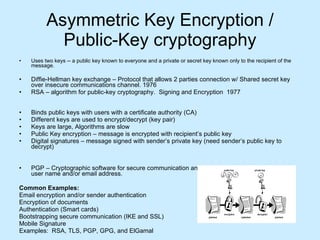
Asymmetric Key Encryption / Public-Key cryptography Uses two keys -- a public key known to everyone and a private or secret key known only to the recipient of the message.  Diffie-Hellman key exchange – Protocol that allows 2 parties connection w/ Shared secret key over insecure communications channel. 1976 RSA – algorithm for public-key cryptography.  Signing and Encryption  1977 Binds public keys with users with a certificate authority (CA) Different keys are used to encrypt/decrypt (key pair) Keys are large, Algorithms are slow Public Key encryption – message is encrypted with recipient’s public key Digital signatures – message signed with sender’s private key (need sender’s public key to decrypt)  PGP – Cryptographic software for secure communication and storage by binding public keys to user name and/or email address.  Common Examples: Email encryption and/or sender authentication Encryption of documents Authentication (Smart cards) Bootstrapping secure communication (IKE and SSL) Mobile Signature Examples:  RSA, TLS, PGP, GPG, and ElGamal
Firewall Security Software and Hardware Firewalls Methods of protection: Packet filtering Proxy service Stateful inspection Access Control Lists IP Addresses Domain Names Specific Words and phrases to sniff Ports  Protocols IP, TCP, HTTP, FTP, UDP, ICMP, SMTP, SNMP, Telnet  Log monitoring Updating and Patching Vulnerability Testing 2 different firewalls for one network VPN’s
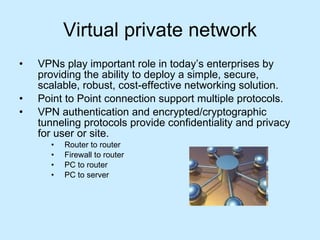
Virtual private network VPNs play important role in today’s enterprises by providing the ability to deploy a simple, secure, scalable, robust, cost-effective networking solution. Point to Point connection support multiple protocols. VPN authentication and encrypted/cryptographic tunneling protocols provide confidentiality and privacy for user or site. Router to router  Firewall to router  PC to router  PC to server
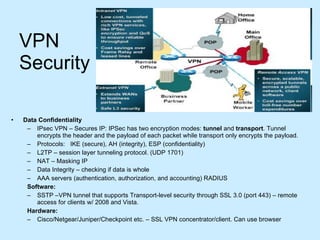
VPN Security Data Confidentiality IPsec VPN – Secures IP: IPSec has two encryption modes:  tunnel  and  transport . Tunnel encrypts the header and the payload of each packet while transport only encrypts the payload.  Protocols:  IKE (secure), AH (integrity), ESP (confidentiality)  L2TP – session layer tunneling protocol. (UDP 1701) NAT – Masking IP Data Integrity – checking if data is whole AAA servers (authentication, authorization, and accounting) RADIUS Software: SSTP –VPN tunnel that supports Transport-level security through SSL 3.0 (port 443) – remote access for clients w/ 2008 and Vista. Hardware: Cisco/Netgear/Juniper/Checkpoint etc. – SSL VPN concentrator/client. Can use browser
Email Security Email server S/MIME: public key encryption and signing with CA TLS: security and data integrity OpenPGP: web of trust, users sign each other’s public keys. Identity based encryption – Uses arbitrary string as a public key, enabling data to be protected without the need for certificates.  Mail sessions encryption: no port change STARTTLS (IMAP and POP3)
Web Security  SSL/TLS Cryptographic protocols for internet communications The SSLv3 protocol was superseded by TLS Used for HTTPS, SMTP etc. Public Keys are distributed as X.509 certs Uses Hierarchical systems (CA’s) for validation
Wireless Security Laptop wireless, Bluetooth, barcode readers, PDA’s, wireless printers/copiers. Man-in-the-middle attacks – soft AP, 2 NIC’s, hotspots DoS – bombards AP / EAP failures Network injection – AP re-configuration Caffe Latte attack – defeats WEP by floods of ARP requests  Counteracting risks MAC ID filtering Static IP addressing / no DHCP Wi-Fi Protected Access (WPA/WPA2)
Wireless TKIP and CCMP Encryption Protocols TKIP vulnerability to a keystream recovery attack. Counter Mode with Cipher Block Chaining Message Authentication Code Protocol Mandatory for WPA2  Replaces TKIP (protocol for WPA/WEP) Advanced Encryption Standard (AES algorithm) – 128-bit key and 128-bit block
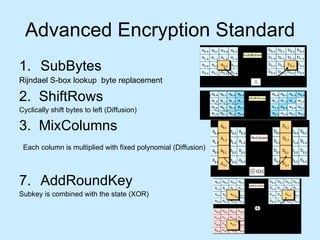
Advanced Encryption Standard SubBytes Rijndael S-box lookup  byte replacement 2.  ShiftRows Cyclically shift bytes to left (Diffusion) 3.  MixColumns Each column is multiplied with fixed polynomial (Diffusion)   AddRoundKey Subkey is combined with the state (XOR)
Securing your computer Install and use anti-virus programs User awareness Keep your system patched Don’t install software / plug ins from unknown sources  Use care when reading email attachments Install and use a firewall program Make backups of important files and folders Use strong passwords Use care when downloading and installing programs Install and use a hardware Firewall Install and use a file encryption program and access controls. Social Networking Smarts
Securing Applications Login security Use SSL on login/registration pages Enforce: numbers, letters, punctuation, caps, symbols in password Minimum number of characters in password Store encrypted password with md5 or similar hash algorithm Lockout account after 3 bad attempts For a forgotten password – send out a password reset request, or a randomly generated password   User data Encrypt any sensitive data such a passwords or credit card numbers Grant users access to specific data via roles   Database Use a specific database login for the website to use, don’t use SA. Lock down access to tables and stored procedures using logins/roles. Change default port that database runs on.   Systems Possibly secure/encrypt any application configuration files which contain database login information. More “physical” separation of layers (UI, Database) allows tighter control of security.  Keep up to date on patches. Other Keep an eye on bots / frequent multiple hits from a block of IP addresses. Watch for SQL injection attacks. Lock down ports not being used. Make sure port 25 is not relaying.
Security Management Small homes A basic  firewall  like COMODO Internet Security or a  unified threat management  system.  For Windows users, basic  Antivirus software  like  AVG Antivirus ,  ESET NOD32  Antivirus , KasperSky ,  McAfee , or  Norton  AntiVirus . An anti-spyware program such as  Windows Defender  or  Spybot  would also be a good idea. There are many other types of antivirus or antispyware programs out there to be considered.  When using a wireless connection, use a robust password. Also try and use the strongest security supported by your wireless devices, such as WPA or WPA2.  Use passwords for all accounts.  Have multiple account per family member. Disable the guest account (Control Panel> Administrative Tools> Computer Management> Users).  Raise awareness about information security to children. [5]   Medium businesses A fairly strong  firewall  or  Unified Threat Management  System  Strong  Antivirus software  and Internet Security Software.  For  authentication , use strong passwords and change it on a bi-weekly/monthly basis.  When using a wireless connection, use a robust password.  Raise awareness about  physical security  to employees.  Use an optional  network analyzer  or network monitor.  It's important that company need an enlightened administrator or manager.  Large businesses A strong  firewall  and  proxy  to keep unwanted people out.  A strong  Antivirus software  package and Internet Security Software package.  For  authentication , use strong passwords and change it on a weekly/bi-weekly basis.  When using a wireless connection, use a robust password.  Exercise  physical security  precautions to employees.  Prepare a  network analyzer  or network monitor and use it when needed. Implement  physical security  management like  closed circuit television  for entry areas and restricted zones.  Security fencing  to mark the company's perimeter.  Fire extinguishers  for fire-sensitive areas like server rooms and security rooms.  Security guards  can help to maximize security.  School An adjustable  firewall  and  proxy  to allow authorized users access from the outside and inside.  Strong  Antivirus software  and Internet Security Software packages.  Wireless connections that lead to  firewalls .  Children's Internet Protection Act  compliance.  Supervision of network to guarantee updates and changes based on popular site usage.  Constant supervision by teachers, librarians, and administrators to guarantee protection against attacks by both  internet  and  sneakernet  sources.  Large Government A strong  firewall  and  proxy  to keep unwanted people out.  Strong  Antivirus software  and Internet Security Software suites.  Strong  encryption , usually with a 256 bit key.  Whitelist authorized wireless connection, block all else.  All network hardware is in secure zones.  All host should be on a private network that is invisible from the outside.  Put all servers in a  DMZ , or a firewall from the outside and from the inside.  Security fencing  to mark perimeter and set wireless range to this.
Computer Security Compromise Action Unplug Network / Disable wireless / Turn off computer Research behavior Block IP on Firewall Scan Computer and Network Fix the problem or reformat Who is it? Logs Application Firewall Email header nslookup Netstat –an whois / netsol
 

Computer Systems Security

  • 1.
  • 2.
    Outline Computer SystemsSecurity Introduction Examples of Information Security Identity Theft Hackers Types of threats Botnets/Zombies Securing your network Encryption Firewalls VPN Email Web Wireless Applications Computers
  • 3.
    Computer Security /Information Security Protection of digital information from theft, corruption or natural disaster What is being protected? Personal or Company Data Credit card numbers Bank Account Information Company from sabotage Delete data Alter websites Denial of Service Use Computer Resources to attack others Hard disk space Fast Processor Internet Connection
  • 4.
    Where Hackers Attack?What Hackers Do? Email Web Firewall Network Operating System / Application Vulnerabilities Mobile Telephone Phishing Spoofing Keystroke logging Malware Virus - replicates through applications Trojan horse – can create backdoor through application Worms – doesn’t need to attach to any application (makes backdoor zombies) Adware – Pop up advertising Spyware - Monitors users surfing habits and degrades system performance Rootkit – Hidden. Replaces system executables Crimeware – Financial or Political crime. 2005: $30M in theft
  • 5.
    Identity theft Fraud crime that involves someone pretending to be someone else in order to steal money or to get other benefits. 3.7 % of American adults are victims to identity theft. Stealing mail through dumpster diving Retrieving info from disposed computers Research internet about victim through internet searches or public records Steals payment or id cards by skimming a compromised card reader or pick pocketing Eavesdropping on public transactions (shoulder surfing) Trojan horses, hacking Data breach (post of personal info on web or mail) Changing your address Phishing
  • 6.
    Types of HackersWhite Hat- breaks security for non-malicious reasons. Enjoys learning about computer security Black Hat – Someone who is hacking for credit card fraud, identity theft, intellectual property theft. Crackers. Script kiddie – non-expert who uses pre-packaged automated tools written by others. Hacktivist – Uses technology to announce a social, ideological, religious, or political message. Defaces websites, DOS attacks. Cyberterrorism.
  • 7.
    How the HackerAttacks? Network enumeration – discover info about intended target (Port Scanner) Vulnerability analysis – identifying potential ways of attack (Packet Sniffer) Exploitation – attempting to compromise the system by vulnerabilities found in the analysis (Spoof, Virus, Spyware, Trojan Horse) He makes himself a master Covers his tracks by modifying log entries Finds passwords by running a “dictionary attack” Use of Trojan horses to find passwords through “login”, “telnet”, or “ftp” Gives himself “root” privileges / system administrator Install Sniffer programs to collect all passwords that come through system Searches trusts on the network by searching the systems /etc/host.equiv and the users .rhosts files. Once in, the intruder can install software, read, copy or erase data.
  • 8.
    Botnets and ZombiesSoftware Robots, or bots, that run autonomously and automaically. Zombie computers are computers that were attacked to run software via worms, trojan horses or backdoors Most zombie computer users are unaware their systems are being used this way. Zombies have been used to extensively send e-mail spam (50 – 80%) Click fraud against sites displaying pay per click ads Phishing or money mule recruiting websites Distributed denial-of-service attacks
  • 9.
  • 10.
    Encryption Uses analgorithm (cipher) to make data unreadable unless the receiver has a key Diffusion and confusion principles Over 70 % of companies use encryption for some of their data in transit Network encryption Encryption with router Encryption with safenet device
  • 11.
    Symmetric-key cryptography Singlekey encrypt/decrypt data Keys are small Algorithm are fast Different keys are needed for each pair of users DES, AES, Blowfish, CAST5 Face-to-Face exchange of keys
  • 12.
    Asymmetric Key Encryption/ Public-Key cryptography Uses two keys -- a public key known to everyone and a private or secret key known only to the recipient of the message. Diffie-Hellman key exchange – Protocol that allows 2 parties connection w/ Shared secret key over insecure communications channel. 1976 RSA – algorithm for public-key cryptography. Signing and Encryption 1977 Binds public keys with users with a certificate authority (CA) Different keys are used to encrypt/decrypt (key pair) Keys are large, Algorithms are slow Public Key encryption – message is encrypted with recipient’s public key Digital signatures – message signed with sender’s private key (need sender’s public key to decrypt) PGP – Cryptographic software for secure communication and storage by binding public keys to user name and/or email address. Common Examples: Email encryption and/or sender authentication Encryption of documents Authentication (Smart cards) Bootstrapping secure communication (IKE and SSL) Mobile Signature Examples: RSA, TLS, PGP, GPG, and ElGamal
  • 13.
    Firewall Security Softwareand Hardware Firewalls Methods of protection: Packet filtering Proxy service Stateful inspection Access Control Lists IP Addresses Domain Names Specific Words and phrases to sniff Ports Protocols IP, TCP, HTTP, FTP, UDP, ICMP, SMTP, SNMP, Telnet Log monitoring Updating and Patching Vulnerability Testing 2 different firewalls for one network VPN’s
  • 14.
    Virtual private networkVPNs play important role in today’s enterprises by providing the ability to deploy a simple, secure, scalable, robust, cost-effective networking solution. Point to Point connection support multiple protocols. VPN authentication and encrypted/cryptographic tunneling protocols provide confidentiality and privacy for user or site. Router to router Firewall to router PC to router PC to server
  • 15.
    VPN Security DataConfidentiality IPsec VPN – Secures IP: IPSec has two encryption modes: tunnel and transport . Tunnel encrypts the header and the payload of each packet while transport only encrypts the payload. Protocols: IKE (secure), AH (integrity), ESP (confidentiality) L2TP – session layer tunneling protocol. (UDP 1701) NAT – Masking IP Data Integrity – checking if data is whole AAA servers (authentication, authorization, and accounting) RADIUS Software: SSTP –VPN tunnel that supports Transport-level security through SSL 3.0 (port 443) – remote access for clients w/ 2008 and Vista. Hardware: Cisco/Netgear/Juniper/Checkpoint etc. – SSL VPN concentrator/client. Can use browser
  • 16.
    Email Security Emailserver S/MIME: public key encryption and signing with CA TLS: security and data integrity OpenPGP: web of trust, users sign each other’s public keys. Identity based encryption – Uses arbitrary string as a public key, enabling data to be protected without the need for certificates. Mail sessions encryption: no port change STARTTLS (IMAP and POP3)
  • 17.
    Web Security SSL/TLS Cryptographic protocols for internet communications The SSLv3 protocol was superseded by TLS Used for HTTPS, SMTP etc. Public Keys are distributed as X.509 certs Uses Hierarchical systems (CA’s) for validation
  • 18.
    Wireless Security Laptopwireless, Bluetooth, barcode readers, PDA’s, wireless printers/copiers. Man-in-the-middle attacks – soft AP, 2 NIC’s, hotspots DoS – bombards AP / EAP failures Network injection – AP re-configuration Caffe Latte attack – defeats WEP by floods of ARP requests Counteracting risks MAC ID filtering Static IP addressing / no DHCP Wi-Fi Protected Access (WPA/WPA2)
  • 19.
    Wireless TKIP andCCMP Encryption Protocols TKIP vulnerability to a keystream recovery attack. Counter Mode with Cipher Block Chaining Message Authentication Code Protocol Mandatory for WPA2 Replaces TKIP (protocol for WPA/WEP) Advanced Encryption Standard (AES algorithm) – 128-bit key and 128-bit block
  • 20.
    Advanced Encryption StandardSubBytes Rijndael S-box lookup byte replacement 2. ShiftRows Cyclically shift bytes to left (Diffusion) 3. MixColumns Each column is multiplied with fixed polynomial (Diffusion) AddRoundKey Subkey is combined with the state (XOR)
  • 21.
    Securing your computerInstall and use anti-virus programs User awareness Keep your system patched Don’t install software / plug ins from unknown sources Use care when reading email attachments Install and use a firewall program Make backups of important files and folders Use strong passwords Use care when downloading and installing programs Install and use a hardware Firewall Install and use a file encryption program and access controls. Social Networking Smarts
  • 22.
    Securing Applications Loginsecurity Use SSL on login/registration pages Enforce: numbers, letters, punctuation, caps, symbols in password Minimum number of characters in password Store encrypted password with md5 or similar hash algorithm Lockout account after 3 bad attempts For a forgotten password – send out a password reset request, or a randomly generated password   User data Encrypt any sensitive data such a passwords or credit card numbers Grant users access to specific data via roles   Database Use a specific database login for the website to use, don’t use SA. Lock down access to tables and stored procedures using logins/roles. Change default port that database runs on.   Systems Possibly secure/encrypt any application configuration files which contain database login information. More “physical” separation of layers (UI, Database) allows tighter control of security. Keep up to date on patches. Other Keep an eye on bots / frequent multiple hits from a block of IP addresses. Watch for SQL injection attacks. Lock down ports not being used. Make sure port 25 is not relaying.
  • 23.
    Security Management Smallhomes A basic firewall like COMODO Internet Security or a unified threat management system. For Windows users, basic Antivirus software like AVG Antivirus , ESET NOD32 Antivirus , KasperSky , McAfee , or Norton AntiVirus . An anti-spyware program such as Windows Defender or Spybot would also be a good idea. There are many other types of antivirus or antispyware programs out there to be considered. When using a wireless connection, use a robust password. Also try and use the strongest security supported by your wireless devices, such as WPA or WPA2. Use passwords for all accounts. Have multiple account per family member. Disable the guest account (Control Panel> Administrative Tools> Computer Management> Users). Raise awareness about information security to children. [5] Medium businesses A fairly strong firewall or Unified Threat Management System Strong Antivirus software and Internet Security Software. For authentication , use strong passwords and change it on a bi-weekly/monthly basis. When using a wireless connection, use a robust password. Raise awareness about physical security to employees. Use an optional network analyzer or network monitor. It's important that company need an enlightened administrator or manager. Large businesses A strong firewall and proxy to keep unwanted people out. A strong Antivirus software package and Internet Security Software package. For authentication , use strong passwords and change it on a weekly/bi-weekly basis. When using a wireless connection, use a robust password. Exercise physical security precautions to employees. Prepare a network analyzer or network monitor and use it when needed. Implement physical security management like closed circuit television for entry areas and restricted zones. Security fencing to mark the company's perimeter. Fire extinguishers for fire-sensitive areas like server rooms and security rooms. Security guards can help to maximize security. School An adjustable firewall and proxy to allow authorized users access from the outside and inside. Strong Antivirus software and Internet Security Software packages. Wireless connections that lead to firewalls . Children's Internet Protection Act compliance. Supervision of network to guarantee updates and changes based on popular site usage. Constant supervision by teachers, librarians, and administrators to guarantee protection against attacks by both internet and sneakernet sources. Large Government A strong firewall and proxy to keep unwanted people out. Strong Antivirus software and Internet Security Software suites. Strong encryption , usually with a 256 bit key. Whitelist authorized wireless connection, block all else. All network hardware is in secure zones. All host should be on a private network that is invisible from the outside. Put all servers in a DMZ , or a firewall from the outside and from the inside. Security fencing to mark perimeter and set wireless range to this.
  • 24.
    Computer Security CompromiseAction Unplug Network / Disable wireless / Turn off computer Research behavior Block IP on Firewall Scan Computer and Network Fix the problem or reformat Who is it? Logs Application Firewall Email header nslookup Netstat –an whois / netsol
  • 25.