









mobile east
                                                       june 2012


advanced iOS
getting your knees wet, rather then your ankles


   PETE GOODLIFFE pete@goodliffe.net @petegoodliffe
@petegoodliffe
pete@goodliffe.net
goodliffe.blogspot.com
www.goodliffe.net


      PE TE G OODL
      PROGRAMME
                   IFFE
                R / AUTHOR / COLUMNIST / TEACHER ★ CON SCIENTIOUS CODER
me
you
this
iOS is a great platform to work on, and many developers have spend some time looking at
the platform. This talk is aimed at programmers with prior iOS experience who want to get
into iOS in more depth.

This presentation will take you from a basic level of understanding of iOS to look at
advanced topics that will make you apps more polished, better designed and, ideally, more
successful.

Abstract concepts are no use, so in this talk we'll take some existing successful commercial


                                      this
iOS applications as a case study, and see how a selection of iOS technologies and
techniques combine within it.

On the way, we'll see:
  ‣How to use Objective-C language facilities to their best advantage
  ‣How to exploit key iOS technologies to save you time and effort
  ‣iOS development idioms that will improve the quality of your code
  ‣Creating "universal" iPhone/iPad/retina applications without going mad
  ‣Successful deployment and testing strategies
iOS is a great platform to work on, and many developers have spend some time looking at
the platform. This talk is aimed at programmers with prior iOS experience who want to get
into iOS in more depth.

This presentation will take you from a basic level of understanding of iOS to look at
advanced topics that will make you apps more polished, better designed and, ideally, more
successful.

Abstract concepts are no use, so in this talk we'll take some existing successful commercial


                                      this
iOS applications as a case study, and see how a selection of iOS technologies and
techniques combine within it.

On the way, we'll see:
  ‣How to use Objective-C language facilities to their best advantage
  ‣How to exploit key iOS technologies to save you time and effort
  ‣iOS development idioms that will improve the quality of your code
  ‣Creating "universal" iPhone/iPad/retina applications without going mad
  ‣Successful deployment and testing strategies
the plan
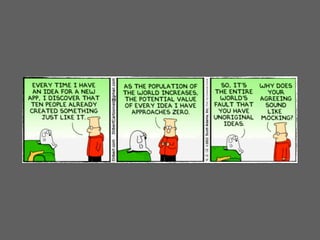
but first...
http://www.dilbert.com/strips/comic/2012-04-02/
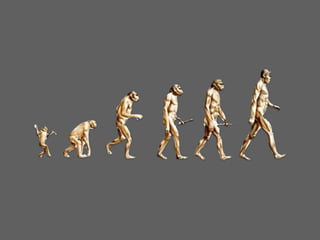
advanced
 what does that mean?
iPhone   objective C

101        cocoa
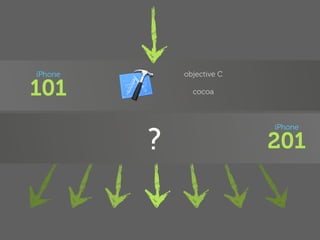
iPhone       objective C

101            cocoa


         ?
                           iPhone

                           201
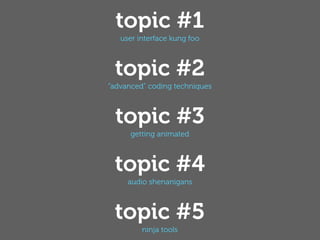
topic #1
   user interface kung foo


 topic #2
”advanced” coding techniques


 topic #3
      getting animated


 topic #4
     audio shenanigans


 topic #5
         ninja tools
topic #1
user interface kung foo
advice case study code
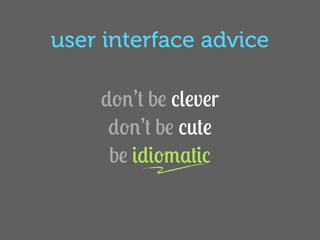
user interface advice

    don’t be clever
     don’t be cute
     be idiomatic
standard iOS conventions
the “extra” conventions
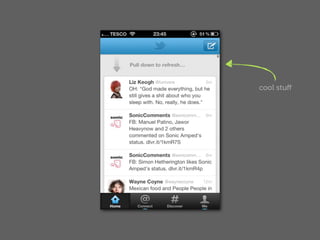
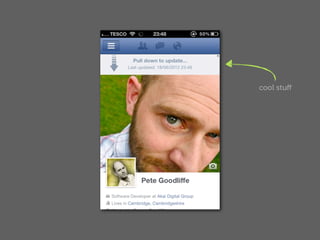
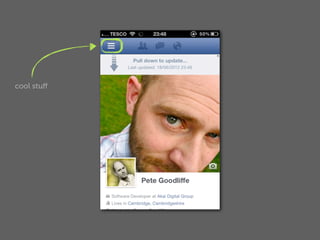
cool stuff
cool stuff
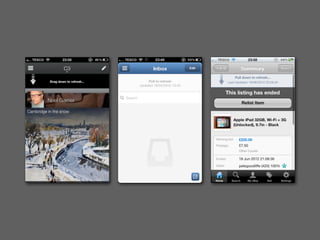
pull to refresh
https://github.com/enormego/EGOTableViewPullRefresh
          https://github.com/leah/PullToRefresh
     https://github.com/shiki/STableViewController
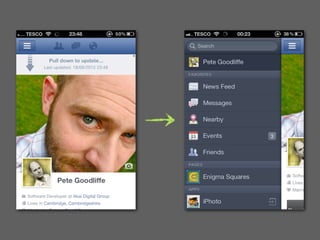
cool stuff
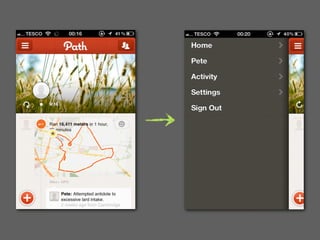
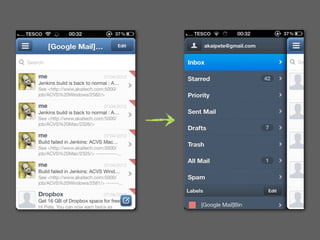
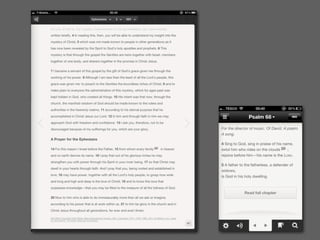
(swipey) sidebar
https://github.com/Inferis/ViewDeck
http://cocoacontrols.com/platforms/ios/controls/pprevealsideviewcontroller

   http://cocoacontrols.com/platforms/ios/controls/hsimagesidebarview
ui joy is in the details
subtle shadow
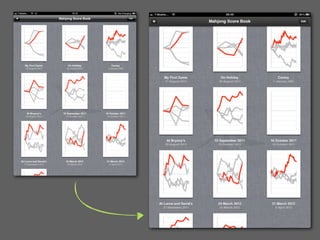
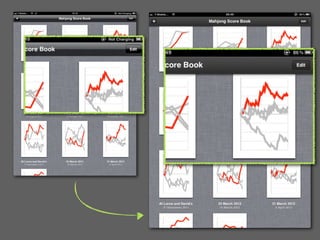
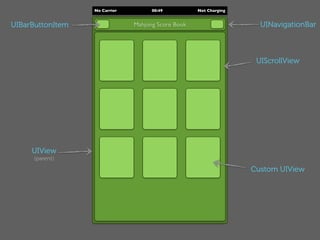
No Carrier         00:49          Not Charging


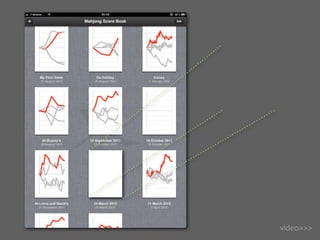
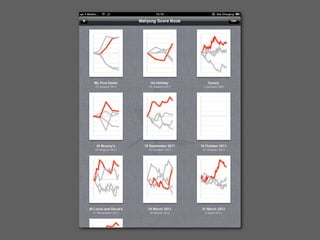
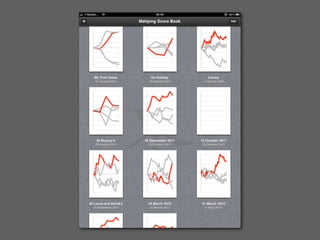
UIBarButtonItem                Mahjong Score Book                    UINavigationBar


                                                                    UIScrollView


     UIView
      (parent)

                                                                   Custom UIView
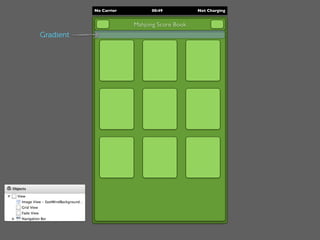
No Carrier         00:49          Not Charging


                        Mahjong Score Book
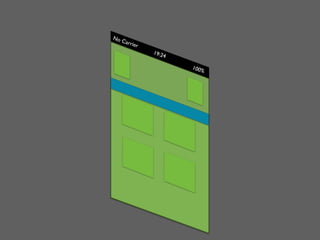
Gradient
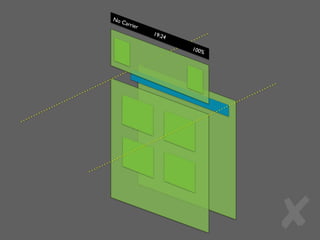
No C
     arrie
           r
               19:2
                   4

                       100%


                              ✘
No C
     arrie
           r
               19:2
                   4

                       100%


                              ✘
No C
                    arrie
                          r
                              19:2
                                  4

                                      100%


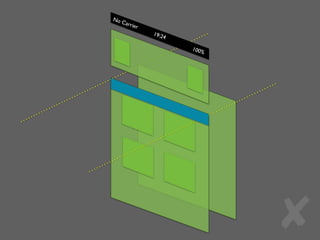
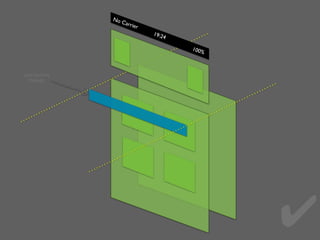
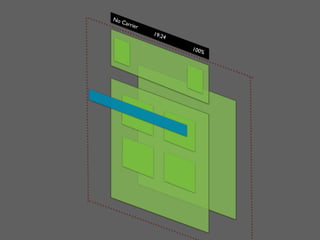
pass touches
  through


                                             ✔
No C
     arrie
           r
               19:2
                   4

                       100%
No C
     arrie
           r
               19:2
                   4

                       100%
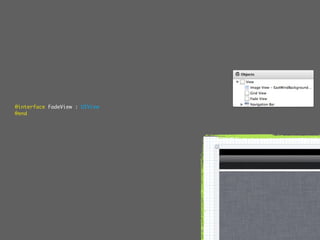
@interface FadeView : UIView
@end
@interface FadeView : UIView
@end


@implementation FadeView

- (void) setUp
{
    self.backgroundColor = [UIColor clearColor];
    CAGradientLayer *gradientLayer = [[CAGradientLayer alloc] init];
    gradientLayer.colors = [NSArray arrayWithObjects:
                            (id)[UIColor colorWithRed:0.0 green:0.0 blue:0.0 alpha:0.5].CGColor,
                            (id)[UIColor colorWithRed:0.0 green:0.0 blue:0.0 alpha:0.0].CGColor,
                            nil];
    gradientLayer.startPoint = CGPointMake(0,0);
    gradientLayer.endPoint   = CGPointMake(0,1);
    gradientLayer.frame = CGRectMake(0,0,self.bounds.size.width, self.bounds.size.height);

       [self.layer insertSublayer:gradientLayer atIndex:0];
}

- (id) initWithCoder:(NSCoder *)aDecoder
{
    if ((self = [super initWithCoder:aDecoder]))
    {
        [self setUp];
    }
    return self;
}

- (id) initWithFrame:(CGRect)frame { /* ... */ }

@end
theming toolbars
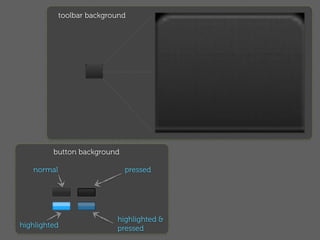
toolbar background


         button background

   normal                    pressed


                           highlighted &
highlighted                pressed
- (void)viewDidLoad
{
    gridView.dataSource = self;
    gridView.delegate = self;
    [gridView reloadData];

    self.navigationItem.title = AppName;
    self.navigationItem.rightBarButtonItem = self.editButtonItem;
    navigationBar.items = [NSArray arrayWithObject:self.navigationItem];
    [self setEditing:NO animated:NO];

    if ([[UINavigationBar class] respondsToSelector:@selector(appearance)])
    {
        UIEdgeInsets insets = {6, 6, 6, 6};
        UIImage *image = [[UIImage imageNamed:@"ToolbarBlack"] resizableImageWithCapInsets:insets];
        [self.navigationBar setBackgroundImage:image forBarMetrics:UIBarMetricsDefault];
        [self styleButton:self.navigationItem.leftBarButtonItem];
        [self styleButton:self.navigationItem.rightBarButtonItem];
    }

    [super viewDidLoad];
}
- (void) setEditButtonAppearance
{
    if ([[UINavigationBar class] respondsToSelector:@selector(appearance)])
    {
        UIEdgeInsets insets = {10, 10, 10, 10};
        UIImage *navButton         = !self.editing
                                   ? [[UIImage imageNamed:@"ToolbarBlackButton"]         resizableImageWithCapInsets:insets]
                                   : [[UIImage imageNamed:@"ToolbarBlackButtonSelected"] resizableImageWithCapInsets:insets];
        UIImage *navButtonPressed = !self.editing
                                   ? [[UIImage imageNamed:@"ToolbarBlackButtonPressed"]          resizableImageWithCapInsets:insets]
                                   : [[UIImage imageNamed:@"ToolbarBlackButtonSelectedPressed"] resizableImageWithCapInsets:insets];

        [self.editButtonItem setBackgroundImage:navButton          forState:UIControlStateNormal      barMetrics:UIBarMetricsDefault];
        [self.editButtonItem setBackgroundImage:navButtonPressed   forState:UIControlStateHighlighted barMetrics:UIBarMetricsDefault];
    }

}
topic #2
”advanced” coding techniques
♪
three
PROBLEMS
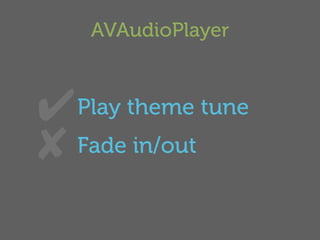
AVAudioPlayer


✔  Play theme tune
✘ Fade in/out
categories
associative references
        blocks
PROBLEM#1


       a nice API
categories
(because one interface is never enough)
AVAudioPlayer *player = … ;
[player play];
[player stop];
AVAudioPlayer *player = … ;
[player play];
[player stop];

[player playWithFadeDuration:1.0];
[player stopWithFadeDuration:1.0];
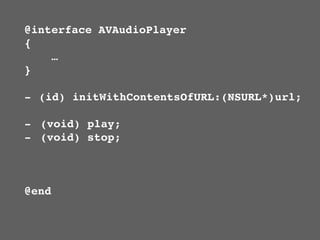
@interface AVAudioPlayer
{
    …
}

- (id) initWithContentsOfURL:(NSURL*)url;

- (void) play;
- (void) stop;


@end
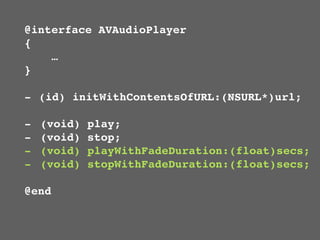
@interface AVAudioPlayer
{
    …
}

- (id) initWithContentsOfURL:(NSURL*)url;

-   (void)   play;
-   (void)   stop;
-   (void)   playWithFadeDuration:(float)secs;
-   (void)   stopWithFadeDuration:(float)secs;

@end
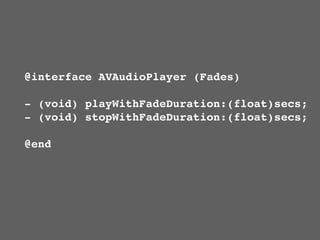
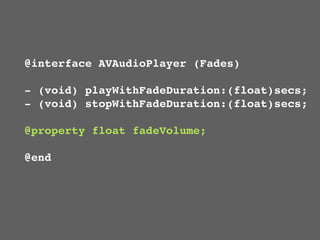
@interface AVAudioPlayer (Fades)

- (void) playWithFadeDuration:(float)secs;
- (void) stopWithFadeDuration:(float)secs;

@end
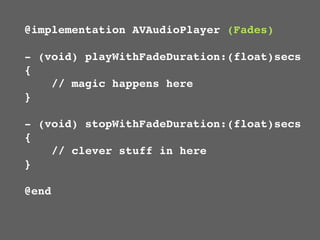
@implementation AVAudioPlayer (Fades)

- (void) playWithFadeDuration:(float)secs
{
    // magic happens here
}

- (void) stopWithFadeDuration:(float)secs
{
    // clever stuff in here
}

@end
AVAudioPlayer *player = … ;
[player play];
[player stop];

[player playWithFadeDuration:1.0];
[player stopWithFadeDuration:1.0];


                                     ✔
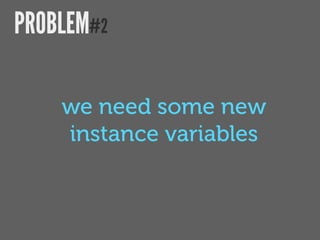
PROBLEM#2

    we need some new
    instance variables
associative references
    (a posh name for cheating)
static const char volumeLevelKey = ‘Q’;
NSNumber *number = [NSNumber numberWithFloat:1.0];

objc_setAssociatedObject(self,
    &volumeLevelKey,
    number,
    OBJ_ASSOCIATION_RETAIN_NONATOMIC);
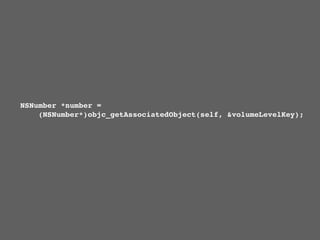
NSNumber *number =
    (NSNumber*)objc_getAssociatedObject(self, &volumeLevelKey);
@interface AVAudioPlayer (Fades)

- (void) playWithFadeDuration:(float)secs;
- (void) stopWithFadeDuration:(float)secs;

@property float fadeVolume;

@end
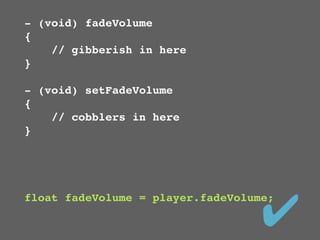
- (void) fadeVolume
{
    // gibberish in here
}

- (void) setFadeVolume
{
    // cobblers in here
}


                                   ✔
float fadeVolume = player.fadeVolume;
PROBLEM#3

  we need to use another
  fancy language feature
blocks
(because C++ isn’t the only cool language)
PROBLEM#3

 when a fade has completed,
      do “something”
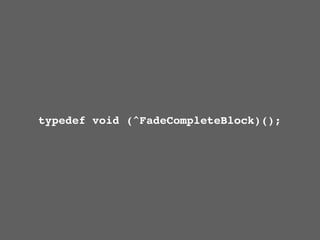
typedef void (^FadeCompleteBlock)();


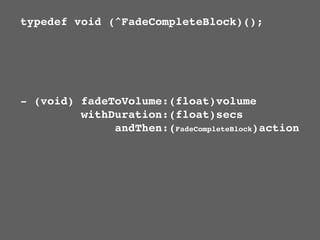
- (void) fadeToVolume:(float)volume
         withDuration:(float)secs
              andThen:(FadeCompleteBlock)action
typedef void (^FadeCompleteBlock)();

- (void) fadeToVolume:(float)volume
         withDuration:(float)secs
              andThen:(FadeCompleteBlock)action


[player fadeToVolume:0.0
        withDuration:1.0
             andThen:^{
                 [player stop];
                 player.volume = 1.0;
             }];
http://goodliffe.blogspot.co.uk/2011/04/ios-fading-avaudioplayer.html
   https://gitorious.org/audioplayerwithfade/audioplayerwithfade
topic #3
 getting animated
video>>>
- (void) documentsViewControllerSelected:(NSString*)file fromRect:(CGRect)from;
{
    lastDocumentRect = from;

    scoresViewController.filename = file;
    [scoresViewController animateAppearingFrom:from afterDelay:0.1];
    [window setRootViewController:scoresViewController animated:YES];
}
- (void) animateAppearingFrom:(CGRect)rect afterDelay:(NSTimeInterval)delay
{
    (void)self.view;

    UIImage     *image     = [mainView drawIntoImage];
    UIImageView *imageView = [[UIImageView alloc] initWithImage:image];

    [mainView.superview addSubview:imageView];
    imageView.frame = rect;
    mainView.hidden = YES;

    [UIView animateWithDuration:1.0
                           delay:delay
                         options:UIViewAnimationOptionAllowUserInteraction
                     animations:^{
                          imageView.frame = mainView.frame;
                     }
                     completion:^(BOOL finished){
                          mainView.hidden = NO;
                          [imageView removeFromSuperview];
                     }];
}
@interface UIView (PGLib)
- (UIImage*) drawIntoImage;
@end


- (UIImage*) drawIntoImage
{
    UIGraphicsBeginImageContextWithOptions(self.bounds.size, self.opaque,
                                           [[UIScreen mainScreen] scale]);
    [self.layer renderInContext:UIGraphicsGetCurrentContext()];
    UIImage *image = UIGraphicsGetImageFromCurrentImageContext();
    UIGraphicsEndImageContext();
    return image;
}
- (void) animateAppearingFrom:(CGRect)rect afterDelay:(NSTimeInterval)delay
{
    (void)self.view;

    UIImage     *image     = [mainView drawIntoImage];
    UIImageView *imageView = [[UIImageView alloc] initWithImage:image];

    [mainView.superview addSubview:imageView];
    imageView.frame = rect;
    mainView.hidden = YES;

    [UIView animateWithDuration:1.0
                           delay:delay
                         options:UIViewAnimationOptionAllowUserInteraction
                     animations:^{
                          imageView.frame = mainView.frame;
                     }
                     completion:^(BOOL finished){
                          mainView.hidden = NO;
                          [imageView removeFromSuperview];
                     }];
}
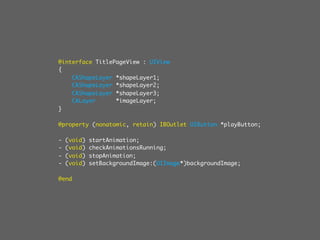
@interface TitlePageView : UIView
{
    CAShapeLayer *shapeLayer1;
    CAShapeLayer *shapeLayer2;
    CAShapeLayer *shapeLayer3;
    CALayer      *imageLayer;
}

@property (nonatomic, retain) IBOutlet UIButton *playButton;

-   (void)   startAnimation;
-   (void)   checkAnimationsRunning;
-   (void)   stopAnimation;
-   (void)   setBackgroundImage:(UIImage*)backgroundImage;

@end
-(void) startAnimation
{
	 CABasicAnimation *animation = [CABasicAnimation animationWithKeyPath:@"transform.rotation.z"];

	   animation.duration          = 5.0;
	   animation.timingFunction = [CAMediaTimingFunction functionWithName:kCAMediaTimingFunctionEaseOut];
	   animation.repeatCount       = 10000;
	   animation.autoreverses      = YES;
	   animation.fromValue         = [NSNumber numberWithDouble:0];
	   animation.toValue           = [NSNumber numberWithDouble:M_PI];
	   [shapeLayer1 addAnimation:animation forKey:@"animatePath"];

	   animation.duration          = 8.0;
	   [shapeLayer2 addAnimation:animation forKey:@"animatePath"];

	   animation.duration          = 13.0;
	   [shapeLayer3 addAnimation:animation forKey:@"animatePath"];
}

-(void) stopAnimation
{
    [shapeLayer1 removeAllAnimations];
    [shapeLayer2 removeAllAnimations];
    [shapeLayer3 removeAllAnimations];
}
topic #4
 audio shenanigans
you have a phone
 it makes a noise
   how do you do that?
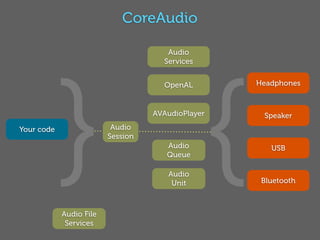
CoreAudio

                                      Audio


            } {
                                     Services


                                     OpenAL        Headphones


                                   AVAudioPlayer    Speaker
Your code                 Audio
                         Session
                                      Audio           USB
                                      Queue

                                      Audio
                                       Unit         Bluetooth


            Audio File
             Services
Audio Session                                      Services


                                                              }                              {
                                                                             OpenAL              Phones

                                                                             AVAudioPlayer
                                                                                                 Speaker
                                                       Code       Session

                                                                              Queue               USB

                                                                                Unit               BT


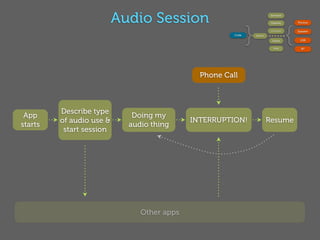
                                              Phone Call


         Describe type
 App                         Doing my
         of audio use &                     INTERRUPTION!                   Resume
starts                      audio thing
          start session


                               Other apps
Audio Services                                                      Services


                                                                                         }                             {
                                                                                                       OpenAL              Phones

                                                                                                       AVAudioPlayer
                                                                                                                           Speaker
                                                                                  Code       Session

                                                                                                        Queue               USB

                                                                                                          Unit               BT
@interface Sounds : NSObject
{
     SystemSoundID lock;
}
- (void) lock;
@end


                               @implementation Sounds

                               - (id)init
                               {
                                   if ((self = [super init]))
                                   {
                                       NSBundle *bundle = [NSBundle mainBundle];
                                       NSURL    *lockUrl = [bundle URLForResource:@"Noise" withExtension:@"wav"];
                                       AudioServicesCreateSystemSoundID((__bridge CFURLRef)lockUrl, &lock);
                                   }

                                      return self;
                               }

                               - (void) lock
                               {
                                   AudioServicesPlayAlertSound(lock);
                               }

                               @end
OpenAL                                             Services


                                                               }                             {
                                                                             OpenAL              Phones

                                                                             AVAudioPlayer
                                                                                                 Speaker
                                                        Code       Session

                                                                              Queue               USB

                                                                                Unit               BT


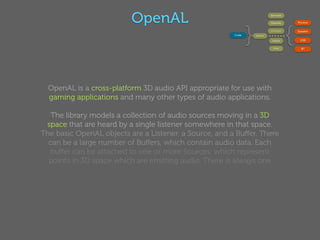
  OpenAL is a cross-platform 3D audio API appropriate for use with
  gaming applications and many other types of audio applications.

   The library models a collection of audio sources moving in a 3D
 space that are heard by a single listener somewhere in that space.
The basic OpenAL objects are a Listener, a Source, and a Buffer. There
  can be a large number of Buffers, which contain audio data. Each
  buffer can be attached to one or more Sources, which represent
  points in 3D space which are emitting audio. There is always one
  Listener object (per audio context), which represents the position
      where the sources are heard -- rendering is done from the
                      perspective of the Listener.
AVAudioPlayer                                  Services


                                        }                             {
                                                      OpenAL              Phones

                                                      AVAudioPlayer
                                                                          Speaker
                                 Code       Session

                                                       Queue               USB

                                                         Unit               BT


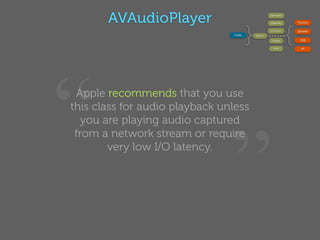
“Apple recommends that you use
this class for audio playback unless


                                ”
   you are playing audio captured
 from a network stream or require
        very low I/O latency.
AVAudioPlayer                              Services


                             }                             {
                                           OpenAL              Phones

                                           AVAudioPlayer
                                                               Speaker
                      Code       Session

                                            Queue               USB

                                              Unit               BT


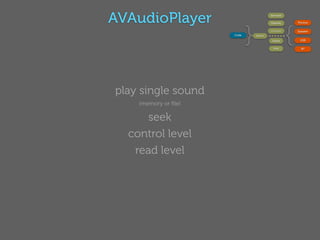
play single sound
    (memory or file)

      seek
  control level
   read level
Services


                                       }                             {
                                                     OpenAL              Phones

                                                     AVAudioPlayer
                                                                         Speaker
                                Code       Session

                                                      Queue               USB

                                                        Unit               BT


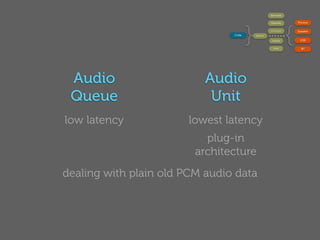
 Audio                     Audio
 Queue                      Unit
low latency            lowest latency
                           plug-in
                         architecture
dealing with plain old PCM audio data
topic #5
  ninja tools
#pragma mark
     . . .
             }
                 afterDelay:0.5];
    }
    return imported >= 0;
}

//==============================================================================
#pragma mark - IBActions

- (IBAction)add:(id)sender
{
    [self hideTipView];
    unsigned index = [documents addNewGame];
    [gridView
    . . .


     . . .
     [popup presentFromRect:popupRect inView:gridView.superview
                                    withText:view.name
                                  withObject:[NSNumber numberWithUnsignedInt:[gridView indexForCell:cell]]];
}

#pragma mark UIActionSheetDelegate

- (void) actionSheet:(UIActionSheet *)actionSheet clickedButtonAtIndex:(NSInteger)buttonIndex
{
    sheet = 0;

     if (buttonIndex != 0) return;
    . . .
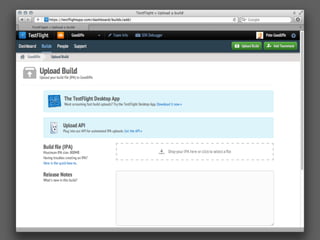
TestFlight
(don’t reinvent)
http://cocoacontrols.com/
http://www.stackoverflow.com/
    http://www.github.com/
QA
                  ★★★


                    &
                  ★★★


Pete Goodliffe @petegoodliffe pete@goodliffe.net
@petegoodliffe
pete@goodliffe.net
goodliffe.blogspot.com
www.goodliffe.net
BUMPH DULL, but important                            ★

THIS DOCUMENT WAS CREATED BY PETE GOODLIFFE
    IT IS COPYRIGHT // © 2012 PETE GOODLIFFE
>> ALL RIGHTS RESERVED
>> ALL THOUGHTS ARE OWNED
>> PHOTOS AND IMAGES ARE MOSTLY
    SOURCED FROM THE WEB
THANK YOU FOR READING // I HOPE IT WAS USEFUL
                                      Version 1.0 2012-08-14

Advanced iOS

  • 1.
    mobile east june 2012 advanced iOS getting your knees wet, rather then your ankles PETE GOODLIFFE pete@goodliffe.net @petegoodliffe
  • 2.
    @petegoodliffe pete@goodliffe.net goodliffe.blogspot.com www.goodliffe.net PE TE G OODL PROGRAMME IFFE R / AUTHOR / COLUMNIST / TEACHER ★ CON SCIENTIOUS CODER
  • 4.
  • 5.
  • 6.
  • 7.
    iOS is agreat platform to work on, and many developers have spend some time looking at the platform. This talk is aimed at programmers with prior iOS experience who want to get into iOS in more depth. This presentation will take you from a basic level of understanding of iOS to look at advanced topics that will make you apps more polished, better designed and, ideally, more successful. Abstract concepts are no use, so in this talk we'll take some existing successful commercial this iOS applications as a case study, and see how a selection of iOS technologies and techniques combine within it. On the way, we'll see: ‣How to use Objective-C language facilities to their best advantage ‣How to exploit key iOS technologies to save you time and effort ‣iOS development idioms that will improve the quality of your code ‣Creating "universal" iPhone/iPad/retina applications without going mad ‣Successful deployment and testing strategies
  • 8.
    iOS is agreat platform to work on, and many developers have spend some time looking at the platform. This talk is aimed at programmers with prior iOS experience who want to get into iOS in more depth. This presentation will take you from a basic level of understanding of iOS to look at advanced topics that will make you apps more polished, better designed and, ideally, more successful. Abstract concepts are no use, so in this talk we'll take some existing successful commercial this iOS applications as a case study, and see how a selection of iOS technologies and techniques combine within it. On the way, we'll see: ‣How to use Objective-C language facilities to their best advantage ‣How to exploit key iOS technologies to save you time and effort ‣iOS development idioms that will improve the quality of your code ‣Creating "universal" iPhone/iPad/retina applications without going mad ‣Successful deployment and testing strategies
  • 9.
  • 10.
  • 11.
  • 13.
  • 14.
    iPhone objective C 101 cocoa
  • 15.
    iPhone objective C 101 cocoa ? iPhone 201
  • 16.
    topic #1 user interface kung foo topic #2 ”advanced” coding techniques topic #3 getting animated topic #4 audio shenanigans topic #5 ninja tools
  • 17.
  • 18.
  • 19.
    user interface advice don’t be clever don’t be cute be idiomatic
  • 20.
  • 21.
  • 22.
  • 23.
  • 25.
  • 26.
    https://github.com/enormego/EGOTableViewPullRefresh https://github.com/leah/PullToRefresh https://github.com/shiki/STableViewController
  • 27.
  • 31.
  • 33.
  • 34.
    ui joy isin the details
  • 39.
  • 40.
    No Carrier 00:49 Not Charging UIBarButtonItem Mahjong Score Book UINavigationBar UIScrollView UIView (parent) Custom UIView
  • 41.
    No Carrier 00:49 Not Charging Mahjong Score Book Gradient
  • 42.
    No C arrie r 19:2 4 100% ✘
  • 43.
    No C arrie r 19:2 4 100% ✘
  • 44.
    No C arrie r 19:2 4 100% pass touches through ✔
  • 45.
    No C arrie r 19:2 4 100%
  • 46.
    No C arrie r 19:2 4 100%
  • 47.
  • 48.
    @interface FadeView :UIView @end @implementation FadeView - (void) setUp { self.backgroundColor = [UIColor clearColor]; CAGradientLayer *gradientLayer = [[CAGradientLayer alloc] init]; gradientLayer.colors = [NSArray arrayWithObjects: (id)[UIColor colorWithRed:0.0 green:0.0 blue:0.0 alpha:0.5].CGColor, (id)[UIColor colorWithRed:0.0 green:0.0 blue:0.0 alpha:0.0].CGColor, nil]; gradientLayer.startPoint = CGPointMake(0,0); gradientLayer.endPoint = CGPointMake(0,1); gradientLayer.frame = CGRectMake(0,0,self.bounds.size.width, self.bounds.size.height); [self.layer insertSublayer:gradientLayer atIndex:0]; } - (id) initWithCoder:(NSCoder *)aDecoder { if ((self = [super initWithCoder:aDecoder])) { [self setUp]; } return self; } - (id) initWithFrame:(CGRect)frame { /* ... */ } @end
  • 49.
  • 50.
    toolbar background button background normal pressed highlighted & highlighted pressed
  • 51.
    - (void)viewDidLoad { gridView.dataSource = self; gridView.delegate = self; [gridView reloadData]; self.navigationItem.title = AppName; self.navigationItem.rightBarButtonItem = self.editButtonItem; navigationBar.items = [NSArray arrayWithObject:self.navigationItem]; [self setEditing:NO animated:NO]; if ([[UINavigationBar class] respondsToSelector:@selector(appearance)]) { UIEdgeInsets insets = {6, 6, 6, 6}; UIImage *image = [[UIImage imageNamed:@"ToolbarBlack"] resizableImageWithCapInsets:insets]; [self.navigationBar setBackgroundImage:image forBarMetrics:UIBarMetricsDefault]; [self styleButton:self.navigationItem.leftBarButtonItem]; [self styleButton:self.navigationItem.rightBarButtonItem]; } [super viewDidLoad]; }
  • 52.
    - (void) setEditButtonAppearance { if ([[UINavigationBar class] respondsToSelector:@selector(appearance)]) { UIEdgeInsets insets = {10, 10, 10, 10}; UIImage *navButton = !self.editing ? [[UIImage imageNamed:@"ToolbarBlackButton"] resizableImageWithCapInsets:insets] : [[UIImage imageNamed:@"ToolbarBlackButtonSelected"] resizableImageWithCapInsets:insets]; UIImage *navButtonPressed = !self.editing ? [[UIImage imageNamed:@"ToolbarBlackButtonPressed"] resizableImageWithCapInsets:insets] : [[UIImage imageNamed:@"ToolbarBlackButtonSelectedPressed"] resizableImageWithCapInsets:insets]; [self.editButtonItem setBackgroundImage:navButton forState:UIControlStateNormal barMetrics:UIBarMetricsDefault]; [self.editButtonItem setBackgroundImage:navButtonPressed forState:UIControlStateHighlighted barMetrics:UIBarMetricsDefault]; } }
  • 53.
  • 54.
  • 55.
  • 56.
    AVAudioPlayer ✔ Playtheme tune ✘ Fade in/out
  • 57.
  • 58.
    PROBLEM#1 a nice API
  • 59.
  • 60.
    AVAudioPlayer *player =… ; [player play]; [player stop];
  • 61.
    AVAudioPlayer *player =… ; [player play]; [player stop]; [player playWithFadeDuration:1.0]; [player stopWithFadeDuration:1.0];
  • 62.
    @interface AVAudioPlayer { … } - (id) initWithContentsOfURL:(NSURL*)url; - (void) play; - (void) stop; @end
  • 63.
    @interface AVAudioPlayer { … } - (id) initWithContentsOfURL:(NSURL*)url; - (void) play; - (void) stop; - (void) playWithFadeDuration:(float)secs; - (void) stopWithFadeDuration:(float)secs; @end
  • 64.
    @interface AVAudioPlayer (Fades) -(void) playWithFadeDuration:(float)secs; - (void) stopWithFadeDuration:(float)secs; @end
  • 65.
    @implementation AVAudioPlayer (Fades) -(void) playWithFadeDuration:(float)secs { // magic happens here } - (void) stopWithFadeDuration:(float)secs { // clever stuff in here } @end
  • 66.
    AVAudioPlayer *player =… ; [player play]; [player stop]; [player playWithFadeDuration:1.0]; [player stopWithFadeDuration:1.0]; ✔
  • 67.
    PROBLEM#2 we need some new instance variables
  • 68.
    associative references (a posh name for cheating)
  • 69.
    static const charvolumeLevelKey = ‘Q’; NSNumber *number = [NSNumber numberWithFloat:1.0]; objc_setAssociatedObject(self, &volumeLevelKey, number, OBJ_ASSOCIATION_RETAIN_NONATOMIC);
  • 70.
    NSNumber *number = (NSNumber*)objc_getAssociatedObject(self, &volumeLevelKey);
  • 71.
    @interface AVAudioPlayer (Fades) -(void) playWithFadeDuration:(float)secs; - (void) stopWithFadeDuration:(float)secs; @property float fadeVolume; @end
  • 72.
    - (void) fadeVolume { // gibberish in here } - (void) setFadeVolume { // cobblers in here } ✔ float fadeVolume = player.fadeVolume;
  • 73.
    PROBLEM#3 weneed to use another fancy language feature
  • 74.
    blocks (because C++ isn’tthe only cool language)
  • 75.
    PROBLEM#3 when afade has completed, do “something”
  • 76.
  • 77.
    typedef void (^FadeCompleteBlock)(); -(void) fadeToVolume:(float)volume withDuration:(float)secs andThen:(FadeCompleteBlock)action
  • 78.
    typedef void (^FadeCompleteBlock)(); -(void) fadeToVolume:(float)volume withDuration:(float)secs andThen:(FadeCompleteBlock)action [player fadeToVolume:0.0 withDuration:1.0 andThen:^{ [player stop]; player.volume = 1.0; }];
  • 79.
    http://goodliffe.blogspot.co.uk/2011/04/ios-fading-avaudioplayer.html https://gitorious.org/audioplayerwithfade/audioplayerwithfade
  • 80.
  • 81.
  • 83.
    - (void) documentsViewControllerSelected:(NSString*)filefromRect:(CGRect)from; { lastDocumentRect = from; scoresViewController.filename = file; [scoresViewController animateAppearingFrom:from afterDelay:0.1]; [window setRootViewController:scoresViewController animated:YES]; }
  • 84.
    - (void) animateAppearingFrom:(CGRect)rectafterDelay:(NSTimeInterval)delay { (void)self.view; UIImage *image = [mainView drawIntoImage]; UIImageView *imageView = [[UIImageView alloc] initWithImage:image]; [mainView.superview addSubview:imageView]; imageView.frame = rect; mainView.hidden = YES; [UIView animateWithDuration:1.0 delay:delay options:UIViewAnimationOptionAllowUserInteraction animations:^{ imageView.frame = mainView.frame; } completion:^(BOOL finished){ mainView.hidden = NO; [imageView removeFromSuperview]; }]; }
  • 85.
    @interface UIView (PGLib) -(UIImage*) drawIntoImage; @end - (UIImage*) drawIntoImage { UIGraphicsBeginImageContextWithOptions(self.bounds.size, self.opaque, [[UIScreen mainScreen] scale]); [self.layer renderInContext:UIGraphicsGetCurrentContext()]; UIImage *image = UIGraphicsGetImageFromCurrentImageContext(); UIGraphicsEndImageContext(); return image; }
  • 86.
    - (void) animateAppearingFrom:(CGRect)rectafterDelay:(NSTimeInterval)delay { (void)self.view; UIImage *image = [mainView drawIntoImage]; UIImageView *imageView = [[UIImageView alloc] initWithImage:image]; [mainView.superview addSubview:imageView]; imageView.frame = rect; mainView.hidden = YES; [UIView animateWithDuration:1.0 delay:delay options:UIViewAnimationOptionAllowUserInteraction animations:^{ imageView.frame = mainView.frame; } completion:^(BOOL finished){ mainView.hidden = NO; [imageView removeFromSuperview]; }]; }
  • 89.
    @interface TitlePageView :UIView { CAShapeLayer *shapeLayer1; CAShapeLayer *shapeLayer2; CAShapeLayer *shapeLayer3; CALayer *imageLayer; } @property (nonatomic, retain) IBOutlet UIButton *playButton; - (void) startAnimation; - (void) checkAnimationsRunning; - (void) stopAnimation; - (void) setBackgroundImage:(UIImage*)backgroundImage; @end
  • 90.
    -(void) startAnimation { CABasicAnimation*animation = [CABasicAnimation animationWithKeyPath:@"transform.rotation.z"]; animation.duration = 5.0; animation.timingFunction = [CAMediaTimingFunction functionWithName:kCAMediaTimingFunctionEaseOut]; animation.repeatCount = 10000; animation.autoreverses = YES; animation.fromValue = [NSNumber numberWithDouble:0]; animation.toValue = [NSNumber numberWithDouble:M_PI]; [shapeLayer1 addAnimation:animation forKey:@"animatePath"]; animation.duration = 8.0; [shapeLayer2 addAnimation:animation forKey:@"animatePath"]; animation.duration = 13.0; [shapeLayer3 addAnimation:animation forKey:@"animatePath"]; } -(void) stopAnimation { [shapeLayer1 removeAllAnimations]; [shapeLayer2 removeAllAnimations]; [shapeLayer3 removeAllAnimations]; }
  • 91.
    topic #4 audioshenanigans
  • 92.
    you have aphone it makes a noise how do you do that?
  • 93.
    CoreAudio Audio } { Services OpenAL Headphones AVAudioPlayer Speaker Your code Audio Session Audio USB Queue Audio Unit Bluetooth Audio File Services
  • 94.
    Audio Session Services } { OpenAL Phones AVAudioPlayer Speaker Code Session Queue USB Unit BT Phone Call Describe type App Doing my of audio use & INTERRUPTION! Resume starts audio thing start session Other apps
  • 95.
    Audio Services Services } { OpenAL Phones AVAudioPlayer Speaker Code Session Queue USB Unit BT @interface Sounds : NSObject { SystemSoundID lock; } - (void) lock; @end @implementation Sounds - (id)init { if ((self = [super init])) { NSBundle *bundle = [NSBundle mainBundle]; NSURL *lockUrl = [bundle URLForResource:@"Noise" withExtension:@"wav"]; AudioServicesCreateSystemSoundID((__bridge CFURLRef)lockUrl, &lock); } return self; } - (void) lock { AudioServicesPlayAlertSound(lock); } @end
  • 96.
    OpenAL Services } { OpenAL Phones AVAudioPlayer Speaker Code Session Queue USB Unit BT OpenAL is a cross-platform 3D audio API appropriate for use with gaming applications and many other types of audio applications. The library models a collection of audio sources moving in a 3D space that are heard by a single listener somewhere in that space. The basic OpenAL objects are a Listener, a Source, and a Buffer. There can be a large number of Buffers, which contain audio data. Each buffer can be attached to one or more Sources, which represent points in 3D space which are emitting audio. There is always one Listener object (per audio context), which represents the position where the sources are heard -- rendering is done from the perspective of the Listener.
  • 97.
    AVAudioPlayer Services } { OpenAL Phones AVAudioPlayer Speaker Code Session Queue USB Unit BT “Apple recommends that you use this class for audio playback unless ” you are playing audio captured from a network stream or require very low I/O latency.
  • 98.
    AVAudioPlayer Services } { OpenAL Phones AVAudioPlayer Speaker Code Session Queue USB Unit BT play single sound (memory or file) seek control level read level
  • 99.
    Services } { OpenAL Phones AVAudioPlayer Speaker Code Session Queue USB Unit BT Audio Audio Queue Unit low latency lowest latency plug-in architecture dealing with plain old PCM audio data
  • 100.
    topic #5 ninja tools
  • 101.
    #pragma mark . . . } afterDelay:0.5]; } return imported >= 0; } //============================================================================== #pragma mark - IBActions - (IBAction)add:(id)sender { [self hideTipView]; unsigned index = [documents addNewGame]; [gridView . . . . . . [popup presentFromRect:popupRect inView:gridView.superview withText:view.name withObject:[NSNumber numberWithUnsignedInt:[gridView indexForCell:cell]]]; } #pragma mark UIActionSheetDelegate - (void) actionSheet:(UIActionSheet *)actionSheet clickedButtonAtIndex:(NSInteger)buttonIndex { sheet = 0; if (buttonIndex != 0) return; . . .
  • 102.
  • 104.
  • 105.
  • 106.
    QA ★★★ & ★★★ Pete Goodliffe @petegoodliffe pete@goodliffe.net
  • 107.
  • 108.
    BUMPH DULL, butimportant ★ THIS DOCUMENT WAS CREATED BY PETE GOODLIFFE IT IS COPYRIGHT // © 2012 PETE GOODLIFFE >> ALL RIGHTS RESERVED >> ALL THOUGHTS ARE OWNED >> PHOTOS AND IMAGES ARE MOSTLY SOURCED FROM THE WEB THANK YOU FOR READING // I HOPE IT WAS USEFUL Version 1.0 2012-08-14