How to code for accelerometer
          and Core Location?
                    Desert Code Camp
                 Phoenix, Arizona 2010
Design Pattern
             1.
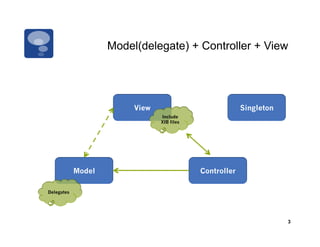
Model(delegate) + Controller + View


                         View                            Singleton
                                Include
                                XIB files


            Model                           Controller

Delegates


                                                                     3
Objective-C
          2.
Objective-C

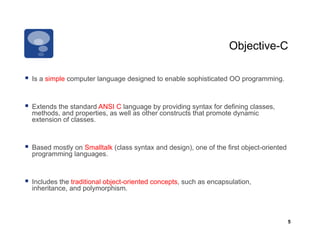
  Is a simple computer language designed to enable sophisticated OO programming.


  Extends the standard ANSI C language by providing syntax for defining classes,
  methods, and properties, as well as other constructs that promote dynamic
  extension of classes.


  Based mostly on Smalltalk (class syntax and design), one of the first object-oriented
  programming languages.


  Includes the traditional object-oriented concepts, such as encapsulation,
  inheritance, and polymorphism.


                                                                                           5
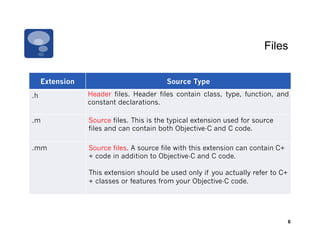
Files


     Extension                           Source Type
.h               Header files. Header files contain class, type, function, and
                 constant declarations.

.m               Source files. This is the typical extension used for source
                 files and can contain both Objective-C and C code.

.mm              Source files. A source file with this extension can contain C+
                 + code in addition to Objective-C and C code.

                 This extension should be used only if you actually refer to C+
                 + classes or features from your Objective-C code.


                                                                                  6
#import

  To include header files in your source code, you can use the standard #include, but….
  Objective-C provides a better way #import. it makes sure that the same file is never
  included more than once.


  #import	
  “MyAppDelegate.h”	
  
 	
  #import	
  “MyViewController.h”	


  #import	
  <UIKit/UIKit.h>	


                                                                                           7
Class

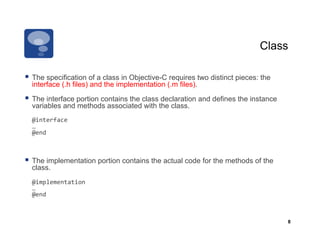
  The specification of a class in Objective-C requires two distinct pieces: the
  interface (.h files) and the implementation (.m files).

  The interface portion contains the class declaration and defines the instance
  variables and methods associated with the class.
     @interface	
  
 	
  …	
  
 	
  @end	


  The implementation portion contains the actual code for the methods of the
  class.
 	
  @implementation	
  
 	
  …	
  
 	
  @end	


                                                                                   8
Class
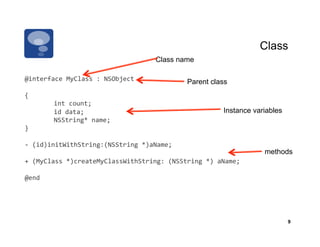
                                             Class name

@interface	
  MyClass	
  :	
  NSObject	
                Parent class
{	
  
           	
  int	
  count;	
  
           	
  id	
  data;	
                                        Instance variables
           	
  NSString*	
  name;	
  
}	
  

-­‐	
  (id)initWithString:(NSString	
  *)aName;	
  
                                                                                methods
+	
  (MyClass	
  *)createMyClassWithString:	
  (NSString	
  *)	
  aName;	
  

@end	


                                                                                         9
Class
                                                                    Class name

@implementation	
  MyClass	
  

-­‐	
  (id)initWithString:(NSString	
  *)	
  aName	
  
{	


  if	
  (self	
  =	
  [super	
  init])	
  {	


  count	
  =	
  0;	


  data	
  =	
  nil;	
                                         methods


  name	
  =	
  [aName	
  copy];	


  return	
  self;	


  }	
  
}	
  

+	
  (MyClass	
  *)createMyClassWithString:	
  (NSString	
  *)	
  aName	
  
{	


  return	
  [[[self	
  alloc]	
  initWithString:aName]	
  autorelease];	
  
}	
  

@end	


                                                                                                 10
Methods

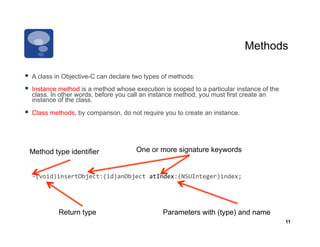
  A class in Objective-C can declare two types of methods:
  Instance method is a method whose execution is scoped to a particular instance of the
  class. In other words, before you call an instance method, you must first create an
  instance of the class.

  Class methods, by comparison, do not require you to create an instance.


 Method type identifier               One or more signature keywords


  -­‐(void)insertObject:(id)anObject	
  atIndex:(NSUInteger)index;	


           Return type                          Parameters with (type) and name
                                                                                           11
Methods

So	
  the	
  declaration	
  of	
  the	
  method	
  insertObject	
  would	
  be:	
  

-­‐(void)insertObject:(id)anObject	
  atIndex:(NSUInteger)index	


     Method type identifier, is (-) to instance methods, (+) to class methods.


And	
  the	
  line	
  to	
  call	
  the	
  method	
  would	
  be:	
  

[myArray	
  insertObject:anObj	
  atIndex:0];	


                                                                                            12
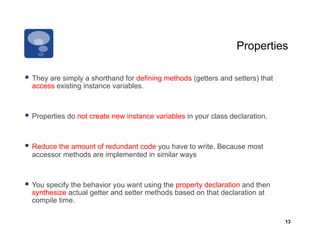
Properties

  They are simply a shorthand for defining methods (getters and setters) that
  access existing instance variables.


  Properties do not create new instance variables in your class declaration.


  Reduce the amount of redundant code you have to write. Because most
  accessor methods are implemented in similar ways


  You specify the behavior you want using the property declaration and then
  synthesize actual getter and setter methods based on that declaration at
  compile time.

                                                                                 13
Properties

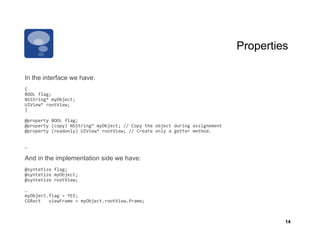
In the interface we have:
{	
  
BOOL	
  flag;	
  
NSString*	
  myObject;	
  
UIView*	
  rootView;	
  
}	
  

@property	
  BOOL	
  flag;	
  
@property	
  (copy)	
  NSString*	
  myObject;	
  //	
  Copy	
  the	
  object	
  during	
  assignement	
  
@property	
  (readonly)	
  UIView*	
  rootView;	
  //	
  Create	
  only	
  a	
  getter	
  method.	


…	
  

And in the implementation side we have:
@syntetize	
  flag;	
  
@syntetize	
  myObject;	
  
@syntetize	
  rootView;	
  

…	
  
myObject.flag	
  =	
  YES;	
  
CGRect	
  	
  	
  viewFrame	
  =	
  myObject.rootView.frame;	


                                                                                                                     14
Properties

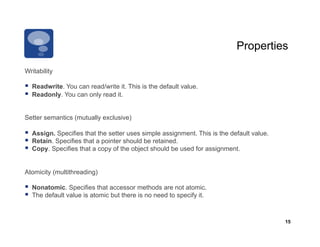
Writability

  Readwrite. You can read/write it. This is the default value.
  Readonly. You can only read it.

Setter semantics (mutually exclusive)

  Assign. Specifies that the setter uses simple assignment. This is the default value.
  Retain. Specifies that a pointer should be retained.
  Copy. Specifies that a copy of the object should be used for assignment.

Atomicity (multithreading)

  Nonatomic. Specifies that accessor methods are not atomic.
  The default value is atomic but there is no need to specify it.


                                                                                          15
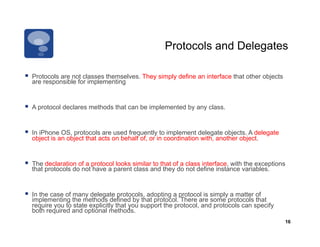
Protocols and Delegates

  Protocols are not classes themselves. They simply define an interface that other objects
  are responsible for implementing


  A protocol declares methods that can be implemented by any class.


  In iPhone OS, protocols are used frequently to implement delegate objects. A delegate
  object is an object that acts on behalf of, or in coordination with, another object.


  The declaration of a protocol looks similar to that of a class interface, with the exceptions
  that protocols do not have a parent class and they do not define instance variables.


  In the case of many delegate protocols, adopting a protocol is simply a matter of
  implementing the methods defined by that protocol. There are some protocols that
  require you to state explicitly that you support the protocol, and protocols can specify
  both required and optional methods.
                                                                                               16
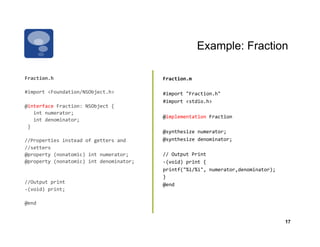
Example: Fraction

Fraction.h	
                                               Fraction.m	
  

#import	
  <Foundation/NSObject.h>	
  	
                   #import	
  "Fraction.h"	
  	
  
                                                           #import	
  <stdio.h>	


@interface	
  Fraction:	
  NSObject	
  {	


  int	
  numerator;	


                                                           @implementation	
  Fraction	


  int	
  denominator;	


  }	


                                                           @synthesize	
  numerator;	
  
//Properties	
  instead	
  of	
  getters	
  and	
  	
      @synthesize	
  denominator;	
  
//setters	
  
@property	
  (nonatomic)	
  int	
  numerator;	
            //	
  Output	
  Print	
  
@property	
  (nonatomic)	
  int	
  denominator;	
          -­‐(void)	
  print	
  {	


                                                           printf("%i/%i",	
  numerator,denominator);	
  	
  
                                                           }	


//Output	
  print	
                                        @end	
  	
  
-­‐(void)	
  print;	


@end	


                                                                                                                17
Example: Fraction

main.m


#import <stdio.h>
#import "Fraction.h"

int main( int argc, const char *argv[] ) {
    Fraction *frac = [[Fraction alloc] init];
    frac.numerator = 1;
    frac.denominator=3;

    printf( "The fraction is: " );
    [frac print];
    printf( "n" );

    [frac release]
    return 0;
}


                                                                18
Strings

  The NSString class provides an object wrapper.
  Supports storing arbitrary-length strings, support for Unicode, printf-style
  formatting utilities, and more.

  Shorthand notation for creating NSString objects from constant values.
  Precede a normal, double-quoted string with the @ symbol.


  NSString*	
  	
  myString	
  =	
  @”Hello	
  Worldn";	


  NSString*	
  	
  anotherString	
  =	


  [NSString	
  stringWithFormat:@"%d	
  %s",	
  1,	
  @"String”];	


                                                                                                         19
Let us code:
Autorotate and Accelerometer
                           3
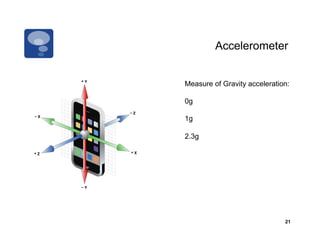
Accelerometer


Measure of Gravity acceleration:

0g

1g

2.3g


                              21
Reading the Accelerometer

  UIAccelerometer object in UIKit allow you to access to the raw accelerometer
     data directly. This object reports the current accelerometer values.

  To get an instance of this class, call the sharedAccelerometer method of
     UIAccelerometer class.

    The updateInterval property define the reporting interval in seconds.


-­‐(void)viewDidLoad	
  {	


  UIAccelerometer	
  *accelerometer	
  =	
  [UIAccelerometer	
  sharedAccelerometer];	


  accelerometer.delegate	
  =	
  self;	


  accelerometer.updateInterval	
  =	
  	
  1.0/60;	


  [super	
  viewDidLoad];	
  
}	


                                                                                              22
Reading the Accelerometer

  A delegate (UIAccelerometerDelegate) will receive acceleration events.


@interface	
  FooViewController:	
  UIViewController	
  <UIAccelerometerDelegate>	


  Use   accelerometer:didAccelerate: method to process accelerometer data.


-­‐(void)accelerometer:(UIAccelerometer	
  *)accelerometer	
  didAccelerate:
                	
  (UIAcceleration	
  *)acceleration	
  {	


  NSString	
  *s	
  =	
  [[NSString	
  alloc]	
  initWithFormat:@"%f,	
  %f,	
  %f",	


  acceleration.x,	
  acceleration.y,	
  acceleration.z];	
  
    	
  accLabel.text	
  =	
  s;	


  [s	
  release];	
  
}
                                                                                                        23
AutoRotate

The UIViewController class provides the infrastructure needed to rotate your interface and
  adjust the position of views automatically in response to orientation changes.


-(BOOL)shouldAutorotateToInterfaceOrientation:(UIInterfaceOrientation interfaceOrientation {
   return YES;
   //return (interfaceOrientation == UIInterfaceOrientationPortrait);
}


interfaceOrientation values:

  UIInterfaceOrientationPortrait
  UIInterfaceOrientationPortraitUpsideDown
  UIInterfaceOrientationLandscapeLeft
  UIInterfaceOrientationLandscapeRight

                                                                                             24
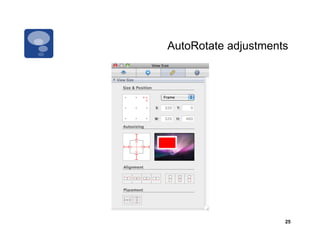
AutoRotate adjustments


                     25
Core Location
            4
Core Location


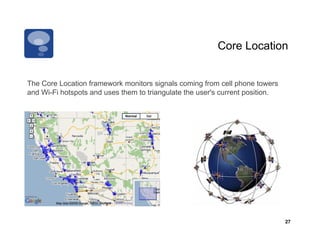
The Core Location framework monitors signals coming from cell phone towers
and Wi-Fi hotspots and uses them to triangulate the user's current position.


                                                                               27
Getting the User's Current Location

  Create an instance of CLLocationManager class.
It	
  is	
  necessary	
  to	
  include	
  the	
  CoreLocation.framework	
  

#import	
  <CoreLocation/CoreLocation.h>	
  

@interface	
  FooViewController:	
  UIViewController<CLLocationManagerDelegate>	


  To begin receiving notifications, assign a delegate and call the
   startUpdatingLocation method.


-­‐(void)viewDidLoad	
  {	


  CLLocationManager	
  *locationManager=	
  [[CLLocationManager	
  alloc]	
  init];	


  [locationManager	
  startUpdatingLocation];locationManager.delegate	
  =	
  self;	


  locationManager.distanceFilter	
  =	
  kCLDistanceFilterNone;	


  locationManager.desiredAccuracy	
  =	
  kCLLocationAccuracyBest;	
  
}	
  

                                                                                                28
Using the Core Location

  We need implement this:

-­‐  (void)locationManager:(CLLocationManager	
  *)manager	
  didUpdateToLocation:
  (CLLocation	
  *)newLocation	
  fromLocation:(CLLocation	
  *)oldLocation	
  {	


  NSString	
  *latitudeString	
  =	
  [[NSString	
  alloc]	
  initWithFormat:@"%g°",	


  newLocation.coordinate.latitude];	


  latitudeLabel.text	
  =	
  latitudeString;	


  [latitudeString	
  release];	
  
    	
  NSString	
  *longitudeString	
  =	
  [[NSString	
  alloc]	
  initWithFormat:@"%g°",	


  newLocation.coordinate.longitude];	


  longitudeLabel.text	
  =	
  longitudeString;	


  [longitudeString	
  release];	
  
}	


                                                                                                      29
Exercises and
  References
            5
iPhone Dev Center


http://developer.apple.com/iphone


                                           31

201005 accelerometer and core Location

  • 1.
    How to codefor accelerometer and Core Location? Desert Code Camp Phoenix, Arizona 2010
  • 2.
  • 3.
    Model(delegate) + Controller+ View View Singleton Include XIB files Model Controller Delegates 3
  • 4.
  • 5.
    Objective-C   Is asimple computer language designed to enable sophisticated OO programming.   Extends the standard ANSI C language by providing syntax for defining classes, methods, and properties, as well as other constructs that promote dynamic extension of classes.   Based mostly on Smalltalk (class syntax and design), one of the first object-oriented programming languages.   Includes the traditional object-oriented concepts, such as encapsulation, inheritance, and polymorphism. 5
  • 6.
    Files Extension Source Type .h Header files. Header files contain class, type, function, and constant declarations. .m Source files. This is the typical extension used for source files and can contain both Objective-C and C code. .mm Source files. A source file with this extension can contain C+ + code in addition to Objective-C and C code. This extension should be used only if you actually refer to C+ + classes or features from your Objective-C code. 6
  • 7.
    #import   To includeheader files in your source code, you can use the standard #include, but….   Objective-C provides a better way #import. it makes sure that the same file is never included more than once.  #import  “MyAppDelegate.h”    #import  “MyViewController.h”    #import  <UIKit/UIKit.h>   7
  • 8.
    Class   The specificationof a class in Objective-C requires two distinct pieces: the interface (.h files) and the implementation (.m files).   The interface portion contains the class declaration and defines the instance variables and methods associated with the class. @interface    …    @end     The implementation portion contains the actual code for the methods of the class.  @implementation    …    @end   8
  • 9.
    Class Class name @interface  MyClass  :  NSObject   Parent class {    int  count;    id  data;   Instance variables  NSString*  name;   }   -­‐  (id)initWithString:(NSString  *)aName;   methods +  (MyClass  *)createMyClassWithString:  (NSString  *)  aName;   @end   9
  • 10.
    Class Class name @implementation  MyClass   -­‐  (id)initWithString:(NSString  *)  aName   {          if  (self  =  [super  init])  {                  count  =  0;                  data  =  nil;   methods                name  =  [aName  copy];                  return  self;          }   }   +  (MyClass  *)createMyClassWithString:  (NSString  *)  aName   {          return  [[[self  alloc]  initWithString:aName]  autorelease];   }   @end   10
  • 11.
    Methods   A classin Objective-C can declare two types of methods:   Instance method is a method whose execution is scoped to a particular instance of the class. In other words, before you call an instance method, you must first create an instance of the class.   Class methods, by comparison, do not require you to create an instance. Method type identifier One or more signature keywords  -­‐(void)insertObject:(id)anObject  atIndex:(NSUInteger)index;   Return type Parameters with (type) and name 11
  • 12.
    Methods So  the  declaration  of  the  method  insertObject  would  be:   -­‐(void)insertObject:(id)anObject  atIndex:(NSUInteger)index   Method type identifier, is (-) to instance methods, (+) to class methods. And  the  line  to  call  the  method  would  be:   [myArray  insertObject:anObj  atIndex:0];   12
  • 13.
    Properties   They aresimply a shorthand for defining methods (getters and setters) that access existing instance variables.   Properties do not create new instance variables in your class declaration.   Reduce the amount of redundant code you have to write. Because most accessor methods are implemented in similar ways   You specify the behavior you want using the property declaration and then synthesize actual getter and setter methods based on that declaration at compile time. 13
  • 14.
    Properties In the interfacewe have: {   BOOL  flag;   NSString*  myObject;   UIView*  rootView;   }   @property  BOOL  flag;   @property  (copy)  NSString*  myObject;  //  Copy  the  object  during  assignement   @property  (readonly)  UIView*  rootView;  //  Create  only  a  getter  method.               …   And in the implementation side we have: @syntetize  flag;   @syntetize  myObject;   @syntetize  rootView;   …   myObject.flag  =  YES;   CGRect      viewFrame  =  myObject.rootView.frame;   14
  • 15.
    Properties Writability   Readwrite. Youcan read/write it. This is the default value.   Readonly. You can only read it. Setter semantics (mutually exclusive)   Assign. Specifies that the setter uses simple assignment. This is the default value.   Retain. Specifies that a pointer should be retained.   Copy. Specifies that a copy of the object should be used for assignment. Atomicity (multithreading)   Nonatomic. Specifies that accessor methods are not atomic.   The default value is atomic but there is no need to specify it. 15
  • 16.
    Protocols and Delegates  Protocols are not classes themselves. They simply define an interface that other objects are responsible for implementing   A protocol declares methods that can be implemented by any class.   In iPhone OS, protocols are used frequently to implement delegate objects. A delegate object is an object that acts on behalf of, or in coordination with, another object.   The declaration of a protocol looks similar to that of a class interface, with the exceptions that protocols do not have a parent class and they do not define instance variables.   In the case of many delegate protocols, adopting a protocol is simply a matter of implementing the methods defined by that protocol. There are some protocols that require you to state explicitly that you support the protocol, and protocols can specify both required and optional methods. 16
  • 17.
    Example: Fraction Fraction.h   Fraction.m   #import  <Foundation/NSObject.h>     #import  "Fraction.h"     #import  <stdio.h>       @interface  Fraction:  NSObject  {              int  numerator;             @implementation  Fraction        int  denominator;      }       @synthesize  numerator;   //Properties  instead  of  getters  and     @synthesize  denominator;   //setters   @property  (nonatomic)  int  numerator;   //  Output  Print   @property  (nonatomic)  int  denominator;   -­‐(void)  print  {             printf("%i/%i",  numerator,denominator);     }       //Output  print   @end     -­‐(void)  print;     @end     17
  • 18.
    Example: Fraction main.m #import <stdio.h> #import"Fraction.h" int main( int argc, const char *argv[] ) { Fraction *frac = [[Fraction alloc] init]; frac.numerator = 1; frac.denominator=3; printf( "The fraction is: " ); [frac print]; printf( "n" ); [frac release] return 0; } 18
  • 19.
    Strings   The NSStringclass provides an object wrapper.   Supports storing arbitrary-length strings, support for Unicode, printf-style formatting utilities, and more.   Shorthand notation for creating NSString objects from constant values. Precede a normal, double-quoted string with the @ symbol. NSString*    myString  =  @”Hello  Worldn";   NSString*    anotherString  =                  [NSString  stringWithFormat:@"%d  %s",  1,  @"String”];   19
  • 20.
    Let us code: Autorotateand Accelerometer 3
  • 21.
    Accelerometer Measure of Gravityacceleration: 0g 1g 2.3g 21
  • 22.
    Reading the Accelerometer  UIAccelerometer object in UIKit allow you to access to the raw accelerometer data directly. This object reports the current accelerometer values.   To get an instance of this class, call the sharedAccelerometer method of UIAccelerometer class.   The updateInterval property define the reporting interval in seconds. -­‐(void)viewDidLoad  {      UIAccelerometer  *accelerometer  =  [UIAccelerometer  sharedAccelerometer];      accelerometer.delegate  =  self;      accelerometer.updateInterval  =    1.0/60;      [super  viewDidLoad];   }   22
  • 23.
    Reading the Accelerometer  A delegate (UIAccelerometerDelegate) will receive acceleration events. @interface  FooViewController:  UIViewController  <UIAccelerometerDelegate>     Use accelerometer:didAccelerate: method to process accelerometer data. -­‐(void)accelerometer:(UIAccelerometer  *)accelerometer  didAccelerate:  (UIAcceleration  *)acceleration  {              NSString  *s  =  [[NSString  alloc]  initWithFormat:@"%f,  %f,  %f",        acceleration.x,  acceleration.y,  acceleration.z];    accLabel.text  =  s;      [s  release];   } 23
  • 24.
    AutoRotate The UIViewController classprovides the infrastructure needed to rotate your interface and adjust the position of views automatically in response to orientation changes. -(BOOL)shouldAutorotateToInterfaceOrientation:(UIInterfaceOrientation interfaceOrientation { return YES; //return (interfaceOrientation == UIInterfaceOrientationPortrait); } interfaceOrientation values:   UIInterfaceOrientationPortrait   UIInterfaceOrientationPortraitUpsideDown   UIInterfaceOrientationLandscapeLeft   UIInterfaceOrientationLandscapeRight 24
  • 25.
  • 26.
  • 27.
    Core Location The CoreLocation framework monitors signals coming from cell phone towers and Wi-Fi hotspots and uses them to triangulate the user's current position. 27
  • 28.
    Getting the User'sCurrent Location   Create an instance of CLLocationManager class. It  is  necessary  to  include  the  CoreLocation.framework   #import  <CoreLocation/CoreLocation.h>   @interface  FooViewController:  UIViewController<CLLocationManagerDelegate>       To begin receiving notifications, assign a delegate and call the startUpdatingLocation method. -­‐(void)viewDidLoad  {      CLLocationManager  *locationManager=  [[CLLocationManager  alloc]  init];      [locationManager  startUpdatingLocation];locationManager.delegate  =  self;      locationManager.distanceFilter  =  kCLDistanceFilterNone;            locationManager.desiredAccuracy  =  kCLLocationAccuracyBest;   }   28
  • 29.
    Using the CoreLocation   We need implement this: -­‐  (void)locationManager:(CLLocationManager  *)manager  didUpdateToLocation: (CLLocation  *)newLocation  fromLocation:(CLLocation  *)oldLocation  {      NSString  *latitudeString  =  [[NSString  alloc]  initWithFormat:@"%g°",          newLocation.coordinate.latitude];      latitudeLabel.text  =  latitudeString;      [latitudeString  release];    NSString  *longitudeString  =  [[NSString  alloc]  initWithFormat:@"%g°",          newLocation.coordinate.longitude];      longitudeLabel.text  =  longitudeString;      [longitudeString  release];   }   29
  • 30.
    Exercises and References 5
  • 31.