Experiencing iOS 
Development to Distribution 
Tunvir Rahman Tusher 
Brain Station 23
What is iOS? 
 Apples mobile operating system considered the foundation of the 
iPhone 
 Originally designed for the iPhone but now supports iPod touch, iPad. 
 Current available version of iOS is 7.1.2 and iOS 8 in beta 
 As of June 2014 Apple contains over 1,200,000 iOS applications 
 The reason behind iOS popularity is its great user experience.
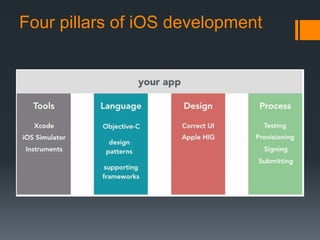
Four pillars of iOS development
iOS Development Requirements 
 Language: Objective C/Swift(beta) 
 IDE : XCode (Latest available one is 5.1.1) 
 Machine : Mac running OS X 10.6 or higher 
 For Distribution and test in real device we need a Developer Account
Xcode 
 Complete tool set for building Apps for 
 Mac OS X 
 And iOS. 
 includes the IDE: 
 Compiler 
 Tools for performance and behavior analysis 
 iOS simulator
UI design Tool 
iPhone/iPad UI design is extremely friendly(comparative to Android!) 
for Developer as the screen size of iOS devices are fixed. 
For iPhone there is two screen size of 3.5 and 4 inch with 
resolution of 320×480, 640×960, 640×1136 
For iPad the screen size is 7.9 and 9.7 inch with resolution of 
1024×768(non-retina) and 2048×1536 (retina). 
The design technique used for iOS is storyboard. In backend its 
actually an xml. 
For universal app(for both iPhone and iPad) we can use two identical 
storyboard.
Design patterns 
 Many of the frameworks use well-known design patterns for 
implementing your application. 
 For example, MVC, Block, Delegate, Target-Action etc
Objective C Overview 
Objective-C is an object oriented language. 
follows ANSI C style coding with methods from 
Smalltalk 
SUPERSET of C 
Flexible almost everything is done at runtime. 
Dynamic Binding 
Dynamic Typing(type id) 
Basic Framework is Cocoa,UIKit
Non-GUI – text output 
 Two standard functions you see used 
 printf() – same as C 
 printf(“Hello World”); //this is actual C code 
 NSLog() 
 NSLog(@”Hello World”); //this is strictly Objective-C
Primitive data types from C 
 int, short, long 
 float,double 
 Char 
Operators same as C 
 + 
 - 
 * 
 / 
 ++ 
 --
Classes 
 Have both definition file and implementation file : 
classname.h and classname.m 
 Similar to how have .h and .cpp in C++
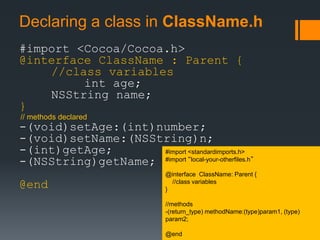
Declaring a class in ClassName.h 
#import <Cocoa/Cocoa.h> 
@interface ClassName : Parent { 
//class variables 
int age; 
NSString name; 
} 
// methods declared 
-(void)setAge:(int)number; 
-(void)setName:(NSString)n; 
-(int)getAge; 
-(NSString)getName; 
@end 
#import <standardimports.h> 
#import “local-your-otherfiles.h” 
@interface ClassName: Parent { 
//class variables 
} 
//methods 
-(return_type) methodName:(type)param1, (type) 
param2; 
@end
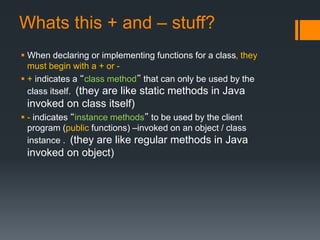
Whats this + and – stuff? 
 When declaring or implementing functions for a class, they 
must begin with a + or - 
 + indicates a “class method” that can only be used by the 
class itself. (they are like static methods in Java 
invoked on class itself) 
 - indicates “instance methods” to be used by the client 
program (public functions) –invoked on an object / class 
instance . (they are like regular methods in Java 
invoked on object)
Main Funciton –like C++ 
#import <whatever/what.h> 
int main(int argc, const char *argv[]) 
{ 
@autoreleasepool { 
//your code here******* 
//you can have C code if you wish or Objective-C 
return 0; 
} 
} 
NOTE: Latest version of Objective-C uses Automatic 
Reference Counting (kind of like automatic garbage collection) 
----to handle getting rid of not needed items in memory (avoiding 
memory leaks). YEAH! AUTOMATIC! 
-----like Java this way 
@autoreleasepool in a needed annotation around your main 
block of code to “enable” this
Automatic Reference Counting 
Objective C uses ‘AUTOMATIC reference 
counting' as memory management 
keeps an internal count of how many times 
an Object is 'needed'. 
System makes sure that objects that are 
needed are not deleted, and when an object 
is not needed it is deleted.
Declaring methods 
C++ syntax 
void function(int x, int y, int z); 
Object.function(x, y, z); 
Objective-C syntax 
-(void)methodWithX : (int)x Y :(int)y andZ (int)z 
[someObject methodWithX:1 Y:2 andZ:2]; 
-(return type) function_Apply function to Object name: (type) p1, (type) p2, ***; 
passing parameters x,y,z
Messages ---really weird (new) 
syntax 
Almost every object manipulation is done by 
sending objects a message 
Two words within a set of brackets, the 
object identifier and the message to send. 
[Identifier message ] 
Like C++ or Java’s Identifier.message()
Memory Allocation 
 Objects are created dynamically through the keyword, “alloc” 
 Objects are automatically deallocated in latest Objective-C 
through automatic reference counting 
Sample Allocation Of Object 
 AClass *object=[[AClass alloc]initWithSomeThing]; 
 Constructor Does not exist in Objective C
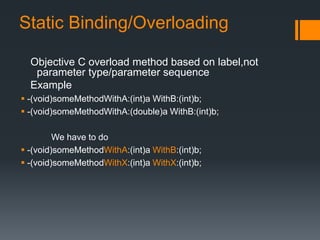
Static Binding/Overloading 
Objective C overload method based on label,not 
parameter type/parameter sequence 
Example 
 -(void)someMethodWithA:(int)a WithB:(int)b; 
 -(void)someMethodWithA:(double)a WithB:(int)b; 
We have to do 
 -(void)someMethodWithA:(int)a WithB:(int)b; 
 -(void)someMethodWithX:(int)a WithX:(int)b;
NSString 
NSString *theMessage = @”hello world”; 
Number of characters in a string 
 NSUInteger charCount = [theMessage length]; 
Test if 2 strings equal 
 if([string_var_1 isEqual: string_var_2]) 
{ //code for equal case }
NSArray – holds fixed array of 
points to objects 
NSArray *thearray = [NSArray arrayWithObjects:o1,o2,o3,o4, nil]; 
//get element 
[thearray objectAtIndex:0]; //element at index 0 
Example 
Note: you can not add or remove a pointer from an NSArray 
---fixed once created 
NSDate *now = [NSDate date]; 
NSDate *tomorrow = [now dateByAddingTImeInterval:24.0*60.0*60.0]; //add a day 
NSDate *yesterday = [now dateByAddingTimeInterval:-24.0*60.0*60.0]; //minus a day 
//array of Dates 
NSArray *dateList = [NSArray arrayWithObjects:now, tomorrow, yesterday]; 
//get elements in array 
NSDate *first = [dateList objectAtIndex:0]; 
Methods are: 
count = gets number of items in array 
objectAtIndex:i = returns element i of array (starting from 0)
NSMutableArray – changeable array 
of pointers to objects. 
NSMutableArray *thearray = [NSArray arrayWithObjects:o1,o2,o3,o4, nil]; 
//get element 
[thearray objectAtIndex:0]; //element at index 0 
Note: you can add or remove a pointer from an NSMutableArray 
Example 
NSDate *now = [NSDate date]; 
NSDate *tomorrow = [now dateByAddingTImeInterval:24.0*60.0*60.0]; //add a day 
NSDate *yesterday = [now dateByAddingTimeInterval:-24.0*60.0*60.0]; //minus a day 
//array of Dates 
NSMutableArray *dateList = [NSMutableArray array]; 
//set elements 
[dateList addObject:now]; 
[dateList addObject:tomorrow]; 
[dateList addObject:yesterday]; 
Methods are: 
array = gets empty NSMutableArray 
addObject:obj = adds as next element the obj 
to array
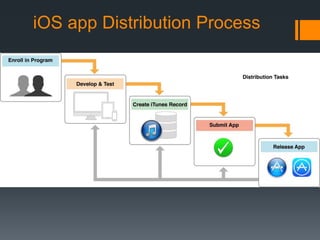
iOS app Distribution Process
iOS Developer Program 
 $99/year 
 provides 
 a complete and integrated process 
 for developing and distributing iOS apps on the App 
Store.
Test Your App in real Device 
Prepare Dev certificate in developer portal 
with your mac keychain. 
Download and install it in your mac. 
Add Devices to your portal(max 100) 
Prepare provisioning profile adding this 
certificate and devices you want to test. 
In xcode set the provisioning profile and 
certuficate you made. 
Build and Go!
Submit App To App Store 
What we need? 
1.A Distribution Certificate 
2. A provisioning profile 
3. App meta data like Some Screenshot of the app,Description 
etc 
Create ipa(iOS executable) using certificate and provisioning 
profile and Submit it using itunes connect. 
After both automated and manual testing the app is ready to 
sell. This process may take upto a week.
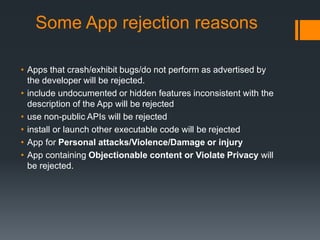
Some App rejection reasons 
• Apps that crash/exhibit bugs/do not perform as advertised by 
the developer will be rejected. 
• include undocumented or hidden features inconsistent with the 
description of the App will be rejected 
• use non-public APIs will be rejected 
• install or launch other executable code will be rejected 
• App for Personal attacks/Violence/Damage or injury 
• App containing Objectionable content or Violate Privacy will 
be rejected.
Thank you all.
Q/A?

iOS,From Development to Distribution

  • 1.
    Experiencing iOS Developmentto Distribution Tunvir Rahman Tusher Brain Station 23
  • 2.
    What is iOS?  Apples mobile operating system considered the foundation of the iPhone  Originally designed for the iPhone but now supports iPod touch, iPad.  Current available version of iOS is 7.1.2 and iOS 8 in beta  As of June 2014 Apple contains over 1,200,000 iOS applications  The reason behind iOS popularity is its great user experience.
  • 3.
    Four pillars ofiOS development
  • 4.
    iOS Development Requirements  Language: Objective C/Swift(beta)  IDE : XCode (Latest available one is 5.1.1)  Machine : Mac running OS X 10.6 or higher  For Distribution and test in real device we need a Developer Account
  • 5.
    Xcode  Completetool set for building Apps for  Mac OS X  And iOS.  includes the IDE:  Compiler  Tools for performance and behavior analysis  iOS simulator
  • 6.
    UI design Tool iPhone/iPad UI design is extremely friendly(comparative to Android!) for Developer as the screen size of iOS devices are fixed. For iPhone there is two screen size of 3.5 and 4 inch with resolution of 320×480, 640×960, 640×1136 For iPad the screen size is 7.9 and 9.7 inch with resolution of 1024×768(non-retina) and 2048×1536 (retina). The design technique used for iOS is storyboard. In backend its actually an xml. For universal app(for both iPhone and iPad) we can use two identical storyboard.
  • 7.
    Design patterns Many of the frameworks use well-known design patterns for implementing your application.  For example, MVC, Block, Delegate, Target-Action etc
  • 8.
    Objective C Overview Objective-C is an object oriented language. follows ANSI C style coding with methods from Smalltalk SUPERSET of C Flexible almost everything is done at runtime. Dynamic Binding Dynamic Typing(type id) Basic Framework is Cocoa,UIKit
  • 9.
    Non-GUI – textoutput  Two standard functions you see used  printf() – same as C  printf(“Hello World”); //this is actual C code  NSLog()  NSLog(@”Hello World”); //this is strictly Objective-C
  • 10.
    Primitive data typesfrom C  int, short, long  float,double  Char Operators same as C  +  -  *  /  ++  --
  • 11.
    Classes  Haveboth definition file and implementation file : classname.h and classname.m  Similar to how have .h and .cpp in C++
  • 12.
    Declaring a classin ClassName.h #import <Cocoa/Cocoa.h> @interface ClassName : Parent { //class variables int age; NSString name; } // methods declared -(void)setAge:(int)number; -(void)setName:(NSString)n; -(int)getAge; -(NSString)getName; @end #import <standardimports.h> #import “local-your-otherfiles.h” @interface ClassName: Parent { //class variables } //methods -(return_type) methodName:(type)param1, (type) param2; @end
  • 13.
    Whats this +and – stuff?  When declaring or implementing functions for a class, they must begin with a + or -  + indicates a “class method” that can only be used by the class itself. (they are like static methods in Java invoked on class itself)  - indicates “instance methods” to be used by the client program (public functions) –invoked on an object / class instance . (they are like regular methods in Java invoked on object)
  • 14.
    Main Funciton –likeC++ #import <whatever/what.h> int main(int argc, const char *argv[]) { @autoreleasepool { //your code here******* //you can have C code if you wish or Objective-C return 0; } } NOTE: Latest version of Objective-C uses Automatic Reference Counting (kind of like automatic garbage collection) ----to handle getting rid of not needed items in memory (avoiding memory leaks). YEAH! AUTOMATIC! -----like Java this way @autoreleasepool in a needed annotation around your main block of code to “enable” this
  • 15.
    Automatic Reference Counting Objective C uses ‘AUTOMATIC reference counting' as memory management keeps an internal count of how many times an Object is 'needed'. System makes sure that objects that are needed are not deleted, and when an object is not needed it is deleted.
  • 16.
    Declaring methods C++syntax void function(int x, int y, int z); Object.function(x, y, z); Objective-C syntax -(void)methodWithX : (int)x Y :(int)y andZ (int)z [someObject methodWithX:1 Y:2 andZ:2]; -(return type) function_Apply function to Object name: (type) p1, (type) p2, ***; passing parameters x,y,z
  • 17.
    Messages ---really weird(new) syntax Almost every object manipulation is done by sending objects a message Two words within a set of brackets, the object identifier and the message to send. [Identifier message ] Like C++ or Java’s Identifier.message()
  • 18.
    Memory Allocation Objects are created dynamically through the keyword, “alloc”  Objects are automatically deallocated in latest Objective-C through automatic reference counting Sample Allocation Of Object  AClass *object=[[AClass alloc]initWithSomeThing];  Constructor Does not exist in Objective C
  • 19.
    Static Binding/Overloading ObjectiveC overload method based on label,not parameter type/parameter sequence Example  -(void)someMethodWithA:(int)a WithB:(int)b;  -(void)someMethodWithA:(double)a WithB:(int)b; We have to do  -(void)someMethodWithA:(int)a WithB:(int)b;  -(void)someMethodWithX:(int)a WithX:(int)b;
  • 20.
    NSString NSString *theMessage= @”hello world”; Number of characters in a string  NSUInteger charCount = [theMessage length]; Test if 2 strings equal  if([string_var_1 isEqual: string_var_2]) { //code for equal case }
  • 21.
    NSArray – holdsfixed array of points to objects NSArray *thearray = [NSArray arrayWithObjects:o1,o2,o3,o4, nil]; //get element [thearray objectAtIndex:0]; //element at index 0 Example Note: you can not add or remove a pointer from an NSArray ---fixed once created NSDate *now = [NSDate date]; NSDate *tomorrow = [now dateByAddingTImeInterval:24.0*60.0*60.0]; //add a day NSDate *yesterday = [now dateByAddingTimeInterval:-24.0*60.0*60.0]; //minus a day //array of Dates NSArray *dateList = [NSArray arrayWithObjects:now, tomorrow, yesterday]; //get elements in array NSDate *first = [dateList objectAtIndex:0]; Methods are: count = gets number of items in array objectAtIndex:i = returns element i of array (starting from 0)
  • 22.
    NSMutableArray – changeablearray of pointers to objects. NSMutableArray *thearray = [NSArray arrayWithObjects:o1,o2,o3,o4, nil]; //get element [thearray objectAtIndex:0]; //element at index 0 Note: you can add or remove a pointer from an NSMutableArray Example NSDate *now = [NSDate date]; NSDate *tomorrow = [now dateByAddingTImeInterval:24.0*60.0*60.0]; //add a day NSDate *yesterday = [now dateByAddingTimeInterval:-24.0*60.0*60.0]; //minus a day //array of Dates NSMutableArray *dateList = [NSMutableArray array]; //set elements [dateList addObject:now]; [dateList addObject:tomorrow]; [dateList addObject:yesterday]; Methods are: array = gets empty NSMutableArray addObject:obj = adds as next element the obj to array
  • 23.
  • 24.
    iOS Developer Program  $99/year  provides  a complete and integrated process  for developing and distributing iOS apps on the App Store.
  • 25.
    Test Your Appin real Device Prepare Dev certificate in developer portal with your mac keychain. Download and install it in your mac. Add Devices to your portal(max 100) Prepare provisioning profile adding this certificate and devices you want to test. In xcode set the provisioning profile and certuficate you made. Build and Go!
  • 26.
    Submit App ToApp Store What we need? 1.A Distribution Certificate 2. A provisioning profile 3. App meta data like Some Screenshot of the app,Description etc Create ipa(iOS executable) using certificate and provisioning profile and Submit it using itunes connect. After both automated and manual testing the app is ready to sell. This process may take upto a week.
  • 27.
    Some App rejectionreasons • Apps that crash/exhibit bugs/do not perform as advertised by the developer will be rejected. • include undocumented or hidden features inconsistent with the description of the App will be rejected • use non-public APIs will be rejected • install or launch other executable code will be rejected • App for Personal attacks/Violence/Damage or injury • App containing Objectionable content or Violate Privacy will be rejected.
  • 28.
  • 29.