ThomasV. Frauenhofer
Beret Applications LLC
360iDev Austin, November, 2010
Introduction to Cocos2d:
Learning from Examples
Monday, November 8, 2010
Who am I?
• Software developer for 28+ years
• IBM’er by day, mobile developer at night
• 10 years in Palm OS mobile development
• (May it rest in peace)
Monday, November 8, 2010
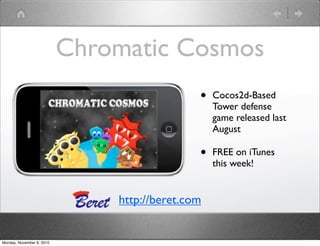
Chromatic Cosmos
• Cocos2d-Based
Tower defense
game released last
August
• FREE on iTunes
this week!
http://beret.com
Monday, November 8, 2010
Overview
• Motivation - Why Cocos2D?
• Definition of simple project (BlockGame)
• Building the project
• We won’t finish, but you’ll get all the
code
Monday, November 8, 2010
Why Cocos2D?
Monday, November 8, 2010
Why Cocos2D?
• Simple 2D Gaming SDK
• Built upon the OpenGL API’s
• Rich Objective-C API
• Used in thousands of apps
• Very active developer community
Monday, November 8, 2010
Even more Why Cocos2D
• Integrates with some very useful libraries
• Physics (Chimpunk, Box2D)
• Sound (CocosDension)
• Game boards (cocoslive)
• And others...
Monday, November 8, 2010
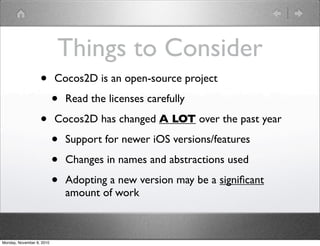
Things to Consider
• Cocos2D is an open-source project
• Read the licenses carefully
• Cocos2D has changed A LOT over the past year
• Support for newer iOS versions/features
• Changes in names and abstractions used
• Adopting a new version may be a significant
amount of work
Monday, November 8, 2010
A brief overview of
Cocos2D
Monday, November 8, 2010
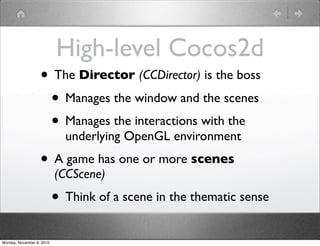
High-level Cocos2d
• The Director (CCDirector) is the boss
• Manages the window and the scenes
• Manages the interactions with the
underlying OpenGL environment
• A game has one or more scenes
(CCScene)
• Think of a scene in the thematic sense
Monday, November 8, 2010
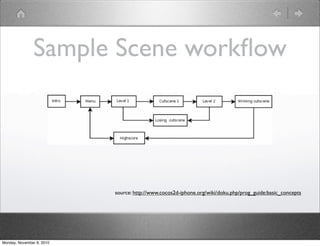
Sample Scene workflow
source: http://www.cocos2d-iphone.org/wiki/doku.php/prog_guide:basic_concepts
Monday, November 8, 2010
It all started with a (CC)Node...
• CCNode is the base class of (almost) all Cocos2D
classes
• Many attributes are defined
• Position
• Size
• z-order
• etc...
Monday, November 8, 2010
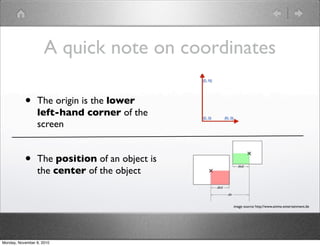
• The origin is the lower
left-hand corner of the
screen
• The position of an object is
the center of the object
image source: http://www.anima-entertainment.de
A quick note on coordinates
Monday, November 8, 2010
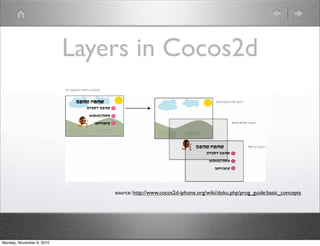
Layers in Cocos2d
source: http://www.cocos2d-iphone.org/wiki/doku.php/prog_guide:basic_concepts
Monday, November 8, 2010
Layers
• A layer (CCLayer) is where a user interacts
with Cocos2d objects
• A layer handles touch and accelerometer
events
• A layer contains other layers and sprites
Monday, November 8, 2010
Sprites
• A sprite (CCSprite) is an active object in
your game
• 2 dimensional object
• Has an image (not generated)
• Can be animated, touched, moved, etc.
Monday, November 8, 2010
Animated Sprites
• Use of Batch Sprites/Sprite Sheets/Atlas
Sprites (versus individual image files)
• Depending on your version/history with
Cocos2d
• Uses OpenGL Texture Atlas to provide
higher animation performance
Monday, November 8, 2010
Actions and Animation
• You animate a sprite using the CCAnimation
class
• You make a sprite move using derivatives of
the CCAction class
• You can specify sequences of actions
(CCSequence) and actions done in parallel
(CCSpawn)
Monday, November 8, 2010
Block Game - a simple
game to introduce you
to Cocos2d
Monday, November 8, 2010
Commentary
• It is important to know what you are building
before you build it...
• Design, look, interaction
• Cheaper and faster to design than to code
• ...but don’t go overboard
• Avoid “analysis paralysis”
• Iterate - design, code, test, rinse, repeat
Monday, November 8, 2010
In short...
• Make it work
• Next, make it good
• Next, make it GREAT!
Monday, November 8, 2010
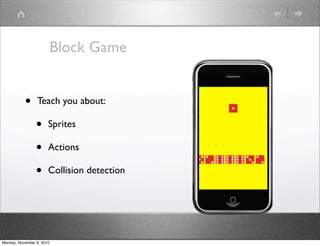
Block Game
• Teach you about:
• Sprites
• Actions
• Collision detection
Monday, November 8, 2010
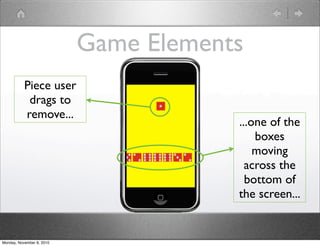
Game Elements
Piece user
drags to
remove...
...one of the
boxes
moving
across the
bottom of
the screen...
Monday, November 8, 2010
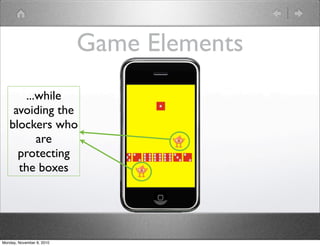
Game Elements
...while
avoiding the
blockers who
are
protecting
the boxes
Monday, November 8, 2010
Additional Notes
• Single-color background
• I chose yellow, but you could pick another color
• You can use either color squares or dice images for
UserSprite/boxes
• Both are included in basic sample project
• Using Cocos2d version 0.99.5 beta 3
Monday, November 8, 2010
Game Items
• The piece the user moves around is a
sprite (UserSprite)
• The boxes are sprites (BoxSprite)
• Blockers that move back and forth above
and below the conveyor belt
Monday, November 8, 2010
Game Actions
• Touch and move UserSprite
• Boxes just move right-to-left
• New boxes are periodically added on
right
• Blockers move back and forth
• UserSprite can collide with boxes and
blockers
Monday, November 8, 2010
Miscellanous
• Using XCode 3.2.5
• Using cocos2d-iphone-0.99.5-beta3
• Requires iOS 4.0+ (4.2 for iPad versions)
Monday, November 8, 2010
Building the project
Monday, November 8, 2010
Setting the scene
• Set orientation to portrait (Example 01)
• Set background color yellow (Example 02)
Monday, November 8, 2010
Add the UserSprite
• Example 03
Monday, November 8, 2010
Make UserSprite move
• Example 04
Monday, November 8, 2010
Add the Boxes
• Example 05
Monday, November 8, 2010
Collisions between
UserSprite and Boxes
• Example 06
Monday, November 8, 2010
Add the Blockers
• Example 07
Monday, November 8, 2010
Miscellaneous changes
• Random start values - Example 08
• CocosDension (Sound) - Example 09
• iPad support - Example 10
Monday, November 8, 2010
Miscellaneous
Monday, November 8, 2010
For more information
• http://cocos2d-iphone.org - Cocos2d for iOS information
• New book: Learn iPhone and iPad Cocos2D Game Development
(Apress)
• Previous 360iDev Presentations, including:
• “Introduction to 2d Game Programming Using
cocos2d” (360iDev Denver 2009)
• “Cocos2D + Box2D” (360iDev San Jose)
• Blogs (Ray Wenderlich’s is especially good)
Monday, November 8, 2010
From this presentation
• Slides:
• http://dl.dropbox.com/u/5375467/Introduction%20to%20Cocos2d.key
• http://dl.dropbox.com/u/5375467/Introduction%20to%20Cocos2d.pdf
• Sample code:
• http://dl.dropbox.com/u/5375467/IntroToCocos2DSamples.zip
Monday, November 8, 2010
My Contact Information
• Email: tvf@beret.com
• Our company: http://beret.com
• Web: http://tomfrauenhofer.com
• Twitter: @tvf
Monday, November 8, 2010
Thank you!
(and don’t forget the Game Jam!)
http://gamejam.360idev.com
Monday, November 8, 2010

Introduction to-cocos2d

  • 1.
    ThomasV. Frauenhofer Beret ApplicationsLLC 360iDev Austin, November, 2010 Introduction to Cocos2d: Learning from Examples Monday, November 8, 2010
  • 2.
    Who am I? •Software developer for 28+ years • IBM’er by day, mobile developer at night • 10 years in Palm OS mobile development • (May it rest in peace) Monday, November 8, 2010
  • 3.
    Chromatic Cosmos • Cocos2d-Based Towerdefense game released last August • FREE on iTunes this week! http://beret.com Monday, November 8, 2010
  • 4.
    Overview • Motivation -Why Cocos2D? • Definition of simple project (BlockGame) • Building the project • We won’t finish, but you’ll get all the code Monday, November 8, 2010
  • 5.
  • 6.
    Why Cocos2D? • Simple2D Gaming SDK • Built upon the OpenGL API’s • Rich Objective-C API • Used in thousands of apps • Very active developer community Monday, November 8, 2010
  • 7.
    Even more WhyCocos2D • Integrates with some very useful libraries • Physics (Chimpunk, Box2D) • Sound (CocosDension) • Game boards (cocoslive) • And others... Monday, November 8, 2010
  • 8.
    Things to Consider •Cocos2D is an open-source project • Read the licenses carefully • Cocos2D has changed A LOT over the past year • Support for newer iOS versions/features • Changes in names and abstractions used • Adopting a new version may be a significant amount of work Monday, November 8, 2010
  • 9.
    A brief overviewof Cocos2D Monday, November 8, 2010
  • 10.
    High-level Cocos2d • TheDirector (CCDirector) is the boss • Manages the window and the scenes • Manages the interactions with the underlying OpenGL environment • A game has one or more scenes (CCScene) • Think of a scene in the thematic sense Monday, November 8, 2010
  • 11.
    Sample Scene workflow source:http://www.cocos2d-iphone.org/wiki/doku.php/prog_guide:basic_concepts Monday, November 8, 2010
  • 12.
    It all startedwith a (CC)Node... • CCNode is the base class of (almost) all Cocos2D classes • Many attributes are defined • Position • Size • z-order • etc... Monday, November 8, 2010
  • 13.
    • The originis the lower left-hand corner of the screen • The position of an object is the center of the object image source: http://www.anima-entertainment.de A quick note on coordinates Monday, November 8, 2010
  • 14.
    Layers in Cocos2d source:http://www.cocos2d-iphone.org/wiki/doku.php/prog_guide:basic_concepts Monday, November 8, 2010
  • 15.
    Layers • A layer(CCLayer) is where a user interacts with Cocos2d objects • A layer handles touch and accelerometer events • A layer contains other layers and sprites Monday, November 8, 2010
  • 16.
    Sprites • A sprite(CCSprite) is an active object in your game • 2 dimensional object • Has an image (not generated) • Can be animated, touched, moved, etc. Monday, November 8, 2010
  • 17.
    Animated Sprites • Useof Batch Sprites/Sprite Sheets/Atlas Sprites (versus individual image files) • Depending on your version/history with Cocos2d • Uses OpenGL Texture Atlas to provide higher animation performance Monday, November 8, 2010
  • 18.
    Actions and Animation •You animate a sprite using the CCAnimation class • You make a sprite move using derivatives of the CCAction class • You can specify sequences of actions (CCSequence) and actions done in parallel (CCSpawn) Monday, November 8, 2010
  • 19.
    Block Game -a simple game to introduce you to Cocos2d Monday, November 8, 2010
  • 20.
    Commentary • It isimportant to know what you are building before you build it... • Design, look, interaction • Cheaper and faster to design than to code • ...but don’t go overboard • Avoid “analysis paralysis” • Iterate - design, code, test, rinse, repeat Monday, November 8, 2010
  • 21.
    In short... • Makeit work • Next, make it good • Next, make it GREAT! Monday, November 8, 2010
  • 22.
    Block Game • Teachyou about: • Sprites • Actions • Collision detection Monday, November 8, 2010
  • 23.
    Game Elements Piece user dragsto remove... ...one of the boxes moving across the bottom of the screen... Monday, November 8, 2010
  • 24.
    Game Elements ...while avoiding the blockerswho are protecting the boxes Monday, November 8, 2010
  • 25.
    Additional Notes • Single-colorbackground • I chose yellow, but you could pick another color • You can use either color squares or dice images for UserSprite/boxes • Both are included in basic sample project • Using Cocos2d version 0.99.5 beta 3 Monday, November 8, 2010
  • 26.
    Game Items • Thepiece the user moves around is a sprite (UserSprite) • The boxes are sprites (BoxSprite) • Blockers that move back and forth above and below the conveyor belt Monday, November 8, 2010
  • 27.
    Game Actions • Touchand move UserSprite • Boxes just move right-to-left • New boxes are periodically added on right • Blockers move back and forth • UserSprite can collide with boxes and blockers Monday, November 8, 2010
  • 28.
    Miscellanous • Using XCode3.2.5 • Using cocos2d-iphone-0.99.5-beta3 • Requires iOS 4.0+ (4.2 for iPad versions) Monday, November 8, 2010
  • 29.
  • 30.
    Setting the scene •Set orientation to portrait (Example 01) • Set background color yellow (Example 02) Monday, November 8, 2010
  • 31.
    Add the UserSprite •Example 03 Monday, November 8, 2010
  • 32.
    Make UserSprite move •Example 04 Monday, November 8, 2010
  • 33.
    Add the Boxes •Example 05 Monday, November 8, 2010
  • 34.
    Collisions between UserSprite andBoxes • Example 06 Monday, November 8, 2010
  • 35.
    Add the Blockers •Example 07 Monday, November 8, 2010
  • 36.
    Miscellaneous changes • Randomstart values - Example 08 • CocosDension (Sound) - Example 09 • iPad support - Example 10 Monday, November 8, 2010
  • 37.
  • 38.
    For more information •http://cocos2d-iphone.org - Cocos2d for iOS information • New book: Learn iPhone and iPad Cocos2D Game Development (Apress) • Previous 360iDev Presentations, including: • “Introduction to 2d Game Programming Using cocos2d” (360iDev Denver 2009) • “Cocos2D + Box2D” (360iDev San Jose) • Blogs (Ray Wenderlich’s is especially good) Monday, November 8, 2010
  • 39.
    From this presentation •Slides: • http://dl.dropbox.com/u/5375467/Introduction%20to%20Cocos2d.key • http://dl.dropbox.com/u/5375467/Introduction%20to%20Cocos2d.pdf • Sample code: • http://dl.dropbox.com/u/5375467/IntroToCocos2DSamples.zip Monday, November 8, 2010
  • 40.
    My Contact Information •Email: tvf@beret.com • Our company: http://beret.com • Web: http://tomfrauenhofer.com • Twitter: @tvf Monday, November 8, 2010
  • 41.
    Thank you! (and don’tforget the Game Jam!) http://gamejam.360idev.com Monday, November 8, 2010