


Game zone
Building a Game is like Taking a Dream into actionWe are the Bridge between the human imagination and the implementationGame build by you is like your WorldWe drag user to our world
The Game VisionNo one is dependent on game but everyone find time to playSimple user interfacesimplicity = beauty (how things look) + elegance (how things work)
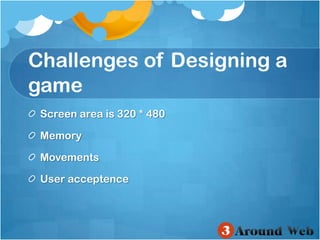
Challenges of Designing a gameScreen area is 320 * 480 MemoryMovementsUser acceptence
New Era of GamesResponsiveSocialGamingMultiplayergamesNetwork GamesMobile Games
Games vs Application
Download Cocos2dDownload from http://www.cocos2d-iphone.org/downloadUnzip Downloaded Zip/Developer/Platforms/iPhoneOS.platform/Developer/Library/Xcode/Project Templates/Application/
IN GAMES THINGS ALWAYS MOVE
Lets Start Building!!NO
Think!! Think!! Think!!
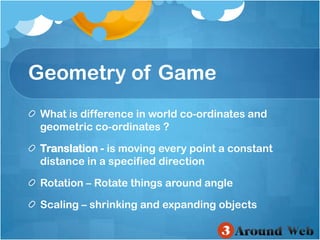
Geometry of GameWhat is difference in world co-ordinates and geometric co-ordinates ?Translation -is moving every point a constant distance in a specified direction Rotation – Rotate things around angle Scaling – shrinking and expanding objects
You Look good in Geometry But we are building games?
Sprites
Game EngineRigid Bodies-A rigid body holds the physical properties of an object Collision Shapes-By attaching shapes to bodies, you can define the a body’s shape. Constraints/Joints-Constraints and joints describe how bodies are attached to each other Spaces-Spaces are the basic simulation unit
TechnologyCocoas2d with ChipmunkCocoas2d with Box2d
Some ConceptsScenes - A scene (implemented with the CCScene object) is more or less an independent piece of the app workflow Director - The CCDirector is the component which takes care of going back and forth between scenes
Some ConceptsLayers - A CCLayer has a size of the whole drawable area, and knows how to draw itself SpritesActions  - Actions are like orders given to any CCNode object. These actions usually modify some of the object's attributes like position, rotation, scale, etc.
Lets Start Building!!What?Where?How?
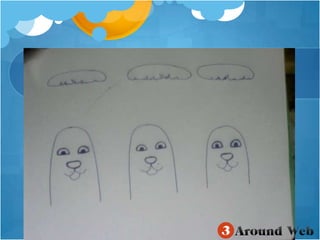
What? Punch a Mole
Where?Iphone ,Ipod ,Ipad320 × 480 (iPhone/iPod touch)640 × 960 (iPhone 4 and iPod with Retina display)768 × 1024 / 1024 × 768 (iPad)
Where?Retina Display - Add double-sized sprites to your app, but instead of using the “@2x” extension, you use an “-hd” extension for Cocos2D. When loading your sprites, use normal name (without the “-hd” extension) – Cocos2D will automatically load the hd images on the Retina display
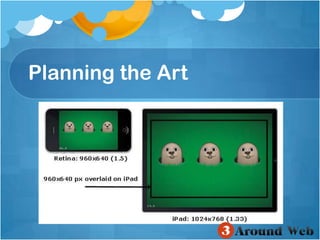
How?Planning the Art
Planning the Art
Setting the BackgroundDetermine names of sprite sheets (go to code)Load background and foreground (go to code)Add background  (go to code)Add foreground (go to code)
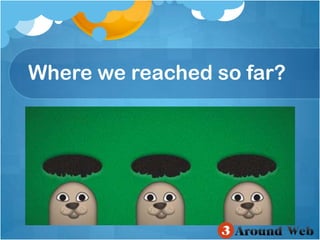
Where we reached so far?
Placing the moleNSMutableArray *moles;Loadmolesprites (gotocode)ConvertpointforIpad (gotocode)Popping the Moles (gotocode)
Where we reached so far?
Defining AnimationsAdding animation sprite of laugh like -[animFramesaddObject:[[CCSpriteFrameCachesharedSpriteFrameCache]spriteFrameByName:@"myImage.png"]];Laughing Animation1, Laughing Animation2, Laughing Animation3 (go to code)
Laugh AnimationWe need to add All Images for laugh animation?NO
Laugh AnimationWe will use Pliststo load using animationFromPlist
Laugh AnimationAdding laugh animation to main Init method (go to code)When mole is going to laugh?Are we done?
Game logicAdd Below variables to .h file CCLabelTTF*label; intscore; inttotalSpawns; BOOLgameOver;
Game LogicDefine scoreboard for Application(go to code)Convert font-size according to deviceWhen to kick a mole?How to tap?Adding sound effects
Where we reached so far?Just Run the Code
We Did it !!Hip Hip Hooray!!
The Game Design DocumentGame SummaryGame settingGame play: controls and user interfaceLevelmap and SoundEffectsGame System/Engine

Iphone game developement - In a game things always move

  • 1.
  • 2.
    Building a Gameis like Taking a Dream into actionWe are the Bridge between the human imagination and the implementationGame build by you is like your WorldWe drag user to our world
  • 3.
    The Game VisionNoone is dependent on game but everyone find time to playSimple user interfacesimplicity = beauty (how things look) + elegance (how things work)
  • 4.
    Challenges of Designinga gameScreen area is 320 * 480 MemoryMovementsUser acceptence
  • 5.
    New Era ofGamesResponsiveSocialGamingMultiplayergamesNetwork GamesMobile Games
  • 6.
  • 7.
    Download Cocos2dDownload fromhttp://www.cocos2d-iphone.org/downloadUnzip Downloaded Zip/Developer/Platforms/iPhoneOS.platform/Developer/Library/Xcode/Project Templates/Application/
  • 8.
    IN GAMES THINGSALWAYS MOVE
  • 9.
  • 10.
  • 11.
    Geometry of GameWhatis difference in world co-ordinates and geometric co-ordinates ?Translation -is moving every point a constant distance in a specified direction Rotation – Rotate things around angle Scaling – shrinking and expanding objects
  • 12.
    You Look goodin Geometry But we are building games?
  • 13.
  • 14.
    Game EngineRigid Bodies-Arigid body holds the physical properties of an object Collision Shapes-By attaching shapes to bodies, you can define the a body’s shape. Constraints/Joints-Constraints and joints describe how bodies are attached to each other Spaces-Spaces are the basic simulation unit
  • 15.
  • 16.
    Some ConceptsScenes -A scene (implemented with the CCScene object) is more or less an independent piece of the app workflow Director - The CCDirector is the component which takes care of going back and forth between scenes
  • 17.
    Some ConceptsLayers -A CCLayer has a size of the whole drawable area, and knows how to draw itself SpritesActions - Actions are like orders given to any CCNode object. These actions usually modify some of the object's attributes like position, rotation, scale, etc.
  • 18.
  • 19.
  • 21.
    Where?Iphone ,Ipod ,Ipad320× 480 (iPhone/iPod touch)640 × 960 (iPhone 4 and iPod with Retina display)768 × 1024 / 1024 × 768 (iPad)
  • 22.
    Where?Retina Display -Add double-sized sprites to your app, but instead of using the “@2x” extension, you use an “-hd” extension for Cocos2D. When loading your sprites, use normal name (without the “-hd” extension) – Cocos2D will automatically load the hd images on the Retina display
  • 23.
  • 24.
  • 25.
    Setting the BackgroundDeterminenames of sprite sheets (go to code)Load background and foreground (go to code)Add background (go to code)Add foreground (go to code)
  • 26.
  • 27.
    Placing the moleNSMutableArray*moles;Loadmolesprites (gotocode)ConvertpointforIpad (gotocode)Popping the Moles (gotocode)
  • 28.
  • 29.
    Defining AnimationsAdding animationsprite of laugh like -[animFramesaddObject:[[CCSpriteFrameCachesharedSpriteFrameCache]spriteFrameByName:@"myImage.png"]];Laughing Animation1, Laughing Animation2, Laughing Animation3 (go to code)
  • 30.
    Laugh AnimationWe needto add All Images for laugh animation?NO
  • 31.
    Laugh AnimationWe willuse Pliststo load using animationFromPlist
  • 32.
    Laugh AnimationAdding laughanimation to main Init method (go to code)When mole is going to laugh?Are we done?
  • 33.
    Game logicAdd Belowvariables to .h file CCLabelTTF*label; intscore; inttotalSpawns; BOOLgameOver;
  • 34.
    Game LogicDefine scoreboardfor Application(go to code)Convert font-size according to deviceWhen to kick a mole?How to tap?Adding sound effects
  • 35.
    Where we reachedso far?Just Run the Code
  • 36.
    We Did it!!Hip Hip Hooray!!
  • 37.
    The Game DesignDocumentGame SummaryGame settingGame play: controls and user interfaceLevelmap and SoundEffectsGame System/Engine