iOS Game
Development with UIKit
Martin Grider
@livingtech
http://abstractpuzzle.com/ ~ http://chesstris.com/
September 30, 2015
Overview
• Who am I?
• Apple native game technologies
• UIKit Game Opinions
• Me & UIKit Games
• About GenericGameModel
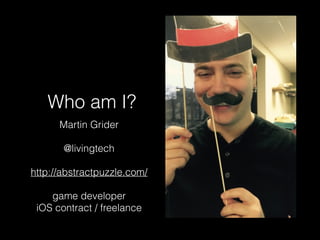
Who am I?
Martin Grider
@livingtech
http://abstractpuzzle.com/
game developer
iOS contract / freelance
IGDATC
• International Game
Developer’s Association (Twin
Cities)
• http://igdatc.org/
Why UIKit?
Got to have the Skillz to Pay the Bills!
• My Business: 

I specialize in all native iOS development!
• Definitely Not: Android, Phone Gap, Java, PHP
• …and now not: Swift (maybe someday?!?)
• Quality: 

10,000 hours to mastery (maybe debunked*)
• Enjoyment: 

I do what I love.
* http://www.popsci.com/article/science/practice-not-important-thought-success-study-says
I ❤ UIKit ..?
• Yes! Maybe.
• Maybe I’m just lazy.
• But it is very fast to prototype some games in UIKit.
• Also: UIKit is the oldest iOS API. Examples are easy
to come by, and it’s relatively stable and easy to
learn.
Apple Native Game
Technologies
Metal
• Hardware-specific graphics API
• Introduced in iOS 8
• Closest to the “metal” (CPU / GPU)
• Uses a custom shader language
• Best performance possible in iOS
Open GL (ES)
• Open Graphics Library (for Embedded Systems)
• Cross-platform

(this is what ran underneath iOS before Metal)
• Also extremely low-level
Metal / OpenGL ES
• Both are fundamentally similar
• Useful to know how these work, because they
are running “underneath” most game
frameworks
• But these are APIs for the framework developers

(probably not you)
SpriteKit
• A 2D framework for drawing images (sprites)
• (You can also draw text, path-based shapes,
and video.)
• Probably loosely based on Cocos2D

(without nearly as many features)
• Physics
SceneKit
• 3D framework for drawing 3D models

(also to an OpenGL view)
• New to iOS in 8
• Some really nice debugging tools
SpriteKit & SceneKit
• Main advantage to these is flexibility /
interoperation with other iOS APIs 

(Core Image, Core Animation, etc.)
• So if ^^^ is not you, there are other more flexible
options.


Note that I will be arguing later, weakly, in favor of UIKit instead of SpriteKit.
(It is not a replacement for 3D, however. Unity or Unreal are a better fit there.)
GameKit, aka Game Center
• Leaderboards
• Achievements
• Challenges
• Multiplayer (real-time and asynchronous)
• iCloud saved games as of iOS 8
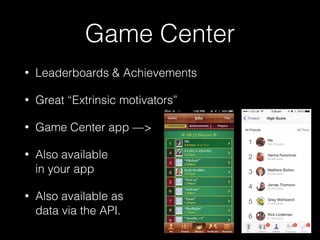
Game Center
• Leaderboards & Achievements
• Great “Extrinsic motivators”
• Game Center app —>
• Also available

in your app
• Also available as 

data via the API.
Game Center
• Challenges


SPAM!
Game Center
• Multiplayer options:
• Real-time match making
• helps with making the multiplayer connection, (local or
internet)
• Asynchronous game match making
• game data stored in Game Center
• All options are very flexible for how many players are allowed, and allow
“segmenting” so you can invite a particular subset of players, or
specific Game Center Users.
• All options allow for either using some built-in View controllers, or doing
the matchmaking programmatically.
GCController
• Physical Controller API
• Supports iOS bluetooth controllers
• Supports Polling for state or change Events
• Will work with new Apple TV (including the
remote!)
GamePlayKit
• New in iOS 9
• GameplayKit Programming Guide contains links to lots of sample
code.
• New classes to help with:
• Entity / Component architecture
• State machines
• Rule Systems
• Minmax AI
• AI behaviors (agents/goals/pathfinding)
ReplayKit
• Share gameplay videos with social media
• New in iOS 9
• (Not compatible with AVPlayer)
UIKit
• Highest level Drawing / UI API
• Includes many “built-in” controls

(buttons, sliders, tables, etc.)
• Gesture Recognizers
• UIView animateWith… API for motion
• Doesn't preclude using Core Graphics / Quartz
Core Graphics / Quartz
• Basically interchangeable terms for the “layers” that back
UIView drawing
• All UIView objects have a CALayer .layer property
• Compossible Animations
• Path-based drawing
• Transformations
• Bitmap rendering — including offscreen!
• “easy” shadows, gradients, particles
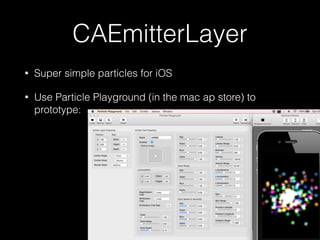
CAEmitterLayer
• Super simple particles for iOS
• Use Particle Playground (in the mac ap store) to
prototype:


UIView Animations
• animateWith… family of methods
• provide a way to animate view properties based on a specific
amount of time

(can animate the following: frame, bounds, center, transform, alpha,
backgroundColor, contentStretch)
• Block-based callbacks for completion
• Dynamics: provide some “juiciness” via simple physics
• Pro tip: When things start jumping around check the options
• Note: you can also animate constraints (if that’s your thing)
• Lots of “helpers” out there…
UIView Animation Helpers
• JazzHands — from If This Then That
• keyframes & combining animations
• can “lock” animations to a scroll view (or your own property/counter!)
• JHChainableAnimations — for readable animations!
• POP — from Facebook
• Also see AGGeometryKit+POP
• AHEasing — Awesome set of easing functions
• Squash — Brings traditional video animation techniques to UIView 

(https://github.com/Spaceman-Labs/Squash)
Cocapods
• ObjectAL-for-iPhone — everything audio
• GooglePlayGames — for Google Play
leaderboards / achievements / etc.

(There is even a “Game Center co-existence Guide” here: https://
developers.google.com/games/services/ios/gameCenter)
• GenericGameModel — my own small lib for grid-
based games

(More about this later!)
• Others..?
UIKit Game Opinions
Why UIKit?
• Actually: “Why not any of the previously
discussed API or frameworks?”
• Essentially, there are better alternatives, mostly
• For 3D: Unity, Unreal
• For 2D: Unity, HAXE, OpenFrameworks, Moai
• These are easier, more cross-platform, less
half-assed
Understand the Game Loop
• Every game has a loop. Ideally, a loop runs 30-60
times a second, and handles:
• Update
• looks at events and input
• updates game state
• Draw
• renders from Game State
Game Loop, Continued
• Drawbacks:
• Need to handle the case where it isn’t exactly your
target frame rate
• Need to be “smart” about what you do in the loop, it’s
very easy to do everything (calculate and render)
every frame, and this will heat up the device
• Without using some kind of animation manager, you
need to manage animations yourself (Worth noting
that SpriteKit and other frameworks do usually
provide this sort of thing for you)
Game Loop Alternative
• Worth noting that iOS apps are already running in a “game
loop”, the run loop (NSRunLoop)
• In it, everything is event-based:
• Responding to touches
• Responding to button (UIResponder) events
• “Schedule” animations, Apple’s frameworks handle easing
• You can also “schedule” game updates, if you want / need
to, using dispatch_async()
UIKit Game Types
• Event driven — Turn-based, board games,
simple puzzle games
• Data Driven — trivia or word games
• Location or Map-based games — typically using
one of the map frameworks
• Others?
Me & UIKit Games
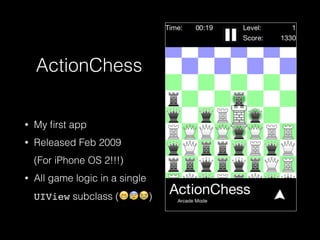
ActionChess
• My first app
• Released Feb 2009

(For iPhone OS 2!!!)
• All game logic in a single
UIView subclass (😁😰😭)
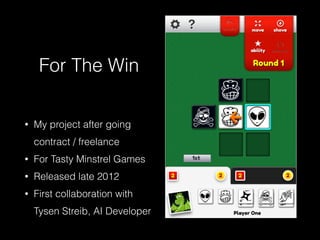
For The Win
• My project after going
contract / freelance
• For Tasty Minstrel Games
• Released late 2012
• First collaboration with
Tysen Streib, AI Developer
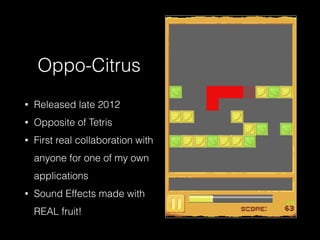
Oppo-Citrus
• Released late 2012
• Opposite of Tetris
• First real collaboration with
anyone for one of my own
applications
• Sound Effects made with 

REAL fruit!
Enter GenericGameModel
• Common themes in previous games:
• coordinate / grid-based games
• "stateful" grid elements
• minimal animations required
• Began work on GGM during the Overnight
Game Jam at 360iDev in September 2012
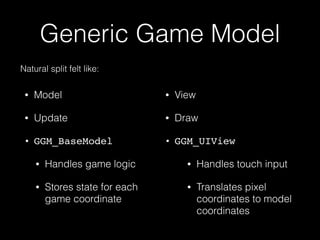
Generic Game Model
• Model
• Update
• GGM_BaseModel
• Handles game logic
• Stores state for each
game coordinate

• View
• Draw
• GGM_UIView
• Handles touch input
• Translates pixel
coordinates to model
coordinates
Natural split felt like:
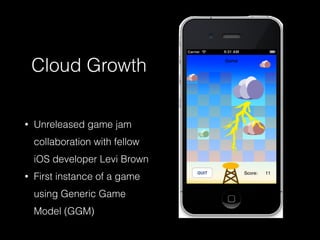
Cloud Growth
• Unreleased game jam
collaboration with fellow
iOS developer Levi Brown
• First instance of a game
using Generic Game
Model (GGM)
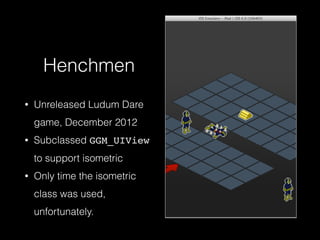
Henchmen
• Unreleased Ludum Dare
game, December 2012
• Subclassed GGM_UIView
to support isometric
• Only time the isometric
class was used,
unfortunately.
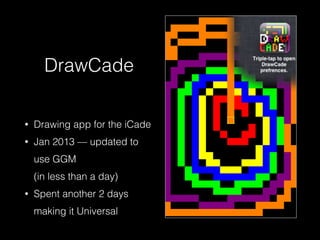
DrawCade
• Drawing app for the iCade
• Jan 2013 — updated to
use GGM 

(in less than a day)
• Spent another 2 days
making it Universal
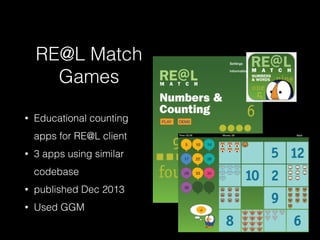
RE@L Match
Games
• Educational counting 

apps for RE@L client
• 3 apps using similar
codebase
• published Dec 2013
• Used GGM
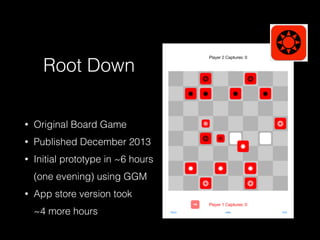
Root Down
• Original Board Game
• Published December 2013
• Initial prototype in ~6 hours
(one evening) using GGM
• App store version took

~4 more hours
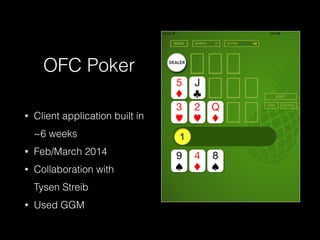
OFC Poker
• Client application built in
~6 weeks
• Feb/March 2014
• Collaboration with 

Tysen Streib
• Used GGM
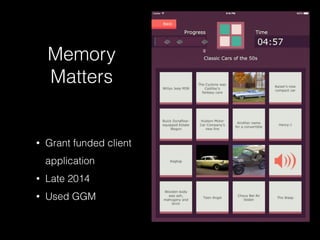
Memory
Matters
• Grant funded client
application
• Late 2014
• Used GGM
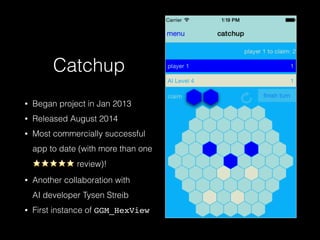
Catchup
• Began project in Jan 2013
• Released August 2014
• Most commercially successful
app to date (with more than one

⭐️⭐️⭐️⭐️⭐️ review)!
• Another collaboration with 

AI developer Tysen Streib
• First instance of GGM_HexView
Other Misc GGM Stuff
• I have “experimented” with porting GGM_UIView
to use SpriteKit
• Lost steam after discovering its poor
performance in the iOS simulator
• Triangle games experiments
• Moving toward more “built-in” functionality
• Have removed its single dependency
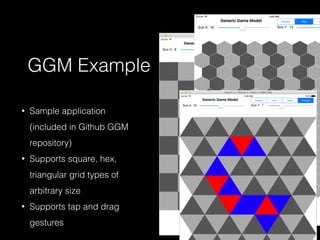
GGM Example
• Sample application 

(included in Github GGM
repository)
• Supports square, hex,
triangular grid types of
arbitrary size
• Supports tap and drag
gestures
What’s next for GGM?
• More prototypes! (Obviously)
• Possibly more grid types
• More platforms
• possibly porting this to another framework

(current front-runners are OpenFL or OpenFrameworks)
• tvOS
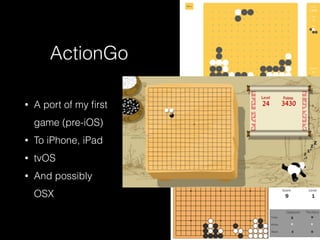
ActionGo
• A port of my first
game (pre-iOS)
• To iPhone, iPad
• tvOS
• And possibly
OSX
Questions?
References
• http://developer.apple.com/metal
• http://developer.apple.com/spritekit
• http://developer.apple.com/scenekit
• https://developer.apple.com/library/ios/documentation/General/Conceptual/
GameplayKit_Guide/ & https://developer.apple.com/library/prerelease/
mac/documentation/GameplayKit/Reference/GameplayKit_Framework
• Particle Playground: https://itunes.apple.com/us/app/particle-playground/
id600661093?mt=12
• Nice intro to SceneKit: https://www.objc.io/issues/18-games/scenekit/
• Generic Game Model: https://github.com/mgrider/GenericGameModel

iOS Game Development With UIKit

  • 1.
    iOS Game Development withUIKit Martin Grider @livingtech http://abstractpuzzle.com/ ~ http://chesstris.com/ September 30, 2015
  • 2.
    Overview • Who amI? • Apple native game technologies • UIKit Game Opinions • Me & UIKit Games • About GenericGameModel
  • 3.
    Who am I? MartinGrider @livingtech http://abstractpuzzle.com/ game developer iOS contract / freelance
  • 4.
    IGDATC • International Game Developer’sAssociation (Twin Cities) • http://igdatc.org/
  • 5.
    Why UIKit? Got tohave the Skillz to Pay the Bills! • My Business: 
 I specialize in all native iOS development! • Definitely Not: Android, Phone Gap, Java, PHP • …and now not: Swift (maybe someday?!?) • Quality: 
 10,000 hours to mastery (maybe debunked*) • Enjoyment: 
 I do what I love. * http://www.popsci.com/article/science/practice-not-important-thought-success-study-says
  • 6.
    I ❤ UIKit..? • Yes! Maybe. • Maybe I’m just lazy. • But it is very fast to prototype some games in UIKit. • Also: UIKit is the oldest iOS API. Examples are easy to come by, and it’s relatively stable and easy to learn.
  • 7.
  • 8.
    Metal • Hardware-specific graphicsAPI • Introduced in iOS 8 • Closest to the “metal” (CPU / GPU) • Uses a custom shader language • Best performance possible in iOS
  • 9.
    Open GL (ES) •Open Graphics Library (for Embedded Systems) • Cross-platform
 (this is what ran underneath iOS before Metal) • Also extremely low-level
  • 10.
    Metal / OpenGLES • Both are fundamentally similar • Useful to know how these work, because they are running “underneath” most game frameworks • But these are APIs for the framework developers
 (probably not you)
  • 11.
    SpriteKit • A 2Dframework for drawing images (sprites) • (You can also draw text, path-based shapes, and video.) • Probably loosely based on Cocos2D
 (without nearly as many features) • Physics
  • 12.
    SceneKit • 3D frameworkfor drawing 3D models
 (also to an OpenGL view) • New to iOS in 8 • Some really nice debugging tools
  • 13.
    SpriteKit & SceneKit •Main advantage to these is flexibility / interoperation with other iOS APIs 
 (Core Image, Core Animation, etc.) • So if ^^^ is not you, there are other more flexible options.
 
 
 Note that I will be arguing later, weakly, in favor of UIKit instead of SpriteKit.
 (It is not a replacement for 3D, however. Unity or Unreal are a better fit there.)
  • 14.
    GameKit, aka GameCenter • Leaderboards • Achievements • Challenges • Multiplayer (real-time and asynchronous) • iCloud saved games as of iOS 8
  • 15.
    Game Center • Leaderboards& Achievements • Great “Extrinsic motivators” • Game Center app —> • Also available
 in your app • Also available as 
 data via the API.
  • 16.
  • 17.
    Game Center • Multiplayeroptions: • Real-time match making • helps with making the multiplayer connection, (local or internet) • Asynchronous game match making • game data stored in Game Center • All options are very flexible for how many players are allowed, and allow “segmenting” so you can invite a particular subset of players, or specific Game Center Users. • All options allow for either using some built-in View controllers, or doing the matchmaking programmatically.
  • 18.
    GCController • Physical ControllerAPI • Supports iOS bluetooth controllers • Supports Polling for state or change Events • Will work with new Apple TV (including the remote!)
  • 19.
    GamePlayKit • New iniOS 9 • GameplayKit Programming Guide contains links to lots of sample code. • New classes to help with: • Entity / Component architecture • State machines • Rule Systems • Minmax AI • AI behaviors (agents/goals/pathfinding)
  • 20.
    ReplayKit • Share gameplayvideos with social media • New in iOS 9 • (Not compatible with AVPlayer)
  • 21.
    UIKit • Highest levelDrawing / UI API • Includes many “built-in” controls
 (buttons, sliders, tables, etc.) • Gesture Recognizers • UIView animateWith… API for motion • Doesn't preclude using Core Graphics / Quartz
  • 22.
    Core Graphics /Quartz • Basically interchangeable terms for the “layers” that back UIView drawing • All UIView objects have a CALayer .layer property • Compossible Animations • Path-based drawing • Transformations • Bitmap rendering — including offscreen! • “easy” shadows, gradients, particles
  • 23.
    CAEmitterLayer • Super simpleparticles for iOS • Use Particle Playground (in the mac ap store) to prototype:


  • 24.
    UIView Animations • animateWith…family of methods • provide a way to animate view properties based on a specific amount of time
 (can animate the following: frame, bounds, center, transform, alpha, backgroundColor, contentStretch) • Block-based callbacks for completion • Dynamics: provide some “juiciness” via simple physics • Pro tip: When things start jumping around check the options • Note: you can also animate constraints (if that’s your thing) • Lots of “helpers” out there…
  • 25.
    UIView Animation Helpers •JazzHands — from If This Then That • keyframes & combining animations • can “lock” animations to a scroll view (or your own property/counter!) • JHChainableAnimations — for readable animations! • POP — from Facebook • Also see AGGeometryKit+POP • AHEasing — Awesome set of easing functions • Squash — Brings traditional video animation techniques to UIView 
 (https://github.com/Spaceman-Labs/Squash)
  • 26.
    Cocapods • ObjectAL-for-iPhone —everything audio • GooglePlayGames — for Google Play leaderboards / achievements / etc.
 (There is even a “Game Center co-existence Guide” here: https:// developers.google.com/games/services/ios/gameCenter) • GenericGameModel — my own small lib for grid- based games
 (More about this later!) • Others..?
  • 27.
  • 28.
    Why UIKit? • Actually:“Why not any of the previously discussed API or frameworks?” • Essentially, there are better alternatives, mostly • For 3D: Unity, Unreal • For 2D: Unity, HAXE, OpenFrameworks, Moai • These are easier, more cross-platform, less half-assed
  • 29.
    Understand the GameLoop • Every game has a loop. Ideally, a loop runs 30-60 times a second, and handles: • Update • looks at events and input • updates game state • Draw • renders from Game State
  • 30.
    Game Loop, Continued •Drawbacks: • Need to handle the case where it isn’t exactly your target frame rate • Need to be “smart” about what you do in the loop, it’s very easy to do everything (calculate and render) every frame, and this will heat up the device • Without using some kind of animation manager, you need to manage animations yourself (Worth noting that SpriteKit and other frameworks do usually provide this sort of thing for you)
  • 31.
    Game Loop Alternative •Worth noting that iOS apps are already running in a “game loop”, the run loop (NSRunLoop) • In it, everything is event-based: • Responding to touches • Responding to button (UIResponder) events • “Schedule” animations, Apple’s frameworks handle easing • You can also “schedule” game updates, if you want / need to, using dispatch_async()
  • 32.
    UIKit Game Types •Event driven — Turn-based, board games, simple puzzle games • Data Driven — trivia or word games • Location or Map-based games — typically using one of the map frameworks • Others?
  • 33.
  • 34.
    ActionChess • My firstapp • Released Feb 2009
 (For iPhone OS 2!!!) • All game logic in a single UIView subclass (😁😰😭)
  • 35.
    For The Win •My project after going contract / freelance • For Tasty Minstrel Games • Released late 2012 • First collaboration with Tysen Streib, AI Developer
  • 36.
    Oppo-Citrus • Released late2012 • Opposite of Tetris • First real collaboration with anyone for one of my own applications • Sound Effects made with 
 REAL fruit!
  • 37.
    Enter GenericGameModel • Commonthemes in previous games: • coordinate / grid-based games • "stateful" grid elements • minimal animations required • Began work on GGM during the Overnight Game Jam at 360iDev in September 2012
  • 38.
    Generic Game Model •Model • Update • GGM_BaseModel • Handles game logic • Stores state for each game coordinate
 • View • Draw • GGM_UIView • Handles touch input • Translates pixel coordinates to model coordinates Natural split felt like:
  • 39.
    Cloud Growth • Unreleasedgame jam collaboration with fellow iOS developer Levi Brown • First instance of a game using Generic Game Model (GGM)
  • 40.
    Henchmen • Unreleased LudumDare game, December 2012 • Subclassed GGM_UIView to support isometric • Only time the isometric class was used, unfortunately.
  • 41.
    DrawCade • Drawing appfor the iCade • Jan 2013 — updated to use GGM 
 (in less than a day) • Spent another 2 days making it Universal
  • 42.
    RE@L Match Games • Educationalcounting 
 apps for RE@L client • 3 apps using similar codebase • published Dec 2013 • Used GGM
  • 43.
    Root Down • OriginalBoard Game • Published December 2013 • Initial prototype in ~6 hours (one evening) using GGM • App store version took
 ~4 more hours
  • 44.
    OFC Poker • Clientapplication built in ~6 weeks • Feb/March 2014 • Collaboration with 
 Tysen Streib • Used GGM
  • 45.
    Memory Matters • Grant fundedclient application • Late 2014 • Used GGM
  • 46.
    Catchup • Began projectin Jan 2013 • Released August 2014 • Most commercially successful app to date (with more than one
 ⭐️⭐️⭐️⭐️⭐️ review)! • Another collaboration with 
 AI developer Tysen Streib • First instance of GGM_HexView
  • 47.
    Other Misc GGMStuff • I have “experimented” with porting GGM_UIView to use SpriteKit • Lost steam after discovering its poor performance in the iOS simulator • Triangle games experiments • Moving toward more “built-in” functionality • Have removed its single dependency
  • 48.
    GGM Example • Sampleapplication 
 (included in Github GGM repository) • Supports square, hex, triangular grid types of arbitrary size • Supports tap and drag gestures
  • 49.
    What’s next forGGM? • More prototypes! (Obviously) • Possibly more grid types • More platforms • possibly porting this to another framework
 (current front-runners are OpenFL or OpenFrameworks) • tvOS
  • 50.
    ActionGo • A portof my first game (pre-iOS) • To iPhone, iPad • tvOS • And possibly OSX
  • 51.
  • 52.
    References • http://developer.apple.com/metal • http://developer.apple.com/spritekit •http://developer.apple.com/scenekit • https://developer.apple.com/library/ios/documentation/General/Conceptual/ GameplayKit_Guide/ & https://developer.apple.com/library/prerelease/ mac/documentation/GameplayKit/Reference/GameplayKit_Framework • Particle Playground: https://itunes.apple.com/us/app/particle-playground/ id600661093?mt=12 • Nice intro to SceneKit: https://www.objc.io/issues/18-games/scenekit/ • Generic Game Model: https://github.com/mgrider/GenericGameModel