MODULE 1

NETWORKS AND THE
    INTERNET
  THE INTERNET

Introduction to the
     Internet
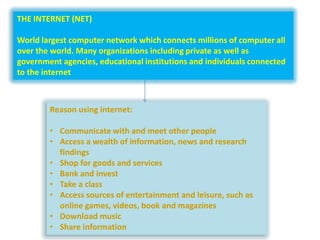
THE INTERNET (NET)

World largest computer network which connects millions of computer all
over the world. Many organizations including private as well as
government agencies, educational institutions and individuals connected
to the internet


        Reason using internet:

        • Communicate with and meet other people
        • Access a wealth of information, news and research
          findings
        • Shop for goods and services
        • Bank and invest
        • Take a class
        • Access sources of entertainment and leisure, such as
          online games, videos, book and magazines
        • Download music
        • Share information
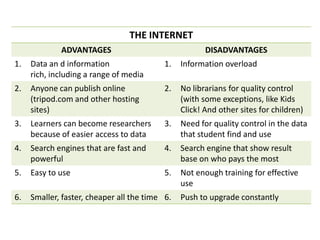
THE INTERNET
             ADVANTAGES                                DISADVANTAGES
1.   Data an d information                 1.   Information overload
     rich, including a range of media
2.   Anyone can publish online             2.   No librarians for quality control
     (tripod.com and other hosting              (with some exceptions, like Kids
     sites)                                     Click! And other sites for children)
3.   Learners can become researchers       3.   Need for quality control in the data
     because of easier access to data           that student find and use
4.   Search engines that are fast and      4.   Search engine that show result
     powerful                                   base on who pays the most
5.   Easy to use                           5.   Not enough training for effective
                                                use
6.   Smaller, faster, cheaper all the time 6.   Push to upgrade constantly
INTERNET REQUIREMENTS


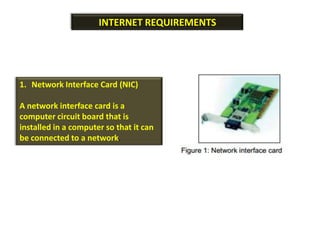
1. Network Interface Card (NIC)

A network interface card is a
computer circuit board that is
installed in a computer so that it can
be connected to a network.
a) Direct Access

                                       User computers are directly
                                       connected to the internet
                                       through a local network
2. Access Account                      server.

New subscriber needs to subscribe
for an account from the service
provider (ISP). There are several
listed internet service providers in
Malaysia such as JARING, TELEKOM       b) Dial-Up
MALAYSIA-TM net, MAXIS-maxis.net
and TIME.COM-time.net.                 Accessing the internet is
                                       made by making a call
                                       through the telephone line to
                                       the ISP
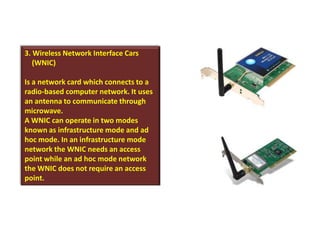
3. Wireless Network Interface Cars
   (WNIC)

Is a network card which connects to a
radio-based computer network. It uses
an antenna to communicate through
microwave.
A WNIC can operate in two modes
known as infrastructure mode and ad
hoc mode. In an infrastructure mode
network the WNIC needs an access
point while an ad hoc mode network
the WNIC does not require an access
point.
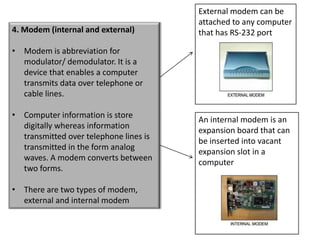
External modem can be
                                        attached to any computer
4. Modem (internal and external)        that has RS-232 port

• Modem is abbreviation for
  modulator/ demodulator. It is a
  device that enables a computer
  transmits data over telephone or
  cable lines.

• Computer information is store
                                        An internal modem is an
  digitally whereas information
                                        expansion board that can
  transmitted over telephone lines is
                                        be inserted into vacant
  transmitted in the form analog
                                        expansion slot in a
  waves. A modem converts between
                                        computer
  two forms.

• There are two types of modem,
  external and internal modem
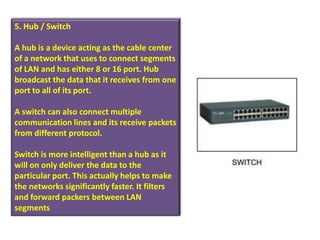
5. Hub / Switch

A hub is a device acting as the cable center
of a network that uses to connect segments
of LAN and has either 8 or 16 port. Hub
broadcast the data that it receives from one
port to all of its port.

A switch can also connect multiple
communication lines and its receive packets
from different protocol.

Switch is more intelligent than a hub as it
will on only deliver the data to the
particular port. This actually helps to make
the networks significantly faster. It filters
and forward packers between LAN
segments
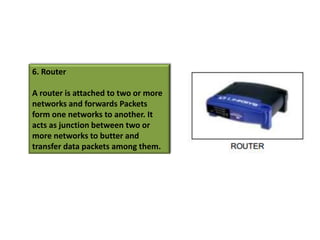
6. Router

A router is attached to two or more
networks and forwards Packets
form one networks to another. It
acts as junction between two or
more networks to butter and
transfer data packets among them.
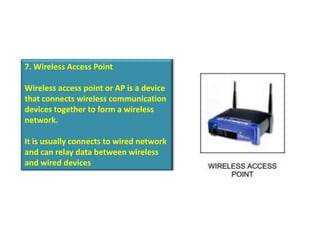
7. Wireless Access Point

Wireless access point or AP is a device
that connects wireless communication
devices together to form a wireless
network.

It is usually connects to wired network
and can relay data between wireless
and wired devices

Introduction to the internet

  • 1.
    MODULE 1 NETWORKS ANDTHE INTERNET THE INTERNET Introduction to the Internet
  • 2.
    THE INTERNET (NET) Worldlargest computer network which connects millions of computer all over the world. Many organizations including private as well as government agencies, educational institutions and individuals connected to the internet Reason using internet: • Communicate with and meet other people • Access a wealth of information, news and research findings • Shop for goods and services • Bank and invest • Take a class • Access sources of entertainment and leisure, such as online games, videos, book and magazines • Download music • Share information
  • 3.
    THE INTERNET ADVANTAGES DISADVANTAGES 1. Data an d information 1. Information overload rich, including a range of media 2. Anyone can publish online 2. No librarians for quality control (tripod.com and other hosting (with some exceptions, like Kids sites) Click! And other sites for children) 3. Learners can become researchers 3. Need for quality control in the data because of easier access to data that student find and use 4. Search engines that are fast and 4. Search engine that show result powerful base on who pays the most 5. Easy to use 5. Not enough training for effective use 6. Smaller, faster, cheaper all the time 6. Push to upgrade constantly
  • 4.
    INTERNET REQUIREMENTS 1. NetworkInterface Card (NIC) A network interface card is a computer circuit board that is installed in a computer so that it can be connected to a network.
  • 5.
    a) Direct Access User computers are directly connected to the internet through a local network 2. Access Account server. New subscriber needs to subscribe for an account from the service provider (ISP). There are several listed internet service providers in Malaysia such as JARING, TELEKOM b) Dial-Up MALAYSIA-TM net, MAXIS-maxis.net and TIME.COM-time.net. Accessing the internet is made by making a call through the telephone line to the ISP
  • 6.
    3. Wireless NetworkInterface Cars (WNIC) Is a network card which connects to a radio-based computer network. It uses an antenna to communicate through microwave. A WNIC can operate in two modes known as infrastructure mode and ad hoc mode. In an infrastructure mode network the WNIC needs an access point while an ad hoc mode network the WNIC does not require an access point.
  • 7.
    External modem canbe attached to any computer 4. Modem (internal and external) that has RS-232 port • Modem is abbreviation for modulator/ demodulator. It is a device that enables a computer transmits data over telephone or cable lines. • Computer information is store An internal modem is an digitally whereas information expansion board that can transmitted over telephone lines is be inserted into vacant transmitted in the form analog expansion slot in a waves. A modem converts between computer two forms. • There are two types of modem, external and internal modem
  • 8.
    5. Hub /Switch A hub is a device acting as the cable center of a network that uses to connect segments of LAN and has either 8 or 16 port. Hub broadcast the data that it receives from one port to all of its port. A switch can also connect multiple communication lines and its receive packets from different protocol. Switch is more intelligent than a hub as it will on only deliver the data to the particular port. This actually helps to make the networks significantly faster. It filters and forward packers between LAN segments
  • 9.
    6. Router A routeris attached to two or more networks and forwards Packets form one networks to another. It acts as junction between two or more networks to butter and transfer data packets among them.
  • 10.
    7. Wireless AccessPoint Wireless access point or AP is a device that connects wireless communication devices together to form a wireless network. It is usually connects to wired network and can relay data between wireless and wired devices