

Introduction to SLURM
Ismael Fernández Pavón Cristian Gomollón Escribano
08 / 10 / 2019
What is SLURM?
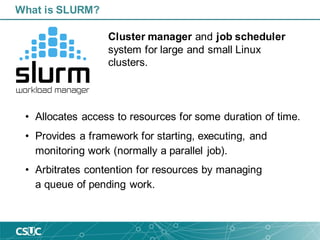
What is SLURM?
• Allocates access to resources for some duration of time.
• Provides a framework for starting, executing, and
monitoring work (normally a parallel job).
• Arbitrates contention for resources by managing
a queue of pending work.
Cluster manager and job scheduler
system for large and small Linux
clusters.
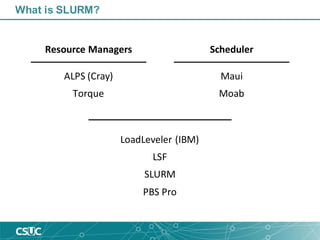
LoadLeveler (IBM)
LSF
SLURM
PBS Pro
Resource Managers Scheduler
What is SLURM?
ALPS (Cray)
Torque
Maui
Moab
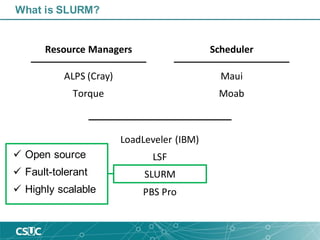
✓ Open source
✓ Fault-tolerant
✓ Highly scalable
LoadLeveler (IBM)
LSF
SLURM
PBS Pro
Resource Managers Scheduler
What is SLURM?
ALPS (Cray)
Torque
Maui
Moab
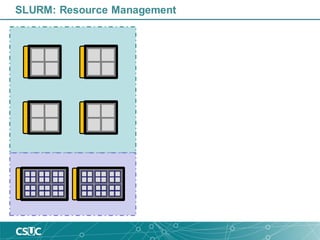
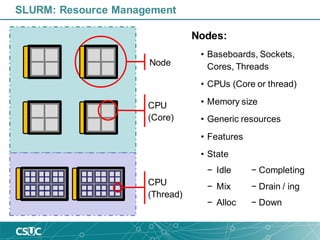
SLURM: Resource Management
Node
CPU
(Core)
CPU
(Thread)
SLURM: Resource Management
Nodes:
• Baseboards, Sockets,
Cores, Threads
• CPUs (Core or thread)
• Memory size
• Generic resources
• Features
• State
− Idle − Completing
− Mix − Drain / ing
− Alloc − Down
SLURM: Resource Management
Partitions:
• Associatedwith specific
set of nodes
• Nodes can be in more
than one partition
• Job size and time limits
• Access control list
• State information
− Up
− Drain
− Down
Partitions
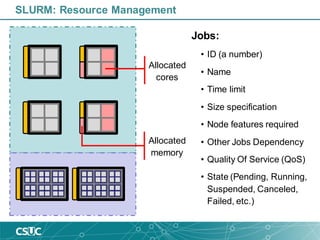
Allocated
cores
SLURM: Resource Management
Allocated
memory
Jobs:
• ID (a number)
• Name
• Time limit
• Size specification
• Node features required
• Other Jobs Dependency
• Quality Of Service (QoS)
• State (Pending, Running,
Suspended, Canceled,
Failed, etc.)
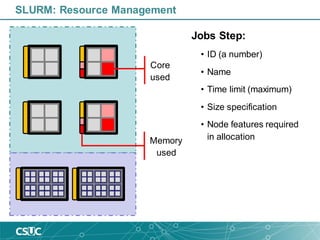
Core
used
SLURM: Resource Management
Memory
used
Jobs Step:
• ID (a number)
• Name
• Time limit (maximum)
• Size specification
• Node features required
in allocation
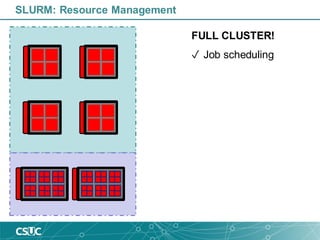
SLURM: Resource Management
FULL CLUSTER!
✓ Job scheduling
SLURM: Job Scheduling
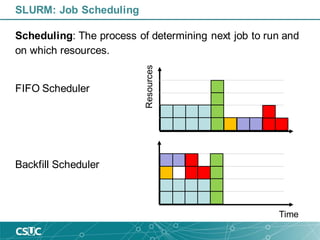
Scheduling: The process of determining next job to run and
on which resources.
FIFO Scheduler
Backfill Scheduler
Resources
Time
SLURM: Job Scheduling
Scheduling: The process of determining next job to run and
on which resources.
Backfill Scheduler:
• Based on the job request, resources available, and
policy limits imposed.
• Starts with job priority.
• Results in a resource allocation over a period.
SLURM: Job Scheduling
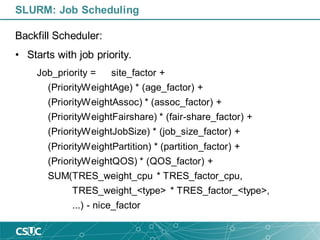
Backfill Scheduler:
• Starts with job priority.
Job_priority = site_factor +
(PriorityWeightAge) * (age_factor) +
(PriorityWeightAssoc) * (assoc_factor) +
(PriorityWeightFairshare) * (fair-share_factor) +
(PriorityWeightJobSize) * (job_size_factor) +
(PriorityWeightPartition) * (partition_factor) +
(PriorityWeightQOS) * (QOS_factor) +
SUM(TRES_weight_cpu * TRES_factor_cpu,
TRES_weight_<type> * TRES_factor_<type>,
...) - nice_factor
•sbatch – Submit a batch script to Slurm.
•salloc – Request resources to SLURM for an interactive
job.
•srun – Start a new job step.
•scancel – Cancel a job.
SLURM: Commands
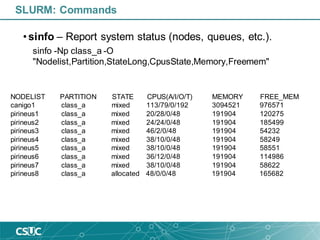
• sinfo – Report system status (nodes, queues, etc.).
PARTITION AVAIL TIMELIMIT NODES STATE NODELIST
rest up infinite 3 idle~ pirineusgpu[1-2],pirineusknl1
rest up infinite 1 idle canigo2
std* up infinite 11 idle~ pirineus[14,19-20,23,25-26,29-30,33-34,40]
std* up infinite 18 mix pirineus[13,15-16,18,21-22,27-28,35,38-39,41-45,48-49]
std* up infinite 7 alloc pirineus[17,24,31,36-37,46-47]
gpu up infinite 2 alloc pirineusgpu[3-4]
knl up infinite 3 idle~ pirineusknl[2-4]
mem up infinite 1 mix canigo1
class_a up infinite 8 mix canigo1,pirineus[1-7]
class_a up infinite 1 alloc pirineus8
class_b up infinite 8 mix canigo1,pirineus[1-7]
class_b up infinite 1 alloc pirineus8
class_c up infinite 8 mix canigo1,pirineus[1-7]
class_c up infinite 1 alloc pirineus8
std_curs up infinite 5 idle~ pirineus[9-12,50]
gpu_curs up infinite 2 idle~ pirineusgpu[1-2]
SLURM: Commands
• sinfo – Report system status (nodes, queues, etc.).
sinfo -Np class_a -O
"Nodelist,Partition,StateLong,CpusState,Memory,Freemem"
NODELIST PARTITION STATE CPUS(A/I/O/T) MEMORY FREE_MEM
canigo1 class_a mixed 113/79/0/192 3094521 976571
pirineus1 class_a mixed 20/28/0/48 191904 120275
pirineus2 class_a mixed 24/24/0/48 191904 185499
pirineus3 class_a mixed 46/2/0/48 191904 54232
pirineus4 class_a mixed 38/10/0/48 191904 58249
pirineus5 class_a mixed 38/10/0/48 191904 58551
pirineus6 class_a mixed 36/12/0/48 191904 114986
pirineus7 class_a mixed 38/10/0/48 191904 58622
pirineus8 class_a allocated 48/0/0/48 191904 165682
SLURM: Commands
1193936 std g09d1 upceqt04 PD 0:00 1 16 32G (Priority)
1195916 gpu A2B2_APO_n ubator01 PD 0:00 1 24 3900M (Priority)
1195915 gpu A2B2_APO_n ubator01 PD 0:00 1 24 3900M (Priority)
1195920 gpu A2B2_APO_n ubator01 PD 0:00 1 24 3900M (Priority)
1195927 gpu uncleaved_ ubator02 PD 0:00 1 24 3900M (Priority)
1195928 gpu uncleaved_ ubator02 PD 0:00 1 24 3900M (Priority)
1195929 gpu cleaved_wt ubator02 PD 0:00 1 24 3900M (Priority)
1138005 std U98-CuONN1 imoreira PD 0:00 1 12 3998M (Priority)
1195531 std g09d1 upceqt04 PD 0:00 1 16 32G (Priority)
1195532 std g09d1 upceqt04 PD 0:00 1 16 32G (Priority)
1195533 std g09d1 upceqt04 PD 0:00 1 16 32G (Priority)
1195536 std g09d1 upceqt04 PD 0:00 1 16 32G (Priority)
1195597 std sh gomollon R 20:04:04 4 24 6000M pirineus[31,38,44,47]
1195579 class_a rice crag49366 R 6:44:45 1 8 3998M pirineus5
1195576 class_a rice crag49366 R 6:36:48 1 8 3998M pirineus2
1195578 class_a rice crag49366 R 6:37:53 1 8 3998M pirineus4
• squeue – Report job and job step status.
SLURM: Commands
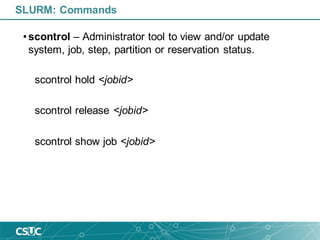
• scontrol – Administrator tool to view and/or update
system, job, step, partition or reservation status.
scontrol hold <jobid>
scontrol release <jobid>
scontrol show job <jobid>
SLURM: Commands
JobId=1195597 JobName=sh
UserId=gomollon(80128) GroupId=csuc(10000) MCS_label=N/A
Priority=100176 Nice=0 Account=csuc QOS=test
JobState=RUNNING Reason=None Dependency=(null)
Requeue=1 Restarts=0 BatchFlag=0 Reboot=0 ExitCode=0:0
RunTime=20:09:58 TimeLimit=5-00:00:00 TimeMin=N/A
SubmitTime=2019-10-07T12:21:29 EligibleTime=2019-10-07T12:21:29
StartTime=2019-10-07T12:21:29 EndTime=2019-10-12T12:21:30 Deadline=N/A
PreemptTime=None SuspendTime=None SecsPreSuspend=0
Partition=std AllocNode:Sid=login2:20262
ReqNodeList=(null) ExcNodeList=(null)
NodeList=pirineus[31,38,44,47]
BatchHost=pirineus31
NumNodes=4 NumCPUs=24 NumTasks=24 CPUs/Task=1 ReqB:S:C:T=0:0:*:*
TRES=cpu=24,mem=144000M,node=4
Socks/Node=* NtasksPerN:B:S:C=0:0:*:* CoreSpec=*
MinCPUsNode=1 MinMemoryCPU=6000M MinTmpDiskNode=0
Features=(null) Gres=(null) Reservation=(null)
OverSubscribe=OK Contiguous=0 Licenses=(null) Network=(null)
Command=(null)
WorkDir=/home/gomollon
Power=
SLURM: Commands
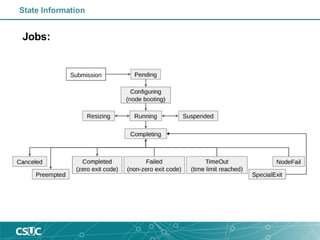
Jobs:
State Information
Enjoy SLURM!
How to launch jobs?
Login on CSUC infrastructure
• Login
ssh –p 2122 username@hpc.csuc.cat
• Transferfiles
scp -P 2122 local_file username@hpc.csuc.cat:[path to your folder]
sftp -oPort=2122 username@hpc.csuc.cat
• Useful paths
Name Variable Availability Quote/project Time limit Backup
/home/$user $HOME global 4 GB unlimited Yes
/scratch/$user $SCRATCH global unlimited 30 days No
/scratch/$user/tmp/jobid $TMPDIR Local to each node job file limit 1 week No
/tmp/$user/jobid $TMPDIR Local to each node job file limit 1 week No
• Get HC consumption
consum -a ‘any’ (group consumption)
consum -a ‘any’ -u ‘nom_usuari’ (user consumption)
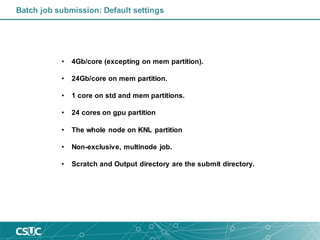
Batch job submission: Default settings
• 4Gb/core (excepting on mem partition).
• 24Gb/core on mem partition.
• 1 core on std and mem partitions.
• 24 cores on gpu partition
• The whole node on KNL partition
• Non-exclusive, multinode job.
• Scratch and Output directory are the submit directory.
Batch job submission
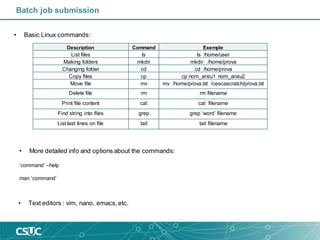
• Basic Linux commands:
Description Command Exemple
List files ls ls /home/user
Making folders mkdir mkdir /home/prova
Changing folder cd cd /home/prova
Copy files cp cp nom_arxiu1 nom_arxiu2
Move file mv mv /home/prova.txt /cescascratch/prova.txt
Delete file rm rm filename
Print file content cat cat filename
Find string into files grep grep ‘word’ filename
List last lines on file tail tail filename
• Text editors : vim, nano, emacs,etc.
• More detailed info and options about the commands:
‘command’ –help
man ‘command’
Scheduler directives/Options
• -c, --cpus-per-task=ncpus number of cpus required per task
• --gres=list required generic resources
• -J, --job-name=jobname name of job
• -n, --ntasks=ntasks number of tasks to run
• --ntasks-per-node=n number of tasks to invoke on each node
• -N, --nodes=N number of nodes on which to run (N = min[-max])
• -o, --output=out file for batch script's standard output
• -p, --partition=partition partition requested
• -t, --time=minutes time limit (format: dd-hh:mm)
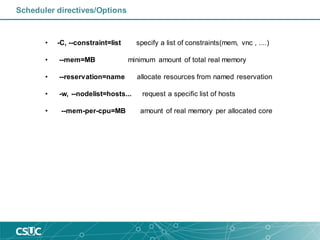
• -C, --constraint=list specify a list of constraints(mem, vnc , ....)
• --mem=MB minimum amount of total real memory
• --reservation=name allocate resources from named reservation
• -w, --nodelist=hosts... request a specific list of hosts
• --mem-per-cpu=MB amount of real memory per allocated core
Scheduler directives/Options
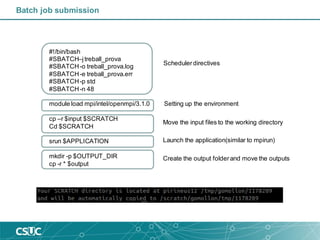
#!/bin/bash
#SBATCH–jtreball_prova
#SBATCH-o treball_prova.log
#SBATCH-e treball_prova.err
#SBATCH-p std
#SBATCH-n 48
module load mpi/intel/openmpi/3.1.0
cp –r $input $SCRATCH
Cd $SCRATCH
srun $APPLICATION
mkdir -p $OUTPUT_DIR
cp -r * $output
Batch job submission
Schedulerdirectives
Setting up the environment
Move the input files to the working directory
Launch the application(similar to mpirun)
Create the output folderand move the outputs
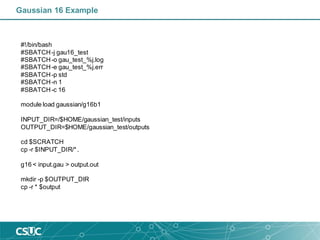
Gaussian 16 Example
#!/bin/bash
#SBATCH-j gau16_test
#SBATCH-o gau_test_%j.log
#SBATCH-e gau_test_%j.err
#SBATCH-p std
#SBATCH-n 1
#SBATCH-c 16
module load gaussian/g16b1
INPUT_DIR=/$HOME/gaussian_test/inputs
OUTPUT_DIR=$HOME/gaussian_test/outputs
cd $SCRATCH
cp -r $INPUT_DIR/*.
g16 < input.gau > output.out
mkdir -p $OUTPUT_DIR
cp -r * $output
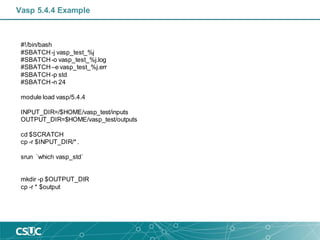
Vasp 5.4.4 Example
#!/bin/bash
#SBATCH-j vasp_test_%j
#SBATCH-o vasp_test_%j.log
#SBATCH–e vasp_test_%j.err
#SBATCH-p std
#SBATCH-n 24
module load vasp/5.4.4
INPUT_DIR=/$HOME/vasp_test/inputs
OUTPUT_DIR=$HOME/vasp_test/outputs
cd $SCRATCH
cp -r $INPUT_DIR/*.
srun `which vasp_std`
mkdir -p $OUTPUT_DIR
cp -r * $output
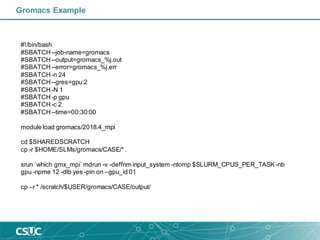
Gromacs Example
#!/bin/bash
#SBATCH--job-name=gromacs
#SBATCH--output=gromacs_%j.out
#SBATCH--error=gromacs_%j.err
#SBATCH-n 24
#SBATCH--gres=gpu:2
#SBATCH-N 1
#SBATCH-p gpu
#SBATCH-c 2
#SBATCH--time=00:30:00
module load gromacs/2018.4_mpi
cd $SHAREDSCRATCH
cp -r $HOME/SLMs/gromacs/CASE/*.
srun `which gmx_mpi`mdrun -v -deffnm input_system -ntomp $SLURM_CPUS_PER_TASK -nb
gpu -npme 12 -dlb yes -pin on –gpu_id 01
cp –r * /scratch/$USER/gromacs/CASE/output/
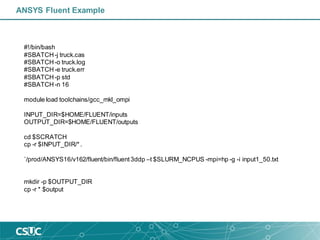
ANSYS Fluent Example
#!/bin/bash
#SBATCH-j truck.cas
#SBATCH-o truck.log
#SBATCH-e truck.err
#SBATCH-p std
#SBATCH-n 16
module load toolchains/gcc_mkl_ompi
INPUT_DIR=$HOME/FLUENT/inputs
OUTPUT_DIR=$HOME/FLUENT/outputs
cd $SCRATCH
cp -r $INPUT_DIR/*.
`/prod/ANSYS16/v162/fluent/bin/fluent3ddp –t $SLURM_NCPUS -mpi=hp -g -i input1_50.txt
mkdir -p $OUTPUT_DIR
cp -r * $output
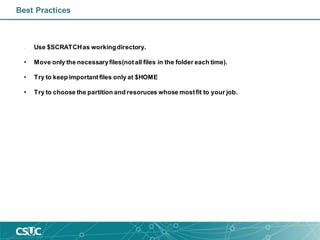
Best Practices
• Use $SCRATCHas workingdirectory.
• Move only the necessaryfiles(notall files in the folder each time).
• Try to keep importantfiles only at $HOME
• Try to choose the partition and resoruces whose mostfit to your job.

Introduction to SLURM

  • 1.
    Introduction to SLURM IsmaelFernández Pavón Cristian Gomollón Escribano 08 / 10 / 2019
  • 2.
  • 3.
    What is SLURM? •Allocates access to resources for some duration of time. • Provides a framework for starting, executing, and monitoring work (normally a parallel job). • Arbitrates contention for resources by managing a queue of pending work. Cluster manager and job scheduler system for large and small Linux clusters.
  • 4.
    LoadLeveler (IBM) LSF SLURM PBS Pro ResourceManagers Scheduler What is SLURM? ALPS (Cray) Torque Maui Moab
  • 5.
    ✓ Open source ✓Fault-tolerant ✓ Highly scalable LoadLeveler (IBM) LSF SLURM PBS Pro Resource Managers Scheduler What is SLURM? ALPS (Cray) Torque Maui Moab
  • 6.
  • 7.
    Node CPU (Core) CPU (Thread) SLURM: Resource Management Nodes: •Baseboards, Sockets, Cores, Threads • CPUs (Core or thread) • Memory size • Generic resources • Features • State − Idle − Completing − Mix − Drain / ing − Alloc − Down
  • 8.
    SLURM: Resource Management Partitions: •Associatedwith specific set of nodes • Nodes can be in more than one partition • Job size and time limits • Access control list • State information − Up − Drain − Down Partitions
  • 9.
    Allocated cores SLURM: Resource Management Allocated memory Jobs: •ID (a number) • Name • Time limit • Size specification • Node features required • Other Jobs Dependency • Quality Of Service (QoS) • State (Pending, Running, Suspended, Canceled, Failed, etc.)
  • 10.
    Core used SLURM: Resource Management Memory used JobsStep: • ID (a number) • Name • Time limit (maximum) • Size specification • Node features required in allocation
  • 11.
    SLURM: Resource Management FULLCLUSTER! ✓ Job scheduling
  • 12.
    SLURM: Job Scheduling Scheduling:The process of determining next job to run and on which resources. FIFO Scheduler Backfill Scheduler Resources Time
  • 13.
    SLURM: Job Scheduling Scheduling:The process of determining next job to run and on which resources. Backfill Scheduler: • Based on the job request, resources available, and policy limits imposed. • Starts with job priority. • Results in a resource allocation over a period.
  • 14.
    SLURM: Job Scheduling BackfillScheduler: • Starts with job priority. Job_priority = site_factor + (PriorityWeightAge) * (age_factor) + (PriorityWeightAssoc) * (assoc_factor) + (PriorityWeightFairshare) * (fair-share_factor) + (PriorityWeightJobSize) * (job_size_factor) + (PriorityWeightPartition) * (partition_factor) + (PriorityWeightQOS) * (QOS_factor) + SUM(TRES_weight_cpu * TRES_factor_cpu, TRES_weight_<type> * TRES_factor_<type>, ...) - nice_factor
  • 15.
    •sbatch – Submita batch script to Slurm. •salloc – Request resources to SLURM for an interactive job. •srun – Start a new job step. •scancel – Cancel a job. SLURM: Commands
  • 16.
    • sinfo –Report system status (nodes, queues, etc.). PARTITION AVAIL TIMELIMIT NODES STATE NODELIST rest up infinite 3 idle~ pirineusgpu[1-2],pirineusknl1 rest up infinite 1 idle canigo2 std* up infinite 11 idle~ pirineus[14,19-20,23,25-26,29-30,33-34,40] std* up infinite 18 mix pirineus[13,15-16,18,21-22,27-28,35,38-39,41-45,48-49] std* up infinite 7 alloc pirineus[17,24,31,36-37,46-47] gpu up infinite 2 alloc pirineusgpu[3-4] knl up infinite 3 idle~ pirineusknl[2-4] mem up infinite 1 mix canigo1 class_a up infinite 8 mix canigo1,pirineus[1-7] class_a up infinite 1 alloc pirineus8 class_b up infinite 8 mix canigo1,pirineus[1-7] class_b up infinite 1 alloc pirineus8 class_c up infinite 8 mix canigo1,pirineus[1-7] class_c up infinite 1 alloc pirineus8 std_curs up infinite 5 idle~ pirineus[9-12,50] gpu_curs up infinite 2 idle~ pirineusgpu[1-2] SLURM: Commands
  • 17.
    • sinfo –Report system status (nodes, queues, etc.). sinfo -Np class_a -O "Nodelist,Partition,StateLong,CpusState,Memory,Freemem" NODELIST PARTITION STATE CPUS(A/I/O/T) MEMORY FREE_MEM canigo1 class_a mixed 113/79/0/192 3094521 976571 pirineus1 class_a mixed 20/28/0/48 191904 120275 pirineus2 class_a mixed 24/24/0/48 191904 185499 pirineus3 class_a mixed 46/2/0/48 191904 54232 pirineus4 class_a mixed 38/10/0/48 191904 58249 pirineus5 class_a mixed 38/10/0/48 191904 58551 pirineus6 class_a mixed 36/12/0/48 191904 114986 pirineus7 class_a mixed 38/10/0/48 191904 58622 pirineus8 class_a allocated 48/0/0/48 191904 165682 SLURM: Commands
  • 18.
    1193936 std g09d1upceqt04 PD 0:00 1 16 32G (Priority) 1195916 gpu A2B2_APO_n ubator01 PD 0:00 1 24 3900M (Priority) 1195915 gpu A2B2_APO_n ubator01 PD 0:00 1 24 3900M (Priority) 1195920 gpu A2B2_APO_n ubator01 PD 0:00 1 24 3900M (Priority) 1195927 gpu uncleaved_ ubator02 PD 0:00 1 24 3900M (Priority) 1195928 gpu uncleaved_ ubator02 PD 0:00 1 24 3900M (Priority) 1195929 gpu cleaved_wt ubator02 PD 0:00 1 24 3900M (Priority) 1138005 std U98-CuONN1 imoreira PD 0:00 1 12 3998M (Priority) 1195531 std g09d1 upceqt04 PD 0:00 1 16 32G (Priority) 1195532 std g09d1 upceqt04 PD 0:00 1 16 32G (Priority) 1195533 std g09d1 upceqt04 PD 0:00 1 16 32G (Priority) 1195536 std g09d1 upceqt04 PD 0:00 1 16 32G (Priority) 1195597 std sh gomollon R 20:04:04 4 24 6000M pirineus[31,38,44,47] 1195579 class_a rice crag49366 R 6:44:45 1 8 3998M pirineus5 1195576 class_a rice crag49366 R 6:36:48 1 8 3998M pirineus2 1195578 class_a rice crag49366 R 6:37:53 1 8 3998M pirineus4 • squeue – Report job and job step status. SLURM: Commands
  • 19.
    • scontrol –Administrator tool to view and/or update system, job, step, partition or reservation status. scontrol hold <jobid> scontrol release <jobid> scontrol show job <jobid> SLURM: Commands
  • 20.
    JobId=1195597 JobName=sh UserId=gomollon(80128) GroupId=csuc(10000)MCS_label=N/A Priority=100176 Nice=0 Account=csuc QOS=test JobState=RUNNING Reason=None Dependency=(null) Requeue=1 Restarts=0 BatchFlag=0 Reboot=0 ExitCode=0:0 RunTime=20:09:58 TimeLimit=5-00:00:00 TimeMin=N/A SubmitTime=2019-10-07T12:21:29 EligibleTime=2019-10-07T12:21:29 StartTime=2019-10-07T12:21:29 EndTime=2019-10-12T12:21:30 Deadline=N/A PreemptTime=None SuspendTime=None SecsPreSuspend=0 Partition=std AllocNode:Sid=login2:20262 ReqNodeList=(null) ExcNodeList=(null) NodeList=pirineus[31,38,44,47] BatchHost=pirineus31 NumNodes=4 NumCPUs=24 NumTasks=24 CPUs/Task=1 ReqB:S:C:T=0:0:*:* TRES=cpu=24,mem=144000M,node=4 Socks/Node=* NtasksPerN:B:S:C=0:0:*:* CoreSpec=* MinCPUsNode=1 MinMemoryCPU=6000M MinTmpDiskNode=0 Features=(null) Gres=(null) Reservation=(null) OverSubscribe=OK Contiguous=0 Licenses=(null) Network=(null) Command=(null) WorkDir=/home/gomollon Power= SLURM: Commands
  • 21.
  • 22.
  • 23.
  • 24.
    Login on CSUCinfrastructure • Login ssh –p 2122 username@hpc.csuc.cat • Transferfiles scp -P 2122 local_file username@hpc.csuc.cat:[path to your folder] sftp -oPort=2122 username@hpc.csuc.cat • Useful paths Name Variable Availability Quote/project Time limit Backup /home/$user $HOME global 4 GB unlimited Yes /scratch/$user $SCRATCH global unlimited 30 days No /scratch/$user/tmp/jobid $TMPDIR Local to each node job file limit 1 week No /tmp/$user/jobid $TMPDIR Local to each node job file limit 1 week No • Get HC consumption consum -a ‘any’ (group consumption) consum -a ‘any’ -u ‘nom_usuari’ (user consumption)
  • 25.
    Batch job submission:Default settings • 4Gb/core (excepting on mem partition). • 24Gb/core on mem partition. • 1 core on std and mem partitions. • 24 cores on gpu partition • The whole node on KNL partition • Non-exclusive, multinode job. • Scratch and Output directory are the submit directory.
  • 26.
    Batch job submission •Basic Linux commands: Description Command Exemple List files ls ls /home/user Making folders mkdir mkdir /home/prova Changing folder cd cd /home/prova Copy files cp cp nom_arxiu1 nom_arxiu2 Move file mv mv /home/prova.txt /cescascratch/prova.txt Delete file rm rm filename Print file content cat cat filename Find string into files grep grep ‘word’ filename List last lines on file tail tail filename • Text editors : vim, nano, emacs,etc. • More detailed info and options about the commands: ‘command’ –help man ‘command’
  • 27.
    Scheduler directives/Options • -c,--cpus-per-task=ncpus number of cpus required per task • --gres=list required generic resources • -J, --job-name=jobname name of job • -n, --ntasks=ntasks number of tasks to run • --ntasks-per-node=n number of tasks to invoke on each node • -N, --nodes=N number of nodes on which to run (N = min[-max]) • -o, --output=out file for batch script's standard output • -p, --partition=partition partition requested • -t, --time=minutes time limit (format: dd-hh:mm)
  • 28.
    • -C, --constraint=listspecify a list of constraints(mem, vnc , ....) • --mem=MB minimum amount of total real memory • --reservation=name allocate resources from named reservation • -w, --nodelist=hosts... request a specific list of hosts • --mem-per-cpu=MB amount of real memory per allocated core Scheduler directives/Options
  • 29.
    #!/bin/bash #SBATCH–jtreball_prova #SBATCH-o treball_prova.log #SBATCH-e treball_prova.err #SBATCH-pstd #SBATCH-n 48 module load mpi/intel/openmpi/3.1.0 cp –r $input $SCRATCH Cd $SCRATCH srun $APPLICATION mkdir -p $OUTPUT_DIR cp -r * $output Batch job submission Schedulerdirectives Setting up the environment Move the input files to the working directory Launch the application(similar to mpirun) Create the output folderand move the outputs
  • 30.
    Gaussian 16 Example #!/bin/bash #SBATCH-jgau16_test #SBATCH-o gau_test_%j.log #SBATCH-e gau_test_%j.err #SBATCH-p std #SBATCH-n 1 #SBATCH-c 16 module load gaussian/g16b1 INPUT_DIR=/$HOME/gaussian_test/inputs OUTPUT_DIR=$HOME/gaussian_test/outputs cd $SCRATCH cp -r $INPUT_DIR/*. g16 < input.gau > output.out mkdir -p $OUTPUT_DIR cp -r * $output
  • 31.
    Vasp 5.4.4 Example #!/bin/bash #SBATCH-jvasp_test_%j #SBATCH-o vasp_test_%j.log #SBATCH–e vasp_test_%j.err #SBATCH-p std #SBATCH-n 24 module load vasp/5.4.4 INPUT_DIR=/$HOME/vasp_test/inputs OUTPUT_DIR=$HOME/vasp_test/outputs cd $SCRATCH cp -r $INPUT_DIR/*. srun `which vasp_std` mkdir -p $OUTPUT_DIR cp -r * $output
  • 32.
    Gromacs Example #!/bin/bash #SBATCH--job-name=gromacs #SBATCH--output=gromacs_%j.out #SBATCH--error=gromacs_%j.err #SBATCH-n 24 #SBATCH--gres=gpu:2 #SBATCH-N1 #SBATCH-p gpu #SBATCH-c 2 #SBATCH--time=00:30:00 module load gromacs/2018.4_mpi cd $SHAREDSCRATCH cp -r $HOME/SLMs/gromacs/CASE/*. srun `which gmx_mpi`mdrun -v -deffnm input_system -ntomp $SLURM_CPUS_PER_TASK -nb gpu -npme 12 -dlb yes -pin on –gpu_id 01 cp –r * /scratch/$USER/gromacs/CASE/output/
  • 33.
    ANSYS Fluent Example #!/bin/bash #SBATCH-jtruck.cas #SBATCH-o truck.log #SBATCH-e truck.err #SBATCH-p std #SBATCH-n 16 module load toolchains/gcc_mkl_ompi INPUT_DIR=$HOME/FLUENT/inputs OUTPUT_DIR=$HOME/FLUENT/outputs cd $SCRATCH cp -r $INPUT_DIR/*. `/prod/ANSYS16/v162/fluent/bin/fluent3ddp –t $SLURM_NCPUS -mpi=hp -g -i input1_50.txt mkdir -p $OUTPUT_DIR cp -r * $output
  • 34.
    Best Practices • Use$SCRATCHas workingdirectory. • Move only the necessaryfiles(notall files in the folder each time). • Try to keep importantfiles only at $HOME • Try to choose the partition and resoruces whose mostfit to your job.