Copyright© 2012 Microsoft Corporation
Introduction to the
SharePoint Framework
Don Kirkham
Lead Collaboration Architect
MCPD: SharePoint, MCT
Don.Kirkham@GMFinancial.com
DonKirkham@live.com
@DonKirkham
Copyright© 2012 Microsoft Corporation
Agenda
Intro/Poll
Overview of
Dev Models
New Tools
and Process
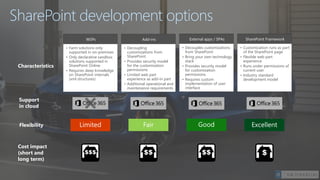
WSPs
• Farm solutions only
supported in on-premises
• Only declarative sandbox
solutions supported in
SharePoint Online
• Requires deep knowledge
on SharePoint internals
(xml structures)
Add-ins
• Decoupling
customizations from
SharePoint
• Provides security model
for the customization
permissions
• Limited web part
experience as add-in part
• Additional operational and
maintenance requirements
External apps / SPAs
• Decouples customizations
from SharePoint
• Bring your own technology
stack
• Provides security model
for customization
permissions
• Requires custom
implementation of user
interface
SharePoint Framework
• Customization runs as part
of the SharePoint page
• Flexible web part
experience
• Runs under permissions of
current user
• Industry standard
development model
Characteristics
Flexibility
Cost impact
(short and
long term)
Support
in cloud
SharePoint development options
Fair Good ExcellentLimited
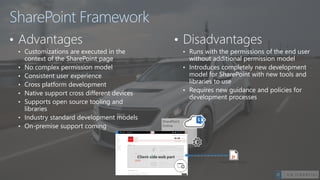
SharePoint Framework
• Advantages
• Customizations are executed in the
context of the SharePoint page
• No complex permission model
• Consistent user experience
• Cross platform development
• Native support cross different devices
• Supports open source tooling and
libraries
• Industry standard development models
• On-premise support coming
• Disadvantages
• Runs with the permissions of the end user
without additional permission model
• Introduces completely new development
model for SharePoint with new tools and
libraries to use
• Requires new guidance and policies for
development processes
• Tooling
• Node.js
• Yeoman
• Gulp
• TypeScript
• Visual Studio (Code)
• Frameworks – Choose yours
• React
• Angular.js
• Knockout
• Etc.
Typical tooling for SharePoint Framework
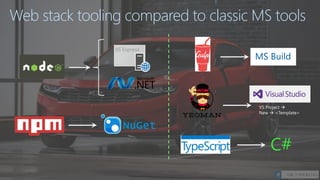
Web stack tooling compared to classic MS tools
IIS Express
VS Project →
New → <Template>
C#
MS Build
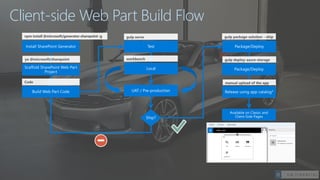
Client-side Web Part Build Flow
gulp package-solution --ship
gulp deploy-azure-storage
manual upload of the app
Q&A
aka.ms/OfficeDevPnP

Introduction to SharePoint Framework

  • 1.
    Copyright© 2012 MicrosoftCorporation Introduction to the SharePoint Framework Don Kirkham Lead Collaboration Architect MCPD: SharePoint, MCT Don.Kirkham@GMFinancial.com DonKirkham@live.com @DonKirkham
  • 2.
    Copyright© 2012 MicrosoftCorporation Agenda Intro/Poll Overview of Dev Models New Tools and Process
  • 3.
    WSPs • Farm solutionsonly supported in on-premises • Only declarative sandbox solutions supported in SharePoint Online • Requires deep knowledge on SharePoint internals (xml structures) Add-ins • Decoupling customizations from SharePoint • Provides security model for the customization permissions • Limited web part experience as add-in part • Additional operational and maintenance requirements External apps / SPAs • Decouples customizations from SharePoint • Bring your own technology stack • Provides security model for customization permissions • Requires custom implementation of user interface SharePoint Framework • Customization runs as part of the SharePoint page • Flexible web part experience • Runs under permissions of current user • Industry standard development model Characteristics Flexibility Cost impact (short and long term) Support in cloud SharePoint development options Fair Good ExcellentLimited
  • 4.
    SharePoint Framework • Advantages •Customizations are executed in the context of the SharePoint page • No complex permission model • Consistent user experience • Cross platform development • Native support cross different devices • Supports open source tooling and libraries • Industry standard development models • On-premise support coming • Disadvantages • Runs with the permissions of the end user without additional permission model • Introduces completely new development model for SharePoint with new tools and libraries to use • Requires new guidance and policies for development processes
  • 5.
    • Tooling • Node.js •Yeoman • Gulp • TypeScript • Visual Studio (Code) • Frameworks – Choose yours • React • Angular.js • Knockout • Etc. Typical tooling for SharePoint Framework
  • 6.
    Web stack toolingcompared to classic MS tools IIS Express VS Project → New → <Template> C# MS Build
  • 7.
    Client-side Web PartBuild Flow gulp package-solution --ship gulp deploy-azure-storage manual upload of the app
  • 9.
  • 10.