Антон
Вітязь
Head of Microsoft Dynamics &
Power Apps Practice, Infopulse
Ukraine
No code, low code чи
code?
No Code / Low Code Platform
Microsoft Power Apps World
4
4
Microsoft Power Platform 360
Power Apps in the Microsoft Business Solutions Ecosystem
• Building Apps with Power Apps
• Data analysis and reporting in Power BI
• Power Automate automation
• Chatbots Virtual Agents
• Dynamics 365 Business Solutions
• Office 365: Outlook, Exchange, Teams, SharePoint,
Planner
• Integration with ERP systems - Microsoft, SAP
• Azure - cloud infrastructure, integration, virtualization,
storage and data processing
5
5
Microsoft Power Apps - Low Code Application
Platform leader
Gartner Magic Quadrant
• Minimal or No Code
• First PoC / MVP comes VERY FAST
• Easy to build applications
• Fast and easy to design and deploy
• Using constructors and editors/forms
• Data types are prepared in advance
• Role-based access to data
• Excel-like formulas are allowed
6
6
Microsoft Power Apps
• Application building platform
• Simplicity Low Code / No Code
• Own CDS / Dataverse database or connection to
other Databases
• Ready business interface Model Driven
• Mobile interface Canvas
• Business processes
• Business rules
• Business logic (plugins)
 Canvas Apps (Web, Mobile, Embedded)
 Model Driven Apps
 Portal
7
7
Draw your UI : from Canvas to Model
Driven
• Screen size and orientation
• Advanced Settings
• Ready color themes
• Collections
• Forms
• Multimedia
• Charts and Diagrams
• Icons
Be aware of: Model Driven UI require Dataverse, Dataverse
requires Power Apps license. Easiest way not always got the
most “likes” from your employee.
You can select free draw Canvas UI or strict Model
Driven Approach – be free or be efficient.
• Standard layout
• Standard UX
• Most easiest and fast way
• Advanced views and forms
• Advanced charts and
Diagrams
No Code / Low Code or Code
In a Microsoft Power Apps World
Do you have simple
answer?
IT DEPENDS
… on many factors
Depends on
what ….
• Project Time / Costs
• Architecture Landscape
• Licensing
• Integration
• App Logic
• App Security
• UI Logic
• UI Complexity
• Ambitions
• Level of Idiotism
12
12
Architecture bricks
Non-functional requirements, clear user count, current licensing, complexity of
application parts and technology capabilities
Users: focused
group / wide group
/ all employee /
external
5 users case 50 users
500 users and all
M365
5000+ users
without full
license
Technology colors
Backend logic:
Flow, Rules and
Code
Fronted: Web UI,
Mobile UI, Teams
based,
SharePoint based
Frontend parts:
PCF, custom code
Integration with
Cloud and On
Premise
Usage nuances
Online / Offline
mode
Number of
records and data
13
UI Technologies : Pros and Cons
Pros Cons Notes
Canvas - Wide design options
- Built-in technology for Office 365
products
- Predefined aspect ratio for
device
- Limited in some visual effects
Good for small application with
limited visual functionality
Model-Driven - Responsive design
- Out of the box drag-and-drop
designer
- Built-in filtering and searching
engine
- No visual interaction with user
- Only position changing of
elements is available
Excellent drill down/up technology
Custom Components - Unlimited in design variety
- Restrictions depends on
technology
- Complexity of the development
- Complexity of maintaining
The last point when standard does
not reach your demands
14
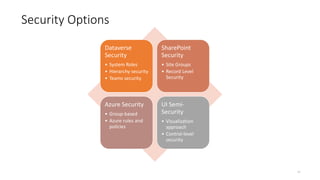
Security Options
Dataverse
Security
• System Roles
• Hierarchy security
• Teams security
SharePoint
Security
• Site Groups
• Record Level
Security
Azure Security
• Group-based
• Azure rules and
policies
UI Semi-
Security
• Visualization
approach
• Control-level
security
15
15
Security Trade-offs
Security decision HIGHLY impact on Time, Costs and Features
• Advanced start
with full license
• Simplified basic
site security
Readiness: Powerful & Flexible vs Very Basic
Licenses: Power Apps license vs Free
Efforts: Customize vs Develop / Ignore
16
16
App Logic : all colors
Power
Automate
Business
Rules
Logic
Apps
Hooks
Azure
Functions
Front end
– Custom
Code
Plugins
Front end
- PCF
17
17
App Logic Options
• Power Automate for
repeated actions
• Plug-ins for complex
under the hood stuff
• PCF for visual complex
interactions
• Azure Functions/Logic
App for integrations
Code/No code Billing model Performance
Power Automate No code License Depends on License
Business Rules No code License No limits
Logic Apps No code Consumption pricing Base on Consumption
Hooks Code License No limits
Azure Functions No code Consumption pricing Base on Consumption
Front end – Custom Code Code License No limits
Plugins Code License 2 min limit execution
Front end - PCF Code - No limits
18
18
How complex this could be?
There are multiple complexity levels and dimensions – everything depends
on expectation and requirements
Design Complexity
• Simple Canvas App
• Dataverse App
• Advanced Canvas App
Business Logic
Complexity
• Decision rules
• UI Rules (fields, forms)
• Security rules
UI Complexity
• Basic Model-Driven
layout
• Basic Canvas App
• Advanced Canvas UI
• Custom Model-Driven
logic
• PCF
Suggestions
• Start As Simple As
Possible
• Less logic
• Less constraint
• More trust
Templates
Canvas
Office 365
Standard connector
OR
Power App + Office
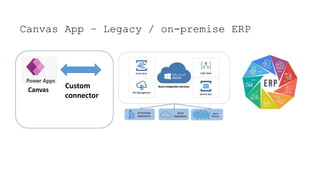
Canvas App – Legacy / on-premise ERP
Canvas
Custom
connector
Model Driven – DataVerse / CDS (Data)
Model Driven
Plan and understand journey
Mode #1 No Code
Mood In a nutshell
• Model Driven
• Canvas very basic
• Very simple Power Automate
Mode #2 Scripting
Mood In a nutshell
• Canvas Scripts
• Power Automate
• Logic Apps + APIM
Mode #3 Low Code
Mood In a nutshell
• Canvas Scripts
• Power Automate & Logic Apps
• Front-end: Very basic TS/JS
• Plugins: few, very simple
Mode #4 Code
Mood In a nutshell
• Advanced Canvas
• Plugin: many plugins, pipeline
• Frontend: advanced TS/JS
• Azure: basic functions
Mode #5 Nightmare
Mood In a nutshell
• Extreme Canvas
• Plugin: many plugins, record level security
• Azure: Functions, Messaging
• Frontend: Extreme TS/JS
• PCF: React + Redux + Typescript
So ……… ….. …. … ?!!?!
Do you have simple
answer?
NO
But you know
IT DEPENDS
… and you can manage it!
Дякую
за увагу

Code or No Code

  • 2.
    Антон Вітязь Head of MicrosoftDynamics & Power Apps Practice, Infopulse Ukraine No code, low code чи code?
  • 3.
    No Code /Low Code Platform Microsoft Power Apps World
  • 4.
    4 4 Microsoft Power Platform360 Power Apps in the Microsoft Business Solutions Ecosystem • Building Apps with Power Apps • Data analysis and reporting in Power BI • Power Automate automation • Chatbots Virtual Agents • Dynamics 365 Business Solutions • Office 365: Outlook, Exchange, Teams, SharePoint, Planner • Integration with ERP systems - Microsoft, SAP • Azure - cloud infrastructure, integration, virtualization, storage and data processing
  • 5.
    5 5 Microsoft Power Apps- Low Code Application Platform leader Gartner Magic Quadrant • Minimal or No Code • First PoC / MVP comes VERY FAST • Easy to build applications • Fast and easy to design and deploy • Using constructors and editors/forms • Data types are prepared in advance • Role-based access to data • Excel-like formulas are allowed
  • 6.
    6 6 Microsoft Power Apps •Application building platform • Simplicity Low Code / No Code • Own CDS / Dataverse database or connection to other Databases • Ready business interface Model Driven • Mobile interface Canvas • Business processes • Business rules • Business logic (plugins)  Canvas Apps (Web, Mobile, Embedded)  Model Driven Apps  Portal
  • 7.
    7 7 Draw your UI: from Canvas to Model Driven • Screen size and orientation • Advanced Settings • Ready color themes • Collections • Forms • Multimedia • Charts and Diagrams • Icons Be aware of: Model Driven UI require Dataverse, Dataverse requires Power Apps license. Easiest way not always got the most “likes” from your employee. You can select free draw Canvas UI or strict Model Driven Approach – be free or be efficient. • Standard layout • Standard UX • Most easiest and fast way • Advanced views and forms • Advanced charts and Diagrams
  • 8.
    No Code /Low Code or Code In a Microsoft Power Apps World
  • 9.
    Do you havesimple answer?
  • 10.
    IT DEPENDS … onmany factors
  • 11.
    Depends on what …. •Project Time / Costs • Architecture Landscape • Licensing • Integration • App Logic • App Security • UI Logic • UI Complexity • Ambitions • Level of Idiotism
  • 12.
    12 12 Architecture bricks Non-functional requirements,clear user count, current licensing, complexity of application parts and technology capabilities Users: focused group / wide group / all employee / external 5 users case 50 users 500 users and all M365 5000+ users without full license Technology colors Backend logic: Flow, Rules and Code Fronted: Web UI, Mobile UI, Teams based, SharePoint based Frontend parts: PCF, custom code Integration with Cloud and On Premise Usage nuances Online / Offline mode Number of records and data
  • 13.
    13 UI Technologies :Pros and Cons Pros Cons Notes Canvas - Wide design options - Built-in technology for Office 365 products - Predefined aspect ratio for device - Limited in some visual effects Good for small application with limited visual functionality Model-Driven - Responsive design - Out of the box drag-and-drop designer - Built-in filtering and searching engine - No visual interaction with user - Only position changing of elements is available Excellent drill down/up technology Custom Components - Unlimited in design variety - Restrictions depends on technology - Complexity of the development - Complexity of maintaining The last point when standard does not reach your demands
  • 14.
    14 Security Options Dataverse Security • SystemRoles • Hierarchy security • Teams security SharePoint Security • Site Groups • Record Level Security Azure Security • Group-based • Azure rules and policies UI Semi- Security • Visualization approach • Control-level security
  • 15.
    15 15 Security Trade-offs Security decisionHIGHLY impact on Time, Costs and Features • Advanced start with full license • Simplified basic site security Readiness: Powerful & Flexible vs Very Basic Licenses: Power Apps license vs Free Efforts: Customize vs Develop / Ignore
  • 16.
    16 16 App Logic :all colors Power Automate Business Rules Logic Apps Hooks Azure Functions Front end – Custom Code Plugins Front end - PCF
  • 17.
    17 17 App Logic Options •Power Automate for repeated actions • Plug-ins for complex under the hood stuff • PCF for visual complex interactions • Azure Functions/Logic App for integrations Code/No code Billing model Performance Power Automate No code License Depends on License Business Rules No code License No limits Logic Apps No code Consumption pricing Base on Consumption Hooks Code License No limits Azure Functions No code Consumption pricing Base on Consumption Front end – Custom Code Code License No limits Plugins Code License 2 min limit execution Front end - PCF Code - No limits
  • 18.
    18 18 How complex thiscould be? There are multiple complexity levels and dimensions – everything depends on expectation and requirements Design Complexity • Simple Canvas App • Dataverse App • Advanced Canvas App Business Logic Complexity • Decision rules • UI Rules (fields, forms) • Security rules UI Complexity • Basic Model-Driven layout • Basic Canvas App • Advanced Canvas UI • Custom Model-Driven logic • PCF Suggestions • Start As Simple As Possible • Less logic • Less constraint • More trust
  • 19.
  • 20.
  • 21.
    Canvas App –Legacy / on-premise ERP Canvas Custom connector
  • 22.
    Model Driven –DataVerse / CDS (Data) Model Driven
  • 23.
  • 24.
    Mode #1 NoCode Mood In a nutshell • Model Driven • Canvas very basic • Very simple Power Automate
  • 25.
    Mode #2 Scripting MoodIn a nutshell • Canvas Scripts • Power Automate • Logic Apps + APIM
  • 26.
    Mode #3 LowCode Mood In a nutshell • Canvas Scripts • Power Automate & Logic Apps • Front-end: Very basic TS/JS • Plugins: few, very simple
  • 27.
    Mode #4 Code MoodIn a nutshell • Advanced Canvas • Plugin: many plugins, pipeline • Frontend: advanced TS/JS • Azure: basic functions
  • 28.
    Mode #5 Nightmare MoodIn a nutshell • Extreme Canvas • Plugin: many plugins, record level security • Azure: Functions, Messaging • Frontend: Extreme TS/JS • PCF: React + Redux + Typescript
  • 29.
    So ……… …..…. … ?!!?!
  • 30.
    Do you havesimple answer?
  • 31.
  • 32.
    IT DEPENDS … andyou can manage it!
  • 33.

Editor's Notes

  • #5 2
  • #6 2:30
  • #7 2
  • #8 1:30
  • #23 Можно использовать виртуальные сущности для работы с данными без хранения в системе.