Custom CRM Integration Demo
Sami Ellong
10/28/2013
Known Requirements

Easy to navigate Folder Structure
Guidance on Content Migration
Ability to associate documents to a customer Account
record
Open security model allowing all employees to
upload/download files
Limited technical bandwidth require innovative
solutions
Project Milestones

1.
2.
3.
4.
5.
6.
7.
8.

Data Analysis
Prep Box environment
Content Migration
Build CRM Integrations
Embed Box into CRM interfaces
Testing/Bug Fixes/Enhancements
End User Training
Go Live
Data Analysis

Analysis of file usage patterns to determine if there are any
files that can be deleted or archived
Ensuring that every file can be associated to a customer
account
Ensuring that every file can be categorized with a type
(Account, Contact, Opportunity, Contract)
Ensuring that all file names use a proper naming
convention which will make them easily identifiable in a
sub folder. (Example: Sami Ellong – Document 123)
Identifying outliers and working with the Business to
identify next steps. Categorize & Migrate or Delete/Archive
Prep Box environment

Use Create Folder method to create Account folders:
Create a Folder for each Account record. Root folder passed
as Parent Folder Id parameter
Capture the Folder Id from the response and store it as a field
on Account record

Use Create Folder method to create Account specific
subfolders
Create a subfolder for each file type per Account record.
Account folder id passed as Parent Folder Id parameter
Capture the Subfolder Ids from the response and store them
as fields on Account record
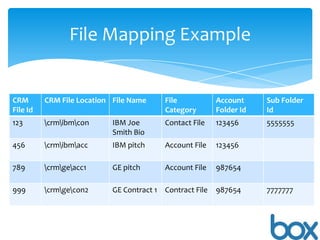
File Mapping Example

CRM
File Id

CRM File Location File Name

File
Category

Account
Folder Id

Sub Folder
Id

123

crmibmcon

IBM Joe
Smith Bio

Contact File

123456

5555555

456

crmibmacc

IBM pitch

Account File

123456

789

crmgeacc1

GE pitch

Account File

987654

999

crmgecon2

GE Contract 1 Contract File

987654

7777777
Build CRM Integrations

Account Creation: Leverage Create Folder method to
create the Account folder and necessary subfolders.
Account Deletion: Leverage Move Folder method to
Archive the Account folder into a separate root
folder.
Embed Box into CRM interfaces

Embed Root folder into a page/tab in the Application
For each account record page, embed the account's
corresponding Box folder
For each Contact record page, embed the account's
corresponding Box Contact subfolder
For each Oppty record page, embed the account's
corresponding Box Oppty subfolder
For each Contract record page, embed the account's
corresponding Box Contract subfolder
Testing/Bug Fixes/Enhancements

Perform end to end testing on the functionality
Perform user acceptance testing with a subset of
users
Fix bugs, make enhancements
End User Training

Train end users on Box basics
Train end users on the custom integration btwn CRM
and Box
Required Resources

Project Manager
Business Analyst
Developer
Trainer
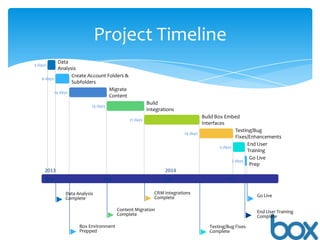
Project Timeline
Data
Analysis
Create Account Folders &
Nov 8 - Nov 15
6 days
Subfolders
Migrate
Nov 15 - Dec 4
14 days
Content

5 days

Nov 4 - Nov 8

Build
Integrations

14 days

Dec 4 - Dec 23

Build Box Embed
Interfaces
Testing/Bug
Jan 20 - Feb 6
14 days
Fixes/Enhancements
End User
Feb 6 - Feb 12
5 days
Training
Go Live
2 days Feb 12 - Feb 13
Prep

21 days

Dec 23 - Jan 20

2013

2014

Nov

Dec

Jan

Data Analysis
Complete

CRM Integrations
Complete

Nov 8

Feb

Dec 23

Go Live
Feb 13

Content Migration
Complete
Dec 4

Feb 6

Box Environment
Prepped

Testing/Bug Fixes
Complete

Nov 15

Jan 20

End User Training
Complete

Box Demo - Custom CRM

  • 1.
    Custom CRM IntegrationDemo Sami Ellong 10/28/2013
  • 2.
    Known Requirements Easy tonavigate Folder Structure Guidance on Content Migration Ability to associate documents to a customer Account record Open security model allowing all employees to upload/download files Limited technical bandwidth require innovative solutions
  • 3.
    Project Milestones 1. 2. 3. 4. 5. 6. 7. 8. Data Analysis PrepBox environment Content Migration Build CRM Integrations Embed Box into CRM interfaces Testing/Bug Fixes/Enhancements End User Training Go Live
  • 4.
    Data Analysis Analysis offile usage patterns to determine if there are any files that can be deleted or archived Ensuring that every file can be associated to a customer account Ensuring that every file can be categorized with a type (Account, Contact, Opportunity, Contract) Ensuring that all file names use a proper naming convention which will make them easily identifiable in a sub folder. (Example: Sami Ellong – Document 123) Identifying outliers and working with the Business to identify next steps. Categorize & Migrate or Delete/Archive
  • 5.
    Prep Box environment UseCreate Folder method to create Account folders: Create a Folder for each Account record. Root folder passed as Parent Folder Id parameter Capture the Folder Id from the response and store it as a field on Account record Use Create Folder method to create Account specific subfolders Create a subfolder for each file type per Account record. Account folder id passed as Parent Folder Id parameter Capture the Subfolder Ids from the response and store them as fields on Account record
  • 6.
    File Mapping Example CRM FileId CRM File Location File Name File Category Account Folder Id Sub Folder Id 123 crmibmcon IBM Joe Smith Bio Contact File 123456 5555555 456 crmibmacc IBM pitch Account File 123456 789 crmgeacc1 GE pitch Account File 987654 999 crmgecon2 GE Contract 1 Contract File 987654 7777777
  • 7.
    Build CRM Integrations AccountCreation: Leverage Create Folder method to create the Account folder and necessary subfolders. Account Deletion: Leverage Move Folder method to Archive the Account folder into a separate root folder.
  • 8.
    Embed Box intoCRM interfaces Embed Root folder into a page/tab in the Application For each account record page, embed the account's corresponding Box folder For each Contact record page, embed the account's corresponding Box Contact subfolder For each Oppty record page, embed the account's corresponding Box Oppty subfolder For each Contract record page, embed the account's corresponding Box Contract subfolder
  • 9.
    Testing/Bug Fixes/Enhancements Perform endto end testing on the functionality Perform user acceptance testing with a subset of users Fix bugs, make enhancements
  • 10.
    End User Training Trainend users on Box basics Train end users on the custom integration btwn CRM and Box
  • 11.
  • 12.
    Project Timeline Data Analysis Create AccountFolders & Nov 8 - Nov 15 6 days Subfolders Migrate Nov 15 - Dec 4 14 days Content 5 days Nov 4 - Nov 8 Build Integrations 14 days Dec 4 - Dec 23 Build Box Embed Interfaces Testing/Bug Jan 20 - Feb 6 14 days Fixes/Enhancements End User Feb 6 - Feb 12 5 days Training Go Live 2 days Feb 12 - Feb 13 Prep 21 days Dec 23 - Jan 20 2013 2014 Nov Dec Jan Data Analysis Complete CRM Integrations Complete Nov 8 Feb Dec 23 Go Live Feb 13 Content Migration Complete Dec 4 Feb 6 Box Environment Prepped Testing/Bug Fixes Complete Nov 15 Jan 20 End User Training Complete

Editor's Notes

  • #5 Assumptions: Current CRM documents can be categorized and related to customer accounts (via an account number)No need to see documents across a company hierarchy (If I'm looking at the Google account, I don't need to see Youtube's documents)
  • #9 Given the resource constraints on the customer side, I was also thinking of a "Poor man's integration." This would involve capturing each account folder's share link on the account record. Users would click on the link and be taken to Box instead of embedding Box into the CRM.If the custom CRM is to be used on a mobile device, leverage the View API to display documents to the user. (I'm still iffy on how exactly this would work).I also wanted to leverage tags to at least place the customer account number on all files but tagging is not available in v2 of the APIMetadata when available could also be used instead of tags