

11/23/2019 1
Samina khan
Fazaia Degree College Risalpur
• Chapter 1 Data –Processing Cycle
• Chapter 2 Binary Computing
• Chapter 3 System Software
• Chapter 4 Application Software
• Chapter 5 More on Word
• Chapter 6 More on Spreadsheets
• Chapter 7 Algorithms and Flow charts
• Chapter 8 Introduction to Programming Languages
• Chapter 9 Computer Networks
• Chapter 10 The Internet
• Chapter 11 Communicating through Email11/23/2019
2
CHAPTER 8
Step-by-step instructions
• Breaking down an activity into a sequence of
steps.
• By listing tasks in steps make it easier for
computer to follow them.
• Easier for user to read and understand.
• Step by step instructions are important to
create programs.
• Computers are not intelligent as human; they
simply do as they are instructed.
Programs
• Programs are written to instruct computers.
• These instructions are written in steps so the
computer can follow them quickly and
accurately.
• The same program run on different computers
will give the same result.
• When a program is run or followed by
computer, it is said to be executed.
• Programs are also stored in microcontrollers
that are used to run various electronic
machines.
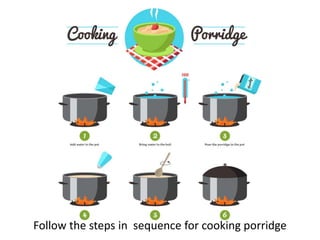
Follow the steps in sequence for cooking porridge
Programming Languages
• Computer understands instructions in binary
language or machine code.
• Machine code consists of instructions using
only two digits 0 & 1.
• It is difficult for human beings to understand
binary code.
• Programmers find it easy to write program in
machine code but they want to use
programming languages that are easy for
ordinary people to understand.
Programming Languages
• Earliest form of programming languages was a
sequence of holes punched onto a piece of card.
• These punched card were used to control
Jacquard’s loom.
• When computers came to be used,
programming languages were developed for
giving instructions to computers.
• In the beginning these languages were based on
machine code . These languages are called low-
level languages.
Jacquard’s looms
Programming languages
• With the passage of time, low level languages
were replaced by high level language.
• High level languages are user-friendly languages.
• User-friendly languages use words from English
language. User can easily understand these
instructions.
• They know what their computer is doing.
Low-level languages
• Low-level languages are used to write
instructions in machine code.
• These instructions are very easily understood by
the computers.
• They are called low-level languages because they
are used to write instructions in very basic
terms.
• Because of their simplicity, these instructions
control the working of the computer directly.
First-generation languages
• Based on machine code.
• Machine code is directly processed by the a
microprocessor.
• Programmer don’t use this language because it
requires a lot of attention to detail.
Second-generation languages
• Second generation languages are based on
assembly languages. It is easier than machine
code.
• It is easier form programmer to write instructions
in assembly languages.
• They are programmer-friendly languages but the
computer doesn’t understand instructions in
assembly language.
• It has to translate instructions into machine code.
• A program written in assembly language can only
run on a specific type of program.
High-level languages
• High level languages are user-friendly as well as
programmer-friendly language.
• Low-level languages have given way to high-level
languages. Further progress has been made with
the growth of artificial intelligence.
• High level languages can be divided into three
groups.
• Third-generation languages
• Fourth- generation languages
• Fifth- generation languages
Third-generation languages
• Third-generation languages were created during
the 1950s.
• They were user-friendly languages because they
used English words.
• Easy for programmers to write programs.
• Fortran stands for FORmula TRANslation. It was
developed for writing programs to be used for
scientific work an calculations.
• Use by engineers, weather forecasters and
scientists.
Third-generation languages
• Cobol stands for Common Business Oriented
Language.
• Used to write programs to be used by
businesses like in large companies
• Other third-generation languages are C & BASIC.
Fourth-generation languages
• Fourth-generation languages were developed
from the 1960s to the 1990s.
• More programmer-friendly as compared to
third-generation languages.
• Used o create programs for businesses.
• Visual Basic, SQL, FoxPro, Oracle and ABAP(
Advanced Business Application Programming).
Fifth-generation languages
• They are most recent programming languages
• Used to create programs based on artificial
intelligence.
• LISP & Prolog are the two earliest fifth-
generation languages.
Assembler, Compiler & Interpreters
• Programs are written in high-level language but
computer understand machine code so we need
some way of translating instructions form high
level into machine code.
• Assembler, interpreter and compiler are used to
translate a program into machine code to be
easily understand by the computer.
• Assembler converts assembly language
commands into machine code.
• Compiler converts high-level language into
machine code.
Assembler, Compiler & Interpreters
• Interpreter is used to execute a program.
• Used by programmer while writing a program to
check whether he is doing it right.
• Compiler can translate a completed program
whereas an interpreter can translate an
incomplete program too.
• Interpreter do line by line execution.
• High level languages first have to be translated
into machine code so they slow down the
computer’s processing.
BASIC: A simple programming language
• BASIC stands for Beginner’s All-purpose
Symbolic Instruction Code.
• It was developed during 1960s.
• BASIC is easy to learn by new users because it
used common English words and has simple
syntax.
• It is user-friendly and simple so widely used in
education.
• There are several versions of BASIC but GW-
BASICS is the most popular one
Introduction to programming languages

Introduction to programming languages

  • 1.
    11/23/2019 1 Samina khan FazaiaDegree College Risalpur
  • 2.
    • Chapter 1Data –Processing Cycle • Chapter 2 Binary Computing • Chapter 3 System Software • Chapter 4 Application Software • Chapter 5 More on Word • Chapter 6 More on Spreadsheets • Chapter 7 Algorithms and Flow charts • Chapter 8 Introduction to Programming Languages • Chapter 9 Computer Networks • Chapter 10 The Internet • Chapter 11 Communicating through Email11/23/2019 2
  • 3.
  • 4.
    Step-by-step instructions • Breakingdown an activity into a sequence of steps. • By listing tasks in steps make it easier for computer to follow them. • Easier for user to read and understand. • Step by step instructions are important to create programs. • Computers are not intelligent as human; they simply do as they are instructed.
  • 5.
    Programs • Programs arewritten to instruct computers. • These instructions are written in steps so the computer can follow them quickly and accurately. • The same program run on different computers will give the same result. • When a program is run or followed by computer, it is said to be executed. • Programs are also stored in microcontrollers that are used to run various electronic machines.
  • 6.
    Follow the stepsin sequence for cooking porridge
  • 7.
    Programming Languages • Computerunderstands instructions in binary language or machine code. • Machine code consists of instructions using only two digits 0 & 1. • It is difficult for human beings to understand binary code. • Programmers find it easy to write program in machine code but they want to use programming languages that are easy for ordinary people to understand.
  • 8.
    Programming Languages • Earliestform of programming languages was a sequence of holes punched onto a piece of card. • These punched card were used to control Jacquard’s loom. • When computers came to be used, programming languages were developed for giving instructions to computers. • In the beginning these languages were based on machine code . These languages are called low- level languages.
  • 9.
  • 10.
    Programming languages • Withthe passage of time, low level languages were replaced by high level language. • High level languages are user-friendly languages. • User-friendly languages use words from English language. User can easily understand these instructions. • They know what their computer is doing.
  • 11.
    Low-level languages • Low-levellanguages are used to write instructions in machine code. • These instructions are very easily understood by the computers. • They are called low-level languages because they are used to write instructions in very basic terms. • Because of their simplicity, these instructions control the working of the computer directly.
  • 12.
    First-generation languages • Basedon machine code. • Machine code is directly processed by the a microprocessor. • Programmer don’t use this language because it requires a lot of attention to detail.
  • 13.
    Second-generation languages • Secondgeneration languages are based on assembly languages. It is easier than machine code. • It is easier form programmer to write instructions in assembly languages. • They are programmer-friendly languages but the computer doesn’t understand instructions in assembly language. • It has to translate instructions into machine code. • A program written in assembly language can only run on a specific type of program.
  • 14.
    High-level languages • Highlevel languages are user-friendly as well as programmer-friendly language. • Low-level languages have given way to high-level languages. Further progress has been made with the growth of artificial intelligence. • High level languages can be divided into three groups. • Third-generation languages • Fourth- generation languages • Fifth- generation languages
  • 15.
    Third-generation languages • Third-generationlanguages were created during the 1950s. • They were user-friendly languages because they used English words. • Easy for programmers to write programs. • Fortran stands for FORmula TRANslation. It was developed for writing programs to be used for scientific work an calculations. • Use by engineers, weather forecasters and scientists.
  • 16.
    Third-generation languages • Cobolstands for Common Business Oriented Language. • Used to write programs to be used by businesses like in large companies • Other third-generation languages are C & BASIC.
  • 17.
    Fourth-generation languages • Fourth-generationlanguages were developed from the 1960s to the 1990s. • More programmer-friendly as compared to third-generation languages. • Used o create programs for businesses. • Visual Basic, SQL, FoxPro, Oracle and ABAP( Advanced Business Application Programming).
  • 18.
    Fifth-generation languages • Theyare most recent programming languages • Used to create programs based on artificial intelligence. • LISP & Prolog are the two earliest fifth- generation languages.
  • 19.
    Assembler, Compiler &Interpreters • Programs are written in high-level language but computer understand machine code so we need some way of translating instructions form high level into machine code. • Assembler, interpreter and compiler are used to translate a program into machine code to be easily understand by the computer. • Assembler converts assembly language commands into machine code. • Compiler converts high-level language into machine code.
  • 20.
    Assembler, Compiler &Interpreters • Interpreter is used to execute a program. • Used by programmer while writing a program to check whether he is doing it right. • Compiler can translate a completed program whereas an interpreter can translate an incomplete program too. • Interpreter do line by line execution. • High level languages first have to be translated into machine code so they slow down the computer’s processing.
  • 21.
    BASIC: A simpleprogramming language • BASIC stands for Beginner’s All-purpose Symbolic Instruction Code. • It was developed during 1960s. • BASIC is easy to learn by new users because it used common English words and has simple syntax. • It is user-friendly and simple so widely used in education. • There are several versions of BASIC but GW- BASICS is the most popular one