Microsoft
Powershell v5
Presented By:
Nishtha Kesarwani
Agenda
What is Powershell ?
Working with Powershell
Cmdlets
Scripting in Powershell
Powershell Classes
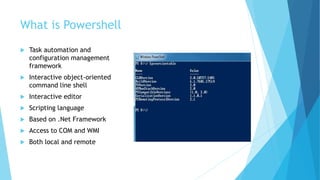
What is Powershell
 Task automation and
configuration management
framework
 Interactive object-oriented
command line shell
 Interactive editor
 Scripting language
 Based on .Net Framework
 Access to COM and WMI
 Both local and remote
How to install Powershell in Mac
 https://github.com/PowerShell/PowerShell
 http://www.howtogeek.com/267858/how-to-install-microsoft-
powershell-on-linux-or-os-x/
Working with Powershell
Cmdlets
Scripts
Classes
Cmdlets
 Heart-and-Soul of Windows
PowerShell
 Written in .Net framework
language
 PowerShell cmdlets use the
Verb-Noun format as in Get-
Service, Stop-Service, or
Import-Csv
Difference between cmdlets and
commands
 Instances of .NET Framework classes; they are not stand-alone
executables.
 Can be created from as few as a dozen lines of code.
 Parsing, error presentation, and output formatting are handled by the
Windows PowerShell runtime.
 Process input objects from the pipeline rather than from streams of
text
 Deliver objects as output to the pipeline.
 Cmdlets are record-oriented as they process a single object at a time.
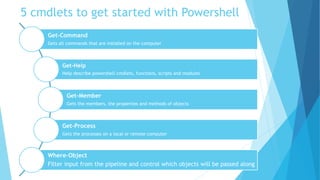
5 cmdlets to get started with Powershell
Get-Command
Gets all commands that are installed on the computer
Get-Help
Help describe powershell cmdlets, functions, scripts and modules
Get-Member
Gets the members, the properties and methods of objects
Get-Process
Gets the processes on a local or remote computer
Where-Object
Filter input from the pipeline and control which objects will be passed along
Get-Help
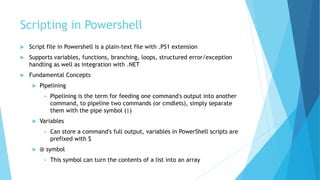
Scripting in Powershell
 Script file in Powershell is a plain-text file with .PS1 extension
 Supports variables, functions, branching, loops, structured error/exception
handling as well as integration with .NET
 Fundamental Concepts
 Pipelining
 Pipelining is the term for feeding one command's output into another
command, to pipeline two commands (or cmdlets), simply separate
them with the pipe symbol (|)
 Variables
 Can store a command's full output, variables in PowerShell scripts are
prefixed with $
 @ symbol
 This symbol can turn the contents of a list into an array
Set-Execution Policy
Restricted : Scripts won't run
RemoteSigned : Locally-created scripts will run
AllSigned : Scripts will only run if signed by a trusted publisher
Unrestricted : All scripts will run regardless of who created them and
whether or not they are signed
Script Example
$colItems = get-wmiobject -class "Win32_Printer" -namespace "rootCIMV2" -
computername $strComputer
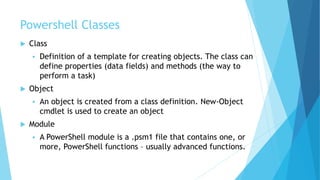
Powershell Classes
 Class
 Definition of a template for creating objects. The class can
define properties (data fields) and methods (the way to
perform a task)
 Object
 An object is created from a class definition. New-Object
cmdlet is used to create an object
 Module
 A PowerShell module is a .psm1 file that contains one, or
more, PowerShell functions – usually advanced functions.
Class Syntax
 Class <Class_Name>
 {
 #Properties
 <Data_Type> $<Variable_Name>
 }
 #Methods
 [Return Type] <Method_Name> {
 # Script
 }
 #Creating an object
 $<Object_Name> = New-Object –TypeName <Class_Name>
 #Calling a method
 <Object_Name>.<Method_Name>()
Class Example
class Person {
#Properties
[string]$lastName
[string]$firstName
#Methods
[void] SetLast ( [string]$ln )
{
$this.lastName = $ln
}
[string] ToString ( [String]$firstName,
[String]$lastName )
{
return $firstName + " " + $lastName
}
}# end class Person
Summary
 Powershell is a task automation tool built on .Net framework with interactive
command line shell and editor
 Scripting language designed specially for administrative tasks
 Built-in Windows PowerShell commands, called cmdlets, that allows us to
manage the computers from the command line
 5 basic cmdlets to get started with Powershell
 Powershell script files have a .PS1 extension
 Scripting in Powershell supports pipelining and can handle functions,
branching, loops and exception handling
 Execution Policy for running scripts in Powershell for avoiding malicious code
execution
 Powershell classes contains properties and methods; Objects can be created
with New-Object cmdlet
Resources
 https://msdn.microsoft.com/en-us/powershell/scripting/core-
powershell/ise/introducing-the-windows-powershell-ise
 https://blogs.technet.microsoft.com/heyscriptingguy/2015/01/02/wh
at-is-powershell/
 https://msdn.microsoft.com/en-us/library/ms714395(v=vs.85).aspx
 http://www.howtogeek.com/114344/5-cmdlets-to-get-you-started-
with-powershell/
 https://technet.microsoft.com/en-us/library/cc732114(v=ws.10).aspx
 https://technet.microsoft.com/en-us/scriptcenter/dd742419
Introduction to Powershell Version 5

Introduction to Powershell Version 5

  • 1.
  • 2.
    Agenda What is Powershell? Working with Powershell Cmdlets Scripting in Powershell Powershell Classes
  • 3.
    What is Powershell Task automation and configuration management framework  Interactive object-oriented command line shell  Interactive editor  Scripting language  Based on .Net Framework  Access to COM and WMI  Both local and remote
  • 4.
    How to installPowershell in Mac  https://github.com/PowerShell/PowerShell  http://www.howtogeek.com/267858/how-to-install-microsoft- powershell-on-linux-or-os-x/
  • 5.
  • 6.
    Cmdlets  Heart-and-Soul ofWindows PowerShell  Written in .Net framework language  PowerShell cmdlets use the Verb-Noun format as in Get- Service, Stop-Service, or Import-Csv
  • 7.
    Difference between cmdletsand commands  Instances of .NET Framework classes; they are not stand-alone executables.  Can be created from as few as a dozen lines of code.  Parsing, error presentation, and output formatting are handled by the Windows PowerShell runtime.  Process input objects from the pipeline rather than from streams of text  Deliver objects as output to the pipeline.  Cmdlets are record-oriented as they process a single object at a time.
  • 8.
    5 cmdlets toget started with Powershell Get-Command Gets all commands that are installed on the computer Get-Help Help describe powershell cmdlets, functions, scripts and modules Get-Member Gets the members, the properties and methods of objects Get-Process Gets the processes on a local or remote computer Where-Object Filter input from the pipeline and control which objects will be passed along
  • 9.
  • 10.
    Scripting in Powershell Script file in Powershell is a plain-text file with .PS1 extension  Supports variables, functions, branching, loops, structured error/exception handling as well as integration with .NET  Fundamental Concepts  Pipelining  Pipelining is the term for feeding one command's output into another command, to pipeline two commands (or cmdlets), simply separate them with the pipe symbol (|)  Variables  Can store a command's full output, variables in PowerShell scripts are prefixed with $  @ symbol  This symbol can turn the contents of a list into an array
  • 11.
    Set-Execution Policy Restricted :Scripts won't run RemoteSigned : Locally-created scripts will run AllSigned : Scripts will only run if signed by a trusted publisher Unrestricted : All scripts will run regardless of who created them and whether or not they are signed
  • 12.
    Script Example $colItems =get-wmiobject -class "Win32_Printer" -namespace "rootCIMV2" - computername $strComputer
  • 13.
    Powershell Classes  Class Definition of a template for creating objects. The class can define properties (data fields) and methods (the way to perform a task)  Object  An object is created from a class definition. New-Object cmdlet is used to create an object  Module  A PowerShell module is a .psm1 file that contains one, or more, PowerShell functions – usually advanced functions.
  • 14.
    Class Syntax  Class<Class_Name>  {  #Properties  <Data_Type> $<Variable_Name>  }  #Methods  [Return Type] <Method_Name> {  # Script  }  #Creating an object  $<Object_Name> = New-Object –TypeName <Class_Name>  #Calling a method  <Object_Name>.<Method_Name>()
  • 15.
    Class Example class Person{ #Properties [string]$lastName [string]$firstName #Methods [void] SetLast ( [string]$ln ) { $this.lastName = $ln } [string] ToString ( [String]$firstName, [String]$lastName ) { return $firstName + " " + $lastName } }# end class Person
  • 16.
    Summary  Powershell isa task automation tool built on .Net framework with interactive command line shell and editor  Scripting language designed specially for administrative tasks  Built-in Windows PowerShell commands, called cmdlets, that allows us to manage the computers from the command line  5 basic cmdlets to get started with Powershell  Powershell script files have a .PS1 extension  Scripting in Powershell supports pipelining and can handle functions, branching, loops and exception handling  Execution Policy for running scripts in Powershell for avoiding malicious code execution  Powershell classes contains properties and methods; Objects can be created with New-Object cmdlet
  • 17.
    Resources  https://msdn.microsoft.com/en-us/powershell/scripting/core- powershell/ise/introducing-the-windows-powershell-ise  https://blogs.technet.microsoft.com/heyscriptingguy/2015/01/02/wh at-is-powershell/ https://msdn.microsoft.com/en-us/library/ms714395(v=vs.85).aspx  http://www.howtogeek.com/114344/5-cmdlets-to-get-you-started- with-powershell/  https://technet.microsoft.com/en-us/library/cc732114(v=ws.10).aspx  https://technet.microsoft.com/en-us/scriptcenter/dd742419

Editor's Notes

  • #5 Before getting to know more about Powershell, Let's see how we can install Powershell in Mac. Powershell is a product of Microsoft Windows but has recently become cross-platform and is now available for Mac / Linux.I have provided two links from where you can download the package for any platform. I will now demonstrate how to install and use Powershell in Mac. First you need to download the.pkg  file from the mentioned link,once you have downloaded click on the file and follow theinstallation instruction. After the installation is complete open terminal window