Introduction to
JavaFX Dialogs
HASUNUMA Kenji

k.hasunuma@coppermine.jp
@khasunuma
Overview
JavaFX Dialogs (8u40)
• Alert - returns any ButtonType

• TextInputDialog - returns input text

• ChoiceDialog - returns choosen item

• Dialog - superclass of all dialogs
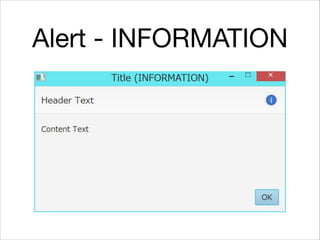
Alert - INFORMATION
Alert - WARNING
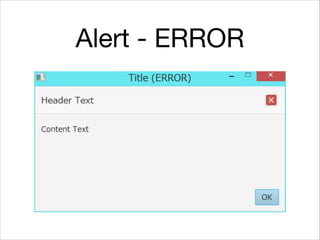
Alert - ERROR
Alert - CONFIRMATION
Alert - NONE
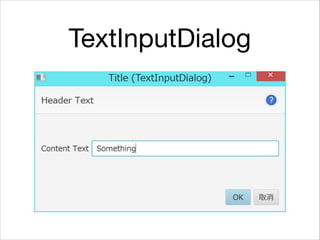
TextInputDialog
ChoiceDialog
Usage
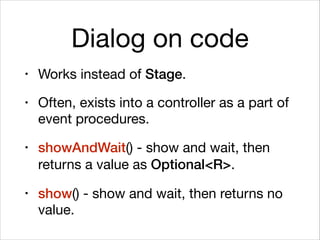
Dialog on code
• Works instead of Stage.

• Often, exists into a controller as a part of
event procedures.

• showAndWait() - show and wait, then
returns a value as Optional<R>.
• show() - show and wait, then returns no
value.
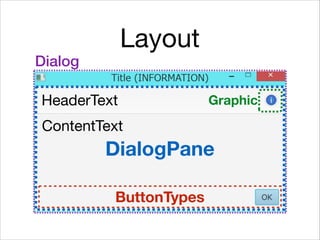
Layout
DialogPane
ButtonTypes
Graphic
HeaderText
ContentText
Dialog
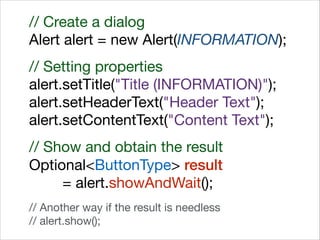
// Create a dialog

Alert alert = new Alert(INFORMATION);

!
// Setting properties

alert.setTitle("Title (INFORMATION)");

alert.setHeaderText("Header Text");

alert.setContentText("Content Text");

!
// Show and obtain the result

Optional<ButtonType> result 

= alert.showAndWait();

!
// Another way if the result is needless

// alert.show();
Result types
Dialog Result type
Alert
ButtonType

!
OK, CANCEL, CLOSE, APPLY,
FINISH, YES, NO, NEXT, PREVIOUS
TextInputDialog String
ChoiceDialog Type of choosen item
Tips
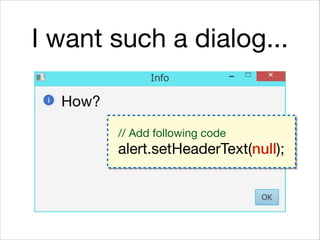
I want such a dialog...
How?
I want such a dialog...
How?
// Add following code

alert.setHeaderText(null);
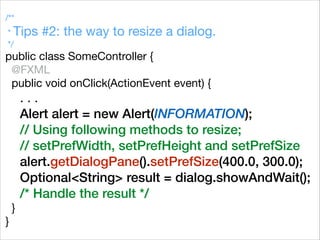
/**

* Tips #2: the way to resize a dialog.

*/

public class SomeController {

@FXML

public void onClick(ActionEvent event) {

. . .

Alert alert = new Alert(INFORMATION);
// Using following methods to resize;
// setPrefWidth, setPrefHeight and setPrefSize
alert.getDialogPane().setPrefSize(400.0, 300.0);
Optional<String> result = dialog.showAndWait();
/* Handle the result */
}

}
/**

* Tips #3: Simple dialog-based application.

*/

public class DialogApp extends Application {

@Overrides

public void start(Stage stage) throws Exception {

TextInputDialog dialog = new TextInputDialog();
/* setting the dialog */
Optional<String> result = dialog.showAndWait();
/* handle the result */
}


public static void main(String...args) {

launch(args);

}

}
Conclusion
• The representation of JavaFX dialogs
are Dialog and their subclasses.

• JavaFX Dialog looks like Stage, but is
not Stage.

• At first create and configure a dialog,
and call showAndWait method.
Introduction to
JavaFX Dialogs
HASUNUMA Kenji

k.hasunuma@coppermine.jp

@khasunuma

Introduction to JavaFX Dialogs

  • 1.
    Introduction to JavaFX Dialogs HASUNUMAKenji k.hasunuma@coppermine.jp @khasunuma
  • 2.
  • 3.
    JavaFX Dialogs (8u40) •Alert - returns any ButtonType • TextInputDialog - returns input text • ChoiceDialog - returns choosen item • Dialog - superclass of all dialogs
  • 4.
  • 5.
  • 6.
  • 7.
  • 8.
  • 9.
  • 10.
  • 11.
  • 12.
    Dialog on code •Works instead of Stage. • Often, exists into a controller as a part of event procedures. • showAndWait() - show and wait, then returns a value as Optional<R>. • show() - show and wait, then returns no value.
  • 13.
  • 14.
    // Create adialog Alert alert = new Alert(INFORMATION); ! // Setting properties alert.setTitle("Title (INFORMATION)"); alert.setHeaderText("Header Text"); alert.setContentText("Content Text"); ! // Show and obtain the result Optional<ButtonType> result = alert.showAndWait(); ! // Another way if the result is needless // alert.show();
  • 15.
    Result types Dialog Resulttype Alert ButtonType ! OK, CANCEL, CLOSE, APPLY, FINISH, YES, NO, NEXT, PREVIOUS TextInputDialog String ChoiceDialog Type of choosen item
  • 16.
  • 17.
    I want sucha dialog... How?
  • 18.
    I want sucha dialog... How? // Add following code alert.setHeaderText(null);
  • 19.
    /** * Tips #2:the way to resize a dialog. */ public class SomeController { @FXML public void onClick(ActionEvent event) { . . . Alert alert = new Alert(INFORMATION); // Using following methods to resize; // setPrefWidth, setPrefHeight and setPrefSize alert.getDialogPane().setPrefSize(400.0, 300.0); Optional<String> result = dialog.showAndWait(); /* Handle the result */ } }
  • 20.
    /** * Tips #3:Simple dialog-based application. */ public class DialogApp extends Application { @Overrides public void start(Stage stage) throws Exception { TextInputDialog dialog = new TextInputDialog(); /* setting the dialog */ Optional<String> result = dialog.showAndWait(); /* handle the result */ } public static void main(String...args) { launch(args); } }
  • 21.
  • 22.
    • The representationof JavaFX dialogs are Dialog and their subclasses. • JavaFX Dialog looks like Stage, but is not Stage. • At first create and configure a dialog, and call showAndWait method.
  • 23.
    Introduction to JavaFX Dialogs HASUNUMAKenji k.hasunuma@coppermine.jp @khasunuma