Testing JavaFX UI Tips from JavaFX quality team Alexandre (Shura) Iline Java and JavaFX quality architect Oracle
Agenda UI testing overview
Test automation approaches
Jemmy library
Test automation effectiveness
Test library design approaches
UI testing … by Wikipedia «GUI software testing is the process of testing a product that uses a graphical user interface, to ensure it meets its written specifications.»
UI testing … most often ... «Checking whether usage of a product UI leads to results   expected  by the the person who performs testing »
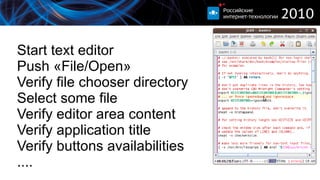
Start text editor
Push «File/Open»
Verify file chooser directory
Select some file
Verify editor area content
Verify application title
Verify buttons availabilities
....
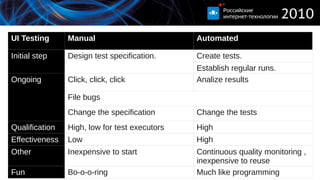
UI Testing Manual Automated Initial step Design test specification. Create tests.  Establish regular runs.  Ongoing Click, click, click Analize results File bugs Change the specification Change the tests Qualification High, low for test executors High Effectiveness Low High Other Inexpensive to start Continuous quality monitoring , inexpensive to reuse Fun Bo-o-o-ring Much like programming
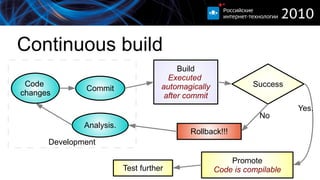
Continuous build No Yes. Development Success
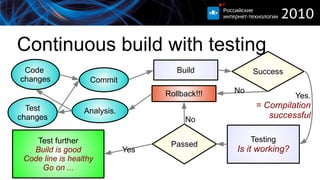
Continuous build with testing No No Yes Yes. = Compilation successful Success Passed
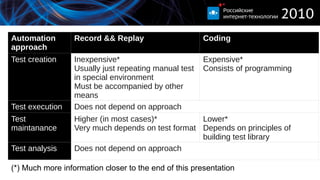
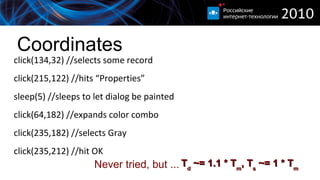
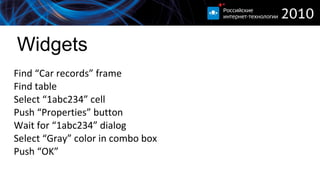
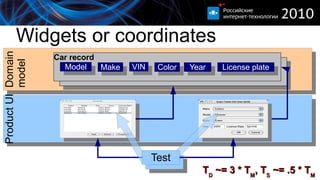
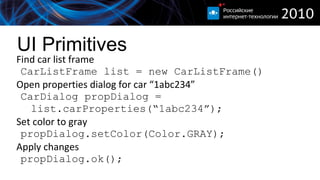
Automation approach Record && Replay Coding Test creation Inexpensive* Usually just repeating manual test in special environment Must be accompanied by other means Expensive* Consists of programming Test execution Does not depend on approach Test maintanance Higher (in most cases)* Very much depends on test format Lower* Depends on principles of building test library Test analysis Does not depend on approach (*) Much more information closer to the end of this presentation
Jemmy
Jemmy v2 Started as a tool to tests TeamWare UI (1999) Used for NetBeans extensions (2000) Official test tool for NetBeans (2001) Open-source (2001) Jemmy v3 Started in (2008) as a proof of concept experiemnt Extended to support JavaFX (2009) Opensource with support of JavaFX 1.2 (2009) Developed in close-source for 1.3 since then
Jemmy usages V2 (Swing/AWT) Internal: Swing, NetBeans, Glassfish
External:  Used by: Boeing (x2), agfa.com, compuware.com, attix5.com, exgate.tek.com, globo.com, gmx.de, non.agilent.com
Evaluated by: syntelinc.com, covast.com, visus-tt.com, covast.com, nokia.com, twt.com, ubs.com V3 (FX) Internal: JavaFX, Authoring Tool, JavaStore
Demo... Finally!
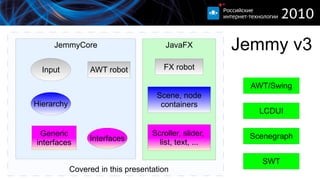
Jemmy v3 Covered in this presentation JavaFX AWT/Swing SWT Scenegraph LCDUI JemmyCore Interfaces AWT robot FX robot Hierarchy Input Scene, node containers Scroller, slider,  list, text, ... Generic interfaces
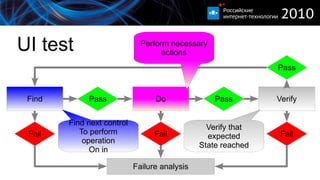
UI test  Find Do Verify Pass Pass Pass Fail Fail Fail Failure analysis Find next control To perform operation On in Verify that expected State reached Perform necessary  actions
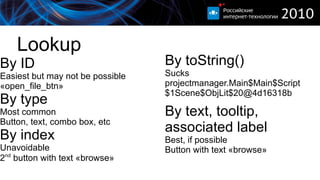
Lookup By ID Easiest but may not be possible
«open_file_btn» By type Most common
Button, text, combo box, etc By index Unavoidable
2 nd  button with text «browse» By toString() Sucks
projectmanager.Main$Main$Script$1Scene$ObjLit$20@4d16318b By text, tooltip, associated label Best, if possible
Button with text «browse»
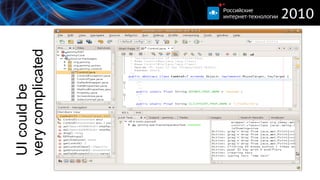
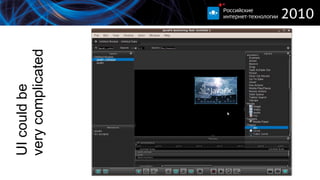
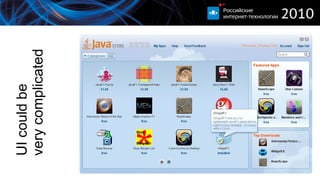
UI could be very complicated
Lookup demo
Interfaces Interface Control types Description Mouse, Keyboard, Drag Enything Low level input Parent Containers, list (for its content) Something you could look within Selectable Toggle button, radio button, combobox, check box, lists, etc A control which provides limited number of choices CaretOwner Text box, scroll bar, slider A control which has a number value which changes within some range Text Text box Editable text container
Interfaces demo
Verifications UI feedback Non UI feedback Dialog displayed Test changed Image updated Progress bar changed position File created Database updated Sunset happened :)
Waiting UI is a multy-thread environment Things happen in background Test code is in another thread Not much could be really verified
Everything should be waited for
Verification demo
Test automation effectiveness
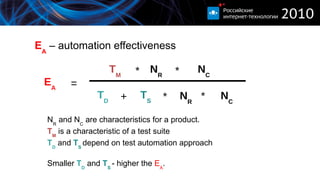
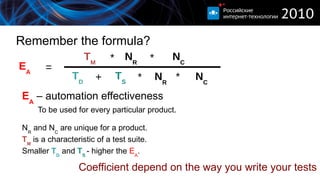
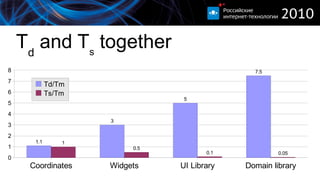
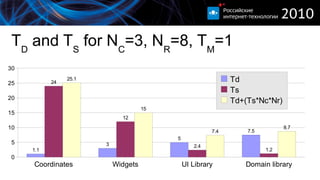
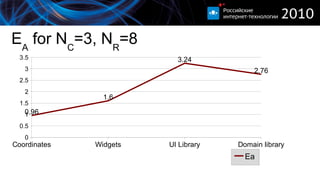
E A  – automation effectiveness N R  and N C  are characteristics for a product. T M  is a characteristic of a test suite T D  and  T S  depend on test automation approach Smaller  T D  and  T S  - higher the  E A . T D + * T S N R T M * N R N C * E A = N C *
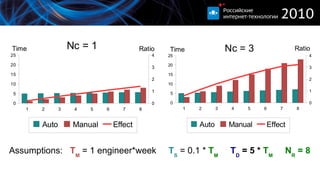
Assumptions:  T M  = 1 engineer*week  T S  = 0.1 *  T M   T D  = 5 *  T M   N R  = 8
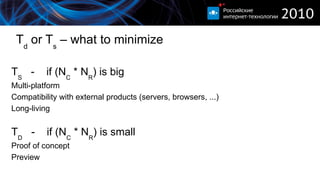
T d  or T s  – what to minimize T S   -  if (N C  * N R ) is big  Multi-platform Compatibility with external products (servers, browsers, ...) Long-living T D   -  if (N C  * N R ) is small  Proof of concept Preview
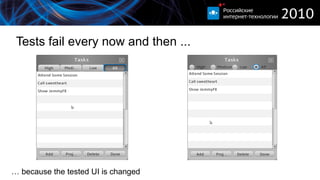
Tests fail every now and then ... …  because the tested UI is changed
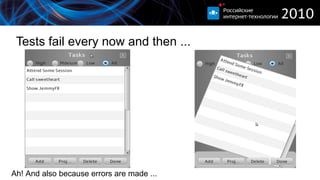
Tests fail every now and then ... Ah! And also because errors are made ...
End2End demo
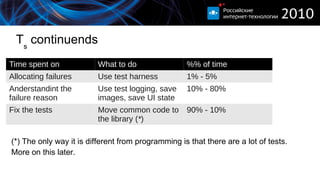
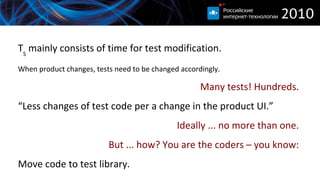
T s  continuends Time spent on What to do %% of time Allocating failures Use test harness 1% - 5% Anderstandint the failure reason Use test logging, save images, save UI state 10% - 80% Fix the tests Move common code to the library ( * ) 90% - 10% (*) The only way it is different from programming is that there are a lot of tests.  More on this later.
Harness TestNG
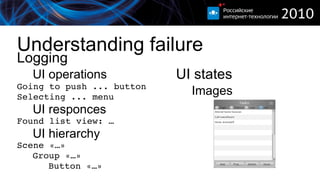
Understanding failure Logging UI operations Going to push ... button Selecting ... menu UI responces Found list view: … UI hierarchy Scene «…» Group «…» Button «…» UI states Images
Demo Jemmy logging functionality
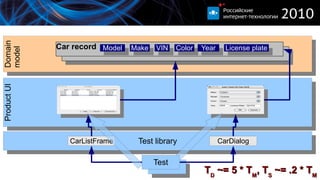
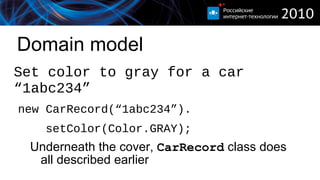
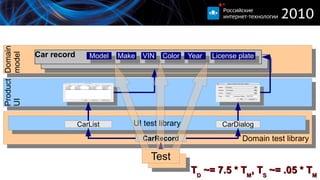
Fix the tests One UI, many-many tests. Do as few test code changes as possible Ideally … one change in test code for one change in UI code.

Alexandre Iline Rit 2010 Java Fxui

  • 1.
    Testing JavaFX UITips from JavaFX quality team Alexandre (Shura) Iline Java and JavaFX quality architect Oracle
  • 2.
  • 3.
  • 4.
  • 5.
  • 6.
  • 7.
    UI testing …by Wikipedia «GUI software testing is the process of testing a product that uses a graphical user interface, to ensure it meets its written specifications.»
  • 8.
    UI testing …most often ... «Checking whether usage of a product UI leads to results expected by the the person who performs testing »
  • 9.
  • 10.
  • 11.
  • 12.
  • 13.
  • 14.
  • 15.
  • 16.
  • 17.
    UI Testing ManualAutomated Initial step Design test specification. Create tests. Establish regular runs. Ongoing Click, click, click Analize results File bugs Change the specification Change the tests Qualification High, low for test executors High Effectiveness Low High Other Inexpensive to start Continuous quality monitoring , inexpensive to reuse Fun Bo-o-o-ring Much like programming
  • 18.
    Continuous build NoYes. Development Success
  • 19.
    Continuous build withtesting No No Yes Yes. = Compilation successful Success Passed
  • 20.
    Automation approach Record&& Replay Coding Test creation Inexpensive* Usually just repeating manual test in special environment Must be accompanied by other means Expensive* Consists of programming Test execution Does not depend on approach Test maintanance Higher (in most cases)* Very much depends on test format Lower* Depends on principles of building test library Test analysis Does not depend on approach (*) Much more information closer to the end of this presentation
  • 21.
  • 22.
    Jemmy v2 Startedas a tool to tests TeamWare UI (1999) Used for NetBeans extensions (2000) Official test tool for NetBeans (2001) Open-source (2001) Jemmy v3 Started in (2008) as a proof of concept experiemnt Extended to support JavaFX (2009) Opensource with support of JavaFX 1.2 (2009) Developed in close-source for 1.3 since then
  • 23.
    Jemmy usages V2(Swing/AWT) Internal: Swing, NetBeans, Glassfish
  • 24.
    External: Usedby: Boeing (x2), agfa.com, compuware.com, attix5.com, exgate.tek.com, globo.com, gmx.de, non.agilent.com
  • 25.
    Evaluated by: syntelinc.com,covast.com, visus-tt.com, covast.com, nokia.com, twt.com, ubs.com V3 (FX) Internal: JavaFX, Authoring Tool, JavaStore
  • 26.
  • 27.
    Jemmy v3 Coveredin this presentation JavaFX AWT/Swing SWT Scenegraph LCDUI JemmyCore Interfaces AWT robot FX robot Hierarchy Input Scene, node containers Scroller, slider, list, text, ... Generic interfaces
  • 28.
    UI test Find Do Verify Pass Pass Pass Fail Fail Fail Failure analysis Find next control To perform operation On in Verify that expected State reached Perform necessary actions
  • 29.
    Lookup By IDEasiest but may not be possible
  • 30.
  • 31.
    Button, text, combobox, etc By index Unavoidable
  • 32.
    2 nd button with text «browse» By toString() Sucks
  • 33.
    projectmanager.Main$Main$Script$1Scene$ObjLit$20@4d16318b By text,tooltip, associated label Best, if possible
  • 34.
    Button with text«browse»
  • 35.
    UI could bevery complicated
  • 36.
    UI could bevery complicated
  • 37.
    UI could bevery complicated
  • 38.
  • 39.
    Interfaces Interface Controltypes Description Mouse, Keyboard, Drag Enything Low level input Parent Containers, list (for its content) Something you could look within Selectable Toggle button, radio button, combobox, check box, lists, etc A control which provides limited number of choices CaretOwner Text box, scroll bar, slider A control which has a number value which changes within some range Text Text box Editable text container
  • 40.
  • 41.
    Verifications UI feedbackNon UI feedback Dialog displayed Test changed Image updated Progress bar changed position File created Database updated Sunset happened :)
  • 42.
    Waiting UI isa multy-thread environment Things happen in background Test code is in another thread Not much could be really verified
  • 43.
  • 44.
  • 45.
  • 46.
    E A – automation effectiveness N R and N C are characteristics for a product. T M is a characteristic of a test suite T D and T S depend on test automation approach Smaller T D and T S - higher the E A . T D + * T S N R T M * N R N C * E A = N C *
  • 47.
    Assumptions: TM = 1 engineer*week T S = 0.1 * T M T D = 5 * T M N R = 8
  • 48.
    T d or T s – what to minimize T S - if (N C * N R ) is big Multi-platform Compatibility with external products (servers, browsers, ...) Long-living T D - if (N C * N R ) is small Proof of concept Preview
  • 49.
    Tests fail everynow and then ... … because the tested UI is changed
  • 50.
    Tests fail everynow and then ... Ah! And also because errors are made ...
  • 51.
  • 52.
    T s continuends Time spent on What to do %% of time Allocating failures Use test harness 1% - 5% Anderstandint the failure reason Use test logging, save images, save UI state 10% - 80% Fix the tests Move common code to the library ( * ) 90% - 10% (*) The only way it is different from programming is that there are a lot of tests. More on this later.
  • 53.
  • 54.
    Understanding failure LoggingUI operations Going to push ... button Selecting ... menu UI responces Found list view: … UI hierarchy Scene «…» Group «…» Button «…» UI states Images
  • 55.
    Demo Jemmy loggingfunctionality
  • 56.
    Fix the testsOne UI, many-many tests. Do as few test code changes as possible Ideally … one change in test code for one change in UI code.

Editor's Notes

  • #6 Note that in reality all the verifications should be done throwg waiting
  • #7 Effectiveness is estimated under assumtion that the testing is thoruogh and there are many tests
  • #8 This is a well accepeted practice nowadays. However it is not really possible without testing. And it is not really possible with manual testing as the turnaround is too long to rely on.
  • #9 This is a well accepeted practice nowadays. However it is not really possible without testing. And it is not really possible with manual testing as the turnaround is too long to rely on.
  • #10 If we get to it, I will be howing figures which explain why do we think so
  • #12 It is not a toy
  • #13 ditto
  • #48 The values of course depend on how the fast product is changing The estimations are for NetBeans – we went throughthis stage Now would happen if the combobox is replaced by color chooser page up test would fail, 'cause it's looking for combobox page down Most importantly ... all tests would fail!
  • #49 Obvious solution