1
09/12/2017
AWT Packages , Containers and Components
2
AWT (Abstract Window Toolkit)
AWT – The Abstract Window Toolkit provides basic graphics tools
(tools for putting information on the screen).
AWT contains numerous classes and methods that allow you to create and
manage applet windows and standard windows that run in a GUI environment,
such as Windows The AWT classes are contained in the java.awt package.
The AWT defines windows based on a class hierarchy that adds functionality at
each level. The two most common windows are those derived from Panel used
by applets and Frame that creates standard windows.
3
Container – a graphic element that can hold other
graphic elements (and is itself a Component).
The container class is an abstract subclass of Component. The class is
responsible for laying out any components it contains through using
various layout managers.
Component – a graphic element (such as a Button or a
TextArea) provided by a graphics toolkit.
Component is an abstract class that encapsulates all of the user
interface elements that are displayed on the screen and that interact
with the user.
Containers & Components4
Containers & Components
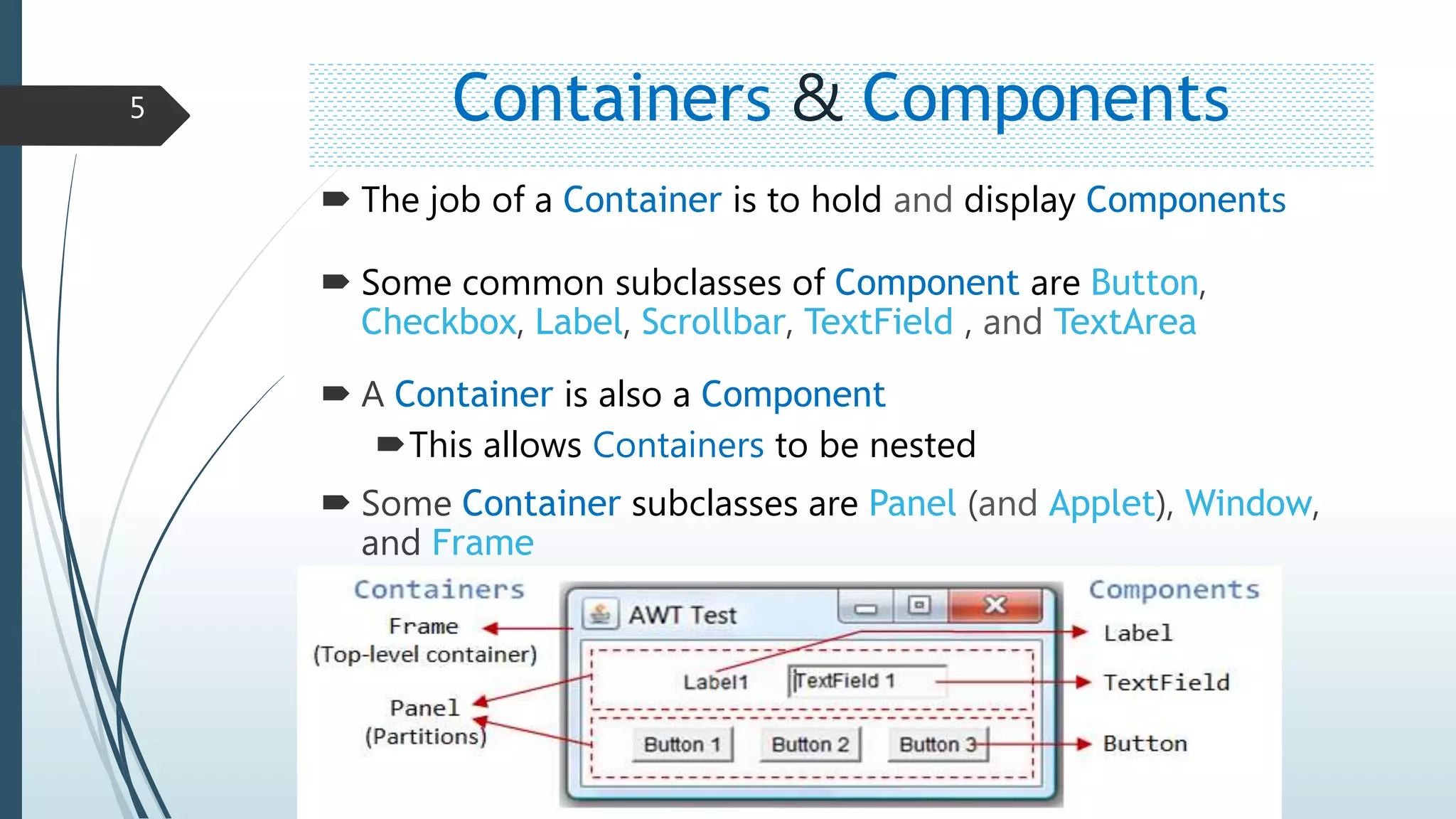
 The job of a Container is to hold and display Components
 Some common subclasses of Component are Button,
Checkbox, Label, Scrollbar, TextField , and TextArea
 A Container is also a Component
This allows Containers to be nested
 Some Container subclasses are Panel (and Applet), Window,
and Frame
5
Creating Containers
Frame frame=new Frame(“My Frame”);
Pane pane=new Pane();
6
Creating components
Label lab = new Label ("Hi, Java!");
Button but = new Button ("Click me!");
Checkbox check_me = new Checkbox (“Check");
TextField txt = new TextField ("Initial text.", 20);
7
Example…..
import java.awt.*;
public class Test extends Frame {
public void test() {
Frame frame=new Frame("My Frame");
Button button=new Button("Button");
Label label=new Label("Simple Test");
TextField textfield=new TextField(20);
Panel panel=new Panel();
panel.add(label);
panel.add(textfield);
panel.add(button);
frame.add(panel);
frame.setLayout(new FlowLayout());
frame.setSize(400,300);
frame.setVisible(true); }
public static void main(String args[]) {
Test t=new Test();
t.test();
}
}
8

AWT Packages , Containers and Components

  • 1.
  • 2.
    AWT Packages ,Containers and Components 2
  • 3.
    AWT (Abstract WindowToolkit) AWT – The Abstract Window Toolkit provides basic graphics tools (tools for putting information on the screen). AWT contains numerous classes and methods that allow you to create and manage applet windows and standard windows that run in a GUI environment, such as Windows The AWT classes are contained in the java.awt package. The AWT defines windows based on a class hierarchy that adds functionality at each level. The two most common windows are those derived from Panel used by applets and Frame that creates standard windows. 3
  • 4.
    Container – agraphic element that can hold other graphic elements (and is itself a Component). The container class is an abstract subclass of Component. The class is responsible for laying out any components it contains through using various layout managers. Component – a graphic element (such as a Button or a TextArea) provided by a graphics toolkit. Component is an abstract class that encapsulates all of the user interface elements that are displayed on the screen and that interact with the user. Containers & Components4
  • 5.
    Containers & Components The job of a Container is to hold and display Components  Some common subclasses of Component are Button, Checkbox, Label, Scrollbar, TextField , and TextArea  A Container is also a Component This allows Containers to be nested  Some Container subclasses are Panel (and Applet), Window, and Frame 5
  • 6.
    Creating Containers Frame frame=newFrame(“My Frame”); Pane pane=new Pane(); 6
  • 7.
    Creating components Label lab= new Label ("Hi, Java!"); Button but = new Button ("Click me!"); Checkbox check_me = new Checkbox (“Check"); TextField txt = new TextField ("Initial text.", 20); 7
  • 8.
    Example….. import java.awt.*; public classTest extends Frame { public void test() { Frame frame=new Frame("My Frame"); Button button=new Button("Button"); Label label=new Label("Simple Test"); TextField textfield=new TextField(20); Panel panel=new Panel(); panel.add(label); panel.add(textfield); panel.add(button); frame.add(panel); frame.setLayout(new FlowLayout()); frame.setSize(400,300); frame.setVisible(true); } public static void main(String args[]) { Test t=new Test(); t.test(); } } 8