Date:
Time:
Duration:
Hashtag on Twitter:
Jakarta EE:
The First Parts
Introduction to Prime Jakarta EE APIs
HASUNUMA Kenji @khasunuma
7th November 2020
40 minutes
#jjug_ccc
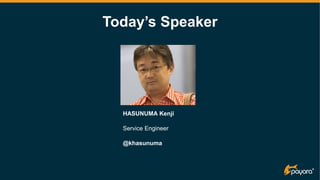
Today’s Speaker
HASUNUMA Kenji
Service Engineer
@khasunuma
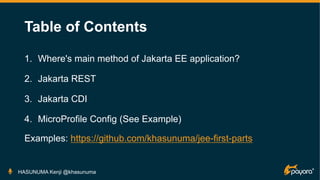
Table of Contents
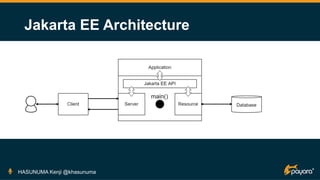
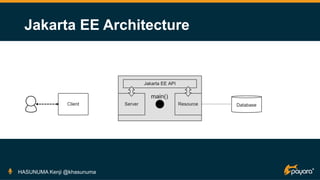
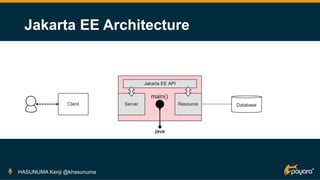
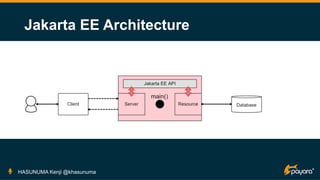
1. Where's main method of Jakarta EE application?
2. Jakarta REST
3. Jakarta CDI
4. MicroProfile Config (See Example)
Examples: https://github.com/khasunuma/jee-first-parts
HASUNUMA Kenji @khasunuma
Introduction
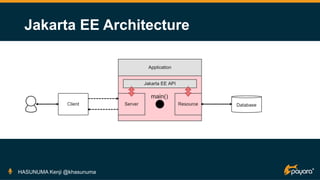
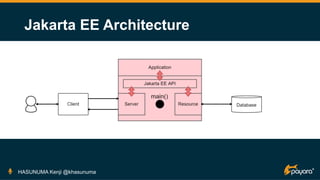
Where's main method of Jakarta EE application?
HASUNUMA Kenji @khasunuma
Jakarta EE Architecture
HASUNUMA Kenji @khasunuma
Jakarta EE Architecture
HASUNUMA Kenji @khasunuma
Jakarta EE Architecture
HASUNUMA Kenji @khasunuma
Jakarta EE Architecture
HASUNUMA Kenji @khasunuma
Jakarta EE Architecture
HASUNUMA Kenji @khasunuma
Jakarta EE Architecture
HASUNUMA Kenji @khasunuma
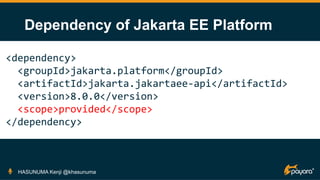
Dependency of Jakarta EE Platform
HASUNUMA Kenji @khasunuma
<dependency>
<groupId>jakarta.platform</groupId>
<artifactId>jakarta.jakartaee-api</artifactId>
<version>8.0.0</version>
<scope>provided</scope>
</dependency>
Jakarta REST
Where we and Jakarta EE meet
HASUNUMA Kenji @khasunuma
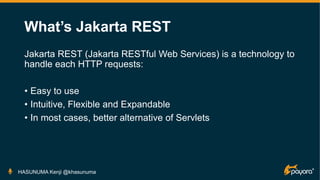
What’s Jakarta REST
Jakarta REST (Jakarta RESTful Web Services) is a technology to
handle each HTTP requests:
• Easy to use
• Intuitive, Flexible and Expandable
• In most cases, better alternative of Servlets
HASUNUMA Kenji @khasunuma
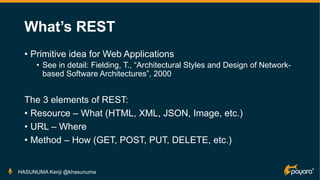
What’s REST
• Primitive idea for Web Applications
• See in detail: Fielding, T., “Architectural Styles and Design of Network-
based Software Architectures”, 2000
The 3 elements of REST:
• Resource – What (HTML, XML, JSON, Image, etc.)
• URL – Where
• Method – How (GET, POST, PUT, DELETE, etc.)
HASUNUMA Kenji @khasunuma
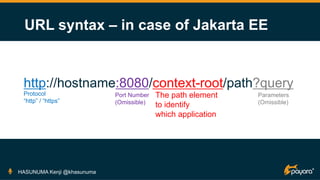
URL syntax – in case of Jakarta EE
HASUNUMA Kenji @khasunuma
http://hostname:8080/context-root/path?query
Protocol
“http” / “https”
Port Number
(Omissible)
The path element
to identify
which application
Parameters
(Omissible)
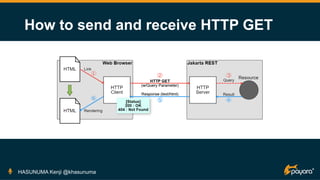
How to send and receive HTTP GET
HASUNUMA Kenji @khasunuma
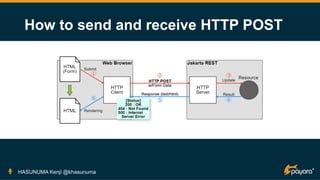
How to send and receive HTTP POST
HASUNUMA Kenji @khasunuma
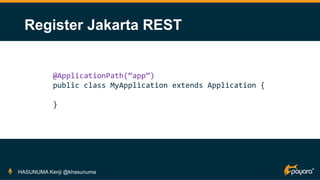
Register Jakarta REST
HASUNUMA Kenji @khasunuma
@ApplicationPath(“app”)
public class MyApplication extends Application {
}
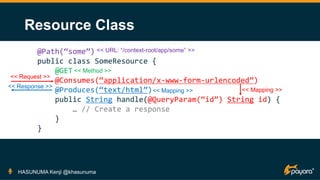
Resource Class
HASUNUMA Kenji @khasunuma
@Path(“some”)
public class SomeResource {
@GET
@Consumes(“application/x-www-form-urlencoded”)
@Produces(“text/html”)
public String handle(@QueryParam(“id”) String id) {
… // Create a response
}
}
<< URL: “/context-root/app/some” >>
<< Request >>
<< Response >>
<< Mapping >>
<< Mapping >>
<< Method >>
Handle GET method
HASUNUMA Kenji @khasunuma
@GET
@Consumes(“application/x-www-form-urlencoded”)
@Produces(“text/html”)
public String handle(@QueryParam(“id”) String id) {
// 1. Query Parameter (“id”) -> Argument (“id”) [0..N]
// 2. Create a response
// 3. Return value (String) -> Response (HTML)
...
}
Handle POST method
HASUNUMA Kenji @khasunuma
@POST
@Consumes(“application/x-www-form-urlencoded”)
@Produces(“text/html”)
public String handle(@FormParam(“data”) String data) {
// 1. Form Parameter (“data”) -> Argument (“data”) [1..N]
// 2. Create a response
// 3. Return value (String) -> Response (HTML)
...
}
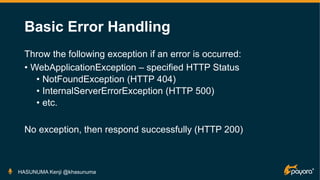
Basic Error Handling
Throw the following exception if an error is occurred:
• WebApplicationException – specified HTTP Status
• NotFoundException (HTTP 404)
• InternalServerErrorException (HTTP 500)
• etc.
No exception, then respond successfully (HTTP 200)
HASUNUMA Kenji @khasunuma
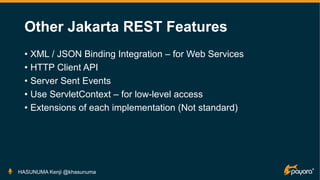
Other Jakarta REST Features
• XML / JSON Binding Integration – for Web Services
• HTTP Client API
• Server Sent Events
• Use ServletContext – for low-level access
• Extensions of each implementation (Not standard)
HASUNUMA Kenji @khasunuma
Jakarta CDI
How to divide a complex thing to simple parts
HASUNUMA Kenji @khasunuma
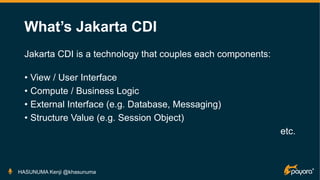
What’s Jakarta CDI
Jakarta CDI is a technology that couples each components:
• View / User Interface
• Compute / Business Logic
• External Interface (e.g. Database, Messaging)
• Structure Value (e.g. Session Object)
etc.
HASUNUMA Kenji @khasunuma
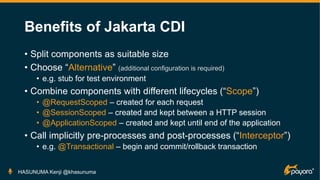
Benefits of Jakarta CDI
• Split components as suitable size
• Choose “Alternative” (additional configuration is required)
• e.g. stub for test environment
• Combine components with different lifecycles (“Scope”)
• @RequestScoped – created for each request
• @SessionScoped – created and kept between a HTTP session
• @ApplicationScoped – created and kept until end of the application
• Call implicitly pre-processes and post-processes (“Interceptor”)
• e.g. @Transactional – begin and commit/rollback transaction
HASUNUMA Kenji @khasunuma
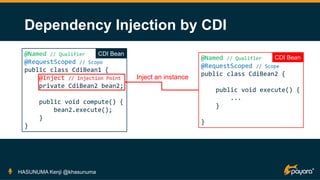
Dependency Injection by CDI
HASUNUMA Kenji @khasunuma
@Named // Qualifier
@RequestScoped // Scope
public class CdiBean1 {
@Inject // Injection Point
private CdiBean2 bean2;
public void compute() {
bean2.execute();
}
}
@Named // Qualifier
@RequestScoped // Scope
public class CdiBean2 {
public void execute() {
...
}
}
Inject an instance
CDI Bean
CDI Bean
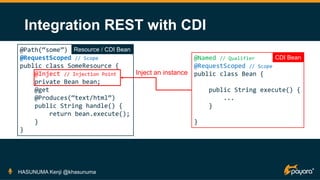
Integration REST with CDI
HASUNUMA Kenji @khasunuma
@Path(“some”)
@RequestScoped // Scope
public class SomeResource {
@Inject // Injection Point
private Bean bean;
@get
@Produces(“text/html”)
public String handle() {
return bean.execute();
}
}
@Named // Qualifier
@RequestScoped // Scope
public class Bean {
public String execute() {
...
}
}
Inject an instance
CDI Bean
Resource / CDI Bean
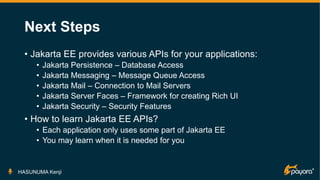
Next Steps
• Jakarta EE provides various APIs for your applications:
• Jakarta Persistence – Database Access
• Jakarta Messaging – Message Queue Access
• Jakarta Mail – Connection to Mail Servers
• Jakarta Server Faces – Framework for creating Rich UI
• Jakarta Security – Security Features
• How to learn Jakarta EE APIs?
• Each application only uses some part of Jakarta EE
• You may learn when it is needed for you
HASUNUMA Kenji
We’ll Support You With:
Let us help you spread the word about our open source software. Join the Reef!
• Event, JUG, conference sponsorship
• Freebies, swag, handouts, speakers
• Promotion and advertising of events and articles
• Community forum
Learn More:
www.payara.fish/reef
Payara Reef: Community Growth Program
Download the open source software:
https://payara.fish/downloads
Need support for the Payara Platform?
https://payara.fish/support

Jakarta EE : The First Parts

  • 1.
    Date: Time: Duration: Hashtag on Twitter: JakartaEE: The First Parts Introduction to Prime Jakarta EE APIs HASUNUMA Kenji @khasunuma 7th November 2020 40 minutes #jjug_ccc
  • 2.
  • 3.
    Table of Contents 1.Where's main method of Jakarta EE application? 2. Jakarta REST 3. Jakarta CDI 4. MicroProfile Config (See Example) Examples: https://github.com/khasunuma/jee-first-parts HASUNUMA Kenji @khasunuma
  • 4.
    Introduction Where's main methodof Jakarta EE application? HASUNUMA Kenji @khasunuma
  • 5.
  • 6.
  • 7.
  • 8.
  • 9.
  • 10.
  • 11.
    Dependency of JakartaEE Platform HASUNUMA Kenji @khasunuma <dependency> <groupId>jakarta.platform</groupId> <artifactId>jakarta.jakartaee-api</artifactId> <version>8.0.0</version> <scope>provided</scope> </dependency>
  • 12.
    Jakarta REST Where weand Jakarta EE meet HASUNUMA Kenji @khasunuma
  • 13.
    What’s Jakarta REST JakartaREST (Jakarta RESTful Web Services) is a technology to handle each HTTP requests: • Easy to use • Intuitive, Flexible and Expandable • In most cases, better alternative of Servlets HASUNUMA Kenji @khasunuma
  • 14.
    What’s REST • Primitiveidea for Web Applications • See in detail: Fielding, T., “Architectural Styles and Design of Network- based Software Architectures”, 2000 The 3 elements of REST: • Resource – What (HTML, XML, JSON, Image, etc.) • URL – Where • Method – How (GET, POST, PUT, DELETE, etc.) HASUNUMA Kenji @khasunuma
  • 15.
    URL syntax –in case of Jakarta EE HASUNUMA Kenji @khasunuma http://hostname:8080/context-root/path?query Protocol “http” / “https” Port Number (Omissible) The path element to identify which application Parameters (Omissible)
  • 16.
    How to sendand receive HTTP GET HASUNUMA Kenji @khasunuma
  • 17.
    How to sendand receive HTTP POST HASUNUMA Kenji @khasunuma
  • 18.
    Register Jakarta REST HASUNUMAKenji @khasunuma @ApplicationPath(“app”) public class MyApplication extends Application { }
  • 19.
    Resource Class HASUNUMA Kenji@khasunuma @Path(“some”) public class SomeResource { @GET @Consumes(“application/x-www-form-urlencoded”) @Produces(“text/html”) public String handle(@QueryParam(“id”) String id) { … // Create a response } } << URL: “/context-root/app/some” >> << Request >> << Response >> << Mapping >> << Mapping >> << Method >>
  • 20.
    Handle GET method HASUNUMAKenji @khasunuma @GET @Consumes(“application/x-www-form-urlencoded”) @Produces(“text/html”) public String handle(@QueryParam(“id”) String id) { // 1. Query Parameter (“id”) -> Argument (“id”) [0..N] // 2. Create a response // 3. Return value (String) -> Response (HTML) ... }
  • 21.
    Handle POST method HASUNUMAKenji @khasunuma @POST @Consumes(“application/x-www-form-urlencoded”) @Produces(“text/html”) public String handle(@FormParam(“data”) String data) { // 1. Form Parameter (“data”) -> Argument (“data”) [1..N] // 2. Create a response // 3. Return value (String) -> Response (HTML) ... }
  • 22.
    Basic Error Handling Throwthe following exception if an error is occurred: • WebApplicationException – specified HTTP Status • NotFoundException (HTTP 404) • InternalServerErrorException (HTTP 500) • etc. No exception, then respond successfully (HTTP 200) HASUNUMA Kenji @khasunuma
  • 23.
    Other Jakarta RESTFeatures • XML / JSON Binding Integration – for Web Services • HTTP Client API • Server Sent Events • Use ServletContext – for low-level access • Extensions of each implementation (Not standard) HASUNUMA Kenji @khasunuma
  • 24.
    Jakarta CDI How todivide a complex thing to simple parts HASUNUMA Kenji @khasunuma
  • 25.
    What’s Jakarta CDI JakartaCDI is a technology that couples each components: • View / User Interface • Compute / Business Logic • External Interface (e.g. Database, Messaging) • Structure Value (e.g. Session Object) etc. HASUNUMA Kenji @khasunuma
  • 26.
    Benefits of JakartaCDI • Split components as suitable size • Choose “Alternative” (additional configuration is required) • e.g. stub for test environment • Combine components with different lifecycles (“Scope”) • @RequestScoped – created for each request • @SessionScoped – created and kept between a HTTP session • @ApplicationScoped – created and kept until end of the application • Call implicitly pre-processes and post-processes (“Interceptor”) • e.g. @Transactional – begin and commit/rollback transaction HASUNUMA Kenji @khasunuma
  • 27.
    Dependency Injection byCDI HASUNUMA Kenji @khasunuma @Named // Qualifier @RequestScoped // Scope public class CdiBean1 { @Inject // Injection Point private CdiBean2 bean2; public void compute() { bean2.execute(); } } @Named // Qualifier @RequestScoped // Scope public class CdiBean2 { public void execute() { ... } } Inject an instance CDI Bean CDI Bean
  • 28.
    Integration REST withCDI HASUNUMA Kenji @khasunuma @Path(“some”) @RequestScoped // Scope public class SomeResource { @Inject // Injection Point private Bean bean; @get @Produces(“text/html”) public String handle() { return bean.execute(); } } @Named // Qualifier @RequestScoped // Scope public class Bean { public String execute() { ... } } Inject an instance CDI Bean Resource / CDI Bean
  • 29.
    Next Steps • JakartaEE provides various APIs for your applications: • Jakarta Persistence – Database Access • Jakarta Messaging – Message Queue Access • Jakarta Mail – Connection to Mail Servers • Jakarta Server Faces – Framework for creating Rich UI • Jakarta Security – Security Features • How to learn Jakarta EE APIs? • Each application only uses some part of Jakarta EE • You may learn when it is needed for you HASUNUMA Kenji
  • 30.
    We’ll Support YouWith: Let us help you spread the word about our open source software. Join the Reef! • Event, JUG, conference sponsorship • Freebies, swag, handouts, speakers • Promotion and advertising of events and articles • Community forum Learn More: www.payara.fish/reef Payara Reef: Community Growth Program
  • 31.
    Download the opensource software: https://payara.fish/downloads Need support for the Payara Platform? https://payara.fish/support