CI/CD Workflow
Simplify your development life
cycle
Crash Course
Who am I?
What is CI/CD?
When is CI/CD useful?
Where do you start?
Why is this important?
How?
Who am I?
Research Database Administrator @ ARC-TS
Worked with CI/CD deployments since 2012
Presented CI/CD workflow at several venues
All around geek
Jeffrey Sica
jsica@umich.edu
@jeefy
Who am I?
Research Database Administrator @ ARC-TS
Worked with CI/CD deployments since 2012
Presented CI/CD workflow at several venues
All around motivational geek
Jeffrey Sica
jsica@umich.edu
@jeefy
What is CI/CD?
CI/CD stands for Continuous Integration / Continuous Deployment
Translation: Continually push code to SCM. Tests run and changes deploy to
“live” environments automatically
No production code changes by hand.
No manual code pushes.
No “quick hacks”
What is CI/CD?
CI/CD stands for Continuous Integration / Continuous Deployment
Translation: Continually push code to SCM. Tests run and changes deploy to
“live” environments automatically
No production code changes by hand.
No manual code pushes.
No “quick hacks”
Automate everything
This is a fundamental
paradigm shift.
This is a scary
paradigm shift.
This is also the best
thing you can do for
yourself.
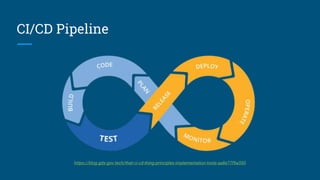
CI/CD Pipeline
https://blog.gds-gov.tech/that-ci-cd-thing-principles-implementation-tools-aa8e77f9a350
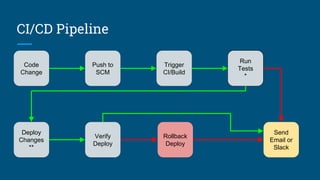
CI/CD Pipeline
Code
Change
Push to
SCM
Send
Email or
Slack
Trigger
CI/Build
Run
Tests
*
Verify
Deploy
Deploy
Changes
**
Rollback
Deploy
You are only as good
as your tests.
Smaller, faster
deployments mean
smaller, faster
rollbacks.
When is CI/CD useful?
It’s always useful.
When is CI/CD useful?
Web applications
Mobile applications
Config management
When is CI/CD useful?
Web applications
Leverage some form of database migration/versioning. Include rollback scripts
Build UI regression tests (Selenium is a well known tool)
Build unit tests
Trigger a security scan once deployed (or better yet, scan in a sandbox)
When is CI/CD useful?
Mobile applications
Run unit tests against your code before building
Run UI tests against your app before building
Test against multiple platforms before distributing a build
Trigger staggered rollouts automatically
When is CI/CD useful?
Config management
Lint your config files automatically
Push config changes automatically
Run tests to confirm changes were applied
If left hanging or a deploy failed: Roll back to the previous commit
Common things are
common.
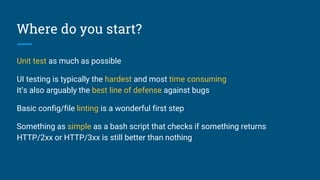
Where do you start?
Unit test as much as possible
UI testing is typically the hardest and most time consuming
It’s also arguably the best line of defense against bugs
Basic config/file linting is a wonderful first step
Something as simple as a bash script that checks if something returns
HTTP/2xx or HTTP/3xx is still better than nothing
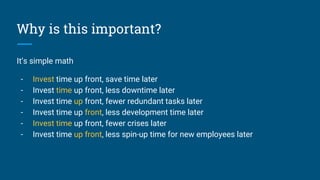
Why is this important?
It’s simple math
- Invest time up front, save time later
- Invest time up front, less downtime later
- Invest time up front, fewer redundant tasks later
- Invest time up front, less development time later
- Invest time up front, fewer crises later
- Invest time up front, less spin-up time for new employees later
Invest time up front.
Avoid technical debt.
How?I’ll try not to ramble
Jenkins
Enough rope to hang yourself with
Jenkins
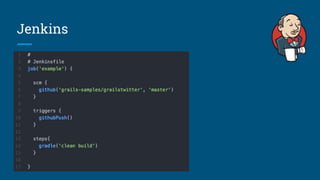
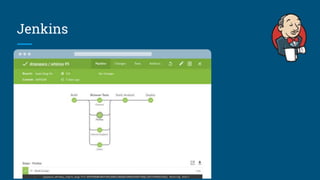
If it can be done, Jenkins can automate it
Very well established, large plugin ecosystem
Incredibly modular, configuration hell
Several DSLs (Custom, Scala, or configure via UI)
Completely separate from SCM
https://jenkins.io/
Jenkins
Jenkins
TravisCI
Simple, free, and requires GitHub
TravisCI
Third-party cloud-based solution tied into GitHub
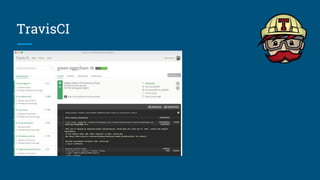
Connect Travis to a GitHub repo, it just works
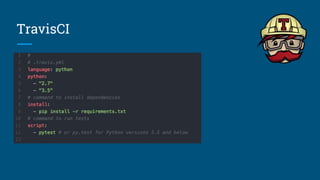
YAML based DSL
Free for public repos
https://travis-ci.org
TravisCI
TravisCI
GitLabCI
I hope you’re using GitLab
GitLabCI
Great integration with your SCM (if your SCM is GitLab)
Bring your own job runner, even your laptop
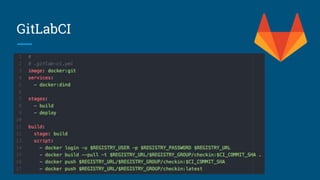
YAML based DSL
Youngest CI solution out of the three
https://about.gitlab.com/
GitLabCI
GitLabCI
Common things are
common.
This is DevOps.
This is DevOps.
TutorialFollow along at home!
https://git.arc-ts.umich.edu/open/cicd-tutorial
http://141.211.55.211:5050/
Questions?
Jeffrey Sica
jsica@umich.edu
@jeefy
http://arc-ts.umich.edu
Docker Webinar on CI/CD Infrastructure
http://bit.ly/2h8GsJ2

Michigan IT Symposium 2017 - CI/CD Workflow Tutorial

Editor's Notes

  • #2 Let’s get right into it
  • #3 I wanted to present a brief primer before we get into the hands on portion. We’re going to go fast and I’m not going to dive deep into certain things for the sake of time. If I had four hours I could go over all of that I’d want. Save questions for the end, and even after the symposium if you have questions or need help or ideas, feel free to email me.
  • #4 Been with the University for over ten years Before ARC I built and managed web based systems for Dept of Path I’m one of the luckiest people because my main hobby and passion is also my career My free time is spent playing with and investigating new technology One of the benefits of that is I can then take what I learn and share it I’m very passionate about this sort of things
  • #5 And that makes me a pretty good motivational speaker about using technology across many spectrums
  • #6 At its core, CI/CD means “dev fast, test fast, push fast, fail fast, rollback fast” By live meaning environments outside a local (laptop) environment. You could be pushing changes to a remote dev or QA environment, and this would still apply. In fact, a common pattern is mirroring branch names to environments. More advanced places provision and destroy entire environments dynamically based on new and deleted branches
  • #7 Automation is the primary goal. Take repeatable and necessary tasks and make them part of your development process. Remove the need to SSH to a server. Install a service. Run a database script. Remove the fear that a code change will break your application
  • #8 I know this is a very big change for most people. Especially larger institutions.
  • #9 It can also be scary. It’s a lot to learn, it’s a different way of thinking. It’s also giving up a lot of control. This can be frightening.
  • #10 This can also be the single biggest value added change you could implement. This increases overall productivity, alleviates stress, and if you’re a development nerd like me, is SUPER fun.
  • #11 This is the circle of life. Dev. Test. Push. Repeat. It’s a constant cycle. Some of these stages you might not think apply, but they should. Here’s a more practical look
  • #12 Asterisk one: Tests come in a variety of shapes, sizes, and stages. A test could be a unit test, deploying a short lived instance and running practical tests. Asterisk two: Deployments also come in a variety of shapes and sizes. Deploy could mean changing code on a server. Spinning up a new docker container. Or pushing a new android and ios build up to the store. Verifying deployment is just another safeguard or test. It could be part of the CI build checking logs, polling a health check, or as simple as a bash script checking for an open port. CI/CD should really be CI/CD/CF. You want constant feedback.
  • #13 Part of this transition to automation involves having good tests. Yes, seeing if a port opens is a test in a pinch, or asserting 1+1=2. But the more you can test, and verify your tests, the fewer bugs will come up. The safer you’ll feel every time you make a change.
  • #14 With this paradigm of pushing small and pushing fast, your changes should apply faster. Also, if one of your many feedback mechanisms shows a problem, you can rollback faster. Just as much as building automated tests, you need to build automated rollbacks as part of your deployments. Yet again though, this is a case of “It depends on your actual use case”Mo
  • #17 I think there are three big pools that people fall into these days.
  • #18 Get your database schema into your SCM. Bundle tests into it. Always have a rollback plan. Test. Your. UI. I cannot stress this enough. There is an abundance of tools out that can do it for every platform. When I say test your application, most people will think I mean Unit Tests. I mean unit tests and more. Another test? Security scan. Sure the code might run but you also might have deployed something vulnerable. Lots of scanners these days have APIs that you can use to trigger new scans if it’s a security appliance. It depends on your environment and your project.
  • #19 Common things are common. Automatically test against multiple versions of Android and iOS. Even run UI tests against different emulated hardware. Automatically. After that, you can push the new build up to Android/iOS and immediately start a staggered rollout. Luckily with mobile apps, rollbacks are easy and you get crash reports. Constant Feedback.
  • #20 Common problem with config management? Simple syntax errors. Lint your files ahead of time. At this point you’re already trusting services to push infrastructure changes. Remove the commands you run by hand and automate the deployments. Build functional tests to ensure your changes applied correctly and if not: ROLLBACK
  • #21 If it feels like I’m repeating myself, I am. A lot of these concepts are common across any project. The devil’s in the details but the desired structure stays static.
  • #22 You have to start somewhere. And again, it depends. If you take something away from these slides let it be UI Testing should not be overlooked or ignored. Ultimately some testing is better than none, but (again repeating myself) You’re only as good as your tests. And the more tests you build the better and safer you are.
  • #23 I could come up with endless reasons but here are just a few for why this is important.
  • #24 I cannot stress this enough. Adopt this mantra. This isn’t just for CI/CD. This is for everything.
  • #38 There are patterns. Surprise!