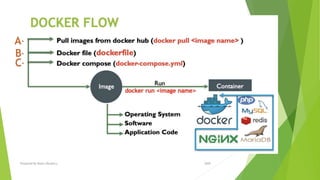
Prepared By Mutlu Okuducu
2020
https://github.com/mutluokuducu/Docker
• Docker is a container management service. The
keywords of Docker are develop,
ship and run anywhere. The whole idea of Docker is for
developers to easily develop applications, ship them
into containers which can then be deployed anywhere.
• Docker is an Open platform for developers and
sysadmins to build, ship and run distributed
applications.
• It can run on most Linux distributions, Windows and
Mac OS running Docker Engine (Toolbox).
WHAT IS DOCKER?
2020Prepared By Mutlu Okuducu
DOCKER FEATURES….
 Light-Weight
 Minimal overhead (cpu/io/network)
 Based on Linux containers
 Decrease storage consumption
 Uses layered filesystem to save space (AUFS/LVM)
 Portable
 Run it Everywhere! - Linux, Mac OS or Windows operating system that has Docker installed.
 Raspberry pi support.
 Move from one environment to another by using the same Docker technology.
 Self-sufficient
 A Docker container contains everything it needs to run
 Minimal Base OS
 Libraries and frameworks
 Application code
 A Docker container should be able to run anywhere that Docker can run.
2020Prepared By Mutlu Okuducu
IMAGES - CONTAINERS
 Docker images are executable packages that
include everything needed to run an application —
the code, a runtime, libraries, environment
variables, and configuration files.
 Docker containers are a runtime instance of an
image — what the image becomes in memory
when executed (that is, an image with state, or a
user process).
2020Prepared By Mutlu Okuducu
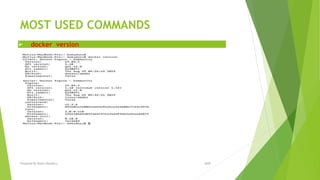
MOST USED COMMANDS
 docker version
2020Prepared By Mutlu Okuducu
A-DOCKER HUB
 Docker Hub is a service provided by Docker for finding and sharing container
images with your team.
 https://hub.docker.com/
2020Prepared By Mutlu Okuducu
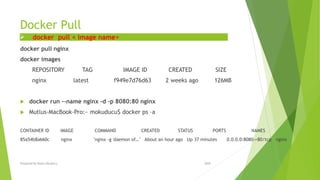
Docker Pull
docker pull nginx
docker images
REPOSITORY TAG IMAGE ID CREATED SIZE
nginx latest f949e7d76d63 2 weeks ago 126MB
 docker run --name nginx -d -p 8080:80 nginx
 Mutlus-MacBook-Pro:~ mokuducu$ docker ps –a
CONTAINER ID IMAGE COMMAND CREATED STATUS PORTS NAMES
85a54b8a660c nginx "nginx -g 'daemon of…" About an hour ago Up 37 minutes 0.0.0.0:8080->80/tcp nginx
 docker pull < image name>
2020Prepared By Mutlu Okuducu
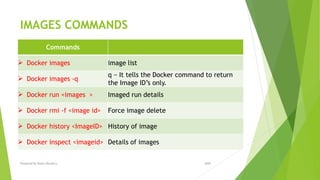
IMAGES COMMANDS
Commands
 Docker images image list
 Docker images -q
q − It tells the Docker command to return
the Image ID’s only.
 Docker run <images > Imaged run details
 Docker rmi -f <image id> Force image delete
 Docker history <ImageID> History of image
 Docker inspect <imageid> Details of images
2020Prepared By Mutlu Okuducu
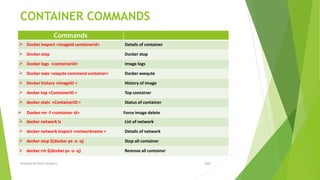
CONTAINER COMMANDS
Commands
 Docker inspect <imageid containerid> Details of container
 Docker stop Docker stop
 Docker logs <containerid> Image logs
 Docker exec <exqute command container> Docker exequte
 Docker history <ImageID > History of image
 docker top <ContainerID > Top container
 docker stats <ContainerID > Status of container
 Docker rm -f <container id> Force image delete
 docker network ls List of network
 docker network inspect <networkname > Details of network
 docker stop $(docker ps -a -q) Stop all container
 docker rm $(docker ps -a -q) Remove all container
2020Prepared By Mutlu Okuducu
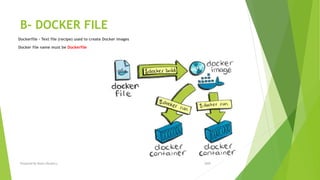
B- DOCKER FILE
Dockerfile – Text file (recipe) used to create Docker images
Docker file name must be Dockerfile
2020Prepared By Mutlu Okuducu
Docker File Commands
ADD copies the files from a source on the host into the container’s own filesystem at
the set destination.
CMD can be used for executing a specific command within the container.
ENTRYPOINT sets a default application to be used every time a container is created
with the image.
ENV sets environment variables.
EXPOSE associates a specific port to enable networking between the container and
the outside world.
FROM defines the base image used to start the build process.
MAINTAINER defines a full name and email address of the image creator.
RUN is the central executing directive for Dockerfiles.
USER sets the UID (or username) which is to run the container.
VOLUME is used to enable access from the container to a directory on the host
machine.
WORKDIR sets the path where the command, defined with CMD, is to be executed.
LABEL allows you to add a label to your docker image.
2020Prepared By Mutlu Okuducu
Build Docker File
# Ubuntu
FROM ubuntu
MAINTAINER demousr@gmail.com
RUN apt-get update
RUN apt-get install –y nginx
CMD [“echo”,”Image created”]
 •The first line "#This is a sample Image" is a comment.
 •The next line has to start with the FROM keyword. It tells docker, from which base image
you want to base your image from. In our example, we are creating an image from
the ubuntu image.
 •The next command is the person who is going to maintain this image. Here you specify
the MAINTAINER keyword and just mention the email ID.
 •The RUN command is used to run instructions against the image. In our case, we first update
our Ubuntu system and then install the nginx server on our ubuntu image.
 •The last command is used to display a message to the user.
 docker build .
2020Prepared By Mutlu Okuducu
C- DOCKER-COMPOSE
Docker Compose is used to run multiple containers as a single service. For
example, suppose you had an application which required NGNIX and Redis, you
could create one file
Create Docker-Compose File at any location on your system
 All Docker Compose files are YAML
 File name docker-compose.yml
Install Docker Compose:
•From
github (https://github.com/docker/compose/releases)
•Using PIP
Pip install-U docker-compose
2020Prepared By Mutlu Okuducu
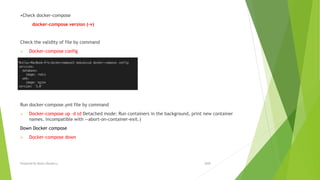
•Check docker-compose
docker-compose version (-v)
Check the validity of file by command
 Docker-compose config
Run docker-compose.yml file by command
 Docker-compose up –d (d Detached mode: Run containers in the background, print new container
names. Incompatible with --abort-on-container-exit.)
Down Docker compose
 Docker-compose down
2020Prepared By Mutlu Okuducu
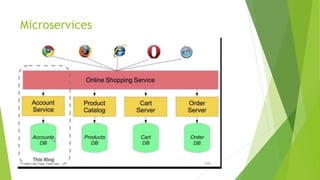
Microservices
2020Prepared By Mutlu Okuducu
Scale
scale Set number of containers for a service
docker-compose up -d --scale <service name>=number of instance
 docker-compose up -d --scale database=4
2020Prepared By Mutlu Okuducu
COMPOSE COMMANDS
Commands
 docker-compose -help Help compose commands
 docker-compose version (-v) Compose version
 Docker-compose config Validate and view the Compose file
 Docker-compose up –d Create and start containers
 Docker-compose down Stop and remove containers, networks, images, and
volumes
 docker-compose up -d --scale <service
name>=number of instance
Set number of containers for a service
2020Prepared By Mutlu Okuducu
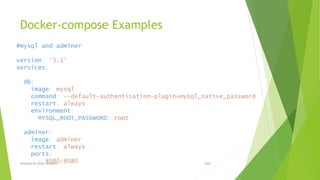
Docker-compose Examples
#mysql and adminer
version: '3.1'
services:
db:
image: mysql
command: --default-authentication-plugin=mysql_native_password
restart: always
environment:
MYSQL_ROOT_PASSWORD: root
adminer:
image: adminer
restart: always
ports:
- 8080:8080 2020Prepared By Mutlu Okuducu

Docker

  • 1.
    Prepared By MutluOkuducu 2020 https://github.com/mutluokuducu/Docker
  • 2.
    • Docker isa container management service. The keywords of Docker are develop, ship and run anywhere. The whole idea of Docker is for developers to easily develop applications, ship them into containers which can then be deployed anywhere. • Docker is an Open platform for developers and sysadmins to build, ship and run distributed applications. • It can run on most Linux distributions, Windows and Mac OS running Docker Engine (Toolbox). WHAT IS DOCKER? 2020Prepared By Mutlu Okuducu
  • 3.
  • 4.
    DOCKER FEATURES….  Light-Weight Minimal overhead (cpu/io/network)  Based on Linux containers  Decrease storage consumption  Uses layered filesystem to save space (AUFS/LVM)  Portable  Run it Everywhere! - Linux, Mac OS or Windows operating system that has Docker installed.  Raspberry pi support.  Move from one environment to another by using the same Docker technology.  Self-sufficient  A Docker container contains everything it needs to run  Minimal Base OS  Libraries and frameworks  Application code  A Docker container should be able to run anywhere that Docker can run. 2020Prepared By Mutlu Okuducu
  • 5.
    IMAGES - CONTAINERS Docker images are executable packages that include everything needed to run an application — the code, a runtime, libraries, environment variables, and configuration files.  Docker containers are a runtime instance of an image — what the image becomes in memory when executed (that is, an image with state, or a user process). 2020Prepared By Mutlu Okuducu
  • 6.
  • 7.
    MOST USED COMMANDS docker version 2020Prepared By Mutlu Okuducu
  • 8.
    A-DOCKER HUB  DockerHub is a service provided by Docker for finding and sharing container images with your team.  https://hub.docker.com/ 2020Prepared By Mutlu Okuducu
  • 9.
    Docker Pull docker pullnginx docker images REPOSITORY TAG IMAGE ID CREATED SIZE nginx latest f949e7d76d63 2 weeks ago 126MB  docker run --name nginx -d -p 8080:80 nginx  Mutlus-MacBook-Pro:~ mokuducu$ docker ps –a CONTAINER ID IMAGE COMMAND CREATED STATUS PORTS NAMES 85a54b8a660c nginx "nginx -g 'daemon of…" About an hour ago Up 37 minutes 0.0.0.0:8080->80/tcp nginx  docker pull < image name> 2020Prepared By Mutlu Okuducu
  • 10.
    IMAGES COMMANDS Commands  Dockerimages image list  Docker images -q q − It tells the Docker command to return the Image ID’s only.  Docker run <images > Imaged run details  Docker rmi -f <image id> Force image delete  Docker history <ImageID> History of image  Docker inspect <imageid> Details of images 2020Prepared By Mutlu Okuducu
  • 11.
    CONTAINER COMMANDS Commands  Dockerinspect <imageid containerid> Details of container  Docker stop Docker stop  Docker logs <containerid> Image logs  Docker exec <exqute command container> Docker exequte  Docker history <ImageID > History of image  docker top <ContainerID > Top container  docker stats <ContainerID > Status of container  Docker rm -f <container id> Force image delete  docker network ls List of network  docker network inspect <networkname > Details of network  docker stop $(docker ps -a -q) Stop all container  docker rm $(docker ps -a -q) Remove all container 2020Prepared By Mutlu Okuducu
  • 12.
    B- DOCKER FILE Dockerfile– Text file (recipe) used to create Docker images Docker file name must be Dockerfile 2020Prepared By Mutlu Okuducu
  • 13.
    Docker File Commands ADDcopies the files from a source on the host into the container’s own filesystem at the set destination. CMD can be used for executing a specific command within the container. ENTRYPOINT sets a default application to be used every time a container is created with the image. ENV sets environment variables. EXPOSE associates a specific port to enable networking between the container and the outside world. FROM defines the base image used to start the build process. MAINTAINER defines a full name and email address of the image creator. RUN is the central executing directive for Dockerfiles. USER sets the UID (or username) which is to run the container. VOLUME is used to enable access from the container to a directory on the host machine. WORKDIR sets the path where the command, defined with CMD, is to be executed. LABEL allows you to add a label to your docker image. 2020Prepared By Mutlu Okuducu
  • 14.
    Build Docker File #Ubuntu FROM ubuntu MAINTAINER demousr@gmail.com RUN apt-get update RUN apt-get install –y nginx CMD [“echo”,”Image created”]  •The first line "#This is a sample Image" is a comment.  •The next line has to start with the FROM keyword. It tells docker, from which base image you want to base your image from. In our example, we are creating an image from the ubuntu image.  •The next command is the person who is going to maintain this image. Here you specify the MAINTAINER keyword and just mention the email ID.  •The RUN command is used to run instructions against the image. In our case, we first update our Ubuntu system and then install the nginx server on our ubuntu image.  •The last command is used to display a message to the user.  docker build . 2020Prepared By Mutlu Okuducu
  • 15.
    C- DOCKER-COMPOSE Docker Composeis used to run multiple containers as a single service. For example, suppose you had an application which required NGNIX and Redis, you could create one file Create Docker-Compose File at any location on your system  All Docker Compose files are YAML  File name docker-compose.yml Install Docker Compose: •From github (https://github.com/docker/compose/releases) •Using PIP Pip install-U docker-compose 2020Prepared By Mutlu Okuducu
  • 16.
    •Check docker-compose docker-compose version(-v) Check the validity of file by command  Docker-compose config Run docker-compose.yml file by command  Docker-compose up –d (d Detached mode: Run containers in the background, print new container names. Incompatible with --abort-on-container-exit.) Down Docker compose  Docker-compose down 2020Prepared By Mutlu Okuducu
  • 17.
  • 18.
    Scale scale Set numberof containers for a service docker-compose up -d --scale <service name>=number of instance  docker-compose up -d --scale database=4 2020Prepared By Mutlu Okuducu
  • 19.
    COMPOSE COMMANDS Commands  docker-compose-help Help compose commands  docker-compose version (-v) Compose version  Docker-compose config Validate and view the Compose file  Docker-compose up –d Create and start containers  Docker-compose down Stop and remove containers, networks, images, and volumes  docker-compose up -d --scale <service name>=number of instance Set number of containers for a service 2020Prepared By Mutlu Okuducu
  • 20.
    Docker-compose Examples #mysql andadminer version: '3.1' services: db: image: mysql command: --default-authentication-plugin=mysql_native_password restart: always environment: MYSQL_ROOT_PASSWORD: root adminer: image: adminer restart: always ports: - 8080:8080 2020Prepared By Mutlu Okuducu