NiFi – First approach
The very basics
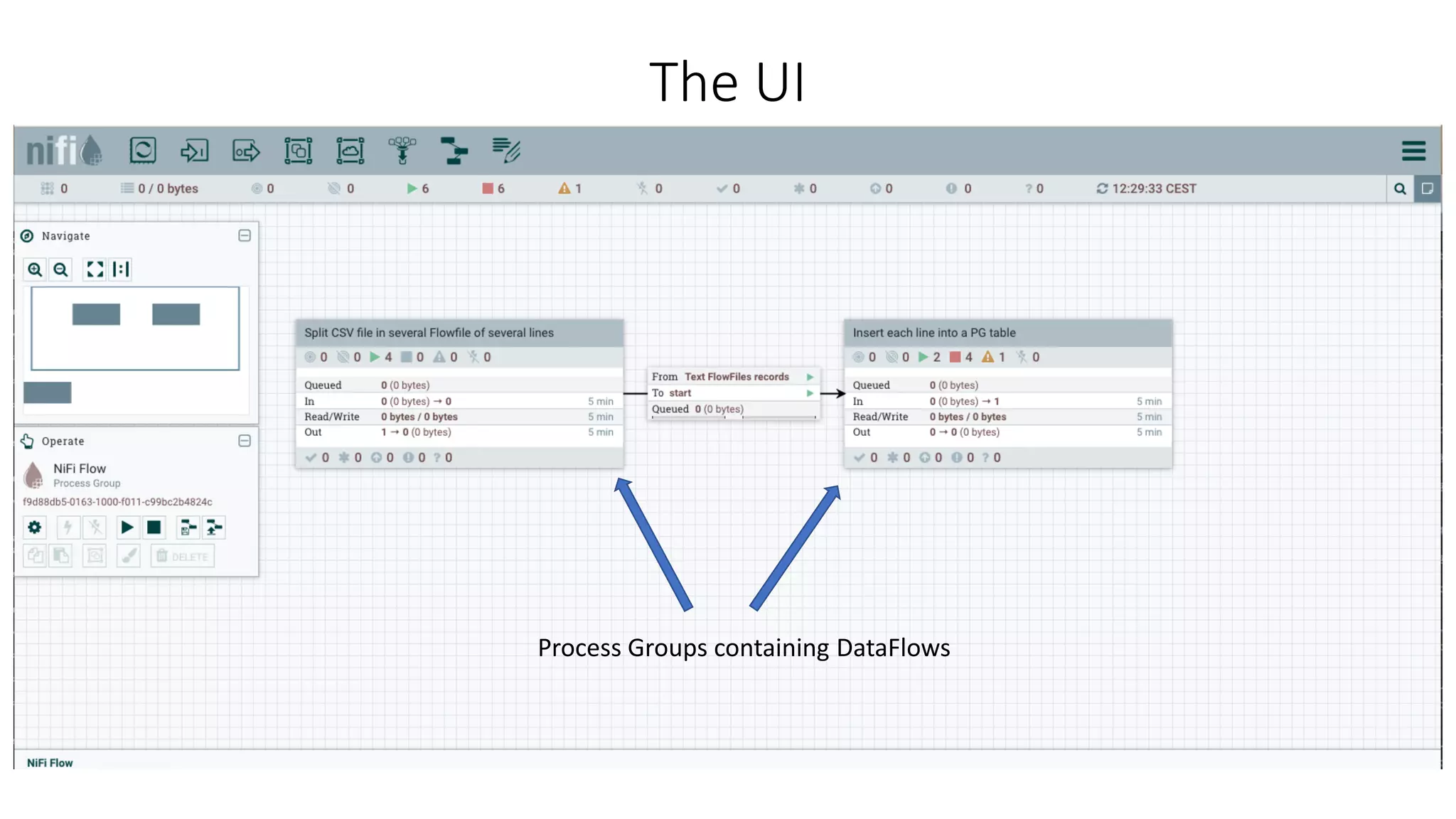
The UI
Process Groups containing DataFlows
A Data Flow
In fact, 2 Process Groups. DataFlows can be grouped together into process
groups.
• Easier to get an overall view of a complex DataFlow
• Process Groups can be remotely called from other instances of NiFi.
This DataFlow read a CSV file from a folder, and insert each line into a
postgresql table.
Processors & Queues
Processors’ properties & variables
FlowFile
The GetFile processor first properties.
Input Directory supports NiFi Expression Language. « ${data_in} » will render « /usr/local/Cellar/nifi/data-in ».
File Filter accepts Regular Expressions only.
More about the NiFi Expressions Language in the official doc : https://nifi.apache.org/docs/nifi-docs/html/expression-
language-guide.html
• Boolean Logic
• String Manipulation
• Encode/Decode Functions (json/xml/csv/base64/etc)
• Searching (into string/json/etc)
• Mathematical operation
• Date Manipulation
• Type Coercion
• join/count/etc
Variables
FlowFile
data_in is selected and used by a processor
Variables are :
• Scoped in their Process Group
• Inherited from parent Process Group
• Used in properties
FlowFiles, Properties, Attributes
Input SQL
Properties
JDBC Connection Pool (jdbc:postgresql….)
Statement Type (insert/update/…)
Table Name (my_table)
Schema Name (public/…)
…
FlowFile
Attributes
(64KB max.)
Payload
(Resources bound)
Controllers
FlowFile
• Are much like processors, but they don’t read nor write FlowFiles.
• Used by Processors, Reporting Tasks, and other Controller Services.
• Allows to share functionality and state across the JVM in a clean and consistent manner.
• Like variables, exists in their own Process Group or are inherited from parents.
• As example : DBCPConnectionPool
• Uses JDBC to connect to databases
• Allows to configure a pool of connection
• Connects to only one database
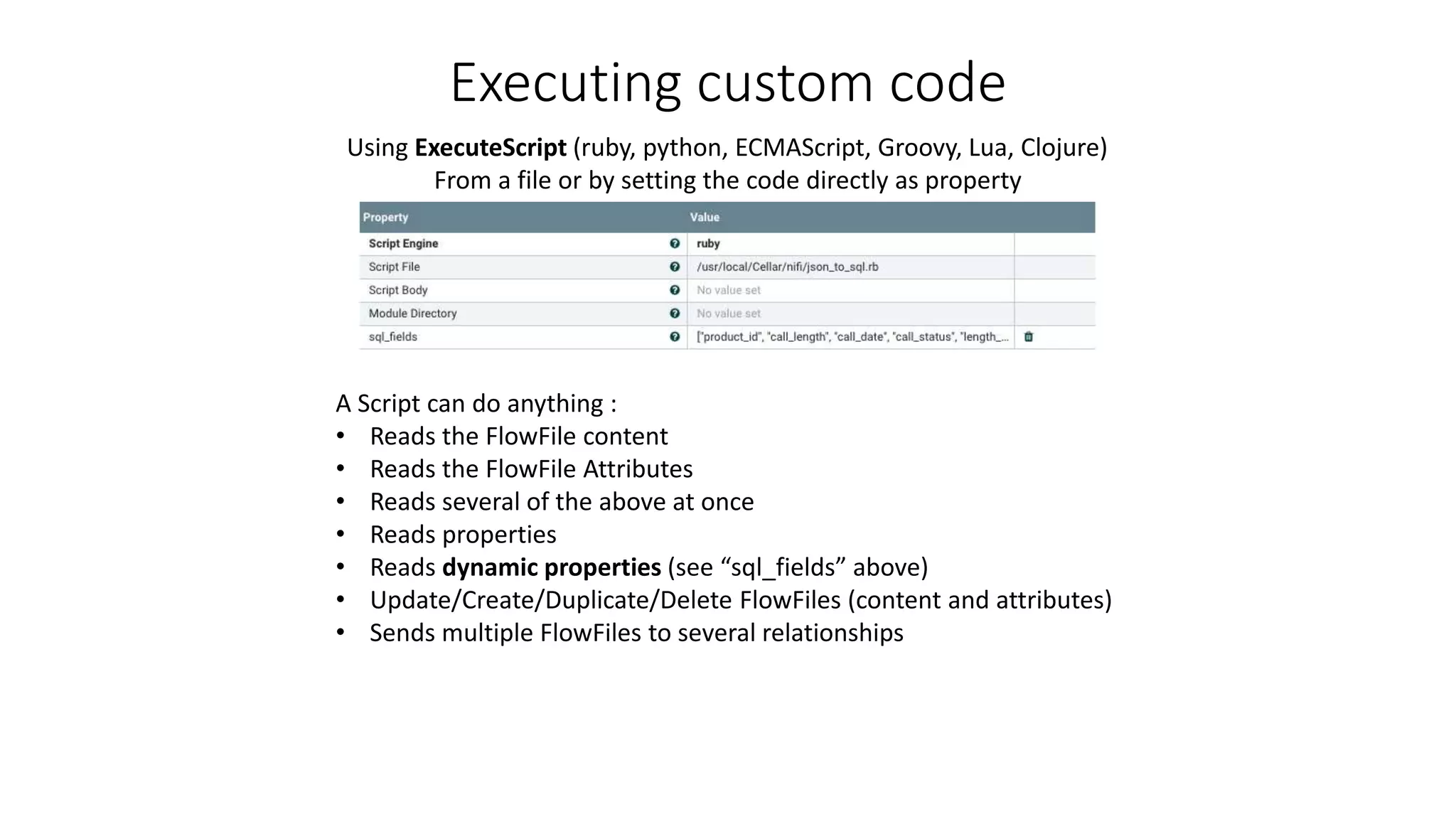
Executing custom code
FlowFile
Using ExecuteScript (ruby, python, ECMAScript, Groovy, Lua, Clojure)
From a file or by setting the code directly as property
A Script can do anything :
• Reads the FlowFile content
• Reads the FlowFile Attributes
• Reads several of the above at once
• Reads properties
• Reads dynamic properties (see “sql_fields” above)
• Update/Create/Duplicate/Delete FlowFiles (content and attributes)
• Sends multiple FlowFiles to several relationships
Example of custom code
FlowFile
For some reasons, unkown yet to me,
doesn’t work when multithreaded
• Reads a dynamic “sql_fields” parameter
• Takes a FlowFile with json inside
• Replaces it by an SQL query
• Creates the necessary attributes
• Sends the updated FlowFile to the SUCCESS relationship
• So it can be read and executed by PutSQL
Resources to look at
FlowFile
Resources to look at :
https://nifi.apache.org/docs.html
https://community.hortonworks.com/articles/75032/executescript-cookbook-part-1.html
https://community.hortonworks.com/articles/75545/executescript-cookbook-part-2.html
https://community.hortonworks.com/articles/77739/executescript-cookbook-part-3.html
https://community.hortonworks.com/questions/106878/split-one-nifi-flow-file-into-multiple-flow-file-b.html

NiFi - First approach

  • 1.
    NiFi – Firstapproach The very basics
  • 2.
    The UI Process Groupscontaining DataFlows
  • 3.
    A Data Flow Infact, 2 Process Groups. DataFlows can be grouped together into process groups. • Easier to get an overall view of a complex DataFlow • Process Groups can be remotely called from other instances of NiFi. This DataFlow read a CSV file from a folder, and insert each line into a postgresql table.
  • 4.
  • 5.
    Processors’ properties &variables FlowFile The GetFile processor first properties. Input Directory supports NiFi Expression Language. « ${data_in} » will render « /usr/local/Cellar/nifi/data-in ». File Filter accepts Regular Expressions only. More about the NiFi Expressions Language in the official doc : https://nifi.apache.org/docs/nifi-docs/html/expression- language-guide.html • Boolean Logic • String Manipulation • Encode/Decode Functions (json/xml/csv/base64/etc) • Searching (into string/json/etc) • Mathematical operation • Date Manipulation • Type Coercion • join/count/etc
  • 6.
    Variables FlowFile data_in is selectedand used by a processor Variables are : • Scoped in their Process Group • Inherited from parent Process Group • Used in properties
  • 7.
    FlowFiles, Properties, Attributes InputSQL Properties JDBC Connection Pool (jdbc:postgresql….) Statement Type (insert/update/…) Table Name (my_table) Schema Name (public/…) … FlowFile Attributes (64KB max.) Payload (Resources bound)
  • 8.
    Controllers FlowFile • Are muchlike processors, but they don’t read nor write FlowFiles. • Used by Processors, Reporting Tasks, and other Controller Services. • Allows to share functionality and state across the JVM in a clean and consistent manner. • Like variables, exists in their own Process Group or are inherited from parents. • As example : DBCPConnectionPool • Uses JDBC to connect to databases • Allows to configure a pool of connection • Connects to only one database
  • 9.
    Executing custom code FlowFile UsingExecuteScript (ruby, python, ECMAScript, Groovy, Lua, Clojure) From a file or by setting the code directly as property A Script can do anything : • Reads the FlowFile content • Reads the FlowFile Attributes • Reads several of the above at once • Reads properties • Reads dynamic properties (see “sql_fields” above) • Update/Create/Duplicate/Delete FlowFiles (content and attributes) • Sends multiple FlowFiles to several relationships
  • 10.
    Example of customcode FlowFile For some reasons, unkown yet to me, doesn’t work when multithreaded • Reads a dynamic “sql_fields” parameter • Takes a FlowFile with json inside • Replaces it by an SQL query • Creates the necessary attributes • Sends the updated FlowFile to the SUCCESS relationship • So it can be read and executed by PutSQL
  • 11.
    Resources to lookat FlowFile Resources to look at : https://nifi.apache.org/docs.html https://community.hortonworks.com/articles/75032/executescript-cookbook-part-1.html https://community.hortonworks.com/articles/75545/executescript-cookbook-part-2.html https://community.hortonworks.com/articles/77739/executescript-cookbook-part-3.html https://community.hortonworks.com/questions/106878/split-one-nifi-flow-file-into-multiple-flow-file-b.html

Editor's Notes

  • #3 In fact, 2 Process Groups. DataFlows can be grouped together into process groups. Easier to get an overall view of a complex DataFlow Process Groups can be remotely called from other instances of NiFi. This DataFlow read a CSV file from a folder, and insert each line into a postgresql table.
  • #4 In fact, 2 Process Groups. DataFlows can be grouped together into process groups. Easier to get an overall view of a complex DataFlow Process Groups can be remotely called from other instances of NiFi. This DataFlow read a CSV file from a folder, and insert each line into a postgresql table.
  • #5 Processors can be scaled independently. (threads) They communicate with each-other using queues They read one or more FlowFiles from a queue, and can queue one or more FlowFile to another. More than that, they can read from many queues and push to many queues Queues have limits, both in number of FlowFiles waiting to be processed and size in bytes. Once they reach this limit, they will: SWAP to disk Apply backpressure to the previous processor (I guess by reducing the number of threads, maybe even stop it for a while) Each queues can have its own way to prioritize (FIFO/LIFO/Attribute based) Several Prioritizers can be stacked
  • #6 The GetFile processor first properties. Input Directory supports NiFi Expression Language. « ${data_in} » will render « /usr/local/Cellar/nifi/data-in ». File Filter accepts Regular Expressions only. More about the NiFi Expressions Language in the official doc : https://nifi.apache.org/docs/nifi-docs/html/expression-language-guide.html Chaining Functions Boolean Logic String Manipulation Encode/Decode Functions (json/xml/csv/base64/etc) Searching (into string/json/etc) Mathematical operation Date Manipulation Type Coercion join/count/etc
  • #7 Variables are : Scoped in their Process Group Inherited from parent Process Group Used in properties
  • #10  Resources to look at : https://community.hortonworks.com/articles/75032/executescript-cookbook-part-1.html https://community.hortonworks.com/articles/75545/executescript-cookbook-part-2.html https://community.hortonworks.com/articles/77739/executescript-cookbook-part-3.html https://community.hortonworks.com/questions/106878/split-one-nifi-flow-file-into-multiple-flow-file-b.html
  • #11  Resources to look at : https://community.hortonworks.com/articles/75032/executescript-cookbook-part-1.html https://community.hortonworks.com/articles/75545/executescript-cookbook-part-2.html https://community.hortonworks.com/articles/77739/executescript-cookbook-part-3.html https://community.hortonworks.com/questions/106878/split-one-nifi-flow-file-into-multiple-flow-file-b.html
  • #12  Resources to look at : https://community.hortonworks.com/articles/75032/executescript-cookbook-part-1.html https://community.hortonworks.com/articles/75545/executescript-cookbook-part-2.html https://community.hortonworks.com/articles/77739/executescript-cookbook-part-3.html https://community.hortonworks.com/questions/106878/split-one-nifi-flow-file-into-multiple-flow-file-b.html