Modeling Infrastructure With Chef
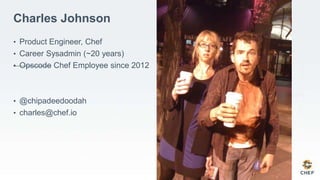
Charles Johnson
• Product Engineer, Chef
• Career Sysadmin (~20 years)
• Opscode Chef Employee since 2012
• @chipadeedoodah
• charles@chef.io
Where Does Configuration Live?
Layers of Policy
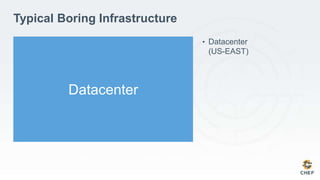
Typical Boring Infrastructure
• Datacenter
(US-EAST)
Datacenter
Datacenter
Zone
Zone
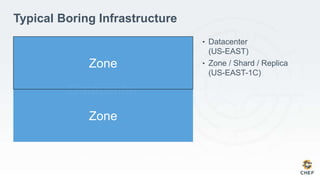
Typical Boring Infrastructure
• Datacenter
(US-EAST)
• Zone / Shard / Replica
(US-EAST-1C)
Datacenter
Zone
Zone
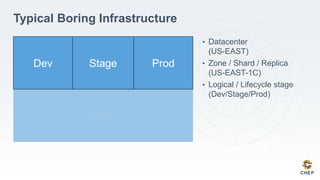
Typical Boring Infrastructure
• Datacenter
(US-EAST)
• Zone / Shard / Replica
(US-EAST-1C)
• Logical / Lifecycle stage
(Dev/Stage/Prod)
Dev Stage Prod
Datacenter
Zone
Zone
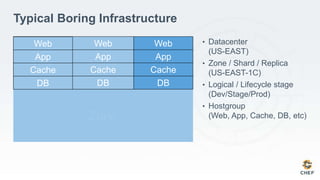
Typical Boring Infrastructure
• Datacenter
(US-EAST)
• Zone / Shard / Replica
(US-EAST-1C)
• Logical / Lifecycle stage
(Dev/Stage/Prod)
• Hostgroup
(Web, App, Cache, DB, etc)
Dev Stage Prod
Web
App
Cache
DB
Web
App
Cache
DB
Web
App
Cache
DB
Datacenter
Zone
Zone
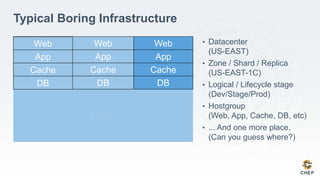
Typical Boring Infrastructure
• Datacenter
(US-EAST)
• Zone / Shard / Replica
(US-EAST-1C)
• Logical / Lifecycle stage
(Dev/Stage/Prod)
• Hostgroup
(Web, App, Cache, DB, etc)
• ... And one more place.
(Can you guess where?)
Dev Stage Prod
Web
App
Cache
DB
Web
App
Cache
DB
Web
App
Cache
DB
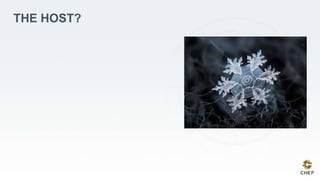
THE HOST?
THE “NO SNOWFLAKES” RULE
• Rule #1 of modeling infrastructure with
Chef: There Shall Be No Host-Specific
Configuration.
• That one server in the corner that
nobody touches because the person
who built it is long-gone and if that
server dies you’re all screwed? No
longer allowed.
• So where, then?
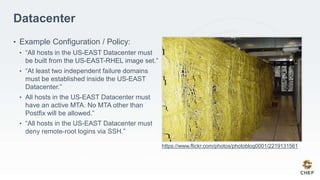
Datacenter
• Example Configuration / Policy:
• “All hosts in the US-EAST Datacenter must
be built from the US-EAST-RHEL image set.”
• “At least two independent failure domains
must be established inside the US-EAST
Datacenter.”
• All hosts in the US-EAST Datacenter must
have an active MTA. No MTA other than
Postfix will be allowed.”
• “All hosts in the US-EAST Datacenter must
deny remote-root logins via SSH.”
https://www.flickr.com/photos/photoblog0001/2219131561
Zone / Shard / Replica
• Example Configuration / Policy:
• “In order to comply with the failure domain
policy within the US-EAST Datacenter, all
configurations, policies, and changes in US-
EAST-1A must be duplicated locally in zone
US-EAST-1D.”
• “All hosts in each zone must use zone-local
DNS and NTP servers.”
https://www.flickr.com/photos/winnieshuman/3559464042/
Logical Stage
• Example Configuration / Policy:
• “All Development servers must route
outbound mail to /dev/null.”
• “All staging servers cannot run in debug log-
level for more than 6h.”
• “All Production servers must route outbound
mail through a specific named relay.”
https://www.flickr.com/photos/srkkiran/6096554915
Hostgroup
• Example Configuration / Policy:
• “All Web Servers must run NGINX.”
• “All Web Servers should have a specific SSL
certificate.”
• “All Web servers should listen on TCP ports
443 and 80.”
• “All Database servers should run
PostgreSQL.”
• “All monitoring servers must run Sensu.”
https://www.flickr.com/photos/mr_t_in_dc/4800819674
Datacenter
Zone
Zone
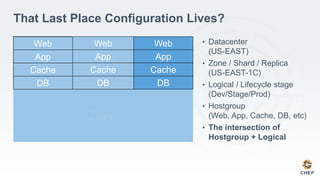
That Last Place Configuration Lives?
• Datacenter
(US-EAST)
• Zone / Shard / Replica
(US-EAST-1C)
• Logical / Lifecycle stage
(Dev/Stage/Prod)
• Hostgroup
(Web, App, Cache, DB, etc)
• The intersection of
Hostgroup + Logical
Dev Stage Prod
Web
App
Cache
DB
Web
App
Cache
DB
Web
App
Cache
DB
The Intersection of Hostgroup and Logical Stage
• Example Configuration / Policy:
• “All staging application servers must only
communicate with staging database
servers.”
• “No cross-stage communication may be
allowed.”
• Exceptions! “Development database servers
should be refreshed with replicated data
from production database servers every 72
hours.”
https://www.flickr.com/photos/collylogic/12620887894
Infrastructure Modeling With Chef
Available Primitives
Organizations
• Immutable & stateless
• Have no data or policy of their own
• Isolated / Sandboxed “tenants”
• Data cannot be shared between organizations
• Each has its own API endpoint and keys
• Container objects
• All other objects exist within an organization
• Can represent different companies, business units, departments, or even isolate
production from dev/stage.
Nodes
• Represent individual compute resources in the infrastructure (hosts)
• Have a single environment, and 0 or more roles
• Contain a run_list
• An order list of Chef recipes (programs) that will be executed on the node
• Contain attributes
• Store state data such as the default webserver ports
• Store information about the node, such as number of CPUs, block devices, runtimes, etc.
• Are their own SOA
• The node object in Chef is the sole authority for the configuration of the node.
• Autonomous individual nodes acting together correctly comprise a working, reliable
infrastructure.
Roles
• Collects multiple policies into a single object for easy duplication
• Contain a run_list
• An order list of Chef recipes (programs) that will be executed on the node
• Contain attributes
• Store state data such as the default webserver ports
• The relationships between role and node are defined at the node, not at the role.
Environments
• Have no run_list
• Contain attributes
• Store blanket policies such as “all nodes in this environment must behave in a particular way.”
• Can be used to version cookbook releases and model application lifecycle for
Chef code.
• The relationship between environment and node is defined at the node, not at
the environment.
Data Bags
• Collections of indexed data, stored in JSON format. “A hash table in the sky.”
• Can be read from and written to on the fly by Chef recipes.
• No drivers necessary, data bags are searchable from Chef code without any
additional libraries.
• Suitable for storing information that is true of the entire infrastructure, without
necessarily being true for any one individual node. eg. A list of users, a list of
current code version releases, etc.
Cookbooks
• Unit of code sharing in Chef: Thousands of existing cookbooks are available for
free on the Chef Supermarket repository!
• Contain executable code
• Recipes
• Libraries
• LWRPs
• Configuration file templates
• Contain Attributes
• Typically default data, such as “Web servers listen on TCP port 80.”
Example policies, modeled in Chef
Disclaimer: With Chef, there is almost always more than one way to do
anything. These are examples, not dogma.
All hosts must deny remote-root logins via SSH.
• Upload the OpenSSH cookbook from the Chef Supermarket to the Chef Server
• Create a “base” role that will be applied to all hosts as a default set of
configuration, regardless of environment
• Include “recipe[‘openssh::default’] in the role run_list
• Add an attribute to the role that sets the OpenSSH permitRootLogin value to ‘no’
• Modify the node object so that role[‘base’] is the first item in the run_list.
• Execute chef-client on the node.
Example roles/base.json file:
{
"name":"base",
"description":"Default run_list for the Krustylu Studios”,
"chef_type": "role”,
"default_attributes":{
"openssh":{
"server":{
"permit_root_login": "no"
}
}
},
"run_list":[
"recipe[openssh]"
],
}
All Production servers must use the Postfix MTA,
and must route outbound mail through a specific
named relay.
• Upload the Postfix cookbook from the Chef Supermarket to the Chef Server
• Add the postfix cookbook to the run_list in the previously created ‘base’ role
• Create a production environment
• Add an attribute that sets the Postfix remote relay to our specific named relay
• Modify the node object so that it is associated with the production environment.
• Execute chef-client on the node.
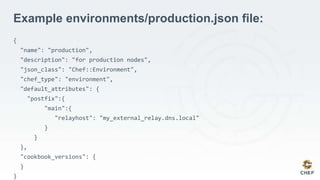
Example environments/production.json file:
{
"name": "production",
"description": "for production nodes",
"json_class": "Chef::Environment",
"chef_type": "environment",
"default_attributes": {
"postfix":{
"main":{
"relayhost": "my_external_relay.dns.local"
}
}
},
"cookbook_versions": {
}
}
Benefits
• Separating code (cookbooks) from configuration (roles, environments, etc.) leads
to greater re-use across teams, and allows teams to focus on their own domain
without interfering with others
• Quickly react to policy changes
• Centralize the flow of change into the infrastructure
• Chef has precedence rules for automatically layering conflicting configurations
together to create exceptions: “All production servers must use external DNS
except for machines on the TRUST VLAN segments.”
Wrapping Up
• Datacenter & IT Compute Infrastructure is typically modeled by subdividing
nodes into smaller groups
• Management and security policies typically exist at every layer
• These policies often intersect, complement, or conflict with one another, and
these must also be modeled.
• Chef provides primitives for accurately modeling all of these layers and
intersections of policy
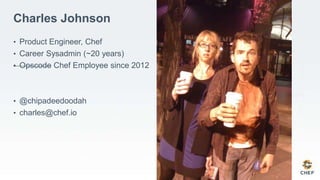
Charles Johnson
• Product Engineer, Chef
• Career Sysadmin (~20 years)
• Opscode Chef Employee since 2012
• @chipadeedoodah
• charles@chef.io
Thanks!
Q&A?

Infrastructure modeling with chef

  • 2.
  • 3.
    Charles Johnson • ProductEngineer, Chef • Career Sysadmin (~20 years) • Opscode Chef Employee since 2012 • @chipadeedoodah • charles@chef.io
  • 4.
    Where Does ConfigurationLive? Layers of Policy
  • 5.
    Typical Boring Infrastructure •Datacenter (US-EAST) Datacenter
  • 6.
    Datacenter Zone Zone Typical Boring Infrastructure •Datacenter (US-EAST) • Zone / Shard / Replica (US-EAST-1C)
  • 7.
    Datacenter Zone Zone Typical Boring Infrastructure •Datacenter (US-EAST) • Zone / Shard / Replica (US-EAST-1C) • Logical / Lifecycle stage (Dev/Stage/Prod) Dev Stage Prod
  • 8.
    Datacenter Zone Zone Typical Boring Infrastructure •Datacenter (US-EAST) • Zone / Shard / Replica (US-EAST-1C) • Logical / Lifecycle stage (Dev/Stage/Prod) • Hostgroup (Web, App, Cache, DB, etc) Dev Stage Prod Web App Cache DB Web App Cache DB Web App Cache DB
  • 9.
    Datacenter Zone Zone Typical Boring Infrastructure •Datacenter (US-EAST) • Zone / Shard / Replica (US-EAST-1C) • Logical / Lifecycle stage (Dev/Stage/Prod) • Hostgroup (Web, App, Cache, DB, etc) • ... And one more place. (Can you guess where?) Dev Stage Prod Web App Cache DB Web App Cache DB Web App Cache DB
  • 10.
  • 11.
    THE “NO SNOWFLAKES”RULE • Rule #1 of modeling infrastructure with Chef: There Shall Be No Host-Specific Configuration. • That one server in the corner that nobody touches because the person who built it is long-gone and if that server dies you’re all screwed? No longer allowed. • So where, then?
  • 12.
    Datacenter • Example Configuration/ Policy: • “All hosts in the US-EAST Datacenter must be built from the US-EAST-RHEL image set.” • “At least two independent failure domains must be established inside the US-EAST Datacenter.” • All hosts in the US-EAST Datacenter must have an active MTA. No MTA other than Postfix will be allowed.” • “All hosts in the US-EAST Datacenter must deny remote-root logins via SSH.” https://www.flickr.com/photos/photoblog0001/2219131561
  • 13.
    Zone / Shard/ Replica • Example Configuration / Policy: • “In order to comply with the failure domain policy within the US-EAST Datacenter, all configurations, policies, and changes in US- EAST-1A must be duplicated locally in zone US-EAST-1D.” • “All hosts in each zone must use zone-local DNS and NTP servers.” https://www.flickr.com/photos/winnieshuman/3559464042/
  • 14.
    Logical Stage • ExampleConfiguration / Policy: • “All Development servers must route outbound mail to /dev/null.” • “All staging servers cannot run in debug log- level for more than 6h.” • “All Production servers must route outbound mail through a specific named relay.” https://www.flickr.com/photos/srkkiran/6096554915
  • 15.
    Hostgroup • Example Configuration/ Policy: • “All Web Servers must run NGINX.” • “All Web Servers should have a specific SSL certificate.” • “All Web servers should listen on TCP ports 443 and 80.” • “All Database servers should run PostgreSQL.” • “All monitoring servers must run Sensu.” https://www.flickr.com/photos/mr_t_in_dc/4800819674
  • 16.
    Datacenter Zone Zone That Last PlaceConfiguration Lives? • Datacenter (US-EAST) • Zone / Shard / Replica (US-EAST-1C) • Logical / Lifecycle stage (Dev/Stage/Prod) • Hostgroup (Web, App, Cache, DB, etc) • The intersection of Hostgroup + Logical Dev Stage Prod Web App Cache DB Web App Cache DB Web App Cache DB
  • 17.
    The Intersection ofHostgroup and Logical Stage • Example Configuration / Policy: • “All staging application servers must only communicate with staging database servers.” • “No cross-stage communication may be allowed.” • Exceptions! “Development database servers should be refreshed with replicated data from production database servers every 72 hours.” https://www.flickr.com/photos/collylogic/12620887894
  • 18.
    Infrastructure Modeling WithChef Available Primitives
  • 19.
    Organizations • Immutable &stateless • Have no data or policy of their own • Isolated / Sandboxed “tenants” • Data cannot be shared between organizations • Each has its own API endpoint and keys • Container objects • All other objects exist within an organization • Can represent different companies, business units, departments, or even isolate production from dev/stage.
  • 20.
    Nodes • Represent individualcompute resources in the infrastructure (hosts) • Have a single environment, and 0 or more roles • Contain a run_list • An order list of Chef recipes (programs) that will be executed on the node • Contain attributes • Store state data such as the default webserver ports • Store information about the node, such as number of CPUs, block devices, runtimes, etc. • Are their own SOA • The node object in Chef is the sole authority for the configuration of the node. • Autonomous individual nodes acting together correctly comprise a working, reliable infrastructure.
  • 21.
    Roles • Collects multiplepolicies into a single object for easy duplication • Contain a run_list • An order list of Chef recipes (programs) that will be executed on the node • Contain attributes • Store state data such as the default webserver ports • The relationships between role and node are defined at the node, not at the role.
  • 22.
    Environments • Have norun_list • Contain attributes • Store blanket policies such as “all nodes in this environment must behave in a particular way.” • Can be used to version cookbook releases and model application lifecycle for Chef code. • The relationship between environment and node is defined at the node, not at the environment.
  • 23.
    Data Bags • Collectionsof indexed data, stored in JSON format. “A hash table in the sky.” • Can be read from and written to on the fly by Chef recipes. • No drivers necessary, data bags are searchable from Chef code without any additional libraries. • Suitable for storing information that is true of the entire infrastructure, without necessarily being true for any one individual node. eg. A list of users, a list of current code version releases, etc.
  • 24.
    Cookbooks • Unit ofcode sharing in Chef: Thousands of existing cookbooks are available for free on the Chef Supermarket repository! • Contain executable code • Recipes • Libraries • LWRPs • Configuration file templates • Contain Attributes • Typically default data, such as “Web servers listen on TCP port 80.”
  • 25.
    Example policies, modeledin Chef Disclaimer: With Chef, there is almost always more than one way to do anything. These are examples, not dogma.
  • 26.
    All hosts mustdeny remote-root logins via SSH. • Upload the OpenSSH cookbook from the Chef Supermarket to the Chef Server • Create a “base” role that will be applied to all hosts as a default set of configuration, regardless of environment • Include “recipe[‘openssh::default’] in the role run_list • Add an attribute to the role that sets the OpenSSH permitRootLogin value to ‘no’ • Modify the node object so that role[‘base’] is the first item in the run_list. • Execute chef-client on the node.
  • 27.
    Example roles/base.json file: { "name":"base", "description":"Defaultrun_list for the Krustylu Studios”, "chef_type": "role”, "default_attributes":{ "openssh":{ "server":{ "permit_root_login": "no" } } }, "run_list":[ "recipe[openssh]" ], }
  • 28.
    All Production serversmust use the Postfix MTA, and must route outbound mail through a specific named relay. • Upload the Postfix cookbook from the Chef Supermarket to the Chef Server • Add the postfix cookbook to the run_list in the previously created ‘base’ role • Create a production environment • Add an attribute that sets the Postfix remote relay to our specific named relay • Modify the node object so that it is associated with the production environment. • Execute chef-client on the node.
  • 29.
    Example environments/production.json file: { "name":"production", "description": "for production nodes", "json_class": "Chef::Environment", "chef_type": "environment", "default_attributes": { "postfix":{ "main":{ "relayhost": "my_external_relay.dns.local" } } }, "cookbook_versions": { } }
  • 30.
    Benefits • Separating code(cookbooks) from configuration (roles, environments, etc.) leads to greater re-use across teams, and allows teams to focus on their own domain without interfering with others • Quickly react to policy changes • Centralize the flow of change into the infrastructure • Chef has precedence rules for automatically layering conflicting configurations together to create exceptions: “All production servers must use external DNS except for machines on the TRUST VLAN segments.”
  • 31.
    Wrapping Up • Datacenter& IT Compute Infrastructure is typically modeled by subdividing nodes into smaller groups • Management and security policies typically exist at every layer • These policies often intersect, complement, or conflict with one another, and these must also be modeled. • Chef provides primitives for accurately modeling all of these layers and intersections of policy
  • 32.
    Charles Johnson • ProductEngineer, Chef • Career Sysadmin (~20 years) • Opscode Chef Employee since 2012 • @chipadeedoodah • charles@chef.io
  • 33.